Posted on Leave a comment

Xbox continues commitment to safe, welcoming and inclusive gaming

In honor of Safer Internet Day 2019, I’ll be joining students and leaders from Google and Facebook on today’s Youth & Tech Industry Issues in Perspective panel starting at 1:30 p.m. PST. Together, we will share our thoughts on the tough questions around technology, online engagement and living in a connected world.

At Xbox, positive online experiences are a key ingredient of a safe, welcoming and inclusive community for gamers worldwide, and Safer Internet Day provides a valuable reminder of the importance of these issues and the continued work that still needs to be done. Gamers are at the center of everything we do, and we believe everyone has the right to create, play and enjoy the games they want to play, with the people they want to play with, on the devices they choose, without the fear of being a target of harassment or threats. That is why over the past 15 years, we have worked to develop industry-leading controls and tools to support safe and fun gaming.

For families, Xbox One and Windows 10 both come equipped with family settings, which includes more than 20 easy to use, customizable tools across four categories to support safe and fun gaming for children of all ages across their devices.

  • Privacy: Parents and caregivers can set what people see about their child’s online profile, status and gaming history and who they can communicate with online. In December, we announced a new feature that enables or blocks both cross-network play and cross-network communication on Fortnite.
  • Content filters: Filter games, apps and websites based on the age of each child to ensure they are interacting with age-appropriate content.
  • Purchase limits: Avoid unexpected online purchases by choosing to pre-approve each purchase, receive alerts after each purchase, or set up an allowance to limit what children can buy on their own.
  • Screen time management: Set time limits and view activity reports to keep on top of children’s activity. Limits can be set for each day of the week to limit gaming on school nights or allow more time over the weekend.

The first step is to set up a child account at account.microsoft.com or via the console. Xbox Assist features tips on how to set up a child account and install family settings that are right for your family.

Furthermore, Xbox customers can also visit their local Microsoft Store in the U.S., Canada, Australia and Puerto Rico for free workshops and demonstrations of family settings.

In support of our ongoing commitment to our customers and listening to their concerns, we have added recent changes to help make gaming safer and more inclusive. It’s now easier than ever to set up a child account on Xbox One; parents or caregivers just need to add their e-signature to provide consent for their child to have a Microsoft account, no credit cards required for verification or a second device. We’ve also begun testing features which provide more transparency and information in our enforcement area, so people understand how to play together better. One of these allows a suspended player to see the specific behavior which led to a suspension, with the goal of improving understanding of what is appropriate when gaming. Additionally, we’re evaluating new features to help make gaming a safer, more welcoming place, and are working to make our Code of Conduct rules easier for people to understand. We’ll have more to share in the future, including how we plan to provide new tools to improve safe online gaming and reinforce our 24/7 enforcement coverage currently in place.

Today, more than 100 countries will celebrate Safer Internet Day 2019, which aims to create a safer and better internet where everyone is empowered to use technology responsibly, respectfully, critically and creatively. I am proud to join forces with everyone supporting today’s effort and continue to make safe, welcoming and inclusive gaming on Xbox a priority. It’s important that we all work together – both gamers and the industry – to achieve this goal, which will lead to a stronger and more diverse community that everyone can enjoy no matter what you’re playing, who you’re playing with, or where you’re playing.

Posted on Leave a comment

Azure IoT Edge: secure, portable, open – and now available on virtual machines

Earlier this year, Microsoft announced the general availability of Azure IoT Edge which enables customers to bring cloud intelligence to the edge and act immediately on real-time data, whether it be a drone recognizing a crack in a gas pipe or predicting equipment failure before it happens. Azure IoT Edge is built to be secure, portable, and open. The Azure IoT Edge runtime is open sourced on GitHub so you can easily modify code, and the open container approach allows you to deploy Microsoft and 3rd party services across a range of edge devices.

We’re committed to building an open, robust ecosystem and giving customers choices in deploying their edge solution. Today we’re announcing that Azure IoT Edge runs in a virtual machine (VM) using one of these supported operating systems. While this works for multiple virtualization technologies, VMware has simplified the deployment process of Azure IoT Edge to VMs using VMware vSphere. Additionally, vSphere 6.7 and later provide passthrough support for Trusted Platform Module (TPM), allowing Azure IoT Edge to maintain its industry leading security framework by leveraging the hardware root of trust.

Azure’s intelligent edge portfolio is designed to run on a breath of hardware to match our customers’ scenarios. This includes everything from microcontroller units (MCUs) running Azure Sphere to a fully consistent experience that is both cloud and edge, powered by Azure Stack. Azure IoT Edge already supports a variety of Linux and Windows operating systems as well as a spectrum of hardware from devices smaller than a Raspberry Pi to servers. Supporting IoT Edge in VMware vSphere offers even more customer choice for those who want to run AI on infrastructure they already own.

The hardware portfolio available to customers to power scenarios at the intelligent edge is almost as diverse as the sectors it’s being used in. We see customers building hybrid cloud and edge solutions in virtually every industry, and the hardware they choose for each is fit for purpose:

  • Home appliance makers can use Azure Sphere certified chips in their appliances to ensure operation is never compromised and customer data stays secure.
  • The oil and gas industry is optimizing production and performing predictive maintenance by processing rod pump data on site with Azure IoT Edge devices, smaller than a Raspberry Pi.
  • Utilities companies are autonomously inspecting pipelines and powerlines for defects through video analytics running on drones with Azure IoT Edge.
  • Textile producers are detecting weaving defects by adding industrialized PCs running Azure IoT Edge to their production lines.
  • Large retailers are optimizing their stores’ energy usage by analyzing HVAC data with Azure IoT Edge in a VM, running on existing servers in each retail store.
  • Electronic makers are implementing quality control and audit compliance scenarios with Azure Data Box Edge.
  • Healthcare networks are using Azure Stack to optimize stocking vaccines while complying with industry regulations around personally identifiable medical data.

Every company’s digital transformation is unique. Some scenarios can be accomplished primarily in the cloud, while a number of use cases require high value cloud services to be free from data centers and run adjacent to, or actually on, the devices creating data. Azure provides the most secure, scalable, and flexible options, regardless your company’s hybrid cloud and edge needs.

Posted on Leave a comment

People around the world report increased civility online, new Microsoft research shows

People around the world and in the U.S., Germany, France and Belgium, in particular, are experiencing increased levels of online civility, data from a new Microsoft research study show. The findings are being released in conjunction with international Safer Internet Day, Feb. 5.

Microsoft’s Digital Civility Index (DCI) fell two points in the latest year to 66 percent, although the level is still 1 point higher than the inaugural reading taken two years ago. Meanwhile, the DCI as measured by online risks experienced by family and friends of respondents fell 5 points to 63 percent. The findings are from “Civility, Safety and Interactions Online – 2018,” which measured the perception of teens and adults in 22 countries about their exposure to a number[1] of online risks across four categories: reputational, behavioral, sexual and personal/intrusive. The index works like a golf score: the lower the value (on a scale from zero to 100), the lower the respondents’ risk exposure and the higher the perceived level of online civility among people in that country.

digital civility cover

Indeed, the U.S., Germany, France and Belgium all registered noticeably lower DCI readings in the latest survey, and thus higher levels of perceived online civility among people in those countries. The U.S. DCI showed the biggest improvement, down 10 points to 51 and an overall ranking of No. 2 behind the U.K. Germany’s DCI stands at 57, down 8. France’s DCI fell 6 points and Belgium’s reading came in at 56, down 5 points from the prior year. All four countries also showed improvement in DCI from the first readings taken in 2016.

Unwanted contact is still a prominent risk, but has subsided

Unwanted contact has by far been the standout risk across all three years of research and across  geographies and demographics. In the latest report, four in 10 respondents (40 percent) said they experienced unwanted contact, still the highest of all 21 risks, but 4 points lower than the level of unwanted contact recorded a year ago. This slight decline was the primary driver for overall improvement in the DCI. Exposure to other online risks were largely unchanged from the prior year.

Because the global DCI has seen limited movement year over year, in this latest study, we wanted to dive deeper into some of the actual risk types, as well as the consequences and the follow-on pain and discomfort. It should come as no surprise that the pain and suffering from online risks is real, as these latest data confirm. Indeed, following online risk exposure, people became less trusting of others both online and off. They said their lives became more stressful; they lost sleep and they were less likely to participate in social media, blogs and online forums. Each of these – the top five consequences from the latest study – posted 3- or 4-point increases over the previous year.

On the positive side, a standout piece of good news from the study came from the teen data. Teens now more than ever are looking to their parents and other trusted adults for help with online risks. Forty-two percent of teens surveyed said they asked a parent for help with an online issue, up 32 percent from the prior year. Just under 3 in 10 (28 percent) said they asked another adult for help, such as a teacher, coach or counselor. The severity of online risks is certainly on the rise – consider “sextortion,” grooming, and bullying and “piling on;” but the fact that more teens are turning to adults for wisdom and guidance is a welcome development.

Commit to the Digital Civility Challenge

Also on this international Safer Internet Day, we’re reminding people about our Digital Civility Challenge: four practical principles for safer and healthier online interactions. Everyone can commit to the challenge actions this Safer Internet Day and pledge to adopt positive online habits and practices throughout the year.

Here are the Digital Civility Challenge actions:

  1. Live the Golden Rule by acting with empathy, compassion and kindness in every interaction, and treat everyone you connect with online with dignity and respect.
  2. Respect differences, honor diverse perspectives and when disagreements surface, engage thoughtfully, and avoid name-calling and personal attacks.
  3. Pause before replying to things you disagree with, and don’t post or send anything that could hurt someone else, damage a reputation or threaten someone’s safety.
  4. Stand up for yourself and others by supporting those who are targets of online abuse or cruelty, reporting threatening activity and preserving evidence of inappropriate or unsafe behavior.

More resources to promote digital civility

To help digital civility gain a firmer foothold in 2019, we’re offering some new resources. We conduct our research in more than 20 countries, and there may be opportunities for others to take part. If you are a leader or part of a nongovernmental organization and would like to launch our research in your country, we are making our research questionnaire available free of charge. In addition, you may have heard about our inaugural Council for Digital Good. In 2017, we selected 15 teens from 12 U.S. states to become champions for digital civility as part of an 18-month pilot program. The impact and positivity that came from those efforts, we feel, can and should be replicated. So, we’ve compiled a short guidebook about the time we spent with our teens and the program that we devised. We are making it available to others interested in creating youth-focused programs and initiatives. To receive either or both of these resources, please contact Microsoft Online Safety and Digital Civility at msftosdc@microsoft.com.

We again share some best practices for all stakeholders, and we highlight the written manifesto for life online created by our inaugural Council for Digital Good. Finally, we thank our partners and collaborators that have taken up the digital civility cause by starting their own projects and programs rooted in this universal message of treating each other with respect and dignity. This new version of Voices for Digital Civility highlights the numerous individuals and organizations dedicated to advancing these common-sense ideas.

We hope you’ll get involved this Safer Internet Day and become an ambassador for digital civility today and throughout the year. Our website and resources page offer advice and guidance for learning about and addressing almost any online safety issue. For more regular news and information, you can connect with us on Facebook and Twitter. Remember to take the Digital Civility Challenge, and here’s to promoting safe, respectful and inclusive online interactions in 2019 and beyond!

[1] Reputational – “Doxing” and damage to personal or professional reputations

Behavioral – Being treated meanly; experiencing trolling, online harassment or bullying; encountering hate speech and microaggressions

Sexual – Sending or receiving unwanted sexting messages and making sexual solicitations; receiving unwanted sexual attention* and being a victim of sextortion or non-consensual pornography (aka “revenge porn”), and

Personal / Intrusive – Being the target of unwanted contact, experiencing discrimination, swatting, misogyny, exposure to extremist content/recruiting, or falling victim to hoaxes, scams or fraud

* Indicates a new risk in this latest study

Tags: ,

Posted on Leave a comment

How Europe’s clinicians and patients are using data and AI to fight cancer

Fabian Bolin was just 28-years-old when he found out he had leukemia. A promising actor, the diagnosis of cancer made him feel as if he suddenly lost control of his future and that nothing could help him regain it.

His experience is all too common.

Each year, there are an estimated 3.7 million new cases of cancer and 1.9 million deaths from the disease in Europe. According to the World Health Organization, despite making up only one eighth of the total global population, Europe bears a quarter of the world’s cancer cases. In fact, cancer is the second leading cause of death across the region behind cardiovascular disease.

While Europe is home to some of the best and most established healthcare systems in the world, cancer remains a formidable opponent. Today, leading healthcare providers and organizations are using technology such as artificial intelligence (AI) to engage and support patients, empower doctors and accelerate research. Moving us one-step closer to help manage and conquer the disease.

Giving power back to the patient
When Fabian was first diagnosed, he felt powerless and began sharing his experiences on social media. The response was so great that he helped launch WarOnCancer, a social network for cancer patients and relatives.

Group shot of people smiling while wearing war on cancer tshirts

The original platform comprised of a 150-member strong blogging community, who represented 40 types of cancer, highlighted that most cancer patients suffer from low self-esteem and depression. With this insight, WarOnCancer is working with six partners in the pharmaceutical and broader life science industry to develop and test a new mobile app, which aims to become a global social network for cancer patients.

Scheduled to launch during 2019, the app will allow members to share their data and track how the industry uses this data in research. Through the power of Microsoft Azure, WarOnCancer can analyze this data to detect flaws and benefits experienced by different groups of patients depending on where, and how, they are treated.

“During my treatment and interactions with specialists, I was astounded to learn that almost half of clinical trials in oncology are delayed because it’s hard to find patients who meet the right criteria for that particular trial,” said Fabian. “Despite the vast majority of patients willing to share their data for clinical trials, many don’t know these are even taking place or aren’t properly informed how their data will be used. This disconnect can literally be the difference between finding a life-saving treatment or not.”

“The long-term goal is to build a ‘matchmaking’ type service for clinical trials and patients. This will increase the number of successful clinical trials, spearhead the pharmaceutical R&D-process, tailor treatment schedules and medication around a cancer patient’s needs, and ultimately save lives,” says Sebastian Hermelin, co-founder and head of WarOnCancer’s industry partnerships.

Helping doctors deliver early-detection, and increase precision and accuracy

The benefits of early cancer detection are clear. Not only does it result in a higher survival rate, but it helps minimize treatment side effects. While the process varies in every country, standard breast cancer screening typically occurs every two years and involves the mammography of women within a certain age bracket.

However, the effectiveness of mammography dramatically decreases when examining ‘dense’ breasts with a higher percentage of fibroglandular tissue. To address this challenge, the Veneto Institute of Oncology (IOV) is using a new breast density assessment tool from Volpara that has the potential to help millions of people. Leaping beyond the limits of a traditional mammogram, the cloud-based solution assesses images of a patient’s breast tissue, honing in on its density.

“Since dense breast tissue and lesions both appear white on X-rays, it is difficult to detect cancer in women with dense breasts. Moreover, it has been proven that women with dense breasts have higher risk of developing breast cancer compared to women with low breast density,” says Gisella Gennaro, Medical Physicist at the Venetian Institute of Oncology. ““But now, through advanced image analysis, we can automatically and objectively assess women’s breast density, use it to estimate their risk of developing breast cancer, and provide them with personalized imaging protocols such as using ultrasound in the event that breast density hinders cancer detection.”

“Without advanced image computing, it would be impossible to get such fast and accurate analysis. Over the next five years: we plan to examine more than 10,000 women; see an increase in cancer detection rates; a decrease in interval cancers; and sustainable screening costs. It’s truly a step forward towards precision medicine,” says Francesca Caumo, Director of Breast Radiology Department at the Venetian Institute of Oncology.

Back in Stockholm, Fabian and his team are tireless in their mission to improve the lives for everyone affected by cancer. It has been almost four years since his initial diagnosis and the journey to date has been nothing short of courageous. Alongside first-rate treatment and family support, data has also proved a somewhat hidden helping hand.

Whether its researchers, clinicians or patients – together with cloud computing and AI – humanity’s war on cancer has never been as fierce.

For more information on how Data&AI are helping clinicians, researchers and patients to make healthcare more efficient, click here.

Posted on Leave a comment

Podcast series explores how AI can help solve society’s toughest challenges

YouTube Video

A podcast series sponsored by Microsoft on how artificial intelligence is helping people solve previously intractable societal challenges launches Monday, Feb. 4, on This Week in Machine Learning and AI. The six-episode “AI For the Benefit of Society with Microsoft” series highlights how AI breakthroughs are advancing work in environmental sustainability, precision medicine, accessibility and life-saving humanitarian assistance.

Hosted by Sam Charrington, the podcast episodes cover technologies and people using AI to pinpoint communities that are at risk of famine before it strikes, help children with autism get additional communication tools, fight climate change through sustainable forest management and develop chatbots to efficiently connect refugees with legal services. They also explore cross-cutting themes around AI and ethics, including how to account for bias in data, ensure new technologies work for the broadest range of users and build a culture of responsible innovation.

Episodes will be available on the following dates at the This Week in Machine Learning and AI website and on Spotify, iTunes and Google Play.

  • Feb. 4: AI for Humanitarian Action (podcast, transcript)
    With Justin Spelhaug, Microsoft general manager for Technology for Social Impact
  • Feb. 6: AI for Accessibility
    With Wendy Chisholm, Microsoft principal accessibility architect, and AI for Accessibility grantee InnerVoice
  • Feb. 8: AI for Earth
    With Lucas Joppa, Microsoft chief environmental officer, and AI for Earth grantee SilviaTerra
  • Feb. 18: AI for Healthcare
    With Peter Lee, corporate vice president, Microsoft Healthcare
  • Feb. 20: Human-Centered Design
    With Mira Lane, Microsoft partner director–ethics and society
  • Feb. 22: Fairness in Machine Learning
    With Hanna Wallach, principal researcher at Microsoft Research

Related:

Jennifer Langston writes about Microsoft research and innovation. Follow her on Twitter.

Posted on Leave a comment

Learn about the most potent cybersecurity threats to critical infrastructure at Feb. 4 webinar

The Cybersecurity Tech Accord’s upcoming webinar and the importance of public-private partnership

Today, cyberattacks from increasingly sophisticated actors threaten organizations across every sector, and whether a Fortune 500 company or a local bakery, organizations of all sizes need to take steps to limit the dangers posed by these threats. This is the core of cybersecurity risk management—understanding potential threats and actively working to mitigate them. But while organizations large and small should protect themselves against such threats, the owners and operators of critical infrastructure have a unique additional obligation to understand risks and improve their cyber resilience in the interests of the communities, and even whole societies, that rely on their industries.

“Critical Infrastructure” refers to the industries and institutions whose continued operation is necessary for the security and stability of a society. Energy, water, and healthcare sectors are often deemed critical infrastructure, as are essential government organizations, transportation sectors, and even entire elections systems. The organizations that own and operate this infrastructure have a responsibility to keep it up and, running in the face of any challenge, require even more careful attention to security, particularly cybersecurity.

It is with this responsibility in mind that we are excited for the upcoming webinar from the senior malware researcher at the IT security firm, ESET, on the latest and most potent cyberthreats to critical infrastructure. The webinar is free to attend and will be hosted by the Cybersecurity Tech Accord on February 4, 2019.

As a signatory to the Cybersecurity Tech Accord, Microsoft is glad to see this diverse coalition of technology companies taking time to address this important issue and highlight the most significant cyberthreats to critical infrastructure. These are the types of challenges that the tech industry should be working collaboratively to address. In fact, Microsoft recently published a white paper titled Risk Management for Cybersecurity: Security Baselines on how policies can improve critical infrastructure protection by establishing outcome-focused security baselines. Such policies mandate how secure critical infrastructure systems must be while allowing industry to innovate and evolve their approaches as necessary to achieve those goals.

Critical infrastructure protection requires cooperation between the public and private sectors because, while the resilience of these sectors is a national security priority, the critical infrastructure itself is most often owned and operated by private industry and dependent on the technologies that are developed and maintained by private companies. In this dynamic, governments play an indispensable role in identifying security needs and standards for success, while industry understands its own technology and how to best meet security objectives.

The benefits of this collaboration are highlighted in the recently published report by the Organization of American States (OAS), developed in partnership with Microsoft, Critical Infrastructure Protection in Latin America and the Caribbean 2018. The report is a tremendous resource for policymakers in the region, as OAS was able to acutely identify the cybersecurity priorities and challenges of its Latin American and the Caribbean member states, while Microsoft was able to provide technical insights on how to best enable critical infrastructure owners and operators to protect their systems based on those priorities.

The upcoming webinar from ESET will doubtlessly shed additional light on the ever-changing nature of cybersecurity threats, especially as they relate to critical infrastructure, further underscoring the importance of cooperative relationships between sectors moving forward. We invite you to attend the live event; and for those who cannot attend on February 4, 2019, the webinar will be recorded and made available on the Cybersecurity Tech Accord website in the days that follow.

For a full list of upcoming webinars, and to access previous sessions on demand, visit the Cybersecurity Tech Accord website.

Posted on Leave a comment

Game for Safer Internet Day shows kids how to protect themselves online

[embedded content]

Use unique passwords1. Use complex, unique passwords for different accounts
If someone has your house key, they can enter and burglarize every room in your home. The same is true of passwords and online accounts. Too often we choose passwords that are easy to remember, such as names or birthday dates. But if it’s easy for you to remember, it’s likely to be easy for cybercriminals to guess. If you use the same, simple password for multiple accounts, then cybercriminals can – and will – be able to access all your sensitive personal information.

Use a password manager to save multiple passwords to different accounts safely and make sure that each password is complex; using at least 10 characters and a mixture of numbers, letters, capitalizations and special characters.

Social media icons2. Don’t accept invites from strangers on social media
Not everyone you meet online is who they claim to be. It’s common for cybercriminals to create fake social media profiles to foster relationships with unwary users and pick their cyber pockets – or worse.

If you’re approached by a stranger online, who insists you share personal information or requests money, that should set off alarm bells. If possible, search the person directly to see if the account is authentic. Still unsure about the person’s identity but want to accept their friend request anyway? Just to be on the safe side, limit the information that person can view on your profile using privacy setting.

Remember: the same rules apply online as they do in the real world – don’t share sensitive or private information with strangers.

Personal info icons3. Online actions can have offline consequences
Think of the Internet like a town square or a sidewalk: it’s a public space, where anyone can see or share anything you publish, irrespective of whether it’s meant for them or if you’ve given permission.

Before you post something online, ask yourself; would I want my employer, customer or relative to know this? Even things like your relationship status or home address, which might seem harmless, can be misused if the wrong people see them.

Online action icon4. Protect sensitive and personal information
With a few exceptions, unfortunately there is no permanent delete key for content posted online. Any image, comment or photo you post online is like to remain there forever. Even if you remove the original post, you can’t be sure that others have not made copies or shared your content on other networks. So don’t put anything online that you wouldn’t want others to see.

Careful click icon5. Be careful where you click
A tried-and-tested cybercriminal tactic is to trick you into downloading malware that allows them to steal information. From a popular game to an email offering tech support, malware can be disguised in a variety of different ways.

Avoid downloading apps that look odd or come from an unknown site. Not sure if an email is legitimate? Ask yourself the following questions: Does the sender have a bizarre email address? Is the greeting impersonal? Are there a lot of spelling mistakes? Is there a strange sense of urgency?

If you’re still unsure, get in touch with the brand or company through their official channels such as their website or social media page. It is always better to triple check than risk compromising your security.

Privacy setting icon6. Update your privacy settings & antivirus
If you don’t update your defences, cybercriminals will eventually come up with a way to overcome them. Be sure to stay current with your operating system’s updates and make an effort to check the privacy settings on the applications and browser you use.

Secure connection icon7. Always use a secure connection
When using a public internet connection, such as Wi-Fi in a shopping center, you have no direct control over its security. If you’re unable to establish a secure connection or ensure your device is protected, don’t share sensitive information. It’s safer to wait until you’re at home and using a secure Wi-Fi network.

Ask advice icon8. Ask advice from those you trust
Never feel rushed to click on a link or publish a post. There is nothing more urgent than our online safety.

Navigating online threats can be stressful, but there are plenty of resources to help you out. Whenever you find yourself in a situation where you are unsure or suspicious, always defer to the expertise of those you trust – whether a friend, parent, teacher or even a technology partner.

Looking for a fun way to teach youth about internet safety? Download the free Safer Internet Day chatterbox and discussion guide.

Posted on Leave a comment

Neiman Marcus CIO on enabling smarter interactions with customers and among employees

For Sarah Miller, the job of reading patterns in retail data has long felt like a perfect fit.

She built her early IT career by pulling insights from grocery aisles, restaurant rushes, and the nuts and bolts of home improvement. Then, in 2013, she added a new look to her resume – the business of fashion. The tech exec arrived at Neiman Marcus Group as “a big customer” of the iconic brand.

“Once I got to know people within the organization, I recognized how passionate other associates were about the company,” says Miller, senior vice president and chief information officer. “It’s a special place.  And every day, it continues to be inspiring.”

Now Miller is leading a growth and transformation strategy specifically focused on technology across Neiman Marcus Group and aimed at “capturing the hearts and minds of our customers,” she says.

By adopting an array of technologies, including the communication and collaboration tools within Microsoft Office 365, Miller seeks to build on the intimate relationship Neiman Marcus Group has with its customers, expanding that fan base by fueling deeper ties both digitally and in the stores.

Transform recently caught up with Miller to hear more about her plans to get to know those customers even better.

TRANSFORM: How does collecting and analyzing consumer data drive this new initiative?

SARAH MILLER: We’ll be using data in a lot of new platforms to have a deeper understanding of the customer and to be able to predict (purchases) and create communications with those customers, then feed that to our sales associates and stylists to grow that relationship.

And this is not from a transactional level. A lot of retailers and e-commerce businesses are using technology just to focus on the transaction. This is more around knowing our customers and creating a unique and memorable experience for each one of them.

TRANSFORM: Are you also using these technologies to improve the employee experience?

MILLER: We believe we have a very good culture today at Neiman Marcus Group. That has traditionally been an innovative culture. We were the first luxury retailer to have a loyalty program and an e-commerce site.

Going forward, we are investing in collaboration and communication tools to continue to expand that innovative culture so that we can connect more among ourselves – whether it’s sales associates connecting with corporate teams or the sales associates connecting between stores, sharing information and receiving feedback.

We can drive more of a performance culture within the organization. We see the Office 365 products being able to provide that for us today.

TRANSFORM: What can employees achieve that they couldn’t achieve previously?

MILLER: Today, we don’t have an efficient way to share information within the organization – no Teams site, no common place to share documentation and information or to get feedback from the organization on what we’re doing.

As we roll out Office 365, we’ll be able to more easily stream video and communications to the organization and also receive real-time feedback.

Our executive team and our CEO are interested in understanding how the organization is receiving information on the ideas they have to contribute to our growth strategy – and to help them create the customer experience that we are trying to achieve.

TRANSFORM: How do you see these tools improving work culture?

MILLER: We all use technology to communicate, to get our news, to share information and to socialize. So consumers have high expectations of technology. They understand what good technology is, what it’s built like and how it helps them in their daily lives. It’s important to also have that (same expectation) in the workplace.

But when it comes to the workplace, a lot of companies are behind. We think creating that same (tech-friendly) experience within the workplace will help enhance the culture we want to foster at Neiman Marcus Group. And as we all know, a rich culture, helps attract the very best talent to an organization.

TRANSFORM: What’s your vision for how Office 365 will change how people do their jobs?

MILLER: Quite frankly, it’s going to be beyond probably what I imagine today.

We have product teams that build the technology for our customer experience. Those product teams will be able now to use these technologies to communicate, collaborate and share the designs and information that they need in order to build those products.

Our marketing organization will be able to collaborate in real time with our merchandising organization on how we are planning communications to our customers or working with our brand partners. Our merchandising organization will be able to access real-time data through mobile devices so when they are in market and working with our brand partners, they have all the data they need.

I think the organization is then going to create use cases that we haven’t even thought of yet. That’s what excites me.

TRANSFORM: You’re also incorporating real-time data and predictive AI into your customer relationships. How do you see those technologies influencing what Neiman Marcus Group offers?

MILLER: We already know our customers very well, so we have a lot of information and data (from their purchases) that will help enhance their experience. We can use that customer data to make product recommendations or styling recommendations for them.

Going forward, we will use machine learning and predictive analysis to tap all of the fashion and style experience that Neiman Marcus Group has. Our technology will learn that information from both our internal associates as well as from fashion trends out there to create the look and the experience that our customers will love.

Top image: Sarah Miller, courtesy of Neiman Marcus.

Posted on Leave a comment

Podcast with Dr. Rico Malvar, manager of Microsoft Research’s NExT Enable group

Rico Malvar, Chief Scientist and Distinguished Engineer

Episode 61, January 30, 2019

From his deep technical roots as a principal researcher and founder of the Communications, Collaboration and Signal Processing group at MSR, through his tenure as Managing Director of the lab in Redmond, to his current role as Distinguished Engineer, Chief Scientist for Microsoft Research and manager of the MSR NExT Enable group, Dr. Rico Malvar has seen – and pretty well done – it all.

Today, Dr. Malvar recalls his early years at a fledgling Microsoft Research, talks about the exciting work he oversees now, explains why designing with the user is as important as designing for the user, and tells us how a challenge from an ex-football player with ALS led to a prize winning hackathon project and produced the core technology that allows you to type on a keyboard without your hands and drive a wheelchair with your eyes.

Related:


Episode Transcript

Rico Malvar: At some point, the leader of the team, Alex Kipman, came to us and says, oh, we want to do a new controller. What if you just spoke to the machine, made gestures and we could recognize everything? You say, that sounds like sci-fi. And then we said, no, wait a second, but to detect gestures, we need specialized computer vision. We’ve been doing computer vision for 15 years. To identify your voice, we need speech recognition. We’ve also been doing speech recognition for 15 years. Oh, but now there maybe be other sounds and multiple people… oh, but just a little over 10 years ago, we started these microphone arrays. They are acoustic antennas. And I said, wait a second, we actually have all the core elements, we could actually do this thing!

Host: You’re listening to the Microsoft Research Podcast, a show that brings you closer to the cutting-edge of technology research and the scientists behind it. I’m your host, Gretchen Huizinga.

Host: From his deep technical roots as a principal researcher and founder of the Communications, Collaboration and Signal Processing group at MSR, through his tenure as Managing Director of the lab in Redmond, to his current role as Distinguished Engineer, Chief Scientist for Microsoft Research and manager of the MSR NExT Enable group, Dr. Rico Malvar has seen – and pretty well done – it all.

Today, Dr. Malvar recalls his early years at a fledgling Microsoft Research, talks about the exciting work he oversees now, explains why designing with the user is as important as designing for the user, and tells us how a challenge from an ex-football player with ALS led to a prize winning hackathon project and produced the core technology that allows you to type on a keyboard without your hands and drive a wheelchair with your eyes. That and much more on this episode of the Microsoft Research Podcast.

Host: Rico Malvar, welcome to the podcast.

Rico Malvar: It’s a pleasure to be with you, Gretchen.

Host: You’re a Distinguished Engineer and Chief Scientist at Microsoft Research. How would you define your current role? What gets you up in the morning?

Rico Malvar: Ha ha! Uh, yeah, by chief scientist, it means I tell everybody what to do, very simple. (laughing) Yeah… Not really, but Chief Scientist is basically a way for me to have my fingers and eyes, in particular, on everything going on at Microsoft Research. So, I have an opportunity to interact with, essentially, all the labs, many of the groups, and find opportunities to do collaborative projects. And that is really super-exciting. And it’s really hard to be on top of what everybody is doing. It’s quite the opposite of telling people what to do, it’s like trying follow-up what they are doing.

Host: It’s um – on some level herding cats?

Rico Malvar: It’s not even herding. It’s where are they??

Host: You got to find the cats.

Rico Malvar: Find the cats, yeah.

Host: Well, talk a little bit about your role as Distinguished Engineer. What does that entail, what does that mean?

Rico Malvar: That’s basically… there’s a whole set of us. We have Distinguished Engineers and Technical Fellows which are at the top of our technical ladder. And the idea is a little bit recognition of some of the contributions we’ve done in the technical area, but it’s mostly our responsibility to go after big technical problems and don’t think just about the group you’re in, but think about the company, what the company needs, what the technology in that particular area should be evolving. My area, in particular, on the technical side, is signal processing, data compression, media compression. And these days, with audio and video entering the internet, that matters a lot. But also a few other areas, but that’s the idea. The idea is that what are the big problems in technology, how can we drive new things, how can we watch out for new things coming up at the company level?

Host: You know, those two things that you mentioned, drive things and anticipate things, are two kind of different gears and two different, I won’t say skillsets, but maybe it’s having your brain in two places.

Rico Malvar: You are right. It’s not completely different skillsets but driving and following are both important and one helps the other. And it’s very important for us to do both.

Host: Let’s go back to your roots a little bit. When you started here at Microsoft Research, you were a principle researcher and the founder and manager of what was called the Communications, Collaboration and Signal Processing group at MSR. So, tell us a little bit about the work you used to do and give us a short “where are they now?” snapshot of that group.

Rico Malvar: Yeah, that name is funny. That name was a bad example when you get too democratic about choosing names, and then we got everybody in the team to give ideas and then it got all complicated and we end up with a little bit of everything and came up with a boring name instead of a cool one. But it was a very descriptive name which was good. It was just called Signal Processing when we started, and then it evolved to Communication, Collaboration and Signal Processing because of the new things we were doing. For example, we had a big project on the collaboration area which is the prototype of a system which later evolved to become the RoundTable product. And that’s just not signal processing, it’s collaboration. Well, we have put collaboration. But people use it to communicate so it’s also communication, saying okay, put it all in the name. So, it’s just like that. And on your question of where people are, a cool thing is that we had a combination of expertise in the team to be able to do things like RoundTable. So, we had computer vision experts, we had distributed systems experts, we had streaming media experts and we had audio experts, on the last one for example, in audio. Then later, we actually evolved a new group doing specifically audio signal processing which is now led by Ivan Tashev who was a member of my team and now has his own team. He already participated in your podcast, so it’s nice to see the interesting challenges in those areas continue. And we keep evolving, as you know. The groups are always changing, modifying, renewing.

Host: In fact, that leads into my next question. Microsoft Research, as an entity, has evolved quite a bit since it was formed in 1991. And you were Managing Director in the mid-2000’s from like 2007 to 2010?

Rico Malvar: ‘10. Of the lab here in Redmond, yeah.

Host: Yeah. So, tell us a little bit about the history of the organization in the time you’ve been here.

Rico Malvar: Yeah. It’s great. One thing I really like about Microsoft Research is first, is that it started early with the top leaders in the company always believing in the concept. So, Bill Gates started Microsoft Research, driven by Nathan Myhrvold who was the CTO at the time, and it was a no-brainer for them to start Microsoft Research. They found Rick Rashid, who was our first leader of MSR. And I had the pleasure of reporting to Rick for many years. And the vision he put in, it is still to this day, is let’s really push the limits of technology. We don’t start by thinking how this is going to help Microsoft, we start by thinking how we push the technology, how it helps people. Later, we will figure out how it’s going to help Microsoft. And to this date, that’s how we operate. With the difference being, maybe, is that in the old days, the lab was more of a classical research lab. Almost everything was pivoted on research projects.

Host: Sure.

Rico Malvar: Which is great, and many, many of them generated good technology or even new products to the company. I was just talking about RoundTable as one example, and we have several. Of course, the vast majority fail because research is a business of failure and we all know that! We submit ten papers for publication, two or three get accepted. That is totally fine, and we keep playing the game. And we do the papers as a validation and also as a way to interact with the community. And both are extremely of value to us so we can have a better understanding we are pushing the state-of-the-art. And today, the new Microsoft Research puts even a little more emphasis on the impact side. We still want to push the state-of-the-art, we still do innovative things, but we want to spend a little more effort on making those things real.

Host: Yeah.

Rico Malvar: On helping the company. And even the company, itself, evolved to a point where that has even a higher value from Satya, our CEO, down. It is the mission of the company to empower people to do more. But empowering is not just developing the technology, it’s packaging it, shipping it in the right way, making products that actually leverage that. So, I would say the new MSR gets even more into, okay, what it takes to make this real.

Host: Well, let’s talk a little bit about Microsoft Research NExT. Give our listeners what I would call your elevator pitch of Microsoft NExT. What does it stand for, how does it fit in the portfolio of Microsoft Research? I kind of liken it to pick-up basketball, only with scientists and more money, but you do it more justice than I do!

Rico Malvar: That’s funny. Yeah, NExT is actually a great idea. As I said, we’re always evolving. And then, when Peter Lee came in, and also Harry Shum is our new leader, they thought hard about diversifying the approaches in which we do research. So, we still have the Microsoft Research labs, the part that is a bit more traditional in the sense that the research is mostly pivoted by areas. We have a graphics team, natural language processing group, human computer interaction, systems, and so forth. Many, many of them. When you go to NExT, the idea is different. One way to achieve potentially even more impact is pivot some of those activities, not by area, but by project, by impact goal. Oh, because of this technology and that technology, maybe we have an opportunity to do X, where X is this new project. Oh, but we’re going to have the first technology is computer vision, the other one is hardware architecture. Oops, we’re going to have to need people in all those areas together in a project team and then Peter Lee has been driving that, always trying to find disruptive, high impact things so that we can take new challenges. And lots of things are coming up from this new model which we call NExT, which is New Experiences in Technology.

Host: I actually didn’t know that, what the acronym stood for. I just thought it was, what’s NExT, right?

Rico Malvar: Of course, that is a cool acronym. Peter did a much better job than we did on the CCSB thing.

Host: I love it.

(music plays)

Host: Well, let’s talk about Enable, the group. There’s a fascinating story of how this all got started and it involves a former football player and what’s now called the yearly hackathon. Tell us the story.

Rico Malvar: That is exactly right. It all started when that famous football player, ex-football player, Steve Gleason, still a good partner of ours, is still a consultant to my team… Steve is a totally impressive person. He got diagnosed with ALS, and ALS is a very difficult disease because you basically lose mobility. And at some point in life, your organs may lose their ability to function, so, most people actually don’t survive ALS. But with some mitigations you can prolong, a little bit, and technology can help. Steve, actually, we quote him saying, “Until there is a cure for ALS, technology is the cure.” This is very inspiring. And he created a foundation, Team Gleason, that really does a wonderful job of securing resources and distributing resources to people with ALS. They really, really make a difference in the community. And he came to us almost five years ago, and we were toying with the idea of creating this hackathon, which is a company-wide effort to create hack-projects. And then in one of those, which actually the first time we did, which is in 2014, Steve told us, “You know what guys, I want to be able to do more. In particular, I want to be able to argue with my wife and play with my son. So, I need to communicate, and I need to move. My eyes still work, this eye tracking thing might be the way to go. Do you want to do something with that?” The hackathon team really got inspired by the challenge and within a very short period of time, they created an eye tracking system where you look at the computer and then there’s a keyboard and you can look at the keys and type at the keys by looking. And there is a play button so you can compose sentences and then speak out with your eyes.

Host: That’s amazing.

Rico Malvar: And they also created an interface where they put buttons, similar to a joy stick, on the screen. You look at those, and the wheelchair moves in the direction of where you are selecting. They did a nice overlay between the buttons and the video, so it’s almost like they put the computer, mount it on the wheelchair, you look through the computer, the camera shows what’s in front of you, and then the wheelchair goes. With lots of safety things like a stop button. And it was very successful, that project. In fact, it won the first prize.

Host: The hackathon prize?

Rico Malvar: On the hackathon prize. And then, a little bit later, Peter and I were thinking about where to go on new projects. And then Peter really suggested, Rico, what about that hackathon thing? That seems to be quite impactful, so maybe we want to develop that technology further. What do you think? I said, well if I had a team… (laughs) we could do that…

Host: (sings) If I only had a team…

Rico Malvar: (sings) If I only had had a team… And then Peter said, ehh, how many people you need? I don’t know, six, seven to start. I said, okay, let’s go do it. It was as easy as that.

Host: Well, let’s talk a little bit more about the hackathon. Like you said, it’s about in its fifth year. And, as I understand it, it’s kind of a ground-up approach. Satya replaced the annual “executive-inspirational-talk-top-down” kind of summer event with, hey, let’s get the whole company involved in invention. I would imagine it’s had a huge impact on the company at large. But how would you describe the role of the hackathon for people in Microsoft Research now? It seems like a lot of really interesting things have come out of that summer event.

Rico Malvar: You know, for us, it was a clear thing, because Microsoft Research was always bottom-up. I mean, we literally don’t tell researchers what to do. People, researchers, engineers, designers, managers, they all have great ideas, right? And they come up with those great ideas. When they click enough, they start developing something and we look from the top and say, that sounds good, keep going, right? So, we try to foster the most promising ones. But the idea of bottom-up was already there.

Host: Yeah.

Rico Malvar: When we look at the hackathon, we say, hey, thanks to Satya and the new leadership of Microsoft, the company’s embracing this concept of moving bottom-up. There’s The Garage. The Garage has been involved with many of those hackathons. Garage has been a driver and supporter of the hackathon. So, to us, it was like, hey, great, that’s how we work! And now we’re going to do more collaboration with the rest of the company.

Host: You have a fantastic and diverse group of researchers working with you, many of whom have been on the podcast already and been delightful. Who and what does it take to tackle big issues, huge ideas like hands-free keyboards and eye tracking and 3-D sound?

Rico Malvar: Right. One important concept, and it’s particularly important for Enable, is that we really need to pay attention to the user. Terms such as “user-centric” – yeah, they sound like cliché – but especially in accessibility, this is super important. For example, in our Enable team, the area working with eye tracking, our main intended user were people with ALS since the motivation from Steve Gleason. And then, in our team, Ann Paradiso, who is our user experience manager, she created what we call the PALS program. PALS means Person with ALS. And we actually brought people with ALS in their wheelchairs and everything to our lab and discussed ideas with them. So, they were not just testers, they were brainstorming with us on the design and technologies…

Host: Collaborators.

Rico Malvar: Collaborators. They loved doing it. They really felt, wow, I’m in this condition but I can contribute to something meaningful and we will make it better for the next generation…

Host: Sure.

Rico Malvar: …of people with this. So, this concept of strong user understanding through user design and user research, particularly on accessibility, makes a big difference.

Host: Mmm hmm. Talk a little bit about the technical side of things. What kinds of technical lines of inquiry are you really focusing on right now? I think our listeners are really curious about what they’re studying and how that might translate over here if they wanted to…

Rico Malvar: That’s a great question. Many of the advancements today are associated with artificial intelligence, AI, because of all the applications of AI, including in our projects. AI is typically a bunch of algorithms and data manipulation in finding patterns in data and so forth. But AI, itself, doesn’t talk to the user. You still need the last mile of the interfaces, the new interface. Is the AI going to appear to the user as a voice? Or as something on the screen? How is the user going to interact with the AI? So, we need new interfaces. And then, with the evolution of technology, we can develop novel interfaces. Eye tracking being an example. If I tell you that you’re going to control your computer with your eyes, you’re going to say, what? What does that mean? If I tell you, you’re going to control the computer with your voice, you say, oh yeah, I’ve been doing that for a while. With the eye tracking for a person with a disability, they immediately get it and say, a-ha! I know what it means, and I want to use that. For everybody, suppose, for example, that you are having your lunch break and you want to browse the news on the internet, get up to date on a topic of interest. But you’re eating a sandwich. Your hands are busy, your mouth is busy, but your eyes are free. You could actually flip around pages, do a lot of things, just with your eyes and you don’t need to worry about cleaning your hands and touching the computer because you don’t need to touch the computer. And you can think, in the future, where you may not even need your eyes. I may read your thoughts directly. And, at some point, it’s just a matter of time. It’s not that far away. We are going to read your thoughts directly.

Host: That’s both exciting and scary. Ummmm…

Rico Malvar: Yes.

Host: What does it take to say, all right, we’re going to make a machine be able to look at your eyes and tell you back what you are doing?

Rico Malvar: Yeah, you see, it’s a specialized version of computer vision. It’s basically cameras that look at your eyes. In fact, the sensor works by first illuminating your eyes with bright IR lights, infrared, so it doesn’t bother you because you can’t see. But now you have this bright image that the camera is looking at, IR can see, and then models in a little bit of AI and a little bit of just graphics and computer vision and signal modeling, that then make an estimate of the position of your eyes and associate that with elements on the screen. So, it’s almost as if you have a cursor on the screen.

Host: Okay.

Rico Malvar: That is controlled with your eyes, very similar to a mouse, with the difference that the eye control works better if we don’t display the cursor. With the mouse, you actually should display the cursor…

Host: Ooohhh, interesting….

Rico Malvar: …with eye control, the cursor works better if it is invisible. But you see the idea there is that you do need specialists, you need folks who understand that. And sometimes you do a combination of some of that understanding being in the group, so we need to be the top leaders in that technology, or we partner with partners that have a piece of the technology. For example, for the eye tracking, we put much more emphasis on designing the proper user interfaces and user experiences, because there are companies that do a good job introducing eye tracking devices. So, we leverage the eye tracking devices that these companies produce.

Host: And behind that, you are building on machine learning technologies, on computer vision technologies and… um… so…

Rico Malvar: Correct. For example, a typical one is that the keyboard driven by your eyes. You still want to have a predictive keyboard.

Host: Sure.

Rico Malvar: So, as you are typing the letters, it guesses. But how you interface on the guess, it’s very interesting, because when you are typically using a keyboard, your eye is looking at the letters, your fingers are typing on the keys. When you’re doing an eye control keyboard, your eye has to do everything. So, how you design the interface should be different.

Host: Yeah.

Rico Malvar: And we’ve learned and designed good ways to make that different.

Host: If I’m looking at the screen and I’m moving my eyes, how does it know when I’m done, you know, like that’s the letter I want? Do I just laser beam the…??

Rico Malvar: You said you would be asking deep technical questions and you are. That one, we use the concept that we call “dwelling.” As you look around the keyboard, remember that I told you we don’t display the cursor?

Host: Right.

Rico Malvar: So, but as you – the position where you look in your eyes, the focus of your eye, is in a particular letter, we highlight that letter. It can be a different color, it can be a lighter shade of grey…

Host: Gotcha.

Rico Malvar: So, as you move around, you see the letters moving around. If you want to type a particular letter, once you get to that letter, you stop moving for a little bit, let’s say half a second. That’s a dwell. You dwell on that letter a little bit and we measure the dwell. And there’s a little bit of AI to learn what is the proper dwell time based on the user.

(music plays)

Host: One thing I’m fascinated by, not just here, but in scientific ventures everywhere, is the research “success story.” The one that chronicles the path of a blue-sky research thing to instantiation in a product. And, I know, over and over, researchers have told me, research is generally a slow business, so it’s not like, oh, the overnight success story, but there’s a lot of hard-won success stories or stories that sort of blossomed over multiple years of serendipitous discovery. Do you have any stories that you could share about things that you’ve seen that started out like a hair-brained idea and now millions of people are using?

Rico Malvar: You know, there’s so many examples. I particularly like the story of Kinect, which was actually not a product developed by Microsoft Research, but in close collaboration with Microsoft Research. It was the Kinect team, at the time, in Windows. Because at some point, the leader of the team, Alex Kipman, came to us and says, oh, we want to do a new controller. What if you just spoke to the machine, made gestures and we could recognize everything? You say, that sounds like sci-fi. So, naahhh, that doesn’t work. But then Alex was very insistent. And then we said, no, wait a second, but to detect gestures, we need specialized computer vision. We’ve been doing computer vision for 15 years. To identify your voice, we need speech recognition. We’ve also been doing speech recognition for 15 years. Oh, but now there maybe be other sounds and there are maybe multiple people… oh, but just a little over 10 years ago, we started these microphone arrays. They are acoustic antennas. They can tune to the sound of whoever is speaking all of that.

Host: Directional.

Rico Malvar: The directional sound input. And I said, wait a second, we actually have all the core elements, we could actually do this thing. So, after the third or fourth meeting, I said, okay Alex, I think we can do that. And he said, great, you have two years to do it. What??? Yeah, because we need to ship at this particular date. And it all worked. I doubt there’s some other institution or company that could have produced that because we’ve been doing what was, apparently, “blue-sky” for many years, but then we created all those technologies and when then need arose, I say, a-ha, we can put them altogether.

Host: Where is Kinect today?

Rico Malvar: Kinect used to be a peripheral device for Xbox. We changed it into an IoT device. So, there’s a new Kinect kit, connects to Azure so people can do Kinect-like things, not just for games but for everything. And all the technology that supports that is now in Azure.

Host: So, Rico, you have a reputation for being an optimist. You’ve actually said as much yourself.

Rico Malvar: (laughs) Yes, I am!

Host: Plus, you work with teams on projects that are actually making the lives of people with disabilities, and others, profoundly better. But I know some of the projects that you worked on fall somewhere in the bounds of medical interventions.

Rico Malvar: Mmm-hmm.

Host: So, is there anything about what you do that keeps you up at night, anything we should be concerned about?

Rico Malvar: Yeah, you know, when you are helping a person with disability, sometimes what you are doing can be seen as, is that a treatment, is that a medical device? In most cases, they are not. But the answer to those questions can be complicated and there can be regulations. And of course, Microsoft is a super-responsible company, and if anything is regulated, of course, we are going to pay attention to the regulations. But some of those are complex. So, doing it right by the regulations can take significant amount of work. So, we have to do this extra work. So, my team has to spend time, sometimes in collaboration with our legal team, to make sure we do the right things. And I hope also that we will help evolve those regulations, potentially by working with the regulatory bodies, educating them on the evolution of the technology. Because in all areas, not just this area, but almost all areas of technology, regulations tend to be behind. It’s hard to move, and understandably so. So, the fact that we have to spend significant effort dealing with that does keep me up at night a little bit. But we do our best.

Host: You know, there’s a bit of a Wild West mentality where you have to, like you say, educate. And so, in a sense what I hear you saying is that, as you take responsibility for what you are doing, you are helping to shape and inform the way the culture onboards these things.

Rico Malvar: Exactly right, yes. Exactly right.

Host: So, how would you sort of frame that for people out there? How do we, you, help move the culture into a space that more understands what’s going on and can onboard it with responsibility themselves?

Rico Malvar: That is a great question. And you see for example, in areas such as AI, artificial intelligence, people are naturally afraid of how far can AI go? What are the kinds of things it could do?

Host: Yeah.

Rico Malvar: Can we regulate so that there will be some control in how it’s developed? And Microsoft has taken the stance that we have to be very serious about AI. We have to be ethical, we have to preserve privacy and all of those things. So, instead of waiting for regulation and regulatory aspects to develop, let’s help them. So, we were founders of – not just me, but the company and especially the Microsoft Research AI team – founders of the Partnership for AI, in partnership with other companies to actually say no, let’s be proactive about that.

(music plays)

Host: Tell us a bit about Rico Malvar. Let’s go further back than your time here at MSR and tell us how you got interested in technology, technology research. How did you end up here at Microsoft Research?

Rico Malvar: Okay, on the first question, how I got interested in technology? It took me a long time. I think I was 8 years old when my dad gave me an electronics kit and I start playing with that thing and I said, a-ha! That’s what I want to do when I grow up. So, then I went through high school taking courses in electronics and then I went to college to become an electrical engineer and I loved the academic environment, I loved doing research. So, I knew I wanted to do grad school. I got lucky enough to be accepted at MIT and when I arrived there, I was like, boy, this place is tough! And it was tough! But then when I finished and I went back to my home country, I created the signal processing group at the school there, which was… I was lucky to get fair amounts of funding, so we did lots of cool things. And then, one day, some colleagues in a company here in the US called me back in Brazil and they say, hey, our director of research decided to do something else. Do you want to apply for the position? And then I told my wife, hey, there’s a job opening in the US, what about that? I said, well go talk to them. And I came, talked to them. They make me an offer. And then it took us about a whole month discussing, are we going to move our whole family to another country? Hey, we lived there before, it’s not so bad, because I studied here. And maybe it’s going to be good for the kids. Let’s go. If something doesn’t work, we move back. I say, okay. So, and… here we are. But that was not Microsoft. That was for another company at the time, a company called PictureTel which was actually the leading company in professional video conferencing systems.

Host: Oh, okay.

Rico Malvar: So, we were pushing the state-of-the-art on how do you compress video and audio and these other things? And I was working happily there for about four years and then one day I see Microsoft and I say, wow, Microsoft Research is growing fast. Then one afternoon, I said, ah, okay, I think about it and I send an email to the CTO of Microsoft saying, you guys are great, you are developing all these groups. You don’t have yet a group on signal processing. And signal processing is important because one day we’re going to be watching video on your computers via the internet and all of that, so you should be investing more on that. And I see you already have Windows Media Player. Anyways, if you want to do research in signal processing, here’s my CV. I could build and lead a group for you doing that. And then I tell my wife and she goes, you did what?? You sent an email to the CTO of Microsoft??

Host: Who was it at the time?

Rico Malvar: It was Nathan Myhrvold.

Host: Nathan.

Rico Malvar: And she said, nah. I say, what do I have to lose? The worst case, they don’t respond, and life is good. I have a good job here. It’s all good. And that was on a Sunday afternoon. Monday morning, I get an email from Microsoft. Hey, my name is Suzanne. I work on recruiting. I’m coordinating your interview trip. I said, alright! And then I show the email to my wife and she was like, what? It worked? Whoa! And then it actually was a great time. The environment here, from day one, since the interviews, the openness of everybody, of management, the possibilities and the desire of Microsoft to, yeah, let’s explore this area, this area. One big word here is diversity. Diversity of people, diversity of areas. It is so broad. And that’s super exciting. So, I was almost saying, whatever offer they make me, I’ll take it! Fortunately, they made a reasonable one, so it wasn’t too hard to make that decision.

Host: Well, two things I take away from what you’ve just told me. You keep using the word lucky and I think that has less to do with it than you are making it out to be. Um, because there’s a lot of really smart people here that say, I was so lucky that they offered me this. It’s like, no, they’re lucky to have you, actually. But also, the idea that if you don’t ask, you are never going to know whether you could have or not. I think that’s a wonderful story of boldness and saying why not?

Rico Malvar: Yeah. And in fact, boldness is very characteristic of Microsoft Research. We’re not afraid. We have an idea, we just go and execute. And we’re fortunate, and I’m not going to say lucky, I’m going to say fortunate, that we’re in a company that sees that and gives us the resources to do so.

Host: Rico, I like to ask all my guests, as we come to the end of our conversation, to offer some parting thoughts to our listeners. I think what you just said is a fantastic parting thought. But maybe there’s more. So, what advice or wisdom would you pass on to what we might call the next generation of technical researchers? What’s important for them to know? What qualities should they be cultivating in their lives and work in order to be successful in this arena?

Rico Malvar: I would go back on boldness and diversity. Boldness, you’ve already highlighted Gretchen, that, you know, if you have an idea but it’s not just too rough an idea, you know a thing or two why that actually could work, go after it! Give it a try. Especially if you are young. Don’t worry if you fail many things. I failed many things in my life. But what matters is not the failures. You learn from the failures and you do it again. And the other one is diversity. Always think diversity in all the dimensions. All kind of people, everywhere in the world. It doesn’t matter gender, race, ethnicity, upbringing, rich, poor, whatever they come from, everybody can have cool ideas. The person whom you least expect to invent something might be the one inventing. So, listen to everybody because that diversity is great. And remember, the diversity of users. Don’t assume that all users are the same. Go learn what users really think. If you are not sure if Idea A or Idea B is the better, go talk to them. Try them out, test, get their opinion, test things with them. So, push diversity on both sides, diversity on the creation and diversity on who is going to use your technology. And don’t assume you know. In fact, Satya has been pushing the whole company towards that. Put us in a growth mindset which basically means keep learning, right? Because then if you do that, that diversity will expand and then we’ll be able to do more.

Host: Rico Malvar, I’m so glad that I finally got you on the podcast. It’s been delightful. Thanks for joining us today.

Rico Malvar: It has been a pleasure. Thanks for inviting me.

(music plays)

To learn more about Dr. Rico Malvar and how research for people with disabilities is enabling people of all abilities, visit Microsoft.com/research.

Posted on Leave a comment

Bett 2019 recap: 13 new Microsoft Teams updates to transform classroom time

Microsoft Teams is proving to be a powerful way to help students find their voice and develop critical social emotional skills, while also giving teachers new capabilities for peer-to-peer professional development. 

 
The Microsoft Education team is coming back from an incredible week in London for Bett 2019 where we were able to share some big announcements directly with our favorite people on earth, teachers! I was so honored to share these updates on behalf of the entire team live in 2 back-to-back episodes of What’s New in EduCheck out part 1 and part 2 of these Bett edition episodes. Since last week was a whirlwind, we thought we would round-up all the news in one place. 


And don’t forget, teachers and students can get started with Teams for free as part of Office 365 Education.  


Okay, now let’s get into the updates! 

1. Grade Sync to connect Teams to your SIS! 

Say hello to Grade Sync, which automatically sends grades from Teams Assignments directly to your Student Information System, saving teachers lots of time. Grade Sync will be coming to systems like PowerSchool, Infinite Campus, Capita SIMS and many others soon. If you would like to join the Grade Sync preview release, sign up here

2. Mobile grading

You asked and we answered. Now, teachers can grade Teams Assignments from anywhere on an iOS or Android device using the Teams app! 

0117-gradingview.png0117-gradingview.png

3. Turnitin integration

Turnitin allows teachers to check student submissions for multiple forms of plagiarism and helps teach the value of academic integrity, proper attribution, and authentic writing. With our new integration, coming soon, Turnitin subscribers will have access directly within Teams Assignments! 

Turnitin Teams integration

Turnitin Teams integration

If you’d like to learn more, I’ll be sharing a live demo and answering YOUR questions with my friends at Turnitin next week! Register for the webinar and save your spot.

4. Free Computer Science Curriculum in Teams with MakeCode! 

We’ll soon kick off a beta which will allow teachers to access MakeCode, Microsoft’s free platform for creating engaging computer science activities directly within Teams Assignments. Teachers can help students get started building their own programs using drag-and-drop block coding or JavaScript. You can even provide feedback to students and grade.

MakeCode Assignments in Microsoft Teams

MakeCode Assignments in Microsoft Teams

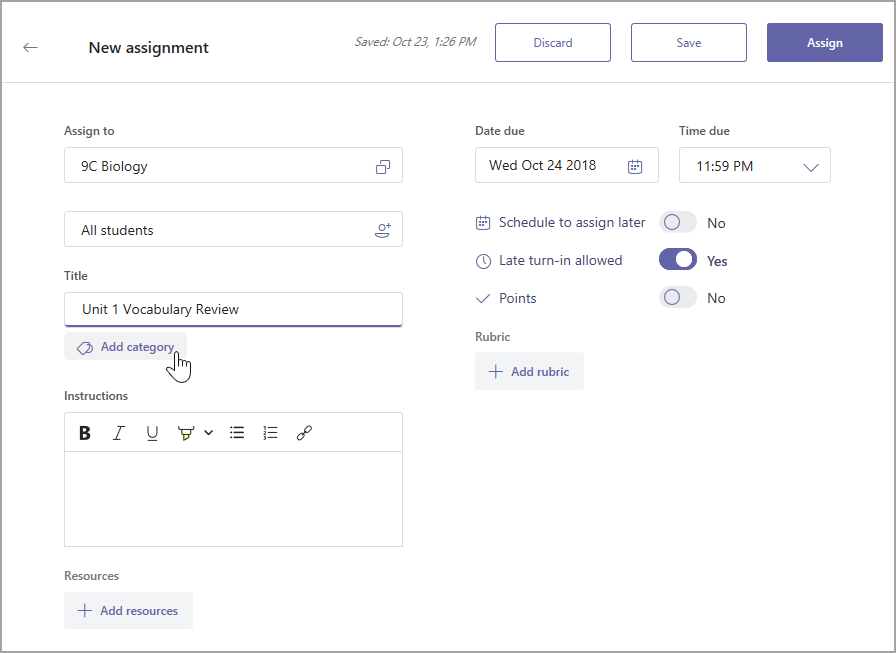
5. Assignments is faster and easier to use.

Coming soon, you’ll see a new and simplified assignments experience. With the latest updates, you’ll be able to grade faster than before and save time creating new assignments.

New Assignments list experience in Teams

New Assignments list experience in Teams

6. Moodle LMS integration in Teams!

Moodle helps educators create effective online courses – and it’s open-source. For schools using Moodle, the integration in Teams helps educators bring their students, conversations and content — along with their Moodle courses and assignments — together in one single hub. This integration offers two core experiences the Moodle tab and the Moodle Assistant Bot. If you’d like to learn how to get started, go to aka.ms/TeamsMoodle. If you have any questions, you can join the discussion on aka.ms/TeamsMoodleDiscussion.

Moodle LMS integration in Microsoft Teams

Moodle LMS integration in Microsoft Teams

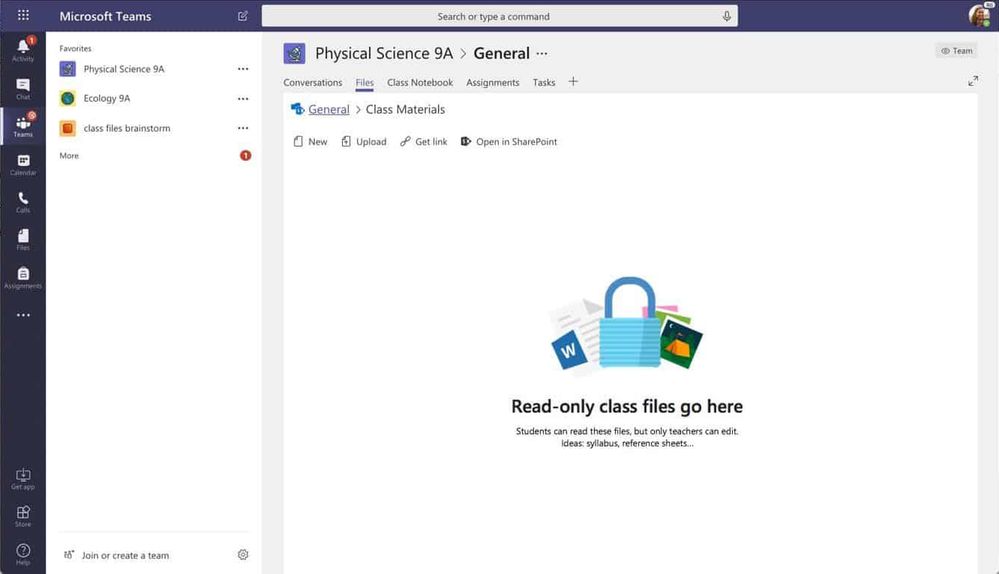
7. Read-only files folder, Class Materials coming to your team soon

Microsoft Teams is great for collaborating with your class, including sharing reference materials to help guide students. You can easily drop these files into the folder called ‘Class Materials,’ which is read-only by default.

teams-read-only.jpgteams-read-only.jpg

8. Join a team by code on your mobile device

Joining a team with a code has become a popular way for students to join their classes on Teams. We’ve now added this ability to the Teams app on iOS and Android.

9. Customize chat settings for students and faculty

In talking to educators using Teams, we’ve learned a common request is to allow student-to-teacher chat, while also having the option to prevent students from chatting with each other. IT Admins can learn how to set this up here.

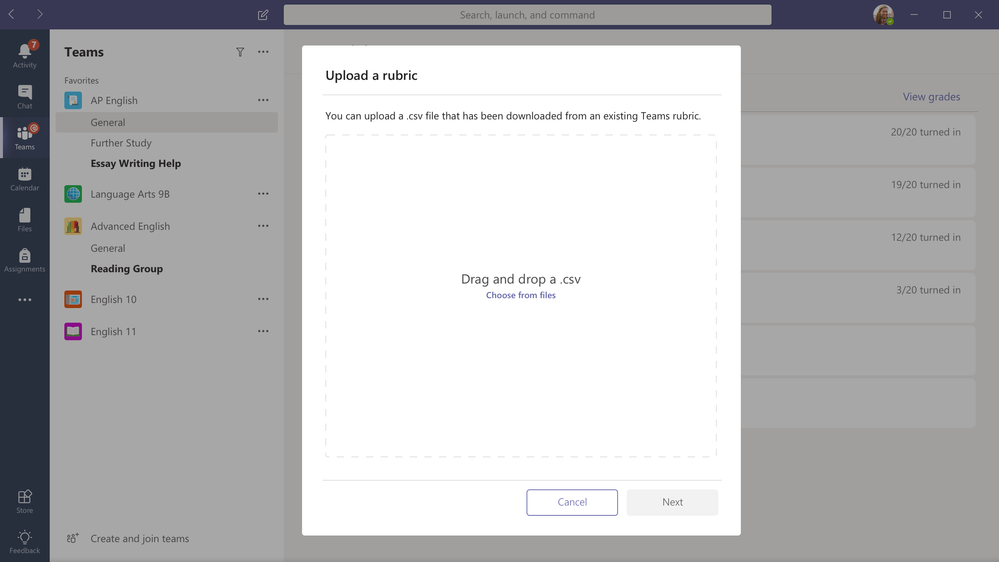
10. Rubric sharing

We recently launched rubric grading inside Microsoft Teams and we’ve heard so much of your great feedback on the feature already. We’ve now added a new capability that allows teachers to import and export their favorite rubrics from Teams Assignments. Now you can share great rubrics with other teachers and build on each other’s ideas from year to year, for stronger and more robust curricula. Learn more about rubric sharing here.

Teams_rubricimport.pngTeams_rubricimport.png

11. Categorize your Assignments

Teachers can now categorize Assignments. Assignment categories are an easy way to organize your assignment by type – segment by Homework, Quizzes, or a unit of study.

add-category-teams.pngadd-category-teams.png

12. Safari browser support

By popular demand – you will soon be able to use Microsoft Teams on macOS and iPad with Safari!

13. Access ThingLink right from Microsoft Teams

With ThingLink now built into Microsoft Teams, students will be able to create and view interactive images, videos and 360-degree virtual tours in the Microsoft Teams environment. ThingLink’s technology is especially useful in the education space because it lets teachers build interactive, visual learning experiences and multimedia presentations, which can help develop vocabulary and contextual understanding in technical education, science and social studies.

ThingLink-Teams-app.jpgThingLink-Teams-app.jpg

Students can use ThingLink to document their learning with interactive maps, infographics, presentations, and virtual 360-degree tours that combine multiple forms of media: text, images, sound, and video. ThingLink offers teachers free basic accounts, as well as paid school and eLearning accounts with a virtual tour creator. Microsoft Office 365 users can get a free 14-day access to ThingLink’s Premium teacher and business subscriptions via the Microsoft AppSource marketplace.

Once again we could never thank the rockstar educators in our community enough for sharing such amazing ideas and feedback with us. It’s all thanks to you that we get to build these tools.

Any questions, give me a shout any time 💙🦄

– Justin Chando

@justinchando

This post was originally published on this site.