Posted on Leave a comment

How to Convert a List to a NumPy Array?

To convert a Python list to a NumPy array, use either of the following two methods:

  1. The np.array() function that takes an iterable and returns a NumPy array creating a new data structure in memory.
  2. The np.asarray() function that takes an iterable as argument and converts it to the array. The difference to np.array() is that np.asarray() doesn’t create a new copy in memory if you pass a NumPy array. All changes made on the original array are reflected on the NumPy array.

Exercise: Create array b from array a using both methods. Then change a value in array a. What happens at array b?

NumPy vs Python Lists

The Python built-in list data type is powerful. However, the NumPy array has many advantages over Python lists. What are they?

Advantages NumPy Advantages Python Lists
Multi-dimensional Slicing Library-Independent
Broadcasting Functionality Intuitive
Processing Speed Less Complicated
Memory Footprint Heterogeneous List Data Allowed
Many Convenience Methods Arbitrary Data Shape (Non-Square Matrix)

To read more about the advantages of a NumPy array over a Python list, read my detailed blog tutorial.

How to Convert a 1D Python List to a NumPy Array?

Problem: Given a one-dimensional Python list. How to convert it to a NumPy array?

Example: You have the following 1D Python list of integers.

lst = [0, 1, 100, 42, 13, 7]

You want to convert it into a NumPy array.

array([ 0, 1, 100, 42, 13, 7])

Method 1: np.array(…)

The simplest way to convert a Python list to a NumPy array is to use the np.array() function that takes an iterable and returns a NumPy array.

import numpy as np
lst = [0, 1, 100, 42, 13, 7]
print(np.array(lst))

The output is:

# [ 0 1 100 42 13 7]

This creates a new data structure in memory. Changes on the original list are not visible to the variable that holds the NumPy array:

lst = [0, 1, 100, 42, 13, 7]
a = np.array(lst)
lst.append(999)
print(a)
# [ 0 1 100 42 13 7]

The element 999 which is now part of list lst is not part of array a.

Method 2: np.asarray(…)

An alternative is to use the np.asarray() function that takes one argument—the iterable—and converts it to the NumPy array. The difference to np.array() is that it doesn’t create a new copy in memory IF you pass a NumPy array. All changes made on the original array are reflected on the NumPy array! So be careful.

lst = [0, 1, 100, 42, 13, 7]
a = np.array(lst)
b = np.asarray(a)
a[0] = 99
print(b)
# [ 99 1 100 42 13 7]

The array b is created using the np.asarray() function, so if you change a value of array a, the change will be reflected on the variable b (because they point to the same object in memory).

[Video] How to Convert a List of Lists to a NumPy Array?

Convert List of Lists to 2D Array

Problem: Given a list of lists in Python. How to convert it to a 2D NumPy array?

Example: Convert the following list of lists

[[1, 2, 3], [4, 5, 6]]

into a NumPy array

[[1 2 3] [4 5 6]]

Solution: Use the np.array(list) function to convert a list of lists into a two-dimensional NumPy array. Here’s the code:

# Import the NumPy library
import numpy as np # Create the list of lists
lst = [[1, 2, 3], [4, 5, 6]] # Convert it to a NumPy array
a = np.array(lst) # Print the resulting array
print(a) '''
[[1 2 3] [4 5 6]] '''

Try It Yourself: Here’s the same code in our interactive code interpreter:

<iframe height="700px" width="100%" src="https://repl.it/@finxter/numpylistoflists?lite=true" scrolling="no" frameborder="no" allowtransparency="true" allowfullscreen="true" sandbox="allow-forms allow-pointer-lock allow-popups allow-same-origin allow-scripts allow-modals"></iframe>

Hint: The NumPy method np.array() takes an iterable as input and converts it into a NumPy array.

Convert a List of Lists With Different Number of Elements

Problem: Given a list of lists. The inner lists have a varying number of elements. How to convert them to a NumPy array?

Example: Say, you’ve got the following list of lists:

[[1, 2, 3], [4, 5], [6, 7, 8]]

What are the different approaches to convert this list of lists into a NumPy array?

Solution: There are three different strategies you can use. (source)

(1) Use the standard np.array() function.

# Import the NumPy library
import numpy as np # Create the list of lists
lst = [[1, 2, 3], [4, 5], [6, 7, 8]] # Convert it to a NumPy array
a = np.array(lst) # Print the resulting array
print(a) '''
[list([1, 2, 3]) list([4, 5]) list([6, 7, 8])] '''

This creates a NumPy array with three elements—each element is a list type. You can check the type of the output by using the built-in type() function:

>>> type(a)
<class 'numpy.ndarray'>

(2) Make an array of arrays.

# Import the NumPy library
import numpy as np # Create the list of lists
lst = [[1, 2, 3], [4, 5], [6, 7, 8]] # Convert it to a NumPy array
a = np.array([np.array(x) for x in lst]) # Print the resulting array
print(a) '''
[array([1, 2, 3]) array([4, 5]) array([6, 7, 8])] '''

This is more logical than the previous version because it creates a NumPy array of 1D NumPy arrays (rather than 1D Python lists).

(3) Make the lists equal in length.

# Import the NumPy library
import numpy as np # Create the list of lists
lst = [[1, 2, 3], [4, 5], [6, 7, 8, 9]] # Calculate length of maximal list
n = len(max(lst, key=len)) # Make the lists equal in length
lst_2 = [x + [None]*(n-len(x)) for x in lst]
print(lst_2)
# [[1, 2, 3, None], [4, 5, None, None], [6, 7, 8, 9]] # Convert it to a NumPy array
a = np.array(lst_2) # Print the resulting array
print(a) '''
[[1 2 3 None] [4 5 None None] [6 7 8 9]] '''

You use list comprehension to “pad” None values to each inner list with smaller than maximal length.

Related Articles

Where to Go From Here?

Enough theory, let’s get some practice!

To become successful in coding, you need to get out there and solve real problems for real people. That’s how you can become a six-figure earner easily. And that’s how you polish the skills you really need in practice. After all, what’s the use of learning theory that nobody ever needs?

Practice projects is how you sharpen your saw in coding!

Do you want to become a code master by focusing on practical code projects that actually earn you money and solve problems for people?

Then become a Python freelance developer! It’s the best way of approaching the task of improving your Python skills—even if you are a complete beginner.

Join my free webinar “How to Build Your High-Income Skill Python” and watch how I grew my coding business online and how you can, too—from the comfort of your own home.

Join the free webinar now!

Posted on Leave a comment

Python Join List Slice

To join and replace all strings in a list lst between start index 1 and end index 5, use the one-liner lst[1:5] = [''.join(lst[1:5])]. This solution is based on slice assignment that selects the slice you want to replace on the left and the values to replace it on the right side of the assignment.

Problem: Given a list of strings. How to join all strings in a given list slice and replace the slice with the joined string?

Example:You start with the following list:

lst = ['i', 'l', 'o', 'v', 'e', 'u']

You want to join the slice ['l', 'o', 'v', 'e'] with start index 1 and end index 4 (included) and replace it in the list to obtain the result:

# Output: ['i', 'love', 'u']

You can get a quick overview of all three methods in the following interactive Python shell. If you’re short on time—method 1 using slice assignment is the most Pythonic solution!

Exercise: Modify the code so that only elements with start index 2 and end index 4 (included) are replaced by the joined string!

Method 1: Slice Assignment

Slice assignment is a little-used, beautiful Python feature to replace a slice with another sequence. Select the slice you want to replace on the left and the values to replace it on the right side of the equation.

Here’s how you can join and replace all strings in a list slice (between indices 1 and 5) in a single line of Python code:

# Method 1: Slice Assignments
lst = ['i', 'l', 'o', 'v', 'e', 'u']
lst[1:5] = [''.join(lst[1:5])]
print(lst)
# ['i', 'love', 'u']

The one-liner lst[1:5] = [''.join(lst[1:5])] performs the following steps:

  • Select the slice to be replaced on the left-hand side of the equation with lst[1:5]. Read more about slicing on my Finxter blog tutorial.
  • Create a list that replaces this slice on the right-hand side of the equation with [...].
  • Select the slice of string elements to be joined together ('l', 'o', 'v', 'e') with lst[1:5].
  • Pass this slice into the join function to create a new string with all four characters 'love'.
  • This string replaces all four selected positions in the original list.

If you love the power of Python one-liners, check out my new book with the same name “Python One-Liners” on Amazon (published in 2020 with San Francisco’s high-quality NoStarch publishing house).

Method 2: List Concatenation + Slicing + Join

A simpler but quite readable method is to use simple list concatenation. Read more on my Finxter blog tutorial to master all different ways to concatenate lists in Python.

# Method 2: List Concatenation + Join
lst = ['i', 'l', 'o', 'v', 'e', 'u']
lst = lst[:1] + [''.join(lst[1:5])] + lst[5:]
print(lst)
# ['i', 'love', 'u']

This approach uses three slicing calls to select (or create) three lists. Then, it glues them together using the + operator. This approach has the slight disadvantage that a new list is created in memory (rather than working on the old list). Thus, it’s slightly less memory-friendly as the first method.

Method 3: Naive

This method is what a non-Python coder (maybe coming from Java or C++) would use. It’s NOT the recommended way though.

# Method 3: Naive
lst = ['i', 'l', 'o', 'v', 'e', 'u']
new = ''
for i in range(1,5): new += lst[i]
lst = lst[:1] + [new] + lst[5:]
print(lst)
# ['i', 'love', 'u']

Instead of selecting the slice of strings to be joined using slicing, the coder creates a string variable new and adds one character at-a-time. This is very inefficient as many different strings are created—each time one adds one more character to the string.

Where to Go From Here?

Enough theory, let’s get some practice!

To become successful in coding, you need to get out there and solve real problems for real people. That’s how you can become a six-figure earner easily. And that’s how you polish the skills you really need in practice. After all, what’s the use of learning theory that nobody ever needs?

Practice projects is how you sharpen your saw in coding!

Do you want to become a code master by focusing on practical code projects that actually earn you money and solve problems for people?

Then become a Python freelance developer! It’s the best way of approaching the task of improving your Python skills—even if you are a complete beginner.

Join my free webinar “How to Build Your High-Income Skill Python” and watch how I grew my coding business online and how you can, too—from the comfort of your own home.

Join the free webinar now!

Posted on Leave a comment

Python Join List Pairs

Given a list of strings. Join the first with the second string, the second with the third, and so on. The one-liner [lst[i] + lst[i+1] for i in range(0, len(lst), 2)] solves the problem by using the range function to iterate over every other index i=0, 2, 4, 5, ... to concatenate the i-th and the i+1-th elements in a list comprehension expression with lst[i] + lst[i+1].

You may already know the normal join function in Python:

Intro: Python Join

Problem: Given a list of elements. How to join the elements by concatenating all elements in the list?

Example: You want to convert list ['learn ', 'python ', 'fast'] to the string 'learn python fast'.

Quick Solution: to convert a list of strings to a string, do the following.

  • Call the ''.join(list) method on the empty string '' that glues together all strings in the list and returns a new string.
  • The string on which you call the join method is used as a delimiter between the list elements.
  • If you don’t need a delimiter, just use the empty string ''.

Code: Let’s have a look at the code.

lst = ['learn ', 'python ', 'fast']
print(''.join(lst))

The output is:

learn python fast

However, what if you want to do something different. Rather than joining all strings in the list to a single string, you want to join the strings in the list in pairs.

Problem: Python Join List Pairs

Problem: Given a list of strings. Join the first with the second string, the second with the third, and so on.

Example: Let’s consider the following minimal example:

['x', 'y', 'v', 'w']

Is there any simple way to pair the first with the second and the third with the fourth string to obtain the following output?

['xy', 'vw']

Note that the length of the strings in the list is variable so the following would be a perfectly acceptable input:

['aaaa', 'b', 'cc', 'dddd', 'eee', 'fff'] 

You can play with all three methods before diving into each of them:

Exercise: What’s the most Pythonic method?

Method 1: Zip() + List Comprehension

You can use the following smart one-liner solution

lst = ['aaaa', 'b', 'cc', 'dddd', 'eee', 'fff']
out = [x + y for x,y in zip(lst[::2], lst[1::2])]
print(out)
# ['aaaab', 'ccdddd', 'eeefff']

The one-liner uses the following strategy:

  • Obtain two slices lst[::2] and lst[1::2] of the original list over every other element starting from the first and the second elements, respectively. If you need to refresh your slicing skills, check out my detailed blog article.
  • Zip the two slices to a sequence of tuples using the zip(...) function. This aligns the first with the second elements from the original list, the third with the forth, and so on. To refresh your zip() skills, check out my blog tutorial here.
  • Use list comprehension to iterate over each pair of values x,y and concatenate them using list concatenation x+y. For a refresher on list comprehension, check out this free tutorial—and for a refresher on list concatenation, check out this one.

Method 2: Iterator + List Comprehension

You can also use an iterator to accomplish this:

lst = ['aaaa', 'b', 'cc', 'dddd', 'eee', 'fff']
it = iter(lst)
out = [x + next(it, '') for x in it] print(out)
# ['aaaab', 'ccdddd', 'eeefff']

Here’s the idea:

  • Create an iterator object it using the built-in function iter().
  • Use list comprehension to go over each element in the iterator.
  • Concatenate each element with the return value of calling the next() function on the iterator. This ensures that the iterator moves one position further iterating over the list. So, the next element x won’t be a duplicate.

Method 3: Use List Comprehension with Indexing

This method is the most straightforward one for Python beginners:

lst = ['aaaa', 'b', 'cc', 'dddd', 'eee', 'fff']
out = [lst[i] + lst[i+1] for i in range(0, len(lst), 2)]
print(out)
# ['aaaab', 'ccdddd', 'eeefff']

The idea is simply to use the range function to iterate over every other index i=0, 2, 4, 5, ... to access the i-th and the i+1-th elements at the same time in the expression statement of list comprehension (to concatenate those with lst[i] + lst[i+1]).

Where to Go From Here?

Enough theory, let’s get some practice!

To become successful in coding, you need to get out there and solve real problems for real people. That’s how you can become a six-figure earner easily. And that’s how you polish the skills you really need in practice. After all, what’s the use of learning theory that nobody ever needs?

Practice projects is how you sharpen your saw in coding!

Do you want to become a code master by focusing on practical code projects that actually earn you money and solve problems for people?

Then become a Python freelance developer! It’s the best way of approaching the task of improving your Python skills—even if you are a complete beginner.

Join my free webinar “How to Build Your High-Income Skill Python” and watch how I grew my coding business online and how you can, too—from the comfort of your own home.

Join the free webinar now!

Posted on Leave a comment

How to Merge Lists into a List of Tuples? [6 Pythonic Ways]

Merge Lists to List of Tuples

The most Pythonic way to merge multiple lists l0, l1, ..., ln into a list of tuples (grouping together the i-th elements) is to use the zip() function zip(l0, l1, ..., ln). If you store your lists in a list of lists lst, write zip(*lst) to unpack all inner lists into the zip function.

l1 = [1, 2, 3]
l2 = [4, 5, 6]
l = list(zip(l1, l2))
print(l)
# [(1, 4), (2, 5), (3, 6)]

The proficient use of Python’s built-in data structures is an integral part of your Python education. This tutorial shows you how you can merge multiple lists into the “column” representation—a list of tuples. By studying these six different ways, you’ll not only understand how to solve this particular problem, you’ll also become a better coder overall.

Problem: Given a number of lists l1, l2, …, ln. How to merge them into a list of tuples (column-wise)?

Example: Say, you want to merge the following lists

l0 = [0, 'Alice', 4500.00]
l1 = [1, 'Bob', 6666.66]
l2 = [2, 'Liz', 9999.99]

into a list of tuples

[(0, 1, 2), ('Alice', 'Bob', 'Liz'), (4500.0, 6666.66, 9999.99)]

This tutorial shows you different ways to merge multiple lists into a list of tuples in Python 3. You can get a quick overview in our interactive Python shell:

Exercise: Which method needs the least number of characters?

Method 1: Zip Function

The most Pythonic way that merges multiple lists into a list of tuples is the zip function. It accomplishes this in a single line of code—while being readable, concise, and efficient.

The zip() function takes one or more iterables and aggregates them to a single one by combining the i-th values of each iterable into a tuple. For example, zip together lists [1, 2, 3] and [4, 5, 6] to [(1,4), (2,5), (3,6)].

Here’s the code solution:

l0 = [0, 'Alice', 4500.00]
l1 = [1, 'Bob', 6666.66]
l2 = [2, 'Liz', 9999.99] print(list(zip(l0, l1, l2)))

The output is the following list of tuples:

[(0, 1, 2), ('Alice', 'Bob', 'Liz'), (4500.0, 6666.66, 9999.99)]

Note that the return value of the zip() function is a zip object. You need to convert it to a list using the list(...) constructor to create a list of tuples.

If you have stored the input lists in a single list of lists, the following method is best for you!

Method 2: Zip Function with Unpacking

You can use the asterisk operator *lst to unpack all inner elements from a given list lst. Especially if you want to merge many different lists, this can significantly reduce the length of your code. Instead of writing zip(lst[0], lst[1], ..., lst[n]), simplify to zip(*lst) to unpack all inner lists into the zip function and accomplish the same thing!

lst = [[0, 'Alice', 4500.00], [1, 'Bob', 6666.66], [2, 'Liz', 9999.99]]
print(list(zip(*lst)))

This generates the list of tuples:

[(0, 1, 2), ('Alice', 'Bob', 'Liz'), (4500.0, 6666.66, 9999.99)]

I’d consider using the zip() function with unpacking the most Pythonic way to merge multiple lists into a list of tuples.

Method 3: List Comprehension

List comprehension is a compact way of creating lists. The simple formula is [expression + context].

  • Expression: What to do with each list element?
  • Context: What elements to select? The context consists of an arbitrary number of for and if statements.

The example [x for x in range(3)] creates the list [0, 1, 2].

Related Article: You can read more about list comprehension in my ultimate guide on this blog.

You can use a straightforward list comprehension statement [(l0[i], l1[i], l2[i]) for i in range(len(l0))] to merge multiple lists into a list of tuples:

l0 = [0, 'Alice', 4500.00]
l1 = [1, 'Bob', 6666.66]
l2 = [2, 'Liz', 9999.99] print([(l0[i], l1[i], l2[i]) for i in range(len(l0))])

The output produces the merged list of tuples:

[(0, 1, 2), ('Alice', 'Bob', 'Liz'), (4500.0, 6666.66, 9999.99)]

This method is short and efficient. It may not be too readable for you if you’re a beginner coder—but advanced coders usually have no problems understanding this one-liner. If you love to learn everything there is about one-liner Python code snippets, check out my new book “Python One-Liners” (published with San Francisco Publisher NoStarch in 2020).

Method 4: Simple Loop

Sure, you can skip all the fancy Python and just use a simple loop as well! Here’s how this works:

l0 = [0, 'Alice', 4500.00]
l1 = [1, 'Bob', 6666.66]
l2 = [2, 'Liz', 9999.99] lst = []
for i in range(len(l0)): lst.append((l0[i], l1[i], l2[i]))
print(lst)

The output is the merged list of tuples:

[(0, 1, 2), ('Alice', 'Bob', 'Liz'), (4500.0, 6666.66, 9999.99)]

Especially coders who come to Python from another programming language such as Go, C++, or Java like this approach. They’re used to writing loops and they can quickly grasp what’s going on in this code snippet.

You can visualize the execution of this code snippet in the interactive widget:

Exercise: Click “Next” to see how the memory usage unfolds when running the code.

Method 5: Enumerate

The enumerate() method is considered to be better Python style in many scenarios—for example, if you want to iterate over all indices of a list. In my opinion, it’s slightly better than using range(len(l)). Here’s how you can use enumerate() in your code to merge multiple lists into a single list of tuples:

l0 = [0, 'Alice', 4500.00]
l1 = [1, 'Bob', 6666.66]
l2 = [2, 'Liz', 9999.99] lst = []
for i,x in enumerate(l0): lst.append((x,l1[i],l2[i]))
print(lst)

The output is the list of tuples:

[(0, 1, 2), ('Alice', 'Bob', 'Liz'), (4500.0, 6666.66, 9999.99)]

Still not satisfied? Let’s have a look at functional programming.

Method 6: Map + Lambda

With Python’s map() function, you can apply a specific function to each element of an iterable. It takes two arguments:

  • Function: In most cases, this is a lambda function you define on the fly. This is the function which you are going to apply to each element of an…
  • Iterable: This is an iterable that you convert into a new iterable where each element is the result of the applied map() function.

The result is a map object. What many coders don’t know is that the map() function also allows multiple iterables. In this case, the lambda function takes multiple arguments—one for each iterable. It then creates an iterable of tuples and returns this as a result.

Here’s how you can create a list of tuples from a few given lists:

l0 = [0, 'Alice', 4500.00]
l1 = [1, 'Bob', 6666.66]
l2 = [2, 'Liz', 9999.99] lst = list(map(lambda x, y, z: (x, y, z), l0, l1, l2))
print(lst)

The output is the merged list of tuples:

[(0, 1, 2), ('Alice', 'Bob', 'Liz'), (4500.0, 6666.66, 9999.99)]

This is both an efficient and readable way to merge multiple lists into a list of tuples. The fact that it isn’t well-known to use the map() function with multiple arguments doesn’t make this less beautiful.

Where to Go From Here?

Enough theory, let’s get some practice!

To become successful in coding, you need to get out there and solve real problems for real people. That’s how you can become a six-figure earner easily. And that’s how you polish the skills you really need in practice. After all, what’s the use of learning theory that nobody ever needs?

Practice projects is how you sharpen your saw in coding!

Do you want to become a code master by focusing on practical code projects that actually earn you money and solve problems for people?

Then become a Python freelance developer! It’s the best way of approaching the task of improving your Python skills—even if you are a complete beginner.

Join my free webinar “How to Build Your High-Income Skill Python” and watch how I grew my coding business online and how you can, too—from the comfort of your own home.

Join the free webinar now!

Posted on Leave a comment

Python Join List Range: A Helpful Guide

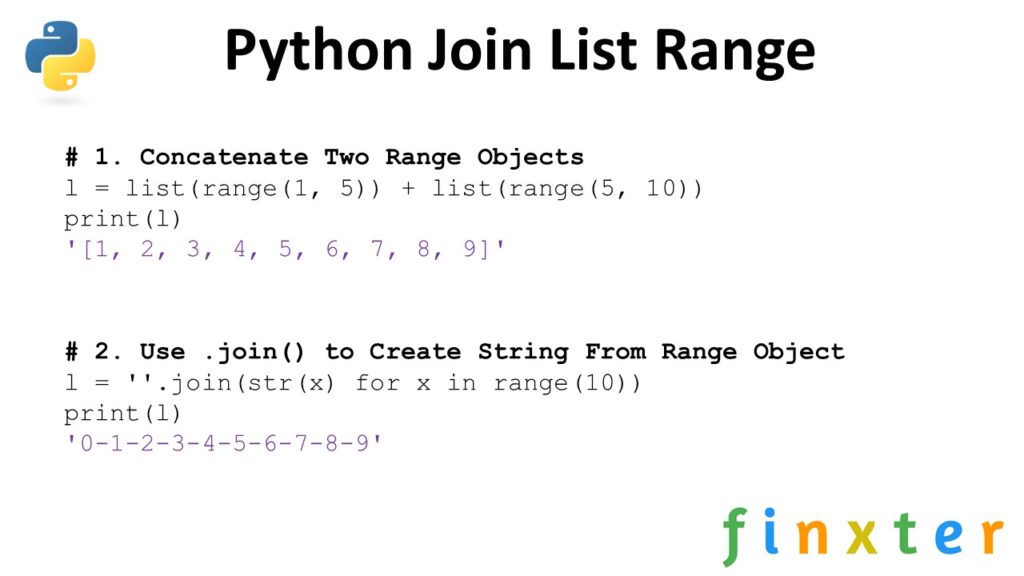
If the search phrase “Python Join List Range” brought you here, you’re having most likely one of the following problems:

  1. You don’t know how to concatenate two range() iterables, or
  2. You want to use .join() to create a string from a range() iterable—but it doesn’t work.

In any case, by reading this article, I hope that you’ll not only answer your question, you’re also become a slightly better (Python) coder by understanding important nuances in the Python programming language.

But let’s first play with some code and get an overview of the two solutions, shall we?

Exercise: Can you accomplish both objectives in a single line of Python code?

Python Join List Range

Concatenate Two range() Iterables

Problem: How to create a new list by concatenating two range() iterables?

Example: You want to concatenate the following two range() iterables

range(1,5) + range(5,10)

Your expected result is:

[1, 2, 3, 4, 5, 6, 7, 8, 9]

Developing the Solution: The result of the range(start, stop, step) function is an iterable “range” object:

>>> range(10)
range(0, 10)
>>> type(range(10))
<class 'range'>

Unfortunately, you cannot simply concatenate two range objects because this would cause a TypeError—the + operator is not defined on two range objects:

>>> range(1, 5) + range(5, 10)
Traceback (most recent call last): File "<pyshell#2>", line 1, in <module> range(1, 5) + range(5, 10)
TypeError: unsupported operand type(s) for +: 'range' and 'range'

Thus, the easiest way to concatenate two range objects is to do the following.

  • Convert both range objects to lists using the list(range(...)) function calls.
  • Use the list concatenation operator + on the resulting objects.
l = list(range(1, 5)) + list(range(5, 10))
print(l)
# [1, 2, 3, 4, 5, 6, 7, 8, 9]

There are other ways to concatenate lists—and a more efficient one is to use the itertools.chain() function.

from itertools import chain
l = chain(range(1, 5), range(5, 10))
print(list(l))
# [1, 2, 3, 4, 5, 6, 7, 8, 9]

This has the advantage that you work purely on iterables rather than lists. There’s no need to waste computational cycles to create a list object if you need it only to concatenate it to another list object. By avoiding the superfluous list creation, you win in performance (at the costs of adding another library to your code).

You can see how the first version creates multiple list objects in memory in the interactive memory visualizer:

Exercise: How many list objects are there in memory after the code terminates?

Use .join() to Create a String From a range() Iterable

Problem: Given a range object—which is an iterable of integers—how to join all integers into a new string variable?

Example: You have the following range object:

range(10)

You want the following string:

'0123456789'

Solution: To convert a range object to a string, use the string.join() method and pass the generator expression str(x) for x in range(...) to convert each integer to a string value first. This is necessary as the join function expects an iterable of strings and not integers. If you miss this second step, Python will throw a TypeError:

print(''.join(range(10))) '''
Traceback (most recent call last): File "C:\Users\xcent\Desktop\code.py", line 2, in <module> print(''.join(range(10)))
TypeError: sequence item 0: expected str instance, int found '''

So, the correct way is to convert each element to a string using the generator expression str(x) for x in range(...) inside the join(...) argument list. Here’s the correct code that joins together all integers in a range object in the most Pyhtonic way:

print(''.join(str(x) for x in range(10))) '0123456789'

You can use different delimiter strings if you need to:

print('-'.join(str(x) for x in range(10))) '0-1-2-3-4-5-6-7-8-9'

Related articles:

Where to Go From Here?

Enough theory, let’s get some practice!

To become successful in coding, you need to get out there and solve real problems for real people. That’s how you can become a six-figure earner easily. And that’s how you polish the skills you really need in practice. After all, what’s the use of learning theory that nobody ever needs?

Practice projects is how you sharpen your saw in coding!

Do you want to become a code master by focusing on practical code projects that actually earn you money and solve problems for people?

Then become a Python freelance developer! It’s the best way of approaching the task of improving your Python skills—even if you are a complete beginner.

Join my free webinar “How to Build Your High-Income Skill Python” and watch how I grew my coding business online and how you can, too—from the comfort of your own home.
Join the free webinar now!

Posted on Leave a comment

The Most Pythonic Way to Join a List in Reverse Order

The most efficient method to join a list of Python strings in reverse order is to use the Python code ''.join(l[::-1]). First, reverse the list l using slicing with a negative step size l[::-1]. Second, glue together the strings in the list using the join(...) method on the empty string ''.

Problem: Given a list of strings. How to join the strings in reverse order?

Example: You want to join the following list

l = ['n', 'o', 'h', 't', 'y', 'p']

to obtain the joined string in reverse order

python

Let’s get a short overview on how to accomplish this.

Solution Overview: You can try the three methods in our interactive Python shell.

Next, we’ll dive into each method separately.

Method 1: Join + Slicing

The first and most Pythonic method to reverse and join a list of strings is to use slicing with a negative step size.

You can slice any list in Python using the notation list[start:stop:step] to create a sublist starting with index start, ending right before index stop, and using the given step size—which can also be negative to slice from right to left. If you need a refresher on slicing, check out our detailed Finxter blog tutorial or our focused book “Coffee Break Python Slicing”.

Here’s the first method to reverse a list of strings and join the elements together:

l = ['n', 'o', 'h', 't', 'y', 'p'] # Method 1
print(''.join(l[::-1]))
# python

The string.join(iterable) method joins the string elements in the iterable to a new string by using the string on which it is called as a delimiter.

You can call this method on each list object in Python. Here’s the syntax:

string.join(iterable)

Argument Description
iterable The elements to be concatenated.

Related articles:

Method 2: Join + reversed()

The second method is also quite Pythonic: using the reversed() built-in function rather than slicing with a negative step size. I’d say that beginners generally prefer this method because it’s more readable to them—while expert coders prefer slicing because it’s more concise and slightly more efficient.

l = ['n', 'o', 'h', 't', 'y', 'p']
print(''.join(reversed(l)))
# python

The join method glues together all strings in the list—in reversed order!

Method 3: Simple Loop

The third method is the least Pythonic one: using a loop where it’s not really needed. Anyways, especially coders coming from other programming languages like Java or C++ will often use this approach.

l = ['n', 'o', 'h', 't', 'y', 'p'] s = ''
for x in reversed(l): s += x
print(s)
# python

However, there are several disadvantages. Can you see them?

  • The code is less concise.
  • The code is less efficient because of the repeated string concatenation. Each loop execution causes the creation of a new string, which is highly inefficient.
  • The code requires the definition of two new variables x and s and introduces a higher level of complexity.

You can see this in our interactive memory visualizer:

Exercise: click “Next” to see the memory objects used in this code snippet!

Related articles:

Where to Go From Here?

Enough theory, let’s get some practice!

To become successful in coding, you need to get out there and solve real problems for real people. That’s how you can become a six-figure earner easily. And that’s how you polish the skills you really need in practice. After all, what’s the use of learning theory that nobody ever needs?

Practice projects is how you sharpen your saw in coding!

Do you want to become a code master by focusing on practical code projects that actually earn you money and solve problems for people?

Then become a Python freelance developer! It’s the best way of approaching the task of improving your Python skills—even if you are a complete beginner.

Join my free webinar “How to Build Your High-Income Skill Python” and watch how I grew my coding business online and how you can, too—from the comfort of your own home.

Join the free webinar now!

Posted on Leave a comment

How to Combine Two Python Lists and Remove Duplicates in Second List?

Problem: Given two lists [1, 2, 2, 4] and [2, 5, 5, 5, 6]. How do you combine those lists to the new list [1, 2, 2, 4, 5, 6] by removing the duplicates in the second list?

Note: You want to remove all duplicates in the second list and the elements in the second list that are already in the first list.

Solution: Use the following three steps to combine two lists and remove the duplicates in the second list:

  • Convert the first and second lists to a set using the set(...) constructor.
  • Use the set minus operation to get all elements that are in the second list but not in the first list.
  • Create a new list by concatenating those elements to the first list.

Here’s the code:

# Create the two lists
l1 = [1, 2, 2, 4]
l2 = [2, 5, 5, 5, 6] # Find elements that are in second but not in first
new = set(l2) - set(l1) # Create the new list using list concatenation
l = l1 + list(new)
print(l)
# [1, 2, 2, 4, 5, 6]

Try it yourself in our interactive Python shell:

Exercise: Can you rewrite this in a single line of Python code (Python One-Liner)?

Let’s dive into the more concise one-liner to accomplish the same thing:

l = l1 + list(set(l2) - set(l1))

If you want to learn about the most Pythonic way to remove ALL duplicates from a Python list, read on:

How to Remove Duplicates From a Python List?

Naive Method: Go over each element and check whether this element already exists in the list. If so, remove it. However, this takes a few lines of code.

Efficient Method: A shorter and more concise way is to create a dictionary out of the elements in the list to remove all duplicates and convert the dictionary back to a list. This preserves the order of the original list elements.

lst = ['Alice', 'Bob', 'Bob', 1, 1, 1, 2, 3, 3]
print(list(dict.fromkeys(lst)))
# ['Alice', 'Bob', 1, 2, 3]
  1. Convert the list to a dictionary with dict.fromkeys(lst).
  2. Convert the dictionary into a list with list(dict).

Each list element becomes a new key to the dictionary. For example, the list [1, 2, 3] becomes the dictionary {1:None, 2:None, 3:None}. All elements that occur multiple times will be assigned to the same key. Thus, the dictionary contains only unique keys—there cannot be multiple equal keys.

As dictionary values, you take dummy values (per default).

Then, you convert the dictionary back to a list, throwing away the dummy values.

Here’s the code:

>>> lst = [1, 1, 1, 3, 2, 5, 5, 2]
>>> dic = dict.fromkeys(lst)
>>> dic
{1: None, 3: None, 2: None, 5: None}
>>> duplicate_free = list(dic)
>>> duplicate_free
[1, 3, 2, 5]

Related blog articles:

Where to Go From Here?

Enough theory, let’s get some practice!

To become successful in coding, you need to get out there and solve real problems for real people. That’s how you can become a six-figure earner easily. And that’s how you polish the skills you really need in practice. After all, what’s the use of learning theory that nobody ever needs?

Practice projects is how you sharpen your saw in coding!

Do you want to become a code master by focusing on practical code projects that actually earn you money and solve problems for people?

Then become a Python freelance developer! It’s the best way of approaching the task of improving your Python skills—even if you are a complete beginner.

Join my free webinar “How to Build Your High-Income Skill Python” and watch how I grew my coding business online and how you can, too—from the comfort of your own home.

Join the free webinar now!

Posted on Leave a comment

Python How to Join a List of Dictionaries into a Single One?

Problem: Say, you’ve got a list of dictionaries:

[{'a': 0}, {'b': 1}, {'c': 2}, {'d': 3}, {'e': 4, 'a': 4}]

Notice how the first and the last dictionaries carry the same key 'a'.

How do you merge all those dictionaries into a single dictionary to obtain the following one?

{'a': 4, 'b': 1, 'c': 2, 'd': 3, 'e': 4}

Notice how the value of the duplicate key 'a' is the value of the last and not the first dict in the list of dicts.

To merge multiple dictionaries, the most Pythonic way is to use dictionary comprehension {k:v for x in l for k,v in x.items()} to first iterate over all dictionaries in the list l and then iterate over all (key, value) pairs in each dictionary.

Let’s explore all the available options in the remaining article:

Exercise: Run the code—which method generates a different output than all the other methods?

Method 1: Dictionary Comprehension With Nested Context

You can use dictionary comprehension {k:v for x in l for k,v in x.items()} to first iterate over all dictionaries in the list l and then iterate over all (key, value) pairs in each dictionary.

  • Create a new dictionary using the {...} notation.
  • Go over all dictionaries in the list of dictionaries l by using the outer loop for x in l.
  • Go over all (key, value) pairs in the current dictionary x by using the x.items() method that returns an iterable of (key, value) pairs.
  • Fill the new dictionary with (key, value) pairs k:v using the general dictionary comprehension syntax {k:v for ...}.
l = [{'a': 0}, {'b': 1}, {'c': 2}, {'d': 3}, {'e': 4, 'a': 4}] d = {k:v for x in l for k,v in x.items()}
print(d)
# {'a': 4, 'b': 1, 'c': 2, 'd': 3, 'e': 4}

This is the most Pythonic way to merge multiple dictionaries into a single one and it works for an arbitrary number of dictionaries.

Method 2: Simple Nested Loop

Use a simple nested loop to add each (key, value) pair separately to a newly created dictionary:

  • Create a new, empty dictionary.
  • Go over each dictionary in the list of dictionaries.
  • Go over each (key, value) pair in the current dictionary.
  • Add the (key, value) pair to the new dictionary—possibly overwriting “older” keys with the current one.
l = [{'a': 0}, {'b': 1}, {'c': 2}, {'d': 3}, {'e': 4, 'a': 4}] d = {}
for dictionary in l: for k, v in dictionary.items(): d[k] = v print(d)
{'a': 4, 'b': 1, 'c': 2, 'd': 3, 'e': 4}

You can visualize the execution flow of this code here:

This is the easiest to read for many beginner coders—but it’s much less concise and less Pythonic.

Method 3: Use the update() Method

The dict.update(x) method updates the dictionary on which it is called with a bunch of new (key, value) pairs given in the dictionary argument x. The method to merge multiple dictionaries is simple:

  • Create a new, empty dictionary.
  • Go over each dictionary in the list of dictionaries.
  • Update the new dictionary with the values in the current dictionary.
l = [{'a': 0}, {'b': 1}, {'c': 2}, {'d': 3}, {'e': 4, 'a': 4}] d = {}
for dictionary in l: d.update(dictionary) print(d)
# {'a': 4, 'b': 1, 'c': 2, 'd': 3, 'e': 4}

This is a very readable and efficient way and it’s shorter than method 2.

Method 4: Dictionary Unpacking

When applied to a dictionary d, the double asterisk operator **d unpacks all elements in d into the outer dictionary. You can only use this “dictionary unpacking” method within an environment (in our case a dictionary) that’s capable of handling the (key, value) pairs.

Side note: Sometimes it’s also used for keyword arguments.

l = [{'a': 0}, {'b': 1}, {'c': 2}, {'d': 3}, {'e': 4, 'a': 4}] d = {**l[0], **l[1], **l[2], **l[3], **l[4]}
print(d)
# {'a': 4, 'b': 1, 'c': 2, 'd': 3, 'e': 4}

This is a concise, efficient, and Pythonic way to merge multiple dictionaries. However, it’s not optimal because you must manually type each unpacking operation. If the dictionary has 100 elements, this wouldn’t be feasible.

Note: you cannot use dictionary unpacking in dictionary comprehension to alleviate this problem—Python will throw a SyntaxError!

Method 5: Use ChainMap With Unpacking

If you’re not happy with either of those methods, you can also use the ChainMap data structure from the collections library.

l = [{'a': 0}, {'b': 1}, {'c': 2}, {'d': 3}, {'e': 4, 'a': 4}] from collections import ChainMap
d = dict(ChainMap(*l))
print(d)
# {'e': 4, 'a': 0, 'd': 3, 'c': 2, 'b': 1}

However, this does not exactly meet our specifications: the fifth dictionary in our collection does not overwrite the (key, value) pairs of the first dictionary. Other than that, it’s a fast way to merge multiple dictionaries and I wanted to include it here for comprehensibility.

Where to Go From Here?

Enough theory, let’s get some practice!

To become successful in coding, you need to get out there and solve real problems for real people. That’s how you can become a six-figure earner easily. And that’s how you polish the skills you really need in practice. After all, what’s the use of learning theory that nobody ever needs?

Practice projects is how you sharpen your saw in coding!

Do you want to become a code master by focusing on practical code projects that actually earn you money and solve problems for people?

Then become a Python freelance developer! It’s the best way of approaching the task of improving your Python skills—even if you are a complete beginner.

Join my free webinar “How to Build Your High-Income Skill Python” and watch how I grew my coding business online and how you can, too—from the comfort of your own home.

Join the free webinar now!

Posted on Leave a comment

Python Join List of Bytes (and What’s a Python Byte Anyway?)

When teaching the Finxter Python students, I’m often shocked how even intermediate-level coders do not understand the very basic foundations of computer science. In CS, there’s almost nothing as fundamental as a simple, plain byte. (You know, that sequence of 0s and 1s called bits).

This tutorial aims to clarify some misconceptions and questions regarding Bytes in Python—a term that has a quite different meaning to bytes in general. In particular, you’ll learn the definition of the Byte object and how to correctly join a sequence of Bytes. Here’s the short answer:

A Python Byte is a sequence of bytes. You create a Byte object using the notation b'...' similar to the string notation '...'. To join a list of Bytes, call the Byte.join(list) method. If you try to join a list of Bytes on a string delimiter, Python will throw a TypeError, so make sure to call it on a Byte object b' '.join(...) rather than ' '.join(...).

Before you dive into all of this in a step-by-step manner, let’s play a bit with the interactive code shell to open your knowledge gap:

Exercise: What happens if you join the list of Bytes on a string delimiter? Try it in the shell!

What’s a Byte in Python Anyway?

You think you know what a byte is, right? It’s a sequence of 8 bits.

Well, that’s what a byte is outside the Python world. In Python, it’s not the whole story.

Python comes with a built-in Byte data type. According to the official documentation, the Byte object is an “immutable sequence of bytes“. If you talk about a byte outside Python, you mean 8 bits. If you talk about a byte inside Python, you mean a sequence of one or more bytes.

Let’s keep that on a hold for a moment and look how you create a simple byte object:

>>> a = b'X'
>>> a
b'X'
>>> type(a)
<class 'bytes'>

You create the Byte object just like you create a string in Python using the single, double, or triple quotes around a text that’s to be encoded in a “sequence of bytes”. In this case, the sequence of bytes consists only of the bytes needed to encode a single character 'X'. The ASCII code of character 'X' is 88, or in binary format 0b1011000. You can see that you only need one byte to encode the character.

But can you also create more complicated “Python Byte” objects that consist of more “real bytes”? Sure, you can:

>>> a = b'hello'
>>> a
b'hello'
>>> type(a)
<class 'bytes'>

Again, you create the Byte object for 'hello'. You cannot encode the whole string 'hello' in eight bits (=byte), so the Python Byte object a now consists of a “sequence of bytes”.

Takeaway: A (Python) Byte is a sequence of bytes and you can use it just like you use strings by using the syntax b'...' instead of '...'. As string objects, Bytes are immutable—so you cannot modify them after creation.

Concatenate Byte Strings in Python

You can concatenate two byte objects x and y in Python by using the (overloaded) add operation x+y:

>>> x = b'hello '
>>> y = b'world!'
>>> x + y
b'hello world!'

This works for Python 2 and Python 3—and it will probably also work in Python 4! (Why? Because the semantics of the __add__ operation won’t change just by setting up a new programming language or modifying an old one.)

How to Join a List of Bytes?

Python Bytes are similar than Python strings (at least for you, the person who used the Byte data structure in their program).

So, joining a list of Bytes is similar than joining a list of strings: use the join method! The Byte object comes with a method Byte.join(iterable) that concatenates all Byte objects in the iterable.

Keep in mind that a Byte object is a sequence of bytes by itself (and not a sequence of bits as you may have expected). And, yes, I’ll repeat this until it sticks.

Syntax: Byte.join(iterable)

Argument Description
iterable A collection of Byte objects.

Examples: Let’s see a bunch of examples on how you can join a collection of Byte objects!

lst = [b'Python', b'is', b'beautiful'] # Example 1
print(b' '.join(lst))
b'Python is beautiful' # Example 2
print(b'-'.join(lst))
b'Python-is-beautiful' # Example 3
print(b'\n'.join(lst))
b'Python\nis\nbeautiful'

You get the point: you call the join() method on the Byte object and pass an iterable of Byte objects to be concatenated. Notice how all involved data types are Byte objects!

How to Fix “TypeError: sequence item 0: expected str instance, bytes found”?

A common mistake of many Python coders is to call the wrong join() method! Say, you’ve got an iterable of Bytes to be joined. If you call the string.join(...) method instead of the Byte.join(...) method, Python will throw a TypeError with the following error message:

lst = [b'Python', b'is', b'beautiful']
print(' '.join(lst))
# TypeError: sequence item 0: expected str instance, bytes found

The error message doesn’t directly tell you how to fix this issue. The reason is that you call the join() method on the string object. And the string join() method expects you to pass an iterable of string objects to be concatenated. But you pass an iterable of Byte objects!

To fix it, simply call the join(...) method on the Byte object b' '.join(...) instead of ' '.join(...).

lst = [b'Python', b'is', b'beautiful']
print(b' '.join(lst))
b'Python is beautiful'

This way, you can easily concatenate multiple Byte objects by using the Byte.join() method.

Where to Go From Here?

Enough theory, let’s get some practice!

To become successful in coding, you need to get out there and solve real problems for real people. That’s how you can become a six-figure earner easily. And that’s how you polish the skills you really need in practice. After all, what’s the use of learning theory that nobody ever needs?

Practice projects is how you sharpen your saw in coding!

Do you want to become a code master by focusing on practical code projects that actually earn you money and solve problems for people?

Then become a Python freelance developer! It’s the best way of approaching the task of improving your Python skills—even if you are a complete beginner.

Join my free webinar “How to Build Your High-Income Skill Python” and watch how I grew my coding business online and how you can, too—from the comfort of your own home.

Join the free webinar now!

Posted on Leave a comment

How to Intersect Multiple Sets in Python?

To intersect multiple sets, stored in a list l, use the Python one-liner l.pop().intersection(*l) that takes the first set from the list, calls the intersection() method on it, and passes the remaining sets as arguments by unpacking them from the list.

A set is a unique collection of unordered elements. The intersection operation creates a new set that consists of the elements that exist in all sets.

So, let’s dive into the formal problem formulation, shall we?

Problem: Given a list or a collection of sets. How to join those sets using the intersection operation?

Example: You’ve got a list of sets [{1, 2, 3}, {1, 4}, {2, 3, 5}] and you want to calculate the intersection {1}.

Solution: To intersect a list of sets, use the following strategy:

  • Get the first element from the list as a starting point. This assumes the list has at least one element.
  • Call the intersection() method on the first set object.
  • Pass all sets as arguments into the intersection() method by unpacking the list with the asterisk operator *list.
  • The result of the intersection() method is a new set containing all elements that are in all of the sets.

Code: Here’s the one-liner code that intersects a collection of sets.

# Create the list of sets
lst = [{1, 2, 3}, {1, 4}, {1, 2, 3}] # One-Liner to intersect a list of sets
print(lst[0].intersection(*lst))

The output of this code is the intersection of the three sets {1, 2, 3}, {1, 4}, and {2, 3, 5}. Only one element appears in all three sets:

{1}

If you love Python one-liners, check out my new book “Python One-Liners” (Amazon Link) that teaches you a thorough understanding of all single lines of Python code.

Try it yourself: Here’s the code in an interactive code shell that runs it in your browser:

Exercise: Change the code to calculate the union of the sets in the list!

Related video: A similar problem is to perform the union operation on a list of sets. In the following video, you can watch me explain how to union multiple sets in Python:

Where to Go From Here?

Enough theory, let’s get some practice!

To become successful in coding, you need to get out there and solve real problems for real people. That’s how you can become a six-figure earner easily. And that’s how you polish the skills you really need in practice. After all, what’s the use of learning theory that nobody ever needs?

Practice projects is how you sharpen your saw in coding!

Do you want to become a code master by focusing on practical code projects that actually earn you money and solve problems for people?

Then become a Python freelance developer! It’s the best way of approaching the task of improving your Python skills—even if you are a complete beginner.

Join my free webinar “How to Build Your High-Income Skill Python” and watch how I grew my coding business online and how you can, too—from the comfort of your own home.

Join the free webinar now!