
Coding agents are becoming part of everyday development, but quality of responses
and usefulness still depends on the best context as input. That context comes in
different forms starting from your environment, the code in the workspace, the
model training knowledge, previous memory, agent instructions, and of course
your own starting prompt. On the .NET team we’ve really adopted coding agents as
a part of our regular workflow and have, like you, learned the ways to improve
our productivity by providing great context. Across our repos we’ve adopted our
agent instructions and have also started to use agent skills to improve our
workflows. We’re introducing dotnet/skills,
a repository that hosts a set of agent skills for .NET developers from the team
who is building the platform itself.
What is an agent skill?
If you’re new to the concept, an agent skill is a lightweight package with specialized knowledge an agent can discover and use while solving a task. A skill bundles intent,
task-specific context, and supporting artifacts so the agent can choose better
actions with less trial and error. This work follows the
Agent Skills specification, which defines a common
model for authoring and sharing these capabilities with coding agents. GitHub Copilot CLI, VS Code, Claude Code and other coding agents support this specification.
What we are doing with dotnet/skills
With dotnet/skills, we’re publishing skills from the team that ships the platform.
These are the same workflows we’ve used ourselves, with first-party teams, and
in engineering scenarios we’ve seen in working with developers like yourself.
So what does that look like in practice? You’re not starting from generic
prompts. You’re starting from patterns we’ve already tested while shipping
.NET.
Our goal is practical: ship skills that help agents complete common .NET tasks
more reliably, with better context and fewer dead ends.
Does it help?
While we’ve learned that context is essential, we also have learned not to assume
more is always better. The AI models are getting remarkably better each release
and what was thought to be needed even 3 months ago, may no longer be required
with newer models. In producing skills we want to measure the validity if an
added skill actually improves the result. For each of our skills merged, we run
a lightweight validator (also available in the repo) to score it. We’re also learning the best graders/evals for this type…and so is the ecosystem as well.
Think of this as a unit test for a skill, not an integration test for the
whole system. We measure (using a specific model each run) against a baseline (no skill present) and try to score if the specific skill improved the intended behavior, and by how much. Some of this is taste as well so we’re careful not to draw too many hard lines on a specific number, but look at the result, adjust and re-score.
Each skill’s evaluation lives in the repository as well, so
you can inspect and run them. This gives us a practical signal on usefulness
without waiting for large end-to-end benchmark cycles. We will continue to learn in this space and adjust. We have a lot of partner teams trying different evaluation techniques as well at this level. The real test is you telling us if they have improved.
A developer posted this just recently on Discord sharing what we want to see:
The skill just worked with the log that I’ve with me, thankfully it was smartter[sic] than me and found the correct debug symbol. At the end it says the crash is caused by a heap corruption and the stack-trace points to GC code, by any chance does it ring a bell for you?
This is a great example of how a skill accelerated to the next step rapidly in this particular investigation for this developer. This is the true definition of success in unblocking and accelerating productivity.
Discovery, installation, and using skills
Popular agent tools have adopted the concept of
plugin marketplaces
which simply put are a registry of agent artifacts, like skills. The
plugin definition
serves as an organizational unit and defines what skills, agents, hooks, etc.
exist for that plugin in a single installable package. The dotnet/skills repo
is organized in the same manner, with the repo serving as the marketplace and we
have organized a set of plugins by functional areas. We’ll continue to define
more plugins as they get merged and based on your feedback.
While you can simply copy the SKILL.md files directly to your environment, the
plugin concept in coding agents like GitHub Copilot aim to make that process simpler.
As noted in the
README,
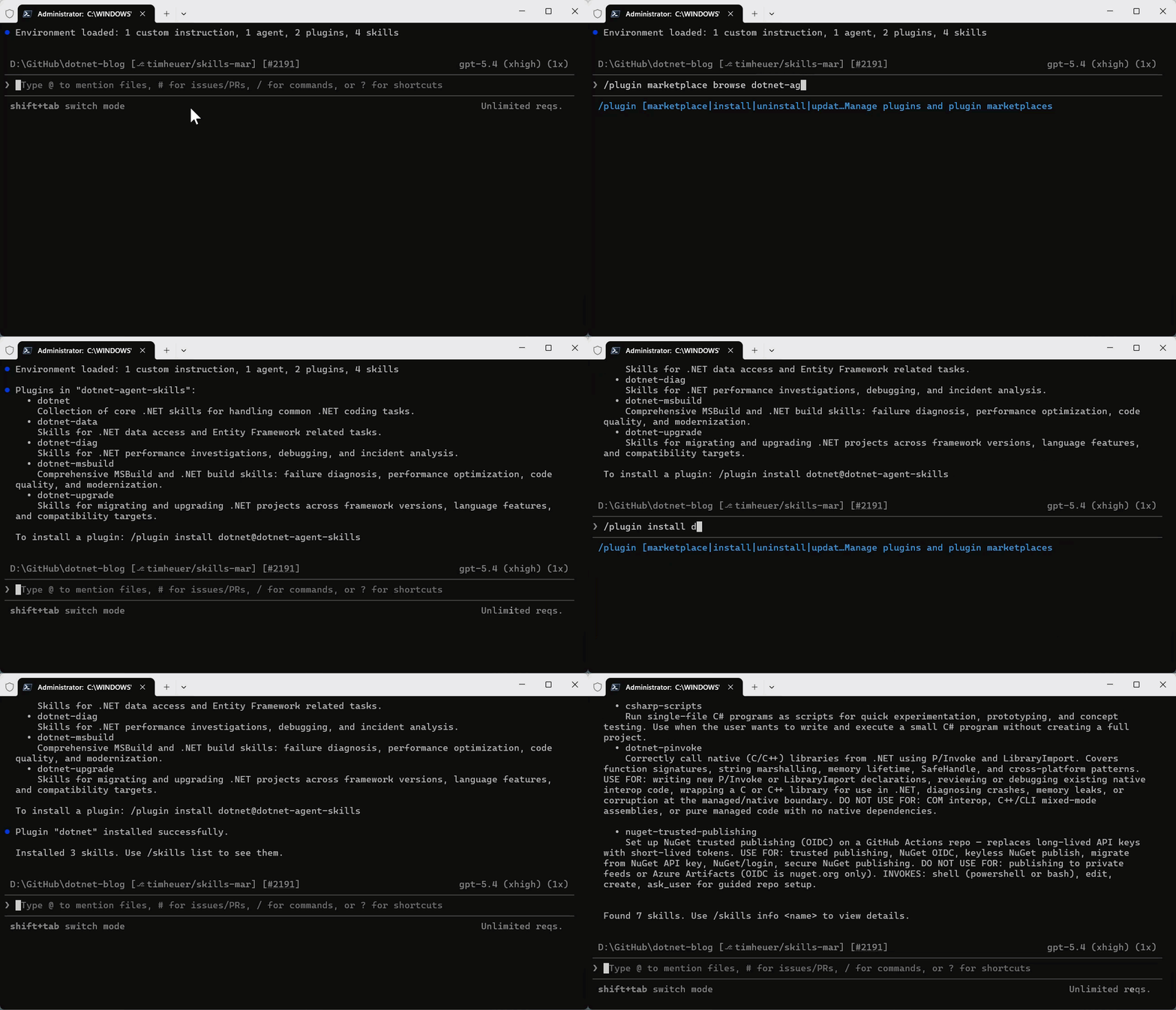
you can register the repo as a marketplace and browse/install the plugins.
/plugin marketplace add dotnet/skillsOnce the marketplace is added, then you can browse any marketplace for a set of plugins to install and install the named plugin:
/plugin marketplace browse dotnet-agent-skills
/plugin install <plugin>@dotnet-agent-skills
They are now available in your environment automatically by your coding agent, or you can also invoke them explicitly.
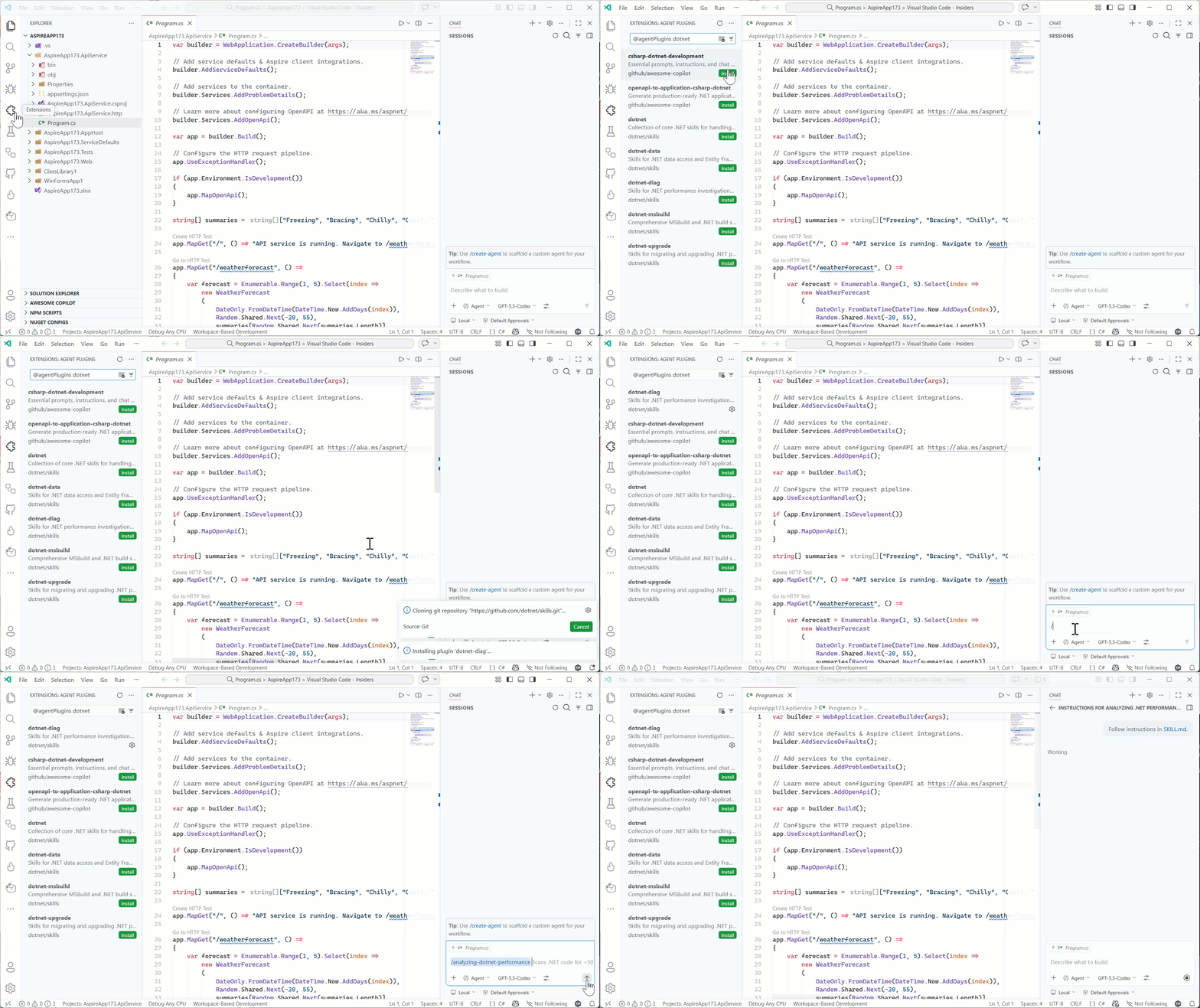
/dotnet:analyzing-dotnet-performanceAnd in VS Code you can add the marketplace URL into the Copilot extension settings for Insiders, adding https://github.com/dotnet/skills as the location and then you can browse in the extensions explorer to install, and then directly execute in Copilot Chat using the slash command:
We acknowledge that discovery of even marketplaces can be a challenge and are
working with our own Copilot partners and ecosystem to better understand ways to
improve this discovery flow — it’s hard to use great skills if you don’t know
where to look! We’ll be sure to post more on any changes and possible .NET
specific tools to help identify skills that will make your project and developer
productivity better.
Starting principles
Like evolving standards in the AI extensibility space, skills is fast moving. We
are starting with the principle of simplicity first. We’ve seen in our own uses
that a huge set of new tools may not be needed with well scoped skills
themselves. Where we need more, we’ll leverage things like MCP or scripts, or
SDK tools that already exist and rely on them to enhance the particular skill
workflow. We want our skills to be proven, practical, and task-oriented.
We also know there are great community-provided agent skills that have evolved,
like github/awesome-copilot which
provide a lot of value for specific libraries and architectural patterns for .NET
developers. We support all these efforts as well and don’t think there is a ‘one
winner’ skills marketplace for .NET developers. We want our team to keep focused
closest to the core runtime, concepts, tools, and frameworks we deliver as a
team and support and learn from the community as the broader set of agentic
skills help all .NET developers in many more ways. Our skills are meant to
complement, not replace any other marketplace of skills.
What’s next
The AI ecosystem is moving fast, and this repository will too. We’ll iterate
and learn in the open with the developer community.
Expect frequent updates, new skills, and continued collaboration as we improve
how coding agents work across .NET development scenarios.
Explore dotnet/skills, try the skills in your own workflows, and share
feedback on things that can improve or new ideas we should consider.


