Posted on Leave a comment

EMCOR Group transitions to the cloud, constructs intelligent workplace with Microsoft 365

The EMCOR logo.

Today’s post was written by Peter Baker, senior director of information technology at EMCOR Group.

Profile picture of Peter Baker, senior director of information technology at EMCOR Group.A good way to describe the culture at EMCOR is to reference the many awards we’ve received for excellent customer service and safety. We provide mechanical and electrical construction, industrial and energy infrastructure, and facilities services to commercial, industrial, utility, and institutional customers around the world. For 10 consecutive years, EMCOR has been named among the top five “World’s Most Admired Companies” in the Engineering and Construction Industry by Fortune, and in 2018, EMCOR was ranked #1. Our IT team concentrates on helping employees build on that culture of customer-focused service and safety, so we can continue to differentiate ourselves from the competition and serve customers with excellence.

We stand out by taking advantage of the latest opportunities for IT advancements—when it makes sense for our business. That’s why we turned to cloud computing now. Cloud-based solutions are typically more cost-competitive than on-premises solutions. In addition, we want to reduce the administrative burden of on-premises solutions so that IT staff can focus on business-critical areas. For example, we will be able to collaborate more effectively across multiple divisions and business units using Microsoft 365 cloud-based workplace services. It’s easier for our employees to share information with each other, customers, and suppliers. Also, a modern, intelligent workplace helps EMCOR compete for talent among today’s younger workforce.

We chose Microsoft because we felt it has the most comprehensive set of cloud-based components for a large enterprise. EMCOR needs enterprise-class messaging, applications, infrastructure, mobile security, collaboration tools, document management solutions, and governance capabilities. Microsoft offered the widest array of integrated solutions for each of those areas.

In making the transition from an on-premises IT organization to a cloud-friendly IT organization, one of our biggest anticipated benefits is that we’ll have a more standardized IT infrastructure that’s easier to support and secure. Microsoft fully supports our commitment to security and data privacy as defined by internal and customer-driven requirements. With solutions such as Microsoft Azure Key Vault, EMCOR can encrypt its data and control the encryption keys. This was a major differentiator for us. Also, we plan to use Azure Information Protection P2, a component of Enterprise Mobility + Security, along with Customer Lockbox for Office 365—a deal maker for moving to the cloud—shortly after our pilot project. Enabling Customer Lockbox is a must for EMCOR because it helps us meet our customers requirement that we control access to their data. We’re in the early stages of configuring our tenant, and so far things are going well.

As a result of moving to a Microsoft cloud platform, EMCOR has a much closer business relationship with Microsoft. We’re counting on Microsoft to remain the leader in enterprise-class, cloud-based messaging and workplace tools. Meanwhile, the total set of capabilities we gain with Microsoft 365 E3 provides value. EMCOR obtains multiple software and service elements wrapped in a single unified price, and all services and software will remain current and fully patched with little effort on our part. This frees our IT staff to focus on issues more critical to supporting revenue generation and business operations.

Posted on Leave a comment

ERM contributes to a more sustainable future with Microsoft 365

Today’s post was written by Richard Zotov, Group CIO at ERM.

The sustainability industry addresses the complex balancing act between supporting socioeconomic development and ensuring the healthy future of our environment and our communities. ERM employees are passionate about helping to shape a sustainable future with the world’s leading organizations. We work with the majority of Fortune 500 companies, whose activities—from drilling oil to discovering the next miracle drug—have an enormous impact on us all. Because sustainability means something different for every customer, like exploring clean energy sources or guaranteeing an ethical supply chain, ERM employees must be skilled, flexible, and agile in how they approach each engagement.

It is my goal as CIO to make sure this amazing group of more than 5,000 individuals have the best tools at their disposal as they collaborate in creative teams across 40 countries to help our customers achieve their unique business and sustainability goals. So we made the strategic decision to harness technology and data to digitalize and transform how we work. That’s when we deployed Microsoft 365 across our entire organization, from administrators in our 160 offices to mobile consultants gathering data in the field. Today, ERM employees have new tools to work faster, better, and safer, accelerating the positive, global impact of the work we do.

Now that everyone uses the same Microsoft 365 toolkit to collaborate, harness data, and streamline operations, we have a unified foundational layer for our new workplace culture. We’re connecting our entire business to be more efficient. And when it comes to security, we can meet our customers’ high standards and enhance the credibility of our security position with the Microsoft cloud platform.

This workplace transformation is really a two-pronged approach to remaining at the forefront of the sustainability industry. First, we harness technology and data to accelerate our sustainability and environmental health and safety services. The second involves looking at how we develop new revenue streams as an offshoot of our newly digitalized way of doing business.

With Microsoft 365, we are making headway with the first goal. It’s part of an enterprise-wide push to focus on exceptional customer value. For example, we have technologically transformed how we collect, store, and manage data during site investigation, one of our biggest service lines. Onsite data collection used to be a laborious manual process. Today, we use Microsoft 365 to help digitalize data collection—consultants take tablets into the field for data input and upload it for storage in the Microsoft cloud where it’s available in real-time for colleagues to analyze back at the office. Now our customers receive our reports in easily consumable Power BI dashboards, as opposed to lengthy write-ups, and we’re delivering insightful data into the hands of our customers faster.

As we gain experience in transforming our service lines using Microsoft cloud services, among others, we’ll be in a better position to explore new digital opportunities that help add value to the work we do for customers. This strategy will keep us at the leading edge of technology innovation and help maintain our competitive advantage.

As we work with the intelligent tools within the Microsoft 365 cloud platform, we empower our employees to deliver value to our customers—helping them achieve that balance between doing business and being a conscious steward of the environment. It’s great to know that ERM is adding to the global dialogue on sustainability, contributing to a healthier future for the planet.

—Richard Zotov

Read the ERM case study for more on their move to a modern workplace with Microsoft 365.

Posted on Leave a comment

Collaborate more easily, keep track of to-dos with new AI features in Word

Focus is a simple but powerful thing. When you’re in your flow, your creativity takes over, and your work is effortless. When you’re faced with distractions and interruptions, progress is slow and painful. And nowhere is that truer than when writing.

Word has long been the standard for creating professional-quality documents. Technologies like Editor—Word’s AI-powered writing assistant—make it an indispensable tool for the written word. But at some point in the writing process, you’ll need some information you don’t have at your fingertips, even with the best tools. When this happens, you likely do what research tells us many Word users do: leave a placeholder in your document and come back to it later to stay in your flow.

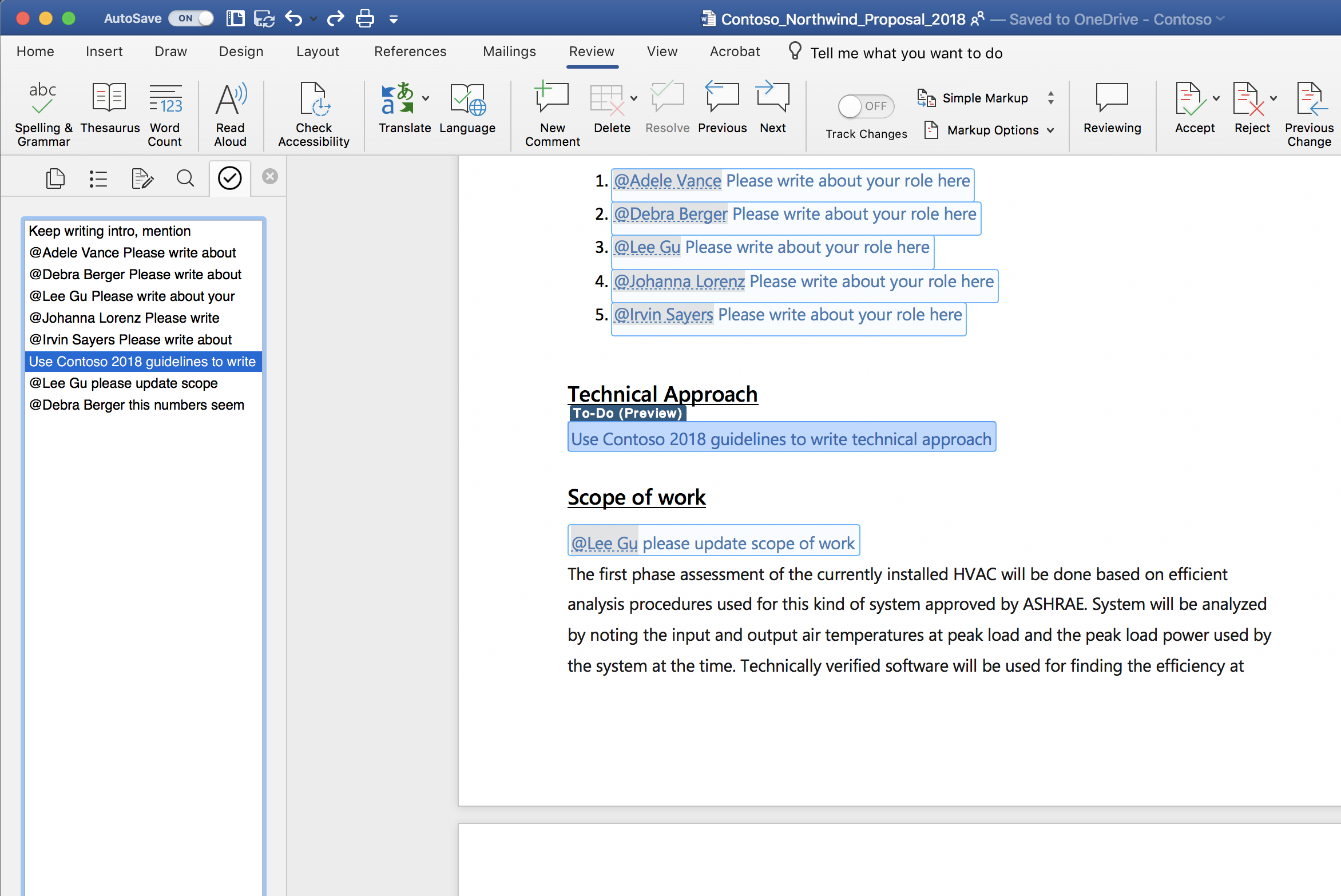
Today, we’re starting to roll out new capabilities to Word that help users create and fill in these placeholders without leaving the flow of their work. For example, type TODO: finish this section or <<insert closing here>> and Word recognizes and tracks them as to-dos. When you come back to the document, you’ll see a list of your remaining to-dos, and you can click each one to navigate back to the right spot.

Screenshot of a Word document open using the AI-powered To-Do feature.

Once you’ve created your to-dos, Word can also help you complete them. If you need help from a friend or coworker, just @mention them within a placeholder. Word sends them a notification with a “deep link” to the relevant place in the document. Soon, they’ll be able to reply to the notification with their contributions, and those contributions will be inserted directly into the document—making it easy to complete the task with an email from any device.

Over time, Office will use AI to help fill in many of these placeholders. In the next few months, Word will use Microsoft Search to suggest content for a to-do like <<insert chart of quarterly sales figures>>. You will be able to pick from the results and insert content from another document with a single click.

These capabilities are available today for Word on the Mac for Office Insiders (Fast) as a preview. We’ll roll these features out to all Office 365 subscribers soon for Word for Windows, the Mac, and the web.

Get started as an Office for Mac Insider

Office Insider for Mac has two speeds: Insider Fast and Insider Slow. To get access to this and other new feature releases, you’ll need a subscription to Office 365. To select a speed, open Microsoft Auto Update and on the Help menu select Check for Updates.

As always, we would love to hear from you, please send us your thoughts at UserVoice or visit us on Twitter or Facebook. You can also let us know how you like the new features by clicking the smiley face icon in the upper-right corner of Word.

Posted on Leave a comment

Microsoft 365 helps pharma giant Eli Lilly deliver on promise to make life better for patients everywhere

Today’s post was written by Mike Meadows, vice president and chief technology officer at Eli Lilly and Company.

We have an expression at Lilly that inspires our workforce every day: the patient is waiting. This mindset informs our culture, encourages us to work faster, and helps us deliver on the promise to make life better for patients everywhere. It’s behind everything we do at Lilly—from chasing a molecule in a lab to developing new ways to engage with patients, and even troubleshooting a server or network issue.

Our challenge continues to be the discovery of new therapies and accelerating their time-to-market. The process is too slow—and while clearly difficult and complex, our ability to get faster is key. We need to forge new partnerships, comply with a complex regulatory environment, keep quality and safety at the forefront, and reduce costs. All of these seemingly conflicting elements put significant pressure on how we fulfill our promise.

Lilly is responding to these challenges with new thinking across our business process cycle. Through discovery research, product development, manufacturing, and customer engagement, we are working on next-generation capabilities to improve our speed and productivity.

[embedded content]

Our workplace environment, and how we interact with one another, is certainly not exempt from such transformation, and in part will be supported by Microsoft 365 cloud technologies. We could see that Microsoft has made great strides in its own transformation to better meet customer needs, and that certainly played a role in our interest in Microsoft technologies for our own workplace transformation goals.

Fostering seamless collaboration and creative teamwork globally is key as we need different ideas to come together to generate new capabilities and products. That’s basically the definition of innovation, and innovation is our lifeblood. With facilities around the world in research and development (R&D), manufacturing, and administrative services, our ability to collaborate across diverse cultures, ways of thinking, and languages has a huge impact on accelerating our product innovation workstreams and our promise to patients.

We’ve been using Microsoft Exchange Online and Office apps for years, but the enhanced interoperation between tools like Microsoft Teams and innovative devices such as Surface Hub and HoloLens has the potential to take collaboration to the next level.

In discovery research today, we have two primary working environments: the laboratory, where scientists in lab coats conduct their experiments in isolation from their colleagues; and the traditional office space occupied by administration and leadership. Not much collaboration happens in real time between these environments. If a scientist has a brilliant idea in the lab, to act on it or share it with colleagues requires them to stop what they’re doing, take off their gear, and return to the office to phone or email someone.

We envision dissolving these physical barriers through something we call “in-lab collaboration”—putting communication and collaboration tools inside our labs that empower scientists to share a creative spark with other scientists across the globe, or with the clinical development manager just upstairs. Using Surface Hubs to whiteboard ideas, making Office 365 video calls, and chatting in real-time through Teams foster innovation at scale and can help ensure that great ideas don’t get lost.

In today’s healthcare environment, we’re working more and more with innovators outside the company itself. We’re looking at new scenarios where Lilly might run experiments in a cost-effective arrangement called “lab-as-a-service,” where we can quickly and seamlessly leverage specialty labs in a lease-like manner from partners as needed, thus expediting R&D. Increasingly, as we follow the science to new experimental designs and new therapeutic technologies (CAR T-cell therapy, cancer vaccines, digital therapeutics, etc.), we are less focused on building durable, static labs. Instead, dynamically accessing elastic lab capabilities will empower our evolving R&D strategy. Our new cloud-based collaboration solutions will go a long way toward supporting virtual teamwork with providers outside our walls.

When we collaborate efficiently, it drives productivity by helping us to work faster. One of the most significant benefits of working faster at Lilly will revolve around effectively changing our workplace processes to use Teams day to day throughout the enterprise. We are conducting approximately 300 Teams pilot projects around the world within IT, research, and marketing departments. When communication channels are oriented to particular project workflows, documents are all in one place. We can add creative flows with team members around the world, opening up collaborative possibilities at Lilly. Teams also facilitates coauthoring—a significant benefit given the abundance of documentation this industry requires. Whenever we can spend less time redlining and passing around versions among people, there will be an efficiency gain in running the business.

As a technologist, I’m always seeking these opportunities for positive change in our work habits. Looking back to when we deployed Exchange Online, we migrated over 70,000 mailboxes for our employees and collaborators in less than nine months with a seamless transition—which also provided them with nearly unlimited storage to improve their work lives. I think we can generate more successes like that with Microsoft 365. We expect that Windows 10, with its ongoing updates and new capabilities, will be a case in point. Additionally, the AI capabilities that are built into Office 365, even for something as routine as automating how we schedule meetings, could be a boon to our culture.

And when it comes to regulatory compliance and security, I have believed for years that we have the opportunity to be more compliant and secure in the cloud, rather than less. The capabilities we see in the Microsoft Cloud environment are the latest confirmation of these instincts. Complying with the regulatory requirements in the life science industry is always a given at Lilly, but Microsoft 365 security features help improve how we meet data privacy and quality requirements. “Security and quality by design” is one of our IT strategy principles, and the Microsoft Cloud is clearly aligned.

A few years ago, Lilly went through a significant period of patent expiration that challenged our business like never before. Our CEO at the time inspired us to double down on innovation, and today we have a strong pipeline of new molecules to help deliver on our purpose. Our current CEO is inspiring an increased sense of teamwork, speed, and productivity. Using services within Microsoft 365 is one component of that drive and will help put us in an even better position to continue the innovation required to deliver on our promise to patients everywhere.

—Mike Meadows

Posted on Leave a comment

Goodyear mobilizes with Microsoft 365 to lead in a new mobility ecosystem

Today’s post was written by Sherry Neubert, chief information officer at The Goodyear Tire & Rubber Company.

Goodyear has a 120-year history of being at the forefront of an ever-changing mobility industry. From bicycles, carriages, and the first Ford Model Ts off the production line, to blimps, airplanes, and even the first tire on the moon—Goodyear has always delivered innovative solutions that keep the world moving.

Today, our industry faces even more disruption through shifting consumer behaviors and expectations, digital transformation, and breakthroughs in technology that are accelerating change at speeds unlike anything we’ve ever experienced. This is creating a new mobility ecosystem shaped by shared mobility fleets, autonomous vehicles, connected vehicles, and electric vehicles.

Harnessing the power of our associates is key to competing—and continuing to lead—in this new world. With 64,000 associates selling products in around 150 countries, we need workplace productivity tools that enable innovation and bring together all of Goodyear’s diverse knowledge and capabilities. In 2014, we began to adopt Office 365 to modernize our workplace. Since then, we’ve empowered our associates worldwide with Microsoft 365 productivity and security tools and reached the halfway point in our global rollout of Windows 10. This cloud-connected modern desktop has given us the right tools to allow our teams to be as collaborative, agile, and productive as possible, while providing a highly secure digital environment.

[embedded content]

Enhancing collaboration is crucial to us for improved decision making and to drive innovation, both in tires and beyond tires. Connecting associates via Microsoft 365 tools such as Outlook, SharePoint Online, OneDrive, Yammer, and Skype for Business Online helps us take better advantage of our cross-functional and geographically dispersed teams. Our multigenerational and multicultural global workforce is now sharing perspectives and ideas more quickly and easily than ever.

Another focus for Goodyear is driving productivity and greater efficiencies so we can deliver the right products to the right place at the right time—faster than ever. With Microsoft 365, we stay connected and access shared content from anywhere, at any time, on any device, which allows us to innovate with greater speed. We also have an Internet of Things (IoT) proof of concept with Azure hosting big data from sensors in our factories. This allows us to use machine-learning capabilities to improve our predictive maintenance.

It is critically important for Goodyear to keep our information and systems safe so we can help protect our customers, associates, and the company and keep our focus on the changing needs of the marketplace. We safeguard our people, devices, data, and IP better with Windows 10 and Enterprise Mobility + Security. This has greatly improved our security capabilities, while at the same time continuously hardening our devices by providing updates as a service.

As our Microsoft 365 environment continues to mature, we’re evaluating the use of other Microsoft technologies. We’ve been using Microsoft HoloLens in exploration mode—it represents exciting possibilities for virtual tire modeling and design as well as remote knowledge transfer. We are also making strides advancing the AI infused in Microsoft 365, including Cortana, Azure-powered chatbots, and Focused Inbox, to amplify skills and democratize knowledge. The next big initiative on our horizon is adopting Microsoft Teams—we expect this to become our associates’ go-to social and collaboration platform.

The digital world is changing fast, and we must lead with digital innovation. For Goodyear, it’s all about how we can enable everyone in the company to put the customer at the center of everything we do and ensure that we maintain our leadership position in the new mobility ecosystem of tomorrow. When you find and deploy solutions that bring out the best in your people, the possibilities are endless.

—Sherry Neubert

Posted on Leave a comment

10 new ways for everyone to achieve more in the modern workplace

It’s been over a year since we introduced Microsoft 365, the complete, intelligent, and secure solution that empowers employees to drive their organizations to future growth. Customers are seeking to transform and support a workforce that is more diverse and mobile than ever before, and they are relying on latest advancements in technology to do so. Customers such as Goodyear, Eli Lilly, and Fruit of the Loom use Microsoft 365 to empower their employees.

Microsoft 365 is growing quickly, built on the strength of more than 135 million commercial monthly Office 365 users. Windows 10 has approximately 200 million commercial devices in use, and there is an install base of over 82 million for Enterprise Mobility + Security (EMS). Today, at the Microsoft Ignite Conference in Orlando, Florida, we are introducing new capabilities in Microsoft 365 that make it possible for every person to do their best work.

1. Microsoft Teams is the fastest growing business app in Microsoft history

After less than two years in market, more than 329,000 organizations worldwide use Microsoft Teams, including 87 of the Fortune 100 companies. In fact, 54 customers now have more than 10,000 active users of Teams, and Accenture just crossed the 100,000 active-user mark in Teams. Further growth has been spurred by the recently announced free version of Teams.

We continue to add powerful new capabilities to foster teamwork and collaboration. New artificial intelligence (AI) powered meeting features are now generally available—including background blur and meeting recording. Background blur uses facial detection to blur your background during video meetings, and meeting recording allows you to playback recorded meeting content at any time with captions and a searchable, timecoded transcript.

General availability of new live event capabilities will begin to roll out worldwide in Microsoft 365 later this year. These new tools allow customers to create and stream live and on-demand events in Teams, Yammer and Microsoft Stream to inform and engage customers and employees, wherever they are. Beginning in October, employees can watch videos on the go with the Stream mobile app for iOS and Android, with support for offline viewing. And we’re working with our ecosystem of device partners to deliver new devices optimized for Teams meetings and calling, including the new Surface Hub 2. Surface Hub 2 is perfect for dynamic teamwork and features a light, sleek, and intelligent design that’s easy to move around and fit in any workspace. The first phase of Surface Hub 2, Surface Hub 2 S, will start shipping in the second quarter of 2019.

Animated image of a man blurring his background in Teams.

Blur your background during meetings.

2. Extend the power of Teams to empower workers in all roles and across industries

We are extending the power of Teams with new experiences that are tailored to industry-specific and role-based workflows. For example, new capabilities in Teams help empower Firstline Workers to do their best work. With new schedule management tools, managers can now create and share schedules, and employees can easily swap shifts, request time off, and see who else is working as well as important announcements. These new features will be available in October. As an example of how Teams can enable secure workflows for regulated industries, we’re delivering a new care coordination solution, now available in private preview, that gives healthcare teams a secure hub for coordinating care across multiple patients. It provides for integration with electronic health records (EHR) systems and enables care providers to communicate about patient care in real-time within Teams’ secure platform. We are also releasing two new secure messaging features with particular relevance in healthcare settingsimage annotation, now generally available, and priority notifications, which will roll out by the end of this year to all Teams commercial customers. These capabilities support HIPAA compliance and enable doctors, nurses, and other clinicians to communicate about patients while avoiding the privacy risks that arise when healthcare professionals use consumer chat apps.

Image of a mobile device creating an event in Microsoft Teams.

Easily swap shifts, request time off, and see who else is working.

3. Find what you need faster with Microsoft Search

Microsoft Search, a new cohesive search capability, makes it easier for you to find what you need without leaving the flow of your work. We’re putting the search box in a consistent, prominent place across Edge, Bing, Windows, and Office apps, so that search is always one click away. We’re also supercharging the search box so you can not only quickly find people and related content, but you can also access commands for apps and navigate to other content wherever you need to get work done—even before you start typing in the search box. Recognizing that you work in an ecosystem of information, we’re extending Microsoft Search to connect across your organization’s data, inside and outside of Microsoft 365. Learning from your everyday work patterns and acting as a brain for your organization, the Microsoft Graph personalizes your experiences everywhere. We’re pulling together the power of the Microsoft Graph and AI technology from Bing to deliver future experiences that are more relevant to what you are working on. This will include automatically answering questions such as “Can I bring my wife and kids on a work trip?” by using machine reading comprehension that takes knowledge of the world and pairs it with understanding of your organization’s documents. Preview the Microsoft Search capability it as it rolls out to Office.com, Bing.com, and in the SharePoint mobile app today, with many more experiences to come in Edge, Windows, and Office.

Image shows Microsoft Search in Office.com.

Find what you need faster with Microsoft Search.

4. Create content that stands out with Microsoft 365

Three new features in Microsoft 365 use the power of AI to help you create content that shines. Ideas is a new feature that follows along as you create a document and makes intelligent suggestions. In PowerPoint, Ideas recommends designs, layouts, and images. In Excel, Ideas recognizes trends, suggests charts, and identifies outliers in your data. Ideas will be generally available in Excel soon and will also begin rolling out in preview to the other apps starting with PowerPoint Online. Additionally, new data types in Excel turn references to stocks and geographies into rich entities that can be used to build powerful, interactive spreadsheets. The Stocks and Geography data typesgenerally available soonmake it easy to get updated stock prices, company information, population, area, and more. Finally, new image recognition capabilities in Excel take a picture of a hand-drawn or printed data table and turn it into an Excel spreadsheet, making data entry as easy as taking a picture.

Animated image shows a laptop open and Ideas being used in PowerPoint.

In PowerPoint, Ideas recommends designs, layouts, and images for your presentation.

5. Office loves the Mac

Office empowers everyone to achieve more on any device. And Office loves the Mac. We’re committed to the Mac as a first-class endpoint and have made significant investments in the platform over the past year—including moving the Mac and Windows versions of the apps onto a single code base and releasing new features for the Mac every month. We also tailored new experiences for the Mac, like the new Touch Bar integration.

Today, we’re announcing OneDrive Files On-Demand for Mac, a way to access all your personal and work files from the cloud in Finder without using storage space and only download them when you need them. Files On-Demand gives the Mac an intelligent connection to the cloud and is just one more example of the power of Office on the Mac platform. Preview it before it rolls out to all Mac users.

Image shows OneDrive Files On-Demand on an open Mac.

OneDrive Files On-Demand for Mac displays all your OneDrive files in Finder but only downloads them when you need them.

6. Work together with your entire network with LinkedIn in Outlook and Office web apps

We’re announcing two new ways to use the power of the LinkedIn network within your daily workflow. Soon, when you connect your LinkedIn account to Office 365, you’ll be able to coauthor documents with people in your LinkedIn network in Word, Excel, and PowerPoint and send emails to them directly from Outlook. This brings your corporate directory and your LinkedIn network together, so you never lose touch with the contacts who can help you succeed, inside or outside your organization. You’ll also see LinkedIn highlights about the people in your meeting invites, providing you with insights about attendees, so you can prep for important meetings quickly and easily. These features help you focus on what’s important by providing information and connections directly in your flow of work and will be coming soon in a staged rollout.

7. Deliver a modern desktop with Azure

For many companies, the specific needs of their business demand a virtualized desktop experience. Today, we are introducing Windows Virtual Desktop, the only cloud-based service that delivers a multi-user Windows 10 experience, which is optimized for Office 365 ProPlus and includes free Windows 7 Extended Security Updates. With Windows Virtual Desktop, you can deploy and scale Windows and Office on Azure in minutes with built-in security and compliance. Sign up to be notified of the preview availability.

8. Manage your environment with the Microsoft 365 admin center

Following our recent release of the new Microsoft 365 admin center, we’re announcing new features to help you to monitor and manage applications, services, data, devices, and users across your Microsoft 365 subscriptions, including Office 365, Windows 10, and EMS. The Microsoft 365 admin center has several new capabilities to help you better manage your environment, including insight-based recommendations, a more consistent UI, and customized views for each of your admins. The public preview of these features is rolling out now to targeted release admins and soon to all admins. To get started, visit admin.microsoft.com.

Image shows the Microsoft 365 admin center on an open laptop.

Manage your environment more easily with the Microsoft 365 admin center.

9. Achieve modern compliance easily for the General Data Protection Regulation (GDPR) and more

In the world of complex regulations and evolving privacy standards, customers consistently tell us they need the built-in, intelligent capabilities of Microsoft 365 to proactively achieve compliance in their organizations. We’ve expanded Compliance Manager to now include 12 assessments across different industries. The unified labeling experience is also now available in the Security & Compliance Center as a single destination where you can create, configure, and automatically apply policies to ensure protection and governance of sensitive data.

Image shows the Compliance Manager on a tablet.

Compliance Manager now includes 12 assessments across different industries.

10. Advancing security for IT professionals

The work we do in security at Microsoft gives us the broadest perspective on the challenges and a unique ability to help. We focus on three areas: running security operations that work for you, building enterprise-class technology, and driving partnerships for a heterogeneous world. Today, we’re announcing several new enterprise-class capabilities that leverage the Microsoft intelligent cloud and operational learnings to help organizations secure their people, devices, and data.

New support for passwordless sign-in via the Microsoft Authenticator app is now available for the hundreds of thousands of Azure Active Directory connected apps that businesses use every day. Nearly all data loss starts with compromised passwords. Today, we are declaring an end to the era of passwords. No company lets enterprises eliminate more passwords than Microsoft.

Microsoft Secure Score is the only enterprise-class dynamic report card for cybersecurity. By using it, organizations get assessments and recommendations that typically reduce their chance of a breach by 30-fold. It guides you to take steps like securing admin accounts with Multi-Factor Authentication (MFA), securing users accounts with MFA, and turning off client-side email forwarding rules. Starting today, we’re expanding Secure Score to cover all of Microsoft 365. We are also introducing Secure Score for your hybrid cloud workloads in the Azure Security Center, so you have full visibility across your estate.

Finally, we are announcing Microsoft Threat Protection, an integrated experience for detection, investigation, and remediation across endpoints, email, documents, identity, and infrastructure in the Microsoft 365 admin console. This will save analysts thousands of hours as they automate the more mundane security tasks.

Image shows Microsoft Secure Score in Microsoft 365 Security, on a tablet.

Microsoft Secure Score is expanding to cover all of Microsoft 365.

We look forward to bringing you these new ways to achieve more from unlocking creativity to advancing security. You can learn more about our announcements, see all of our Microsoft Ignite sessions live streaming or on-demand, and connect with experts on the Microsoft Tech Community.

Editor’s note 9/24/2018:
This post has been edited with updated information on the availability of Ideas and new data types in Excel.

Posted on Leave a comment

Introducing 3 updates to help organizations make the shift to a modern desktop

IT is complex. And that means it can be difficult to keep up with the day-to-day demands of your organization, let alone deliver technological innovation that drives the business forward. In desktop management, this is especially true: the process of creating standard images, deploying devices, testing updates, and providing end user support hasn’t changed much in years. It can be tedious, manual, and time consuming. We’re determined to change that with our vision for a modern desktop powered by Windows 10 and Office 365 ProPlus. A modern desktop not only offers end users the most productive, most secure computing experience—it also saves IT time and money so you can focus on driving business results.

Today, we’re pleased to make three announcements that help you make the shift to a modern desktop:

  • Cloud-based analytics tools to make modern desktop deployment even easier.
  • A program to ensure app compatibility for upgrades and updates of Windows and Office.
  • Servicing and support changes to give you additional deployment flexibility.

Analytics to make modern desktop deployment easier

Collectively, you’ve told us that one of your biggest upgrade and update challenges is application testing. A critical part of any desktop deployment plan is analysis of existing applications—and the process of testing apps and remediating issues has historically been very manual and very time consuming. Microsoft 365 offers incredible tools today to help customers shift to a modern desktop, including System Center Configuration Manager, Microsoft Intune, Windows Analytics, and Office Readiness Toolkit. But we’ve felt like there’s even more we could do.

Today, we’re announcing that Windows Analytics is being expanded to Desktop Analytics—a new cloud-based service integrated with ConfigMgr and designed to create an inventory of apps running in the organization, assess app compatibility with the latest feature updates of Windows 10 and Office 365 ProPlus, and create pilot groups that represent the entire application and driver estate across a minimal set of devices.

The new Desktop Analytics service will provide insight and intelligence for you to make more informed decisions about the update readiness of your Windows and Office clients. You can then optimize pilot and production deployments with ConfigMgr. Combining data from your own organization with data aggregated from millions of devices connected to our cloud services, you can take the guess work out of testing and focus your attention on key blockers. We’ll share more information about Desktop Analytics and other modern desktop deployment tools at Ignite.

Standing behind our app compatibility promise

We’re also pleased to announce Desktop App Assure—a new service from Microsoft FastTrack designed to address issues with Windows 10 and Office 365 ProPlus app compatibility. Windows 10 is the most compatible Windows operating system ever, and using millions of data points from customer diagnostic data and the Windows Insider validation process, we’ve found that 99 percent of apps are compatible with new Windows updates. So you should generally expect that apps that work on Windows 7 will continue to work on Windows 10 and subsequent feature updates. But if you find any app compatibility issues after a Windows 10 or Office 365 ProPlus update, Desktop App Assure is designed to help you get a fix. Simply let us know by filing a ticket through FastTrack, and a Microsoft engineer will follow up to work with you until the issue is resolved. In short, Desktop App Assure operationalizes our Windows 10 and Office 365 ProPlus compatibility promise: We’ve got your back on app compatibility and are committed to removing it entirely as a blocker.

Desktop App Assure will be offered at no additional cost to Windows 10 Enterprise and Windows 10 Education customers. We’ll share more details on this new service at Ignite and will begin to preview this service in North America on October 1, 2018, with worldwide availability by February 1, 2019.

Servicing and support flexibility

Longer Windows 10 servicing for enterprises and educational institutions
In April 2017, we aligned the Windows 10 and Office 365 ProPlus update cadence to a predictable semi-annual schedule, targeting September and March. While many customers—including Mars and Accenture—have shifted to a modern desktop and are using the semi-annual channel to take updates regularly with great success, we’ve also heard feedback from some of you that you need more time and flexibility in the Windows 10 update cycle.

Based on that feedback, we’re announcing four changes:

  • All currently supported feature updates of Windows 10 Enterprise and Education editions (versions 1607, 1703, 1709, and 1803) will be supported for 30 months from their original release date. This will give customers on those versions more time for change management as they move to a faster update cycle.
  • All future feature updates of Windows 10 Enterprise and Education editions with a targeted release month of September (starting with 1809) will be supported for 30 months from their release date. This will give customers with longer deployment cycles the time they need to plan, test, and deploy.
  • All future feature updates of Windows 10 Enterprise and Education editions with a targeted release month of March (starting with 1903) will continue to be supported for 18 months from their release date. This maintains the semi-annual update cadence as our north star and retains the option for customers that want to update twice a year.
  • All feature releases of Windows 10 Home, Windows 10 Pro, and Office 365 ProPlus will continue to be supported for 18 months (this applies to feature updates targeting both March and September).

In summary, our new modern desktop support policies—starting in September 2018—are:

Windows 7 Extended Security Updates
As previously announced, Windows 7 extended support is ending January 14, 2020. While many of you are already well on your way in deploying Windows 10, we understand that everyone is at a different point in the upgrade process.

With that in mind, today we are announcing that we will offer paid Windows 7 Extended Security Updates (ESU) through January 2023. The Windows 7 ESU will be sold on a per-device basis and the price will increase each year. Windows 7 ESUs will be available to all Windows 7 Professional and Windows 7 Enterprise customers in Volume Licensing, with a discount to customers with Windows software assurance, Windows 10 Enterprise or Windows 10 Education subscriptions. In addition, Office 365 ProPlus will be supported on devices with active Windows 7 Extended Security Updates (ESU) through January 2023. This means that customers who purchase the Windows 7 ESU will be able to continue to run Office 365 ProPlus.

Please reach out to your partner or Microsoft account team for further details.

Support for Office 365 ProPlus on Windows 8.1 and Windows Server 2016
Office 365 ProPlus delivers cloud-connected and always up-to-date versions of the Office desktop apps. To support customers already on Office 365 ProPlus through their operating system transitions, we are updating the Windows system requirements for Office 365 ProPlus and revising some announcements that were made in February. We are pleased to announce the following updates to our Office 365 ProPlus system requirements:

  • Office 365 ProPlus will continue to be supported on Windows 8.1 through January 2023, which is the end of support date for Windows 8.1.
  • Office 365 ProPlus will also continue to be supported on Windows Server 2016 until October 2025.

Office 2016 connectivity support for Office 365 services
In addition, we are modifying the Office 365 services system requirements related to service connectivity. In February, we announced that starting October 13, 2020, customers will need Office 365 ProPlus or Office 2019 clients in mainstream support to connect to Office 365 services. To give you more time to transition fully to the cloud, we are now modifying that policy and will continue to support Office 2016 connections with the Office 365 services through October 2023.

Shift to a modern desktop

You’ve been talking, and we’ve been listening. Specifically, we’ve heard your feedback on desktop deployment, and we’re working hard to introduce new capabilities, services, and policies to help you on your way. The combination of Windows 10 and Office 365 ProPlus delivers the most productive, most secure end user computing experience available. But we recognize that it takes time to both upgrade devices and operationalize new update processes. Today’s announcements are designed to respond to your feedback and make it easier, faster, and cheaper to deploy a modern desktop. We know that there is still a lot of work to do. But we’re committed to working with you and systematically resolving any issues. We’d love to hear your thoughts and look forward to seeing you and discussing in more detail in the keynotes and sessions at Ignite in a few weeks!

Posted on Leave a comment

Schlumberger boosts global collaboration with Microsoft 365

The Schlumberger logo.


Profile picture of Ron Markezich.With more than 80 years of pioneering innovation in reservoir characterization, drilling, production, and exploration, Schlumberger is the leading provider of upstream products and services in the oil and gas industry. It’s a highly collaborative business, both internally, with more than 100,000 employees working in 85 countries, and externally, with the world’s leading global oil and gas customers depending on Schlumberger products and services. Moving data and expensive resources through a complex network of delivery systems calls for reliable, real-time collaboration and communication for all stakeholders. That’s one reason why standardizing on Microsoft 365 is a major step forward in the company’s strategy to harness the cloud and drive efficient customer service.

Recently, Schlumberger’s VP of Information Technology Sebastien Lehnherr had this to say about driving teamwork and productivity on a global scale:

“Operational efficiency and agility are requirements in a highly regulated service industry striving for performance and service quality. We use Microsoft 365 as a core element of our digital strategy—Microsoft Teams, Enterprise Mobility + Security, Power BI, and Windows 10 empower our employees globally with the intuitive, feature-rich tools that help them collaborate more efficiently and be more productive working in the office or while on the road.”

With highly secure, collaborative cloud apps at their fingertips, Schlumberger employees working in the field and at head offices in Paris, Houston, London, and The Hague are empowered by agile digital connections that accelerate service delivery and keep customers’ products moving to market. Unimpeded communication helps connect the big-picture expertise from Schlumberger’s leadership centers with local experience at production sites, adding value to customer relationships. We’re also excited to see how Schlumberger’s global Windows 10 deployment will add value to its Microsoft cloud business productivity platform.

Posted on Leave a comment

Adventist Health System enhances delivery using Microsoft 365

Today’s post was written by Tony Qualls, director of enterprise technical services at Adventist Health System in Altamonte Springs, Florida.

Over the years, healthcare has changed from hospital-based care to preventive and continuous care that happens throughout an individual’s life—outside of hospital walls and inside patient homes and neighborhood clinics. Consequently, Adventist Health System is in the midst of a big transformation to a more consumer-centric organization to meet the needs of patients and families at every stage of health.

Our more than 80,000 employees are embracing this new care delivery model, and as many of them are frequently on the go, they need secure, quick access to information from anywhere.

With Microsoft 365, we’re able to give them access to the information they need in a secure, compliant environment. We’ve been a longtime user of Microsoft Office 365 to deliver the latest productivity innovations to our clinical and non-clinical employees. We migrated to Microsoft 365 to gain more flexibility with our licensing for Office 365 and for the Windows 10 operating system and Microsoft Enterprise Mobility + Security (EMS).

We have 28,000 Microsoft 365 E3 licenses for our office staff and 41,000 Office 365 F1 licenses for our Firstline team members—nurses, doctors, and other employees. These individuals carry laptops and tablets with them throughout the day or access shared devices using badge-tapping technology. With Microsoft 365, we can cost-effectively license the specific applications that employees need to accomplish various tasks throughout their workdays.

For example, our clinical staff uses Skype for Business Online to improve patient flow and connect physicians with remote patients. Now, we’re taking it to the next level with Microsoft Teams—probably the fastest-growing Office 365 application we have deployed. Everything’s in one place—SharePoint Online sites, files, chat, meetings, and Microsoft Planner. It’s so easy to use, and we find that after people get invited to one Teams channel, they turn around and create channels of their own to support other projects. With Teams, we have persistent conversations, documents, and other resources about a topic in one place, which helps groups focus and move faster. In addition, it’s a highly secure environment that we trust, and we can remain completely compliant with HIPAA and other healthcare regulations.

At Adventist Health System, we strive for excellence in all that we do. Our IT employees strive to be recognized as an industry leader. Utilizing Teams is just one way we are supporting our organization’s vision to be wholistic, exceptional, connected, affordable, and viable.

Communication is crucial to the success of any organization, and Adventist Health System is no different. The quicker we can share information, updates, and plans, the faster we gain buy-in from our team members. The clinical workspace thrives on rapid communication and collaboration around patient care. This, in turn, helps foster better outcomes and patient satisfaction.

It’s exciting to see the Teams roadmap incorporating artificial intelligence capabilities by offering speech-to-text and meeting transcription services. As we gather takeaways and valuable information from meetings, I am happy that Teams allows me to focus on listening to my staff and peers while it captures and transcribes meeting notes for later review.

There’s an abundance of innovation coming from Microsoft, and we’ve taken the approach of releasing new Office 365 applications directly to employees and letting user communities provide guidance, tips, and support on Yammer channels. This has been a great adoption model that has empowered employees to put these tools to work in ways that make sense for them.

Because Microsoft matches productivity innovation with security innovation, we can confidently utilize new technologies on tens of thousands of mobile devices. We’ve standardized on Windows 10 Enterprise, chiefly for security features such as default encryption. But EMS also includes a great bundle of security tools and licensing options that have significantly decreased our licensing costs while giving us enhanced security capabilities.

From a support perspective, Microsoft Intune and mobile email with Exchange Online have been tremendous timesavers. Employees had to unenroll and re-enroll devices in a previous email security program, and our infrastructure support team was inundated with support tickets around the need to resync mobile email accounts. But with Intune, employees download the Microsoft Outlook mobile app, we apply the correct policies, and they’re off and running.

With Microsoft 365, our clinical, support, and IT staffs are all better equipped to help Adventist Health System transform its business in a secure, compliant manner to meet the needs of today’s changing healthcare landscape.

—Tony Qualls

Posted on Leave a comment

4 ways to engage employees with new live events in Microsoft 365

Earlier this month, we announced new intelligent event capabilities in Microsoft 365 that enable anyone to create live and on-demand events for teams and across the organization. Today, we invite you to use the public preview of live events in Microsoft 365 and discover new ways to foster connection and engagement between leaders and employees at every level in your organization.

More than ever before, employees in the modern workplace seek work environments that unlock creativity, make their lives more productive and fulfilling, and foster a sense of connection with their organization’s mission and purpose.

A critical first step for your organization to thrive in this new culture of work is to drive alignment of your people around shared purpose and goals. Leaders realize that organizations who do this well have an advantage in attracting and retaining an engaged workforce.

Here are four ways your organization can enable leaders and employees to connect with new live events in Microsoft 365:

1—Use live events to kickstart interactive discussions across your organization

Today, executives at Microsoft—including CEO Satya Nadella—use Microsoft 365 to connect and communicate with employees around the globe. Now, any company or organization with Microsoft 365 can create these moments of high engagement, where people are focused on leaders and their messages and ask questions to clarify or reinforce conversations in the community.

Using Microsoft Stream, Teams, or Yammer, you can create a live event wherever your audience, team, or community resides. Attendees receive notifications and can participate in real-time, with high-definition video and interactive discussion using web, mobile, or desktop.

Following an event, it’s easy to make the recording available on an event page, allowing you to watch the event on your own schedule and catch up quickly with powerful AI features that unlock the content of the event recording. The recording is automatically transcribed and detects changes in speakers—making it simple to search for content later.

For employees who are in different time zones or unable to attend live, the conversation keeps going, so they still feel connected to leaders and peers—helping to overcome geographical or organizational boundaries.

The event and recordings are powered by Microsoft Stream, the intelligent video service in Office 365.

Image of a laptop open to display a live event in Microsoft 365.

2—Foster sustained dialogue in open communities

Give everyone a voice—before, during, and after a live event in Microsoft 365—with Yammer communities that span functions or the entire organization. Providing a forum for employees to be heard is an important piece of transforming a culture. These communities are where people can come any time to raise ideas, concerns, or questions, and where leaders can reply in an authentic way.

An active Yammer community builds trust and a sense of connection and belonging. And it provides a forum where employees who might not feel comfortable speaking out during a live event can connect directly with leaders.

With inline message translation, live events in Microsoft 365 empowers people to express themselves in their own language.

3—Create an intranet site for leaders to share events, blogs, video, news, and resources

Communicate at scale as a leader with a continuous, online presence using content, conversation, and video channels within a SharePoint communications site. You can optimize for news distribution and blogs, and deepen engagement with related content, polls and surveys, and readership analytics.

This is also a great spot to share recorded events for later viewing. Simply create a dedicated page for each event where employees can submit questions and comments in advance. Leaders and organizers can then use this input to craft the messaging and content of the events.

4—Plan corporate communications and measure impact

Executive and internal communications may be managed by a team of one or a team of many—but it takes careful planning and execution to ensure success. Microsoft Teams—the hub for teamwork in Office 365—is ideally suited to work together in the creation and production of events and other executive communications. It provides an effective backstage for your live event, giving you a shared space to work with speakers and approve content before sharing with a broader audience.

Once you have begun engaging your audience, every message within a Yammer community has a visible count of how many people your post has reached. This helps both community organizers and employees understand what is being read. Group insights demonstrate how the knowledge and information created in the community benefit people—regardless of their membership status in the group. For example, passive visitors may gain value from group conversations and apply the information elsewhere in their daily work. You can also see the number of views for an event recording and across a channel, and how many people liked the video. Pages and news articles also have statistics to understand readership.

Empowering all leaders across an organization

Leadership, of course, does not just refer to organizational leaders. Leaders of communities may be subject matter experts, functional managers, or passionate individuals who are leading areas of expertise, practices, or interest groups. These same capabilities in Microsoft 365 can enable leaders at any level to create and sustain connection with their communities.

Patrick Yates, manager of Diversity and Inclusion at TDS Telecom, considers community connections and engagement an important part of the employee experience, and a boon to recruiting talent. “Younger generations entering the workforce especially want a modern, inclusive environment—to be part of something that’s larger than themselves.”

Connect your employees and leaders today

Experience the public preview of live events in Microsoft 365, and get started on connecting your leaders and employees today. We will be adding additional features and functionality based on your feedback in the Tech Community.

To create a live event, you will need an Office 365 E3 or E5 license and your admin must give you permission to do so. To attend a live event, you need an Office 365 license for authenticated users. Public (anonymous) access is possible in specific configurations.

For more information on the intelligent event capabilities, visit the Microsoft 365 live events post on Tech Community.