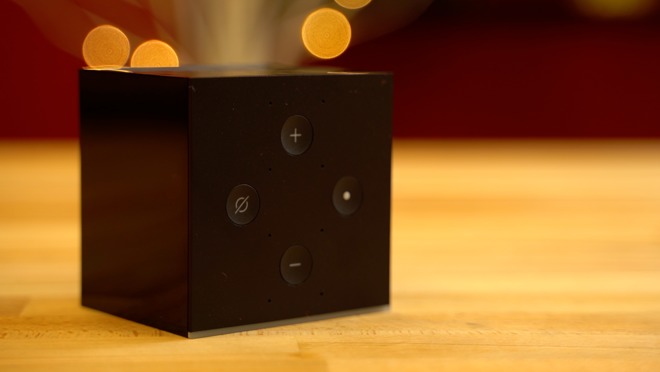
Amazon has started shipping the Fire TV Cube, a media player aiming at the Apple TV 4K. But, can it bring as much to the table as Apple’s device does, for just a little bit less money?
[embedded content]
Quite literally, the device is Amazon’s 2017 Fire TV with more storage and a built-in Echo Dot. At regular price, those two items come out to $120, exactly what the Cube costs. Amazon is currently offering the combo for only $95.
Last year’s Fire TV and the Cube share the same exact hardware specs, other than a bump to 16GB of storage. The regular 2017 Fire TV has the same exact processor, the same 2GB of RAM, the same MIMO WiFi, and can support the same 4K Ultra HD resolution, HDR10, and Dolby Atmos surround sound.
Where wired Ethernet is an add-on for the Fire TV, the Cube does include an Amazon Ethernet Adapter in the box.
Most of the Fire TV Cube Reviews out there focus on the basics surrounding the device, how it works, and what it can do, but unfortunately, a lot of them fail to mention some of its biggest problems.
For those of us who already have an Echo device in our homes, buying the Cube makes little sense.
The previous Fire TV models can also do pretty much everything the Cube can do if you’ve got an Echo in the same room as your TV, with one addition —the Cube is able to control many third-party devices with just your voice, including your TV.
Google Home and Chromecast allow users to turn supported TV’s on and off, but the Cube shines because you can control other devices like an Xbox, Playstation, cable boxes, and more through Alexa integration, HDMI CEC, or an IR Blaster repeater.
This leads us to our first problem, if you’ve already got an Echo in your living room, is being able to control some of your other devices worth the extra money? Plus, if you do have an Echo, it might cause problems with Cube. Amazon recommends you relocate your Echo to another room or change its wake word.
One of our testers had no problem with the same wake word between devices. Another kept having a problem with the Fire TV Cube picking up commands intended for the Echo.
If you have the more expensive $100 Echo, or the Echo Plus, and prefer to play music on it instead of the tv, this could be a problem.
The Fire TV Cube’s iron
Cube’s second major issue is cheap and outdated hardware. It uses the same 1.5GHz quad-core processor from the 2017 Fire TV, as well as the Mali 450 MP3 graphics that’s based on architecture from 2012! The reviews of the Fire TV are littered with people complaining about an overall slow and buggy experience. Some even decided to go back to an older generation Fire TV because of it.
In our experience, Cube’s UI animations on the main screen seemed fairly smooth, although it took a bit for them to start at times. Loading certain apps took longer than we expected them too, like Netflix for example. More on this in practice, in a bit.
The Apple TV 4K is $40 more expensive than the Cube, but at least it’s using one the most powerful mobile chips available, the A10X. That’s the same chip powering last year’s iPad Pro.
With performance like that, you know the Apple TV 4K will remain current for years, but you can’t say the same for Amazon’s Fire TV Cube.
Video Playback, and app shopping
The Amazon Fire TV Cube does what it says it will do. After it buffers, it will play back your Amazon Prime Video either through a wired Ethernet connection with the dongle, or on Wi-Fi.
On Ethernet, speeds hit around 11 megabytes per second from the router. While we’d prefer Gigabit on the Fire TV Cube, both speeds are more than enough for 4K streaming with no buffering breaks in the middle of the event. The 802.11ac Wi-Fi speeds started better, at about 80 megabytes per second, but prone to big dips down to less than 5 megabytes per second for reasons we couldn’t pin down.
Because of the strange speed excursions on Wi-Fi, we had a better streaming experience with the wired Ethernet connection than we did on the Wi-Fi. Looking at Amazon’s customer reviews for the Fire TV, we don’t seem to be alone in that regard.
But, again, our biggest issue is the janky interface. A dropped frame now and again isn’t a giant problem with interfaces. But, with half-second lock-ups of the interface while scrolling through a list, you wonder if Amazon should have charged $10 more and used a beefier processor.
The Fire TV Cube has a robust app selection, rivaling the Apple TV in many ways. This isn’t really a credit to Amazon, but a ding on Apple. We’ve said it before, and we’ll say it again —Apple had an opportunity to lock-down the TV-based apps market when it launched the fourth generation Apple TV, and it blew it because of an assortment of choices about limitations on developers.
Alexa Voice Remote isn’t any better on the new hardware
Moving on to our third problem, you get basically the same old Alexa Voice Remote that comes with the old Fire TV.
The Cube has Alexa built-in, so Amazon says you don’t really need the remote, but in our experience, it takes so much longer to navigate. It also can be kind of awkward when you have guests over, so for those reasons, we would much rather use a standard remote control.
Looking at the remote’s reviews on Amazon, however, reveals yet another snag. The device has almost as many 1 star ratings as it does 5 star. Users complain of corroded batteries or extreme battery drain. There’s also more than a fair share of users who had their remotes completely stop working, forcing them to get a replacement.
The fourth issue is related to remote issues. Let’s say your Alexa Voice Remote stops working or you lose it, you can just use the Cube’s built-in voice controls. At least in theory.
When AppleInsider tried in two different locations, we had Alexa misunderstand our commands in both environments multiple times, and when searching for certain categories of movies, it gave us different results than it did when we used the remote. We would try to search for Prime movies, for example, but the UI would mix in shows that are only available for purchase or rent.
The worst is when you’re using your voice to manually navigate the UI. You have to constantly repeat, “Alexa, scroll right,” over and over again. It just takes forever!
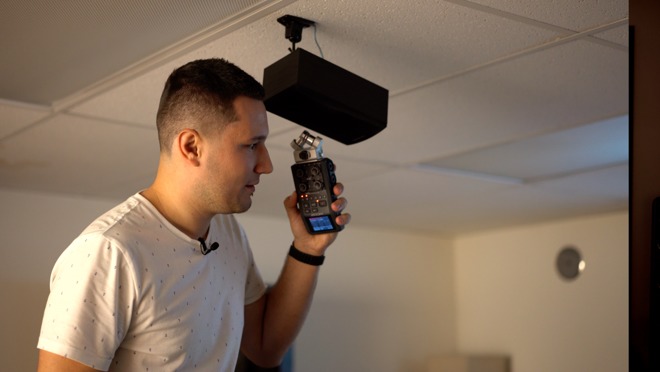
The situation only got worse when we had the volume cranked up on the TV. I had to yell “Alexa” multiple times at the Cube after she didn’t hear my first couple of attempts, and that happened quite a few times.
Amazon says they added an extra microphone into the Cube to help hear your commands, but in my experience, it doesn’t seem any better than the other Echo devices.
With those problems aside, Cube works fairly well for its core purpose, playing video. We’ll do a long-term review and talk about any problems we run into as we use it in a few months.
Alexa home automation status
Having Alexa built-in definitely has its perks, but if you have any smart home accessories, you probably already own an Echo device.
Visually seeing the weather and other information that Alexa gives you on the big screen is definitely a plus, and probably one of the best things about it, right next to the ability to turn on your TV and control all of your devices with just your voice.
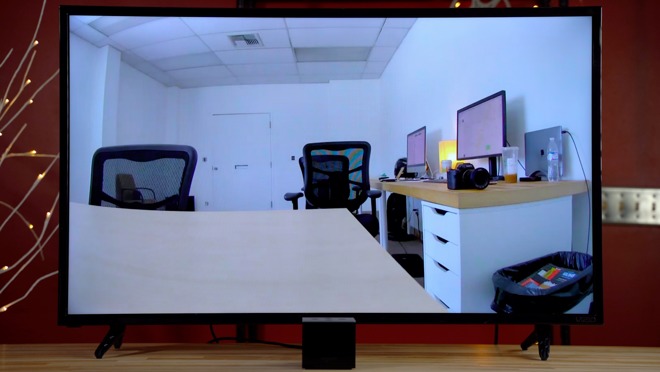
Amazon is currently offering the Fire TV Cube in a bundle with their Cloud Cam, and upon installation, it syncs up instantly with the Cube. So, you can just ask Alexa to show the cloud cam, and it’s up after that same delay that seems to infect every other action on the device.
However, when your TV is off, it takes even longer to appear as the device wakes. We were seeing almost half a minute for the cam to show up.
But, once it gets going, the lag between what’s going on in front of the camera and what you see on the TV isn’t too bad —and you have audio as well.
Amazon Fire TV Cube and the Apple TV
We’ll be doing a more direct comparison to the Apple TV 4K on AppleInsider soon to help you decide which streaming box is right for you, but in short, if you’re just looking at Amazon Prime Video or Netflix, either device will do. But, if you need iTunes streaming, the Apple TV 4K is the only way to go.
Otherwise, the Amazon Fire TV Cube is a decent device, but not a great one. If you’ve got a home server set up at home, you can point something like Plex or Infuse at your iTunes library to get them to stream to your Cube —but it isn’t a native solution and will require a little fiddling on your end.
What would have made it great? Charging $10 more and opting for a faster processor.
Overall, if you’re embedded in the Apple ecosystem, we give the Amazon Fire TV a:
Score: 3 out of 5
Amazon has continued its trend of “good enough” devices at a relatively low cost, with little panache or flair again in the Amazon Fire TV Cube. If that’s okay, and you have no need for iTunes streaming at all, and don’t care about the UI jank, it’s a bit better at 4 out of 5.