Posted on Leave a comment

Python List extend() Method

How can you not one but multiple elements to a given list? Use the extend() method in Python. This tutorial shows you everything you need to know to help you master an essential method of the most fundamental container data type in the Python programming language.

Definition and Usage

The list.extend(iter) method adds all elements in the argument iterable iter to an existing list.

Here’s a short example:

>>> lst = [1, 2, 3]
>>> lst.extend([4, 5, 6])
>>> lst
[1, 2, 3, 4, 5, 6]

In the first line of the example, you create the list lst. You then append the integers 4, 5, 6 to the end of the list using the extend() method. The result is the list with six elements [1, 2, 3, 4, 5, 6].

Try it yourself:

Syntax

You can call this method on each list object in Python. Here’s the syntax:

list.extend(iterable)

Arguments

Argument Description
iterable All the elements of the iterable will be added to the end of the list—in the order of their occurrence.

Video

Code Puzzle

Now you know the basics. Let’s deepen your understanding with a short code puzzle—can you solve it?

# Puzzle
# Author: Finxter Lee
lst1 = [1, 2, 3]
lst2 = [4, 5, 6]
lst1.append(lst2) lst3 = [1, 2, 3]
lst4 = [4, 5, 6]
lst3.extend(lst4) print(lst1 == lst3)
# What's the output of this code snippet?

You can check out the solution on the Finxter app. (I know it’s tricky!)

Examples

Let’s dive into a few more examples:

>>> lst = [1, 2, 3]
>>> lst.extend({32, 42})
>>> lst
[1, 2, 3, 32, 42]
>>> lst.extend((1, 2))
>>> lst
[1, 2, 3, 32, 42, 1, 2]
>>> lst.extend(range(10,13))
>>> lst
[1, 2, 3, 32, 42, 1, 2, 10, 11, 12]
>>> lst.extend(1)
Traceback (most recent call last): File "<pyshell#10>", line 1, in <module> lst.extend(1)
TypeError: 'int' object is not iterable
>>> 

You can see that the extend() method allows for all sorts of iterables: lists, sets, tuples, and even range objects. But what it doesn’t allow is an integer argument. Why? Because the integer argument isn’t an iterable—it doesn’t make sense to “iterate over all values in an integer”.

Python List extend() At The Beginning

What if you want to use the extend() method at the beginning: you want to “add” a number of elements just before the first element of the list.

Well, you should work on your terminology for starters. But if you insist, you can use the insert() method instead.

Here’s an example:

>>> lst = [1, 2, 3]
>>> lst.insert(0, 99)
>>> lst
[99, 1, 2, 3]

The insert(i, x) method inserts an element x at position i in the list. This way, you can insert an element to each position in the list—even at the first position. Note that if you insert an element at the first position, each subsequent element will be moved by one position. In other words, element i will move to position i+1.

Python List extend() vs +

List concatenation operator +: If you use the + operator on two integers, you’ll get the sum of those integers. But if you use the + operator on two lists, you’ll get a new list that is the concatenation of those lists.

l1 = [1, 2, 3]
l2 = [4, 5, 6]
l3 = l1 + l2
print(l3)

Output:

[1, 2, 3, 4, 5, 6]

The problem with the + operator for list concatenation is that it creates a new list for each list concatenation operation. This can be very inefficient if you use the + operator multiple times in a loop.

How fast is the + operator really? Here’s a common scenario how people use it to add new elements to a list in a loop. This is very inefficient:

import time start = time.time() l = []
for i in range(100000): l = l + [i] stop = time.time() print("Elapsed time: " + str(stop - start))

Output:

Elapsed time: 14.438847541809082

The experiments were performed on my notebook with an Intel(R) Core(TM) i7-8565U 1.8GHz processor (with Turbo Boost up to 4.6 GHz) and 8 GB of RAM.

I measured the start and stop timestamps to calculate the total elapsed time for adding 100,000 elements to a list.

The result shows that it takes 14 seconds to perform this operation.

This seems slow (it is!). So let’s investigate some other methods to concatenate and their performance:

Python List extend() Performance

Here’s a similar example that shows how you can use the extend() method to concatenate two lists l1 and l2.

l1 = [1, 2, 3]
l2 = [4, 5, 6]
l1.extend(l2)
print(l1)

Output:

[1, 2, 3, 4, 5, 6]

But is it also fast? Let’s check the performance!

Performance:

I performed a similar experiment as before for the list concatenation operator +.

import time start = time.time() l = []
l.extend(range(100000)) stop = time.time() print("Elapsed time: " + str(stop - start))

Output:

Elapsed time: 0.0

I measured the start and stop timestamps to calculate the total elapsed time for adding 100,000 elements to a list.

The result shows that it takes negligible time to run the code (0.0 seconds compared to 0.006 seconds for the append() operation above).

The extend() method is the most concise and fastest way to concatenate lists.

Python List append() vs extend()

I shot a small video explaining the difference and which method is faster, too:

The method list.append(x) adds element x to the end of the list.

The method list.extend(iter) adds all elements in iter to the end of the list.

The difference between append() and extend() is that the former adds only one element and the latter adds a collection of elements to the list.
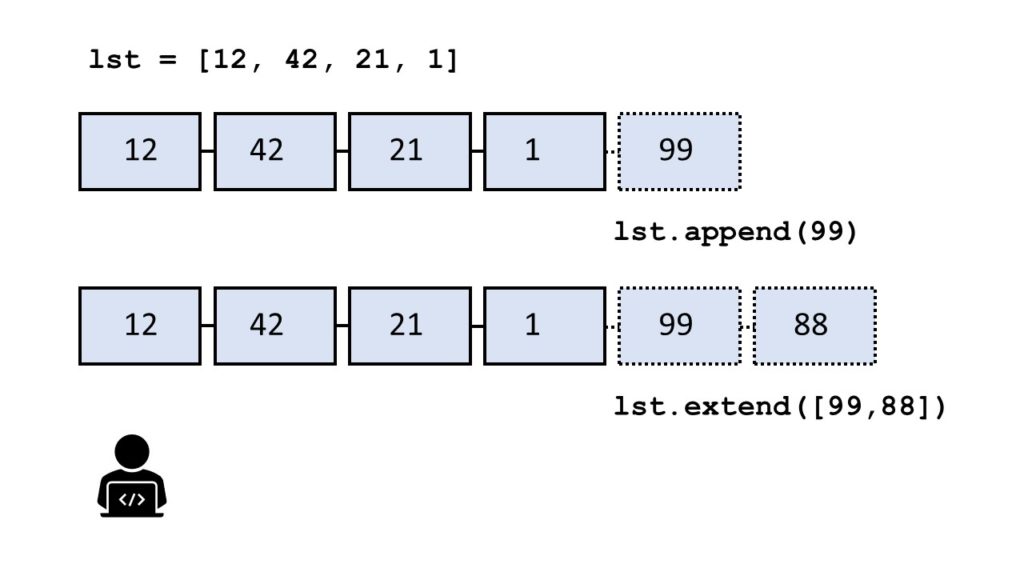
You can see this in the following example:

>>> l = []
>>> l.append(1)
>>> l.append(2)
>>> l
[1, 2]
>>> l.extend([3, 4, 5])
>>> l
[1, 2, 3, 4, 5]

In the code, you first add integer elements 1 and 2 to the list using two calls to the append() method. Then, you use the extend method to add the three elements 3, 4, and 5 in a single call of the extend() method.

Which method is faster — extend() vs append()?

To answer this question, I’ve written a short script that tests the runtime performance of creating large lists of increasing sizes using the extend() and the append() methods.

Our thesis is that the extend() method should be faster for larger list sizes because Python can append elements to a list in a batch rather than by calling the same method again and again.

I used my notebook with an Intel(R) Core(TM) i7-8565U 1.8GHz processor (with Turbo Boost up to 4.6 GHz) and 8 GB of RAM.

Then, I created 100 lists with both methods, extend() and append(), with sizes ranging from 10,000 elements to 1,000,000 elements. As elements, I simply incremented integer numbers by one starting from 0.

Here’s the code I used to measure and plot the results: which method is faster—append() or extend()?

import time def list_by_append(n): '''Creates a list & appends n elements''' lst = [] for i in range(n): lst.append(n) return lst def list_by_extend(n): '''Creates a list & extends it with n elements''' lst = [] lst.extend(range(n)) return lst # Compare runtime of both methods
list_sizes = [i * 10000 for i in range(100)]
append_runtimes = []
extend_runtimes = [] for size in list_sizes: # Get time stamps time_0 = time.time() list_by_append(size) time_1 = time.time() list_by_extend(size) time_2 = time.time() # Calculate runtimes append_runtimes.append((size, time_1 - time_0)) extend_runtimes.append((size, time_2 - time_1)) # Plot everything
import matplotlib.pyplot as plt
import numpy as np append_runtimes = np.array(append_runtimes)
extend_runtimes = np.array(extend_runtimes) print(append_runtimes)
print(extend_runtimes) plt.plot(append_runtimes[:,0], append_runtimes[:,1], label='append()')
plt.plot(extend_runtimes[:,0], extend_runtimes[:,1], label='extend()') plt.xlabel('list size')
plt.ylabel('runtime (seconds)') plt.legend()
plt.savefig('append_vs_extend.jpg')
plt.show()

The code consists of three high-level parts:

  • In the first part of the code, you define two functions list_by_append(n) and list_by_extend(n) that take as input argument an integer list size n and create lists of successively increasing integer elements using the append() and extend() methods, respectively.
  • In the second part of the code, you compare the runtime of both functions using 100 different values for the list size n.
  • In the third part of the code, you plot everything using the Python matplotlib library.

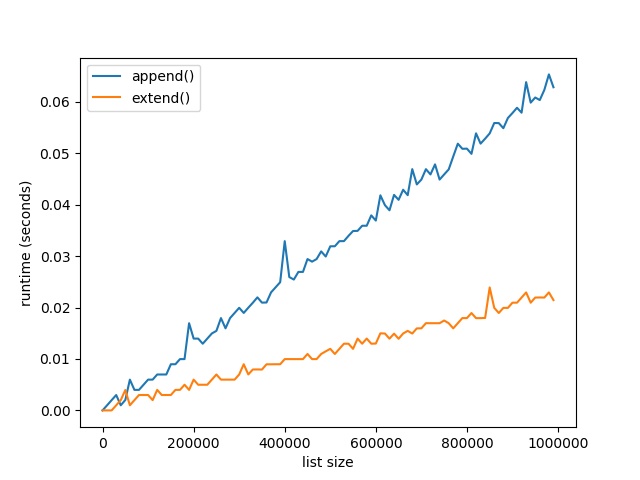
Here’s the resulting plot that compares the runtime of the two methods append() vs extend(). On the x axis, you can see the list size from 0 to 1,000,000 elements. On the y axis, you can see the runtime in seconds needed to execute the respective functions.

The resulting plot shows that both methods are extremely fast for a few tens of thousands of elements. In fact, they are so fast that the time() function of the time module cannot capture the elapsed time.

But as you increase the size of the lists to hundreds of thousands of elements, the extend() method starts to win:

For large lists with one million elements, the runtime of the extend() method is 60% faster than the runtime of the append() method.

The reason is the already mentioned batching of individual append operations.

However, the effect only plays out for very large lists. For small lists, you can choose either method. Well, for clarity of your code, it would still make sense to prefer extend() over append() if you need to add a bunch of elements rather than only a single element.

Python Append List to Another List

To append list lst_1 to another list lst_2, use the lst_2.extend(lst_1) method. Here’s an example:

>>> lst_1 = [1, 2, 3]
>>> lst_2 = [4, 5, 6]
>>> lst_2.extend(lst_1)
>>> lst_2
[4, 5, 6, 1, 2, 3]

Python List extend() Returns None

The return value of the extend() method is None. The return value of the extend() method is not a list with the added elements. Assuming this is a common source of mistakes.

Here’s such an error where the coder wrongly assumed this:

>>> lst = [1, 2].extend([3, 4])
>>> lst[0]
Traceback (most recent call last): File "<pyshell#16>", line 1, in <module> lst[0]
TypeError: 'NoneType' object is not subscriptable

It doesn’t make sense to assign the result of the extend() method to another variable—because it’s always None. Instead, the extend() method changes a list object without creating (and returning) a new list.

Here’s the correct version of the same code:

>>> lst = [1, 2]
>>> lst.extend([3, 4])
>>> lst[0]
1

Now, you change the list object itself by calling the extend() method on it. You through away the None return value because it’s not needed.

Python List Concatenation

So you have two or more lists and you want to glue them together. This is called list concatenation. How can you do that?

These are six ways of concatenating lists (detailed tutorial here):

  1. List concatenation operator +
  2. List append() method
  3. List extend() method
  4. Asterisk operator *
  5. Itertools.chain()
  6. List comprehension
a = [1, 2, 3]
b = [4, 5, 6] # 1. List concatenation operator +
l_1 = a + b # 2. List append() method
l_2 = [] for el in a: l_2.append(el) for el in b: l_2.append(el) # 3. List extend() method
l_3 = []
l_3.extend(a)
l_3.extend(b) # 4. Asterisk operator *
l_4 = [*a, *b] # 5. Itertools.chain()
import itertools
l_5 = list(itertools.chain(a, b)) # 6. List comprehension
l_6 = [el for lst in (a, b) for el in lst]

Output:

'''
l_1 --> [1, 2, 3, 4, 5, 6]
l_2 --> [1, 2, 3, 4, 5, 6]
l_3 --> [1, 2, 3, 4, 5, 6]
l_4 --> [1, 2, 3, 4, 5, 6]
l_5 --> [1, 2, 3, 4, 5, 6]
l_6 --> [1, 2, 3, 4, 5, 6] '''

What’s the best way to concatenate two lists?

If you’re busy, you may want to know the best answer immediately. Here it is:

To concatenate two lists l1, l2, use the l1.extend(l2) method which is the fastest and the most readable.

To concatenate more than two lists, use the unpacking (asterisk) operator [*l1, *l2, ..., *ln].

However, you should avoid using the append() method for list concatenation because it’s neither very efficient nor concise and readable.

Python List extend() Unique – Add If Not Exists

A common question is the following:

How can you add or append elements to a list, but only if they don’t already exist in the list?

When ignoring any performance issues, the answer is simple: use an if condition in combination with the membership operation element in list and only append() the element if the result is False (don’t use extend() for this fine-grained method). As an alternative, you can also use the negative membership operation element not in list and add the element if the result is True.

Example: Say, you want to add all elements between 0 and 9 to a list of three elements. But you don’t want any duplicates. Here’s how you can do this:

lst = [1, 2, 3]
for element in range(10): if element not in lst: lst.append(element)	

Resulting list:

[1, 2, 3, 0, 4, 5, 6, 7, 8, 9]

You add all elements between 0 and 9 to the list but only if they aren’t already present. Thus, the resulting list doesn’t contain duplicates.

But there’s a problem: this method is highly inefficient!

In each loop iteration, the snippet element not in lst searches the whole list for the current element. For a list with n elements, this results in n comparisons, per iteration. As you have n iterations, the runtime complexity of this code snippet is quadratic in the number of elements.

Can you do better?

Sure, but you need to look beyond the list data type: Python sets are the right abstraction here. If you need to refresh your basic understanding of the set data type, check out my detailed set tutorial (with Harry Potter examples) on the Finxter blog.

Why are Python sets great for this? Because they don’t allow any duplicates per design: a set is a unique collection of unordered elements. And the runtime complexity of the membership operation is not linear in the number of elements (as it’s the case for lists) but constant!

Example: Say, you want to add all elements between 0 and 9 to a set of three elements. But you don’t want any duplicates. Here’s how you can do this with sets:

s = {1, 2, 3}
for element in range(10): s.add(element) print(s)

Resulting set:

{0, 1, 2, 3, 4, 5, 6, 7, 8, 9}

The set doesn’t allow for duplicate entries so the elements 1, 2, and 3 are not added twice to the set.

You can even make this code more concise:

s = {1, 2, 3}
s = s.union(range(10)) print(s)

Output:

{0, 1, 2, 3, 4, 5, 6, 7, 8, 9}

The union method creates a new set that consists of all elements in both operands.

Now, you may want to have a list as a result and not a set. The solution is simple: convert the resulting set to a list by using the list(set) conversion method. This has linear runtime complexity and if you call it only once, it doesn’t change the overall runtime complexity of the code snippet (it remains linear in the number of set elements).

Problem: what if you want to maintain the order information and still add all elements that are not already in the list?

The problem with the previous approach is that by converting the list to a set, the order of the list is lost. In this case, I’d advise you to do the following: use two data structures, a list and a set. You use the list to add new elements and keep the order information. You use the set to check membership (constant rather than linear runtime complexity). Here’s the code:

lst = [1, 2, 3]
s = set(lst) for element in range(10): if element not in s: s.add(element) lst.append(element) print(lst)

Resulting list:

[1, 2, 3, 0, 4, 5, 6, 7, 8, 9]

You can see that the resulting list doesn’t contain any duplicates but the order information is maintained. At the same time, the runtime complexity of the code is linear because each loop iteration can be completed in constant time.

The trade-off is that you have to maintain two data structures which results in double the memory overhead. This nicely demonstrates the common inverse relationship between memory and runtime overhead.

Python List extend() Return New List

If you use the lst.extend(iter) operation, you add the elements in iter to the existing list lst. But what if you want to create a new list where all elements were added?

The answer is simply to use the list concatenation operation lst + list(iter) which creates a new list each time it is used. The original list lst will not be affected by the list concatenation operation.

Here’s an example that shows that the extend() method only modifies an existing list:

>>> lst_1 = [1, 2, 3]
>>> lst_2 = lst_1.extend([42, 99])
>>> lst_1
[1, 2, 3, 42, 99]

And here’s the example that shows how to create a new list as you add elements 42 and 99 to a list:

>>> lst_3 = [1, 2, 3]
>>> lst_4 = lst_3 + [42, 99]
>>> lst_3
[1, 2, 3]

By using the list concatenation operation, you can create a new list rather than appending the element to an existing list.

Python List extend() Time Complexity, Memory, and Efficiency

Time Complexity: The extend() method has linear time complexity O(n) in the number of elements n to be added to the list. Adding one element to the list requires only a constant number of operations—no matter the size of the list.

Space Complexity: The extend() method has linear space complexity O(n) in the number of elements n to be added to the list. The operation itself needs only a constant number of bytes for the involved temporary variables. The memory overhead does not depend on the size of the list.

If you’re interested in the most performant ways to add multiple elements to a list, you can see extensive performance tests in this tutorial on the Finxter blog.

Python List extend() at Index

If you want to insert a whole list at a certain position and create a new list by doing so, I’d recommend to use Python slicing. Check out this in-depth blog tutorial that’ll show you everything you need to know about slicing.

Here’s the code that shows how to create a new list after inserting a list at a certain position:

>>> lst = [33, 44, 55]
>>> lst[:2] + [99, 42] + lst[2:]
[33, 44, 99, 42, 55]

Again, you’re using list concatenation to create a new list with element 99 inserted at position 2. Note that the slicing operations lst[:2] and lst[2:] create their own shallow copy of the list.

Python List extend() Thread Safe

Do you have a multiple threads that access your list at the same time? Then you need to be sure that the list operations (such as extend()) are actually thread safe.

In other words: can you call the extend() operation in two threads on the same list at the same time? (And can you be sure that the result is meaningful?)

The answer is yes (if you use the cPython implementation). The reason is Python’s global interpreter lock that ensures that a thread that’s currently working on it’s code will first finish its current basic Python operation as defined by the cPython implementation. Only if it terminates with this operation will the next thread be able to access the computational resource. This is ensured with a sophisticated locking scheme by the cPython implementation.

The only thing you need to know is that each basic operation in the cPython implementation is atomic. It’s executed wholly and at once before any other thread has the chance to run on the same virtual engine. Therefore, there are no race conditions. An example for such a race condition would be the following: the first thread reads a value from the list, the second threads overwrites the value, and the first thread overwrites the value again invalidating the second thread’s operation.

All cPython operations are thread-safe. But if you combine those operations into higher-level functions, those are not generally thread safe as they consist of many (possibly interleaving) operations.

Where to Go From Here?

The list.extend(iter) method adds all elements in iter to the end of the list (in the order of their appearance).

You’ve learned the ins and outs of this important Python list method.

If you keep struggling with those basic Python commands and you feel stuck in your learning progress, I’ve got something for you: Python One-Liners (Amazon Link).

In the book, I’ll give you a thorough overview of critical computer science topics such as machine learning, regular expression, data science, NumPy, and Python basics—all in a single line of Python code!

Get the book from Amazon!

OFFICIAL BOOK DESCRIPTION: Python One-Liners will show readers how to perform useful tasks with one line of Python code. Following a brief Python refresher, the book covers essential advanced topics like slicing, list comprehension, broadcasting, lambda functions, algorithms, regular expressions, neural networks, logistic regression and more. Each of the 50 book sections introduces a problem to solve, walks the reader through the skills necessary to solve that problem, then provides a concise one-liner Python solution with a detailed explanation.

Posted on Leave a comment

How to Go Full-Time ($3000/m) as a Python Freelancer

… Without Working Full-Time Hours!         

In this article, you are going to learn my exact strategy how to earn $3000 per month as a Python freelancer without actually working full-time and without sacrificing time with your family!

This article is based on the following webinar I gave to my community of Python coders. You can also watch the webinar if you prefer video (100% Free)!

At the end of this article, you will know the exact steps you need to perform to become a well-paid Python freelancer. So stick around, if you like the idea of working part-time as a Python freelancer receiving a full-time income.

Are you broke?

Especially in the US, but also in Europe, many people are broke. What is the definition of broke? You don’t have any leftover money to account for special circumstances. It’s that easy.

It is reported that the average debt of college students is $27,225. But is this debt really a problem? The popular consultant Dan Lok (he calls himself world’s highest paid consultant), has a somehow different view on debt. Let me read one of his statements for you:

“You don’t have a debt problem, you have an income problem. You don’t have an income problem, you have a SKILL problem!”.

Because if you are skilled, you can always sell your service at a higher rate.

Suppose there are two employees: Bob and Alice. Bob has $10,000 in assets and a yearly income of $31,524. Bob is debt free. So many people would consider Bobs financial state as convenient (when in fact he is broke). Alice on the other hand has an inconvenient $100,000 in debt. BUT, Alice can sell her skills at a rate of $131,000 per year. What happens after two years? Alice can easily outsave Bob by tens of thousands of Dollars – even if she starts with a lot of debt. You can also see this scenario on the right-hand figure. The higher the skills, the more you can expect to earn.

How much money do you earn per hour?

Do you actually know how much money you currently earn? An average employee works for 1811 hours per year. As an employee it is very hard to earn more than $90,000. In fact, the median wage of all workers in the US is $24. For example, if you are a student, you are earning -$4 per hour, school teachers earn $37 per hour. If you push yourself very hard and become an extremely skilled employee, you might become a university professor with a yearly salary of $98,423. This is $54 per hour. First, know your hourly wage. Second, improve it.

Develop your new high-income skill: Python development!

So how to increase your value to the marketplace? This article and the associated free webinar have two goals:

  • First, creating a new high-income skill for you: Python development.
  • Second, show you how and why to switch the road from being a full-time employee to being at least part-time self-employed.

On the graphic, you can see the income distribution of Python freelancers. The median wage of a Python freelancer is $51!

Let me repeat this: the median wage of a Python freelancer is $51! This means that an average, self-employed Python freelancer easily reaches the income level of a university professor. Think about this: can you become a university professor? It’s totally up to you to answer this question. But you can certainly become average-skilled Python freelancer, can’t you?

About me

You are probably wondering why I am qualified to teach you this topic. Let me quickly introduce myself so that we can go to a more personal level. I’m currently in a transition phase from being an employed doctoral researcher working at the university in Germany (for maybe $24 per hour) to becoming self-employed in the Python education sector. My research included processing large graph data sets (like the web document graph). However, for a few months now, I have parental leave caring about my two children. In the evenings and weekends, I create courses, write books (like my newest book “Coffee Break Python“, and create code puzzles for my Python learning app Finxter.com).

Why to become Python freelancer?

How would your life look like if you only needed to work part-time as a Python freelancer doing projects you like?

I have already stressed the first point: Imagine you work from home and see your kids growing up and having the flexibility to spend more quality time with your wife or husband. But there is also an equally important point if you need to take care of your family. And that is: you can increase your value to the marketplace. And there is virtually no upper limit of your hourly rate. If you are and employee you basically have an upper limit – you have seen that a professor earns $53 per hour. But I have seen many freelancers earning $100-$200 per hour. It all depends on how expensive you can make yourself for the marketplace.

For some of my students, being a Python freelancer is also a lifestyle choice. For example one of my students is successfully employed in the US and earns good money there. But his dream is to go back to India to his family working as a Python freelancer. Doing this, he earns dollars and pays rupees for his living expenses. Why not enjoying the benefits of globalization?

It’s also good to diversify your income streams. You could spend one day per month to earn $400-$500 per month as an additional source of income that you can spend for you or your family (or even safe it for later).

Finally, being a Python freelancer is also a lot of fun. You have to stretch your abilities regarding Python but also regarding soft skills such as communication ability and language skills. If you are not a native speaker (like me), it’s very nice to improve your skills that way while you are getting paid for doing good work for other people.

Can you already see yourself working as a Python freelancer?

How to sell your Python skills for money ($$$)?

There are basically three ways of becoming a Python freelancer. The first is being a consultant working for a big company. The second is to be a freelancer working on a platform such as Upwork or Fiverr doing mostly smaller tasks. The third option is to create your own platform that you own (for example, creating your own website and drive traffic to it). I call it the hybrid approach because you have some elements of both previous options.

Now, we will dive a bit deeper into each of these options.

Career path 1: Work for a big client as a consultant

The first way of becoming self-employed is to work for one or a few big clients as a consultant. Working as a consultant has some advantages. You work in a business-to-business setting which allows you to tap into large earning potentials. There is a lot of money in business-to-business — especially if you focus on high-ticket sales.

However, many people I know working as consultants heavily rely on one or two big clients. They are not diversified at all. And if you work for a single big company, you will have very limited freedom in terms of your projects and working conditions. Many Python consultants report that the pressure is hard and it feels like working as an employee.

This is not the focus of this article, however. So if you prefer to work as a consultant, I would NOT recommend that you take this specific course.

Career path 2: Sell your micro-services as a freelancer

The second way — and this is the focus of this article and also the free webinar which comes with this article — is to sell your services as a Python freelancer on existing freelancing platforms such as Upwork and Fiverr.

These platforms are very convenient. You could start today creating your freelancing account and start with your first gig in the evening. Then you solve the jobs (which takes maybe a week or even only a day). You are very flexible, you can learn fast and without too much pain or commitment.

Also, you have a small feedback cycle: you can go over the whole cycle of acquiring a client, doing the work, finishing the job, and getting reviewed. Over time, you will become an expert in the soft skills and communication part, and you will learn about many different areas where your Python skills can help people out.

It’s the perfect option of getting a foot in the door and to converge, job-by-job, to your final specializations (in case you want to specialize to increase your earning potential on the freelancing market).

Finally, there is no startup overhead. Marketing is simple. We will learn later that you need to have two things: an attractive profile and good ratings.

Of course, nothing is perfect. When working as a freelancer, you don’t own the platforms. You don’t own the clients. As a default, if you don’t do anything against it (later we will see that you can also acquire the clients from the platform and creating your own database of clients to mitigate this last point. Also, these platforms get their significant cut of 25% for each job. That’s quite something.

So overall, working as a freelancer on these platforms is all about getting testimonials, skills, and experiences.

Career path 3: sell your services on your own platform

Finally, the third option is also the one with the highest income potential. You create your own platform (for example setting up a WordPress page where you offer your details and service offerings). You retain 100% of the control over your income, your projects, and even your testimonials. The sky’s the limit (you can earn hundreds of dollars per hour, if you are smart about it).

However, there is also the need for you to market your services. You need to install a marketing funnel. For example, you attract potential customers using Facebook ads. Then, you set up a landing page with a lead magnet so that they are motivated giving you your email address. Finally, you will nurture your leads sending them tons of value via email and build a relationship with them.

While this seems to be complex, it is definitely the most profitable long-term strategy. However, in the short term, it’s much better for most people to gain experiences and testimonials on the freelancing platforms and then gradually shift their focus towards their own platform as they get to know more and more clients.

So these are the three potential career paths for you. This article and the associated webinar focus on the second option as a starting point.

A simple formula for success

This article is about how to go full-time as a Python freelancer without actually working fulltime hours. The success formula is simple. You start working as a Python freelancer now (no matter your current skill level). Then, you keep increasing your value to the marketplace until you have reached at least average Python freelance level. At this point, you will charge $51 per hour.

Would you consider a daily income of $100 as a fulltime income? According to US statistics, earning $3000 per month is already above the median salary. Now, the plan is to work for two hours on your core freelancing activities. The rest of your time you are free to spend with your family, for rest, learning, or finding even better freelancing jobs. That’s it. The strategy is simple but none the less effective. It provides you a clear and manageable path to your new freelancing lifestyle.

The top-3 secrets to earn more money as a Python freelancer on Upwork

How can you increase your value to the marketplace such that you can easily work at average Python freelancing level? What’s the magic key that will allow you to open the doors to your dream clients?

Next, I will give you 3 secrets how you can connect with your clients.

First, use research insights of psychology to build trust. Second, become a specialist rather tan a generalist. Third, leverage network effects.

Secret #1: earn trust

The key is to earn trust and to be attractive. Clients pay more and you will get the better jobs if you are trustworthy and attractive to them. I made a small experiment and searched for the keyword “Python” on the Upwork.com freelancing platform. All proposed freelancers had a job satisfaction rate of 100%.

So how to earn trust? You collect positive ratings. The more ratings you have the better. And the better the rating the better. If you buy properties in the real estate sector, it’s all about location. Trust me, in the freelancing sector, it’s all about ratings. You NEED to engineer your ratings. If you have good ratings, you will always find jobs, no matter how good your external achievements are. You don’t even need an academic degree, you can find the best jobs if you have good ratings. With good ratings, you will always find good, well-paid and attractive jobs. Rating is king.

How to actually get good ratings? We have seen that good ratings are important. There are five basic ways.

  • The first way is communication: be very responsive, be very positive, be a yes-man and be generous with your offers.
  • The second way is to acquire a lot of Python skills (and this is the focus on this article).
  • The third way is to overdeliver. Always. If your task is to give him 100 Python puzzles and you send him 110 Python puzzles, you can almost be sure to get the 5-star rating on the platform. You not only delivered what he asked you to deliver, but you OVERdelivered the task. This is a simple but effective 3-step way to get great ratings.
  • The fourth way is a very important and underestimated point: the reciprocity rule. If you give something away, the receiving person will feel the obligation to give back to you. That’s why they have free food in supermarkets. I have hired many freelancers for my website finxter.com and some of them were really smart. When applying for the project, they just gave me something for free. For example, the project was “develop 100 Python puzzles” and they just gave me 1-3 Python puzzles for free. I was feeling the strong urge to give back to those freelancers by hiring them (I even wanted to hire ALL of them to not miss out on giving back to them). This is a powerful mindset: give first, then you will receive.
  • The fifth way is the following: on some platforms like Upwork, you can complete small Python tests. Certificates go a long way building trust with your clients. You can also solve Python puzzles and download your personal certificate on our Python online learning application Finxter.com.

Secret #2: Money flows to specialists!

There are other tricks that will impact your success on these platforms. One is the specificity of your skill set. The more specific, the better and the more trustworthy.

If you just sell your services telling them “I can program any Python program you need” then they will not really trust you that you are the expert in any Python field. But if you tell them that you are the go-to expert for anything regarding Python Django Authentication, then they will definitely go for you if they need just that. You are honest and authentic about your specific skill set – these signals confidence and expertise to the clients.

What are the skills that the marketplace seeks? There are some foundations which any good Python freelancer must master. These are basic and complex data types, lambda functions, list comprehension, complexity of data structure access, basic algorithms, keywords, and so on. Knowing about the foundations already qualifies you doing Python freelance jobs.

However, if you want to increase your earning potential, you need to specialize in more advanced knowledge areas. Examples are Machine learning, data analysis, web scraping, or web development (e.g. Django). Each of these area consists of subtopics like scikit-learn, regression analysis, numpy, etc. In each of these specialization, you become more focused toward this specific area which automatically increases your value to the client. But an important observation is also that every specialization builds upon a solid foundation. So don’t be lazy and skip the foundations!

Secret #3: Leverage network effects

Finally, just to motivate you again that it’s all about rating. The Internet follows a universal law: “The winner takes it all”. The rich get richer and the popular people get even more popular. If you are already winning on these platforms, you will win even more. People tend to simply reinforce the decisions of their peers. If all of them gave you 5 stars, most clients will simply default to giving you 5 stars as well. The network effect is a well-researched phenomenon in all kinds of networks like social networks, the web, and also freelancer rating networks.

There are two basic tactics that you can use to leverage this information to earn more money and increase your value to the marketplace.

  • First, focus on your initial jobs. See your initial jobs as investments in your future. Even if you did them for free (and I’m not advocating this), they will be profitable in the future by attracting the better jobs and clients.
  • Second, you should prefer many small jobs over few large jobs – because this way, you will gain your credibility faster (many people subconsciously have the simple heuristic: more jobs & more ratings = better freelancer).

How many skills do you need before starting with your freelancing career?

The short answer is to just start now and figure out how to solve the problems as you go.

You will be paid for your learning time. I have annotated the income scale of Python freelancers with the Python levels you can have. As you can see, if you are just beginning with your Python career, you will — of course — earn less, but you will still earn something, make a lot of experiences and gain practical insights into WHAT to learn and WHERE your knowledge gaps are.

The long answer is: if you don’t feel confident, yet, you can master the Python basics first. You can already specialize in a Python topic. And to gain even more confidence, you can even do some toy projects to learn. One of my secret tips for learning to freelance in Python is to learn with archived freelancing projects. You can already gain practical experience and learn the type of projects that people have paid freelancers for. Still – I would always recommend to just start doing real Python projects and then put in all the effort to earn your five-star rating.

How to learn the Python basics?

My recommendation is that you use a personalized training plan which has a very practical focus. You divide your time into two blocks: one block takes 70% of your LEARNING time. You use this time to work on practical Python projects which can be archived freelancing Python projects that challenge you to go to higher levels. You could even spend this learning time on your dream projects – this is even better because it keeps you highly motivated and engaged. The key is to NOT STOP WORKING ON THESE until you have successfully finished them and created a minimum viable product.

The rest of the time (30%), you will invest in solving Python puzzles, work through Python courses, read Python books. You can see that this is a highly practical approach – I’m talking about your learning time which is mainly practical. The reason is that for any subject you want to acquire or even master, you need to have the practical motivation. You need to open your knowledge gap to see what you don’t know before stuffing things in your brain. Ask any expert on Quora – they will tell you that practice-first is the way to learn Python fast. There is no shortcut.

Puzzle-based learning Python

On the theoretical part, I recommend solving Python puzzles as your main lever for your personal improvement. Python puzzles are a powerful tool to become more and more proficient in reading and understanding Python source code.

What’s a Python puzzle? A Python puzzle is an educative snippet of Python source code that teaches a single computer science concept by activating the learner’s curiosity and involving them in the learning process.

The Python puzzles range from easy to complex – each puzzle will push your theoretical and practical code understanding skills one step further. The puzzle-based learning method is very effective and proven by tens of thousands of online students.

Here is an example of a code puzzle:

What’s the output of this code snippet?

Check your correct solution of this puzzle here.

How would your life change if you developed the high-income skill Python to become a Python freelancer?

In this article, I have shown you a simple way out of the rat race of working 8 hours a day, 5 days a week, for 40 years.

In the free webinar with the title

“How to go full-time ($3000/m) as a Python freelancer — without working full-time hours” (Click to join),

I will give you a detailed training plan such that you can start earning money with your Python skills. I show you a new way of becoming a Python expert that is fun, that challenges you to reach higher levels of code understanding, and that gives you a highly practical tool for developing and sharpening your new high-income skill Python.

Posted on Leave a comment

How to Check Your Python Version?

Simple Answer: To check your Python version, run python --version in your command line or shell.

This general method works across all major operating systems (Windows, Linux, and macOS).


Do you need to google important Python keywords again and again? Simply download this popular Python cheat sheet, print the high-resolution PDF, and pin it to your office wall: 🐍


In the following video, I’ll show you how to check your Python version for each operating system (Windows, macOS, Linux, Ubuntu) and programming framework (Jupyter). Or scroll down to read the step-by-step instructions on how to check your Python version.

The Python version output consists of three numbers major:minor:micro. For example, version 3.7.2 means that

  • the major version is 3,
  • the minor version is 7, and
  • the micro version is 2.

[ATTENTION] Different major versions are NOT fully compatible. Different minor versions are compatible.


“Best Python Book on Market”


For example, you can execute code written in Python 3.6.4 in Python 3.7.2 because they are the same major version — Python 3. But you cannot execute code written in Python 2.7.4 in Python 3.7.2 because they are different major versions.

Note that new minor versions can add changes to the language. For example, in Python 3.8 they introduced the reversed() function with dictionaries. You cannot use the reversed() function in older versions of Python. But the vast majority of the language is the same.

Check Python Version Windows 10 (Exact Steps)

Three steps to check the Python version on your Win 10 operating system:

  1. Open the Powershell application: Press the Windows key to open the start screen. In the search box, type “powershell”. Press enter.
  2. Execute command: type python --version and press enter.
  3. The Python version appears in the next line below your command.

Check Python Version Windows 7 (Exact Steps)

Three steps to check the Python version on your Win 7 operating system.

  1. Open the command prompt application: Press the Windows key to open the start screen. In the search box type “command”. Click on the command prompt application.
  2. Execute command: type python --version and press enter.
  3. The Python version appears in the next line right below your command.

Check Python Version Mac (Exact Steps)

Four steps to check the Python version on your Mac operating system.

  1. Press CMD + Space to open Spotlight.
  2. Type “terminal” and press enter.
  3. Execute command: type python --version or python -V and press enter.
  4. The Python version appears in the next line below your command.

Check Python Version Linux (Exact Steps)

Three steps to check the Python version on your Linux operating system.

  1. Open the terminal application (for example, bash).
  2. Execute command: type in python --version or python -V and press enter.
  3. The Python version appears in the next line below your command.

Check Python Version Ubuntu (Exact Steps)

Four steps to check the Python version on your Ubuntu operating system.

  1. Open Dash: click the upper left symbol.
  2. Open terminal: type “terminal”, click on the terminal app.
  3. Execute command: type python --version or python -V and press enter.
  4. The Python version appears in the next line right below your command.

Check Python Version Jupyter (Exact Steps)

Three steps to check the Python version in a Jupyter notebook.

  1. Open the Jupyter notebook: type jupyter notebook in your terminal/console.
  2. Write the following Python code snippet in a code cell:

from platform import python_version
print(python_version())

3. Execute the script.

As an alternative, you can also use the following Python code snippet to check your Python version in a Jupyter notebook:

>>> import sys
>>> sys.version

Here is a screenshot on my computer:

How to Check Which Python Version Runs Your Script?

Sometimes, you want to check Python’s version in your Python program.

To achieve this, simply import the sys module and print the sys.version attribute to your Python shell:

>>> import sys
>>> print(sys.version)
3.7.2 (tags/v3.7.2:9a3ffc0492, Dec 23 2018, 23:09:28) [MSC v.1916 64 bit (AMD64)]

Import the built-in sys module and print sys.version for human-readable output. 

What are the Different Python Versions?

Python has three main versions: version 1, version 2, and version 3. Version 4 is currently (2019) under development.

Here is the version history from Wikipedia.

  • Python 0.9.0 – February 20, 1991
    • Python 0.9.1 – February 1991
    • Python 0.9.2 – Autumn, 1991
    • Python 0.9.4 – December 24, 1991
    • Python 0.9.5 – January 2, 1992
    • Python 0.9.6 – April 6, 1992
    • Python 0.9.8 – January 9, 1993
    • Python 0.9.9 – July 29, 1993
  • Python 1.0 – January 1994
    • Python 1.2 – April 10, 1995
    • Python 1.3 – October 12, 1995
    • Python 1.4 – October 25, 1996
    • Python 1.5 – December 31, 1997
    • Python 1.6 – September 5, 2000
  • Python 2.0 – October 16, 2000
    • Python 2.1 – April 15, 2001
    • Python 2.2 – December 21, 2001
    • Python 2.3 – July 29, 2003
    • Python 2.4 – November 30, 2004
    • Python 2.5 – September 19, 2006
    • Python 2.6 – October 1, 2008
    • Python 2.7 – July 3, 2010
  • Python 3.0 – December 3, 2008
    • Python 3.1 – June 27, 2009
    • Python 3.2 – February 20, 2011
    • Python 3.3 – September 29, 2012
    • Python 3.4 – March 16, 2014
    • Python 3.5 – September 13, 2015
    • Python 3.6 – December 23, 2016
    • Python 3.7 – June 27, 2018

As there are some significant differences in syntax, you should always install the latest version in Python. Keep yourself updated on the official Python website here.

How to Upgrade to a Newer Version?

If you are not using a virtual environment, go to python.org/downloads to download and install whatever version you need. It’s the easiest way to upgrade Python.

But now you’ll run into the following problem: how do I run a specific Python version? Check out this StackOverflow answer to learn the exact steps.

Or you can make your life easier by using virtual environments. These let you have multiple versions of Python installed on your system. Plus, you can switch between them instantaneously. One option is to use the built-in module venv. If you’re a Data Scientist, the industry standard is Anaconda.

Installing and upgrading different Python versions is easy when you use virtual environments. For a full tutorial of virtual environments, read over our introductory Finxter blog article.

How to Check if Python 3 is Installed?

If you’ve installed multiple installations of Python, running python --version may give you only the version of Python 2. To check which version of Python 3 is installed on your computer, simply run the command python3 --version instead of python --version.

How to Check Python Version – Detailed

Not only does Python have major, minor and micro versions. Each of those versions has further versions, namely the release level and serial.

These are displayed when you run

>>> import sys
>>> sys.version_info
sys.version_info(major=3, minor=8, micro=0, releaselevel='final', serial=0)

In the above code, I am running Python 3.8.0.

Most of the time, you will only care about the major, minor and micro releases. Release level and serial are usually for the core Python Dev team to work on changes to the language.

The possible release levels are ‘alpha’, ‘beta’, ‘candidate’, or ‘final’. Alpha contains the first updates made to the language. Beta means the language can be tested with some users but still won’t work perfectly. This is where the phrase ‘beta testers’ comes from. A ‘candidate’ has only a few small bugs left to fix. Final is the last version and the one released to the general public. If you want to try out new features before anyone else, you can download these release levels. However, if you just want a version of Python that works, you should choose ‘final’. When you download any version of Python, it will be a ‘final’ release unless stated otherwise.

Serial is for the smallest changes. The Python Dev team increments it as they make changes to the alpha, beta and candidate versions. All final versions have serial=0. They add future changes to the next major/minor/micro releases.

How to Make Sure My Script Runs a Specific Python Version?

Let’s say you’ve just installed Python 3.8. Your script, my_file.py, uses a brand new feature: reversed() when iterating over a dictionary. For other people to run this script, they must also run Python 3.8. So you should put a check at the start to let other users know this.

We do this by adding an assert statement at the top of my_file.py

# my_file.py
import sys
assert sys.version_info >= (3, 8) my_dict = dict(a=1, b=2, c=3)
for key in reversed(my_dict): print(key)

The assert statement raises an AssertionError if the statement is False. If the statement is True, the script continues to run.

For example, if I am running Python 3.7 and execute my_file.py from the terminal, this happens

# Running Python 3.7
$ python my_file.py
Traceback (most recent call last): File "my_file.py", line 10, in <module> assert sys.version_info >= (3,8)
AssertionError

But if I am running Python 3.8, the assert statement does not raise an error, and it executes the rest of the script.

# Running Python 3.8
$ python my_file.py
c
b
a

Note: I have used the Anaconda virtual environment to install and quickly switch between multiple Python versions.

Where to Go From Here?

In summary, you can check the Python version by typing python --version in your operating system shell or command line.


Do you struggle with Python? And Python source code sometimes feels like a closed book to you?

If this applies to you, check out my free email course! The course guides you step-by-step to a deeper and deeper Python level of code understanding. Here is what my readers say:

Thank you for your newsletter. I find these newsletters highly informative.

Collen

As a fellow educator and fellow (former) Ph.D. student, I just wanted to let you know that I’m really impressed with your teaching materials. You’re doing a really good job!

Daniel

Posted on Leave a comment

13 Best Python Email Newsletters You Don’t Want to Miss (4 Bonus Podcasts)

Python is one of the most popular coding languages out there. Although it may not take long for you to learn the basics, it takes a lot of time and effort to become an expert.

The best way to get there? Practice, practice, practice!

In this article, we’ve put together 13 of the best Python newsletters out there, useful Python news and information you’ll receive to your inbox every single week or more often. We think they’re a great way to keep updated and stay serious with your continuous learning. We hope you find your next favorite Python newsletter on this list!

In my view (but I’m a bit biased), these are the three goto resources for optimal Python development

1) Computer Science Email Academy (Python)

Python Logo

Why is this the number one on this list? Because it’s the best email academy in the area of computer science (with focus Python) that allows you to choose courses in various areas such as Python basics, data science, machine learning, Python freelancing, and many more. You decide what you want to learn in this email series (by clicking links in the email course). It’s by far the most thorough (and free!) email academy in the area of computer science and coding.

2) Import Python

Import Python is a weekly Python newsletter that collects the best content out there to help you in your learning process. You’ll find articles, video tutorials, howtos, easy guides, and even tweets delivered straight to your inbox. We really like this Python newsletter because it gives you access to a good range of material that can help you get better at coding, no matter your learning style. So whether you learn best by watching a video or by reading some in-depth guide, you’re likely to find the material you need in the Import Python newsletter.

3) Python Cheat Sheets (PDFs)

The Python Email Academy is a Python Newsletter that offers something a little different from any of the others on the list. By subscribing to it, you’ll be getting hand-made Python cheat sheets, developed by a leading Python coder. Simple, well-organized, and easy to follow, these cheat sheets are a great way to take your Python coding to the next level and get a bit of a workout along the way.

4) Real Python Newsletter

Real Python is a weekly programming newsletter that offers some exclusive content to subscribers. You can use this Python newsletter to learn new skills, refresh your Python knowledge, and get some tips on improving your coding. We also like that they provide career tips for programmers, helping you see where learning Python could eventually take you!

5) Python Weekly

Python weekly, as you may be able to guess, is a weekly Python newsletter. What stands it out from all the other ones? This newsletter offers a really wide range of curated content that can help you stay up to date with the latest developments in the field. The writers select news and articles from all over the web and link to the very best of the best in their newsletter. Basically, it’s the stuff you’d find after hours of searching on the internet, but in a very simple, accessible format. Python Weekly also has job offers in its weekly newsletter, so watch out for that if you’re in search of a new programming job!

6) Python Freelancer

The Python freelancer webinar also includes an email series that teaches you how to learn to code in the most practical environment possible: as a Python freelancer. No-BS Python learning resource with a high focus on practical Python coding in the real world.

7) Pycoder’s Weekly

This Python newsletter is delivered every Friday and covers pretty much everything you can think of about Python. You’ll find out more about techniques, tips, and some guides that can help you get more confident with the coding language. We like how Pycoder’s weekly focus on simple-to-understand, up-to-date content, with a Python newsletter that’s really easy to unsubscribe from if you want to.

8) Dan’s Python Newsletter

Dan’s Python newsletter is pretty similar to others on the list, with the exception that it’s delivered to your inbox a bit more often. While other newsletters come one day of the week, you’ll be receiving Dan’s Python newsletter every 3 to 4 days when you subscribe. Filled with super useful tips and tricks, it’s a great newsletter for those who are already familiar with Python but want to keep building on top of their existing knowledge.

9) Awesome Python Newsletter

This newsletter gives you a weekly batch of news articles, guides, and how-tos that can help you improve your Python skills. They do a lot of the same things as other newsletters on the list, but one thing is certain, they do it well! This is a very news-oriented newsletter, so it can be perfect for you if you want to learn more about what’s going on in the community. Not to mention, anyone can benefit from constantly updating their knowledge of this fast-moving coding language!

10) The Advanced Python Newsletter

This Python newsletter is a great option if you want to keep on learning more about Python, but you’re no longer a beginner. Written by Aaron Maxwell, it’s a newsletter that keeps you up to date with the latest developments of Python. It also offers tips and tricks, tools, and techniques you can use to build applications with Python. If you’ve been familiar with this coding language for a while and you’re sick and tired of always seeing the same tips and tricks going around, this is the newsletter for you! And if you’re still a beginner, why not subscribe and get a glimpse into what the lives of advanced Python coders look like?

11) PYnative Newsletter

The PYnative newsletter is a weekly newsletter full of articles, tutorials, tips, tricks, and exercises to help you learn Python. Like others on this list, it’s entirely focused on Python language. But the main difference with this one is that it doesn’t take web content from other pages on the internet. Instead, it’s full of exclusive content created by the owner of the PYnative blog. One thing we really like about this newsletter is the number of interactive activities you’ll receive. For example, expect to get quizzed to test your knowledge of Python, exercises you can follow along, and even projects you could begin working on.

Just like on his blog, the PYnative is eager to interact with his audience. So if you need any clarifications or to make any suggestions, you can actually send a reply to the email newsletter. Pretty cool to think it’s a two-way street!

12) Bite Python

Bite Python is a weekly newsletter all about the Python language and surrounding community. This Python newsletter is put together and curated by Muhammad Yasoob from pythontips.com. In it, he shares the newest developments in the world of Python, tips, tutorials, articles, how-tos, and everything he finds on the web. When you subscribe to this Python newsletter, you’ll be receiving a newsletter every Sunday, which you can unsubscribe from at any time.

13) Python Puzzles

Solving puzzles is a proven method to learn and master any skill. Python is no exception: puzzle-based learning belongs to the most effective “active learning” strategies in existence. The Finxter newsletter contains many specialized courses that focus on Python puzzles and interactive modules (all free). All you have to do is to create an account at Finxter.com and participate in the regular Python puzzle challenges in your INBOX.


This concludes our top 13 of the best Python newsletters out there. We’ve selected them for the quality that they offer, and because each and every one of them has something a little different. These are all serious newsletters with valuable, trustworthy information. And because they’re all run by actual Python developers and coders, they’re not spammy, and you can unsubscribe from them easily.

The Best Python Podcasts

We also wanted to mention a couple of Python podcasts because we think they may be of interest as well. Think about it: a podcast is basically a newsletter you get in audio form! Here are some of our favorites you can find on popular apps like Spotify or Google Podcasts:

Talk Python To Me

Talk Python To Me is a weekly Python newsletter in the form of a podcast. It covers a really wide range of Python-related topics, all in a format that’s easy to follow along. On this podcast, Michael Kennedy brings in Python experts as guests and talks with them about anything from Python news to techniques, tips and tricks, and career advice.

Test & Code

Test & Code is a great weekly podcast Python newsletter all about software developments. It’s host Brian Okken is a keen Python user who wants to answer some simple questions: How do I know this program will work? What makes a program work? We like this podcast a lot because it gets very deep into topics that are essential to using Python correctly. And in every episode, Brian Okken brings in a new guest who helps open up our perspective on what it means to be a Python developer. To anyone looking for advice, knowledge, or even inspiration, it’s a great Python newsletter in an easy-to-follow audio format.

Python Bytes

Python Bytes have a great newsletter, and they also make a podcast! The Python Bytes podcast is hosted by Michael Kennedy of Talk Python To Me, and his friend Brian Okken. This one is more news-focused, bringing you the latest developments in the world of the Python coding language. It’s a great Python newsletter in the form of a podcast, perfect for those who want curated news but don’t want to read about them on a screen.

Teaching Python

The teaching Python podcast offers a little something different and will be perfect for anyone who teaches Python to others. It’s run by two teachers who currently teach Python to middle schoolers. In their episodes, they share some exclusive tips on how to make Python accessible to all, how to explain Python concepts to students, and how to make Python understandable without dumbing it down.

These four podcasts and 13 newsletters are some of the best you can find. Of course, with the developments of Python and its popularization, we can expect to see many more coming soon! But for the time being, these are the ones you’ll need to stay up to date on everything Python.

Where to Go From Here?

In my view (but I’m a bit biased), these are the three goto resources for optimal Python development

Posted on Leave a comment

How to Concatenate Lists in Python? [Interactive Guide]

So you have two or more lists and you want to glue them together. This is called list concatenation. How can you do that?

These are six ways of concatenating lists:

  1. List concatenation operator +
  2. List append() method
  3. List extend() method
  4. Asterisk operator *
  5. Itertools.chain()
  6. List comprehension
a = [1, 2, 3]
b = [4, 5, 6] # 1. List concatenation operator +
l_1 = a + b # 2. List append() method
l_2 = [] for el in a: l_2.append(el) for el in b: l_2.append(el) # 3. List extend() method
l_3 = []
l_3.extend(a)
l_3.extend(b) # 4. Asterisk operator *
l_4 = [*a, *b] # 5. Itertools.chain()
import itertools
l_5 = list(itertools.chain(a, b)) # 6. List comprehension
l_6 = [el for lst in (a, b) for el in lst]

Output:

'''
l_1 --> [1, 2, 3, 4, 5, 6]
l_2 --> [1, 2, 3, 4, 5, 6]
l_3 --> [1, 2, 3, 4, 5, 6]
l_4 --> [1, 2, 3, 4, 5, 6]
l_5 --> [1, 2, 3, 4, 5, 6]
l_6 --> [1, 2, 3, 4, 5, 6] '''

What’s the best way to concatenate two lists?

If you’re busy, you may want to know the best answer immediately. Here it is:

To concatenate two lists l1, l2, use the l1.extend(l2) method which is the fastest and the most readable.

To concatenate more than two lists, use the unpacking (asterisk) operator [*l1, *l2, ..., *ln].

You’ll find all of those six ways to concatenate lists in practical code projects so it’s important that you know them very well. Let’s dive into each of them and discuss the pros and cons.

1. List Concatenation with + Operator

If you use the + operator on two integers, you’ll get the sum of those integers. But if you use the + operator on two lists, you’ll get a new list that is the concatenation of those lists.

l1 = [1, 2, 3]
l2 = [4, 5, 6]
l3 = l1 + l2
print(l3)

Output:

[1, 2, 3, 4, 5, 6]

The problem with the + operator for list concatenation is that it creates a new list for each list concatenation operation. This can be very inefficient if you use the + operator multiple times in a loop.

Performance:

How fast is the + operator really? Here’s a common scenario how people use it to add new elements to a list in a loop. This is very inefficient:

import time start = time.time() l = []
for i in range(100000): l = l + [i] stop = time.time() print("Elapsed time: " + str(stop - start))

Output:

Elapsed time: 14.438847541809082

The experiments were performed on my notebook with an Intel(R) Core(TM) i7-8565U 1.8GHz processor (with Turbo Boost up to 4.6 GHz) and 8 GB of RAM.

I measured the start and stop timestamps to calculate the total elapsed time for adding 100,000 elements to a list.

The result shows that it takes 14 seconds to perform this operation.

This seems slow (it is!). So let’s investigate some other methods to concatenate and their performance:

2. List Concatenation with append()

The list.append(x) method—as the name suggests—appends element x to the end of the list. You can read my full blog tutorial about it here.

Here’s a similar example that shows how you can use the append() method to concatenate two lists l1 and l2 and store the result in the list l1.

l1 = [1, 2, 3]
l2 = [4, 5, 6]
for element in l2: l1.append(element)
print(l1)

Output:

[1, 2, 3, 4, 5, 6]

It seems a bit odd to concatenate two lists by iterating over each element in one list. You’ll learn about an alternative in the next section but let’s first check the performance!

Performance:

I performed a similar experiment as before.

import time start = time.time() l = []
for i in range(100000): l.append(i) stop = time.time() print("Elapsed time: " + str(stop - start))

Output:

Elapsed time: 0.006505012512207031

I measured the start and stop timestamps to calculate the total elapsed time for adding 100,000 elements to a list.

The result shows that it takes only 0.006 seconds to perform this operation. This is a more than 2,000X improvement compared to the 14 seconds when using the + operator for the same problem.

While this is readable and performant, let’s investigate some other methods to concatenate lists.

3. List Concatenation with extend()

You’ve studied the append() method in the previous paragraphs. A major problem with it is that if you want to concatenate two lists, you have to iterate over all elements of the lists and append them one by one. This is complicated and there surely must be a better way. Is there?

You bet there is!

The method list.extend(iter) adds all elements in iter to the end of the list.

The difference between append() and extend() is that the former adds only one element and the latter adds a collection of elements to the list.

Here’s a similar example that shows how you can use the extend() method to concatenate two lists l1 and l2.

l1 = [1, 2, 3]
l2 = [4, 5, 6]
l1.extend(l2)
print(l1)

Output:

[1, 2, 3, 4, 5, 6]

The code shows that the extend() method is more readable and concise than iteratively calling the append() method as done before.

But is it also fast? Let’s check the performance!

Performance:

I performed a similar experiment as before for the append() method.

import time start = time.time() l = []
l.extend(range(100000)) stop = time.time() print("Elapsed time: " + str(stop - start))

Output:

Elapsed time: 0.0

I measured the start and stop timestamps to calculate the total elapsed time for adding 100,000 elements to a list.

The result shows that it takes negligible time to run the code (0.0 seconds compared to 0.006 seconds for the append() operation above).

The extend() method is the most concise and fastest way to concatenate lists.

But there’s still more…

4. List Concatenation with Asterisk Operator *

There are many applications of the asterisk operator (read this blog article to learn about all of them). But one nice trick is to use it as an unpacking operator that “unpacks” the contents of a container data structure such as a list or a dictionary into another one.

Here’s a similar example that shows how you can use the asterisk operator to concatenate two lists l1 and l2.

l1 = [1, 2, 3]
l2 = [4, 5, 6]
l3 = [*l1, *l2]
print(l3)

Output:

[1, 2, 3, 4, 5, 6]

The code shows that the asterisk operator is short, concise, and readable (well, for Python pros at least). And the nice thing is that you can also use it to concatenate more than two lists (example: l4 = [*l1, *l2, *l3]).

But how about its performance?

Performance:

You’ve seen before that extend() is very fast. How does the asterisk operator compare against the extend() method? Let’s find out!

import time l1 = list(range(0,1000000))
l2 = list(range(1000000,2000000)) start = time.time()
l1.extend(l2)
stop = time.time() print("Elapsed time extend(): " + str(stop - start))
# Elapsed time extend(): 0.015623092651367188 start = time.time()
l3 = [*l1, *l2]
stop = time.time() print("Elapsed time asterisk: " + str(stop - start))
# Elapsed time asterisk: 0.022125720977783203

I measured the start and stop timestamps to calculate the total elapsed time for concatenating two lists of 1,000,000 elements each.

The result shows that the extend method is 32% faster than the asterisk operator for the given experiment.

To merge two lists, use the extend() method which is more readable and faster compared to unpacking.

Okay, let’s get really nerdy—what about external libraries?

5. List Concatenation with itertools.chain()

Python’s itertools module provides many tools to manipulate iterables such as Python lists. Interestingly, they also have a way of concatenating two iterables. After converting the resulting iterable to a list, you can also reach the same result as before.

Here’s a similar example that shows how you can use the itertools.chain() method to concatenate two lists l1 and l2.

import itertools l1 = [1, 2, 3]
l2 = [4, 5, 6]
l3 = list(itertools.chain(l1, l2))
print(l3)

Output:

[1, 2, 3, 4, 5, 6]

The result is the same. As readability is worse than using extend(), append(), or even the asterisk operator, you may wonder:

Is it any faster?

Performance:

You’ve seen before that extend() is very fast. How does the asterisk operator compare against the extend() method? Let’s find out!

import time
import itertools l1 = list(range(2000000,3000000))
l2 = list(range(3000000,4000000)) start = time.time()
l1.extend(l2)
stop = time.time() print("Elapsed time extend(): " + str(stop - start))
# Elapsed time extend(): 0.015620946884155273 start = time.time()
l3 = list(itertools.chain(l1, l2))
stop = time.time() print("Elapsed time chain(): " + str(stop - start))
# Elapsed time chain(): 0.08469700813293457

I measured the start and stop timestamps to calculate the total elapsed time for concatenating two lists of 1,000,000 elements each.

The result shows that the extend() method is 5.6 times faster than the itertools.chain() method for the given experiment.

Here’s my recommendation:

Never use itertools.chain() because it’s not only less readable, it’s also slower than the extend() method or even the built-in unpacking method for more than two lists.

So let’s go back to more Pythonic solutions: everybody loves list comprehension…

6. List Concatenation with List Comprehension

List comprehension is a compact way of creating lists. The simple formula is [ expression + context ].

  • Expression: What to do with each list element?
  • Context: What list elements to select? It consists of an arbitrary number of for and if statements.

The example [x for x in range(3)] creates the list [0, 1, 2].

Need a refresher on list comprehension? Read this blog tutorial.

Here’s a similar example that shows how you can use list comprehension to concatenate two lists l1 and l2.

l1 = [1, 2, 3]
l2 = [4, 5, 6]
l3 = [ x for lst in (l1, l2) for x in lst ]
print(l3)

Output:

[1, 2, 3, 4, 5, 6]

What a mess! You’d never write code like this in practice. And yet, tutorials like this one propose this exact same method.

The idea is to first iterate over all lists you want to concatenate in the first part of the context lst in (l1, l2) and then iterate over all elements in the respective list in the second part of the context for x in lst.

Do we get a speed performance out of it?

Performance:

You’ve seen before that extend() is very fast. How does the asterisk operator compare against the extend() method? Let’s find out!

import time l1 = list(range(4000000,5000000))
l2 = list(range(6000000,7000000)) start = time.time()
l1.extend(l2)
stop = time.time() print("Elapsed time extend(): " + str(stop - start))
# Elapsed time extend(): 0.015620946884155273 start = time.time()
l3 = [ x for lst in (l1, l2) for x in lst ]
stop = time.time() print("Elapsed time list comprehension: " + str(stop - start))
# Elapsed time list comprehension: 0.11590242385864258

I measured the start and stop timestamps to calculate the total elapsed time for concatenating two lists of 1,000,000 elements each.

The result shows that the extend() method is an order of magnitude faster than using list comprehension.

Summary

To concatenate two lists l1, l2, use the l1.extend(l2) method which is the fastest and the most readable.

To concatenate more than two lists, use the unpacking operator [*l1, *l2, ..., *ln].

Want to use your skills to create your dream life coding from home? Join my Python freelancer webinar and learn how to create your home-based coding business.

Click: How to Become a Python Freelancer?

Posted on Leave a comment

Python List append() Method

How can you add more elements to a given list? Use the append() method in Python. This tutorial shows you everything you need to know to help you master an essential method of the most fundamental container data type in the Python programming language.

Definition and Usage

The list.append(x) method—as the name suggests—appends element x to the end of the list.

Here’s a short example:

>>> l = []
>>> l.append(42)
>>> l
[42]
>>> l.append(21)
>>> l
[42, 21]

In the first line of the example, you create the list l. You then append the integer element 42 to the end of the list. The result is the list with one element [42]. Finally, you append the integer element 21 to the end of that list which results in the list with two elements [42, 21].

Syntax

You can call this method on each list object in Python. Here’s the syntax:

list.append(element)

Arguments

Argument Description
element The object you want to append to the list.

Code Puzzle

Now you know the basics. Let’s deepen your understanding with a short code puzzle—can you solve it?

# Puzzle
nums = [1, 2, 3]
nums.append(nums[:]) print(len(nums))
# What's the output of this code snippet?

You can check out the solution on the Finxter app. (I know it’s tricky!)

Examples

Let’s dive into a few more examples:

>>> lst = [2, 3]
>>> lst.append(3)
>>> lst.append([1,2])
>>> lst.append((3,4))
>>> lst
[2, 3, 3, [1, 2], (3, 4)]

You can see that the append() method also allows for other objects. But be careful: you cannot append multiple elements in one method call. This will only add one new element (even if this new element is a list by itself). Instead, to add multiple elements to your list, you need to call the append() method multiple times.

Python List append() At The Beginning

What if you want to use the append() method at the beginning: you want to “append” an element just before the first element of the list.

Well, you should work on your terminology for starters. But if you insist, you can use the insert() method instead.

Here’s an example:

>>> lst = [1, 2, 3]
>>> lst.insert(0, 99)
>>> lst
[99, 1, 2, 3]

The insert(i, x) method inserts an element x at position i in the list. This way, you can insert an element to each position in the list—even at the first position. Note that if you insert an element at the first position, each subsequent element will be moved by one position. In other words, element i will move to position i+1.

Python List append() Multiple or All Elements

But what if you want to append not one but multiple elements? Or even all elements of a given iterable. Can you do it with append()? Well, let’s try:

>>> l = [1, 2, 3]
>>> l.append([4, 5, 6])
>>> l
[1, 2, 3, [4, 5, 6]]

The answer is no—you cannot append multiple elements to a list by using the append() method. But you can use another method: the extend() method:

>>> l = [1, 2, 3]
>>> l.extend([1, 2, 3])
>>> l
[1, 2, 3, 1, 2, 3]

You call the extend() method on a list object. It takes an iterable as an input argument. Then, it adds all elements of the iterable to the list, in the order of their occurrence.

Python List append() vs extend()

I shot a small video explaining the difference and which method is faster, too:

The method list.append(x) adds element x to the end of the list.

The method list.extend(iter) adds all elements in iter to the end of the list.

The difference between append() and extend() is that the former adds only one element and the latter adds a collection of elements to the list.

You can see this in the following example:

>>> l = []
>>> l.append(1)
>>> l.append(2)
>>> l
[1, 2]
>>> l.extend([3, 4, 5])
>>> l
[1, 2, 3, 4, 5]

In the code, you first add integer elements 1 and 2 to the list using two calls to the append() method. Then, you use the extend method to add the three elements 3, 4, and 5 in a single call of the extend() method.

Which method is faster — extend() vs append()?

To answer this question, I’ve written a short script that tests the runtime performance of creating large lists of increasing sizes using the extend() and the append() methods.

Our thesis is that the extend() method should be faster for larger list sizes because Python can append elements to a list in a batch rather than by calling the same method again and again.

I used my notebook with an Intel(R) Core(TM) i7-8565U 1.8GHz processor (with Turbo Boost up to 4.6 GHz) and 8 GB of RAM.

Then, I created 100 lists with both methods, extend() and append(), with sizes ranging from 10,000 elements to 1,000,000 elements. As elements, I simply incremented integer numbers by one starting from 0.

Here’s the code I used to measure and plot the results: which method is faster—append() or extend()?

import time def list_by_append(n): '''Creates a list & appends n elements''' lst = [] for i in range(n): lst.append(n) return lst def list_by_extend(n): '''Creates a list & extends it with n elements''' lst = [] lst.extend(range(n)) return lst # Compare runtime of both methods
list_sizes = [i * 10000 for i in range(100)]
append_runtimes = []
extend_runtimes = [] for size in list_sizes: # Get time stamps time_0 = time.time() list_by_append(size) time_1 = time.time() list_by_extend(size) time_2 = time.time() # Calculate runtimes append_runtimes.append((size, time_1 - time_0)) extend_runtimes.append((size, time_2 - time_1)) # Plot everything
import matplotlib.pyplot as plt
import numpy as np append_runtimes = np.array(append_runtimes)
extend_runtimes = np.array(extend_runtimes) print(append_runtimes)
print(extend_runtimes) plt.plot(append_runtimes[:,0], append_runtimes[:,1], label='append()')
plt.plot(extend_runtimes[:,0], extend_runtimes[:,1], label='extend()') plt.xlabel('list size')
plt.ylabel('runtime (seconds)') plt.legend()
plt.savefig('append_vs_extend.jpg')
plt.show()

The code consists of three high-level parts:

  • In the first part of the code, you define two functions list_by_append(n) and list_by_extend(n) that take as input argument an integer list size n and create lists of successively increasing integer elements using the append() and extend() methods, respectively.
  • In the second part of the code, you compare the runtime of both functions using 100 different values for the list size n.
  • In the third part of the code, you plot everything using the Python matplotlib library.

Here’s the resulting plot that compares the runtime of the two methods append() vs extend(). On the x axis, you can see the list size from 0 to 1,000,000 elements. On the y axis, you can see the runtime in seconds needed to execute the respective functions.

The resulting plot shows that both methods are extremely fast for a few tens of thousands of elements. In fact, they are so fast that the time() function of the time module cannot capture the elapsed time.

But as you increase the size of the lists to hundreds of thousands of elements, the extend() method starts to win:

For large lists with one million elements, the runtime of the extend() method is 60% faster than the runtime of the append() method.

The reason is the already mentioned batching of individual append operations.

However, the effect only plays out for very large lists. For small lists, you can choose either method. Well, for clarity of your code, it would still make sense to prefer extend() over append() if you need to add a bunch of elements rather than only a single element.

Python List append() vs insert()

Python List append() vs concatenate()

Python List append() If Not Exists

Python List append() Return New List

Python List append() Time Complexity, Memory, and Efficiency

Python List append() at Index

Python List append() Error

Python List append() Empty Element

Python List append() Thread Safe

Python List append() Sorted

Python List append() Dictionary

Python List append() For Loop One Line

Posted on Leave a comment

Python List append() vs extend()

A profound understanding of Python lists is fundamental to your Python education. Today, I wondered: what’s the difference between two of the most-frequently used list methods: append() vs. extend()?

I shot a small video explaining the difference and which method is faster—you can play it as you read over this tutorial:

Here’s the short answer — append() vs extend():

  • The method list.append(x) adds element x to the end of the list.
  • The method list.extend(iter) adds all elements in iter to the end of the list.

The difference between append() and extend() is that the former adds only one element and the latter adds a collection of elements to the list.

You can see this in the following example:

>>> l = []
>>> l.append(1)
>>> l.append(2)
>>> l
[1, 2]
>>> l.extend([3, 4, 5])
>>> l
[1, 2, 3, 4, 5]

In the code, you first add integer elements 1 and 2 to the list using two calls to the append() method. (If you need a deeper understanding, check out my detailed article about the append() method on this blog.)

Then, you use the extend method to add the three elements 3, 4, and 5 in a single call of the extend() method.

Which Method is Faster — extend() or append()?

To answer this question, I’ve written a short script that tests the runtime performance of creating large lists of increasing sizes using the extend() and the append() methods.

My thesis is that the extend() method should be faster for larger list sizes because Python can append elements to a list in a batch rather than by calling the same method again and again.

I used my notebook with an Intel(R) Core(TM) i7-8565U 1.8GHz processor (with Turbo Boost up to 4.6 GHz) and 8 GB of RAM.

Then, I created 100 lists with both methods, extend() and append(), with sizes ranging from 10,000 elements to 1,000,000 elements. As elements, I simply incremented integer numbers by one starting from 0.

Here’s the code I used to measure and plot the results: which method is faster—append() or extend()?

import time def list_by_append(n): '''Creates a list & appends n elements''' lst = [] for i in range(n): lst.append(n) return lst def list_by_extend(n): '''Creates a list & extends it with n elements''' lst = [] lst.extend(range(n)) return lst # Compare runtime of both methods
list_sizes = [i * 10000 for i in range(100)]
append_runtimes = []
extend_runtimes = [] for size in list_sizes: # Get time stamps time_0 = time.time() list_by_append(size) time_1 = time.time() list_by_extend(size) time_2 = time.time() # Calculate runtimes append_runtimes.append((size, time_1 - time_0)) extend_runtimes.append((size, time_2 - time_1)) # Plot everything
import matplotlib.pyplot as plt
import numpy as np append_runtimes = np.array(append_runtimes)
extend_runtimes = np.array(extend_runtimes) print(append_runtimes)
print(extend_runtimes) plt.plot(append_runtimes[:,0], append_runtimes[:,1], label='append()')
plt.plot(extend_runtimes[:,0], extend_runtimes[:,1], label='extend()') plt.xlabel('list size')
plt.ylabel('runtime (seconds)') plt.legend()
plt.savefig('append_vs_extend.jpg')
plt.show()

The code consists of three high-level parts:

  • In the first part, you define two functions list_by_append(n) and list_by_extend(n) that take as input argument an integer list size n and create lists of successively increasing integer elements using the append() and extend() methods, respectively.
  • In the second part, you compare the runtime of both functions using 100 different values for the list size n.
  • In the third part of, you plot everything using the Python matplotlib library.

Here’s the resulting plot that compares the runtime of the two methods append() vs extend(). On the x axis, you can see the list size from 0 to 1,000,000 elements. On the y axis, you can see the runtime in seconds needed to execute the respective functions.

The resulting plot shows that both methods are extremely fast for a few tens of thousands of elements. In fact, they are so fast that the time() function of the time module cannot capture the elapsed time.

But as you increase the size of the lists to hundreds of thousands of elements, the extend() method starts to win:

For large lists with one million elements, the runtime of the extend() method is 60% faster than the runtime of the append() method.

The reason is the already mentioned batching of individual append operations.

However, the effect only plays out for very large lists. For small lists, you can choose either method. Well, for clarity of your code, it would still make sense to prefer extend() over append() if you need to add a bunch of elements rather than only a single element.

Your Coding Skills – What’s the Next Level?

If you love coding and you want to do this full-time from the comfort of your own home, you’re in luck:

I’ve created a free webinar that shows you how I started as a Python freelancer after my computer science studies working from home (and seeing my kids grow up) while earning a full-time income working only part-time hours.

Webinar: How to Become Six-Figure Python Freelancer?

Join 21,419 ambitious Python coders. It’s fun! 😄🐍

Posted on Leave a comment

Python List Methods

The most important collection data type in Python is the list data type. You’ll use lists basically in all your future projects so take 3-5 minutes and study this short guide carefully.

You can also play my short video tutorial as you read over the methods:

Method Description
lst.append(x) Appends element x to the list lst.
lst.clear() Removes all elements from the list lst–which becomes empty.
lst.copy() Returns a copy of the list lst. Copies only the list, not the elements in the list (shallow copy).
lst.count(x) Counts the number of occurrences of element x in the list lst.
lst.extend(iter) Adds all elements of an iterable iter(e.g. another list) to the list lst.
lst.index(x) Returns the position (index) of the first occurrence of value x in the list lst.
lst.insert(i, x) Inserts element x at position (index) i in the list lst.
lst.pop() Removes and returns the final element of the list lst.
lst.remove(x) Removes and returns the first occurrence of element x in the list lst.
lst.reverse() Reverses the order of elements in the list lst.
lst.sort() Sorts the elements in the list lst in ascending order.

If you’ve studied the table carefully, you’ll know the most important list methods in Python. Let’s have a look at some examples of above methods:

>>> l = []
>>> l.append(2)
>>> l
[2]
>>> l.clear()
>>> l
[]
>>> l.append(2)
>>> l
[2]
>>> l.copy()
[2]
>>> l.count(2)
1
>>> l.extend([2,3,4])
>>> l
[2, 2, 3, 4]
>>> l.index(3)
2
>>> l.insert(2, 99)
>>> l
[2, 2, 99, 3, 4]
>>> l.pop()
4
>>> l.remove(2)
>>> l
[2, 99, 3]
>>> l.reverse()
>>> l
[3, 99, 2]
>>> l.sort()
>>> l
[2, 3, 99]

Action Steps:

Thanks for taking the time to reading this article! 🐍

Posted on Leave a comment

How to Find All Lines Not Containing a Regex in Python?

Today, I stumbled upon this beautiful regex problem:

Given is a multi-line string and a regex pattern. How to find all lines that do NOT contain the regex pattern?

I’ll give you a short answer and a long answer.

The short answer is to use the pattern '((?!regex).)*' to match all lines that do not contain regex pattern regex. The expression '(?! ...)' is a negative lookahead that ensures that the enclosed pattern ... does not follow from the current position.

So let’s discuss this solution in greater detail. (You can also watch my explainer video if you prefer video format.)

Detailed Example

Let’s consider a practical code snippet. I’ll show you the code first and explain it afterwards:

import re
s = '''the answer is 42
the answer: 42
42 is the answer
43 is not
the answer
42''' for match in re.finditer('^((?!42).)*$', s, flags=re.M): print(match) '''
<re.Match object; span=(49, 58), match='43 is not'>
<re.Match object; span=(59, 69), match='the answer'> '''

You can see that the code successfully matches only the lines that do not contain the string '42'.

How can you do it?

The general idea is to match a line that doesn’t contain the string ‘42', print it to the shell, and move on to the next line.

The re.finditer(pattern, string) accomplishes this easily by returning an iterator over all match objects.

The regex pattern '^((?!42).)*$' matches the whole line from the first position '^' to the last position '$'. If you need a refresher on the start-of-the-line and end-of-the-line metacharacters, read this 5-min tutorial.

In between, you match an arbitrary number of characters: the asterisk quantifier does that for you. If you need help understanding the asterisk quantifier, check out this blog tutorial.

Which characters do you match? Only those where you don’t have the negative word '42' in your lookahead. If you need a refresher on lookaheads, check out this tutorial.

The lookahead itself doesn’t consume a character. Thus, you need to consume it manually by adding the dot metacharacter . which matches all characters except the newline character '\n'. As it turns out, there’s also a blog tutorial on the dot metacharacter.

Finally, you need to define the re.MULTILINE flag, in short: re.M, because it allows the start ^ and end $ metacharacters to match also at the start and end of each line (not only at the start and end of each string). You can read more about the flags argument at this blog tutorial.

Together, this regular expression matches all lines that do not contain the specific word '42'.

In case you had some problems understanding the concept of lookahead (and why it doesn’t consume anything), have a look at this explanation from the matching group tutorial on this blog:

Positive Lookahead (?=…)

The concept of lookahead is a very powerful one and any advanced coder should know it. A friend recently told me that he had written a complicated regex that ignores the order of occurrences of two words in a given text. It’s a challenging problem and without the concept of lookahead, the resulting code will be complicated and hard to understand. However, the concept of lookahead makes this problem simple to write and read.

But first things first: how does the lookahead assertion work?

In normal regular expression processing, the regex is matched from left to right. The regex engine “consumes” partially matching substrings. The consumed substring cannot be matched by any other part of the regex.

Figure: A simple example of lookahead. The regular expression engine matches (“consumes”) the string partially. Then it checks whether the remaining pattern could be matched without actually matching it.

Think of the lookahead assertion as a non-consuming pattern match. The regex engine goes from the left to the right—searching for the pattern. At each point, it has one “current” position to check if this position is the first position of the remaining match. In other words, the regex engine tries to “consume” the next character as a (partial) match of the pattern.

The advantage of the lookahead expression is that it doesn’t consume anything. It just “looks ahead” starting from the current position whether what follows would theoretically match the lookahead pattern. If it doesn’t, the regex engine cannot move on. Next, it “backtracks”—which is just a fancy way of saying: it goes back to a previous decision and tries to match something else.

Positive Lookahead Example: How to Match Two Words in Arbitrary Order?

What if you want to search a given text for pattern A AND pattern B—but in no particular order? If both patterns appear anywhere in the string, the whole string should be returned as a match.

Now, this is a bit more complicated because any regular expression pattern is ordered from left to right. A simple solution is to use the lookahead assertion (?.*A) to check whether regex A appears anywhere in the string. (Note we assume a single line string as the .* pattern doesn’t match the newline character by default.)

Let’s first have a look at the minimal solution to check for two patterns anywhere in the string (say, patterns ‘hi’ AND ‘you’).

>>> import re
>>> pattern = '(?=.*hi)(?=.*you)'
>>> re.findall(pattern, 'hi how are yo?')
[]
>>> re.findall(pattern, 'hi how are you?')
['']

In the first example, both words do not appear. In the second example, they do.

Let’s go back to the expression (?=.*hi)(?=.*you) to match strings that contain both ‘hi’ and ‘you’. Why does it work?

The reason is that the lookahead expressions don’t consume anything. You first search for an arbitrary number of characters .*, followed by the word hi. But because the regex engine hasn’t consumed anything, it’s still in the same position at the beginning of the string. So, you can repeat the same for the word you.

Note that this method doesn’t care about the order of the two words:

>>> import re
>>> pattern = '(?=.*hi)(?=.*you)'
>>> re.findall(pattern, 'hi how are you?')
['']
>>> re.findall(pattern, 'you are how? hi!')
['']

No matter which word “hi” or “you” appears first in the text, the regex engine finds both.

You may ask: why’s the output the empty string? The reason is that the regex engine hasn’t consumed any character. It just checked the lookaheads. So the easy fix is to consume all characters as follows:

>>> import re
>>> pattern = '(?=.*hi)(?=.*you).*'
>>> re.findall(pattern, 'you fly high')
['you fly high']

Now, the whole string is a match because after checking the lookahead with ‘(?=.*hi)(?=.*you)’, you also consume the whole string ‘.*’.

Negative Lookahead (?!…)

The negative lookahead works just like the positive lookahead—only it checks that the given regex pattern does not occur going forward from a certain position.

Here’s an example:

>>> import re
>>> re.search('(?!.*hi.*)', 'hi say hi?')
<re.Match object; span=(8, 8), match=''>

The negative lookahead pattern (?!.*hi.*) ensures that, going forward in the string, there’s no occurrence of the substring 'hi'. The first position where this holds is position 8 (right after the second 'h'). Like the positive lookahead, the negative lookahead does not consume any character so the result is the empty string (which is a valid match of the pattern).

You can even combine multiple negative lookaheads like this:

>>> re.search('(?!.*hi.*)(?!\?).', 'hi say hi?')
<re.Match object; span=(8, 9), match='i'>

You search for a position where neither ‘hi’ is in the lookahead, nor does the question mark character follow immediately. This time, we consume an arbitrary character so the resulting match is the character 'i'.

Where to Go From Here?

Summary: You’ve learned that you can match all lines that do not match a certain regex by using the lookahead pattern ((?!regex).)*.

Now this was a lot of theory! Let’s get some practice.

In my Python freelancer bootcamp, I’ll train you how to create yourself a new success skill as a Python freelancer with the potential of earning six figures online. The next recession is coming for sure and you want to be able to create your own economy so that you can take care of your loved ones.

Check out my free “Python Freelancer” webinar now!

Join 20,000+ ambitious coders for free!

Posted on Leave a comment

Python vs Go – Which Language You Should Choose

Both Python and Go are still relevant today. Both languages are still widely used. However, many people have been switching from Python to the newer and faster language Golang, also known as Go. Go is a much newer language than Python, released by Google in 2009, and it has many advantages over many other programming languages. Golang is an excellent language, although not so one-sidedly better than Python that Python will go away any time soon.

Python, released back in 1991, still has its advantages. Despite how fast computer technology changes, programming languages do not become obsolete quickly. Many languages much older than Python are still in common use today. Since Go is already well established as a successful language, Go may also last for decades.

Go is Both Easy to Learn and Fast

Many programming languages are either fast and difficult (for example, C++) or easier to use but too slow for many types of applications (for example, Javascript). While an application coded in a slow language may still run very smoothly, there are limits on what one can do with a slow language. Golang manages to be both fast and easy.

Golang is as fast as languages such as C++, which is no small achievement. Compared to Go, Python is sluggish. It can take tens of times less processing power to run code in Golang than it takes to run programs in Python. Sometimes, this doesn’t matter – an application might take so little processing power to run that it executes fast even if written in a slow language. Programs coded in slow, high-level languages may work perfectly fine. For other types of applications, speed is vital. This difference gives Golang quite an advantage over Python, though there is no reason to use a fast language if the application does not require speed.

Since a large company like Google created Golang, one might expect it to be impressive, and it is. A programmer will not usually start with a more difficult language like C, C++, or assembler. Instead, they will begin with a programming language that is easier to learn and then learn a more difficult language at a later date. Golang is accessible to novices. One could argue that it is even easier than Python, perhaps even more accessible than Javascript.

Go Lets You Get the Job Done With Less Code

Not only is Go faster than Python, but a program written in Go will require fewer lines of code. Many Python programs re-written in Golang take only half or a third as many lines. The less code there is, the easier it is to debug. This element gives Golang another significant advantage. It is no wonder that the popularity of Golang has increased by so much over the last few years.

Python Includes More Libraries

One of the best things about Python is how easy it is to find code for whatever purpose you need. You will easily be able to find code to add to your program without having to create it yourself. Python comes with a very large number of code libraries created by its users since the language first appeared in 1991. For tasks that the libraries the language comes with cannot handle, there are also free third party libraries. The official libraries may not be good enough for all web development tasks, but you can rely on third-party libraries such as Django for web development. Go also has a great deal of free code for you to use and learn from, but it does not quite beat Python in this case. Go has plenty of useful libraries, but Python’s free libraries are even better.

With Python, there is plenty of help available if you want to learn to code an entire application with graphics and animation. You can easily download an open-source app and modify it to learn how to create commercial applications in Python. No other programming language gives its users as much free source code as Python.

Python is Easy

While Python does not manage to be both fast and easy, it is not both slow and challenging either. It is a relatively easy language, only arguably less accessible than Go is. Python’s free libraries and good commonly used tutorials make it easy to learn. The syntax is also easy to learn in Python. Most languages require you to use an unnecessarily large number of symbols. This requirement can frustrate a novice coder very much, as they will place a semicolon or some other symbol in the wrong place and break their program. Python minimizes the number of brackets, commas, and other symbols required.

Which Language Pays Better?

An expert in the Python language can make almost twice as much money as an expert in Go. While a Go developer in the United States earns only $64000 per year, a Python developer makes $120000. Higher pay is not an advantage of the language per se, but it is a significant reason to learn it. Python does not seem to be obsolete; new jobs for Python developers will continue to appear in the future. You probably want to go with Python if you are interested in learning to do one or the other professionally. Go might be a better language in most ways, but Python programming pays better. For someone hiring software developers, Go is, of course, the better programming language if developers cost much less.

Is Python More Object-Oriented?

Most programmers prefer object-oriented languages. Go is only, to a limited extent, object-oriented. Python is much better in this regard. Programming languages have been shifting more towards being object-oriented over the last few decades, and Go seems old fashioned if it is not fully object-oriented.

With an object-oriented language, code is divided into reusable chunks, instead of being a long sequence. Bugs are much easier to find in object-oriented languages, as an error is likely to break only one portion of the code and not the program as a whole. Data is kept separate from instructions. The C languages, javascript, and visual basic are all object-oriented. The lack of object-orientation does not mean that go is hard to learn, but some programmers may find more advanced projects more difficult due to the lack of it.

Different Languages for Different Purposes

Programmers use Python for web development. Go, on the other hand, is what you could call a system language. A system language is used for creating software that one must pay a monthly fee for, engines for video games, and operating systems. A system language is also for industrial machinery and robotics.

System languages are less likely to be for applications that focus on user interaction. Programmers do not create games, word processors, and media players in system languages. Python and Golang have different purposes. However, it is still possible for programmers to have to choose between one or the other for a specific project.

Python is probably better if you are looking for a general-purpose language. While only a small fraction of game development uses Python, it is nonetheless possible to create a commercial-grade game in Python.

Python is Still More Popular in 2020

Even though many people have switched from Python to Go over the last ten years, Python is still at the top. Python is the most popular programming language today, with Go only being the seventh most widely used [2]. While there is no way to know or even define what the most popular programming language is, Python comes out on top according to a variety of different metrics. C++, C#, and Java are the only languages that are near to Python in popularity.

Languages such as Scala and R have become more popular over the last few years and might be able to overtake Python in the future [3]. The PHP, R, Go, and Assembly languages are also among the most popular. However, Python has remained arguably the most popular programming language for a while and may continue to be the most popular for a while longer.

Here are some Google Trends searching for different keywords:

So no matter how you look—Python is not only the larger programming language, it’s also growing at a much faster pace.

Is Python or Go better for AI Programming?

Today, artificial intelligence is everywhere. The economy runs on it, as advertisers use it to make predictions about what consumers will buy. Artificial intelligence is vital to real estate developers and stock traders. AI also makes predictions for medical purposes. Both Go and Python are relevant to artificial intelligence. In fact, they are probably the two most popular languages for AI developers. The two languages’ usefulness for creating AI will help them continue to be popular in the future, as AI becomes increasingly relevant.

Python for AI Programming

Advantages: Availability of libraries

Python has been around since 1991, and since Python appeared, programmers have built vast numbers of free libraries. Many of these libraries are useful for AI programmers. Python libraries include code for datasets, for creating new algorithms, and for processing the most complex data. The TensorFlow library, the most popular library for AI programmers, is for the Python language.

Advantages: The python community matters

The size of the community that works on a language certainly matters. If a programming language is commonly used, then one can easily find people to work with as well as plentiful source code. Tools like Github make it easier to develop Python code than it ever was before.

Advantages: Python is easy to use

Not only is python code easy to write, but it is also easy to debug and edit. Python code is split into small, manageable chunks. This is less true for most other languages.

Since AI projects often involve large teams, it must be easy for one programmer to understand code written by another. With Python, there is little risk of a programmer not being able to understand the purpose of code they did not write themselves.

Disadvantages: Unsuitable for massive projects

While Python’s ease of use an object orientation can help a mid-sized project succeed, there are some problems with using Python for the most significant projects. If hundreds or even more programmers are involved, Python is not always the right way to go. Python does not use a static type system. The lack of static typing means that the code can be unsure of whether you are trying to put two words together or do a mathematical operation. Type errors happen more commonly in Python than in other languages. If programmers with plenty of experience in coding but relatively little experience in Python work on a Python project, they are annoyed by the syntax, which is in odd ways different from other languages.

Disadvantages: Too many versions of the language exist

Many different versions of Python are used. Python 3 did not fully replace Python 2, which is still commonly used today. This mix of versions results in all sorts of confusion and problems, especially if a large team is working on a project.

Part of the reason why programmers still use older versions of Python is that the libraries are for Python 2 and have not been updated to Python 3 yet. Some programmers also prefer the older version, if only because it is what they have the most experience with. Libraries built for different versions of the programming language are not compatible with each other.

Disadvantages: Cannot take full advantage of new technology

While Golang is for the age of multi-core CPUs, Python is not. Python cannot take advantage of the new technology nearly to the extent that Golang can. There are ways to tap into modern multi-core computing using Python, but even with newer versions of the language, these are workarounds.

Is Go Better for AI Programming?

Advantages: Go is very fast

While speed is not as crucial in AI programming as one might assume, speed is nonetheless relevant. Go is much faster than Python, mainly because it is a compiled language rather than an interpreted language.

With a compiled language, the program is first translated into bytecode that a computer can run directly, and then executed. Every line of text that a programmer writes in Golang is converted into binary before the machine runs it. With a compiled language, instructions are carried out very fast because the code does not have to be translated into binary while the program is running.

Many languages, including many older languages such as C++, are compiled. Many other languages, on the other hand, are interpreted. Python is an interpreted language that has to translate the code into binary and then execute it in real-time. Many programs, including many programs in artificial intelligence, do not require speed, so Python is still usable in AI programming. However, Go has quite an advantage here.

Advantages: Golang supports concurrency

Concurrency is the ability of a programming language to run multiple scripts at the same time. Concurrency is more important than it used to be, including when coding artificial intelligence projects. Python is not truly a concurrent language. At best, it is weakly concurrent.

Advantages: Go has many libraries for AI-related code

While Python is well known for how many free libraries it has, Golang’s libraries are rapidly growing. Many of these free libraries contain AI-related code written in Go. These libraries make it much faster and cheaper for programmers to develop new artificial intelligence projects.

Advantages: Go is better for massive projects

If hundreds of programmers are working on an AI project together, they are more likely to use Go than to use Python. Finding small bugs in massive programs can be a nightmare. Go is better for minimizing the number of errors. It is also easier to debug in Go than in Python.

Advantages: Go is vastly better for mathematical calculations

Go is a faster language in general, and this is particularly true if you are talking about mathematics. A Go program can do math 20 or 50 times faster than a Python program [4]. Many artificial intelligence projects require plenty of mathematical calculations.

Disadvantages: Golang’s libraries are less extensive

While there are many excellent libraries for the Go language, including for Artificial intelligence-related projects, the libraries are not yet as extensive as they are for Python. Python still has an advantage in terms of how much free high-quality code there is available.

Disadvantages: Coding AI in Golang is difficult

If you want to code AI in Golang, you need a team of experts. While Golang can be a fairly easy language to learn for many purposes, this is not the case if you are coding AI. Some features such as multithreading work against Golang when programmers are working on an AI project. Python AI projects can include programmers that do not have such specialized skills.

Overall, both languages are good for AI programming. They may be the two most popular languages for this purpose.

Why do Programmers Choose to Use the Go Language in 2020?

The syntax is familiar to many programmers

The syntax of Go makes it easy for programmers who know other languages to use. Anyone who knows how to program in a C language or in any other language that uses something similar to the C syntax can quickly learn Go. Go is particularly similar to C for more elementary tasks. It becomes more significantly different if more advanced tasks are attempted.

Go has an excellent team behind it

While Google does not back the Go language with the full weight of its resources, there is still an excellent team working on Go. Go is actively being improved by top-end software engineers all the time. Some of the best software engineers in the world are currently working on making the already popular Go language even better.

The number of commands in Go is not enormous

Someone who works with Go for years will pretty much know the whole language and no longer have to look anything up. Languages that contain an enormous number of commands are not likely to be fully learned, so even experienced programmers look up documentation. If programmers have to look everything up, things tend to slow down. When one is learning to code in Go and does not yet know it by heart, it is easy to find a complete list of commands for the language on the official website. The website organizes the commands in a way that makes it easy to find what you are looking for. Despite its power, the Go language is easy to learn, and to a lesser extent, may even be easy to master.

Go programs compile almost instantly

One advantage of using an interpreted language like Python instead of a compiled language like C is that the code can be tested right away without having to be compiled. If one makes a small change to a large program in a compiled language, they must compile it before they can test it. Having to wait for the program to compile before they can test a small change can be quite a hassle.

Thankfully, modern technology makes the compiling process much faster than it was decades ago, and the Go language is designed to compile faster than C does. Often, a Go program will compile effectively instantly. Therefore, programmers are not likely to use Python over Go because one does not have to compile it. The delay in compiling a program is less relevant than ever before.

The Go language has good auto-formatting tools

If every programmer is writing code with their own formatting style, it becomes a chore to read code you didn’t write yourself. With good auto-formatting tools, everyone can use the same style without having to agree on which type of formatting is the best. Auto-formatting can also save you time, as you can write code without worrying about the format and then have the computer automatically format it for you.

The Go language encourages programmers to use a similar style

With Python, there is far more risk of different programmers arguing over what the best programming practices for their language are. This is less of an issue with Go. Go is designed to encourage programmers to use a similar style.

More than one variable can be declared on each line

With most languages, you can only declare a single variable on each line and need separate lines to do math with your variables. With the Go language, one can set the value of X, set the value of Y, add a number to the value of Y, and then multiply X by Y to get Z on the same line of code. This feature reduces the number of lines and makes the code easier to read.

Why Do Programmers Use the Python Language in 2020?

Despite the speed and accessibility of the Go language, Python remains the most popular. As long as the program does not have to be very fast, Python is an excellent language. Speed is not always crucial; this is proven by the fact that the most popular programming language in the world is one of the slower programming languages.

Python has excellent tutorials

If one is new to programming, the early stages are going to be a challenge, and slowly working your way through a lengthy tutorial might be the right way to go. Python has plenty of accessible free tutorials, more than at least most other languages. The active Python community also helps new users get their questions answered as well as possible. Experienced programmers can also find more advanced tutorials. There are also complex program templates available for free.

Python has an excellent integrated development environment

The integrated development environment allows you to not only run but debug your code with a graphical interface. Python’s integrated development environment is particularly good, above the usual standard for programming languages.

The Python community is helpful to amateurs

The Python community on google groups, Reddit, and elsewhere will not have any problem answering the type of questions that new programmers are likely to ask. You will find a supportive and encouraging community if you work with Python.

Experienced programmers can also benefit from the Python community. It is easy to figure out how to build more advanced projects, including client-server architecture, and applications where graphics play an essential role. There will be open source examples for you to learn from, and people willing to help you build these projects. Widely available explanations of how to build a certain type of application tend to be better than their equivalents in Java and other languages.

Python is a general-purpose language

While Python is most strongly associated with web development, it is nonetheless a general-purpose language and not a web development language. Python is general-purpose to the extent that C++ is general-purpose. Python can be used to create anything, games included. Scientists, artificial intelligence researchers, and people building social networks all use Python.

There are always lots of jobs and always lots of workers

Since Python is more popular than at least most other languages, one can easily find high paying work if they know how to code in Python. Developers can also find skilled programmers to work on their projects with ease. There are neither too few nor too many people learning to write code in Python.

Python programmers may make more money than not only Go programmers but programmers in any other language. Python may be the only language where most coders earn six-figure salaries [5]. Those who know many other programming languages approach the six-figure mark, but only with Python do most programmers exceed it.

Python works equally well on many different operating systems

The python language work on Windows, on Mac OS, and on Linux equally well. This cross-platform compatibility helps it remain the world’s most popular language.

Modified versions of the python language exist

If you want a language similar to Python but with faster running speed or more support for concurrency, there is PyPy, which is an alternative implementation of the Python language. Instead of using an interpreter, as regular Python does, PyPy uses something closer to a compiler. PyPy is also much better for multitasking than standard Python is.

It’s easy to get into amateur game development with Python

Amateur game development with C++ can feel like a daunting task unless you already have a lot of programming experience. With Python, you can easily find free templates for games, which you can modify to create your own games. Amateur game design is the most fun way to learn a new programming language.

How Do Python and Go Compare?

Go Python
Speed Faster Slower
Execution Compiled Interpreted
Programmers pay Lower Higher
Year released 2009 1991
Object-oriented Not really Yes
Concurrent Yes Not per default
Memory management Yes No
Popularity Popular Even more popular
Ease of use Easy Slightly less easy

Which Language Should I Use in 2020?

It depends on whether or not speed is key in the applications you are trying to develop. The single largest difference between the two languages is that Go is quite a lot faster than Python. If speed matters a lot, Python is not good enough for the task.

If, however, speed is not critical, then Python may be slightly better than Go in most ways. The free source code and application templates available to Python developers are fantastic. It will take a while before the Go libraries catch up to the quality of the Python libraries.

Python is more likely to be used in data science than Go is. If a scientist is interested in converting a great deal of raw data into useful statistics, they will use either Python or the R language [6]. Go is much less likely to be used to create programs that interpret raw data.

If you are unsure of which language to learn, Python pays considerably better. While a good Go programmer will earn a six-figure salary and a mediocre Python programmer will not, typical Python programmers may be better paid than those in any other language.

Sources

[1] https://www.guru99.com/python-vs-go.html

[2] https://spectrum.ieee.org/at-work/innovation/the-2018-top-programming-languages

[3] https://spectrum.ieee.org/static/interactive-the-top-programming-languages-2018

[4] https://qarea.com/blog/golang-vs-python-which-language-is-best-for-ai-programming

[5] https://www.slant.co/versus/110/126/~python_vs_go

[6] https://www.educba.com/data-science-interview-questions/