Posted on Leave a comment

Google’s FooBar Challenge | See How I Passed Levels 1 to 5 in Real-Time

I just got invited to perform Google’s FooBar challenge. In this article, I want to share with you how I solved the problems in real-time. The purpose of this article is to educate you—and to have some fun. So, are you ready?

Level 1: Prime Numbers

The first goal was to find an identifier for a new employee at the “minions” company.

The identifier is selected base on a random number i. How do we come from the random integer i to the identifier of the new minion employee?

  • Create a sequence of prime numbers '23571113...'.
  • The identifier is the subsequence starting from index i and ending in index i+4 (included).
  • The value i is an integer between 0 and 10000.

Here’s the solution I implemented in the video:

def solution(i): # Determine prime sequence primes = getPrimeNumbers() return primes[i:i+5] def getPrimeNumbers(): '''Returns the string of prime numbers up to 10k+5 positions.''' s = '' prime = 2 while len(s) < 10005: # Add new prime to s s += str(prime) # Calculate next prime prime += 1 while not is_prime(prime): prime += 1 return s def is_prime(n): '''Tests if a number is prime. ''' for i in range(2,n): if n % i == 0: return False return True print(solution(0))
# 23571 print(solution(3))
# 71113

Level 2 | Part 1: Sequence Sum

Here’s the problem posed by Google:

Numbers Station Coded Messages
When you went undercover in Commander Lambda's organization, you set up a coded messaging system with Bunny Headquarters to allow them to send you important mission updates. Now that you're here and promoted to Henchman, you need to make sure you can receive those messages - but since you need to sneak them past Commander Lambda's spies, it won't be easy! Bunny HQ has secretly taken control of two of the galaxy's more obscure numbers stations, and will use them to broadcast lists of numbers. They've given you a numerical key, and their messages will be encrypted within the first sequence of numbers that adds up to that key within any given list of numbers. Given a non-empty list of positive integers l and a 
target positive integer t, write a function solution(l,
 t) which verifies if there is at least one consecutive
 sequence of positive integers within the list l (i.e. 
a contiguous sub-list) that can be summed up to the 
given target positive integer t (the key) and returns 
the lexicographically smallest list containing the 
smallest start and end indexes where this sequence can 
be found, or returns the array [-1, -1] in the case 
that there is no such sequence (to throw off Lambda's spies, not all number broadcasts will contain a coded message). For example, given the broadcast list l as [4, 3, 5, 7, 8] and the key t as 12, the function solution(l, t) would return the list [0, 2] because the list l contains the sub-list [4, 3, 5] starting at index 0 and ending at index 2, for which 4 + 3 + 5 = 12, even though there is a shorter sequence that happens later in the list (5 + 7). On the other hand, given the list l as [1, 2, 3, 4] and the key t as 15, the function solution(l, t) would return [-1, -1] because there is no sub-list of list l that can be summed up to the given target value t = 15. To help you identify the coded broadcasts, Bunny HQ has agreed to the following standards: - Each list l will contain at least 1 element but never more than 100.
- Each element of l will be between 1 and 100.
- t will be a positive integer, not exceeding 250.
- The first element of the list l has index 0.
- For the list returned by solution(l, t), the start index must be equal or smaller than the end index. Remember, to throw off Lambda's spies, Bunny HQ might include more than one contiguous sublist of a number broadcast that can be summed up to the key. You know that the message will always be hidden in the first sublist that sums up to the key, so solution(l, t) should only return that sublist. Languages
To provide a Python solution, edit solution.py
To provide a Java solution, edit Solution.java Test cases
Your code should pass the following test cases.
Note that it may also be run against hidden test cases not shown here. -- Python cases --
Input:
solution.solution([1, 2, 3, 4], 15)
Output:
-1,-1
Input:
solution.solution([4, 3, 10, 2, 8], 12)
Output:
2,3 -- Java cases --
Input:
Solution.solution({1, 2, 3, 4}, 15)
Output:
-1,-1
Input:
Solution.solution({4, 3, 10, 2, 8}, 12)
Output:
2,3 Use verify [file] to test your solution and see how it does. When you are finished editing your code, use submit [file] to submit your answer. If your solution passes the test cases, it will be removed from your home folder.

Here’s the first code that I tried:

def solution(l, t): start = 0 while start < len(l): for stop in range(start, len(l)): s = sum(l[start:stop+1]) if s == t: return [start, stop] elif s > t: break start += 1 return [-1, -1] 

The code solves the problem but it takes quadratic runtime so I though—can we do better? Yes, we can! There’s a linear runtime solution:

def solution(l, t): start = stop = 0 while start <= stop and stop < len(l): s = sum(l[start:stop+1]) if s == t: return [start, stop] elif s < t: stop += 1 else: start += 1 stop = max(start, stop) return [-1, -1]

Both solutions work—but the latter is much faster. Here’s the output and the test cases:

print(solution([250,0,0], 250))
print(solution([1,2,3,4], 15))
print(solution([4, 3, 10, 2, 8], 12))
print(solution([4, 3, 5, 7, 8], 12))
print(solution([260], 260)) '''
[0, 0]
[-1, -1]
[2, 3]
[0, 2]
[0, 0] '''

After submitting the solution in my browser shell, Google tells me that there is one more challenge to go to reach the next level:

Posted on Leave a comment

Matplotlib Animation – A Helpful Illustrated Guide

Creating animations in matplotlib is reasonably straightforward. However, it can be tricky when starting, and there is no consensus for the best way to create them. In this article, I show you a few methods you can use to make amazing animations in matplotlib.

Matplotlib Animation Example

The hardest thing about creating animations in matplotlib is coming up with the idea for them. This article covers the basic ideas for line plots, and I may cover other plots such as scatter and 3D plots in the future. Once you understand these overarching principles, you can animate other plots effortlessly.

There are two classes you can use to create animations: FuncAnimation and ArtistAnimation. I focus on FuncAnimation as this is the more intuitive and more widely used one of the two.

To use FuncAnimation, define a function (often called animate), which matplotlib repeatedly calls to create the next frame/image for your animation.

To create an animation with FuncAnimation in matplotlib, follow these seven steps:

  1. Have a clear picture in your mind of what you want the animation to do
  2. Import standard modules and FuncAnimation
  3. Set up Figure, Axes, and Line objects
  4. Initialize data
  5. Define your animation function – animate(i)
  6. Pass everything to FuncAnimation
  7. Display or save your animation

Let’s create a sin wave that matplotlib ‘draws’ for us. Note that this code may look strange to you when you first read it. Creating animations with matplotlib is different from creating static plots.

# Standard imports
import numpy as np
import matplotlib.pyplot as plt
from matplotlib.animation import FuncAnimation

Import NumPy and matplotlib using their standard aliases and FuncAnimation from matplotlib.animation.

# Set up empty Figure, Axes and Line objects
fig, ax = plt.subplots()
# Set axes limits so that the whole image is included
ax.set(xlim=(-0.1, 2*np.pi+0.1), ylim=(-1.1, 1.1))
# Draw a blank line
line, = ax.plot([], []) 

Set up the Figure and Axes objects using plt.subplots() and – using ax.set() – set the x- and y-axis limits to the same size as a normal sine curve – from 0 to 2π on the x-axis and from -1 to 1 on the y-axis. Note that I included padding of 0.1 on each axis limit so that you can see the whole line matplotlib draws.

Then, I did something you have probably never done before: I drew a blank line. You need to do this because animate modifies this line, and it can only modify something that already exists. You can also think of it as initializing an empty line object that you will soon fill with data.

Note that you must include a comma after line,! The plot method returns a tuple, and you need to unpack it to create the variable line.

# Define data - one sine wave
x = np.linspace(0, 2*np.pi, num=50)
y = np.sin(x)

Next, define the data you want to plot. Here, I am plotting one sine wave, so I used np.linspace() to create the x-axis data and created y by calling np.sin() on x. Thanks to numpy broadcasting, it is easy to apply functions to NumPy arrays!

# Define animate function
def animate(i): line.set_data(x[:i], y[:i]) return line,

Define the animate(i) function. Its argument i is an integer starting from 0 and up to the total number of frames you want in your animation. I used the line.set_data() method to draw the first i elements of the sine curve for both x and y. Note that you return line, with a comma again because you need to return an iterable and adding a comma makes it a tuple.

# Pass to FuncAnimation
anim = FuncAnimation(fig, animate, frames=len(x)+1, interval=30, blit=True)

Create a FuncAnimation object. First, pass the Figure and animate function as positional arguments.

Next, set the number of frames to len(x)+1 so that it includes all the values in x. It works like the range() function, and so even though x has length 50, python only draws frames 0 to 49 and not the 50th member. So, add on one more to draw the entire plot.

The interval is how long in milliseconds matplotlib waits between drawing the next part of the animation. I’ve found that 30 works well as a general go-to. A larger number means matplotlib waits longer between drawing and so the animation is slower.

Finally, set blit=True so that it only redraws parts that have not been drawn before. It doesn’t make much difference for this example, but once you create more complex plots, you should use this; it can take quite a while for matplotlib to create animations (waiting several minutes is common for large ones).

# Save in the current working directory
anim.save('sin.mp4')

I saved the animation as a video called ‘sin.mp4’ to the current working directory.

Open your current working directory, find the saved video, and play it. Congratulations! You’ve just made your first animation in matplotlib!

Some of the steps you take to create animations are unique and may feel unusual the first time you try them. I know I felt strange the first time I used them. Don’t worry, the more you practice and experiment, the easier it becomes.

Here’s the full code:

# Standard imports
import numpy as np
import matplotlib.pyplot as plt
from matplotlib.animation import FuncAnimation # Set up empty Figure, Axes and Line objects
fig, ax = plt.subplots()
# Set axes limits so that the whole image is included
ax.set(xlim=(-0.1, 2*np.pi+0.1), ylim=(-1.1, 1.1))
# Draw a blank line
line, = ax.plot([], []) # Define data - one sine wave
x = np.linspace(0, 2*np.pi, num=50)
y = np.sin(x) # Define animate function
def animate(i): line.set_data(x[:i], y[:i]) return line, # Pass to FuncAnimation
anim = FuncAnimation(fig, animate, frames=len(x)+1, interval=30, blit=True) # Save in the current working directory
anim.save('sin.mp4')

Note that if this final step did not work for you, it’s probably because you don’t have the right libraries installed – I’ll show you what to install right now.

Related:

Matplotlib Animation Save

To save your animation in matplotlib, use the .save() method on your FuncAnimation object. You can either save them as mp4 videos or gifs.

Matplotlib Animation Save Mp4

To save animations as mp4 videos, first, install the FFmpeg library. It’s an incredibly powerful command-line tool, and you can download it from their official site, Github, or, if you use anaconda, by running conda install ffmpeg.

Once you have created your animation, run anim.save('name.mp4', writer='ffmpeg'), and python saves your animation as the video ‘name.mp4’ in your current working directory.

Note that the default writer is FFmpeg, and so you don’t have to explicitly state it if you don’t want to.

Matplotlib Animation Save Gif

To save animations as gifs, first, install the ImageMagick library. It is a command-line tool, and you can download it from their official site, GitHub, or if you use anaconda, by running conda install -c conda-forge imagemagick.

Once you have created your animation, run anim.save('name.gif', writer='imagemagick'), and python saves your animation as the gif ‘name.gif’ in your current working directory.

anim.save('sin.gif', writer='imagemagick')

Note that both ImageMagick and FFmpeg are command-line tools and not python libraries. As such, you cannot install them using pip. There are some python wrappers for those tools online, but they are not what you need to install.

Matplotlib Animation Jupyter

If you write your code in Jupyter notebooks (something I highly recommend), and don’t want to save your animations to disk every time, you may be disappointed to hear that your animations do not work out of the box. By default, Jupyter renders plots as static png images that cannot be animated.

To fix this, you have a couple of options to choose from:

  1. The %matplotlib notebook magic command, or
  2. Changing the plt.rcParams dictionary

If you run %matplotlib notebook in a code cell at the top of your notebook, then all your plots render in interactive windows.

# Run at the top of your notebook
%matplotlib notebook

As I cannot show you interactive Jupyter windows in a blog post, the above video shows you the result of running the sin drawing curve above.

This method is by far the simplest but gives you the least control. For one thing, the buttons at the bottom do nothing. Plus, it keeps running until you click the off button at the top… but when you do, you have no way to turn it on again!

I much prefer using the default %matplotlin inline style for all my plots, but you are free to choose whichever you want.

The other option is to change the plt.rcParams dictionary. This dictionary controls the default behavior for all your matplotlib plots such as figure size, font size, and how your animations should display when you call them.

If you print it to the screen, you can see all the parameters it controls.

The one you are interested in is animation.html, which is none by default. The other options are: 'html5' and 'jshtml'.

Let’s see what happens when you set plt.rcParams to those options. First, let’s look at 'html5'.

plt.rcParams['animation.html'] = 'html5'
anim

Now the animation is rendered as an HTML5 video that plays as a loop. You can start/stop it using the play/pause buttons, but that’s about it. In my experience, this video plays much smoother than the interactive windows produced by %matplotlib notebook.

Now let’s look at the much more powerful option: 'jshtml' which stands for Javascript HTML.

plt.rcParams['animation.html'] = 'jshtml'
anim

Now your animations are displayed in interactive javascript windows! This option is by far the most powerful one available to you.

Here are what each of the keys do (starting from the far left):

  • speed up/slow down: + / –
  • jump to end/start: |<< / >>|
  • move one frame backwards/forwards: |< / >|
  • play it backwards/forwards: < / >
  • pause with the pause key

Moreover, you can choose to play it ‘Once’, ‘Loop’ infinitely or play forwards and backward indefinitely using ‘Reflect’.

To have all your animations render as either HTML5 video or in interactive javascript widgets, set plt.rcParams at the top of your code.

Conclusion

Excellent! You now know how to create basic animations in matplotlib. You know how to use FuncAnimaton, how to save them as videos or gifs, and plot animations in Jupyter notebooks.

You’ve seen how to create ‘drawing’ plots, but there are many other things you can do, such as creating moving plots, animating 3D plots, and even scatter graphs. But we’ll leave them for another article.

Where To Go From Here?

Do you wish you could be a programmer full-time but don’t know how to start?

Check out the pure value-packed webinar where Chris – creator of Finxter.com – teaches you to become a Python freelancer in 60 days or your money back!

https://tinyurl.com/become-a-python-freelancer

It doesn’t matter if you’re a Python novice or Python pro. If you are not making six figures/year with Python right now, you will learn something from this webinar.

These are proven, no-BS methods that get you results fast.

This webinar won’t be online forever. Click the link below before the seats fill up and learn how to become a Python freelancer, guaranteed.
https://tinyurl.com/become-a-python-freelancer

Posted on Leave a comment

How to Find the Max of List of Lists in Python?

Problem: Say you have a list of lists (nested list) and you want to find the maximum of this list. It’s not trivial to compare lists—what’s the maximum among lists after all? To define the maximum among the inner lists, you may want to consider different objectives.

  1. The first element of each inner list.
  2. The i-th element of each inner list.
  3. The sum of inner list elements.
  4. The maximum of inner list elements.
  5. The minimum of inner list elements.

Example: Given list of lists [[1, 1, 1], [0, 2, 0], [3, 3, -1]]. Which is the maximum element?

  1. The first element of each inner list. The maximum is [3, 3, -1].
  2. The i-th element of each inner list (i = 2). The maximum is [1, 1, 1].
  3. The sum of inner list elements. The maximum is [3, 3, -1].
  4. The maximum of inner list elements. The maximum is [3, 3, -1].
  5. The minimum of inner list elements. The maximum is [3, 3, -1].

So how do you accomplish this?

Solution: Use the max() function with key argument.

Syntax: The max() function is a built-in function in Python (Python versions 2.x and 3.x). Here’s the syntax:

max(iterable, key=None)

Arguments:

Argument Description
iterable The values among which you want to find the maximum. In our case, it’s a list of lists.
key (Optional. Default None.) Pass a function that takes a single argument and returns a comparable value. The function is then applied to each element in the list. Then, the method find the maximum based on the key function results rather than the elements themselves.

Let’s study the solution code for our different versions of calculating the maximum “list” of a list of lists (nested list).

lst = [[1, 1, 1], [0, 2, 0], [3, 3, -1]] # Maximum using first element
print(max(lst, key=lambda x: x[0]))
# [3, 3, -1] # Maximum using third element
print(max(lst, key=lambda x: x[2]))
# [1, 1, 1] # Maximum using sum()
print(max(lst, key=sum))
# [3, 3, -1] # Maximum using max
print(max(lst, key=max))
# [3, 3, -1] # Maximum using min
print(max(lst, key=min))
# [1, 1, 1]

Try it yourself in our interactive code shell:

Related articles:

Where to Go From Here?

Enough theory, let’s get some practice!

To become successful in coding, you need to get out there and solve real problems for real people. That’s how you can become a six-figure earner easily. And that’s how you polish the skills you really need in practice. After all, what’s the use of learning theory that nobody ever needs?

Practice projects is how you sharpen your saw in coding!

Do you want to become a code master by focusing on practical code projects that actually earn you money and solve problems for people?

Then become a Python freelance developer! It’s the best way of approaching the task of improving your Python skills—even if you are a complete beginner.

Join my free webinar “How to Build Your High-Income Skill Python” and watch how I grew my coding business online and how you can, too—from the comfort of your own home.

Join the free webinar now!

Posted on Leave a comment

How to Do a Backslash in Python?

The Python backslash ('\') is a special character that’s used for two purposes:

  1. The Python backslash can be part of a special character sequence such as the tab character '\t', the newline character '\n', or the carriage return '\r'.
  2. The Python backslash can escape other special characters in a Python string. For example, the first backslash in the string '\\n' escapes the second backslash and removes the special meaning so that the resulting string contains the two characters '\' and 'n' instead of the special newline character '\n'.

Try it yourself in our interactive Python shell (just click “Run”):

The backslash \ is an escape character–if used in front of another character, it changes the meaning of this character. For example, the character 'n' is just that a simple character, but the character '\n' (yes, it’s one character consisting of two symbols) is the new line character. We say that it is escaped.

So how do we define a string consisting of the backslash? The problem is that if we use the backslash, Python thinks that the character that follows the backslash is escaped. Here’s an example:

We want to print a string consisting of a single backslash, but the backslash escapes the end of string literal \’. Hence, the interpreter believes the string was never closed and throws an error.

The correct way of accomplishing this is to escape the escape character itself:

print('\\')
>>> \

This is exactly what we want to accomplish. the first character \ escapes the second character \ and therefore removes its meaning. The second character \ is therefore interpreted as a simple backslash.

Posted on Leave a comment

Python List of Lists Group By – A Simple Illustrated Guide

This tutorial shows you how to group the inner lists of a Python list of lists by common element. There are three basic methods:

  1. Group the inner lists together by common element.
  2. Group the inner lists together by common element AND aggregating them (e.g. averaging).
  3. Group the inner lists together by common element AND aggregating them (e.g. averaging) using the Pandas external library.

Before we explore these three options in more detail, let’s give you the quick solution first using the Pandas library in our interactive shell:

You can run this code in your browser. If you want to learn about the Pythonic alternatives or you need a few more explanations, then read on!

Method 1: Group List of Lists By Common Element in Dictionary

Problem: Given a list of lists. Group the elements by common element and store the result in a dictionary (key = common element).

Example: Say, you’ve got a database with multiple rows (the list of lists) where each row consists of three attributes: Name, Age, and Income. You want to group by Name and store the result in a dictionary. The dictionary keys are given by the Name attribute. The dictionary values are a list of rows that have this exact Name attribute.

Solution: Here’s the data and how you can group by a common attribute (e.g., Name).

# Database:
# row = [Name, Age, Income]
rows = [['Alice', 19, 45000], ['Bob', 18, 22000], ['Ann', 26, 88000], ['Alice', 33, 118000]] # Create a dictionary grouped by Name
d = {}
for row in rows: # Add name to dict if not exists if row[0] not in d: d[row[0]] = [] # Add all non-Name attributes as a new list d[row[0]].append(row[1:]) print(d)
# {'Alice': [[19, 45000], [33, 118000]],
# 'Bob': [[18, 22000]],
# 'Ann': [[26, 88000]]}

You can see that the result is a dictionary with one key per name ('Alice', 'Bob', and 'Ann'). Alice appears in two rows of the original database (list of lists). Thus, you associate two rows to her name—maintaining only the Age and Income attributes per row.

The strategy how you accomplish this is simple:

  • Create the empty dictionary.
  • Go over each row in the list of lists. The first value of the row list is the Name attribute.
  • Add the Name attribute row[0] to the dictionary if it doesn’t exist, yet—initializing the dictionary to the empty list. Now, you can be sure that the key exist in the dictionary.
  • Append the sublist slice [Age, Income] to the dictionary value so that this becomes a list of lists as well—one list per database row.
  • You’ve now grouped all database entries by a common attribute (=Name).

So far, so good. But what if you want to perform some aggregation on the grouped database rows?

Method 2: Group List of Lists By Common Element and Aggregate Grouped Elements

Problem: In the previous example, you’ve seen that each dictionary value is a list of lists because you store each row as a separate list. But what if you want to aggregate all grouped rows?

Example: The dictionary entry for the key 'Alice' may be [[19, 45000], [33, 118000]] but you want to average the age and income values: [(19+33)/2, (45000+118000)/2]. How do you do that?

Solution: The solution is simply to add one post-processing step after the above code to aggregate all attributes using the zip() function as follows. Note that this is the exact same code as before (without aggregation) with three lines added at the end to aggregate the list of lists for each grouped Name into a single average value.

# Database:
# row = [Name, Age, Income]
rows = [['Alice', 19, 45000], ['Bob', 18, 22000], ['Ann', 26, 88000], ['Alice', 33, 118000]] # Create a dictionary grouped by Name
d = {}
for row in rows: # Add name to dict if not exists if row[0] not in d: d[row[0]] = [] # Add all non-Name attributes as a new list d[row[0]].append(row[1:]) print(d)
# {'Alice': [[19, 45000], [33, 118000]],
# 'Bob': [[18, 22000]],
# 'Ann': [[26, 88000]]} # AGGREGATION FUNCTION:
for key in d: d[key] = [sum(x) / len(x) for x in zip(*d[key])] print(d)
# {'Alice': [26.0, 81500.0], 'Bob': [18.0, 22000.0], 'Ann': [26.0, 88000.0]}

In the code, you use the aggregation function sum(x) / len(x) to calculate the average value for each attribute of the grouped rows. But you can replace this part with your own aggregation function such as average, variance, length, minimum, maximum, etc.

Explanation:

  • You go over each key in the dictionary (the Name attribute) and aggregate the list of lists into a flat list of averaged attributes.
  • You zip the attributes together. For example, zip(*d['Alice']) becomes [[19, 33], [45000, 118000]] (conceptually).
  • You iterate over each list x of this list of lists in the list comprehension statement.
  • You aggregate the grouped attributes using your own custom function (e.g. sum(x) / len(x) to average the attribute values).

See what happens in this code snippet in this interactive memory visualization tool (by clicking “Next”):

Method 3: Pandas GroupBy

The Pandas library has its own powerful implementation of the groupby() function. Have a look at the code first:

# Database:
# row = [Name, Age, Income]
rows = [['Alice', 19, 45000], ['Bob', 18, 22000], ['Ann', 26, 88000], ['Alice', 33, 118000]] import pandas as pd
df = pd.DataFrame(rows) print(df) ''' 0 1 2
0 Alice 19 45000
1 Bob 18 22000
2 Ann 26 88000
3 Alice 33 118000 ''' print(df.groupby([0]).mean()) ''' 1 2
0 Alice 26 81500
Ann 26 88000
Bob 18 22000 '''

Explanation:

  • Import the pandas library. Find your quick refresher cheat sheets here.
  • Create a DataFrame object from the rows—think of it as an Excel spreadsheet in your code (with numbered rows and columns).
  • Call the groupby() function on your DataFrame. Use the column index [0] (which is the Name attribute) to group your data. This creates a DataFrameGroupBy object.
  • On the DataFrameGroupBy object call the mean() function or any other aggregator function you want.
  • The result is the “spreadsheet” with grouped Name attributes where multiple rows with the same Name attributes are averaged (element-wise).

Where to Go From Here?

Enough theory, let’s get some practice!

To become successful in coding, you need to get out there and solve real problems for real people. That’s how you can become a six-figure earner easily. And that’s how you polish the skills you really need in practice. After all, what’s the use of learning theory that nobody ever needs?

Practice projects is how you sharpen your saw in coding!

Do you want to become a code master by focusing on practical code projects that actually earn you money and solve problems for people?

Then become a Python freelance developer! It’s the best way of approaching the task of improving your Python skills—even if you are a complete beginner.

Join my free webinar “How to Build Your High-Income Skill Python” and watch how I grew my coding business online and how you can, too—from the comfort of your own home.

Join the free webinar now!

Posted on Leave a comment

How to Filter a List of Lists in Python?

Short answer: To filter a list of lists for a condition on the inner lists, use the list comprehension statement [x for x in list if condition(x)] and replace condition(x) with your filtering condition that returns True to include inner list x, and False otherwise.

Lists belong to the most important data structures in Python—every master coder knows them by heart! Surprisingly, even intermediate coders don’t know the best way to filter a list—let alone a list of lists in Python. This tutorial shows you how to do the latter!

Problem: Say, you’ve got a list of lists. You want to filter the list of lists so that only those inner lists remain that satisfy a certain condition. The condition is a function of the inner list—such as the average or sum of the inner list elements.

Example: Given the following list of lists with weekly temperature measurements per week—and one inner list per week.

# Measurements of a temperature sensor (7 per week)
temperature = [[10, 8, 9, 12, 13, 7, 8], # week 1 [9, 9, 5, 6, 6, 9, 11], # week 2 [10, 8, 8, 5, 6, 3, 1]] # week 3

How to filter out the colder weeks with average temperature value <8? This is the output you desire:

print(cold_weeks)
# [[9, 9, 5, 6, 6, 9, 11], [10, 8, 8, 5, 6, 3, 1]]

There are two semantically equivalent methods to achieve this: list comprehension and the map() function. Let’s explore both variants next.

If you’re short on time, you can also get a quick overview by playing with the code in your web browser—I’ll explain the code after that.

Method 1: List Comprehension

The most Pythonic way of filtering a list—in my opinion—is the list comprehension statement [x for x in list if condition]. You can replace condition with any function of x you would like to use as a filtering condition. Only elements that are in the list and meet the condition are included in the newly created list.

Solution: Here’s how you can solve the above problem to filter a list of lists based on a function of the inner lists:

# Measurements of a temperature sensor (7 per week)
temperature = [[10, 8, 9, 12, 13, 7, 8], # week 1 [9, 9, 5, 6, 6, 9, 11], # week 2 [10, 8, 8, 5, 6, 3, 1]] # week 3 # How to filter weeks with average temperature <8? # Method 1: List Comprehension
cold_weeks = [x for x in temperature if sum(x)/len(x)<8]
print(cold_weeks)
# [[9, 9, 5, 6, 6, 9, 11], [10, 8, 8, 5, 6, 3, 1]]

The second and third list in the list of lists meet the condition of having an average temperature of less than 8 degrees. So those are included in the variable cold_weeks.

You can visualize the memory usage of this code snippet in the following interactive tool:

This is the most efficient way of filtering a list and it’s also the most Pythonic one. If you look for alternatives though, keep reading.

Related articles:

Method 2: Filter() Function

The filter(function, iterable) function takes a function as input that takes on argument (a list element) and returns a Boolean value that indicates whether this list element should pass the filter. All elements that pass the filter are returned as a new iterable object (a filter object).

You can use the lambda function statement to create the function right where you pass it as an argument. The syntax of the lambda function is lambda x: expression and it means that you use x as an input argument and you return expression as a result (that can or cannot use x to decide about the return value). For more information, see my detailed blog article about the lambda function.

# Measurements of a temperature sensor (7 per week)
temperature = [[10, 8, 9, 12, 13, 7, 8], # week 1 [9, 9, 5, 6, 6, 9, 11], # week 2 [10, 8, 8, 5, 6, 3, 1]] # week 3 # How to filter weeks with average temperature <8? # Method 2: Map()
cold_weeks = list(filter(lambda x: sum(x) / len(x) < 8, temperature))
print(cold_weeks)
# [[9, 9, 5, 6, 6, 9, 11], [10, 8, 8, 5, 6, 3, 1]]

Again, the second and third list in the list of lists meet the condition of having an average temperature of less than 8 degrees. So those are included in the variable cold_weeks.

The filter() function returns a filter object that’s an iterable. To convert it to a list, you use the list(...) constructor.

Play with this code by clicking “Next” in the interactive code visualization tool:

Related articles:

Where to Go From Here?

Enough theory, let’s get some practice!

To become successful in coding, you need to get out there and solve real problems for real people. That’s how you can become a six-figure earner easily. And that’s how you polish the skills you really need in practice. After all, what’s the use of learning theory that nobody ever needs?

Practice projects is how you sharpen your saw in coding!

Do you want to become a code master by focusing on practical code projects that actually earn you money and solve problems for people?

Then become a Python freelance developer! It’s the best way of approaching the task of improving your Python skills—even if you are a complete beginner.

Join my free webinar “How to Build Your High-Income Skill Python” and watch how I grew my coding business online and how you can, too—from the comfort of your own home.

Join the free webinar now!

Posted on Leave a comment

How to Show Only Unread Messages in Primary Gmail Tab?

This is a small trick I learned the hard way. When working through the massive amounts of emails, I often wondered: how to get only the unread ones in Gmail that are also in the primary tab?

Queries like these happen quite frequently when working with Gmail. As it turns out, there’s a simple solution:

Simply type the following command in your search bar:

in: category:primary is:unread

For coders, this is an easily understandable filter operation. We want to retrieve all emails from your inbox (in:) that are also in your primary tab (category:primary) and that are also unread (is:unread).

As it turns out, Gmail comes with powerful filtering options even way beyond what you’ve seen here. Here are all the search and filtering operators in Gmail (screenshot from this source):

Simply bookmark this page and come back if you run into the next Gmail search issue.

Posted on Leave a comment

Why You Need to Stop Learning to Code [Video]

Where to Go From Here?

Enough theory, let’s get some practice!

To become successful in coding, you need to get out there and solve real problems for real people. That’s how you can become a six-figure earner easily. And that’s how you polish the skills you really need in practice. After all, what’s the use of learning theory that nobody ever needs?

Practice projects is how you sharpen your saw in coding!

Do you want to become a code master by focusing on practical code projects that actually earn you money and solve problems for people?

Then become a Python freelance developer! It’s the best way of approaching the task of improving your Python skills—even if you are a complete beginner.

Join my free webinar “How to Build Your High-Income Skill Python” and watch how I grew my coding business online and how you can, too—from the comfort of your own home.

Join the free webinar now!

Posted on Leave a comment

How to Average a List of Lists in Python?

Problem: You have a list of lists and you want to calculate the average of the different columns.

Example: Given the following list of lists with four rows and three columns.

data = [[0, 1, 0], [1, 1, 1], [0, 0, 0], [1, 1, 0]]

You want to have the average values of the three columns:

[average_col_1, average_col_2, average_col_3]

There are three methods that solve this problem. You can play with them in the interactive shell and read more details below:

Method 1: Average in Python (No Library)

A simple one-liner with list comprehension in combination with the zip() function on the unpacked list to transpose the list of lists does the job in Python.

data = [[0, 1, 0], [1, 1, 1], [0, 0, 0], [1, 1, 0]] # Method 1: Pure Python
res = [sum(x) / len(x) for x in zip(*data)]
print(res)
# [0.5, 0.75, 0.25]

Do you love Python one-liners? I do for sure—I’ve even written a whole book about it with San Francisco Publisher NoStarch. Click to check out the book in a new tab:

Python One-Liners Book

You can visualize the code execution and memory objects of this code in the following tool (just click “Next” to see how one step of the code unfolds).

Method 2: Average with NumPy Library

You create a NumPy array out of the data and pass it to the np.average() function.

data = [[0, 1, 0], [1, 1, 1], [0, 0, 0], [1, 1, 0]] # Method 2: NumPy
import numpy as np
a = np.array(data)
res = np.average(a, axis=0)
print(res)
# [0.5 0.75 0.25]

The axis argument of the average function defines along which axis you want to calculate the average value. If you want to average columns, define axis=0. If you want to average rows, define axis=1. If you want to average over all values, skip this argument.

Method 3: Mean Statistics Library + Map()

Just to show you another alternative, here’s one using the map() function and our zip(*data) trick to transpose the “matrix” data.

data = [[0, 1, 0], [1, 1, 1], [0, 0, 0], [1, 1, 0]] # Method 3: Statistics + Map()
import statistics
res = map(statistics.mean, zip(*data))
print(list(res))
# [0.5, 0.75, 0.25]

The map(function, iterable) function applies function to each element in iterable. As an alternative, you can also use list comprehension as shown in method 1 in this tutorial. In fact, Guido van Rossum, the creator of Python and Python’s benevolent dictator for life (BDFL), prefers list comprehension over the map() function.

Where to Go From Here?

Enough theory, let’s get some practice!

To become successful in coding, you need to get out there and solve real problems for real people. That’s how you can become a six-figure earner easily. And that’s how you polish the skills you really need in practice. After all, what’s the use of learning theory that nobody ever needs?

Practice projects is how you sharpen your saw in coding!

Do you want to become a code master by focusing on practical code projects that actually earn you money and solve problems for people?

Then become a Python freelance developer! It’s the best way of approaching the task of improving your Python skills—even if you are a complete beginner.

Join my free webinar “How to Build Your High-Income Skill Python” and watch how I grew my coding business online and how you can, too—from the comfort of your own home.

Join the free webinar now!

Posted on Leave a comment

How to Remove Duplicates From a Python List of Lists?

What’s the best way to remove duplicates from a Python list of lists? This is a popular coding interview question at Google, Facebook, and Amazon. In this article, I’ll show you how (and why) it works—so keep reading!

How to remove all duplicates of a given value in the list?

Method 1: Naive Method

Algorithm: Go over each element and check whether this element already exists in the list. If so, remove it. The problem is that this method has quadratic time complexity because you need to check for each element if it exists in the list (which is n * O(n) for n elements).

lst = [[1, 1], [0, 1], [0, 1], [1, 1]] dup_free = []
for x in lst: if x not in dup_free: dup_free.append(x) print(dup_free)
# [[1, 1], [0, 1]]

Method 2: Temporary Dictionary Conversion

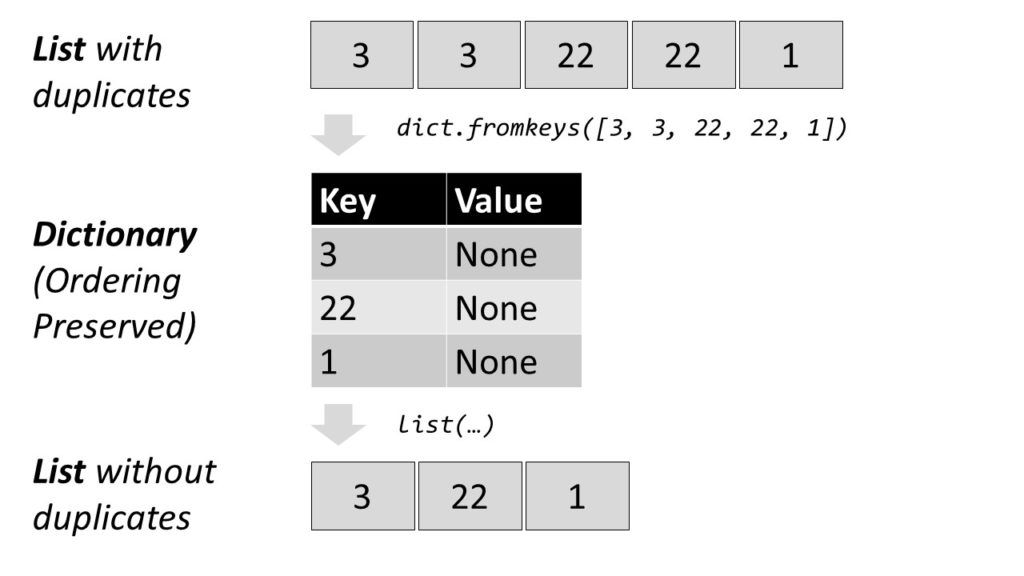
Algorithm: A more efficient way in terms of time complexity is to create a dictionary out of the elements in the list to remove all duplicates and convert the dictionary back to a list. This preserves the order of the original list elements.

lst = [[1, 1], [0, 1], [0, 1], [1, 1]] # 1. Convert into list of tuples
tpls = [tuple(x) for x in lst] # 2. Create dictionary with empty values and
# 3. convert back to a list (dups removed)
dct = list(dict.fromkeys(tpls)) # 4. Convert list of tuples to list of lists
dup_free = [list(x) for x in lst] # Print everything
print(dup_free)
# [[1, 1], [0, 1], [0, 1], [1, 1]]

All of the following four sub methods are linear-runtime operations. Therefore, the algorithm has linear runtime complexity and is more efficient than the naive approach (method 1).

  1. Convert into a list of tuples using list comprehension [tuple(x) for x in lst]. Tuples are hashable and can be used as dictionary keys—while lists can not!
  2. Convert the list of tuples to a dictionary with dict.fromkeys(tpls) to map tuples to dummy values. Each dictionary key can exist only once so duplicates are removed at this point.
  3. Convert the dictionary into a list of tuples with list(...).
  4. Convert the list of tuples into a list of lists using list comprehension [list(x) for x in lst].

Each list element (= a list) becomes a tuple which becomes a new key to the dictionary. For example, the list [[1, 1], [0, 1], [0, 1]] becomes the list [(1, 1), (0, 1), (0, 1)] the dictionary {(1, 1):None, (0, 1):None}. All elements that occur multiple times will be assigned to the same key. Thus, the dictionary contains only unique keys—there cannot be multiple equal keys.

As dictionary values, you take dummy values (per default).

Then, you convert the dictionary back to a list of lists, throwing away the dummy values.

Related blog articles:

Do Python Dictionaries Preserve the Ordering of the Keys?

Surprisingly, the dictionary keys in Python preserve the order of the elements. So, yes, the order of the elements is preserved. (source)

This is surprising to many readers because countless online resources like this one argue that the order of dictionary keys is not preserved. They assume that the underlying implementation of the dictionary key iterables uses sets—and sets are well-known to be agnostic to the ordering of elements. But this assumption is wrong. The built-in Python dictionary implementation in cPython preserves the order.

Here’s an example, feel free to create your own examples and tests to check if the ordering is preserved.

lst = ['Alice', 'Bob', 'Bob', 1, 1, 1, 2, 3, 3]
dic = dict.fromkeys(lst)
print(dic)
# {'Alice': None, 'Bob': None, 1: None, 2: None, 3: None}

You see that the order of elements is preserved so when converting it back, the original ordering of the list elements is still preserved:

print(list(dic))
# ['Alice', 'Bob', 1, 2, 3]

However, you cannot rely on it because any Python implementation could, theoretically, decide not to preserve the order (notice the “COULD” here is 100% theoretical and does not apply to the default cPython implementation).

If you need to be certain that the order is preserved, you can use the ordered dictionary library. In cPython, this is just a wrapper for the default dict implementation.

Method 3: Set Conversion

Given a list of lists, the goal is to remove all elements that exist more than once in the list.

Sets in Python allow only a single instance of an element. So by converting the list to a set, all duplicates are removed. In contrast to the naive approach (checking all pairs of elements if they are duplicates) that has quadratic time complexity, this method has linear runtime complexity. Why? Because the runtime complexity of creating a set is linear in the number of set elements. Now, you convert the set back to a list, and voilà, the duplicates are removed.

lst = list(range(10)) + list(range(10))
lst = list(set(lst))
print(lst)
# [0, 1, 2, 3, 4, 5, 6, 7, 8, 9] # Does this also work for tuples? Yes! lst = [(10,5), (10,5), (5,10), (3,2), (3, 4)]
lst = list(set(lst))
print(lst)
# [(3, 4), (10, 5), (5, 10), (3, 2)]

However, converting a list to a set doesn’t guarantee to preserve the order of the list elements. The set loses all ordering information. Also, you cannot create a set of lists because lists are non-hashable data types:

>>> set([[1,2], [1,1]])
Traceback (most recent call last): File "<pyshell#0>", line 1, in <module> set([[1,2], [1,1]])
TypeError: unhashable type: 'list'

But we can find a simple workaround to both problems as you’ll see in the following method.

Linear-Runtime Method with Set to Remove Duplicates From a List of Lists

This third approach uses a set to check if the element is already in the duplicate-free list. As checking membership on sets is much faster than checking membership on lists, this method has linear runtime complexity as well (membership has constant runtime complexity).

lst = [[1, 1], [0, 1], [0, 1], [1, 1]] dup_free = []
dup_free_set = set()
for x in lst: if tuple(x) not in dup_free_set: dup_free.append(x) dup_free_set.add(tuple(x)) print(dup_free)
# [[1, 1], [0, 1]]

This approach of removing duplicates from a list while maintaining the order of the elements has linear runtime complexity as well. And it works for all programming languages without you having to know implementation details about the dictionary in Python. But, on the other hand, it’s a bit more complicated.

Where to Go From Here?

Enough theory, let’s get some practice!

To become successful in coding, you need to get out there and solve real problems for real people. That’s how you can become a six-figure earner easily. And that’s how you polish the skills you really need in practice. After all, what’s the use of learning theory that nobody ever needs?

Practice projects is how you sharpen your saw in coding!

Do you want to become a code master by focusing on practical code projects that actually earn you money and solve problems for people?

Then become a Python freelance developer! It’s the best way of approaching the task of improving your Python skills—even if you are a complete beginner.

Join my free webinar “How to Build Your High-Income Skill Python” and watch how I grew my coding business online and how you can, too—from the comfort of your own home.

Join the free webinar now!