In Python’s pandas module, DataFrames are two-dimensional data objects. You can think of them as tables with rows and columns that contain data. This article provides an overview of the most common ways to instantiate DataFrames. We follow the convention to rename the pandas import to pd.
Create a DataFrame From a CSV File
Creating DataFrames with the function pd.read_csv(filename) is probably the best known. The first line of the csv file contains the column labels separated by commas. In the following lines follow the data points, in each row as many as there are columns. The data points must be separated by commas, if you want to use the default settings of pd.read_csv(). Here is an example of such a csv file:
The following code snippet creates a DataFrame from the data.csv file:
import pandas as pd df = pd.read_csv('data.csv')
The function pd.read_table() is similar but expects tabs as delimiters instead of comas. The default behavior of pandas adds an integer row index, yet it is also possible to choose one of the data columns to become the index column. To do so, use the parameter index_col. Example: pd.read_csv(‘data.csv’, index_col=0)
Create a DataFrame From a List of Lists
A DataFrame can be created from a list of lists where each list in the outer list contains the data for one row. To create the DataFrame we use the DataFrame’s constructor to which we pass the list of list and a list with the column labels:
import pandas as pd data = [ ['Bob', 23], ['Carl', 34], ['Dan', 14]
]
df = pd.DataFrame(data, columns=['Name', 'Age'])
Create a DataFrame From a Dictionary of Lists
A DataFrame can be created from a dictionary of lists. The dictionary’s keys are the column labels, the lists contain the data for the columns.
import pandas as pd # columns
names = ['Alice', 'Bob', 'Carl']
ages = [21, 27, 35] # create the dictionary of lists
data = {'Name':names, 'Age':ages} df = pd.DataFrame(data)
Create a DataFrame From a List of Dictionaries
A DataFrame can be created from a list of dictionaries. Each dictionary represents a row in the DataFrame. The keys in the dictionaries are the column labels and the values are the values for the columns.
The DataFrame constructor can also be called with a list of tuples where each tuple represents a row in the DataFrame. In addition we pass a list of column labels to the parameter columns.
import pandas as pd names = ['Alice', 'Bob', 'Clarisse', 'Dagobert']
ages = [20, 53, 42, 23] # create a list of tuples
data = list(zip(names, ages)) df = pd.DataFrame(data, columns=['Name', 'Age'])
Summing Up
In this article we have gone through a range of different ways to create DataFrames in pandas. However, it is not exhaustive. You should choose the method which best fits your use-case, this is to say, the method which requires the least amount of data transformation.
You’re not alone—thousands of coders like you generate this error in thousands of projects every single month. This short tutorial will show you exactly why this error occurs, how to fix it, and how to never make the same mistake again. So, let’s get started!
Python throws the TypeError object is not subscriptable if you use indexing with the square bracket notation on an object that is not indexable. This is the case if the object doesn’t define the __getitem__() method. You can fix it by removing the indexing call or defining the __getitem__ method.
The following code snippet shows the minimal example that leads to the error:
variable = None
print(variable[0])
# TypeError: 'NoneType' object is not subscriptable
You set the variable to the value None. The value None is not a container object, it doesn’t contain other objects. So, the code really doesn’t make any sense—which result do you expect from the indexing operation?
Exercise: Before I show you how to fix it, try to resolve the error yourself in the following interactive shell:
If you struggle with indexing in Python, have a look at the following articles on the Finxter blog—especially the third!
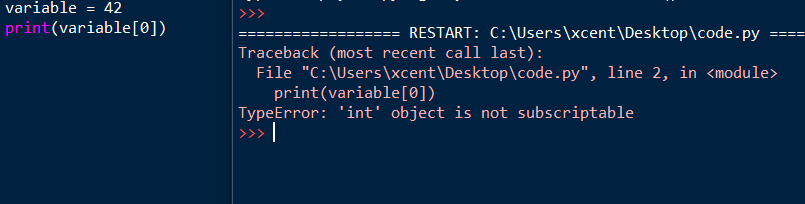
Note that a similar problem arises if you set the variable to the integer value 42 instead of the None value. The only difference is that the error message now is "TypeError: 'int' object is not subscriptable".
You can fix the non-subscriptable TypeError by wrapping the non-indexable values into a container data type such as a list in Python:
variable = [None]
print(variable[0])
# None
The output now is the value None and the script doesn’t throw an error anymore.
An alternative is to define the __getitem__ method in your code:
class X: def __getitem__(self, i): return f"Value {i}" variable = X()
print(variable[0])
# Value 0
You overwrite the __getitem__ method that takes one (index) argument i (in addition to the obligatory self argument) and returns the i-th value of the “container”. In our case, we just return a string "Value 0" for the element variable[0] and "Value 10" for the element variable[10]. It doesn’t make a lot of sense here but is the minimal example that shows how it works.
I hope you’d be able to fix the bug in your code! Before you go, check out our free Python cheat sheets that’ll teach you the basics in Python in minimal time:
The most Pythonic way to convert a list of floats fs to a list of integers is to use the one-liner fs = [int(x) for x in fs]. It iterates over all elements in the list fs using list comprehension and converts each list element x to an integer value using the int(x) constructor.
This article shows you the simplest ways to convert a one-dimensional list consisting only of floats to a list of int.
Problem: Given a list of floats [1.0, 2.0, 3.0]. How to convert it to a list of ints [1, 2, 3]?
The methods are not applicable to lists of lists, they contain rounding errors that are different in each method. If necessary, you can add cycles or define custom functions to check, account for and minimize errors.
Method 1: List Comprehension
Suppose we have a list:
a = [1.1, 1.2, 1.8, 0.5, 5.9, -2.3]
Now, check the type of the list numbers:
print(type(a[0]))
# <class 'float'>
Let’s apply the built-in function int, and get a list of integers:
print([int(a) for a in a])
# [1, 1, 1, 0, 5, -2]
Check the type of numbers in the new list:
A = [int(a) for a in a]
print(type(A[0]))
# <class ‘int’>
Thus, using the built-in function int, which converts a real number rounds towards zero, or rather, it discards the fractional part, we can get a new list of integers with a one-line code.
Method 2: Map Function
The built-in function map is well optimized and efficient, when it is called, the elements of the list are retrieved upon access. Therefore, one element is stored and processed in memory, which allows the program not to store the entire list of elements in the system memory.
Apply to the same list a the following code:
print(list(map(int, a)))
# [1, 1, 1, 0, 5, -2]
It makes no sense to check the type of the elements of the resulting list, since when we called the map function, we passed the int function already described in method 1 as an argument, and wrapped the result in a list using the list function.
The quality of this transformation of the list, or rather the rounding error, is the same as in the first method.
Method 3: Round & List Comprehension
It is very similar to the first, but unlike int, it doesn’t just discard the fractional part but rounds to the nearest even integer if the fractional part is 0.5. You can also pass as the second argument the number of decimal places to which rounding is required, by default it is 0, this is what we will use:
print([round(a) for a in a])
Check the type of numbers in the new list:
D = [round(a) for a in a]
print(type(D[0]))
# <class ‘int’>
As you can see from this example, there are different built-in functions to achieve our goal, the difference is in the method and the magnitude of the rounding error.
Method 4: Math Module
In this way, I suggest using the imported module math, in which we will use the three functions ceil(), floor(), and trunc(). let’s take a closer look at each. They have the same syntax, the difference is in the way of rounding.
Let’s apply to the original list:
a = [1.1, 1.2, 1.8, 0.5, 5.9, -2.3]
print([math.ceil(a) for a in a])
# [2, 2, 2, 1, 6, -2]
‘Ceil’ rounds to the next largest integer, respecting the sign(-2.3 < -2 which is True).
Check the type of numbers in the new list:
C = [math.ceil(a) for a in a]
print(type(C[0]))
# <class ‘int’>
Consider the following function in the ‘math’ – ‘floor’ module, which is the opposite of ‘ceil’ – rounding down to the nearest integer:
print([math.floor(a) for a in a])
# [1, 1, 1, 0, 5, -3]
Check the type:
F = [math.floor(a) for a in a]
print(type(F[0]))
# <class ‘int’>
The next function, trunc(), is analogous to the built-in function int() — it simply discards the fractional part whatever it is:
print([math.trunc(a) for a in a])
# [1, 1, 1, 0, 5, -2]
And check the type:
T = [math.trunc(a) for a in a]
print(type(T[0]))
# <class ‘int’>
Method 5: NumPy
Here’s a look at converting a list from an int to an array using the NumPy module. The difference between an array and a list is that all elements of an array must be of the same type, like “float” and “int”. Numeric operations with large amounts of data can be performed with arrays much faster and more efficiently than with lists.
Let’s turn our first list a into an array:
import numpy as np
N = np.array(a, int)
We pass two arguments to the array function, the name of the list to convert to an array and the type for each element.
# [ 1 1 1 0 5 -2]
Сheck the type of elements:
print(type(N[0]))
# <class 'numpy.int32'>
Unlike the int number type in Python, the NumPy module defines them slightly differently and is divided into several subgroups. For example, 'int32' are integers ranging from -2147483648 to 2147483647 (4-byte numbers), 'int64' are numbers from -9223372036854775808 to 9223372036854775807 (8-byte numbers), there are also different types of 'int' for 32- and 64-bit operating systems, this must be taken into account when calculating with arrays.
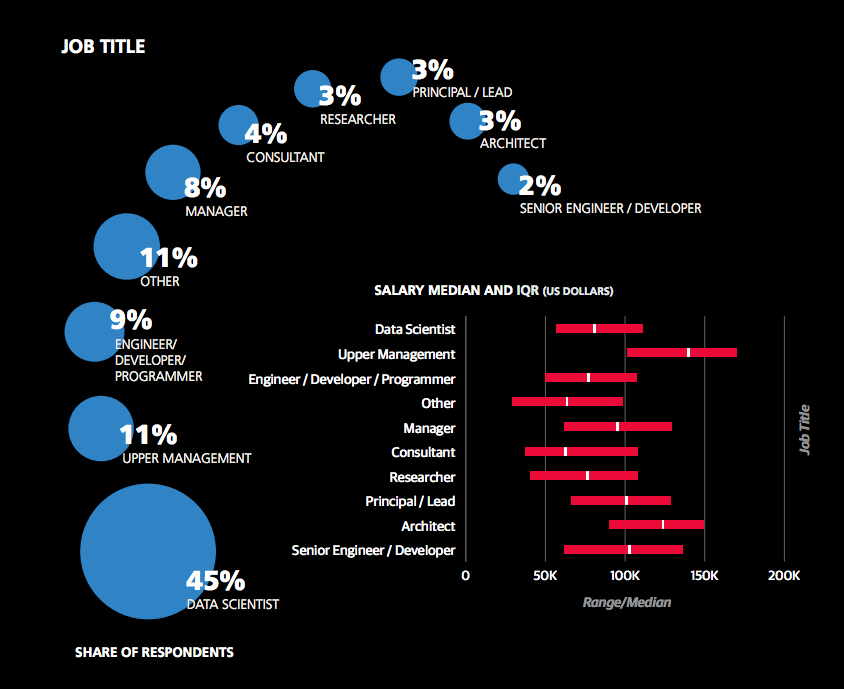
A recent study from O’Reilly found that data science is a wide field with many specializations and job descriptions. However, the average earning of an employed data scientist—45% of all respondents would consider themselves as such—is between $60,000 and $110,000. This means that experienced data scientists over time quite certainly reach six-figure income levels if they keep improving and searching for new opportunities. Here’s a screenshot from the report showing the different routes you can go:
You can see that there are significant opportunities “down the line” by working as an architect, team leader, or manager that earn significantly above six-figures. Becoming an employed data scientist remains an attractive way to make a great living.
But what about freelance data scientists? Do they earn more?
The best data comes directly from the source: Upwork, the biggest freelancer market in the world. Let’s dive into some profiles from freelance data scientists!
Here’s a table of 24 freelance data scientists incomes from the Upwork results:
Freelancer
Hourly Income
Earned
Job Success
Data Science & Machine Learning
$60
$100.000
100%
Data Science & Machine Learning
$300
$100.000
100%
Data Science Consultant
$50
$10.000
97%
Data Science & Machine Learning
$25
$10.000
91%
Data Science/Analyst, Statistician
$70
$100.000
97%
Applied Machine Learning
$300
$50.000
100%
Chief Technology Officer
$55
$200.000
100%
Computer Vision
$32
$2.000.000
100%
Data Engineer
$50
$10.000
100%
Research Scientist
$150
$700.000
95%
Analytics Expert
$52
$10.000
100%
Deep Learning Expert
$195
$10.000
100%
Data Scientist
$60
$10.000
77%
Scalable Analytics Consultant
$300
$500.000
100%
Machine Learning
$40
$8.000
91%
Machine Learning
$80
$30.000
100%
Tutor
$30
$20.000
92%
Math
$38
$4.000
100%
NLP
$35
$30.000
71%
Machine Learning
$50
$4.000
100%
Big Data Engineer
$50
$10.000
100%
AVERAGE
$96
$186.476
96%
The tabular data is drawn from 100 Upwork freelancer profiles as they appeared in the Upwork search. We randomly chose profiles and filtered them for data availability (e.g., total money earned). The result is that the average freelance data scientist earns $96 per hour. For 1700 working hours per year and a full schedule, this results in an average annual income of $163,200. To accomplish this, you need to join the ranks of relatively high-rated freelancers above 90% job satisfaction.
Let’s have a look at some other data sources: As a data scientist, you’re a programmer—in a way. The demand for programming talent has steadily increased in the preceding decades.
Here’s a quick tabular overview of what you can earn as a data scientist—it shows that as a data scientist, you’re in effect a well-compensated coder with specific skill sets.
Title
Best Programming Languages
Yearly Income (Average US)
Web Developer
JavaScript + HTML + CSS + SQL
$78,088
Mobile Developer Android
Java
$126,154
Mobile Developer Apple
Swift
$123,263
Back End Developer
Python + Django + Flask
$127,913
Front End Developer
JavaScript + HTML + CSS
$109,742
Full-Stack Engineer
Python + JavaScript + HTML + CSS + SQL
$112,098
Data Scientist
Python + Matplotlib + Pandas + NumPy + Dash
$122,700
Machine Learning Engineer
Python + NumPy + Scikit-Learn + TensorFlow
$145,734
Let’s dive into the different freelance developer career choices for maximum success!
Do you want to develop the skills of a well-rounded Python professional—while getting paid in the process? Become a Python freelancer and order your book Leaving the Rat Race with Python on Amazon (Kindle/Print)!
Where to Go From Here?
Enough theory, let’s get some practice!
To become successful in coding, you need to get out there and solve real problems for real people. That’s how you can become a six-figure earner easily. And that’s how you polish the skills you really need in practice. After all, what’s the use of learning theory that nobody ever needs?
Practice projects is how you sharpen your saw in coding!
Do you want to become a code master by focusing on practical code projects that actually earn you money and solve problems for people?
Then become a Python freelance developer! It’s the best way of approaching the task of improving your Python skills—even if you are a complete beginner.
Two mega trends can be observed in the 21st century: (I) the proliferation of data—and (II) the reorganization of the biggest market in the world: the global labor market towards project-basedfreelancing work.
By positioning yourself as a freelance data scientist, you’ll not only work in an exciting area with massive growth opportunities but you’ll also put yourself into the “blue ocean” of freelancing where there’s still much more demand than supply.
This article shows you six fundamental building blocks (pillars) that will lead you towards success as a freelancer in the data science space.
Pillar 1: Money—How Much Can You Earn as a Data Science Freelancer?
A recent study from O’Reilly found that data science is a wide field with many specializations and job descriptions. However, the average earning of an employed data scientist—45% of all respondents would consider themselves as such—is between $60,000 and $110,000. This means that experienced data scientists over time quite certainly reach six-figure income levels if they keep improving and searching for new opportunities.
There are significant opportunities “down the line” that earn significantly above six-figures by working as an architect, team leader, or manager. Becoming an employed data scientist remains an attractive way to make a great living.
But what about freelance data scientists? Do they earn more?
The best data comes directly from the source: Upwork, the biggest freelancer market in the world. Let’s dive into some profiles from freelance data scientists!
Here’s a table of 24 freelance data scientists incomes from the Upwork results:
Freelancer
Hourly Income
Earned
Job Success
Data Science & Machine Learning
$60
$100.000
100%
Data Science & Machine Learning
$300
$100.000
100%
Data Science Consultant
$50
$10.000
97%
Data Science & Machine Learning
$25
$10.000
91%
Data Science/Analyst, Statistician
$70
$100.000
97%
Applied Machine Learning
$300
$50.000
100%
Chief Technology Officer
$55
$200.000
100%
Computer Vision
$32
$2.000.000
100%
Data Engineer
$50
$10.000
100%
Research Scientist
$150
$700.000
95%
Analytics Expert
$52
$10.000
100%
Deep Learning Expert
$195
$10.000
100%
Data Scientist
$60
$10.000
77%
Scalable Analytics Consultant
$300
$500.000
100%
Machine Learning
$40
$8.000
91%
Machine Learning
$80
$30.000
100%
Tutor
$30
$20.000
92%
Math
$38
$4.000
100%
NLP
$35
$30.000
71%
Machine Learning
$50
$4.000
100%
Big Data Engineer
$50
$10.000
100%
AVERAGE
$96
$186.476
96%
The tabular data is drawn from 100 Upwork freelancer profiles as they appeared in the Upwork search. We randomly chose profiles and filtered them for data availability (e.g., total money earned). The result is that the average freelance data scientist earns $96 per hour. For 1700 working hours per year and a full schedule, this results in an average annual income of $163,200. To accomplish this, you need to join the ranks of relatively high-rated freelancers above 90% job satisfaction.
Let’s have a look at some other data sources: As a data scientist, you’re a programmer—in a way. The demand for programming talent has steadily increased in the preceding decades.
Here’s a quick tabular overview of what you can earn as a data scientist—it shows that as a data scientist, you’re in effect a well-compensated coder with specific skill sets.
Title
Best Programming Languages
Yearly Income (Average US)
Web Developer
JavaScript + HTML + CSS + SQL
$78,088
Mobile Developer Android
Java
$126,154
Mobile Developer Apple
Swift
$123,263
Back End Developer
Python + Django + Flask
$127,913
Front End Developer
JavaScript + HTML + CSS
$109,742
Full-Stack Engineer
Python + JavaScript + HTML + CSS + SQL
$112,098
Data Scientist
Python + Matplotlib + Pandas + NumPy + Dash
$122,700
Machine Learning Engineer
Python + NumPy + Scikit-Learn + TensorFlow
$145,734
Let’s dive into the different freelance developer career choices for maximum success!
Pillar 2: Confidence—Can You Become a Data Science Freelancer?
Before becoming a Python freelancer, you have to learn the very basics of Python. What’s the point of offering your freelancer services when you can not even write Python code?
Having said this, it’s more likely that you live on the other extreme. You do not want to offer your services before you don’t feel 100% confident about your skills. Unfortunately, this moment never arrives. I have met hundreds of advanced coders, who are still not confident in selling their services. They cannot overcome their self-woven system of limiting believes and mental barriers.
May I tell you a harsh truth? You won’t join the top 1% of the Python coders with high probability (a hard statistical fact). But never mind. Your services will still be valuable to clients who either have less programming skills (there are plenty of them) or little time (a big part of the rest). Most clients are happy to outsource the complex coding work to focus on their key result areas.
Regardless of your skill level, the variety of Python projects is huge. There are simple projects for $10 which an experienced coder can solve in 5 minutes. And there are complex projects that take months and promise you large payments of $100 to $1000 after completing each milestone.
You can be sure that you will find projects in your skill level.
Pillar 3: Learning—What Skills Do You Need as a Data Science Freelancer
Most freelance developers don’t have any experience when they get started on freelancing platforms such as Upwork or Fiverr. You can succeed by follow the three simple steps: (1) get your first gig, (2) learn what’s needed, (3) complete the gig. By repeating this, you’ll learn, grow, and, over time, earn the average hourly rate of $61 per hour for freelance developers.
Teaching many freelancing students, I have come to learn that most don’t believe they have all the skills they need to get started as a freelance developer. And why should they come to that conclusion given that there are so many different skills to be learned?
Programming
Marketing
Sales
Communication
Empathy
Positioning
Administration
Business Strategy
Copy Writing
Networking
Yet, while all of the listed skills are highly important for your freelancing business, I have yet to meet a single person that is highly skilled in all of those.
Consider each of those skills to be an axis of a multi-dimensional coordinate system. Now, you can assign to each person a score between 0% and 100% for each skill. Here’s the skill score card for two imaginary freelancers Alice and Bob:
Given are two freelancers: Alice and Bob.
Alice has a talent for marketing and copywriting. She’s an average coder and not very good in administration.
Bob is a master coder—the classical nerd—but he’s not skilled in marketing, sales, communication. He is a great administrator though.
Here’s the million dollar question: who’s the better freelance developer?
Posed like this, you may find the question ridiculous. Of course, it depends how both position themselves in the marketplace. Alice may have a small edge over Bob due to her people, sales, and marketing skills. However, it will be a close win because Bob’s programming skills are also highly valued by the marketplace.
Both will earn some money between minimum and maximum wage (say, around the average earnings of $51 per hour for freelance developers). The key is to understand that every single person on the planet has some value to the marketplace.
Let’s have a look at a third freelancer: YOU.
Say, Alice earns $55 per hour due to her ability to sell her skills. Bob earns $51 per hour due to his super programming skills.
Suppose you are a beginner in both: sales and programming. Your programming skills are only 30% and your sales skills are even worse with 10%. But you have solid networking, communication, and empathy skills as a human being. That’s all you need—you can offer value to the marketplace! Your skills are worth $23 per hour!
The only thing left for you to do is to sell your skills, keep engaging with the marketplace, and increase your skills over time. You’ll increase your sales and marketing skills. You’ll build confidence. You’ll increase your programming skills over time. By engaging the marketplace, you automatically increase your value to it. Your hourly rate increases with it!
So, do you have enough skills to get started as a freelance developer? Let’s have a look at the following video:
Most people never feel ready to get started with a project. They always want to learn more so that they feel better prepared for the tasks ahead. This may be a result from our modern-day educational system that teaches young people that they have to learn more and more before they can become successful in the real world. Grown ups with 18+ years believe they must learn for 10 more years before they can get started creating value and earning their own income.
The problem is that you’ll never feel ready no matter how much you learn. This is inherent in knowledge acquisition. The more you learn, the more you realize how much you don’t know, and the less ready you will feel to get started.
Therefore, a much better model will be proposed next. Most people understand this model rationally but they don’t internalize it—they don’t really get it.
So, what is it?
BIAS TOWARDS ACTION!
Your value to the marketplace is already larger than zero. If you start as a freelance developer, your hourly rate will be larger than $0. I don’t know what it is but you can already give value to clients. Say, you are a complete beginner and a client can hire you for $1 per hour. They will probably do it. Why? Because even as a complete beginner, you can create, say, $3 on their $1-spent, so you help them increase their business and they purchase as many of your services as they can afford. After all—how often would you buy $3 for a buck?
No matter what your current value, no matter where you start, the strategy is always the same: know your hourly rate, work for it, and increase it over time.
And what’s the best way to increase your hourly value? The answer is simple: create value for clients. Get started now. You have an actual value to contribute to clients no matter your current value. Just select any start hourly rate that you feel comfortable with. And then commit on the path to learning and improving your hourly rate by doing practical work for clients.
There’s no better way. If you want to improve your chess game, you better play chess a lot. If you want to improve your golf games, you better practice golf every day. If you want to become a more successful freelance developer earning a higher hourly rate—which is one of the key success metric of freelance developers—you better be out there on a freelancing platform doing the work and actually increase your hourly rate.
So, you go out there, create an account at Fiverr or Upwork, and get started today, now!
To commit on a quest to continuous improvement of your hourly rate, you can also check out the detailed FINXTER Python freelancer course.
Pillar 4: Clients—How Can You Get Clients and Deliver Value to Them?
Many people struggle with finding clients on a freelancer platform. They apply for one or two freelancer projects and wait for a few days until they get a response. The response is usually negative because the probability of getting accepted for a gig is maybe 5-10% — even if you underbid people. Oftentimes, clients want to have freelancers who have a lot of experience with past projects. If you are just starting out, you cannot showcase your experience.
So they apply for one or two projects and get rejected. If they are motivated, they try the same thing again. Only the super-committed ones repeat the same thing a third time. But after this fails too, they are out of the game. They are frustrated, argue that it’s not possible to earn money on freelancing platforms and go on with the next idea to make money online (on which they’ll fail, too).
I recently read the “The 10x Rule” by Grant Cardone. In his book, he invented the concept of taking massive action towards a goal.
Solution—Massive action.
Not a timid amount of action.
Not thinking in small numbers like “1” or “2”.
Massive action creates a new level of problems where you have too much instead of too little response from the real world.
It’s a simple idea but it’s really powerful. Applying this idea to finding clients on a freelancer platform is very effective and usually leads to success.
Yet, it’s so simple to find clients. It’s a numbers game.
Just realize that the acceptance rate of getting a freelancer gig is 10%. What’s the result? It means that on average, you need to apply for 10 projects to get one gig. If you apply for two projects, you have to be very lucky to get a gig — but most likely, you’ll fail. Even if you are serious and did everything right.
Before working as a self-employed Python coder, I was an academic computer science researcher. During my Ph.D. program, my goal was to get at least four high-quality research papers accepted. The acceptance rate was very low at 10-15% — even if you wrote a very good paper. So how to solve this problem? The only answer is massive action. Just submit the paper 10 times, improving it on the way. Then, you have a good chance of getting it accepted.
Realizing this early, I just committed to submitting a lot of papers. Because if I only submitted four times to a conference, it would have been virtually impossible to get accepted on four quality conferences. Instead, I submitted to maybe 15 conferences. Most papers got rejected but over time, more and more papers got accepted.
The only way of controlling your success in a competitive research environment is to submit papers regularly.
The same applies to get freelancing clients as a Python freelancer. I just want to encourage you to apply for 10 projects at once. If you do this, you’ll get accepted by maybe one or two.
Many people fear too much work when applying for 10 projects. But think about it: wouldn’t it be great if you got accepted for all 10 projects? This means that you can focus on the most interesting ones and simply write a nice email to the remaining clients telling them that you need a bit more time finishing their projects. It’s better to have too many clients than too few. Actually, you want this problem of having too many clients. Only this way, you can increase your hourly rate over time.
A fundamental law of economics is that if demand exceeds supply, prices rise. Your prices.
This is how you will break through your ceiling. Applying for two projects and waiting is not massive action. Ask yourself whether you really want success or whether you manipulate your own success. Massive action is applying for 10, 20, or even 50 projects. And creating yourself a new level of problems (having too many projects rather than too few).
This way, you’ll create your first experiences and a lot of profitable work for yourself.
Pillar 5: Business—How to Build Your Business as a Freelance Data Scientist?
As a freelance data scientist, you’re first and foremost a business person. Only second you’re a data scientist. You need to have solid data science skills but there’s so much more to creating a business system that throws lots of cash at you.
Everyone can create better burgers than McDonalds. But who can create a better business system? If you’re reading this article, chances are that you’re a far better coder than business person (the Finxter community consists of far more coders than business persons). So, stop learning tech-related stuff now and focus on building a great business system. How?
Here are my top tips:
Give More Value Than You Take in Payment
Eat Your Customers Complexity
Perform From Your Strengths
Position Yourself as a Specialist
Be Hyper-Responsive
Be Positive and Upbeat
Create a Client List
Create a Simple Ad Funnel
Lead Acquisition: Contact One Potential Lead Per Day
Lead Conversion: Implement Strategy Sessions
Join Freelancing Platforms
Use Testimonial Videos on Your Website
Get the Referral Engine Rolling
Leave Freelancing Platforms
Use Systems and Templates
Know Your Hourly Rate
Increase Your Hourly Rate
Contribute to Open-Source Projects
Market Yourself on LinkedIn, Not Facebook
Create Your Own Blog
Give, Give, Give, Right Hook
Befriend Colleagues
Be a Coding Consultant, Not a Freelance Developer
Read More Programming Books
Read More Business Books
Seek Expert Advice
You can find a detailed explanation on all of those points on my in-depth blog article.
“A limited liability company (LLC) is a business structure in the United States whereby the owners are not personally liable for the company’s debts or liabilities. Limited liability companies are hybrid entities that combine the characteristics of a corporation with those of a partnership or sole proprietorship.” (source)
So, if you create an LLC, you are generally not liable for any debt or liabilities of your freelancing business. Most likely, your freelancing business doesn’t need a lot of debt—after all, you’re selling your time for money—however, there may still be liabilities!
For example, you may have signed a contract that requires you to pay for all damages incurred by your software. Yes, you shouldn’t have done it—but assuming you have, if you signed in the name of the LLC, you personally cannot be hold accountable for the potentially devastating liabilities.
What are some advantages and disadvantages of a liability?
LLC Pros
LLC Cons
Limited Liability – If you keep your finances separate and fullfil your duties as a business owner, you cannot be personally held liable. Your personal assets like real estate, stocks, bonds, mutual funds will remain protected even if your business fails.
Limitations of Limited Liability – this is called “piercing the corporate veil” and it means that if you don’t follow the rules of the LLC, a judge may decide that your liability protection will be removed and you, personally, can be held liable.
Pass-Through Federal Taxation on Profits – Per default, the profits are not taxed on the company level but are passed through to its owners who then tax them individually. This is an advantage if you have a relatively lower tax rate and it avoids double taxation on the corporate and individual level.
Self-Employment Tax – Per default, you must pay self-employment taxes on the profits of an LLC because it is a pass-through entity.
Management Flexibility – The LLC can be managed by one or more owners. This is a perfect structure for partnerships where ownership percentages can be divided in a flexible way.
Turnover – If an LLC partner dies, goes bankrupt, or leaves the company, the company will be dissolved. You need to create a new one and you take over all the leaving partners’ obligations that result in dissolving the LLC.
Easy Startup Overhead – It’s relatively simple and cheap—a few hundred dollars—to start an LLC. For the amount of protection it offers, it’s a very cheap way to organize your freelancing business.
Investments – It’s difficult to raise outside capital. This is usually not a problem for you as a freelance developer because freelance developing has only minimal capital requirements.
Unproportional ProfitDistribution – Members can receive profits that are not proportional to the ownership percentage they hold. This allows you to reinforce members for great work.
Credibility – Being an LLC gives you more credibility as a freelance developer. Clients tend to trust you more, as a freelance developer organized in an LLC, for two reasons: you’re an US-based business and you’re a serious business.
Upwork places a great focus on quality. This is great for clients because it ensures that their work will get delivered—without compromising quality.
For freelancers just starting out, Upwork poses a significant barrier of entry—oftentimes, new profiles will get rejected by the Upwork team. They want to ensure that only clients who take their freelancing jobs seriously will start out on their platform.
However, the relatively high barrier of entry also protects established freelancers on the Upwork platform from too much competition. There is no price dumping because of low-quality offers which ultimately benefits all market participants.
Fiverr initially started out as a platform where you could buy and sell small gigs worth five bucks. However, in the meantime it grew to a full-fledged freelancing platform where people earn six-figure incomes.
Many jobs earn hundreds of Dollars per hour and many freelancers make a killing—especially in attractive industries such as programming, machine learning, and data science.
If you want to start earning money as a freelance developer with the hot Python programming language, check out my free webinar:
Toptal has a strong market proposition: it’s the platform with the top 3% of freelancers. Hence, it connects high-quality freelancers with high-quality clients.
It’s extremely hard to become a freelancer at Toptal: 97% of the applicants will not enter the platform. However, if you manage to join Toptal, you can greatly benefit with the best-in-class hourly rates. You can easily earn $100 per hour and beyond.
Also, the high barrier of entry ensures that the freelancer stays the valuable resource—he or she doesn’t become a commodity like on other freelancer platforms.
If you are an upcoming freelancer, you should aim for joining Toptal one day. Here’s a great freelancer course that shows you a crystal-clear path towards becoming a highly-paid freelancer.
You can find out about more freelancing sites at the following resource on this Finxter blog with more than 60 links sorted by the size of the freelancing sites.
There are many different ways of starting your Python freelancing adventures. Many freelancing platforms compete for your time, attention, and a share of your value creation. These platforms are a great way to start your freelancing career as a Python coder and gain some experience in business and coding, as well as get some testimonial to kick off your freelancing business. But keep in mind that they are only the first step and in the mid-term, you should strive to become independent of those platforms if you want to avoid global competition for each project in the future.
Where to Go From Here?
Enough theory, let’s get some practice!
To become successful in coding, you need to get out there and solve real problems for real people. That’s how you can become a six-figure earner easily. And that’s how you polish the skills you really need in practice. After all, what’s the use of learning theory that nobody ever needs?
Practice projects is how you sharpen your saw in coding!
Do you want to become a code master by focusing on practical code projects that actually earn you money and solve problems for people?
Then become a Python freelance developer! It’s the best way of approaching the task of improving your Python skills—even if you are a complete beginner.
Ready, Steady, Go —-> Data Science by setting up Conda in your Computer
It has never been easier from the early python data tools invention than now, to set up an user environment in our own computer. Conda brings that easiness with it.
Conda as it defines itself is an “OS-agnostic, system-level binary package manager and ecosystem.”
The guiding principles of python are written by Tim Peters in PEP 20 — The Zen of Python. One of the aphorisms mentioned in it is, “There should be one– and preferably only one –obvious way to do it.” Conda is an effort towards it not only for Python but other languages like R, Ruby, etc.
If you wish to read more about conda, read an excellent blog post written by Travis Oliphant. He’s the creator of Numpy and Scipy.
The best way to install Conda package manager for python is through any one of the two distributions,
Anaconda
Miniconda
Choosing Between Anaconda and Miniconda
Miniconda is a small, bootstrap version of Anaconda that includes only conda, Python, the packages they depend on. If you’re ready to allocate more space (around 3 GB), Anaconda is the best option. Anaconda will install a wide range of packages that you might need to deal with the data. Otherwise, Miniconda will serve the purpose and you can install any package as required.
To get an up to date and stable version of the software, installing from the official documentation is the best way to do so. We’ll provide you the links to the docs. The steps mentioned in the docs are very easy to follow like a cakewalk. Also, by the time whenever any of the links are dead, We’ll update them.
We didn’t provide all the instructions directly here on this page because it’s very easy and clearly mentioned in the docs. The theme of this article is only to provide you with the necessary information to choose between Miniconda and Anaconda.
Do you want to enrich your Python script with powerful text-generation capabilities? You’re in the right place!
What does it do? I just discovered DeepAI’s API that automatically generates a body of text, given a sentence fragment or topic keyword.
How can it be used? You can use this as a basis to generate text automatically.
My opinion: The generated text makes sense (kind of) but you may need to further process it or guide it to generate longer meaningful content. The biggest opportunity, in my opinion, is to use it as a step in a more complex pipeline towards the automatic generation of valuable content. On its own, it wouldn’t generate too much meaning (apart from the entertainment value of reading machine-generated text).
Python Deep API Call
Ready? So, let’s have a look at the short Python script that asks the machine learning model to generate text for you—given a certain keyword such as ‘intelligence’, ‘Donald Trump’, or ‘Learn Python’.
You import Python’s standard library requests to issue web requests and access the DeepAI API that is hosted at the URL "https://api.deepai.org/api/text-generator".
Here’s the output the code snippet generated in my Python shell:
Automatically-Generated Text Example
Intelligence officials were able to confirm the existence of at least some Russian hacking operations, including the one apparent aimed at the White House.
The CIA brief, the statement said, “was made official by the Russian Government on the third assessment of a U.S. official that Russian Government officials had interfered in the 2016 presidential election. In my opinion, assertions that were made in the clear and unequivocal testimony of the public as well as in the public release on any of the Russian accounts were grossly improper, misleading, and should be seen to be completely absent from any official documents as well.”
It added: “In addition, the CIA’s assessment asserted the Russian Government’s claims were grossly misleading, misleading and misleading in their assertions. The CIA has concluded to date, including publicly, it has given credible facts to support the Russia’s claims, and there would be no justification for further claims, if such assertions are to be proven to be false.”
The CIA brief also claimed the CIA “should not” have “repeated, misleading details of Russian officials’ conduct.”
CIA spokeswoman Jane Harman told Fox News: “CIA Director John Brennan fully agrees that Director Brennan’s testimony confirms what we have heard from various intelligence agencies.
“He is clear that Director Brennan gave additional testimony to Congress on the subject, in the first instance in which he spoke frankly about the role of Russian intelligence.”
But Harman also said Brennan should have given “more proof” of “firm Russian intervention into the U.S. political environment” if such claims were to be believed about the same thing.
Brennan told me the U.S would “make public its best communications in Russia for all time.”
Brennan’s testimony was confirmed by CIA Director Gina Haspel.
Brennan’s public admission that the Clinton campaign was hacked “was, in fact, rejected by the CIA by the president,” the CIA brief said.
In a memo prepared to be published early Friday, CIA Director R. John Brennan outlined an intelligence assessment that a Russian national and political operative in the United States was responsible for leaking classified information to the Russian media and opposition leaders.
The CIA has denied the CIA’s assessment. But Brennan argued that the Russian “public claims are simply false assertions that are misleading, unconfirmed and improper.”
In the report, US intelligence provided more details to the National Security Council than a year ago, the first time in the United States that Russia was involved in the hack.
The CIA concluded that the Russian government hacked the DNC to help Trump and was trying to influence the 2016 election.
Russia has denied US attempts to influence the campaign. But President Obama, in a letter to US Secretary of State Rex Tillerson, said the US acted in “complete coordination with the Russian government” and “with Russian military officials, whom we have discussed with other countries.”
Russian election meddling and hacking of DNC were part of an international pattern of human rights violations in which countries have accused their governments of using disinformation to advance a political candidate and undermine a democratic election.
Dmitry Peskov, Russia’s president, said in December that the hacking was meant to interfere with the presidential election and may violate the election regulations.
“The cyberwar waged in this new Russia will not be stopped, the threats and security of the country will be the only legitimate measure,” he said, adding that the hackers “will have no chance to stop.”
The Russian state-sponsored cybercrime group F-Secure, which was based in Moscow, has claimed responsibility for a number of Russian cyber incidents that have been claimed by the United States, the Associated Press reports.
The Russian state-sponsored hacking groups include the computer firms Kaspersky Lab and DigiPG, both known for their malware and research programs, and the Moscow-based anti-virus firm Elemental.
The hacking groups have also said that as part of the election, they were targeting an array of Democratic political candidates.
The Russian military is responsible for the attack, according to Kremlin spokesman Dmitry Peskov.
Russia is often accused of using cyber hacks for its own interests. In December 2016, an Obama administration official stated that “every step is worth watching carefully” in the war in Afghanistan in 2014.
But Russia’s President Vladimir Putin, a Russian citizen and former head of the Communist Party, has denied that Russian state-backed separatists used hacking to support the presidential elections.
“I call on all government officials and political parties to avoid interference and the international community to take up arms for the political and economic purposes of Russia. We are not engaged, and should not be used,” Putin said in a speech in Moscow in February.
He said the Kremlin is not to blame for a country’s cyber crimes against the country during the presidential election.
Putin also said that “there is nothing new or wrong with the election result.”
Short Discussion
You can see that the generated text is quite detailed and looks professional. But is it correct? And does it contain plagiarism? To check these questions, I checked it with Grammarly. Here’s the result:
The text has high writing quality and is original!
But it’s obviously fake news—otherwise, Grammarly should have found the quotes of “CIA officials”. That’s why I think that the powerful text-generation ability should be used in a pipeline or system that ensures to create some real value-add—rather than using it as a stand-alone tool.
Try It Yourself (Interactive Shell)
Challenge
Challenge: Find ways to create real value using the Python API call in a more advanced code snippet and share it with the Finxter community. You can contact me by signing up on the Finxter Email Academy:
I’ll share the results of this poll in a follow-up blog article—so, stay tuned!
Quick Fix: Python throws the “ImportError: No module named pandas” when it cannot find the Pandas installation. The most frequent source of this error is that you haven’t installed Pandas explicitly with pip install pandas. Alternatively, you may have different Python versions on your computer and Pandas is not installed for the particular version you’re using. To fix it, run pip install pandas in your Linux/MacOS/Windows terminal.
Problem: You’ve just learned about the awesome capabilities of the Pandas library and you want to try it out, so you start with the following import statement you found on the web:
import pandas as pd
This is supposed to import the Pandas library into your (virtual) environment. However, it only throws the following import error: no module named pandas!
>>> import pandas as pd
ImportError: No module named pandas on line 1 in main.py
You can reproduce this error in the following interactive Python shell:
Why did this error occur?
The reason is that Python doesn’t provide Pandas in its standard library. You need to install Python first!
Before being able to import the Pandas module, you need to install it using Python’s package manager pip. You can run the following command in your Windows shell:
$ pip install pandas
Here’s the screenshot on my Windows machine:
This simple command installs Pandas in your virtual environment on Windows, Linux, and MacOS. It assumes that you know that your pip version is updated. If it isn’t, use the following two commands (there’s no harm in doing it anyways):
How to Fix “ImportError: No module named pandas” in PyCharm
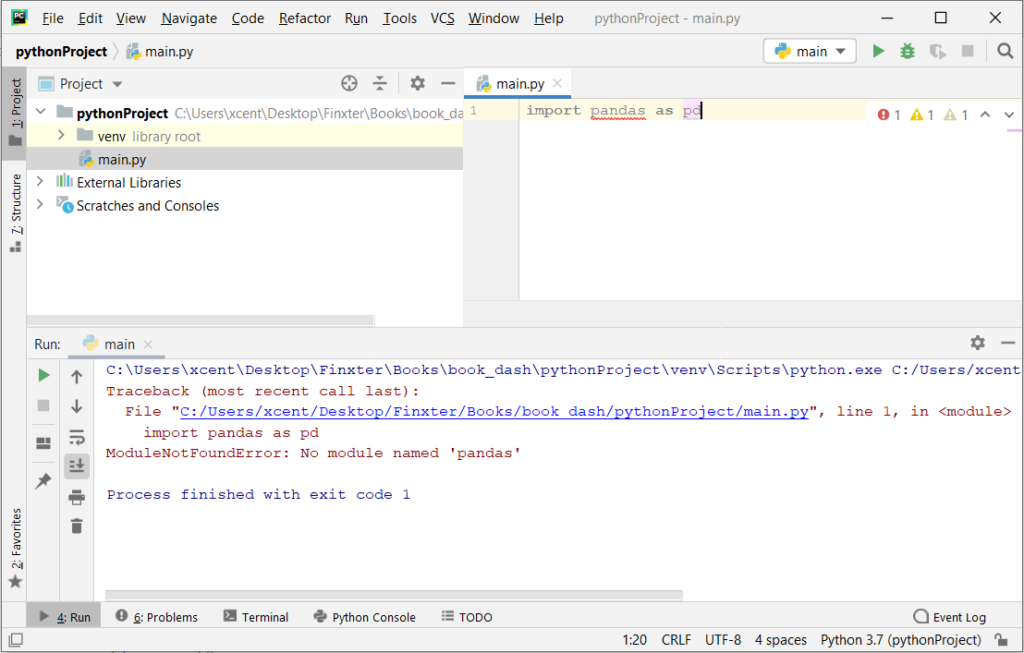
If you create a new Python project in PyCharm and try to import the Pandas library, it’ll throw the following error:
Traceback (most recent call last): File "C:/Users/xcent/Desktop/Finxter/Books/book_dash/pythonProject/main.py", line 1, in <module> import pandas as pd
ModuleNotFoundError: No module named 'pandas' Process finished with exit code 1
The reason is that each PyCharm project, per default, creates a virtual environment in which you can install custom Python modules. But the virtual environment is initially empty—even if you’ve already installed Pandas on your computer!
Here’s a screenshot:
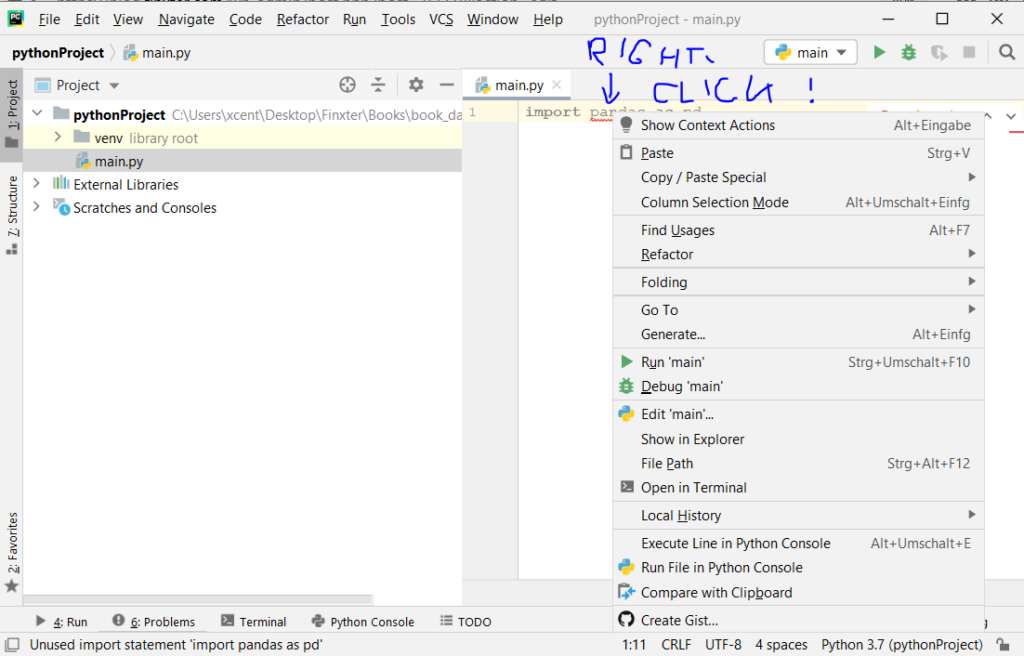
The fix is simple: Use the PyCharm installation tooltips to install Pandas in your virtual environment—two clicks and you’re good to go!
First, right-click on the pandas text in your editor:
Second, click “Show Context Actions” in your context menu. In the new menu that arises, click “Install Pandas” and wait for PyCharm to finish the installation.
The code will run after your installation completes successfully.
Rapid Answer: The following one-liner calculates the MD5 from the string 'hello world':
import hashlib as h;print(h.md5(b'hello world').hexdigest())
Background: MD5 message-digest is a vulnerable cryptographic algorithm to map a string to a 128-bit hash value. You can use it as a checksum on a given text to ensure that the message hasn’t been corrupted. However, you shouldn’t use it as a protection against malicious corruption due to its vulnerability. With modern hardware and algorithms, it’s easy to crack!
Problem: How to generate an MD5 sum from a string?
Example: Say, you have the following string text:
text = 'hello world'
And you want to convert it to the MD5 hash value:
5eb63bbbe01eeed093cb22bb8f5acdc3
We’ll discuss some methods to accomplish this next.
Method 1: hashlib.md5() — Multi-Liner
The hashlib library provides a function md5() that creates an object that can calculate the hash value of a given text for you via the method update():
# Method 1: hashlib.md5()
import hashlib m = hashlib.md5()
text = 'hello world'
m.update(text.encode('utf-8')) print(m.hexdigest())
# 5eb63bbbe01eeed093cb22bb8f5acdc3
Make sure to encode the string as a Unicode string with the string.encode('utf-8') method. Otherwise, Python will throw an error.
I also initialized the md5 object with the Unicode string directly rather than using the update() method. The one-liner now has minimum number of characters—I don’t think it can be made even more concise!
Python One-Liners Book
Python programmers will improve their computer science skills with these useful one-liners.
Python One-Linerswill teach you how to read and write “one-liners”: concise statements of useful functionality packed into a single line of code. You’ll learn how to systematically unpack and understand any line of Python code, and write eloquent, powerfully compressed Python like an expert.
The book’s five chapters cover tips and tricks, regular expressions, machine learning, core data science topics, and useful algorithms. Detailed explanations of one-liners introduce key computer science concepts and boost your coding and analytical skills. You’ll learn about advanced Python features such as list comprehension, slicing, lambda functions, regular expressions, map and reduce functions, and slice assignments. You’ll also learn how to:
• Leverage data structures to solve real-world problems, like using Boolean indexing to find cities with above-average pollution • Use NumPy basics such as array, shape, axis, type, broadcasting, advanced indexing, slicing, sorting, searching, aggregating, and statistics • Calculate basic statistics of multidimensional data arrays and the K-Means algorithms for unsupervised learning • Create more advanced regular expressions using grouping and named groups, negative lookaheads, escaped characters, whitespaces, character sets (and negative characters sets), and greedy/nongreedy operators • Understand a wide range of computer science topics, including anagrams, palindromes, supersets, permutations, factorials, prime numbers, Fibonacci numbers, obfuscation, searching, and algorithmic sorting
By the end of the book, you’ll know how to write Python at its most refined, and create concise, beautiful pieces of “Python art” in merely a single line.
Note that you can change the font-size to 15px, 17px, or even 20px—as you like! Also note that if you use another theme/style for your embedded code than bootstrap4, you need to set the CSS selector accordingly.