Posted on Leave a comment

Apache Flex Developer – Income and Opportunity

Before we learn about the money, let’s get this question out of the way:

What Is Flex?

Let’s have a look at the definition from the official Flex website:

“Flex is a powerful, open source application framework that allows you to easily build mobile applications for iOS, Android™, and BlackBerry® Tablet OS devices, as well as traditional applications for browser and desktop using the same programming model, tool, and codebase.

You can use the Flex SDK to create a wide range of highly interactive, expressive applications. For example, a data visualization application built in Flex can pull data from multiple back-end sources and display it visually. Business users can drill down into the data for deeper insight and even change the data and have it automatically updated on the back end. A product configuration application can help customers navigate the process of selecting or customizing products online. And a self-service application can guide customers through an address change or help employees complete an otherwise complicated multi-step benefits enrollment.”

Now that you know about what it is, let’s have a look at what it earns next!

Annual Income

How much does a Flex Developer make per year?

The average annual income of a Flex Developer in the United States is $99,000 per year according to PayScale. Top earners make $141,000 and more in the US!

Here’s a table of different job roles (source):

Job Title Income (avg)
Software Engineer $92,500
Application Developer $103,000
Senior Java Developer $82,000
Senior Product Manager $84,000
Software Developer, Web Applications $102,000
Software Engineering / Development Director $141,000
Sr. Software Engineer / Developer / Programmer $110,000

Let’s have a look at the hourly rate of Flex Developers next!

Hourly Rate

Flex Developers are well-paid on freelancing platforms such as Upwork or Fiverr.

If you decide to go the route as a freelance Flex Developer, you can expect to make between $30 and $40 per hour on Upwork (source). Assuming an annual workload of 2000 hours, you can expect to make between $60,000 and $80,000 per year.

⚡ Note: Do you want to create your own thriving coding business online? Feel free to check out our freelance developer course — the world’s #1 best-selling freelance developer course that specifically shows you how to succeed on Upwork and Fiverr!

Industry Demand

But is there enough demand? Let’s have a look at Google trends to find out how interest evolves over time (source):

Work Description

So, you may wonder: Flex Developer – what’s the definition?

Flex Developer Definition: A Flex Developer creates, edits, analyzes, debugs, and supervises the development of software written in the Flex programming framework. (Source)

Learning Path, Skills, and Education Requirements

Do you want to become a Flex Developer? Here’s a step-by-step learning path I’d propose to get started with Flex:

You can find many additional computer science courses on the Finxter Computer Science Academy (flatrate model).

But don’t wait too long to acquire practical experience!

Even if you have little skills, it’s best to get started as a freelance developer and learn as you work on real projects for clients — earning income as you learn and gaining motivation through real-world feedback.

🚀 Tip: An excellent start to turbo-charge your freelancing career (earning more in less time) is our Finxter Freelancer Course. The goal of the course is to pay for itself!

You can find more job descriptions for coders, programmers, and computer scientists in our detailed overview guide:

The following statistic shows the self-reported income from 9,649 US-based professional developers (source).

💡 The average annual income of professional developers in the US is between $70,000 and $177,500 for various programming languages.

Question: What is your current total compensation (salary, bonuses, and perks, before taxes and deductions)? Please enter a whole number in the box below, without any punctuation. If you are paid hourly, please estimate an equivalent weekly, monthly, or yearly salary. (source)

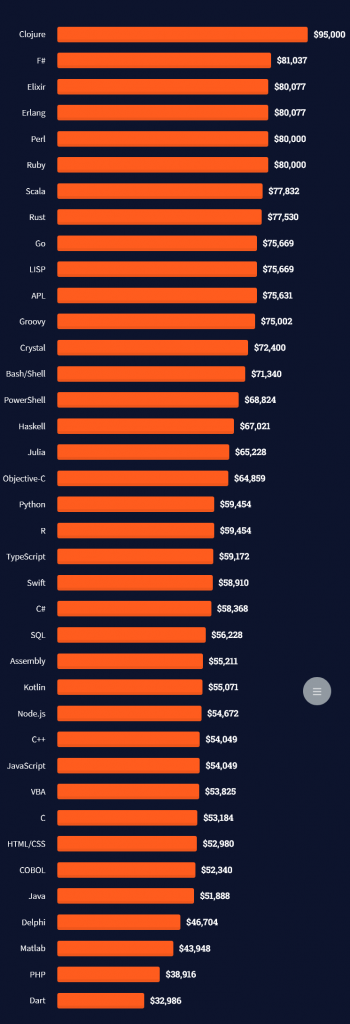
The following statistic compares the self-reported income from 46,693 professional programmers as conducted by StackOverflow.

💡 The average annual income of professional developers worldwide (US and non-US) is between $33,000 and $95,000 for various programming languages.

Here’s a screenshot of a more detailed overview of each programming language considered in the report:
Here’s what different database professionals earn:

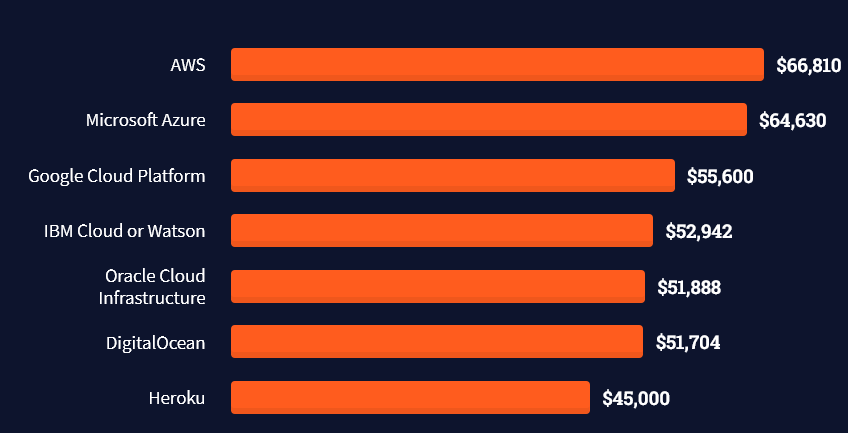
Here’s an overview of different cloud solutions experts:
Here’s what professionals in web frameworks earn:
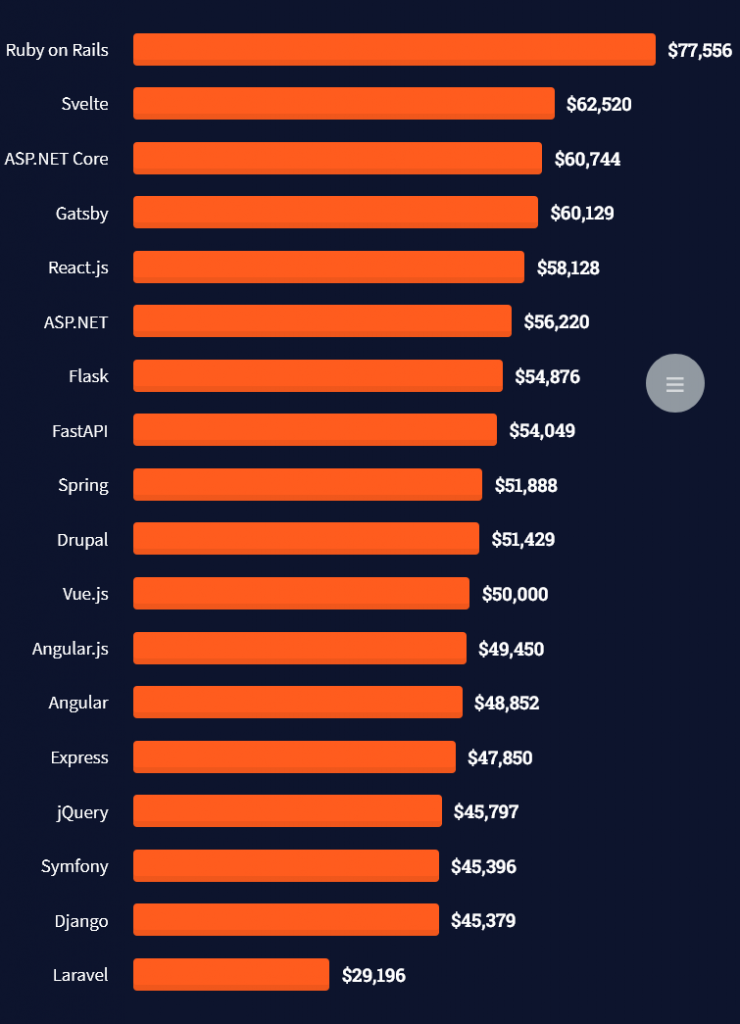
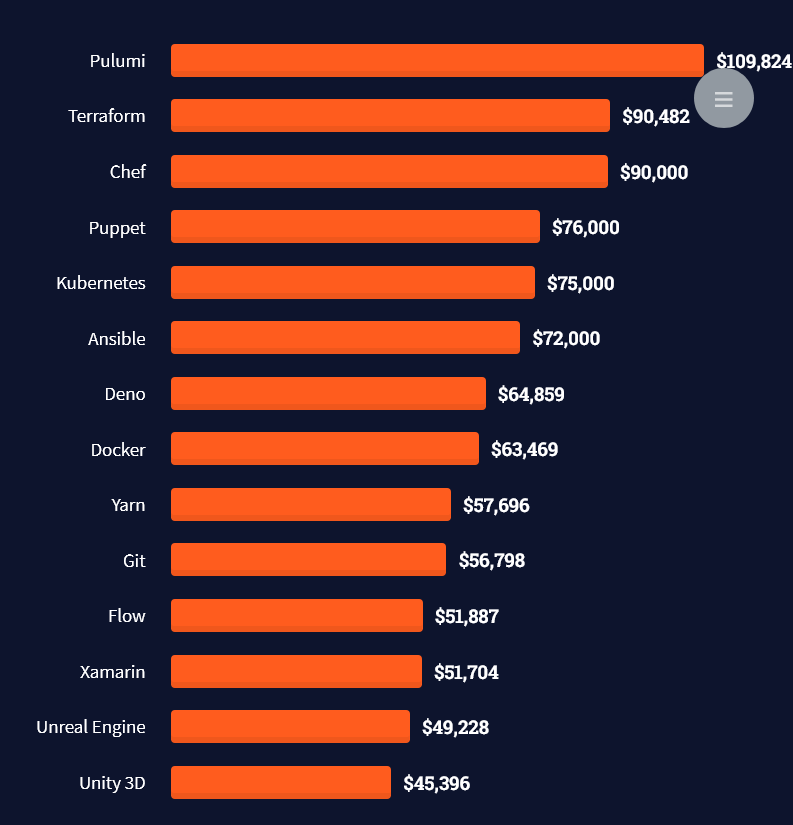
There are many other interesting frameworks—that pay well!
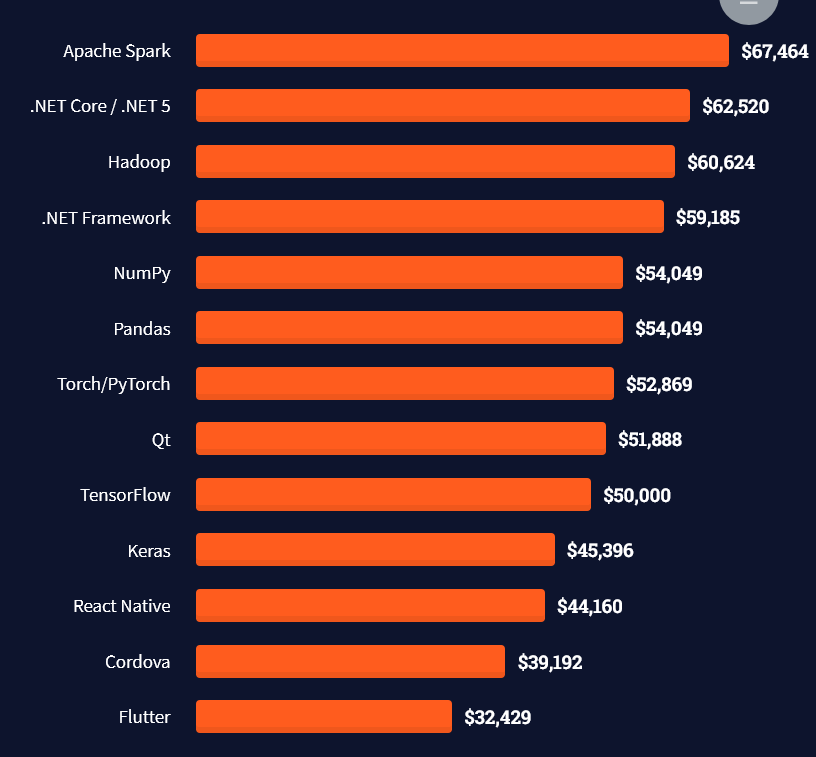
Look at those tools:
Okay, but what do you need to do to get there? What are the skill requirements and qualifications to make you become a professional developer in the area you desire?

Let’s find out next!

General Qualifications of Professionals

StackOverflow performs an annual survey asking professionals, coders, developers, researchers, and engineers various questions about their background and job satisfaction on their website.

Interestingly, when aggregating the data of the developers’ educational background, a good three quarters have an academic background.

Here’s the question asked by StackOverflow (source):

Which of the following best describes the highest level of formal education that you’ve completed?
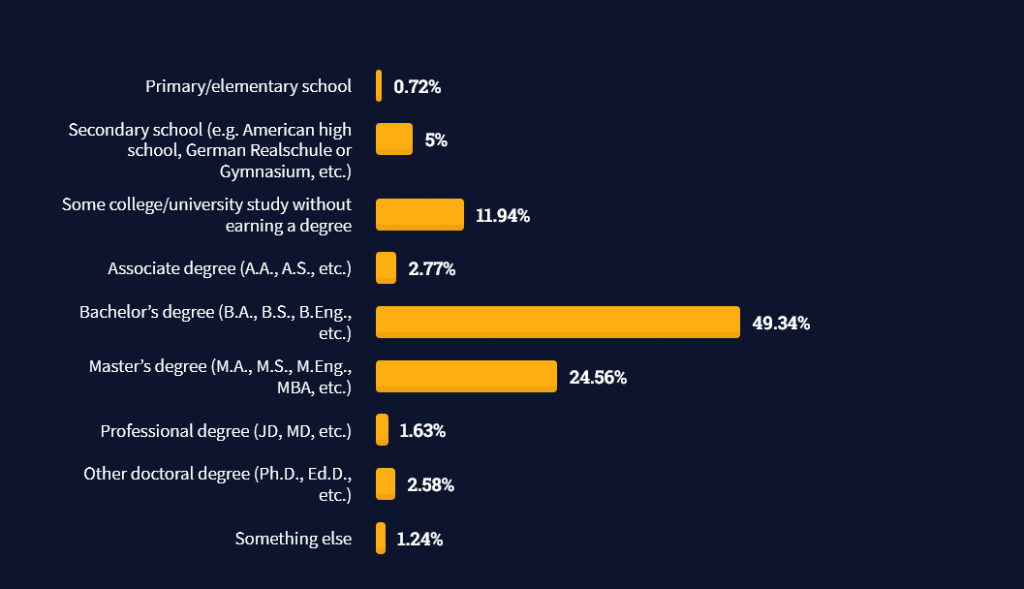
However, if you don’t have a formal degree, don’t fear! Many of the respondents with degrees don’t have a degree in their field—so it may not be of much value for their coding careers anyways.

Also, about one out of four don’t have a formal degree and still succeeds in their field! You certainly don’t need a degree if you’re committed to your own success!

Freelancing vs Employment Status

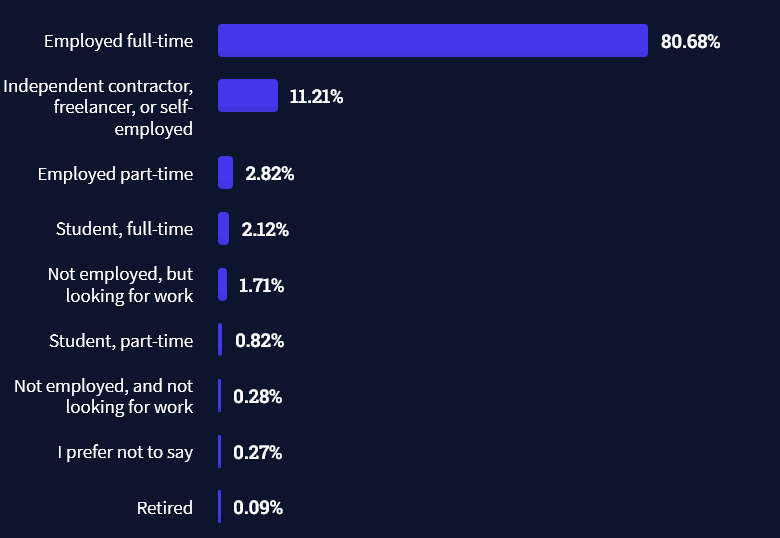
The percentage of freelance developers increases steadily. The fraction of freelance developers has already reached 11.21%!

This indicates that more and more work will be done in a more flexible work environment—and fewer and fewer companies and clients want to hire inflexible talent.

Here are the stats from the StackOverflow developer survey (source):
Do you want to become a professional freelance developer and earn some money on the side or as your primary source of income?

Resource: Check out our freelance developer course—it’s the best freelance developer course in the world with the highest student success rate in the industry!

Other Programming Languages Used by Professional Developers

The StackOverflow developer survey collected 58000 responses about the following question (source):

Which programming, scripting, and markup languages have you done extensive development work in over the past year, and which do you want to work in over the next year?

These are the languages you want to focus on when starting out as a coder:

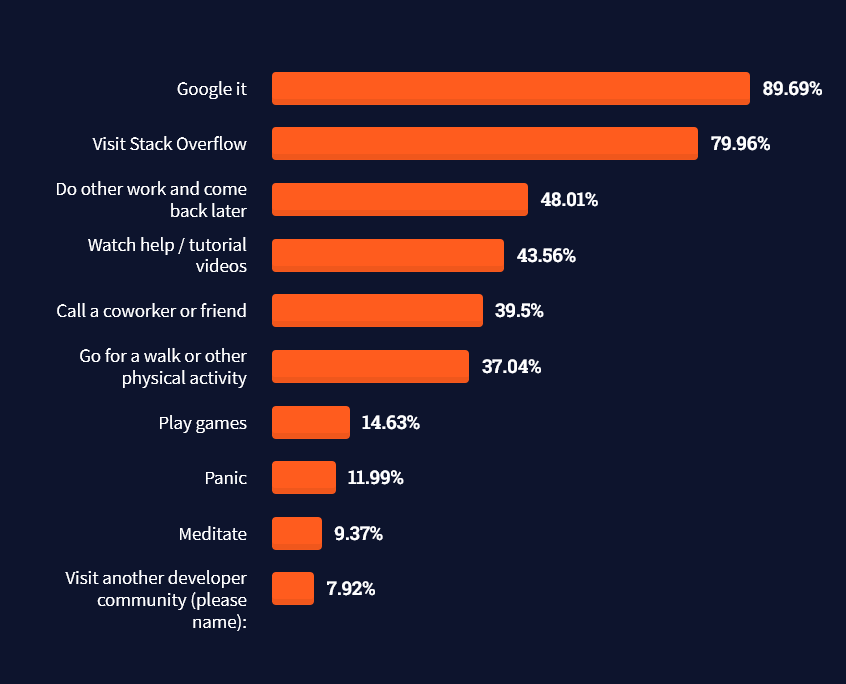
And don’t worry—if you feel stuck or struggle with a nasty bug. We all go through it. Here’s what SO survey respondents and professional developers do when they’re stuck:

What do you do when you get stuck on a problem? Select all that apply. (source)
To get started with some of the fundamentals and industry concepts, feel free to check out these articles:

Where to Go From Here?

Enough theory. Let’s get some practice!

Coders get paid six figures and more because they can solve problems more effectively using machine intelligence and automation.

To become more successful in coding, solve more real problems for real people. That’s how you polish the skills you really need in practice. After all, what’s the use of learning theory that nobody ever needs?

You build high-value coding skills by working on practical coding projects!

Do you want to stop learning with toy projects and focus on practical code projects that earn you money and solve real problems for people?

🚀 If your answer is YES!, consider becoming a Python freelance developer! It’s the best way of approaching the task of improving your Python skills—even if you are a complete beginner.

If you just want to learn about the freelancing opportunity, feel free to watch my free webinar “How to Build Your High-Income Skill Python” and learn how I grew my coding business online and how you can, too—from the comfort of your own home.

Join the free webinar now!

Posted on Leave a comment

The Ultimate Guide to Installing Ghostscript

In this article we explore how to install Ghostscript on numerous different platforms and operating systems.

What is Ghostcript? Why install it?

What is Ghostscript, and why would we want to install it? To understand this we should first learn about Postscript.

Postscript

Postscript is a page description language geared towards desktop publishing documents.

If you want really professional-looking typesetting, layout, and graphics in your documents, desktop publishing software is what you use.

It was first created at Adobe Systems starting in 1982. As a language, it is similar to Python in that documents contain human-readable and writable commands in the language that can be parsed by an interpreter to get something done.

In the case of Python, text files containing Python commands can be parsed by the Python interpreter to create any kind of program imaginable.

In the case of Postscript, files containing Postscript commands can be parsed by a Postscript interpreter to render professional-looking documents, either to the screen or to a printer.

In addition, the PDF format is an extension of the Postscript language which adds more functionality and is now one of the most commonly used document formats.

Ghostscript

Ghostscript is a free open-source interpreter to render Postscript and PDF documents.

One of the reasons you might want to install it is to use a program that requires it.

Even without a program that needs it, installing Ghostscript can be useful:

⭐ Ghostscript can be used to modify PDF documents, such as converting PDF to images, or extracting text, among other things.

Even better, since Ghostscript provides a language-binding API, Ghostscript functions can be implemented in other languages, allowing us to write our own programs for modifying PDF documents. Supported languages are C#, Java, and Python.

Checking if Ghostscript is Already Installed

You may already have Ghostscript installed – your system may have come with it, or it may have been installed in support of a program you have installed. So save yourself some effort and check first.

Checking for Ghostscript on Windows

  1. Press Windows+R to open the “Run” box.   
  2. In the “Run” box type “cmd”.   
  3. A command line window opens.   
  4. In the command line window type “GSWIN64 -h” if your system is 64 bit (most machines these days), or “GSWIN32 -h” if your system is 32 bit (older machines). If Ghostscript is installed you will see Ghostscript help information. If you see an error then Ghostscript is not installed.   
  5. Type “exit” to close the command line window.

Checking for Ghostscript on Mac

  1. In the Finder, open the /Applications/Utilities folder, then double-click Terminal.   
  2. In the terminal window type “gs -h”. If Ghostscript is installed you will see Ghostscript help information. If you see an error then Ghostscript is not installed.       
  3. In the Terminal app on your Mac, choose Terminal > Quit Terminal.

Checking for Ghostscript on Linux

  1. Open a terminal window. How to do this varies depending on which distribution of Linux you are using.   
  2. In the terminal window type “gs -h”. If Ghostscript is installed you will see Ghostscript help information. If you see an error then Ghostscript is not installed.

Installing Ghostscript on Windows

  1. Go to the Ghostscript download page at https://www.ghostscript.com/releases/gsdnld.html    
  2. There are two license versions available: Affero GPL (AGPL), and commercial. Review the license information at https://artifex.com/licensing/. For casual use most users will chose AGPL.   
  3. Choose 64 bit or 32 bit depending on your system.   
  4. Download your choice by clicking on the chosen link.   
  5. The installer program will download.   
  6. The downloaded program will be gsxxxxw64.exe or gsxxxxw32.exe. The ‘xxxx’ will be numbers indicating the release version. The most current version as of this writing is 9.55.0, so the installer program would be gs9550w64.exe for the 64 bit version.   
  7. Double-click the downloaded installer program.   
  8. Follow the prompts to do the installation.

Installing Ghostscript on Unix

Use this for any UNIX-based machine, so this should work for Mac or Linux.

Most UNIX systems have much easier ways of installing Ghostscript, so you will almost certainly not need to do this.

However, if you have trouble with those easier approaches you might try this as a backup.

This method usually works, but sometimes it does not, and then you need to do some troubleshooting to figure out why (the configure file might not be configured properly for your system, for example).

Also note that you will need to make sure that compiling software for Linux or Mac is installed on your system, which is beyond the scope of this article. So choose this approach as a last resort.

  1. Go to the Ghostscript download page and download the source code version. As of this writing this file is ghostscript-9.55.0.tar.gz   
  2. Move this file to some folder where you want to work.   
  3. Unarchive the downloaded file. Usually your system will be configured to do so by double-clicking the file. If not, you can unarchive using this command in the terminal: tar -xzf ghostscript-9.55.0.tar.gz. The file will unpack into sub-directories and files.   
  4. In the terminal go to the top unpacked sub-directory.   
  5. Run the configure file by typing ./configure in your terminal. This will review your system and get ready to compile the code.   
  6. Compile the code by typing make in your terminal.   
  7. Install the compiled code by typing this: sudo make install

Here are the commands for ease of copy&paste:

tar -xzf ghostscript-9.55.0.tar.gz
./configure
make
sudo make install

Installing Ghostscript on Mac

The easiest way to install Ghostscript on Mac is to use the Homebrew or Macports systems. These are package management systems for Mac that make available to the Mac the wide world of Unix open-source software.

In these systems, much of the configuring is done for you by others so that downloading and installing software is as easy as a single command, just like downloading an app for the Mac is as simple as clicking an icon in the Mac App Store.

What programs are available depends on what has been prepared by others for the system.

Fortunately, Ghostscript is available for these systems.

Setting up these systems is beyond the scope of this article. This page has a nice summary of those systems (and of the Fink system, another package management system). Follow their respective links to learn more about each system.

Install Ghostscript using Homebrew using the following command:

brew install ghostscript

Install Ghostscript using Macports using the following command:

sudo port install ghostscript

Installing Ghostscript on Ubuntu

It is often most intuitive to install software on Ubuntu using the GUI-based software application.

This accesses the repositories of extensive software available for Ubuntu.

However, it is often the fastest to do a command line install. Do so for Ghostscript as follows:

sudo apt install ghostscript

Installing Ghostscript on Other Debian-based Distributions

There are many distributions that, like Ubuntu, are based on Debian.

Many also have GUI applications for installing software, and often these can be used to install Ghostscript. But like Ubuntu, it is often the fastest to use the command line install.

The command is still the same:

sudo apt install ghostscript

Installing Ghostscript on Centos 7, and Other Red Hat/ Fedora-based Distributions

Centos 7 is a free version of the Red Hat Linux distribution, without Red Hat branding or technical support from Red Hat.

Fedora is the “bleeding-edge” freely available distribution in the Red Hat family of distributions that serves as the development foundation for the more robust and stable Red Hat distribution.

Since these are all in the same distribution family, they are all most quickly updated by the same command. The many other distributions in this family are also most quickly updated by the same command.

The command is:

sudo yum install ghostscript

Installing Ghostscript for Anaconda

If you are a data scientist more comfortable with data analysis in Anaconda than you are comfortable with OS management, you can still make sure you have ghostscript through Anaconda.

Open the Anaconda command line interface and enter the following command to install Ghostscript:

conda install -c conda-forge ghostscript

Installing Ghostscript in Google Colab

Ghostscript can even be installed in Google Colab.

Cells in Colab are in-effect like the Python shell. Therefore users can use the exclamation mark to submit OS shell commands, then enter the command to install Ghostscript.

The OS behind Colab operates like Ubuntu, so the installation command mirrors that of Ubuntu. Therefore, to install Ghostscript enter the following command in a Colab cell:

!apt get install ghostscript

Conclusion

Ghostscript is a free open-source interpreter that renders Postscript and PDF documents either to the screen or to a printer.

Ghostscript can also be used to process or modify such documents.

Even better, because Ghostscript includes a language-binding API, programmers can use it to write programs in other languages to modify PDF documents.

Supported languages are C#, Java, and Python.

As you can see, Ghostscript is available on many different platforms and operating systems. We have exhibited commands to install Ghostscript on many of these various platforms.

We hope you have found this helpful, and we wish you happy coding!


Posted on Leave a comment

Check for NaN Values in Python

Overview

Problem: How to check if a given value is NaN?

Here’s a quick look at the solutions to follow:

import math
import numpy as np
import pandas as pd x = float('nan')
print(math.isnan(x))
print(x != x)
print(np.isnan(x))
print(pd.isna(x))
print(not(float('-inf') < x < float('inf')))

So, what is a NaN value?

NaN is a constant value that indicates that the given value is Not a Number. It’s a floating-point value, hence cannot be converted to any other type other than float. We should know that NaN and Null are two different things in Python. The Null values indicate something which does not exist, i.e. is empty. But that is not the case with NaN.

We have to deal with NaN values frequently in Python especially when we deal with array objects or DataFrames. So, without further delay, let us dive into our mission critical question and have a look at the different methods to solve our problem.

Method 1: Using math.isnan()

The simplest solution to check for NaN values in Python is to use the mathematical function math.isnan().

math.isnan() is a function of the math module in Python that checks for NaN constants in float objects and returns True for every NaN value encountered and returns False otherwise.

Example:

# Importing the math module
import math # Function to check for NaN values
def isNaN(a): # Using math.isnan() if math.isnan(a): print("NaN value encountered!") else: print("Type of Given Value: ", type(a)) # NaN value
x = float('NaN')
isNaN(x)
# Floating value
y = float("5.78")
isNaN(y)

Output:

NaN value encountered!
Type of Given Value: <class 'float'>

In the above example, since x represents a NaN value, hence, the isNaN method returns True but in case of y , isNan returns False and prints the type of the variable y as an output.

Method 2: Hack NaN Using != Operator

The most unique thing about NaN values is that they are constantly shapeshifting. This means we cannot compare the NaN value even against itself. Hence, we can use the != (not equal to) operator to check for the NaN values. Thus, the idea is to check if the given variable is equal to itself. If we consider any object other than NaN, the expression (x == x) will always return True. If it’s not equal, then it is a NaN value.

Example 1:

print(5 == 5)
# True
print(['a', 'b'] == ['a', 'b'])
# True
print([] == [])
# True
print(float("nan") == float("nan"))
# False
print(float("nan") != float("nan"))
# True

Example 2:

# Function to check for NaN values
def not_a_number(x): # Using != operator if x != x: print("Not a Number!") else: print(f'Type of {x} is {type(x)}') # Floating value
x = float("7.8")
not_a_number(x)
# NaN value
y = float("NaN")
not_a_number(y)

Output:

Type of 7.8 is <class 'float'>
Not a Number!

Method 3: Using numpy.isnan()

We can also use the NumPy library to check whether the given value is NaN or not. We just need to ensure that we import the library at the start of the program and then use its np.isnan(x) method.

The np.isnan(number) function checks whether the element in a Numpy array is NaN or not. It then returns the result as a boolean array.

Example: In the following example we have a Numpy Array and then we will check the type of each value. We will also check if it is a NaN value or not.

import numpy as np arr = np.array([10, 20, np.nan, 40, np.nan])
for x in arr: if np.isnan(x): print("Not a Number!") else: print(x, ":", type(x))

Output:

10.0 : <class 'numpy.float64'>
20.0 : <class 'numpy.float64'>
Not a Number!
40.0 : <class 'numpy.float64'>
Not a Number!

💡TRIVIA

Let us try to perform some basic functions on an numpy array that involves NaN values and find out what happens to it.

import numpy as np arr = np.array([10, 20, np.nan, 40, np.nan])
print(arr.sum())
print(arr.max())

Output:

nan
nan

Now this can be a problem in many cases. So, do we have a way to eliminate the NaN values from our array object and then perform the mathematical operations upon the array elements? Yes! Numpy facilitates us with methods like np.nansum() and np.nanmax() that help us to calculate the sum and maximum values in the array by ignoring the presence of NaN values in the array.

Example:

import numpy as np arr = np.array([10, 20, np.nan, 40, np.nan])
print(np.nansum(arr))
print(np.nanmax(arr))

Output:

70.0
40.0

Method 4: Using pandas.isna()

Another way to solve our problem is to use the isna() method of the Pandas module. pandas.isna() is a function that detects missing values in an array-like object. It returns True if any NaN value is encountered.

Example 1:

import pandas as pd x = float("nan")
y = 25.75
print(pd.isna(x))
print(pd.isna(y))

Output:

True
False

Example 2: In the following example we will have a look at a Pandas DataFrame and detect the presence of NaN values in the DataFrame.

import pandas as pd df = pd.DataFrame([['Mercury', 'Venus', 'Earth'], ['1', float('nan'), '2']])
print(pd.isna(df))

Output:

 0 1 2
0 False False False
1 False True False

Method 5: By Checking The Range

We can check for the NaN values by using another NaN special property: limited range. The range of all the floating-point values falls within negative infinity to infinity. However, NaN values do not fall within this range.

Hence, the idea is to check whether a given value lies within the range of -inf and inf. If yes , then it is not a NaN value else it is a NaN value.

Example:

li = [25.87, float('nan')]
for i in li: if float('-inf') < float(i) < float('inf'): print(i) else: print("Not a Number!")

Output:

25.87
Not a Number!

Recommended read: Python Infinity

Conclusion

In this article, we learned how we can use the various methods and modules (pandas, NumPy, and math) in Python to check for the NaN values. I hope this article was able to answer your queries. Please stay tuned and subscribe for more such articles. 

Authors: SHUBHAM SAYON and RASHI AGARWAL


Do you want to become a NumPy master? Check out our interactive puzzle book Coffee Break NumPy and boost your data science skills! (Amazon link opens in new tab.)

Coffee Break NumPy
Posted on Leave a comment

Is There A Way To Create Multiline Comments In Python?

Summary: You can use consecutive single-line comments (using # character) to create a block of comments (multiline comments) in Python. Another way is to use """ quotes to enclose the comment block.


Problem Statement: How to create multiline comments in Python?

Other programming languages like C++, Java, and JavaScript, have an inbuilt mechanism (block comment symbols) for multiline comments, but there is no built-in mechanism for multiline comments in Python. Hence, the following code won’t work:

/* This is a multiline Comment in Python */

The above code will throw an error in Python. However, there are still some workarounds to using the multiline comments in Python. Let’s look at the different methods to do this in this article.

  • Quick Trivia on Comments:
    • Comments are a very important part of every programming language as it explains the logic used in the code. The developers provide these comments to make it more readable and for the users to get a better understanding of the code. The comments don’t run as they are ignored by the interpreters and compilers. Comments also help us while we are debugging, i.e., when there are two lines of code, we can comment one out to prevent it from running.
  • What is a multiline comment in Python?
    • A multiline comment in Python is a comment that generally expands to multiple lines, i.e., multiline comments are the comments that expand to two or more lines in the source code.

Method 1: Using Multiple Single Line Comments

We can use the multiple single-line comments to create multiline comments in Python. But first, you must know how to make a single-line comment is in Python. The Hash character (#) is used to make single-line comments in Python. The commented line does not get printed in the output.

Example:

# print("Hello Finxters")
print("Learning to create multiline comments in Python")

Output:

Learning to create multiline comments in Python

Now let’s create multiline comments using consecutive single line comments:

Example:

print("Learning to create multiline comments in Python")
# print("Hello Finxters")
# print("This is a")
# print("Multiline comment")
# print("in Python")
print("End of program")

Output:

Learning to create multiline comments in Python End of program

As we can see that the commented lines are ignored by the parser in Python, thereby creating a block of comments.

Discussion: Using single-line comments to comment out every line of a multiline comment individually becomes a very tedious process. Hence this method is not recommended to be used when you are not using any modern editor. However, most of the new code editors have a shortcut for block commenting in Python. You can just select a few lines of code using shift and the cursor keys and then press cmd + / (This shortcut may differ depending upon the editor you are using) to comment them out all at once. You can even uncomment them easily by simply selecting the block of comments and pressing the cmd + / keyboard shortcut.

Method 2: Using Docstrings Or Multiline Strings

We can create the multiline comments using multiline strings or docstrings in Python. This method has the same effect but is generally used for documentation strings, not block comments. However, if you want to comment things out temporarily, you can use this method. Python has two types of docstrings-
1) One-Line docstrings
2) Multiline docstrings.

To create a block comment, we use the multiline docstrings. Let’s create multiline comments using docstrings in the following example:

Example 1:

print("Learning to create multiline comments in Python") '''
print("Hello Finxters")
print("This is a")
print("Multiline comment")
print("in Python") '''
print("End of program")

Output:

Learning to create multiline comments in Python End of program

Example 2: Suppose you want to define a block comment inside a function using docstrings you have to do it the following way:

def multiply(x, y): res = x * y """ This is a multiline comment indented properly This function returns the result after multiplying the two numbers """ return res
print("The multiplication of the two numbers is", multiply(10, 5))

Output:

The multiplication of the two numbers is 50
  • Caution:
    • You must always ensure that you have used the indentation for the first """ correctly; otherwise, you may get a SyntaxError.
    • Also, if you are opening a multiline comment using three double quotes """ then you must ensure that you enclose the block with exactly three double quotes as well. If you do nt follow this convention, you will get an error again. For example – if you open a multiline comment with three double quotes and close it using three single quotes, then you will get an error.

Example I: If you don’t intend """ properly, you may get the following error:

def multiply(x, y): res = x * y """ This is a multiline comment indented properly This function returns the result after multiplying the two numbers """ return res
print("The multiplication of the two numbers is", multiply(10, 5))

Output:

File "main.py", line 10 return res ^ IndentationError: unexpected indent

Example II: Let’s visualize what happens when there is a mismatch between the type of triple quotes used.

def multiply(x, y): res = x * y """ This is a multiline comment indented properly This function returns the result after multiplying the two numbers ''' return res
print("The multiplication of the two numbers is", multiply(10, 5))

Output:

 File "C:\Users\SHUBHAM SAYON\PycharmProjects\Finxter\General\rough.py", line 10 print("The multiplication of the two numbers is", multiply(10, 5)) ^ SyntaxError: EOF while scanning triple-quoted string literal

Note: You must always be careful where you place these multiline comments in the code. If it is commented right after a class definition, function, or at the start of a module, it turns into a docstring that has a different meaning in Python.

Example:

def multiply(x, y): """ This is a multiline comment made right after the function definition It now becomes a function docstring associated with the function object that is also accessible as runtime metadata """ res = x * y return res
print("The multiplication of the two numbers is", multiply(10, 3))

Output:

The multiplication of the two numbers is 30

🖋The difference between the comment and the parser is that the comment is removed by the parser, whereas a docstring can be accessed programmatically at runtime and ends up in the byte code. 
Conclusion

Therefore, in this tutorial, we learned two ways of creating multiline comments in Python –
➨Using consecutive single-line comments.
➨Multiline strings (docstrings).

That’s all for this article. I hope you found it helpful. Please stay tuned and subscribe for more interesting articles and tutorials in the future. Happy learning!

🖋Authors: Rashi Agarwal and Shubham Sayon


Recommended Read:

Posted on Leave a comment

Define A Method Outside Of The Class Definition

Problem Statement: How to define a method outside of class definition in Python?

Example:

# Given Class
class Demo:
# Given Method def foo(self): x = 10 return x

Can we create foo() outside of the class definition or maybe even in another module?

Introduction

We all know Python is an object-oriented programming language, and in Python, everything is an object including properties and methods. In Python, the class is like an object’s constructor for creating the objects. Thus, the variables can be defined inside the class, outside the class, and inside the methods in Python. The variables defined outside the class can be accessed by any method or class by just writing the variable name. So, in this article, we are going to learn how to define a method outside of the class definition.

What are Methods in Python?

As Python is an object-oriented programming language, it has objects that consist of properties. The attributes define the properties of these objects, and the behavior is defined using methods. Methods are reusable pieces of code called at any point in the program and are defined inside the class. Every method is associated with the class and can be invoked on the instances of that class.

For example, we can consider a class named ‘Students’ that contains properties like name, id , and rank. The class also holds behaviors like run, jump , and swim. Suppose an object Stud1 has the following properties:

Name- Finxter
Id – 1020
Rank- 1

Here’s how you can assign the values:

class Student: def __init__(self, name, id, rank): self.name = name self.id = id self.rank = rank def run(self): print(f'{self.name} is a cross country champion!') def jump(self): print(f'{self.name} with the following ID: {self.id} is a high jumper!') def swim(self): print(f'{self.name} secured rank {self.rank} in swimming.') stud1 = Student('Finxter', 1020, 1)
stud1.run()
stud1.jump()
stud1.swim()

Output:

Finxter is a cross country champion!
Finxter with the following ID: 1020 is a high jumper!
Finxter secured rank 1 in swimming.

The above example demonstrated the traditional way of adding functionality (methods) to a Python class. Here, the methods were defined inside the class body. Now, let’s say that you want to define a method outside the class body. How will you do so? Let’s dive into the different approaches to unearth the answers to this question.

Define The Method Outside and Use Inside Class Body

The idea here is to define the method outside the class and then use it inside the class body, as shown below.

Example 1:

# Defining the method outside the class
def foo(self): print("Method foo executed") x = 10 print("Value of x = ", x)
# Using the method inside the class body
class Demo: my_method = foo

You can also define a class first and then add a method or function to it from outside its body, as shown below.

Example 2:

# Define the class
class Demo: pass # Define the method outside the class def foo(self): print("Method foo executed ") # Pass the method to the class
Demo.method1 = foo

Caution: We can even define the functions, methods, and classes in different modules if we want to. However, it is advisable to use example 1 rather than example 2 (defining the class in one module, then importing it into another module and further adding methods to it dynamically) because the class objects may behave differently depending on whether the module has been imported or not.

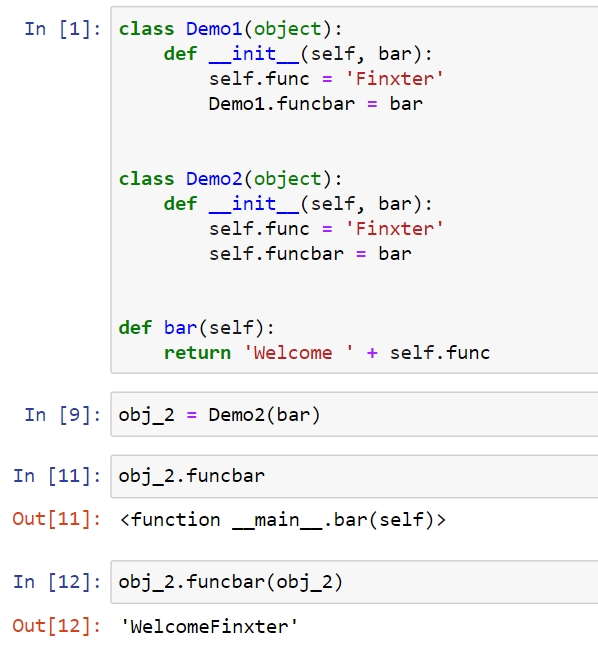
There’s another way to define the function outside of a class and then further add it. But there is a difference in assigning the function to the instance object or the class. Look at the following example to understand the subtle difference:

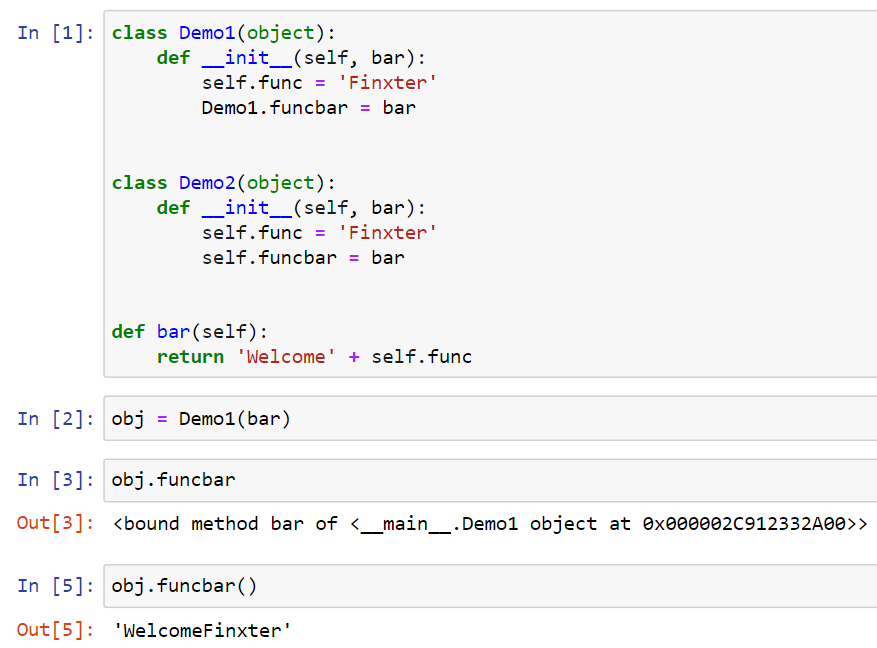
class Demo1(object): def __init__(self, bar): self.func = 'Finxter' Demo1.funcbar = bar class Demo2(object): def __init__(self, bar): self.func = 'Finxter' self.funcbar = bar def bar(self): return 'Welcome' + self.func

Explanation: Let’s understand what’s happening here.

  • In case of class Demo1 , funcbar is just like any other normal method that is bound to the instance of the class. Let’s have a look at what this looks like –
  • In case of class Demo 2, funcbar is simply a reference to the bar function, i.e., it is not a bound function. Thus, we must pass the instance for this function for it to work properly.

Using Inheritance

You can even use the methods of a class in another class. In the following example we have a class Helper with certain methods defined within it. All the methods of the class Helper can be inherited by the class Demo as shown below.

class Helper(object): # Subtraction function def subs(self, a, b): return a - b # Addition function def add(self, a, b): return a + b # Multiplication function def mul(self, a, b): return a * b # Division function def div(self, a, b): return a / b
# Given class
class Demo(Helper): def __init__(self): Helper.__init__(self) print("The addition of numbers is", self.add(10, 5)) print("Subtraction of numbers is", self.subs(60, 15)) print("Multiplication of numbers is", self.mul(5, 9)) print("The division of numbers is", self.div(100, 50))
# Main method
if __name__ == '__main__': obj = Demo()

Output:

The addition of numbers is 15
Subtraction of numbers is 45
Multiplication of numbers is 45
The division of numbers is 2.0

Related Read: Inheritance in Python

Conclusion

To sum things up, it is absolutely possible to have functions outside classes in Python. If you want to gather a group of functions in one box then you can simply put them together in the same module. Further, you can nest modules within packages. It is recommended that you should use classes when you have to create a new datatype and don’t just use it to group functions together.

That’s it for this discussion and I hope it helped you. Please stay tuned and subscribe for more interesting articles and discussions in the future. Happy learning!


Article by Shubham Sayon and Rashi Agarwal

Posted on Leave a comment

Puppet Developer – Income and Opportunity

Before we learn about the money, let’s get this question out of the way:

What Is Puppet?

Let’s have a look at the definition from this Puppet website (highlights be me):

“Puppet is an open source software configuration management and deployment tool. It’s most commonly used on Linux and Windows to pull the strings on multiple application servers at once. But you can also use Puppet on several platforms, including IBM mainframes, Cisco switches, and Mac OS servers.”

Popular alternatives to Puppet are:

Personally, I’d prefer RedHat’s Ansible framework. 😉

Now that you know about what it is, let’s have a look at what it earns next!

Annual Income

How much does a Puppet Developer make per year?

The average annual income of a Puppet Developer in the United States is $92,000 per year according to PayScale (source). Top earners make $160,000 and more in the US!

Here are different job descriptions using the Puppet skillset:

Let’s have a look at the hourly rate of Puppet Developers next!

Hourly Rate

Puppet Developers are well-paid on freelancing platforms such as Upwork or Fiverr.

If you decide to go the route as a freelance Puppet Developer, you can expect to make between $25 and $60 per hour on Upwork (source). Assuming an annual workload of 2000 hours, you can expect to make between $50,000 and $120,000 per year.

⚡ Note: Do you want to create your own thriving coding business online? Feel free to check out our freelance developer course — the world’s #1 best-selling freelance developer course that specifically shows you how to succeed on Upwork and Fiverr!

Industry Demand

But is there enough demand? Let’s have a look at Google trends to find out how interest evolves over time (source):

Work Description

So, you may wonder: Puppet Developer – what’s the definition?

Puppet Developer Definition: A Puppet Developer is a DevOps engineer who automates repetitive administrative tasks in cloud and distributed environments (servers).

Learning Path, Skills, and Education Requirements

Do you want to become a Puppet Developer? Here’s a step-by-step learning path I’d propose to get started with Puppet:

You can find many additional computer science courses on the Finxter Computer Science Academy (flatrate model).

But don’t wait too long to acquire practical experience!

Even if you have little skills, it’s best to get started as a freelance developer and learn as you work on real projects for clients — earning income as you learn and gaining motivation through real-world feedback.

🚀 Tip: An excellent start to turbo-charge your freelancing career (earning more in less time) is our Finxter Freelancer Course. The goal of the course is to pay for itself!

You can find more job descriptions for coders, programmers, and computer scientists in our detailed overview guide:

The following statistic shows the self-reported income from 9,649 US-based professional developers (source).

💡 The average annual income of professional developers in the US is between $70,000 and $177,500 for various programming languages.

Question: What is your current total compensation (salary, bonuses, and perks, before taxes and deductions)? Please enter a whole number in the box below, without any punctuation. If you are paid hourly, please estimate an equivalent weekly, monthly, or yearly salary. (source)

The following statistic compares the self-reported income from 46,693 professional programmers as conducted by StackOverflow.

💡 The average annual income of professional developers worldwide (US and non-US) is between $33,000 and $95,000 for various programming languages.

Here’s a screenshot of a more detailed overview of each programming language considered in the report:

Here’s what different database professionals earn:

Here’s an overview of different cloud solutions experts:

Here’s what professionals in web frameworks earn:

There are many other interesting frameworks—that pay well!

Look at those tools:

Okay, but what do you need to do to get there? What are the skill requirements and qualifications to make you become a professional developer in the area you desire?

Let’s find out next!

General Qualifications of Professionals

StackOverflow performs an annual survey asking professionals, coders, developers, researchers, and engineers various questions about their background and job satisfaction on their website.

Interestingly, when aggregating the data of the developers’ educational background, a good three quarters have an academic background.

Here’s the question asked by StackOverflow (source):

Which of the following best describes the highest level of formal education that you’ve completed?

However, if you don’t have a formal degree, don’t fear! Many of the respondents with degrees don’t have a degree in their field—so it may not be of much value for their coding careers anyways.

Also, about one out of four don’t have a formal degree and still succeeds in their field! You certainly don’t need a degree if you’re committed to your own success!

Freelancing vs Employment Status

The percentage of freelance developers increases steadily. The fraction of freelance developers has already reached 11.21%!

This indicates that more and more work will be done in a more flexible work environment—and fewer and fewer companies and clients want to hire inflexible talent.

Here are the stats from the StackOverflow developer survey (source):

Do you want to become a professional freelance developer and earn some money on the side or as your primary source of income?

Resource: Check out our freelance developer course—it’s the best freelance developer course in the world with the highest student success rate in the industry!

Other Programming Languages Used by Professional Developers

The StackOverflow developer survey collected 58000 responses about the following question (source):

Which programming, scripting, and markup languages have you done extensive development work in over the past year, and which do you want to work in over the next year?

These are the languages you want to focus on when starting out as a coder:

And don’t worry—if you feel stuck or struggle with a nasty bug. We all go through it. Here’s what SO survey respondents and professional developers do when they’re stuck:

What do you do when you get stuck on a problem? Select all that apply. (source)

To get started with some of the fundamentals and industry concepts, feel free to check out these articles:

Where to Go From Here?

Enough theory. Let’s get some practice!

Coders get paid six figures and more because they can solve problems more effectively using machine intelligence and automation.

To become more successful in coding, solve more real problems for real people. That’s how you polish the skills you really need in practice. After all, what’s the use of learning theory that nobody ever needs?

You build high-value coding skills by working on practical coding projects!

Do you want to stop learning with toy projects and focus on practical code projects that earn you money and solve real problems for people?

🚀 If your answer is YES!, consider becoming a Python freelance developer! It’s the best way of approaching the task of improving your Python skills—even if you are a complete beginner.

If you just want to learn about the freelancing opportunity, feel free to watch my free webinar “How to Build Your High-Income Skill Python” and learn how I grew my coding business online and how you can, too—from the comfort of your own home.

Join the free webinar now!

Posted on Leave a comment

Terraform Developer – Income and Opportunity

Before we learn about the money, let’s get this question out of the way:

What Is Terraform?

Let’s have a look at the definition from the official Terraform website:

“Terraform is an open-source infrastructure as code software tool that provides a consistent CLI workflow to manage hundreds of cloud services. Terraform codifies cloud APIs into declarative configuration files.”

source

Now that you know about what it is, let’s have a look at what it earns next!

Annual Income

How much does a Terraform Developer make per year?

The average annual income of a Terraform Developer in the United States is $116,000 per year according to PayScale (source). Top earners make $185,000 and more in the US!

Here’s a table with salary levels of jobs using the Terraform skillset to create more value for their companies and organizations:

Let’s have a look at the hourly rate of Terraform Developers next!

Hourly Rate

Terraform Developers are well-paid on freelancing platforms such as Upwork or Fiverr.

If you decide to go the route as a freelance Terraform Developer, you can expect to make between $40 and $200 per hour on Upwork (source). Assuming an annual workload of 2000 hours, you can expect to make between $80,000 and $400,000 per year.

⚡ Note: Do you want to create your own thriving coding business online? Feel free to check out our freelance developer course — the world’s #1 best-selling freelance developer course that specifically shows you how to succeed on Upwork and Fiverr!

Industry Demand

But is there enough demand? Let’s have a look at Google trends to find out how interest evolves over time (source):

Work Description

So, you may wonder: Terraform Developer – what’s the definition?

Terraform Developer Definition: A Terraform Developer is a DevOps engineer who manages a possibly large number of cloud platforms — such as AWS, Azure, or Google Cloud — via remote access and the Terraform utility toolsets.

Learning Path, Skills, and Education Requirements

Do you want to become a Terraform Developer? Here’s a step-by-step learning path I’d propose to get started with Terraform:

You can find many additional computer science courses on the Finxter Computer Science Academy (flatrate model).

But don’t wait too long to acquire practical experience!

Even if you have little skills, it’s best to get started as a freelance developer and learn as you work on real projects for clients — earning income as you learn and gaining motivation through real-world feedback.

🚀 Tip: An excellent start to turbo-charge your freelancing career (earning more in less time) is our Finxter Freelancer Course. The goal of the course is to pay for itself!

You can find more job descriptions for coders, programmers, and computer scientists in our detailed overview guide:

The following statistic shows the self-reported income from 9,649 US-based professional developers (source).

💡 The average annual income of professional developers in the US is between $70,000 and $177,500 for various programming languages.

Question: What is your current total compensation (salary, bonuses, and perks, before taxes and deductions)? Please enter a whole number in the box below, without any punctuation. If you are paid hourly, please estimate an equivalent weekly, monthly, or yearly salary. (source)

The following statistic compares the self-reported income from 46,693 professional programmers as conducted by StackOverflow.

💡 The average annual income of professional developers worldwide (US and non-US) is between $33,000 and $95,000 for various programming languages.

Here’s a screenshot of a more detailed overview of each programming language considered in the report:

Here’s what different database professionals earn:

Here’s an overview of different cloud solutions experts:

Here’s what professionals in web frameworks earn:

There are many other interesting frameworks—that pay well!

Look at those tools:

Okay, but what do you need to do to get there? What are the skill requirements and qualifications to make you become a professional developer in the area you desire?

Let’s find out next!

General Qualifications of Professionals

StackOverflow performs an annual survey asking professionals, coders, developers, researchers, and engineers various questions about their background and job satisfaction on their website.

Interestingly, when aggregating the data of the developers’ educational background, a good three quarters have an academic background.

Here’s the question asked by StackOverflow (source):

Which of the following best describes the highest level of formal education that you’ve completed?

However, if you don’t have a formal degree, don’t fear! Many of the respondents with degrees don’t have a degree in their field—so it may not be of much value for their coding careers anyways.

Also, about one out of four don’t have a formal degree and still succeeds in their field! You certainly don’t need a degree if you’re committed to your own success!

Freelancing vs Employment Status

The percentage of freelance developers increases steadily. The fraction of freelance developers has already reached 11.21%!

This indicates that more and more work will be done in a more flexible work environment—and fewer and fewer companies and clients want to hire inflexible talent.

Here are the stats from the StackOverflow developer survey (source):

Do you want to become a professional freelance developer and earn some money on the side or as your primary source of income?

Resource: Check out our freelance developer course—it’s the best freelance developer course in the world with the highest student success rate in the industry!

Other Programming Languages Used by Professional Developers

The StackOverflow developer survey collected 58000 responses about the following question (source):

Which programming, scripting, and markup languages have you done extensive development work in over the past year, and which do you want to work in over the next year?

These are the languages you want to focus on when starting out as a coder:

And don’t worry—if you feel stuck or struggle with a nasty bug. We all go through it. Here’s what SO survey respondents and professional developers do when they’re stuck:

What do you do when you get stuck on a problem? Select all that apply. (source)

To get started with some of the fundamentals and industry concepts, feel free to check out these articles:

Where to Go From Here?

Enough theory. Let’s get some practice!

Coders get paid six figures and more because they can solve problems more effectively using machine intelligence and automation.

To become more successful in coding, solve more real problems for real people. That’s how you polish the skills you really need in practice. After all, what’s the use of learning theory that nobody ever needs?

You build high-value coding skills by working on practical coding projects!

Do you want to stop learning with toy projects and focus on practical code projects that earn you money and solve real problems for people?

🚀 If your answer is YES!, consider becoming a Python freelance developer! It’s the best way of approaching the task of improving your Python skills—even if you are a complete beginner.

If you just want to learn about the freelancing opportunity, feel free to watch my free webinar “How to Build Your High-Income Skill Python” and learn how I grew my coding business online and how you can, too—from the comfort of your own home.

Join the free webinar now!

Posted on Leave a comment

Top 10 Solidity Tutorials

If you are considering investing time in learning about blockchain, it can seem a weighty undertaking.  There are a multitude of blockchain variants such as Bitcoin, Ethereum, Litecoin, and Dogecoin, and the terminology can be just as confusing. 

Four general types of blockchain networks are in use today: public, private, consortium, and permissioned.  Each has its own rules as to who may administer the blockchains and who can participate as a node.

Of the blockchain variants, Ethereum is appealing due to its community-driven nature, and it allows for many use cases including DeFi (decentralized finance), DApps (decentralized applications), and NFTs (non-fungible tokens). 

To begin working with Ethereum, I started looking for tutorials, and there are certainly a lot of them.  I visited several sites that turned up in my searches.  I began at ethereum.org, where it bills itself as the programmable blockchain.

The learning section on the Ethereum website contains well over 150 tutorials, and Solidity has over 40 entries. 

💡 Info: Solidity is a high-level, object-oriented language for creating smart contracts (smart contracts are essentially the code or programs stored in the blockchain when sent from a wallet, whereupon the code executes), and is similar in appearance to Python or JavaScript. 

In no particular order, the following tutorials are among the most notable I found during my search.

Solidity for Beginners: Smart Contract Development Crash Course

Gregory McCubbin’s tutorial at Dapp University is a short tutorial for beginners, covering the basics of creating smart contracts.  It doesn’t linger on terminology and history but starts Solidity coding examples right away in the Remix IDE

So if you are eager to see Solidity in use, this quick tutorial (about an hour and a half) gets straight to the point.

Topics covered are language-related, such as constructors, data types, internal functions, etc.  This is a good tutorial for following along in an editor. 

I tried taking notes on paper, but decided better of it and resorted to my laptop.  The examples are easy to understand if you are already familiar with programming concepts, and the videos are short, about 15 – 20 minutes each. 

If you just want to get exposure to Solidity, you may find it worth the time, just don’t expect to use the code immediately. 

The examples in this tutorial are meant for explaining a few of the intricacies of Solidity, and is a small investment of your time to see what Solidity looks like with a few use cases.

Solidity Tutorial: How to Create NFTs with Hardhat

Learn how to leverage Node.js to build Ethereum Dapps and smart contracts.  If you are a JavaScript programmer, this tutorial steps you through the process of installing and configuring a Hardhat development environment with npm, the Node Package Manager.

This is a straightforward, text-based tutorial. 

There is little Solidity code, but the point is to avail yourself of the tools needed to write Solidity in a local, console-based, JavaScript IDE. 

You step through installing the environment, setting up a project, compiling a Solidity contract, and deploying it on the local network.  While you will need more knowledge of the Solidity language to write contracts and Dapps, this tutorial will help you set up your framework.

Solidity Smart Contract Tutuorials

Another text-based tutorial is at w3schools.io

It is more akin to documentation and use cases.  It doesn’t appear to be up to date, and uses varying Solidity versions. 

While there is no actual contract or Dapp built, the tutorial covers almost all of the features and keywords of the Solidity language. 

For instance, source code comments can be inline or block format like C++, and currency units are Wei, Finney, szabo, and ether.  I only listed this one for its brevity and still relevant information.

Hello World Smart Contract

Most beginners would probably want to check out this tutorial hosted at Ethereum.org. 

It is a full-stack guide using JavaScript and Solidity to build a Dapp. 

The only criticism is the need to create multiple 3rd party accounts, such as an Alchemy account for access to Web3 APIs and to generate an API key. 

Hardhat is used as a console-based IDE, and online services Ropsten Etherscan and Metamask are used for blockchain testing and access to a crypto wallet, respectively.  It is the most complete text-based tutorial I’ve read so far.

Complete Guide On Solidity Programming

Part of a larger Blockchain tutorial for beginners, this tutorial steps through Solidity programming from the basics of pragma directives and data types to Smart Contract design patterns. 

There are both textual and video components to this tutorial. 

I found the video tutorial more instructive, while the textual content was good as a guide or outline.

If you learn by jumping in immediately, I suggest focusing on the video portion of this tutorial. In fact, if the thoroughness of this tutorial is any indication, the whole Blockchain playlist of 26 tutorials would be a very good starting point. It covers Etherium, Bitcoin, Dogecoin, Dapps, Merkle Tree, NFT vs. Crypto, and a lot more.  It is current and last updated Feb 16, 2022.

Learn Solidity: Absolute Beginners Solidity Tutorial

From Tutorialspoint comes this tutorial for novices. 

The course assumes prior knowledge of programming in general and some basic familiarity with blockchain. 

It is a little dated, but it covers everything about Solidity. 

Navigation is as easy as clicking a heading on the sidebar.

I was impressed with the amount of content, and this would make an excellent reference page for Solidity. It was like reading the C/C++ reference documentation.  This is a text-only tutorial, and its primary mode of delivery is by example. 

Once you start writing smart contracts in Solidity, this tutorial could be handy to refer back to.

Solidity Tutorial: A Detailed Introduction

This is the tutorial I would suggest starting with. 

It is a year old, but there isn’t much code involved.  It is a good introduction to Solidity and Ethereum in general.  Compiler installation is covered, as well as Remix IDE and Docker images.  A quick introduction to syntax is followed by types, variables, and a few use cases.

Coverage of Ethereum, EVM, and smart contracts is seldom included in the tutorials I’ve reviewed.  The author delivers these details to help define what will be covered in this Solidity tutorial, a method called pre-learning in educational sciences.

Smart Contract Tutorial: Create a lottery smart contract in Solidity

Block Explorer put out a series of videos on smart contracts on YouTube.  The content is focused on smart contracts, but ventures into Web3.js, Chainlink, and Solidity among other topics. 

This particular video covers some peculiarities in Solidity as a lottery smart contract is built.  Remix IDE on the Ethereum site is used to sandbox the contract, so you can test functionality while refinements are made.  This video succeeds in giving a good overview of Solidity basics in about 45 minutes.

Web3 Tutorial: Solidity Smart Contracts

The penultimate tutorial I considered for this article is from Part Time Larry, and is the third of a series of ten recent tutorials on smart contracts.  The tutorial is organized as a series of posts at hackingthemarkets.com. 

The posts each relate to a topic in current Web3 practices regarding smart contracts.

This particular post has the viewer follow along, writing a smart contract within a full-stack environment that is already in place.  It’s a very thorough video with a textual component.  Seeing the tools used helps the viewer become familiar with them as they move back and forth between editor and console.

Solidity Blockchain Smart Contracts: Beginner to Expert

This final tutorial comes from one of my favorite tutorial websites, freecodecamp.org.  I think their work creating free tutorials to help people learn to code is exceptional. 

This tutorial is exceptional as well, it’s sixteen hours of coursework packed into one video.  I am still going through various parts, rewinding and reviewing areas I need to brush up on. 

I will be using this course for a few months I’m sure.

Almost everything in all the other videos is covered here with some additional content.  In addition to that, Python is used in this course, so it is relevant to my current endeavors as a Python developer

This tutorial/course should be considered if the previous tutorials were interesting and you are thinking about working in this niche as a developer.

Conclusion

I hope these tutorials are useful, and shed some light on what Solidity is used for. 

Most simply touch on what Solidity and smart contracts are, but a few of them are full courses. 

Whatever the level of interest you have in blockchain and Ethereum, with the investment of a little time, you are sure to find something of note in them.


Learn Solidity Course

Solidity is the programming language of the future.

It gives you the rare and sought-after superpower to program against the “Internet Computer”, i.e., against decentralized Blockchains such as Ethereum, Binance Smart Chain, Ethereum Classic, Tron, and Avalanche – to mention just a few Blockchain infrastructures that support Solidity.

In particular, Solidity allows you to create smart contracts, i.e., pieces of code that automatically execute on specific conditions in a completely decentralized environment. For example, smart contracts empower you to create your own decentralized autonomous organizations (DAOs) that run on Blockchains without being subject to centralized control.

NFTs, DeFi, DAOs, and Blockchain-based games are all based on smart contracts.

This course is a simple, low-friction introduction to creating your first smart contract using the Remix IDE on the Ethereum testnet – without fluff, significant upfront costs to purchase ETH, or unnecessary complexity.

Posted on Leave a comment

Python Regex – ¿Cómo contar el número de coincidencias?

Para contar un patrón de expresión regular varias veces en una cadena dada, usa el método len(re.findall(pattern, string)) que devuelve el número de subcadenas coincidentes o len([*re.finditer(pattern, text)]) que desempaqueta todas las subcadenas coincidentes en una lista y también devuelve la longitud de la misma.

Hace unas horas, escribí una expresión regular en Python que coincidía no una sino varias veces en el texto y me pregunté: ¿cómo contar el número de coincidencias?

Considera el ejemplo mínimo en el que buscas un número arbitrario de caracteres de palabras '[a-z]+' en una frase dada 'python is the best programming language in the world'.

Puedes ver mi vídeo explicativo a medida que lees el tutorial:

Artículo relacionado: Superpoderes Regex de Python – La guía definitiva

Los ingenieros de Google, Facebook y Amazon son auténticos maestros de expresiones regulares. Si quieres convertirte en uno también, echa un vistazo a nuestro nuevo libro: La forma más inteligente de aprender Python Regex (Amazon Kindle/Print, se abre en una nueva pestaña).

¿Cuántas coincidencias hay en la cadena? Para contar el número de coincidencias, puede usar varios métodos:

Método 1: Python re.findall()

Usa el método re.findall(pattern, string) que devuelve una lista de subcadenas coincidentes. Luego cuenta la longitud de la lista devuelta. Aquí hay un ejemplo:

>>> import re
>>> pattern = '[a-z]+'
>>> text = 'python is the best programming language in the world'
>>> len(re.findall(pattern, text))
9

¿Por qué es 9 el resultado? Debido a que hay nueve subcadenas coincidentes en la lista devuelta por el método re.findall():

>>> re.findall(pattern, text)
['python', 'is', 'the', 'best', 'programming', 'language', 'in', 'the', 'world']

Este método funciona muy bien si no hay coincidencias solapadas.

¿Quieres dominar el superpoder regex? Echa un vistazo a mi nuevo libro La forma más inteligente de aprender expresiones regulares en Python con el innovador enfoque de 3 pasos para el aprendizaje activo: (1) estudia un capítulo de libro, (2) resuelve un rompecabezas de código y (3) mira un video de capítulo educativo.

Método 2: Python re.finditer()

También puedes contar el número de veces que un patrón determinado coincide en un texto utilizando el método re.finditer(pattern, text):

Especificación: re.finditer(pattern, text, flags=0)

Definición: devuelve un iterador que repasa todas las coincidencias no solapadas del patrón en el texto.

El argumento flags te permite personalizar algunas propiedades avanzadas del motor regex, como por ejemplo si se debe ignorar el uso de mayúsculas en los caracteres. Puedes saber más sobre el argumento flags en el tutorial detallado de mi blog.

Ejemplo: puedes usar el iterador para contar el número de coincidencias. A diferencia del método re.findall() descrito anteriormente, esto tiene la ventaja de que puedes analizar los propios objetos coincidentes que contienen mucha más información que la simple subcadena coincidente.

import re
pattern = '[a-z]+'
text = 'python is the best programming language in the world'
for match in re.finditer(pattern, text): print(match) '''
<re.Match object; span=(0, 6), match='python'>
<re.Match object; span=(7, 9), match='is'>
<re.Match object; span=(10, 13), match='the'>
<re.Match object; span=(14, 18), match='best'>
<re.Match object; span=(19, 30), match='programming'>
<re.Match object; span=(31, 39), match='language'>
<re.Match object; span=(40, 42), match='in'>
<re.Match object; span=(43, 46), match='the'>
<re.Match object; span=(47, 52), match='world'> '''

Si quieres contar el número de coincidencias, puedes utilizar una simple variable count:

import re
pattern = '[a-z]+'
text = 'python is the best programming language in the world' count = 0
for match in re.finditer(pattern, text): count += 1 print(count)
# 9

O una solución más pitónica:

import re
pattern = '[a-z]+'
text = 'python is the best programming language in the world' print(len([*re.finditer(pattern, text)]))
# 9

Este método funciona muy bien si no hay coincidencias solapadas. Utiliza el operador asterisco * para desempaquetar todos los valores del iterable.

Método 3: Coincidencias solapadas

Los dos métodos anteriores funcionan muy bien si no hay coincidencias solapadas. Si hay coincidencias solapadas, el motor regex simplemente las ignorará porque “consume” todas las subcadenas coincidentes y comienza a comparar el siguiente patrón sólo después del índice stop de la coincidencia anterior.

Así que si necesitas encontrar el número de coincidencias superpuestas, necesitas usar un enfoque diferente.

La idea es hacer un seguimiento de la posición inicial de la coincidencia precedente e incrementarla en uno después de cada coincidencia:

import re
pattern = '99'
text = '999 ways of writing 99 - 99999' left = 0
count = 0
while True: match = re.search(pattern, text[left:]) if not match: break count += 1 left += match.start() + 1
print(count)
# 7 

Al hacer un seguimiento del índice start de la coincidencia anterior en la variable left, podemos controlar dónde hay que buscar la siguiente coincidencia en la cadena. Ten en cuenta que utilizamos la operación de rebanado de Python text[left:] para ignorar todos los caracteres a la izquierda que ya se han considerado en las coincidencias anteriores. En cada iteración del bucle, emparejamos otro patrón en el texto. Esto funciona incluso si esas coincidencias se solapan.

A dónde ir desde aquí

Has aprendido tres formas de encontrar el número de coincidencias de un patrón dado en una cadena.

¡Si tienes problemas con las expresiones regulares, echa un vistazo a nuestro tutorial de regex gratuito de 20.000 palabras en el blog de Finxter! ¡Te dará superpoderes de regex!

¿Quieres dominar el superpoder regex? Echa un vistazo a mi nuevo libro La forma más inteligente de aprender expresiones regulares en Python con el innovador enfoque de 3 pasos para el aprendizaje activo: (1) estudia un capítulo de libro, (2) resuelve un rompecabezas de código y (3) mira un video de capítulo educativo.

Curso Regex de Python

Los ingenieros de Google son maestros de expresiones regulares. El motor de búsqueda de Google es un motor de procesamiento de texto masivo que extrae valor de billones de páginas web.

Los ingenieros de Facebook son maestros de expresiones regulares. Las redes sociales como Facebook, WhatsApp e Instagram conectan a los humanos a través de mensajes de texto.

Los ingenieros de Amazon son maestros de expresiones regulares. Los gigantes del comercio electrónico envían productos basados en descripciones de productos textuales.Las expresiones regulares rigen el juego cuando el procesamiento de texto se encuentra con la informática. 

Si quieres convertirte también en un maestro de expresiones regulares, echa un vistazo al curso de Python regex más completo del planeta:

¿Por qué Finxter?

“Dadme una palanca lo suficientemente larga […] y moveré el mundo”. 🌍Arquímedes

¡Finxter pretende ser tu palanca! ¡Nuestro único propósito es aumentar la inteligencia colectiva de la humanidad a través de tutoriales de programación para que pueda aprovechar la inteligencia computacional infinita para su éxito! 🧠

Recursos de aprendizaje

¡Únase a nuestra academia gratuita de correo electrónico con más de 1000 tutoriales en Python, freelance, ciencia de datos y aprendizaje automático, y tecnología Blockchain!

Además, no dude en consultar nuestros libros de Finxter y el curso de freelancer #1 del mundo para crear su próspero negocio de codificación en línea. ⭐⭐⭐⭐⭐

Codificador independiente

Si no estás listo para hacerlo, no dudes en leer nuestro artículo de blog sobre cómo ganar tus primeros $ 3,000 como programador freelance.

¡TODOS LOS ENLACES DE LA BARRA LATERAL SE ABREN EN UNA NUEVA PESTAÑA!

Posted on Leave a comment

Convert Bytes To Floating Point Numbers

Summary: The struct module in Python, taken from the C programming language, lets you convert bytes to and from floating point numbers.


Problem: How to convert bytes to floating point numbers?

A quick look at the solution:

A Brief Introduction to Struct

The struct module has three main methods for data conversion:

  • unpack(),
  • pack()
  • calcsize().

➦ You can use the unpack() method to convert bytes to floating point numbers. The method accepts data format and the byte to be converted.

struct.unpack("f", <byte>)

➦ On the other hand, the pack() method helps in converting data types to bytes.

struct.pack("f", <floating point number>)

Where f stands for floats. As you will see in other parts of this tutorial, the struct module handles different data types such as characters, integers and floats. But before that, you should understand bytes, floating point numbers, and the concept of structs.

Definition Of Bytes And Floating Point Numbers

This section focuses on the roots of bytes and data formats.

Unlike humans that represent numbers in base 10 (0 to 9 digits), computers understand the language of 1s and 0s. A pair of 1 and 0 is a binary digit, shortened as a bit. So, the computer converts data into a series of 1s and 0s (bits) before storing them in the memory.

Likewise, non-numerical data get stored as bytes. For instance, a character occupies 1 byte of memory. An array of characters forms a string.

Format Type in C programming language size in bytes
c char 1
b signed char 1
B unsigned char 1
? _Bool 1
h short 2
H unsigned short 2
i int 4
I unsigned int 4
l long 4
L unsigned long 4
q long long 8
Q unsigned long long 8
s char[]
f float 4

Now that you understand how a computer interprets various data types, it would be best to learn how the struct module uses them to convert bytes to floating point numbers. Since struct has been taken from the C programming language, hence, a deeper understanding of how it works in C is crucial.

Struct Padding vs Packing

In the C programming language, a struct is a user-defined data type. Unlike other variables, a struct combines different data types in a structure. Here is an example.

struct Fruit { char firstLetter; int total;
};

We are creating a blueprint of a Fruit with a firstLetter character, and total integer. We can create a banana from the Fruit model, assigning it b as firstLetter and 23 as total.

struct Fruit fruit1 = { 'b', 23 };

Printing the size of each attribute,

printf("firstLetter is %d bytes and total is %d bytes \n", sizeof(fruit1.firstLetter),sizeof(fruit1.number));

we get the result as

firstLetter is 1 bytes and total is 4 bytes

The size of fruit1 should be (1 + 4 =) 5 bytes, right? Let’s check.

Size of fruit1 is 8 bytes

It turns out our computer uses more memory to store smaller data quantities. That happens due to a concept called padding.

CPU reads 4 bytes of data per cycle. For the first cycle, it adds three bytes of space to the available (1) byte and returns the result. Next, it finds 4 bytes and returns them. In total, it records (4 + 4 =) 8 bytes.

Padding wastes memory while reducing CPU cycles. Struct packing comes in to store more bytes in less memory.

#include <stdio.h>
#pragma pack(1) struct Fruit { char firstLetter; int number;
}; int main () { struct Fruit fruit1 = { 'b', 23 }; // printf("firstLetter is %d bytes and total is %d bytes \n", sizeof(fruit1.firstLetter),sizeof(fruit1.number)); printf("Size of fruit1 is %d bytes \n", sizeof(fruit1)); return 0;
}

We include #pragma pack(1) header with pack function of value 1 to reduce the memory wastage when compiling and assembling data. This time around, the struct size is what we expect: 1 byte + 4 bytes = 5 bytes.

Size of fruit1 is 5 bytes 

The key takeaway is that struct is a C programming language data structure for storing user-defined data types. Unlike other data types, it combines a continuous stream of different data types. The various data types consume more memory due to padding, something we can control using struct packing.

We can apply the concept of struct to convert data types to bytes in Python, as illustrated below.

How To Use The Struct Module In Python

Unlike C, which speaks to the memory through data types and compiling, Python is a high-level, dynamically-typed programming language. Most operations occur through modules (classes) that get translated and compiled to produce bytes. One such module is the struct module.
The struct module has three methods: pack(), unpack(), and calcsize(). The pack method accepts two parameters: format and data to be converted to bytes. Like the struct blueprint in C, the format part of the pack function in Python accepts various data types. For example,

struct.pack('iif', 2, 4, 7.68)

This means converting integer 2, integer 4 and float 7.68 to a stream of bytes. i stands for an integer while f represents floats.

You can represent repeating integers by a numeral. For example, iii can map to 3i. Also, you can separate the data types with a space. For example, 3i f is another representation for 3if.

We can check the format size by importing the module,

import struct 

and using its calcsize() method.

struct.calcsize('3if')

In the same way, we can convert a floating point number into bytes. Assume we want to convert 3.76 to bytes. We can do that using the following code.

byteData = struct.pack('f', 3.76) print(byteData)

Output:

b'\xd7\xa3p@'

Here, b stands for bytes. The other parts may differ as per computer depending on the memory address system and endianness. Let’s now find floating point numbers from bytes.

Convert Bytes To Floating Point Numbers

The unpack function accepts format, and the byte stream then converts it to a floating point number. For example, we can decode b'\xd7\xa3p@' as follows.

byteData = struct.unpack('f', b'\xd7\xa3p@') print(byteData)

The result is a tuple containing a floating point number with a massive number of decimal points.

(3.759999990463257,)

We can extract the result by surrounding the input with square brackets.

[byteData] = struct.unpack('f', b'\xd7\xa3p@')

The result of printing the output is 3.759999990463257.

The extended decimal output from a reduced input size shows the essence of scientific notation in computing. It also proves the reason for the preference of floating point numbers over integers.

Apart from efficiency, handling floating point numbers comes with speed since much work has gone into building floating point numbers over the years.

Conclusion

The struct module with its unpack() method helps convert bytes to floating point numbers. It would help to understand other methods such as pack() and calcsize because, from them, you can generate bytes from various data types.

Another way to ease handling the conversion is understanding the ins and outs of the struct module, as explained in this tutorial.