You should always apply your own critical thinking when it comes to the crypto space. One question asked by many critical thinkers who know the overall idea of the Bitcoin protocol but not yet its technicalities is:
Question: What if a miner is not trustworthy and tries to change my transaction?
Can the miner replace the receiver address with its own?
Can the miner change the transaction amount?
Can the miner change the sender address?
The answer to all those questions is: No. Because if you want to issue a transaction, you need to broadcast the information
(sender_public_key, receiver_public_key, amount)
But here’s the trick: you sign the transaction using the private key of the sender:
Everybody knows the public key of the sender because it’s included in the transaction and therefore in the block.
Knowing the public key of the sender, anybody can verify that the whole transaction was signed by the owner of the private key.
If you changed one thing in the transaction (even by 1 SAT), the signature would not fit the transaction anymore and everybody would be able to know it!
Info: With public-key cryptography, robust authentication is possible. A sender can combine a message with a private key to create a short digital signature on the message. Anyone with the sender’s corresponding public key can combine that message with a claimed digital signature. If the signature matches the message, the origin of the message is verified because it must have been made by the owner of the corresponding private key. (Modified from Wikipedia)
Now, what would happen if the miner would change any of the following information?
sender_public_key,
receiver_public_key,
amount,
Well, the signature would not match the changed transaction, so there are two possibilities for a malicious miner:
The miner would now have to include the original signature in the block which would not match the changed data. Any other miner would quickly see that the transaction is invalid and reject the block from the malicious miner. Remember: the assumption is that a majority of the mining power behaves properly in the Bitcoin protocol!
The miner would have to calculate a new signature that fits to the changed transaction data. However, this is not possible as they don’t know the private key of the sender!
The following video does a great job explaining these details in Bitcoin:
There are some details to it that I abstracted away. For example, miners do not actually check if a transaction is valid—that’s what full nodes are here for:
ALL full nodes verify all transactions in all blocks that they receive (as well as transactions received outside of blocks). Just because a block has a valid proof of work does not mean that the block is valid. It must still build upon a valid block and must only contain valid transactions. Full nodes still verify that transactions contained within a block are valid.
Contrary to popular belief, miners do not say what transactions are valid. Their job is to determine the order of transactions, within certain constraints. It is the job of full nodes to verify transactions, and all miners (or the mining pools) should be running full nodes.
Summary: os.path.basename(path) enables us to get the file name from the path, no matter what the os/path format. Another workaround is to use the ntpath module, which is equivalent to os.path.
Problem: How to extract the filename from a path, no matter what the operating system or path format is?
For example, let’s suppose that you want all the following paths to return demo.py:
Let us dive into the solutions without further delay.
❖ Method 1: Using os.path.basename
os.path.basename is a built-in method of the os module in Python that is used to derive the basename of a file from its path. It accepts the path as an input and then returns the basename of the file. Thus, to get the filename from its path, this is exactly the function that you would want to use.
Example 1: In Windows
import os
file_path = r'C:\Users\SHUBHAM SAYON\Desktop\codes\demo.py'
print(os.path.basename(file_path)) # OUTPUT: demo.py
Example 2: In Linux
Caution: If you use the os.path.basename() function on a POSIX system in order to get the basename from a Windows-styled path, for example: “C:\\my\\file.txt“, the entire path will be returned.
Tidbit: os.path.basename() method actually uses the os.path.split() method internally and splits the specified path into a head and tail pair and finally returns the tail part.
❖ Method 2: Using the ntpath Module
The ntpath module can be used to handle Windows paths efficiently on other platforms. os.path.basename function does not work in all the cases, like when we are running the script on a Linux host, and you attempt to process a Windows-style path, the process will fail.
This is where the ntpath module proves to be useful. Generally, the Windows path uses either the backslash or the forward-slash as a path separator. Therefore, the ntpath module, equivalent to the os.path while running on Windows, will work for all the paths on all platforms.
In case the file ends with a slash, then the basename will be empty, so you can make your own function and deal with it:
import ntpath def path_foo(path): head, tail = ntpath.split(path) return tail or ntpath.basename(head) paths = [r'C:\Users\SHUBHAM SAYON\Desktop\codes\demo.py', r'/home/username/Desktop/codes/demo.py', r'/home/username/Desktop/../demo.py']
print([path_foo(path) for path in paths]) # ['demo.py', 'demo.py', 'demo.py']
❖ Method 3: Using pathlib.Path()
If you are using Python 3.4 or above, then the pathlib.Path() function of the pathlib module is another option that can be used to extract the file name from the path, no matter what the path format. The method takes the whole path as an input and extracts the file name from the path and returns the file name.
Note: The .name property followed by the pathname is used to return the full name of the final child element in the path, regardless of whatever the path format is and regardless of whether it is a file or a folder.
Bonus Tip: You can also use Path("File Path").stem to get the file name without the file extension.
If you do not intend to use any built-in module to extract the filename irrespective of the OS/platform in use, then you can simply use the split() method.
Explanation: In the above example os.path.split() method is used to split the entire path string into head and tail pairs. Here, tail represents/stores the ending path name component, which is the base filename, and head represents everything that leads up to that. Therefore, the tail variable stores the name of the file that we need.
➤ A Quick Recap to split(): split() is a built-in method in Python that splits a string into a list based on the separator provided as an argument to it. If no argument is provided, then by default, the separator is any whitespace.
Explanation: The strip method takes care of the forward and backward slashes, which makes the path string fullproof against any OS or path format, and then the split method ensures that the entire path string is split into numerous strings within a list. Lastly, we will just return the last element from this list to get the filename.
If you have a good grip on regular expressions then here’s a regex specific solution for you that will most probably work on any OS.
import re
file_path = r'C:\Users\SHUBHAM SAYON\Desktop\codes\\'
def base_name(path): basename = re.search(r'[^\\/]+(?=[\\/]?$)', path) if basename: return basename.group(0) paths = [r'C:\Users\SHUBHAM SAYON\Desktop\codes\demo.py', r'/home/username/Desktop/codes/demo.py', r'/home/username/Desktop/../demo.py']
print([base_name(path) for path in paths]) # ['demo.py', 'demo.py', 'demo.py']
Do you want to master the regex superpower? Check out my new book The Smartest Way to Learn Regular Expressions in Python with the innovative 3-step approach for active learning: (1) study a book chapter, (2) solve a code puzzle, and (3) watch an educational chapter video.
Conclusion
To sum thungs up, you can use one of the following methods to extract the filename from a given path irrespective of the OS/path format:
Summary: You can evaluate the execution time of your code by saving the timestamps using time.time() at the beginning and the end of your code. Then, you can find the difference between the start and the end timestamps that results in the total execution time.
Table of Contents
Problem: Given a Python program; how will you measure the elapsed time ( the time taken by the code to complete execution)?
Consider the following snippet:
import time def perimeter(x): time.sleep(5) return 4 * x def area(x): time.sleep(2) return x * x p = perimeter(8)
print("Perimeter: ", p)
a = area(8)
print("Area: ", a)
Challenges:
How will you find the time taken by each function in the above program to execute?
How will you compute the total time elapsed by the entire code?
Tidbit: sleep() is a built-in method of the timemodule in Python that is used to delay the execution of your code by the number of seconds specified by you.
Now, let us conquer the given problem and dive into the solutions.
Method 1: Using time.time()
time.time() is a function of the time module in Python that is used to get the time in seconds since the epoch. It returns the output, i.e., the time elapsed, as a floating-point value.
The code:
import time def perimeter(x): time.sleep(5) return 4 * x def area(x): time.sleep(2) return x * x begin = time.time() start = time.time()
p = perimeter(8)
end = time.time()
print("Perimeter: ", p)
print("Time Taken by perimeter(): ", end - start) start = time.time()
a = area(8)
end = time.time()
print("Area: ", a)
print("Time Taken by area(): ", end - start) end = time.time()
print("Total time elapsed: ", end - begin)
Output:
Perimeter: 32
Time Taken by Perimeter(): 5.0040647983551025
Area: 64
Time Taken by area(): 2.0023691654205322
Total time elapsed: 7.006433963775635
Approach: ➤ Keep track of the time taken by each function by saving the time stamp at the beginning of each function with the help of a start variable and using the time() method. ➤ Similarly, the end time, i.e., the timestamp at which a function completes its execution, is also tracked with the help of the time() function at the end of each function. ➤ Finally, the difference between the end and the start time gives the total time taken by a particular function to execute. ➤ To find the total time taken by the entire program to complete its execution, you can follow a similar approach by saving the time stamp at the beginning of the program and the time stamp at the end of the program and then find their difference.
Discussion: If you are working on Python 3.3 or above, then another option to measure the elapsed time is perf_counter or process_time, depending on the requirements. Prior to Python 3.3, you could have used time.clock, however, it has been currently deprecated and is not recommended.
Method 2: Using time.perf_counter()
In Python, the perf_counter() function from the time module is used to calculate the execution time of a function and gives the most accurate time measure of the system. The function returns the system-wide time and also takes the sleep time into account.
import time def perimeter(x): time.sleep(5) return 4 * x def area(x): time.sleep(2) return x * x begin = time.perf_counter() start = time.perf_counter()
p = perimeter(8)
end = time.perf_counter()
print("Perimeter: ", p)
print("Time Taken by perimeter(): ", end - start) start = time.perf_counter()
a = area(8)
end = time.perf_counter()
print("Area: ", a)
print("Time Taken by area(): ", end - start) end = time.perf_counter()
print("Total time elapsed: ", end - begin)
Output:
Perimeter: 32
Time Taken by perimeter(): 5.0133558
Area: 64
Time Taken by are(): 2.0052768
Total time elapsed: 7.0189293
Caution: The perf_counter() function not only counts the time elapsed along with the sleep time, but it is also affected by other programs running in the background on the system. Hence, you must keep this in mind while using perf_counter for performance measurement. It is recommended that if you utilize the perf_counter() function, ensure that you run it several times so that the average time would give an accurate estimate of the execution time.
Method 3: Using time.process_time()
Another method from the time module used to estimate the execution time of the program is process_time(). The function returns a float value containing the sum of the system and the user CPU time of the program. The major advantage of the process_time() function is that it does not get affected by the other programs running in the background on the machine, and it does not count the sleep time.
import time def perimeter(x): time.sleep(5) return 4 * x def area(x): time.sleep(2) return x * x begin = time.process_time() start = time.process_time()
p = perimeter(8)
end = time.process_time()
print("Perimeter: ", p)
print("Time Taken by perimeter(): ", end - start) start = time.process_time()
a = area(8)
end = time.process_time()
print("Area: ", a)
print("Time Taken by area(): ", end - start) end = time.process_time()
print("Total time elapsed: ", end - begin)
Output:
Perimeter: 32
Time Taken by perimeter(): 5.141000000000173e-05
Area: 64
Time Taken by area(): 4.1780000000005146e-05
Total time elapsed: 0.00029919000000000473
Method 4: Using Timeit Module
timeit is a very handy module that allows you to measure the elapsed time of your code. A major advantage of using the timeit module is its ability to measure and execute lambda functions by specifying the number of executions.
Note: The timeit module turns off the garbage collection process temporarily while calculating the execution time.
Let us dive into the different methods of this module to understand how you can use it to measure execution time within your code.
4.1 Using timeit.timeit()
Example 1: In the following example, we will have a look at a lambda function being executed with the help of the timeit module such that we will be specifying the number of times this anonymous function will be executed and then calculate the time taken to execute it.
import timeit count = 1 def foo(x): global count print(f'Output for call{count} = {x * 3}') count += 1 a = timeit.timeit(lambda: foo(8), number=3)
print("Time Elapsed: ", a)
Output:
Output for call1 = 24
Output for call2 = 24
Output for call3 = 24
Time Elapsed: 6.140000000000312e-05
Explanation: After importing the timeit module, you can call the lambda function within the timeit.timeit() function as a parameter and also specify the number of times the function will be called with the help of the second parameter, i.e., number. In this case, we are calling the lambda function three times and printing the output generated by the function every time. Finally, we displayed the total time elapsed by the function.
4.2 Using timeit.repeat
Even though the above method allowed us to calculate the execution time of a lambda function, it is not safe to say that the value evaluated by the timeit() function was accurate. To get a more accurate result, you can record multiple values of execution time and then find their mean to get the best possible outcome. This is what timeit.repeat() function allows you to do.
Example:
import timeit count = 1 def foo(x): global count print(f'Output for call{count} = {x * 3}') count += 1 a = timeit.repeat(lambda: foo(8), number=1, repeat=3)
print(a)
s = 0
for i in a: s = s + i
print("Best Outcome: ", s)
Output:
Output for call1 = 24
Output for call2 = 24
Output for call3 = 24
[5.160000000001275e-05, 1.3399999999996748e-05, 1.0399999999993748e-05]
Best Outcome: 7.540000000000324e-05
4.3 Using timeit.default_timer()
Instead of using timeit.timeit() function, we can also use the timeit.default_timer(), which is a better option as it provides the best clock available based on the platform and Python version you are using, thereby generating more accurate results. Using timeit.default_timer() is quite similar to using time.time().
Example:
import timeit
import time def perimeter(x): time.sleep(5) return 4 * x def area(x): time.sleep(2) return x * x begin = timeit.default_timer() start = timeit.default_timer()
p = perimeter(8)
end = timeit.default_timer()
print("Perimeter: ", p)
print("Time Taken by Perimeter(): ", end - start) start = timeit.default_timer()
a = area(8)
end = timeit.default_timer()
print("Area: ", a)
print("Time Taken by Perimeter(): ", end - start) end = timeit.default_timer()
print("Total time elapsed: ", end - begin)
Output:
Perimeter: 32
Time Taken by Perimeter(): 5.0143883
Area: 64
Time Taken by Perimeter(): 2.0116591
Total time elapsed: 7.0264410999999996
Methdo 5: Using datetime.datetime.now()
The elapsed time can also be calculated using the DateTime.datetime.now() function from the datetime module in Python. The output of the method is represented as days, hours, and minutes. However, the disadvantage of this method is that it is slower than the timeit() module since calculating the difference in time is also included in the execution time.
Example:
import datetime
import time def perimeter(x): time.sleep(5) return 4 * x def area(x): time.sleep(2) return x * x begin = datetime.datetime.now() start = datetime.datetime.now()
p = perimeter(8)
end = datetime.datetime.now()
print("Perimeter: ", p)
print("Time Taken by Perimeter(): ", end - start) start = datetime.datetime.now()
a = area(8)
end = datetime.datetime.now()
print("Area: ", a)
print("Time Taken by Perimeter(): ", end - start) end = datetime.datetime.now()
print("Total time elapsed: ", end - begin)
Output:
Perimeter: 32
Time Taken by Perimeter(): 0:00:05.003221
Area: 64
Time Taken by Perimeter(): 0:00:02.011262
Total time elapsed: 0:00:07.014483
Conclusion
Thus to sum things up, you can use one of the following modules in Python to calculate the elapsed time of your code:
The time module
The timeit module
The datetime module
With that, we come to the end of this tutorial, and I hope you found it helpful. Please subscribe and stay tuned for more interesting articles.
Here’s a list of highly recommended tutorials if you want to dive deep into the execution time of your code and much more:
The most Pythonic way to check if a list has an even number of elements is to use the modulo expressionlen(my_list)%2 that returns 1 if the list length is odd and 0 if the list length is even. So to check if a list has an even number of elements use the expression len(my_list)%2==0.
As background, feel free to watch the following video on the modulo operator:
The length function is explained in this video and blog article:
A slight variant of this method is the following.
Method 2: len() and Modulo and bool()
To check if a list has an even number of elements, you can use the modulo expressionlen(my_list)%2 that returns 1 if the list length is odd and 0 if the list length is even. So to convert the even value 0 to a boolean, use the built-in bool() function around the result and invert the result, i.e., not bool(len(my_list)%2).
As background, you may want to look at this explainer video:
Method 3: Bitwise AND
You can use the expression len(my_list)&1 that uses the Bitwise AND operator to return 1 if the list has an even number of elements and 0 otherwise. Now, you simply convert it to a Boolean if needed using the bool() function and invert it using the not operator: not bool(len(my_list)&1).
Python’s bitwise AND operator x & y performs logical AND on each bit position on the binary representations of integers x and y. Thus, each output bit is 1 if both input bits at the same position are 1, otherwise, it’s 0.
If you run x & 1, Python performs logical and with the bit sequence y=0000...001. For the result, all positions will be 0 and the last position will be 1 only if x‘s last position is already 1 which means it is odd.
After converting it using bool(), you still need to invert it using the not operator so that it returns True if the list has an even number of elements.
Bitwise AND is more efficient than the modulo operator so if performance is an issue for you, you may want to use this third approach.
You may want to watch this video on the Bitwise AND operator:
Where to Go From Here?
Enough theory. Let’s get some practice!
Coders get paid six figures and more because they can solve problems more effectively using machine intelligence and automation.
To become more successful in coding, solve more real problems for real people. That’s how you polish the skills you really need in practice. After all, what’s the use of learning theory that nobody ever needs?
You build high-value coding skills by working on practical coding projects!
Do you want to stop learning with toy projects and focus on practical code projects that earn you money and solve real problems for people?
If your answer is YES!, consider becoming a Python freelance developer! It’s the best way of approaching the task of improving your Python skills—even if you are a complete beginner.
If you just want to learn about the freelancing opportunity, feel free to watch my free webinar “How to Build Your High-Income Skill Python” and learn how I grew my coding business online and how you can, too—from the comfort of your own home.
DevOps is a set of practices that automates the processes between software development and IT teams, in order that they can build, test, and release software faster and more reliably.
A DevOps engineer/specialist works with engineers, software developers, system operators (SysOps) and administrators (SysAdmins), and other production IT professionals to release and deploy code in the real world.
DevOps is the combination of cultural philosophies, practices, and tools that increases an organization’s ability to deliver applications and services at high velocity: evolving and improving products at a faster pace than organizations using traditional software development and infrastructure management processes.
You can play this video as you go over the full article—it’ll play well in the background and you can absorb more information this way:
If you’re interested in learning more about the income and opportunities of DevOps engineers, feel free to check out my in-depth tutorial on the Finxter blog.
Let’s dive into the top 20 skills of a DevOps engineer one by one:
Skill 1: Communication
DevOps engineers do not sit in an office and code all day. They must align goals and coordinate with both the developers and the operations teams. Great communication is crucial for DevOps engineers!
Skill 2: Listening
Many problems can be solved before they occur if you listen either to the developers who are close to the code or to the operators who are close to the customers. As a DevOps engineer, you need to listen to both in order to prevent problems before they happen.
A DevOps engineer is a great listener!
Skill 3: Specific DevOps Tools
There are multiple popular tools specifically to increase efficiency of DevOps engineers. Understanding relevant DevOps tools well is crucial for any professional!
I’ve written an “Income and Opportuntiy” article on some of the most popular tools here:
Skill 4: Basic Programming such as Python, Java, C++
Without understanding code, you cannot possibly become a great DevOps engineer. Yes, you are neither a developer nor an operator so you don’t need to lose yourself in the nitty-gritty details of programming.
However, you need to know your stuff. Because If you don’t know at least the basics of coding, developers and operators alike will run all over you!
DevOps engineers are coders too!
Skill 5: Basics of Scripting Languages
Likewise, SysAdmins are really great in scripting, Linux, SSH, Powershell, and many other scripting languages that help them keep a system running smoothly.
That’s why DevOps engineers need to understand the basics of scripting so they can talk the language of SysAdmins and SysOps engineers.
We already established that communication is important for DevOps—and scripting is communication.
Skill 6: Operating systems (e.g., Windows, Linux, Scheduling)
Technologies fade away. Fundamentals stay. If you learned the basics of operating systems 20 years ago, you’d have built yourself a skillset for life!
DevOps engineers know the basics of operating systems because it helps them easily keep up with new technologies and tools that arise in both the developer and operator fields.
DevOps engineers understand operating systems.
Skill 7: Distributed systems (e.g., Client/Server, P2P)
Yeah, you don’t need to be a distributed system master. But again, you must know the stuff that’s in, say, a 10 page Wikipedia article on distributed systems:
What’s a client server system?
What does peer to peer mean?
How do computers communicate with each other?
What are the basic technologies to create the WWW?
DevOps engineers understand distributed systems because they need to keep up with the latest developments in cloud computing.
Speaking of which…
Skill 8: Cloud (e.g., Amazon Web Services (AWS) and Microsoft Azure)
Deployment is where DevOps engineers shine.
Make no mistake: Learning cloud computing is one of the most important, most sought-after, and most profitable things you can do as a developer! This is also true for DevOps engineers.
Cloud services such as storage, compute, scaling, and machine learning provide a comprehensive IT environment to a wide range of businesses.
This is where the applications get deployed, so as a DevOps engineer you must understand cloud computing very well!
You can find out more about the three biggest cloud providers — and related job roles in our Finxter blog tutorials here:
Before deploying software, you need to test it to find all bugs you can possibly find.
Testing is an integral part of any software engineering cycle because it helps you find bugs that both affect the future development of new features, as well as the deployment and operations of an existing software system.
You won’t be leading a stress-free life if you don’t spend lots of effort testing your application before launching it. This is one of the main responsibilities of a DevOps engineer as well!
Who said it’s going to be easy?
Skill 10: Team Building, Motivation, and Management
DevOps engineers only orchestrate but seldomly build themselves.
The building is done by developer teams that need to be managed. DevOps engineers help in managing those teams.
The operations is done by operators such as SysAdmins that need to be managed as well.
And management is only half of the job — every leader must know how to motivate their teams and reduce friction.
Much of this can be done by listening to the concerns of the implementers. A great DevOps engineers knows this and invests great effort in learning those soft skills.
Speaking of which…
Skill 11: Soft skills
Well, some of the skills mentioned in this article already are soft skills (e.g., listening and communication). However, there are more. DevOps engineers often have great presentation skills and they can figure out problems quickly.
They are sharp thinkers and they remain solution-oriented when bottlenecks in development and operations occur.
Don’t panic!
Really, don’t panic—you’ll learn many of the soft skills just by osmosis being in the field for a long time.
Skill 12: Agile and Scrum
Here’s a great excerpt on the relationship of DevOps and agile from Wikipedia:
The motivations for what has become modern DevOps and several standard DevOps practices such as automated build and test, continuous integration, and continuous delivery originated in the Agile world, which dates (informally) to the 1990s, and formally to 2001.
Agile development teams using methods such as Extreme Programming couldn’t “satisfy the customer through early and continuous delivery of valuable software” unless they subsumed the operations / infrastructure responsibilities associated with their applications, many of which they automated.
Because Scrum emerged as the dominant Agile framework in the early 2000s and it omitted the engineering practices that were part of many Agile teams, the movement to automate operations/infrastructure functions splintered from Agile and expanded into what has become modern DevOps.
Today, DevOps focuses on the deployment of developed software, whether it is developed via Agile or other methodologies.
Why not read the article on Agile — and checking out one of the many free courses online?
Skill 13: Security
Speed of deployment leads to risk in the operations phase: your application or system can get attacked by malicious hackers.
(Yes, some hackers are not malicious.)
Security is one of the pillars of a reliable system that is capable to survive and even thrive in the long term. Without it, your system will eventually fail.
There’s even a term for security for DevOps: DevSecOps. I know it’s not pretty but it delivers the message: security skills are needed and deeply desired by companies seeking DevOps engineers.
DevSecOps stands for development, security, and operations. It’s an approach to culture, automation, and platform design that integrates security as a shared responsibility throughout the entire IT lifecycle.
Skill 14: Automation
Automation is at the heart of any DevOps process.
It’s your bread and butter as a DevOps engineer, so give it the attention it deserves:
Automate configuration tasks for your cloud infrastructure
DevOps engineering is a lot about automation so don’t skip this skill set!
Skill 15: Customer Research and Customer Understanding
Make no mistake—being able to understand the needs and pain points of your customer is a skill.
As a DevOps engineer, you’re ultimately paid by the customers of your organization. They pay the stakeholders of your company who pay you.
So, DevOps engineers know on a high-level basis what their customer need. However, they are not marketing or sales people so a rough understanding is sufficient.
You cannot do everything as a DevOps engineer after all.
Skill 16: Software Engineering
Software engineering is a systematic engineering approach to software development.
Definition: Software engineering examines the design, development, and maintenance of software. It concerns the reduction of problems and issues that arise with low-quality code such as exceeding timelines, budgets, or quality of service (QoS). (source)
This is one of the fields where a detailed study can yield extraordinary results for your practical work as a DevOps engineer.
So, take a mental note to take a course or two on “software engineering”. A great introductory book on the topic is “The Art of Clean Code”.
Skill 17: Site Reliability Engineering (SRE)
Site reliability engineering applies software engineering principles to infrastructure and operations to create scalable and highly reliable software systems.
It is closely related to DevOps in that it helps deliver value to customers by focusing more on operations rather than the creation of a software system.
A DevOps engineer needs to understand the relevant developer tools, at least rudimentary, such as Git, building tools such as Gradle, or IDEs such as PyCharm.
DevOps engineers know the coding tools!
Skill 19: Understanding Operators Tools
A DevOps engineer needs to understand the basic tools used by SysOps and SysAdmins.
Here’s a list of the most relevant (Windows) tools recommended by SysOps expert Paolo:
Notepad++
RSAT: Remote Server Administration Tools for Windows 10)
Sysinternals Suite
PingInfoView to ping multiple host names and IP addresses and watch the result in one table
TreeSize
USB Disk Ejector, allows you to quickly remove USB (and firewire) drives in Windows.
DeviceTool, a Device Manager for administrators. DeviceTool can enable and disable devices remotely – and run on Windows 10.
Rufus, a small portable tool to create bootable USB Flash drives, includes an option to download the Windows.
Microsoft WSUS Client Diagnostic Tool, designed to aid the WSUS administrator in troubleshooting client machines which may be failing to report back to the WSUS Server.
Putty
RVTools, windows .NET 4.6.1 application which uses the VI SDK to display information about your virtual environments. Interacting with VirtualCenter.
vCenter Converter, quickly converts local and remote physical machines into virtual machines without any downtime.
Starwind V2V Converter, makes VM and virtual disk migration between different hardware sets easier by booting the migrated VM in Windows Repair Mode.
Skill 20: Learning to Learn
If you haven’t figured it out already, DevOps engineering is one of the most demanding jobs in any organization in terms of the skills you’ll build over time.
Nobody expects you to have all the skills from the getgo. Be bold and get started — and commit yourself to lifetime learning!
Summary
We’ve explored the following skills of a DevOps engineer:
Skill 1: Communication
Skill 2: Listening
Skill 3: Specific DevOps Tools
Skill 4: Basic Programming such as Python, Java, C++
Skill 5: Basics of Scripting Languages
Skill 6: Operating systems (e.g., Windows, Linux, Scheduling)
Skill 7: Distributed systems (e.g., Client/Server, P2P)
Skill 8: Cloud (e.g., Amazon Web Services (AWS) and Microsoft Azure)
Skill 9: Testing (e.g., PyTest)
Skill 10: Team Building, Motivation, and Management
Skill 11: Soft skills
Skill 12: Agile and Scrum
Skill 13: Security
Skill 14: Automation
Skill 15: Customer Research and Customer Understanding
Skill 16: Software Engineering
Skill 17: Site Reliability Engineering (SRE)
Skill 18: Understanding Developer Tools
Skill 19: Understanding Operators Tools
Skill 20: Learning to Learn
You don’t need to master all of them before starting out—this would be impossible. Just keep them in mind as you gain practical experience and never stop learning!
Where to Go From Here?
Enough theory. Let’s get some practice!
Coders get paid six figures and more because they can solve problems more effectively using machine intelligence and automation.
To become more successful in coding, solve more real problems for real people. That’s how you polish the skills you really need in practice. After all, what’s the use of learning theory that nobody ever needs?
You build high-value coding skills by working on practical coding projects!
Do you want to stop learning with toy projects and focus on practical code projects that earn you money and solve real problems for people?
If your answer is YES!, consider becoming a Python freelance developer! It’s the best way of approaching the task of improving your Python skills—even if you are a complete beginner.
If you just want to learn about the freelancing opportunity, feel free to watch my free webinar “How to Build Your High-Income Skill Python” and learn how I grew my coding business online and how you can, too—from the comfort of your own home.
Note that writing a single tuple to a CSV is a subproblem of writing multiple tuples to a CSV that can be easily solved by passing a list with a single tuple as an input to any function we’ll discuss in the article.
Solution: There are four simple ways to convert a list of tuples to a CSV file in Python.
CSV: Import the csvmodule in Python, create a csv writer object, and write the list of tuples to the file in using the writerows() method on the writer object.
Pandas: Import the pandas library, create a Pandas DataFrame, and write the DataFrame to a file using the DataFrame method DataFrame.to_csv('file.csv').
NumPy: Import the NumPy library, create a NumPy array, and write the output to a CSV file using the numpy.savetxt('file.csv', array, delimiter=',') method.
Python: Use a pure Python implementation that doesn’t require any library by using the Python file I/O functionality.
My preference is method 2 (Pandas) because it’s simplest to use and most robust for different input types (numerical or textual).
Try It Yourself: Before we dive into these methods in more detail, feel free to play with them in our interactive code shell. Simply click the “Run” button and find the generated CSV files in the “Files” tab.
Try It Yourself: Click to run in interactive shell!
Do you want to develop the skills of a well-rounded Python professional—while getting paid in the process? Become a Python freelancer and order your book Leaving the Rat Race with Python on Amazon (Kindle/Print)!
Method 1: Python’s CSV Module
You can convert a list of tuples to a CSV file in Python easily—by using the csv library. This is the most customizable of all four methods.
In the code, you first open the file using Python’s standard open() command. Now, you can write content to the file object f.
Next, you pass this file object to the constructor of the CSV writer that implements some additional helper method—and effectively wraps the file object providing you with new CSV-specific functionality such as the writerows() method.
You now pass a list of tuples to the writerows() method of the CSV writer that takes care of converting the list of tuples to a CSV format.
You can customize the CSV writer in its constructor (e.g., by modifying the delimiter from a comma ',' to a whitespace ' ' character). Have a look at the specification to learn about advanced modifications.
Method 2: Pandas DataFrame to_csv()
You can convert a tuple or list of tuples to a Pandas DataFrame that provides you with powerful capabilities such as the to_csv() method. This is the easiest method and it allows you to avoid importing yet another library (I use Pandas in many Python projects anyways).
You create a Pandas DataFrame—which is Python’s default representation of tabular data. Think of it as an Excel spreadsheet within your code (with rows and columns).
The DataFrame is a very powerful data structure that allows you to perform various methods. One of those is the to_csv() method that allows you to write its contents into a CSV file.
You set the index and header arguments of the to_csv() method to False because Pandas, per default, adds integer row and column indices 0, 1, 2, ….
Again, think of them as the row and column indices in your Excel spreadsheet. You don’t want them to appear in the CSV file so you set the arguments to False.
If you want to customize the CSV output, you’ve got a lot of special arguments to play with. Check out this article for a comprehensive list of all arguments.
NumPy is at the core of Python’s data science and machine learning functionality. Even Pandas uses NumPy arrays to implement critical functionality.
You can convert a list of tuples to a CSV file by using NumPy’s savetext() function and passing the NumPy array as an argument that arises from the conversion of the list of tuples.
This method is best if you have numerical data only—otherwise, it’ll lead to complicated data type conversions which are not recommended.
a = [(1, 2, 3), (4, 5, 6), (7, 8, 9)] # Method 3
import numpy as np
a = np.array(a)
np.savetxt('file3.csv', a, delimiter=',')
The output doesn’t look pretty: it stores the values as floats. But no worries, you can reformat the output using the format argument fmt of the savetxt() method (more here). However, I’d recommend you stick to method 2 (Pandas) to avoid unnecessary complexity in your code.
Method 4: Pure Python Without External Dependencies
If you don’t want to import any library and still convert a list of tuples into a CSV file, you can use standard Python implementation as well: it’s not complicated and efficient. However, if possible you should rely on libraries that do the job for you.
This method is best if you won’t or cannot use external dependencies.
salary = [('Alice', 'Data Scientist', 122000), ('Bob', 'Engineer', 77000), ('Ann', 'Manager', 119000)] # Method 4
with open('file4.csv','w') as f: for row in salary: for x in row: f.write(str(x) + ',') f.write('\n')
In the code, you first open the file object f. Then you iterate over each row and each element in the row and write the element to the file—one by one. After each element, you place the comma to generate the CSV file format. After each row, you place the newline character '\n'.
Note: to get rid of the trailing comma, you can check if the element x is the last element in the row within the loop body and skip writing the comma if it is.
The following video shows how to convert a list of lists to a CSV in Python, converting a tuple or list of tuples will be similar:
Where to Go From Here?
Enough theory. Let’s get some practice!
Coders get paid six figures and more because they can solve problems more effectively using machine intelligence and automation.
To become more successful in coding, solve more real problems for real people. That’s how you polish the skills you really need in practice. After all, what’s the use of learning theory that nobody ever needs?
You build high-value coding skills by working on practical coding projects!
Do you want to stop learning with toy projects and focus on practical code projects that earn you money and solve real problems for people?
If your answer is YES!, consider becoming a Python freelance developer! It’s the best way of approaching the task of improving your Python skills—even if you are a complete beginner.
If you just want to learn about the freelancing opportunity, feel free to watch my free webinar “How to Build Your High-Income Skill Python” and learn how I grew my coding business online and how you can, too—from the comfort of your own home.
Before we learn about the money, let’s get this question out of the way:
What Does a Product Manager Do?
A product manager (PM) identifies customer needs and communicates “success metrics” with the internal team building the product. By understanding the customer needs and what a successful product looks like, the product manager is an integral part of driving the project forward and turning a vision into reality.
In particular, PMs drive the physical or digital product strategy including requirements engineering and feature release management (see agile development).
For organizational and individual success, ownership, accountability, and responsibility are crucial. That’s why great PMs are in demand and highly paid (see later).
You can watch this video as you scan over the post:
This excellent graphic also shows the intersection of business, tech, and UX that is the world of a product manager:
Product managers traditionally resided in the marketing organizations of technology companies. But in recent years, the role has become much more in demand and PMs now work in a wide variety of companies and different departments in engineering, marketing, and software development. (source)
Here are some companies where you can work as a PM:
Amazon
Google
Magic Lab
HSBC
PayPal
Uber
Salesforce
Microsoft
Basically, all major companies have lots of work for a PM one way or the other.
What Are Responsibilities of Product Managers?
As a product manager, you need to fulfill the following responsibilities:
Understand customer or user needs
Communicate and represent these needs to the team and the company
Analyze the existing products in the market.
Perform a competitive analysis (traditional: marketing and product ideation)
Find possible features and prioritize them by using your excellent understanding of customer needs
Define, align, and articulate the vision of a product and/or product lines
Quantify priority of product features
Define the roadmap and strategy to implement the product
Manage the product creation phase orchestrating teams in engineering, sales, marketing, and legal departments.
Take on the role of a customer so that customers have an advocate in your organization and the product development cycle remains focused and on track to maximize customer value.
Empower decision making by making yourself superfluous — the ultimate goal of any leader.
Annual Income
How much does a Product Manager make per year?
Figure: Average Income of a Product Manager in the US by Source. [1]
The average annual income of a Product Manager in the United States is between $100,827 and $133,593 with an average of $113,277 and a median of $113,277 per year.
This data is based on our meta-study of eight salary aggregators sources such as Glassdoor, ZipRecruiter, and PayScale.
If you decide to go the route as a freelance Product Manager, you can expect to make between $60 and $300 per hour on Upwork (source). Assuming an annual workload of 2000 hours, you can expect to make between $120,000 and $600,000 (!) per year.
Seriously!
Note: Do you want to create your own thriving coding business online? Feel free to check out our freelance developer course — the world’s #1 best-selling freelance developer course that specifically shows you how to succeed on Upwork and Fiverr!
But is there enough demand? Let’s have a look at Google trends to find out how interest evolves over time (source):
Interestingly, the demand for “hire product manager” grows even faster in recent years (source):
So, becoming a PM may be one of the best career choices for ambitious product people that want to maximize their earnings and value creation potential.
Learning Path, Skills, and Education Requirements
Do you want to become a Product Manager? Here’s a step-by-step learning path I’d propose to get started:
But don’t wait too long to acquire practical experience!
Even if you have few skills, it’s best to get started as a freelance developer and learn as you work on real projects for clients — earning income as you learn and gaining motivation through real-world feedback.
Tip: An excellent start to turbo-charge your freelancing career (earning more in less time) is our Finxter Freelancer Course. The goal of the course is to pay for itself!
21 Best Tips for Product Managers
Study the platform and architecture.
Call a few meetings with the team and figure out who your stakeholders are.
Build relationships with the developers and designers. Take them to lunch. Buy them a few beers.
Dig through the data. Start looking at what analytics are in place.
Talk to your best customers and ask them about what they like about the product.
Trust your soft skills and intuition.
Manage your own career and never stop learning.
Embrace visual roadmaps.
Don’t settle for a stale prioritization framework.
Be interesting and address things your customers care about.
Be a story teller.
Create meaning and move the business towards quantifiable goals.
Aim to provide real value to customers and your shareholders alike. Prioritize customers if you need to decide.
People create the product and people consume the product. Be mindful about social factors such as emotions and leave nobody behind!
Find actionable steps that really can be implemented adhering to budgets, timelines, and resource limits.
Be clear in what you want to achieve. Ask yourself whether a child can understand your strategy and product roadmap.
Never forget to test — spend lots of effort designing tests to catch all flaws before shipping the product.
Understand how your customers measure value — and use it to guide your product design. Because if the customer perceives success after using your product, your company will get the credit and reach success too!
Focus on customer delight, not customer satisfaction.
Meet with your team regularly and repeat the vision and your goals. Repeat. Repeat. REPEAT!
Be collaborative. The most important tip of all!
I compiled these tips from my own experience creating products in a role similar to that of a PM, and mixed my own tips with those published by various experts in the field. Feel free to study those excellent resources as well!
The following statistic shows the self-reported income from 9,649 US-based professional developers (source).
The average annual income of professional developers in the US is between $70,000 and $177,500 for various programming languages.
Question: What is your current total compensation (salary, bonuses, and perks, before taxes and deductions)? Please enter a whole number in the box below, without any punctuation. If you are paid hourly, please estimate an equivalent weekly, monthly, or yearly salary. (source)
The following statistic compares the self-reported income from 46,693 professional programmers as conducted by StackOverflow.
The average annual income of professional developers worldwide (US and non-US) is between $33,000 and $95,000 for various programming languages.
Here’s a screenshot of a more detailed overview of each programming language considered in the report:
Here’s what different database professionals earn:
Here’s an overview of different cloud solutions experts:
Here’s what professionals in web frameworks earn:
There are many other interesting frameworks—that pay well!
Look at those tools:
Okay, but what do you need to do to get there? What are the skill requirements and qualifications to make you become a professional developer in the area you desire?
Let’s find out next!
General Qualifications of Professionals
StackOverflow performs an annual survey asking professionals, coders, developers, researchers, and engineers various questions about their background and job satisfaction on their website.
Interestingly, when aggregating the data of the developers’ educational background, a good three quarters have an academic background.
Here’s the question asked by StackOverflow (source):
Which of the following best describes the highest level of formal education that you’ve completed?
However, if you don’t have a formal degree, don’t fear! Many of the respondents with degrees don’t have a degree in their field—so it may not be of much value for their coding careers anyways.
Also, about one out of four don’t have a formal degree and still succeeds in their field! You certainly don’t need a degree if you’re committed to your own success!
Freelancing vs Employment Status
The percentage of freelance developers increases steadily. The fraction of freelance developers has already reached 11.21%!
This indicates that more and more work will be done in a more flexible work environment—and fewer and fewer companies and clients want to hire inflexible talent.
Here are the stats from the StackOverflow developer survey (source):
Do you want to become a professional freelance developer and earn some money on the side or as your primary source of income?
Resource: Check out our freelance developer course—it’s the best freelance developer course in the world with the highest student success rate in the industry!
Other Programming Languages Used by Professional Developers
The StackOverflow developer survey collected 58000 responses about the following question (source):
Which programming, scripting, and markup languages have you done extensive development work in over the past year, and which do you want to work in over the next year?
These are the languages you want to focus on when starting out as a coder:
And don’t worry—if you feel stuck or struggle with a nasty bug. We all go through it. Here’s what SO survey respondents and professional developers do when they’re stuck:
What do you do when you get stuck on a problem? Select all that apply. (source)
Related Tutorials
To get started with some of the fundamentals and industry concepts, feel free to check out these articles:
Coders get paid six figures and more because they can solve problems more effectively using machine intelligence and automation.
To become more successful in coding, solve more real problems for real people. That’s how you polish the skills you really need in practice. After all, what’s the use of learning theory that nobody ever needs?
You build high-value coding skills by working on practical coding projects!
Do you want to stop learning with toy projects and focus on practical code projects that earn you money and solve real problems for people?
If your answer is YES!, consider becoming a Python freelance developer! It’s the best way of approaching the task of improving your Python skills—even if you are a complete beginner.
If you just want to learn about the freelancing opportunity, feel free to watch my free webinar “How to Build Your High-Income Skill Python” and learn how I grew my coding business online and how you can, too—from the comfort of your own home.
Base64 is a system of binary-to-text transcoding schemas, which enable the bidirectional transformation of various binary and non-binary content to plain text and back.
Compared to binary content, storage and transfer of textual content over the network is significantly simplified and opens many possibilities for flexible data exchange and processing between different, heterogeneous information systems.
One of the key benefits of Base64 is the possibility of data transfer over e-mail attachments.
Why is this important?
Well, as e-mail is one of the oldest and most used communication technologies, dating back to 1971, it is a very common way of conveying information between a sender and any number of receivers. The information is most often delivered as a readable text message, but it can also carry an attachment in a binary form.
E-mail servers and clients support transfers of attached binary content by converting it to plain text before sending and back to the original binary content after receiving.
Of course, there is some overhead in terms of time needed for conversion of the content, but it lends to the flexibility of unrestricted content exchange.
Some other uses of Base64 are the storage of binary content in information systems, such as databases.
Base64 should not be mistaken for a cryptographic algorithm, because it does not encrypt the data. It just converts the data to plain text and the transcoding schema is very well known, so there is no secrecy involved.
Base64 Memory Addressing Schema
Before we move on, I’d like to share a couple of thoughts on memory addressing schema.
When a computer stores and handles the data in its memory, namely the Random Access Memory (RAM), it has to use an addressing scheme.
In a common computer architecture model, the memory locations are accessed by their addresses.
Although it is not the only approach, we will take a look at how the byte addressing scheme works because it is the best approximation for our explanation of the Base64 mechanism.
When a memory location is addressed, a specific amount of data, i.e. 1 byte (equals to eight bits) is read from it. This one byte is used as the smallest addressable amount of data available.
If in some imaginary case we would have to store less than one byte of data, let’s say, only three bits, such as 101, that data would get padded with zeroes and would look like 0000 0101 (don’t mind the space, it is here just to make the example more readable).
In a described case, we say that the addressing scheme used is byte-addressing.
In some other cases, where the addressing scheme would use more than one byte (but always the multiple), like four bytes (32 bits = 1 word), each data shorter than 4 bytes would get padded to the full length of 4 bytes.
Accordingly, if the data we are handing is longer than four bytes, it would get split between more than one memory location by the formula: ceil(data_len / mem_loc_len), where
ceil() is a mathematical function for up-rounding to the nearest higher integer,
date_len is the length of our data in bits (bytes) and
mem_loc_len is the length of our memory location in bits (bytes).
In other words, if our data is 33 bits long and our memory location is 32 bits long, our data would occupy two memory locations because ceil(33/32) = 2.
Base64 Transcoding Table
Base64 schema uses 64 characters (hence the name), which can be encoded with only six bits, since 2^6 = 64.
Before we go more specific about the transcoding mechanism, we should construct our transcoding table of symbols. The standard way of doing so is defined by RFC 4648, which says that the transcoding table
starts with capital letters of the English alphabet A-Z,
followed by small letters of the English alphabet a-z,
followed by digits 0-9, and
is concluded by symbols + and /.
The padding symbol, not included in the table is the equality sign =.
Base64 Transcoding Mechanism
The transcoding mechanism for binaries takes into account that our data exists in byte-sized segments, meaning that whatever data we take and split into segments of 8-bit size, every segment will be full by design (because of the memory addressing schema), without the need to do any padding.
From this point on, we will consider our data on the bit level.
The process is very simple: we take three byte-sized segments and consider them as a segment of 3 x 8 bits = 24 bits.
This choice of length will be further discussed in our section on “The Least Common Multiple” below.
Our segment of 24 bits is further segmented into four 6-bit segments, which will represent our keys for the transcoding table. Each of the four keys gets transcoded to the associated symbol, i.e. one of the 64 available symbols in the transcoding table.
For instance, if our 6-bit segment is 000 111, it gets transcoded to symbol 'H', and a segment 111 000 gets transcoded to symbol '4'.
Base64 Special Considerations
When there is a case where our ending data segment length does not correspond to three bytes, but two bytes or a one-byte segment instead, we have to take into account special considerations, and this is where we introduce bit padding.
First, let us discuss how to process the two-byte segment.
A two-byte segment consists of 16 bits that get split into two whole 6-bit segments (2 x 6 bit = 12 bit) and a rest of 4 bits. These four bits are padded with two 0 bits that will complete the segment to a 6-bit length.
However, now that we have three 6-bit segments, and four segments were originally needed, the transcoding mechanism will take note of that and introduce a special, character-level padding symbol to account for the last segment.
This symbol does not exist in the transcoding table and is denoted as '='.
Here is an example of such a case: the original 2-byte data segment 0011 0101 0010 1010 gets split into 001 101 010 010 101 0+00 where bits 00 are used as segment-level padding to ensure us having three full segments.
These segments are transcoded to symbols 'NSo' and the symbol '=' is added to account for the missing 6-bit segment, resulting in 'NSo='.
Considering the given example, we can always tell that if there is only one symbol '=' in the end, two bits were added to the original data and will be removed when we transcode the Base64 string back to the original data.
In the second possible example, our original data is made up of only one byte. This byte will get split into one 6-bit segment and the remaining two bits are padded with four 0 bits that will complete the segment to a full 6-bit length.
Now that we have two 6-bit segments, and four segments were originally needed, the special symbol will be used two times to account for the missing segments: '=='.
Here is an example of such a case: the original 1-byte data segment 0011 0101 gets split into 001 101 01+0 000 where bits 0 000 are used as segment-level padding to ensure us having two full segments. These segments are transcoded to symbols 'NQ' and two padding symbols '==' are added to account for the two missing 6-bit segments, resulting in 'NQ=='.
Considering the given example, we can always tell that if there are two symbols '=' in the end, four bits were added to the original data and will be removed when we transcode the Base64 string back to the original data.
Base64 Encoder/Decoder Implementation in Python
A Python implementation of a Base64 encoder/decoder is presented below. Presumably less intuitive parts are commented on for better understanding and convenience.
class Base64(object): CHARS = 'ABCDEFGHIJKLMNOPQRSTUVWXYZabcdefghijklmnopqrstuvwxyz0123456789+/' # 1-byte padding symbol. padding_symbol = b'\x00' @classmethod def chunk(cls, data, length): # Creates an array of data chunks (segments). data_chunks = [data[i:i + length] for i in range(0, len(data), length)] return data_chunks # Encodes the string to a Base64 string. @classmethod def encode(cls, data): padding_length = 0 # Calculates the length of the padding. if len(data) % 3 != 0: padding_length = (3 - len(data) % 3) % 3 data += cls.padding_symbol * padding_length # Splits the data in three-byte chunks. chunks_3_byte = cls.chunk(data, 3) # Generates a binary string representation of each byte in the chunk, # i.e. three bytes -> three binary representations per chunk. bin_string_repr = "" for chunk in chunks_3_byte: for byte in chunk: # Cuts off the '0b' string prefix and appends # to the 'bin_string_repr'. # {:0>8} stands for leading zeroes, align right, 8 places. bin_string_repr += "{:0>8}".format(bin(byte)[2:]) # Splits the data in six-bit chunks. chunks_6_bit = cls.chunk(bin_string_repr, 6) base64_encoded_str = "" for element in chunks_6_bit: # Transcodes the binary representation (2) string to an integer, # and maps it to an alphanumeric string. base64_encoded_str += cls.CHARS[int(element, 2)] # Encodes the ending with the padding character(s) '='. base64_encoded_str = base64_encoded_str[:-padding_length] + '=' * padding_length return base64_encoded_str @classmethod def decode(cls, data): # Counts the number of '=' occurrences; this way we'll know # how much of the padding we should trim (0, 1 or 2 chars). replaced = data.count('=') # Replaces '=' by 'A'; it will be trimmed at the end, but we # need it until then to retain 3-byte segments. data = data.replace('=', 'A') binstring = '' # Processes each character and returns its binary code. for char in data: # {:0>6b} stands for leading zeroes, align right, 6 places, binary. binstring += "{:0>6b}".format(cls.CHARS.index(char)) # Splits the data in 1-byte (8-bit) chunks. chunks_1_byte = cls.chunk(binstring, 8) base64_decoded_str = b'' for chunk in chunks_1_byte: # Creates the decoded byte-string. base64_decoded_str += bytes([int(chunk, 2)]) return base64_decoded_str[:-replaced] if __name__ == "__main__": b64_enc = Base64.encode(b'Finxter rules!') print(b64_enc) b64_dec = Base64.decode(b64_enc) print(b64_dec)
The Least Common Multiple
You might have asked yourself, why are we taking exactly 24 bits as a segment for transcoding to Base64?
There is a very simple reason behind this step, and it is called “the least common multiple”, also denoted shortly as “LSM”.
Least Common Multiple (LSM): Given any two numbers A and B, the least common multiple of A and B is the smallest number that is divisible by both A and B without remainders. For instance, the least common multiple of 2 and 3 is 6, because 6 / 2 = 3 with remainder = 0, and 6 / 3 = 2 with remainder = 0.
In the case of our specific interest, numbers A and B represent the length of segments in our addressing schema (8 bits) and the length of a binary represented character in the Base64 transcoding table (6 bits -> 64 characters).
By calculating the least common multiple for 6 and 8, we get 24.
If we perform a validity check: 24 / 6 = 4 with remainder = 0, 24 / 8 = 3 with remainder = 0, we can confirm that 24 indeed is a length that should be used for segment generation to support both 6-bit and 8-bit segments.
Conclusion
In this article, we learned about the Base64 transcoding mechanism.
First, we explained the use of Base64 in a real-world context.
Second, we touched upon the topic of memory addressing schema.
Third, we got acquainted with the transcoding table.
Fourth, we explained how the transcoding mechanism works.
Fifth, we dove into special considerations on how to handle “incomplete” data (incomplete in terms of not being a 24-bit multiple).
Sixth, we analyzed a Base64 implementation.
Seventh, we held our breath for some simple math theory on the least common multiple.
Streamlit is an easy-to-use rapid web application development platform. It can create compelling data visualizations using python.
Line charts are one of the many types of charts that Streamlit can display. Line charts are often a great visual for displaying numerical data over time.
This tutorial will teach you how to easily create and configure line charts in Streamlit with the Altair Chart library.
Below is a vivid line chart graph that you can create with Altair Charts:
This tutorial will teach you how to make line charts by walking you through the creation and the altering of simple line charts. It will then show you how a more sophisticated multi-line chart like the one above.
The source code for the tutorial is here on Github.
The following imports will need to be made to follow along with the tutorial
The first step you need to do is to create or import a data frame.
To create a line chart there must be one or more number types or one ordinal, which is an ordered type like a date.
Below is a simple example data frame called energy_source. It’ll be used through the next couple of customizations of the chart with the text you’ll need to import. You can see the energy source data frame was created below. This energy source data frame will be used throughout the tutorial.
The data frame then gets passed to the alt.Chart() class that creates the chart object. Now the charts can be extended to different types of graphs.
The mark_line() function is what creates the chart that reflects the data frame that was passed into the function.
Next, call the encode() function and specify the y-axis and the x-axis. They must be specified for the line chart to be created. Also, the y-axis and the x-axis have to be named as columns in the data frame to work. Finally, the y-axis must be a number and the x-axis must be an ordinal, which is a discrete ordered quantity, on the y-axis like a date.
Here’s the visualization created by the above code:
Change the Chart Title and Chart Size with Properties
The chart title and the chart size can be changed by passing in arguments to the properties function.
These get changed with the properties() function by passing in the title. The width and height get passed in to change the overall chart size.
To change the chart title you can chain the configure_title() function to the end of encode() or a configuration function like properties() in the below example.
You can see the visual of the code created below with the title ‘Energy Bill’:
Change the x-Axis and y-Axis Labels
The numerical data the Price ($) is on the y-axis and the non-numerical month (Date) or ordinal (which is a discrete ordered quantity) is on the x-axis.
The default value is the column name. If you want to change the default labels then add the title parameter to the alt function.
In the below example you can see that there is an alt.Y() for the y axis and an alt.X() for the x-axis parameter that gets a title passed as an option to the encode() function.
The chart titles are changed from ‘Price ($)’ and ‘month(Date)’ to the title of ‘Close Price($)’ and ‘Month’. The axis title size can be changed by configuring the access with that which can be changed to the encode() function and other configuration functions such as properties
Below is what the code looks like to change the axis labels and the visual it creates:
Now that you see the basics of how to create a line chart let’s create a visually-rich chart that adds multiple lines to the chart and creates a custom legend. This chart could be used in a demo or as an end project for a client.
Add Multiple Lines to the Chart and Change Legend Text
Multiple lines on a line chart can be great for the comparison of different categories of data over the same time period and on the same numerical scale.
Multiple lines can be added to the chart by making the data frame have multiple category variables in one column that are then passed into the color() function.
The first step is to get a data frame. This is done in the below code by getting get_stock_df. This gets one data frame from a data.DataReader class that contains stock information. The stock symbol determines what stock information the data source gets from yahoo and the start and the end date are what get the data back from.
The second is get_stock_combined(). The get_stock combined combines all the stocks into one data frame. In this different stock symbols of ULT, LIT, USO, and UNG are categories of the below stocks. These different stock categories in the symbol['SymbolFullName'] passed in the line chart are what are used to create multiple lines in the line chart. The name of the stocks being passed in the color function is what is used to create a legend.
The final step is to create the line chart. The line chart is created by using all the steps above. The line variable being passed into streamlit is what creates the chart.
import streamlit as st
import pandas as pd
import altair as alt
from pandas_datareader import data def get_stock_df(symbol,start,end): source = 'yahoo' df = data.DataReader( symbol, start=start, end=end, data_source=source ) return df def get_stock_combined(symbols,start,end): dfs = [] for symbol in symbols.keys(): df = get_stock_df(symbol,start,end) df['Symbol'] = symbol df['SymbolFullName'] = symbols[symbol] dfs.append(df) df_combined = pd.concat(dfs, axis=0) df_combined['date'] = df_combined.index.values return df_combined def get_stock_title(stocks): title = "" idx = 0 for i in stocks.keys(): title = title + stocks[i] if idx < len(stocks.keys()) - 1: title = title + " & " idx = idx + 1 return title stocks = {"LIT":"Lithium","USO":"United States Oil ETF","UNG":"Natural Gas Fund","USL":"US 12 Month Natural Gas Fund (UNL)"} stock_title = get_stock_title(stocks) start = '2021-06-01' end = '2022-08-01' df_combined = get_stock_combined(stocks,start,end) line = alt.Chart(df_combined).mark_line().encode( alt.X("date", title="Date"), alt.Y("Close", title="Closing Price", scale=alt.Scale(zero=False)), color='SymbolFullName' ).properties( height=400, width=650, title=stock_title ).configure_title( fontSize=16 ).configure_axis( titleFontSize=14, labelFontSize=12 ) line
Below is the chart that gets created:
Deploy the Chart to Streamlit.io
Now that you’ve got a seen how to make a line chart. Let’s rapidly deploy it on streamlit.io so it can be shared with others. Streamlit and the Github CLI make the rapid creation of a Streamlit app easy to do.
Streamlit requires a GitHub repository. First, install the Github CLI. Then run the below command.
gh repo create
In the gh repo create step choose git repo to create from an existing repository and choose the configuration you want.
Now type the rest of the commands that add, commit, and push the code to see what you’ve created.
git add .
git commit -m "add file"
git push
Finally, add the repository that you’ve created in Streamlit. When you navigate to the app you’ll see the chart you created in a web application.
Go here
Then select it and click on deploy.
Conclusion
These pieces of demo code should give you a good idea of how to alter the basic functions of the charts.
The last chart is an implementation of the features in the tutorial as well as showing the user how to add multiple lines to a chart and add a chart legend.
The last chart should demonstrate how adding multiple lines to the chart and implementing the above features such as adding a legend, changing the names on the x-axis and the y-axis, and changing the font size. As you can see from this demo adding all these components can create a visually compelling chart!
In this guide, I’ve compiled the top 7 freelancing niches I found highly profitable based on my experience working as a business owner and freelancer myself, hiring hundreds of freelance developers for my company, and teaching thousands of freelancing students through our books and courses.
Each niche is presented with a video where I show you how to make money in this particular niche. This guide is not meant to be watched from the first to the last video.
Instead, feel free to check out the table of contents and choose the niche video that interests you most:
Niche 1: Dashboard Apps
$30 to $185 per Hour Creating Dashboard Apps on Upwork
Niche 2: Tableau
$100/h+ Tableau Freelancers on Upwork
Tableau Revisited – Data Viz Gigs That Pay $400
Niche 3 – Streamlit
Bar Charts — Learning Streamlit with Bar Charts
Niche 4 – Cryptolancer
A Quick Cryptolancer Market Overview on Upwork
This Crypto Gig on Upwork Shows How to Scale as a Freelance Coder
Niche 5 – Financial Python
Financial Python Coders: $70 to $125 per Hour on Upwork
$400/day as a trading bot developer on Upwork
Niche 6 – Solidity and Smart Contracts
10 Solidity Freelancers Making $60/h on Upwork
Smart Contract Developers Make $120,000 per Year on Upwork
This Niche Continues to Make $100/h for Freelance Devs on Upwork
Niche 7 – General Python
$70/h as a Python Coder on Upwork
10 Python Freelancers on Upwork Making $60/h and More … to Len
Niche 8 – Data Science
Simple Data Science Freelancer on Upwork ($60/h)
Becoming a NumPy & Pandas Data Science Freelancer on Upwork
When to Start Freelancing? $5/hr to $250/hr as a DATA SCIENTIST on Upwork
$85 per Hour as an Upwork Data Scientist to Crunch Customer Data
Niche 9 – Spark and Graph Analytics
Freelance Apache Spark Developer
Niche – GraphX (Spark) Freelancer on Upwork
Neo4j and GraphDB freelance coders make $65/h on Upwork
Niche 10 – Writing Technical and Crypto Content
WWW: Writing Web3 Whitepapers as a Cryptolancer
Upwork for Introverts – Writing Crypto Whitepapers for $100+ per Hour
Niche 11 – Machine Learning
$70/h as a TensorFlow Deep Learning Engineer on Upwork
Are TensorFlow and OpenCV still Six-Figure Opportunities on Upwork?
From Keras to $65/h+ on Upwork
Niche 12 – Web3
The Web3 Transformation on Upwork
Niche 13 – Web Developer
Monetizing Your JavaScript Skills for $80/h on Upwork as a Top-Rated Freelance Developer
$120/h on Upwork as a Backend Web Developer
Niche 14 – Creating Decentralized Apps (dApps)
Can dApp Developer make $100/h on Upwork?
Niche 15 – Web Scraping
How Rüdiger Makes $157/h as a Web Scraping Expert on Upwork!
$200/h Web Scraping LinkedIn as a Pro [Upwork Gig]
Where to Go From Here?
Enough theory. Let’s get some practice!
Coders get paid six figures and more because they can solve problems more effectively using machine intelligence and automation.
To become more successful in coding, solve more real problems for real people. That’s how you polish the skills you really need in practice. After all, what’s the use of learning theory that nobody ever needs?
You build high-value coding skills by working on practical coding projects!
Do you want to stop learning with toy projects and focus on practical code projects that earn you money and solve real problems for people?
If your answer is YES!, consider becoming a Python freelance developer! It’s the best way of approaching the task of improving your Python skills—even if you are a complete beginner.
If you just want to learn about the freelancing opportunity, feel free to watch my free webinar “How to Build Your High-Income Skill Python” and learn how I grew my coding business online and how you can, too—from the comfort of your own home.

 Question: What if a miner is not trustworthy and tries to change my transaction?
 Info: With public-key cryptography, robust authentication is possible. A sender can combine a message with a private key to create a short digital signature on the message. Anyone with the sender’s corresponding public key can combine that message with a claimed digital signature. If the signature matches the message, the origin of the message is verified because it must have been made by the owner of the corresponding private key. (Modified from Wikipedia)
 Problem: How to extract the filename from a path, no matter what the operating system or path format is?

 If your answer is YES!, consider becoming a
 Make no mistake: Learning cloud computing is one of the most important, most sought-after, and most profitable things you can do as a developer! This is also true for DevOps engineers.
 Try It Yourself: Before we dive into these


 Note: Do you want to create your own thriving coding business online? Feel free to check out our




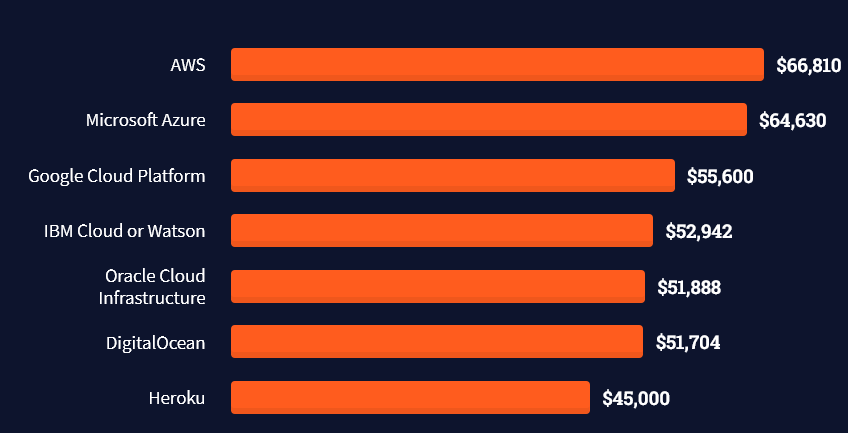

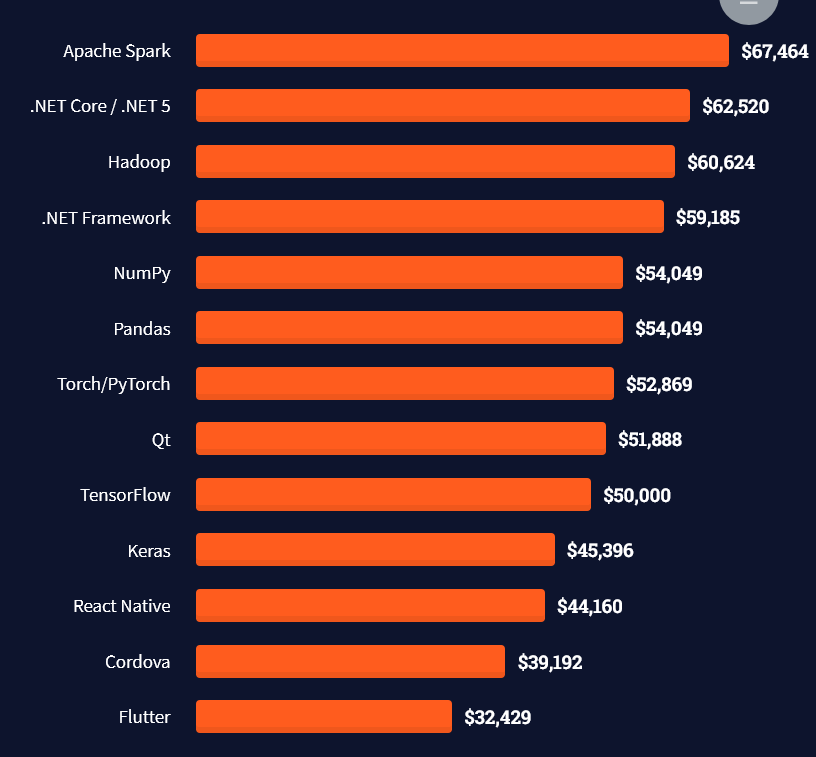

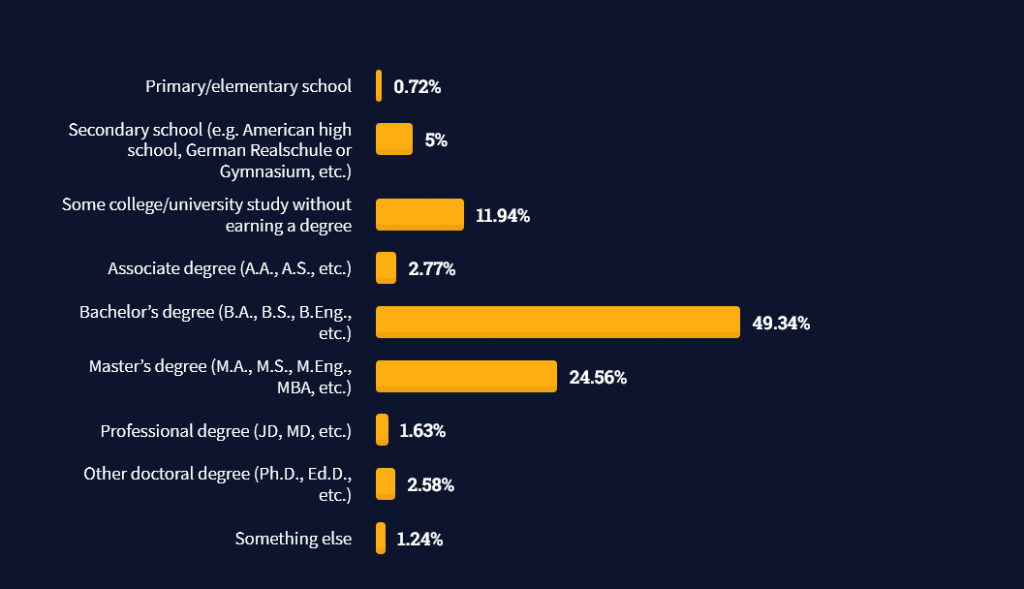
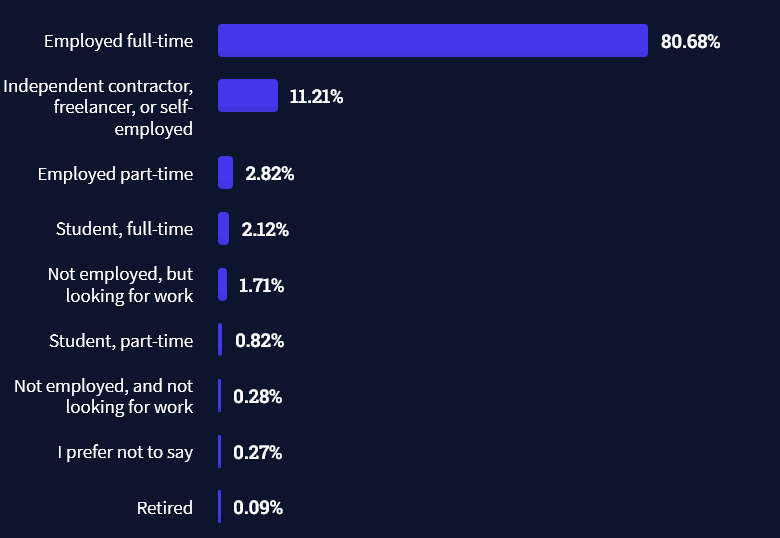


 This choice of length will be further discussed in our section on “The Least Common Multiple” below.


