Posted on Leave a comment

Python Time Series Forecast on Bitcoin Data (Part II)

5/5 – (1 vote)
YouTube Video

A Time Series is essentially a tabular data with the special feature of having a time index. The common forecast taks is ‘knowing the past (and sometimes the present), predict the future’. This task, taken as a principle, reveals itself in several ways: in how to interpret your problem, in feature engineering and in which forecast strategy to take.

This is the second article in our series. In the first article we discussed how to create features out of a time series using lags and trends. Today we follow the opposite direction by highlighting trends as something you want directly deducted from your model.Β 

Reason is, Machine Learning models work in different ways. Some are good with subtractions, others are not.

For example, for any feature you include in a Linear Regression, the model will automatically detect whether to deduce it from the actual data or not. A Tree Regressor (and its variants) will not behave in the same way and usually will ignore a trend in the data.

Therefore, whenever using the latter type of models, one usually calls for a hybrid model, meaning, we use a Linear(ish) first model to detect global periodic patterns and then apply a second Machine Learning model to infer more sophisticated behavior.

We use the Bitcoin Sentiment Analysis data we captured in the last article as a proof of concept.

The hybrid model part of this article is heavily based on Kaggle’s Time Series Crash Course, however, we intend to automate the process and discuss more in-depth the DeterministicProcess class.

Trends, as something you don’t want to have

(Or that you want it deducted from your model)

An aerodynamic way to deal with trends and seasonality is using, respectively, DeterministicProcess and CalendarFourier from statsmodel. Let us start with the former.Β 

DeterministicProcess aims at creating features to be used in a Regression model to determine trend and periodicity. It takes your DatetimeIndex and a few other parameters and returns a DataFrame full of features for your ML model.

A usual instance of the class will read like the one below. We use the sentic_mean column to illustrate.

from statsmodels.tsa.deterministic import DeterministicProcess y = dataset['sentic_mean'].copy() dp = DeterministicProcess(
index=y.index, constant=True, order=2
) X = dp.in_sample() X

We can use X and y as features and target to train a LinearRegression model. In this way, the LinearRegression will learn whatever characteristics from y can be inferred (in our case) solely out of:

  • the number of elapsed time intervals (trend column);
  • the last number squared (trend_squared); and
  • a bias term (const).

Check out the result:

from sklearn.linear_model import LinearRegression model = LinearRegression().fit(X,y) predictions = pd.DataFrame( model.predict(X), index=X.index, columns=['Deterministic Curve']
)

Comparing predictions and actual values gives:

import matplotlib.pyplot as plt plt.figure()
ax = plt.subplot()
y.plot(ax=ax, legend=True)
predictions.plot(ax=ax)
plt.show()

Even the quadratic term seems ignorable here. The DeterministicProcess class also helps us with future predictions since it carries a method that provides the appropriate future form of the chosen features.

Specifically, the out_of_sample method of dp takes the number of time intervals we want to predict as input and generates the needed features for you.

We use 60 days below as an example:

X_out = dp.out_of_sample(60) predictions_out = pd.DataFrame( model.predict(X_out), index=X_out.index, columns=['Future Predictions']
) plt.figure()
ax = plt.subplot()
y.plot(ax=ax, legend=True)
predictions.plot(ax=ax)
predictions_out.plot(ax=ax, color='red')
plt.show()

Let us repeat the process with sentic_count to have a feeling of a higher-order trend.

πŸ‘ As a rule of thumb, the order should be one plus the total number of (trending) hills + peaksΒ  in the graph, but not much more than that.

We choose 3 for sentic_count and compare the output with the order=2 result (we do not write the code twice, though).

y = dataset['sentic_count'].copy() from statsmodels.tsa.deterministic import DeterministicProcess, CalendarFourier dp = DeterministicProcess( index=y.index, constant=True, order=3
)
X = dp.in_sample() model = LinearRegression().fit(X,y) predictions = pd.DataFrame( model.predict(X), index=X.index, columns=['Deterministic Curve']
) X_out = dp.out_of_sample(60) predictions_out = pd.DataFrame( model.predict(X_out), index=X_out.index, columns=['Future Predictions']
) plt.figure()
ax = plt.subplot()
y.plot(ax=ax, legend=True)
predictions.plot(ax=ax)
predictions_out.plot(ax=ax, color='red')
plt.show()

Although the order-three polynomial fits the data better, use discretion in deciding whether the sentiment count will decrease so drastically in the next 60 days or not. Usually, trust short-time predictions rather than long ones.

DeterministicProcess accepts other parameters, making it a very interesting tool. Find a description of the almost full list below.

dp = DeterministicProcess( index, # the DatetimeIndex of your data period: int or None, # in case the data shows some periodicity, include the size of the periodic cycle here: 7 would mean 7 days in our case constant: bool, # includes a constant feature in the returned DataFrame, i.e., a feature with the same value for everyone. It returns the equivalent of a bias term in Linear Regression order: int, # order of the polynomial that you think better approximates your trend: the simplest the better seasonal: bool, # make it True if you think the data has some periodicity. If you make it True and do not specify the period, the dp will try to infer the period out of the index additional_terms: tuple of statsmodel's DeterministicTerms, # we come back to this next drop: bool # drops resulting features which are collinear to others. If you will use a linear model, make it True
)

Seasonality

As a hardened Mathematician, seasonality is my favorite part because it deals with Fourier analysis (and wave functions are just… cool!):

YouTube Video

Do you remember your first ML course when you heard Linear Regression can fit arbitrary functions, not only lines? So, why not a wave function? We just did it for polynomials and didn’t even feel like it πŸ˜‰

In general, for any expression f which is a function of a feature or of your DatetimeIndex, you can create a feature column whose ith row is the value of f corresponding to the ith index.

Then linear regression finds the constant coefficient multiplying f that best fits your data. Again, this procedure works in general, not only with Datetime indexes – the trend_squared term above is an example of it.

For seasonality, we use a second statsmodel‘s amazing class: CalendarFourier. It is another statsmodel‘s DeterministicTerm class (i.e., with the in_sample and out_of_sample methods) and instantiates with two parameters, 'frequency' and 'order'.

As a 'frequency', the class expects a string such as ‘D’, ‘W’, ‘M’ for day, week or month, respectively, or any of the quite comprehensive Pandas Datetime offset aliases.

The 'order' is the Fourier expansion order which should be understood as the number of waves you are expecting in your chosen frequency (count the number of ups and downs – one wave would be understood as one up and one down)

CalendarFourier integrates swiftly with DeterministicProcess by including an instance of it in the list of additional_terms.

Here is the full code for sentic_mean:

from statsmodels.tsa.deterministic import DeterministicProcess, CalendarFourier y = dataset['sentic_mean'].copy() fourier = CalendarFourier(freq='A',order=2) dp = DeterministicProcess( index=y.index, constant=True, order=2, seasonal=False, additional_terms=[fourier], drop=True
)
X = dp.in_sample() from sklearn.linear_model import LinearRegression model = LinearRegression().fit(X,y) predictions = pd.DataFrame( model.predict(X), index=X.index, columns=['Prediction']
) X_out = dp.out_of_sample(60) predictions_out = pd.DataFrame( model.predict(X_out), index=X_out.index, columns=['Prediction']
) plt.figure()
ax = plt.subplot()
y.plot(ax=ax, legend=True)
predictions.plot(ax=ax)
predictions_out.plot(ax=ax, color='red')
plt.show()

If we take seasonal=True inside DeterministicProcess, we get a crispier line:

Including ax.set_xlim(('2022-08-01', '2022-10-01')) before plt.show() zooms the graph in:

Although I suggest using the seasonal=True parameter with care, it does find interesting patterns (with huge RMSE error, though).

For instance, look at this BTC percentage change zoomed chart:

Here period is set to 30 and seasonal=True. I also manually rescaled the predictions to be better visible in the graphic. Although the predictions are far away from truth, thinking as a trader, isn’t it impressive how many peaks and hills it gets right? At least for this zoomed month…

To maintain the workflow promise, I prepared a code that does everything so far in one shot:

def deseasonalize(df: pd.Series, season_freq='A', fourier_order=0, constant=True, dp_order=1, dp_drop=True, model=LinearRegression(), fourier=None, dp=None, **DeterministicProcesskwargs)->(pd.Series, plt.Axes, pd.DataFrame): """ Returns a deseasonalized and detrended df, a seasonal plot, and the fitted DeterministicProcess instance. """ if fourier is None: fourier = CalendarFourier(freq=season_freq, order=fourier_order) if dp is None: dp = DeterministicProcess( index=df.index, constant=True, order=dp_order, additional_terms=[fourier], drop=dp_drop, **DeterministicProcesskwargs ) X = dp.in_sample() model = LinearRegression().fit(X, df) y_pred = pd.Series( model.predict(X), index=X.index, name=df.name+'_pred' ) ax = plt.subplot() y.plot(ax=ax, legend=True) predictions.plot(ax=ax) y_pred.columns = df.name y_deseason = df - y_pred y_deseason.name = df.name +'_deseasoned' return y_deseason, ax, dp The sentic_mean analyses get reduced to: y_deseason, ax, dp= deseasonalize(y, season_freq='A', fourier_order=2, constant=True, dp_order=2, dp_drop=True, model=LinearRegression() )

Cycles and Hybrid Models

Let us move on to a complete Machine Learning prediction. We use XGBRegressor and compare its performance among three instances:Β 

  1. Predict sentic_mean directly using lags;
  2. Same prediction adding the seasonal/trending with a DeterministicProcess;
  3. A hybrid model, using LinearRegression to infer and remove seasons/trends, and then apply a XGBRegressor.

The first part will be the bulkier since the other two follow from simple modifications in the resulting code. 

Preparing the data

Before any analysis, we split the data in train and test sets. Since we are dealing with time series, this means we set the ‘present date’ as a point in the past and try to predict its respective ‘future’. Here we pick 22 days in the past.

s = dataset['sentic_mean'] s_train = s[:'2022-09-01']

We made this first split in order to not leak data while doing any analysis.

Next, we prepare target and feature sets. Recall our SentiCrypto’s data was set to be available everyday at 8AM. Imagine we are doing the prediction by 9AM.

In this case, anything until the present data (the ‘lag_0‘) can be used as features, and our target is s_train‘s first lead (which we define as a -1 lag). To choose other lags as features, we examine theirs statsmodel’s partial auto-correlation plot:

from statsmodels.graphics.tsaplots import plot_pacf plot_pacf(s_train, lags=20)

We use the first four for sentic_mean and the first seven + the 11th for sentic_count (you can easily test different combinations with the code below.)

Now we finish choosing features, we go back to the full series for engineering. We apply to s_maen and s_count the make_lags function we defined in the last article (which we transcribe here for convenience).Β 

def make_lags(df, n_lags=1, lead_time=1): """ Compute lags of a pandas.Series from lead_time to lead_time + n_lags. Alternatively, a list can be passed as n_lags. Returns a pd.DataFrame whose ith column is either the i+lead_time lag or the ith element of n_lags. """ if isinstance(n_lags,int): lag_list = list(range(lead_time, n_lags+lead_time)) else: lag_list = n_lags lags ={ f'{df.name}_lag_{i}': df.shift(i) for i in lag_list } return pd.concat(lags,axis=1) X = make_lags(s, [0,1,2,3,4]) y = make_lags(s, [-1]) display(X)
y

Now a train-test split with sklearn is convenient (Notice the shuffle=False parameter, that is key for time series):

from sklearn.model_selection import train_test_split X_train, X_test, y_train, y_test = train_test_split(X, y, test_size=22, shuffle=False) X_train

(Observe that the final date is set correctly, in accordance with our analysis’ split.)

 Applying the regressor:

xgb = XGBRegressor(n_estimators=50) xgb.fit(X_train,y_train) predictions_train = pd.DataFrame( xgb.predict(X_train), index=X_train.index, columns=['Prediction']
) predictions_test = pd.DataFrame( xgb.predict(X_test), index=X_test.index, columns=['Prediction']
) print(f'R2 train score: {r2_score(y_train[:-1],predictions_train[:-1])}') plt.figure()
ax = plt.subplot()
y_train.plot(ax=ax, legend=True)
predictions_train.plot(ax=ax)
plt.show() plt.figure()
ax = plt.subplot()
y_test.plot(ax=ax, legend=True)
predictions_test.plot(ax=ax)
plt.show() print(f'R2 test score: {r2_score(y_test[:-1],predictions_test[:-1])}')

You can reduce overfitness by reducing the number of estimators, but the R2 test score maintains negative.

We can replicate the process for sentic_count (or whatever you want). Below is a function to automate it.

from xgboost import XGBRegressor
from sklearn.model_selection import train_test_split
from sklearn.metrics import r2_score
from statsmodels.tsa.stattools import pacf def apply_univariate_prediction(series, test_size, to_predict=1, nlags=20, minimal_pacf=0.1, model=XGBRegressor(n_estimators=50)): ''' Starting from series, breaks it in train and test subsets; chooses which lags to use based on pacf > minimal_pacf; and applies the given sklearn-type model. Returns the resulting features and targets and the trained model. It plots the graph of the training and prediction, together with their r2_score. ''' s = series.iloc[:-test_size] if isinstance(to_predict,int): to_predict = [to_predict] from statsmodels.tsa.stattools import pacf s_pacf = pd.Series(pacf(s, nlags=nlags)) column_list = s_pacf[s_pacf>minimal_pacf].index X = make_lags(series, n_lags=column_list).dropna() y = make_lags(series,n_lags=[-x for x in to_predict]).loc[X.index] X_train, X_test, y_train, y_test = train_test_split(X, y, test_size=test_size, shuffle=False) model.fit(X_train,y_train) predictions_train = pd.DataFrame( model.predict(X_train), index=X_train.index, columns=['Train Predictions'] ) predictions_test = pd.DataFrame( model.predict(X_test), index=X_test.index, columns=['Test Predictions'] ) fig, (ax1,ax2) = plt.subplots(1,2, figsize=(14,5), sharey=True) y_train.plot(ax=ax1, legend=True) predictions_train.plot(ax=ax1) ax1.set_title('Train Predictions') y_test.plot(ax=ax2, legend=True) predictions_test.plot(ax=ax2) ax2.set_title('Test Predictions') plt.show() print(f'R2 train score: {r2_score(y_train[:-1],predictions_train[:-1])}') print(f'R2 test score: {r2_score(y_test[:-1],predictions_test[:-1])}') return X, y, model apply_univariate_prediction(dataset['sentic_count'],22)
apply_univariate_prediction(dataset['BTC-USD'], 22)

Predicting with Seasons

Since the features created by DeterministicProcess are only time-dependent, we can add them harmlessly to the feature DataFrame we automated get from our univariate predictions.

The predictions, though, are still univariate. We use the deseasonalize function to obtain the season features. The data preparation is as follows:

s = dataset['sentic_mean'] X, y, _ = apply_univariate_prediction(s,22); s_deseason, _, dp = deseasonalize(s, season_freq='A', fourier_order=2, constant=True, dp_order=2, dp_drop=True, model=LinearRegression() );
X_f = dp.in_sample().shift(-1) X = pd.concat([X,X_f], axis=1, join='inner').dropna()

With a bit of copy and paste, we arrive at:

And we actually perform way worse! 😱

Deseasonalizing

Nevertheless, the right-hand graphic illustrates the inability of grasping trends. Our last shot is a hybrid model.

Here we follow three steps:

  1. We use the LinearRegression to capture the seasons and trends, rendering the series y_s. Then we acquire a deseasonalized target y_ds = y-y_s;
  2. Train an XGBRegressor on y_ds and the lagged features, resulting in deseasonalized predictions y_pred;
  3. Finally, we incorporate y_s back to y_pred to compare the final result.

Although Bitcoin-related data are hard to predict, there was a huge improvement on the r2_score (finally something positive!). We define the used function below.

get_hybrid_univariate_prediction(dataset['sentic_mean'], 22, season_freq='A', fourier_order=2, constant=True, dp_order=2, dp_drop=True, model1=LinearRegression(), fourier=None, is_seasonal=True, season_period=7, dp=None, to_predict=1, nlags=20, minimal_pacf=0.1, model2=XGBRegressor(n_estimators=50) )

Instead of going through every detail, we will also automate this code. In order to get the code running smoothly, we revisit the deseasonalize and the apply_univariate_prediction functions in order to remove the plotting part of them.

The final function only plots graphs and returns nothing. It intends to give you a baseline for a hybrid model score. Change the function at will to make it return whatever you need.

def get_season(series: pd.Series, test_size, season_freq='A', fourier_order=0, constant=True, dp_order=1, dp_drop=True, model1=LinearRegression(), fourier=None, is_seasonal=False, season_period=None, dp=None): """ Decompose series in a deseasonalized and a seasonal part. The parameters are relative to the fourier and DeterministicProcess used. Returns y_ds and y_s. """ se = series.iloc[:-test_size] if fourier is None: fourier = CalendarFourier(freq=season_freq, order=fourier_order) if dp is None: dp = DeterministicProcess( index=se.index, constant=True, order=dp_order, additional_terms=[fourier], drop=dp_drop, seasonal=is_seasonal, period=season_period ) X_in = dp.in_sample() X_out = dp.out_of_sample(test_size) model1 = model1.fit(X_in, se) X = pd.concat([X_in,X_out],axis=0) y_s = pd.Series( model1.predict(X), index=X.index, name=series.name+'_pred' ) y_s.name = series.name y_ds = series - y_s y_ds.name = series.name +'_deseasoned' return y_ds, y_s def prepare_data(series, test_size, to_predict=1, nlags=20, minimal_pacf=0.1): ''' Creates a feature dataframe by making lags and a target series by a negative to_predict-shift. Returns X, y. ''' s = series.iloc[:-test_size] if isinstance(to_predict,int): to_predict = [to_predict] from statsmodels.tsa.stattools import pacf s_pacf = pd.Series(pacf(s,nlags=nlags)) column_list = s_pacf[s_pacf>minimal_pacf].index X = make_lags(series, n_lags=column_list).dropna() y = make_lags(series,n_lags=[-x for x in to_predict]).loc[X.index].squeeze() return X, y def get_hybrid_univariate_prediction(series: pd.Series, test_size, season_freq='A', fourier_order=0, constant=True, dp_order=1, dp_drop=True, model1=LinearRegression(), fourier=None, is_seasonal=False, season_period=None, dp=None, to_predict=1, nlags=20, minimal_pacf=0.1, model2=XGBRegressor(n_estimators=50) ): """ Apply the hybrid model method by deseasonalizing/detrending a time series with model1 and investigating the resulting series with model2. It plots the respective graphs and computes r2_scores. """ y_ds, y_s = get_season(series, test_size, season_freq=season_freq, fourier_order=fourier_order, constant=constant, dp_order=dp_order, dp_drop=dp_drop, model1=model1, fourier=fourier, dp=dp, is_seasonal=is_seasonal, season_period=season_period) X, y_ds = prepare_data(y_ds,test_size=test_size) X_train, X_test, y_train, y_test = train_test_split(X, y_ds, test_size=test_size, shuffle=False) y = y_s.squeeze() + y_ds.squeeze() model2 = model2.fit(X_train,y_train) predictions_train = pd.Series( model2.predict(X_train), index=X_train.index, name='Prediction' )+y_s[X_train.index] predictions_test = pd.Series( model2.predict(X_test), index=X_test.index, name='Prediction' )+y_s[X_test.index] fig, (ax1,ax2) = plt.subplots(1,2, figsize=(14,5), sharey=True) y_train_ps = y.loc[y_train.index] y_test_ps = y.loc[y_test.index] y_train_ps.plot(ax=ax1, legend=True) predictions_train.plot(ax=ax1) ax1.set_title('Train Predictions') y_test_ps.plot(ax=ax2, legend=True) predictions_test.plot(ax=ax2) ax2.set_title('Test Predictions') plt.show() print(f'R2 train score: {r2_score(y_train_ps[:-to_predict],predictions_train[:-to_predict])}') print(f'R2 test score: {r2_score(y_test_ps[:-to_predict],predictions_test[:-to_predict])}')

A note of warning: if you do not expect your data to follow time patterns, do focus on cycles! The hybrid model succeeds well for many tasks, but it actually decreases the R2 score of our previous Bitcoin prediction:

get_hybrid_univariate_prediction(dataset['BTC-USD'], 22, season_freq='A', fourier_order=4, constant=True, dp_order=5, dp_drop=True, model1=LinearRegression(), fourier=None, is_seasonal=True, season_period=30, dp=None, to_predict=1, nlags=20, minimal_pacf=0.05, model2=XGBRegressor(n_estimators=20) )

The former score was around 0.31.

Conclusion

This article aims at presenting functions for your time series workflow, specially for lags and deseasonalization. Use them with care, though: apply them to have baseline scores before delving into more sophisticated models.

In future articles we will bring forth multi-step predictions (predict more than one day ahead) and compare performance of different models, both univariate and multivariate.

Posted on Leave a comment

(Fixed) Python TypeError β€˜bool’ object is not subscriptable

5/5 – (1 vote)

Problem Formulation

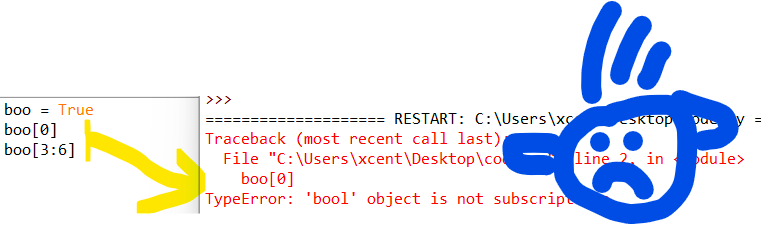
Consider the following minimal example where a TypeError: 'bool' object is not subscriptable occurs:

boo = True
boo[0]
# or:
boo[3:6]

This yields the following output:

Traceback (most recent call last): File "C:\Users\xcent\Desktop\code.py", line 2, in <module> boo[0]
TypeError: 'bool' object is not subscriptable

Solution Overview

Python raises the TypeError: 'bool' object is not subscriptable if you use indexing or slicing with the square bracket notation on a Boolean variable. However, the Boolean type is not indexable and you cannot slice it—it’s not iterable!

In other words, the Boolean class doesn’t define the __getitem__() method.

boo = True
boo[0] # Error!
boo[3:6] # Error!
boo[-1] # Error!
boo[:] # Error!

You can fix this error by

  1. converting the Boolean to a string using the str() function because strings are subscriptable,
  2. removing the indexing or slicing call,
  3. defining a dummy __getitem__() method for a custom “Boolean wrapper class”.

🌍 Related Tutorials: Check out our tutorials on indexing and slicing on the Finxter blog to improve your skills!

Method 1: Convert Boolean to a String

If you want to access individual characters of the “Boolean” strings "True" and "False", consider converting the Boolean to a string using the str() built-in function. A string is subscriptable so the error will not occur when trying to index or slice the converted string.

boo = True
boo_string = str(boo) print(boo_string[0])
# T
print(boo_string[1:-1])
# ru

Method 2: Put Boolean Into List

A simple way to resolve this error is to put the Boolean into a list that is subscriptable—that is you can use indexing or slicing on lists that define the __getitem__() magic method.

bools = [True, True, True, False, False, False, True, False]
print(bools[-1])
# False print(bools[3:-3])
# [False, False]

Method 3: Define the __getitem__() Magic Method

You can also define your own wrapper type around the Boolean variable that defines a dunder method for __getitem__() so that every indexing or slicing operation returns a specified value as defined in the dunder method.

class MyBool: def __init__(self, boo): self.boo = boo def __getitem__(self, index): return self.boo my_boolean = MyBool(True) print(my_boolean[0])
# True print(my_boolean[:-1])
# True

This hack is generally not recommended, I included it just for comprehensibility and to teach you something new. πŸ˜‰

Summary

The error message “TypeError: 'boolean' object is not subscriptable” happens if you access a boolean boo like a list such as boo[0] or boo[1:4]. To solve this error, avoid using slicing or indexing on a Boolean or use a subscriptable object such as lists or strings.

Posted on Leave a comment

Aave for DeFi Developers – A Simple Guide with Video

5/5 – (2 votes)
YouTube Video

This is in continuation of our DeFi series. In this post, we look at yet another decentralized lending and borrowing platform Aave.

πŸͺ™ Full DeFi Course: Click the link to access our free full DeFi course that’ll show you the ins and outs of decentralized finance (DeFi).

Aave

Aave launched in 2017 is a DeFi protocol similar to Compound with a lot of upgrades.

Beyond what Compound provides, Aave gives several extra tokens for supply and borrowing. As of now, Compound offered nine different tokens (various ERC- 20 Ethereum- based assets).

Aave provides these nine besides an additional 13 that Compound does not.

Depositors give the market liquidity to generate a passive income, while borrowers can borrow if they have an over-collateralized token or can avail flash loans for under-collateralized (one-block liquidity).

Currently, we can see two major markets on Aave.

  • The first is for ERC-20 tokens that are more frequently used, like those of Compound, and their underlying assets, such as ETH, DAI and USDC.
  • The latter is only available with Uniswap LP tokens.

For instance, a user receives an LP token signifying market ownership when they deposit collateral into a liquidity pool on the Uniswap platform. To provide additional benefits, the LP tokens can be sold on the Uniswap market of Aave.

As per DeFi pulse, Aave has a TVL (Total Value Locked) of $4.09B as of today.

Fig: Defi Pulse for Aave

Aave Versions

Aave has released three versions (v1, v2 and v3) as of now and the Governance token of Aave is β€˜AAVE’. Version 1 or v1 is the base version launched in 2017 and then there have been upgrades with multiple new features added. Below is a short comparison of when to use v2 or v3.

You should use Aave V2 when:

  • You won’t need to borrow many tokens.
  • Little profit
  • You borrow important tokens like WETH, USDC, etc.

You should use Aave V3 when:

  • Many tokens must be borrowed
  • High profit margin
  • You borrow mid-cap tokens like LINK, etc.

Borrow and Lending in Aave

Fig: Aave borrow and lend (pic credit: https://docs.aave.com)

Borrow

You must deposit any asset to be used as collateral before borrowing.

πŸ’‘ The amount you can borrow up to depends on the value you have deposited and the readily available liquidity.

For instance, if there isn’t enough liquidity or if your health factor (minimum threshold of the collateral = 1, below this value, liquidation of your collateral is triggered) prevents it, you can’t borrow an asset.

πŸ’‘ The loan is repaid with the same asset that you borrowed.

For instance, if you borrow 1 ETH, you’ll need to pay back 1 ETH plus interest.

In the updated Version 2 of the Aave Protocol, you can also use your collateral to make payments. You can borrow any of the stable coins like USDC, DAI, USDT, etc. if you want to repay the loan based on the price of the USD.

Stable vs Variable Interest Rate

In the short-term, stable rates function as a fixed rate, but they can be rebalanced in the long run in reaction to alterations in the market environment. Depending on supply and demand in Aave, the variable rate can change.

The stable rate is the better choice for forecasting how much interest you will have to pay because, as its name suggests, it will remain fairly stable. The variable rate changes over time and, depending on market conditions, could be the optimal rate.

Through your dashboard, you can switch between the stable and variable rate at any time.

Deposit/Lending

Lenders share the interest payments made by borrowers based on the utilization rate multiplied by the average borrowing rate. The yield for depositors increases as reserve utilization increases.

Lenders are also entitled to a portion of the Flash Loan fees, equal to .09% of the Flash Loan volume.

There is no minimum or maximum deposit amount; you may deposit any amount you choose.

Flash Loans in Aave

Flash Loans are unique business agreements that let you borrow an asset as long as you repay the borrowed money (plus a fee) before the deal expires (also called One Block Borrows). Users are not required to provide collateral for these transactions in order to proceed.

Flash Loans have no counterpart in the real world, so understanding how state is controlled within blocks in blockchains is a prerequisite.

πŸ’‘ Flash-loan enables users to access pool liquidity for a single transaction as long as the amount borrowed plus fees are returned or (if permitted) a debt position is opened by the end of the transaction.

For flash loans, Aave V3 provides two choices:

(1) β€œflashLoan”: enables borrowers to access the liquidity of several reserves in a single flash loan transaction. In this situation, the borrower also has the choice to open a fixed or variable-rate loan position secured by provided collateral.

πŸ‘‰ The fee for flashloan is waived for approved flash borrowers.

(2) β€œflashLoanSimple”: enables the borrower to access a single reserve’s liquidity for the transaction. For individuals looking to take advantage of a straightforward flash loan with a single reserve asset, this approach is gas-efficient.

πŸ‘‰ The fee for flashloanSimple is not waived for the flash borrowers. The Flashloan fee on Aave V3 is 0.05%.

Let’s Code a Simple Flash Loan

Let’s code a simple flash loan in Aave, where we buy and repay the asset in the same transaction without having to provide any collateral. First, we set up the environment for writing the code.

β–Ά Note: It is recommended to follow the video along for a better understanding.

$npm install -g truffle # in case truffle not installed
$mkdir aave_flashloan $cd aave_flashloan
$truffle init
$npm install @aave/core-v3
$npm install @openzeppelin/contracts
$npm install @openzeppelin/test-helpers 

Note: Aave3 is currently available on Polygon, Arbitrum, Avalanche, and other L2 chains. As of now, it is not available on the Ethereum mainnet. Thus, we will fork the Polygon mainnet for our tests.

Set up a new app in Alchemy with the chain as Polygon mainnet and note down the API key.

Create a new file .env and enter the below info.

$WEB3_ALCHEMY_POLYGON_ID=<API key noted above>
$USDC_WHALE=0x075e72a5eDf65F0A5f44699c7654C1a76941Ddc8

πŸ‘‰ Recommended Tutorial: Solidity Crash Course — Your First Smart Contract

Simple Flash Loan Contract

The contract code (FlashLoanPolygon.sol) in the contracts folder.

// SPDX-License-Identifier: MIT
pragma solidity ^0.8.10; import "@openzeppelin/contracts/token/ERC20/utils/SafeERC20.sol";
import "@openzeppelin/contracts/utils/math/SafeMath.sol";
import "@aave/core-v3/contracts/interfaces/IPool.sol";
import "@aave/core-v3/contracts/flashloan/base/FlashLoanSimpleReceiverBase.sol"; contract AaveFlashloan is FlashLoanSimpleReceiverBase { using SafeMath for uint256; using SafeERC20 for IERC20; event Log(string message, uint256 val); constructor(IPoolAddressesProvider provider) FlashLoanSimpleReceiverBase(provider) {} function aaveFlashloan(address loanToken, uint256 loanAmount) external { IPool(address(POOL)).flashLoanSimple( address(this), loanToken, loanAmount, "0x", 0 ); } function executeOperation( address asset, uint256 amount, uint256 premium, address initiator, bytes memory ) public override returns (bool) { require( amount <= IERC20(asset).balanceOf(address(this)), "Invalid balance for the contract" ); // pay back the loan amount and the premium (flashloan fee) uint256 amountToReturn = amount.add(premium); require( IERC20(asset).balanceOf(address(this)) >= amountToReturn, "Not enough amount to return loan" ); approveToken(asset, address(POOL), amountToReturn); emit Log("borrowed amount", amount); emit Log("flashloan fee", premium); emit Log("amountToReturn", amountToReturn); return true; }
}

The contract code contains two important functions.

  • aaveFlashloan() which calls the pools function flashLoanSimple(). Our test code must call this function to initiate a flash loan.
  • executeOperation() is a callback function of the pool which pays the loan + interest back to the pool.

Testing Contract

In the test folder, create a JavaScript file config.js with the following content:

const USDC = "0x2791Bca1f2de4661ED88A30C99A7a9449Aa84174"; const aavePoolAddressesProvider = "0xa97684ead0e402dC232d5A977953DF7ECBaB3CDb"; const USDC_WHALE = process.env.USDC_WHALE; module.exports = { USDC, USDC_WHALE, aavePoolAddressesProvider,
}

In the test folder, create another file testAaveFlashLoanSimple.js:

const BN = require("bn.js");
const IERC20 = artifacts.require("IERC20");
const AaveFlashLoan = artifacts.require("AaveFlashloan");
const {USDC,aavePoolAddressesProvider,USDC_WHALE} = require("./config"); function sendEther(web3, from, to, amount) { return web3.eth.sendTransaction({ from, to, value: web3.utils.toWei(amount.toString(), "ether"), });
} contract("AaveFlashLoan", (accounts) => { const WHALE = USDC_WHALE const TOKEN_BORROW = USDC const DECIMALS = 6 // USDC uses 6 decimal places and not 18 like other ERC20 // We fund more because we need to pay back along with the fees during Flash loan. // So let us fund extra (2 million round figure to the calculations simple) const FUND_AMOUNT = new BN(10).pow(new BN(DECIMALS)).mul(new BN(500)); 500 USDC const BORROW_AMOUNT = new BN(10).pow(new BN(DECIMALS)).mul(new BN(1000000)); // 1 million USDC let aaveFlashLoanInstance let token beforeEach(async () => { token = await IERC20.at(TOKEN_BORROW) // USDC token aaveFlashLoanInstance = await AaveFlashLoan.new(aavePoolAddressesProvider) // send ether to USDC WHALE contract to cover tx fees await sendEther(web3, accounts[0], WHALE, 1) // send enough token to cover fee const bal = await token.balanceOf(WHALE) assert(bal.gte(FUND_AMOUNT), "balance < FUND") // Send USDC tokens to AaveFlashLoan contract await token.transfer(aaveFlashLoanInstance.address, FUND_AMOUNT, { from: WHALE, }) console.log("balance of USDC in AAveFlashLoan contract:", bal2.toString()) }) it("aave simple flash loan", async () => { const tx = await aaveFlashLoanInstance.aaveFlashloan(token.address, BORROW_AMOUNT) console.log("token address:",token.address) for (const log of tx.logs) { console.log(log.args.message, log.args.val.toString()) } }) });

Again, feel free to watch the video at the beginning of this tutorial to understand the testing process.

Open two terminals.

In terminal 1:

$source .env
$npx ganache-cli i – fork https://polygon-mainnet.g.alchemy.com/v2/$WEB3_ALCHEMY_POLYGON_ID \
--unlock $USDC_WHALE \
--networkId 999

This should start a local fork of the Polygon mainnet.

In terminal 2:

$ source .env
$ env $(cat .env) npx truffle test – network polygon_main_fork test/testAaveFlashLoanSimple.js

This should run the flash loan test case, and it must pass.

Conclusion

This tutorial discussed Aave, a leading Dapp lending and borrowing provider.

It covered some basic functionalities supported in Aave, such as lending, borrowing, and flash loans.

There are many other features Aave supports and it is not possible to cover it in one post, such as governance, liquidation, and advanced features such as Siloed Borrowing, Credit Delegation, and many more.

The post also examined a simple flash loan contract using Aave API.

You can explore more about borrowing and lending with Aave in this link. It has a full stack Defi Aave dapp with frontend to perform borrowing and lending.

πŸ‘‰ Recommended Tutorial: Crypto Trading Bot Developer — Income and Opportunity

Posted on Leave a comment

How to Retrieve a Single Element from a Python Generator

5/5 – (2 votes)

This article will show you how to retrieve a single generator element in Python. Before moving forward, let’s review what a generator does.

Quick Recap Generators

πŸ’‘ Definition Generator: A generator is commonly used when processing vast amounts of data. This function uses minimal memory and produces results in less time than a standard function.

πŸ’‘ Definition yield: The yield keyword returns a generator object instead of a value.

πŸ’‘ Definition next(): This function takes an iterator and an optional default value. Each time this function is called, it returns the next iterator item until all items are exhausted. Once exhausted, it returns the default value passed or a StopIteration Error.

Problem Formulation and Solution Overview

πŸ’¬ Question: How would we write code to retrieve and return a single element from a Generator?

We can accomplish this task by one of the following options:


Method 1: Use a Generator and random.randint()

This example uses a Generator and the random.randint() function to return a random single element.

Let’s say we want to start a weekly in-house lottery called LottoOne (yeah — the lottery naming doesn’t care about Python’s naming conventions 🐍).

The code below will generate and return one (1) random element (an integer): the winning number for the week.

import random def LottoOne(): num = random.randint(1, 50) yield print(f'The Winning Number for the Week is: {num}!') gen = LottoOne()
next(gen)

The first line in the above code imports the random library. This library allows the generation of random numbers using the random.randint() function.

On the following line, an instance of LottoOne is instantiated and saved to the variable gen. If output to the terminal, an object similar to that shown below will display.

<generator object LottoOne at 0x00000236B9686880>

Since we only want the first randomly generated number, the code calls the next() function once and passes it one (1) argument, the object gen. The results are output to the terminal.

The Winning Number for the Week is: 44
YouTube Video

πŸ‘‰ Recommended Tutorial: An Introduction to Python Classes


Method 2: Use a Generator and islice()

This example uses a generator and the itertools.islice() function to return a single element.

If you know what number you need to return from a generator, it can be referenced directly, as shown in the code below.

import itertools
from itertools import islice gen = (x for x in range(1, 50))
res = next(itertools.islice(gen, 2, None))
print(res)

The first two (2) lines in the above code import the itertools library and its associated function islice() needed to achieve the desired result.

The following line creates a generator comprehension using the range() function and passing it a start and stop position (1, 50-1). The results save to gen as an object.

If output to the terminal, an object similar to that shown below will display.

<generator object at 0x00000285D4DB68F0>

Then, the next() function is called and passed one (1) argument, itertools.islice().

This function is then passed three (3) arguments:

  1. An iterator. In this case, gen.
  2. The value to return, idx.
  3. The default value. In this case, the keyword None. Passing a default value prevents a StopIteration error from occurring when the end of the iterator has been reached.

The results save to res and are output to the terminal.

3

The value of 3 can be found at index 2 in gen.

YouTube Video

Method 3: Use a List, Generator Comprehension and slicing

This example uses a list, generator comprehension and slicing to return a single element.

gen = (i for i in range(1, 50))
res = list(gen)[3]
print(res)

The first line in the above code creates a Generator Comprehension using the range() function and passing it a start and stop position (1, 50-1). The results save to gen as an object.

If output to the terminal, an object similar to that shown below will display.

<generator object at 0x00000295D4DB78F0>

The following line converts the object to a list. Slicing is then applied to retrieve the list element at position three (3).

The results save to res and are output to the terminal.

4

The value of 4 can be found at index 3 in gen.

YouTube Video

Method 4: Use a Generator and a For Loop

This example creates a Generator whose content is output to the terminal until a specific number is found.

def my_func(): yield 10 yield 20 yield 30 gen = my_func() for item in gen: if item == 20: print(item) break

This first line of the above code declares the function my_func(). This function will return, via a yield statement, a number (one/iteration).

Next, an object is declared and saved to gen.

If output to the terminal, an object similar to that shown below will display.

<generator object my_func at 0x0000022DE93D59A0>

The following line instantiates a for loop. This loop iterates through each yield statement in gen until the item contains a value of 20.

This value is output to the terminal, and the loop terminates via the break statement.

20

Summary

This article has provided four (4) ways to retrieve a single element from a Generator to select the best fit for your coding requirements.

Good Luck & Happy Coding!


Programming Humor – Python

“I wrote 20 short programs in Python yesterday. It was wonderful. Perl, I’m leaving you.”xkcd

Posted on Leave a comment

How to Stop a For Loop in Python

Rate this post

Python provides three ways to stop a for loop:

  1. The for loop ends naturally when all elements have been iterated over. After that, Python proceeds with the first statement after the loop construct.
  2. The keyword break terminates a loop immediately. The program proceeds with the first statement after the loop construct.
  3. The keyword continue terminates only the current loop iteration, but not the whole loop. The program proceeds with the first statement in the loop body.

You can see each of these three methods to terminate a for loop in the following graphic:

How to Stop a For Loop in Python

Let’s dive into each of those three approaches next!

Method 1: Visit All Elements in Iterator

The most natural way to end a Python for loop is to deplete the iterator defined in the loop expression for <var> in <iterator>. If the iterator’s next() method doesn’t return a value anymore, the program proceeds with the next statement after the loop construct. This immediately ends the loop.

Here’s an example that shows how the for loop ends as soon as all elements have been visited in the iterator returned by the range() function:

s = 'hello world' for c in range(5): print(c, end='') # hello

πŸ‘‰ Recommended Tutorial: Iterators, Iterables, and Itertools

Method 2: Keyword “break”

If the program executes a statement with the keyword break, the loop terminates immediately. No other statement in the loop body is executed and the program proceeds with the first statement after the loop construct. In most cases, you’d use the keyword break in an if construct to decide dynamically whether a loop should end, or not.

In the following example, we create a string with 11 characters and enter a for loop that ends prematurely after five iterations — using the keyword break in an if condition to accomplish that:

s = 'hello world' for i in range(10): print(s[i], end='') if i == 5: break # hello

As soon as the if condition evaluates to False, the break statement is executed—the loop ends.

πŸ‘‰ Recommended Tutorial: How to End a While Loop?

Method 3: Keyword “continue”

The keyword continue terminates only the current loop iteration, but not the whole loop. The program proceeds with the first statement in the loop body. The most common use of continue is to avoid the execution of certain parts of the loop body, constrained by a condition checked in an if construct.

Here’s an example:

for i in range(10): if i == 5: break else: continue print('NEVER EXECUTED')

Python iterates over an iterator with 10 elements. However, in each iteration, it either ends the loop using break or continues with the next iteration using continue.

However, the remaining loop body that actually does something such as printing 'NEVER EXECUTED' is, well, never executed.

Python Keywords Cheat Sheet

You can learn about the most important Python keywords in this concise cheat sheet—if you’re like me, you love cheat sheets as well! ‡

Python Cheat Sheet Keywords

You can download it here:

Summary

You’ve learned three ways to terminate a while loop.

  • Method 1: The for loop terminates automatically after all elements have been visited. You can modify the iterator using the __next__() dunder method.
  • Method 2: The keyword break terminates a loop immediately. The program proceeds with the first statement after the loop construct.
  • Method 3: The keyword continue terminates only the current loop iteration, but not the whole loop. The program proceeds with the first statement in the loop body.

Thanks for reading this tutorial—if you want to boost your Python skills further, I’d recommend you check out my free email academy and download the free Python lessons and cheat sheets here:

Join us, it’s fun! πŸ™‚

Programmer Humor

❓ Question: How did the programmer die in the shower? ☠

Answer: They read the shampoo bottle instructions:
Lather. Rinse. Repeat.

Posted on Leave a comment

Send, Receive, and Test Emails in Django

5/5 – (1 vote)

Some time ago, we discovered how to send an email with Python using smtplib, a built-in email module. Back then, the focus was made on the delivery of different types of messages via SMTP server. Today, we prepared a similar tutorial but for Django.

This popular Python web framework allows you to accelerate email delivery and make it much easier. And these code samples of sending emails with Django are going to prove that. 

A simple code example of how to send an email

Let’s start our tutorial with a few lines of code that show you how simple it is to send an email in Django.  Import send_mail in the beginning of the file:

from django.core.mail import send_mail

And call the code below in the necessary place.

send_mail( 'That’s your subject', 'That’s your message body', 'from@yourdjangoapp.com', ['to@yourbestuser.com'], fail_silently=False,
)

These lines are enclosed in the django.core.mail module that is based on smtplib. The message delivery is carried out via SMTP host, and all the settings are set by default:

EMAIL_HOST: 'localhost'
EMAIL_PORT: 25
EMAIL_HOST_USER: (Empty string)
EMAIL_HOST_PASSWORD: (Empty string)
EMAIL_USE_TLS: False
EMAIL_USE_SSL: False

Note that the character set of emails sent with django.core.mail are automatically set to the value of your DEFAULT_CHARSET setting.

You can learn about the other default values here. Most likely you will need to adjust them. Therefore, let’s tweak the settings.py file..

Setting up

Before actually sending your email, you need to set up for it. So, let’s add some lines to the settings.py file of your Django app.

EMAIL_BACKEND = 'django.core.mail.backends.smtp.EmailBackend'
EMAIL_HOST = 'smtp.yourserver.com'
EMAIL_PORT = '<your-server-port>'
EMAIL_HOST_USER = 'your@djangoapp.com'
EMAIL_HOST_PASSWORD = 'your-email account-password'
EMAIL_USE_TLS = True
EMAIL_USE_SSL = False

EMAIL_HOST is different for each email provider you use. For example, if you have a Gmail account and use their SMTP server, you’ll have EMAIL_HOST = β€˜smtp.gmail.com’.

Also, validate other values that are relevant to your email server. Eventually, you need to choose the way to encrypt the mail and protect your user account by setting the variable EMAIL_USE_TLS or EMAIL_USE_SSL.

If you have an email provider that explicitly tells you which option to use, then it’s clear. Otherwise, you may try different combinations using True and False operators. Note that only one of these options can be set to True.

EMAIL_BACKEND tells Django which custom or predefined email backend will work with.

EMAIL_HOST. You can set up this parameter as well.Β 

SMTP email backend 

In the example above, EMAIL_BACKEND is specified as django.core.mail.backends.smtp.EmailBackend. It is the default configuration that uses SMTP server for email delivery. Defined email settings will be passed as matching arguments to EmailBackend.

host: EMAIL_HOST
port: EMAIL_PORT
username: EMAIL_HOST_USER
password: EMAIL_HOST_PASSWORD
use_tls: EMAIL_USE_TLS
use_ssl: EMAIL_USE_SSL

Unspecified arguments default to None.Β 

As well as .smtp.EmailBackend, you can use:

  • django.core.mail.backends.console.EmailBackend– the console backend that composes the emails that will be sent to the standard output. Not intended for production use.
  • django.core.mail.backends.filebased.EmailBackend – the file backend that creates emails in the form of a new file per each new session opened on the backend. Not intended for production use.
  • django.core.mail.backends.locmem.EmailBackend– the in-memory backend that stores messages in the local memory cache of django.core.mail.outbox. Not intended for production use.
  • django.core.mail.backends.dummy.EmailBackend – the dummy cache backend that implements the cache interface and does nothing with your emails. Not intended for production use.
  • Any out-of-the-box backend for Amazon SES, Mailgun, SendGrid, and other services.Β 

How to send emails via SMTP 

Once you have that configured, all you need to do to send an email is to import the send_mail or send_mass_mailfunction from django.core.mail.Β  These functions differ in the connection they use for messages. send_mailuses a separate connection for each message. send_mass_mailopens a single connection to the mail server and is mostly intended to handle mass emailing.Β 

Sending email with send_mail

This is the most basic function for email delivery in Django. It comprises four obligatory parameters to be specified: subject, message, from_email, and recipient_list.Β 

In addition to them, you can adjust the following:

  • auth_user: If EMAIL_HOST_USER has not been specified, or you want to override it, this username will be used to authenticate to the SMTP server.Β 
  • auth_password: If EMAIL_HOST_PASSWORDΒ  has not been specified, this password will be used to authenticate to the SMTP server.
  • connection: The optional email backend you can use without tweaking EMAIL_BACKEND.
  • html_message: Lets you send multipart emails.
  • fail_silently: A boolean that controls how the backend should handle errors. If True – exceptions will be silently ignored. If False – smtplib.SMTPException will be raised.Β 

For example, it may look like this:

from django.core.mail import send_mail
send_mail( subject = 'That’s your subject' message = 'That’s your message body' from_email = 'from@yourdjangoapp.com' recipient_list = ['to@yourbestuser.com',] auth_user = 'Login' auth_password = 'Password' fail_silently = False,
)

Other functions for email delivery include mail_admins and mail_managers. Both are shortcuts to send emails to the recipients predefined in ADMINS and MANAGERS settings respectively.

For them, you can specify such arguments as subject, message, fail_silently, connection, and html_message.

The from_email argument is defined by the SERVER_EMAIL setting.

What is EmailMessage for? 

If the email backend handles the email sending, the EmailMessage class answers for the message creation. You’ll need it when some advanced features like BCC or an attachment are desirable. That’s how an initialized EmailMessage may look:

from django.core.mail import EmailMessage
email = EmailMessage( subject = 'That’s your subject', body = 'That’s your message body', from_email = 'from@yourdjangoapp.com', to = ['to@yourbestuser.com'], bcc = ['bcc@anotherbestuser.com'], reply_to = ['whoever@itmaybe.com'],
)

In addition to the EmailMessage objects you can see in the example, there are also other optional parameters:

  • connection: defines an email backend instance for multiple messages.Β 
  • attachments: specifies the attachment for the message.
  • headers: specifies extra headers like Message-ID or CC for the message.Β 
  • cc: specifies email addresses used in the β€œCC” header.

The methods you can use with the EmailMessage class are the following:

  • send: get the message sent.
  • message: composes a MIME object (django.core.mail.SafeMIMEText or django.core.mail.SafeMIMEMultipart).
  • recipients: returns a list of the recipients specified in all the attributes including to, cc, and bcc.Β 
  • attach: creates and adds a file attachment. It can be called with a MIMEBase instance or a triple of arguments consisting of filename, content, and mime type.
  • attach_file: creates an attachment using a file from a filesystem. We’ll talk about adding attachments a bit later.

How to send multiple emails

To deliver a message via SMTP, you need to open a connection and close it afterwards. This approach is quite awkward when you need to send multiple transactional emails. Instead, it is better to create one connection and reuse it for all messages.

This can be done with the send_messages method that the email backend API has. Check out the following example:

from django.core import mail
connection = mail.get_connection()
connection.open()
email1 = mail.EmailMessage( 'That’s your subject', 'That’s your message body', 'from@yourdjangoapp.com', ['to@yourbestuser1.com'], connection=connection,
)
email1.send()
email2 = mail.EmailMessage( 'That’s your subject #2', 'That’s your message body #2', 'from@yourdjangoapp.com', ['to@yourbestuser2.com'],
)
email3 = mail.EmailMessage( 'That’s your subject #3', 'That’s your message body #3', 'from@yourdjangoapp.com', ['to@yourbestuser3.com'],
)
connection.send_messages([email2, email3])
connection.close()

What you can see here is that the connection was opened for email1, and send_messages uses it to send emails #2 and #3. After that, you close the connection manually.Β 

How to send multiple emails with send_mass_mail

send_mass_mail is another option to use only one connection for sending different messages.Β 

message1 = ('That’s your subject #1', 'That’s your message body #1', 'from@yourdjangoapp.com', ['to@yourbestuser1.com', 'to@yourbestuser2.com'])
message2 = ('That’s your subject #2', 'That’s your message body #2', 'from@yourdjangoapp.com', ['to@yourbestuser2.com'])
message3 = ('That’s your subject #3', 'That’s your message body #3', 'from@yourdjangoapp.com', ['to@yourbestuser3.com'])
send_mass_mail((message1, message2, message3), fail_silently=False)

Each email message contains a datatuple made of subject, message, from_email, and recipient_list. Optionally, you can add other arguments that are the same as for send_mail.

How to send an HTML email

All versions starting from 1.7 let you send an email with HTML content using send_mail like this:

from django.core.mail import send_mail
subject = 'That’s your subject'
html_message = render_to_string('mail_template.html', {'context': 'values'})
plain_message = strip_tags(html_message)
from_email = 'from@yourdjangoapp.com>'
to = 'to@yourbestuser.com'
mail.send_mail(subject, plain_message, from_email, [to], html_message=html_message)

Older versions users will have to mess about with EmailMessage and its subclass EmailMultiAlternatives. It lets you include different versions of the message body using the attach_alternative method. For example:

from django.core.mail import EmailMultiAlternatives
subject = 'That’s your subject'
from_email = 'from@yourdjangoapp.com>'
to = 'to@yourbestuser.com'
text_content = 'That’s your plain text.'
html_content = '<p>That’s <strong>the HTML part</strong></p>'
message = EmailMultiAlternatives(subject, text_content, from_email, [to])
message.attach_alternative(html_content, "text/html")
message.send()

How to send an email with attachments

In the EmailMessage section, we’ve already mentioned sending emails with attachments. This can be implemented using attach or attach_file methods.

The first one creates and adds a file attachment through three arguments – filename, content, and mime type.

The second method uses a file from a filesystem as an attachment. That’s how each method would look like in practice:

message.attach('Attachment.pdf', file_to_be_sent, 'file/pdf')

or

message.attach_file('/documents/Attachment.pdf')

Custom email backend

You’re not limited to the abovementioned email backend options and can tailor your own. For this, you can use standard backends as a reference. Let’s say, you need to create a custom email backend with the SMTP_SSL connection support required to interact with Amazon SES.

The default SMTP backend will be the reference. First, add a new email option to settings.py

AWS_ACCESS_KEY_ID = 'your-aws-access-key-id'
AWS_SECRET_ACCESS_KEY = 'your-aws-secret-access-key'
AWS_REGION = 'your-aws-region'
EMAIL_BACKEND = 'your_project_name.email_backend.SesEmailBackend'

Make sure that you are allowed to send emails with Amazon SES using these AWS_ACCESS_KEY_ID and AWS_SECRET_ACCESS_KEY (or error message will tell you about it :D)

Then create a file your_project_name/email_backend.py with the following content: 

import boto3
from django.core.mail.backends.smtp import EmailBackend
from django.conf import settings
class SesEmailBackend(EmailBackend): def __init__( self, fail_silently=False, **kwargs ): super().__init__(fail_silently=fail_silently) self.connection = boto3.client( 'ses', aws_access_key_id=settings.AWS_ACCESS_KEY_ID, aws_secret_access_key=settings.AWS_SECRET_ACCESS_KEY, region_name=settings.AWS_REGION, ) def send_messages(self, email_messages): for email_message in email_messages: self.connection.send_raw_email( Source=email_message.from_email, Destinations=email_message.recipients(), RawMessage={"Data": email_message.message().as_bytes(linesep="\r\n")} )

This is the minimum needed to send an email using SES. Surely you will need to add some error handling, input sanitization, retries etc. but this is out of our topic. 

You might see that we have imported boto3 in the beginning of the file. Don’t forget to install it using a command

pip install boto3

It’s not necessary to reinvent the wheel every time you need a custom email backend. You can find already existing libraries, or just receive SMTP credentials in your Amazon console and use the default email backend. It’s just about figuring out the best option for you and your project.

Sending emails using SES from Amazon

So far, you can benefit from several services that allow you to send transactional emails at ease. If you can’t choose one, check out our blog post about Sendgrid vs. Mandrill vs. Mailgun. It will help a lot. At this point, Mailtrap has launched its own sending solution.

So, you could easily start sending transactional emails in Django using our guide. But today, we’ll discover how to make your Django app send emails via Amazon SES. It is one of the most popular services so far. Besides, you can take advantage of a ready-to-use Django email backend for this service – django-ses.

Set up the library

You need to execute pip install django-ses to install django-ses. Once it’s done, tweak your settings.py with the following line:

EMAIL_BACKEND = 'django_ses.SESBackend'

AWS credentials

Don’t forget to set up your AWS account to get the required credentials – AWS access keys that consist of access key ID and secret access key.

For this, add a user in Identity and Access Management (IAM) service.

Then, choose a user name and Programmatic access type. Attach AmazonSESFullAccess permission and create a user. Once you’ve done this, you should see AWS access keys. Update your settings.py:

AWS_ACCESS_KEY_ID = '********'
AWS_SECRET_ACCESS_KEY = '********'

Email sending

Now, you can send your emails using django.core.mail.send_mail:

from django.core.mail import send_mail
send_mail( 'That’s your subject', 'That’s your message body', 'from@yourdjangoapp.com', ['to@yourbestuser.com']
)

django-ses is not the only preset email backend you can leverage. At the end of this article, you’ll find more useful libraries to optimize email delivery of your Django app. But first, a step you should never send emails without.

Testing email sending in Django 

Once you’ve got everything prepared for sending email messages, it is necessary to do some initial testing of your mail server. In Python, this can be done with one command:

python -m smtpd -n -c DebuggingServer localhost:1025

This allows you to send emails to your local SMTP server. The DebuggingServer feature won’t actually send the email but will let you see the content of your message in the shell window. That’s an option you can use off-hand.

Django’s TestCase

TestCase is a solution to test a few aspects of your email delivery. It uses locmem.EmailBackend, which, as you remember, stores messages in the local memory cache – django.core.mail.outbox. So, this test runner does not actually send emails. Once you’ve selected this email backend

EMAIL_BACKEND = 'django.core.mail.backends.locmem.EmailBackend'

you can use the following unit test sample to test your email sending capability.

from django.core import mail
from django.test import TestCase
class EmailTest(TestCase): def test_send_email(self): mail.send_mail( 'That’s your subject', 'That’s your message body', 'from@yourdjangoapp.com', ['to@yourbestuser.com'], fail_silently=False, ) self.assertEqual(len(mail.outbox), 1) self.assertEqual(mail.outbox[0].subject, 'That’s your subject') self.assertEqual(mail.outbox[0].body, 'That’s your message body')

This code will test not only your email sending but also the correctness of the email subject and message body. 

Testing with Mailtrap

Mailtrap can be a rich solution for testing. First, it lets you test not only the SMTP server but also the email content and do other essential checks from the email testing checklist. Second, it is a rather easy-to-use tool. 

All you need to do is to copy the SMTP credentials from your demo inbox and tweak your settings.py. Or you can just copy/paste these four lines from the Integrations section by choosing Django in the pop-up menu. 

EMAIL_HOST = 'smtp.mailtrap.io'
EMAIL_HOST_USER = '********'
EMAIL_HOST_PASSWORD = '*******'
EMAIL_PORT = '2525'

After that, feel free to send your HTML/CSS email with an attachment to check how it goes.

from django.core.mail import send_mail
subject = 'That’s your subject'
html_message = render_to_string('mail_template.html', {'context': 'values'}) plain_message = strip_tags(html_message)
from_email = 'from@yourdjangoapp.com>'
to = 'to@yourbestuser.com'
mail.send_mail(subject, plain_message, from_email, [to], html_message=html_message)
message.attach('Attachment.pdf', file_to_be_sent, 'file/pdf')

If there is no message in the Mailtrap Demo inbox or there are some issues with HTML content, you need to polish your code.  

Django email libraries to simplify your life

As a conclusion to this blog post about sending emails with Django, we’ve included a brief introduction of a few libraries that will facilitate your email workflow. 

django-anymail

This is a collection of email backends and webhooks for numerous famous email services including SendGrid, Mailgun, and others. django-anymail works with the django.core.mail module and normalizes the functionality of transactional email service providers.Β 

django-mailer

django-mailer is a Django app you can use to queue email sending. With it, scheduling your emails is much easier.Β 

django-post_office

With this app, you can send and manage your emails. django-post_office offers many cool features like asynchronous email sending, built-in scheduling, multiprocessing, etc. 

django-templated-email

This app is about sending templated emails. In addition to its own functionalities, django-templated-email can be used in tow with django-anymail to integrate transactional email service providers.

How to receive emails in Django

To receive emails in Django, it is better to use the django-mailbox development library if you need to import messages from local mailboxes, POP3, IMAP, or directly receive messages from Postfix or Exim4. 

While using Django-mailbox, mailbox functions as a message queue that is being gradually processed. The library helps retrieve email messages and then erases them so they are not downloaded again the next time.

Mailbox types supported by django-mailbox: POP3, IMAP, Gmail IMAP with Oauth2 authentication, local file-based mailboxes like Maildir, Mbox, Babyl, MH, or MMDF.

Here’s a step-by-step guide on how to quickly set up your Django-mailbox and start receiving emails.

Installation

There are two ways to install django-mailbox: 

1. From pip:

pip install django-mailbox

2. From the github-repository:

git clone https://github.com/coddingtonbear/django-mailbox.git
cd django-mailbox
python setup.py install
  • After installing the package, go to settings.py file of the django project and add django_mailbox to INSTALLED_APPS.
  • Then, run python manage.py migrate django_mailbox from your project file to create the necessary database tables.
  • Finally, go to your project’s Django Admin and create a mailbox to consume.
  • Don’t forget to verify if your mailbox was set up right. You can do that from a shell opened to your project’s directory, using the getmail command running python manage.py getmail

When you are done with the installation and checking the configurations, it’s time to receive incoming emails. There are five different ways to do that.

  1. In your code

Use the get_new_mail method to collect new messages from the server.

  1. With Django Admin

Go to Django Admin, then to β€˜Mailboxes’ page, check all the mailboxes you need to receive emails from. At the top of the list with mailboxes, choose the action selector β€˜Get new mail’ and click β€˜Go’.

  1. With cron job

Run the management command getmail in python manage.py getmail

  1. Directly from Exim4

To configure Exim4 to receive incoming mail begin with adding a new router:

django_mailbox: debug_print = 'R: django_mailbox for $localpart@$domain' driver = accept transport = send_to_django_mailbox domains = mydomain.com local_parts = emailusernameone : emailusernametwo

In case the email addresses you are trying to add are handled by other routers, disable them. For this change, the contents of local_parts must match a colon-delimited list of usernames for which you would like to receive mail.

5. Directly from Postfix

With Postfix get new mail to a script using pipe. The steps to set up receiving incoming mail directly from Postfix are pretty much the same as with Exim4. However, you might need to check out the Postfix pipe documentation.Β 

There’s also an option to subscribe to the incoming django-mailbox signal if you need to process your incoming mail at the time that suits you best.

Use this piece of code to do that:

from django_mailbox.signals import message_received
from django.dispatch import receiver @receiver(message_received)
def dance_jig(sender, message, **args): print "I just received a message titled %s from a mailbox named %s" % (message.subject, message.mailbox.name, )

Keep in mind that this should be loaded to models.py or elsewhere early enough for the signal not to be fired before your signal handler’s registration is processed.


We hope that you find our guide helpful and the list of packages covered help facilitate your email workflow. You can always find more apps at Django Packages

πŸ’‘ This article was originally published on Mailtrap’s blog: Sending emails in Django with code examples. We have repurposed it on the Finxter blog with their permission! πŸ‘Œ

Posted on Leave a comment

3 Best Ways to Generate a Random Number with a Fixed Amount of Digits in Python

5/5 – (1 vote)

Coding Challenge

βš” Challenge: Given an integer d representing the number of digits. How to create a random number with d digits in Python?

Here are three examples:

  • my_random(2) generates 12
  • my_random(3) generates 389
  • my_random(10) generates 8943496710

I’ll discuss three interesting methods to accomplish this easily in Python—my personal favorite is Method 2!

Shortest Solution with randint()

Let’s start with an easy hand-coded observation:

The easiest way to create a random number with two digits is to use random‘s randint(10, 99), with three digits is randint(100,999), and with four digits is randint(1000,9999).

Here’s the same example in Python code:

from random import randint # Create random number with two digits (d=2):
print(randint(10, 99)) # Create random number with three digits (d=3):
print(randint(100, 999)) # Create random number with three digits (d=3):
print(randint(1000, 9999))

This solution can be generalized by using the one-liner random.randint(int('1'+'0'*(d-1)), int('9'*d)) that generates the start and end values on the fly, based on the number of digits d.

I used simple string arithmetic to define the start and end index of the random range:

  • int('1'+'0'*(d-1)) creates the start index such as 100 for d=3.
  • int('9'*d)) creates the end index that’s included in randint() such as 999 for d=3.

Here’s the basic Python example:

import random def my_random(d): ''' Generates a random number with d digits ''' return random.randint(int('1'+'0'*(d-1)), int('9'*d)) for i in range(1, 10): print(my_random(i)) '''
Output:
8
82
296
5909
90957
227691
1348638
61368798
160959002 '''

Cleanest Solution with randrange()

The cleanest solution is based on the randrange() function from the random module that takes the start and end index as input and generates a random number in between.

Unlike randint(), the end index is excluded in randrange(), so we have an easier way to construct our range for the d-digit random number problem: random.randrange(10**(d-1), 10**d).

Here’s an example:

import random def my_random(d): ''' Generates a random number with d digits ''' return random.randrange(10**(d-1), 10**d) for i in range(1, 10): print(my_random(i)) '''
Output:
7
64
872
2440
39255
979369
6897920
83589118
707920991 '''

An Iterative Solution Aggregating Outputs of Single-Digit Random Function Calls

You can also use a one-liner to repeatedly execute the random.randint() function for each digit. To combine the digits, you convert each digit to a string, pass them into the string.join() function to get one string with d characters, and convert this string back to an integer:

int(''.join(str(random.randint(0,9)) for _ in range(d)))

Here’s this exact approach in a Python code snippet:

import random def my_random(d): ''' Generates a random number with d digits ''' return int(''.join(str(random.randint(0,9)) for _ in range(d))) for i in range(1, 10): print(my_random(i)) '''
Output:
6
92
135
156
95865
409722
349673
31144072
439469934 '''

Summary

Thanks for reading through the whole article—I hope you got some value out of it.

Here’s again a summary of how to best generate a random number with d digits in Python:

  1. random.randint(int('1'+'0'*(d-1)), int('9'*d))
  2. random.randrange(10**(d-1), 10**d)
  3. int(''.join(str(random.randint(0,9)) for _ in range(d)))

Personally, I like Method 2 the most because it’s short, concise, and very efficient!


Posted on Leave a comment

How to Install the Solidity Compiler? [Overview + Videos]

5/5 – (1 vote)

There are four major ways to install the Solidity compiler:

  1. Install Solidity Compiler via npm
  2. Install Solidity Compiler via Docker on Ubuntu
  3. Install Solidity Compiler via Source Code Compilation
  4. Install Solidity Compiler via Static Binary and Linux Packages

In this tutorial, we’ll have a quick look at each of them and give you a link to a more detailed resource so you can set up your Solidity compiler as quickly and efficiently as possible.

β–Ά Video: For your convenience, I embedded the video tutorial provided by our Solidity expert Matija so you don’t even need to leave this page.

Without further ado, let’s get started! πŸ‘‰

Method 1: Install Solidity Compiler via npm

YouTube Video

As you watch the video or go through this tutorial, feel free to download the following slides as well — for your convenience:

πŸ‘‰ Full Tutorial: How to Install the Solidity Compiler via npm?

Method 2: Install Solidity Compiler via Docker on Ubuntu

YouTube Video

Before we go into details about the Docker installation of solc, let’s first get introduced to what Docker is.

πŸ’‘ Docker is an open platform for developing, shipping, and running applications… Docker provides the ability to package and run an application in a loosely isolated environment called a container… Containers are lightweight and contain everything needed to run the application, so you do not need to rely on what is currently installed on the host.

Source: https://docs.docker.com/get-started/overview/

There are some parts of the description I’ve deliberately left out (separated by the symbol …) because they’re not essential to our understanding of the technology.

πŸ‘‰ Full Tutorial: How to Install the Solidity Compiler via Docker on Ubuntu?

Method 3: Install Solidity Compiler via Source Code Compilation

YouTube Video

⚑ This is a very complex way to install the Solidity compiler and I wouldn’t recommend it for most people. Due to the complexity, I’ll only give a quick overview of the associated article (tutorial).

Feel free to dive into it after scanning through these three contributions:

  1. First, we listed and explained the software prerequisites needed for compiling a Solidity compiler. In some cases, we reached a complete explanation, and in others, we just gave a brief introductory explanation and announced an entire topic, such as in the case of the Satisfiability Modulo Theorem, SMT.
  2. Second, we installed the prerequisites by following the first part of a step-by-step tutorial. All the examples have been checked and validated at the time of writing the article, so I expect that we’ll be able to follow them without issues. We also concluded that a compilation process can in some cases take a substantial amount of time; it took almost 40 minutes to compile the z3 SMT solver on my machine.
  3. Third, we compiled a Solidity compiler following a step-by-step tutorial. I explained for each command example to broaden our learning process even outside of the strict scope of Solidity, to Linux (as far as we needed to go). Finally, when the compilation ended, we confirmed that our home-compiled Solidity compiler works at least as charming as the ones we’ve simply downloaded or installed in a precompiled state.

πŸ‘‰ Full Tutorial: How to Install the Solidity Compiler via Source Code Compilation?

Method 4: Install Solidity Compiler via Static Binary and Linux Packages

YouTube Video

You’ll just download the compiler’s static binary, or in short, binary, and simply run it, without any additional prerequisites or preparations required.

First, downloading the file solc-static-linux and giving it an executable privilege:

$ cd ~ && wget https://github.com/ethereum/solidity/releases/download/v0.8.16/solc-static-linux
$ chmod +x ~/solc-static-linux

Second, running solc:

$ ~/solc-static-linux 1_Storage.sol -o output – abi – bin
Compiler run successful. Artifact(s) can be found in directory "output".

When checking our solidity_src directory, we’ll discover a new directory output, created by the Solidity compiler, containing both .abi and .bin files.

πŸ‘‰ Full Tutorial: How to Install the Solidity Compiler via Static Binary and Linux Packages?


Learn Solidity Course

Solidity is the programming language of the future.

It gives you the rare and sought-after superpower to program against the “Internet Computer”, i.e., against decentralized Blockchains such as Ethereum, Binance Smart Chain, Ethereum Classic, Tron, and Avalanche – to mention just a few Blockchain infrastructures that support Solidity.

In particular, Solidity allows you to create smart contracts, i.e., pieces of code that automatically execute on specific conditions in a completely decentralized environment. For example, smart contracts empower you to create your own decentralized autonomous organizations (DAOs) that run on Blockchains without being subject to centralized control.

NFTs, DeFi, DAOs, and Blockchain-based games are all based on smart contracts.

This course is a simple, low-friction introduction to creating your first smart contract using the Remix IDE on the Ethereum testnet – without fluff, significant upfront costs to purchase ETH, or unnecessary complexity.

Posted on Leave a comment

Python Find Shortest List in List

5/5 – (1 vote)

Problem Formulation

πŸ’¬ Programming Challenge: Given a list of lists (nested list). Find and return the shortest inner list from the outer list of lists.

Here are some examples:

  • [[1], [2, 3], [4, 5, 6]] πŸ‘‰ [1]
  • [[1, [2, 3], 4], [5, 6], [7]] πŸ‘‰ [7]
  • [[[1], [2], [3]], [4, 5, [6]], [7, 8, 9, 10]] πŸ‘‰ [[1], [2], [3]]

Also, you’ll learn how to solve a variant of this challenge.

πŸ’¬ Bonus challenge: Find only the length of the shortest list in the list of lists.

Here are some examples:

  • [[1], [2, 3], [4, 5, 6]] πŸ‘‰ 1
  • [[1, [2, 3], 4], [5, 6], [7]] πŸ‘‰ 1
  • [[[1], [2], [3]], [4, 5, [6]], [7, 8, 9, 10]] πŸ‘‰ 3

So without further ado, let’s get started!

Method 1: min(lst, key=len)

Use Python’s built-in min() function with a key argument to find the shortest list in a list of lists. Call min(lst, key=len) to return the shortest list in lst using the built-in len() function to associate the weight of each list, so that the shortest inner list will be the minimum.

Here’s an example:

def get_shortest_list(lst): return min(lst, key=len) print(get_shortest_list([[1], [2, 3], [4, 5, 6]]))
# [1] print(get_shortest_list([[1, [2, 3], 4], [5, 6], [7]]))
# [7] print(get_shortest_list([[[1], [2], [3]], [4, 5, [6]], [7, 8, 9, 10]]))
# [[1], [2], [3]]

A beautiful one-liner solution, isn’t it? πŸ™‚ Let’s have a look at a slight variant to check the length of the shortest list instead.

Method 2: len(min(lst, key=len))

To get the length of the shortest list in a nested list, use the len(min(lst, key=len)) function. First, you determine the shortest inner list using the min() function with the key argument set to the len() function. Second, you pass this shortest list into the len() function itself to determine the minimum.

Here’s an analogous example:

def get_length_of_shortest_list(lst): return len(min(lst, key=len)) print(get_length_of_shortest_list([[1], [2, 3], [4, 5, 6]]))
# 1 print(get_length_of_shortest_list([[1, [2, 3], 4], [5, 6], [7]]))
# 1 print(get_length_of_shortest_list([[[1], [2], [3]], [4, 5, [6]], [7, 8, 9, 10]]))
# 3

Method 3: min(len(x) for x in lst)

A Pythonic way to check the length of the shortest list is to combine a generator expression or list comprehension with the min() function without key. For instance, min(len(x) for x in lst) first turns all inner list into length integer numbers and passes this iterable into the min() function to get the result.

Here’s this approach on the same examples as before:

def get_length_of_shortest_list(lst): return min(len(x) for x in lst) print(get_length_of_shortest_list([[1], [2, 3], [4, 5, 6]]))
# 1 print(get_length_of_shortest_list([[1, [2, 3], 4], [5, 6], [7]]))
# 1 print(get_length_of_shortest_list([[[1], [2], [3]], [4, 5, [6]], [7, 8, 9, 10]]))
# 3

A good training effect can be obtained by studying the following tutorial on the topic—feel free to do so!

πŸ‘‰ Training: Understanding List Comprehension in Python

Method 4: Naive For Loop

A not so Pythonic but still fine approach is to iterate over all lists in a for loop, check their length using the len() function, and compare it against the currently shortest list stored in a separate variable. After the termination of the loop, the variable contains the shortest list.

Here’s a simple example:

def get_shortest_list(lst): shortest = lst[0] if lst else None for x in lst: if len(x) < len(shortest): shortest = x return shortest print(get_shortest_list([[1], [2, 3], [4, 5, 6]]))
# [1] print(get_shortest_list([[1, [2, 3], 4], [5, 6], [7]]))
# [7] print(get_shortest_list([[[1], [2], [3]], [4, 5, [6]], [7, 8, 9, 10]]))
# [[1], [2], [3]] print(get_shortest_list([]))
# None

So many lines of code! πŸ˜… At least does the approach also work when passing in an empty list due to the ternary operator used in the first line.

lst[0] if lst else None

If you need a refresher on the ternary operator, you should check out our blog tutorial.

πŸ‘‰ Training Tutorial: The Ternary Operator — A Powerful Python Device

⭐ Note: If you need the length of the shortest list, you could simply replace the last line of the function with return len(shortest) , and you’re done!

Summary

You have learned about four ways to find the shortest list and its length from a Python list of lists (nested list):

  • Method 1: min(lst, key=len)
  • Method 2: len(min(lst, key=len))
  • Method 3: min(len(x) for x in lst)
  • Method 4: Naive For Loop

I hope you found the tutorial helpful, if you did, feel free to consider joining our community of likeminded coders—we do have lots of free training material!

πŸ‘‰ Also, check out our tutorial on How to Find the Minimum of a List of Lists in Python?—it’s a slight variation!

πŸ‘‰Recommended Tutorial: Python Find Longest List in Dict of Lists

Posted on Leave a comment

How to Delete a Line from a File in Python?

5/5 – (1 vote)

Problem Formulation and Solution Overview

πŸ’‘ This article will show you how to delete a line from a file in Python.

To make it more interesting, we have the following running scenario:

Rivers Clothing has a flat text file, rivers_emps.txt containing employee data. What happens if an employee leaves? They would like you to write code to resolve this issue.

Contents of rivers_emps.txt

100:Jane Smith
101:Daniel Williams
102:Steve Markham
103:Howie Manson
104:Wendy Wilson
105:Anne McEvans
106:Bev Doyle
107:Hal Holden
108:Mich Matthews
109:Paul Paulson

πŸ’¬ Question: How would we write code to remove this line?

We can accomplish this task by one of the following options:


Method 1: Use List Comprehension

This example uses List Comprehension to remove a specific line from a flat text file.

orig_lines = [line.strip() for line in open('rivers_emps.txt')]
new_lines = [l for l in orig_lines if not l.startswith('102')] with open('rivers_01.txt', 'w') as fp: print(*new_lines, sep='\n', file=fp)

The above code uses List Comprehension to read in the contents of a flat text file to a List, orig_lines. If output to the terminal, the following displays.

['100:Jane Smith', '101:Daniel Williams', '102:Steve Markham', '103:Howie Manson', '104:Wendy Wilson', '105:Anne McEvans',
'106:Bev Doyle', '107:Hal Holden', '108:Mich Matthews',
'109:Paul Paulson']

Then, List Comprehension is used again to append each element to a new List only if the element does not start with 102. If output to the terminal, the following displays.

['100:Jane Smith', '101:Daniel Williams', '103:Howie Manson', '104:Wendy Wilson', '105:Anne McEvans', '106:Bev Doyle', '107:Hal Holden', '108:Mich Matthews', '109:Paul Paulson']

As you can see, the element starting with 102 has been removed.

Next, a new file, rivers_01.txt, is opened in write (w) mode and the List created above is written to the file with a newline (\n) character appended to each line. The contents of the file are shown below.

100:Jane Smith
101:Daniel Williams
103:Howie Manson
104:Wendy Wilson
105:Anne McEvans
106:Bev Doyle
107:Hal Holden
108:Mich Matthews
109:Paul Paulson
YouTube Video

Method 2: Use List Comprehension and Slicing

This example uses List Comprehension and Slicing to remove a specific line from a flat text file.

orig_lines = [line.strip() for line in open('rivers_emps.txt')]
new_lines = orig_lines[0:2] + orig_lines[3:] with open('rivers_02.txt', 'w') as fp: fp.write('\n'.join(new_lines))

The above code uses List Comprehension to read in the contents of a flat text file to a List, orig_lines. If output to the terminal, the following displays.

['100:Jane Smith', '101:Daniel Williams', '102:Steve Markham', '103:Howie Manson', '104:Wendy Wilson', '105:Anne McEvans', '106:Bev Doyle', '107:Hal Holden', '108:Mich Matthews', '109:Paul Paulson']

Then Slicing is used to extract all elements, except element two (2). The results save to new_lines. If output to the terminal, the following displays.

100:Jane Smith
101:Daniel Williams
103:Howie Manson
104:Wendy Wilson
105:Anne McEvans
106:Bev Doyle
107:Hal Holden
108:Mich Matthews
109:Paul Paulson

As you can see, element two (2) has been removed.

Next, a new file, rivers_02.txt, is opened in write (w) mode and the List created above is written to the file with a newline (\n) character appended to each line. The contents of the file are shown below.

100:Jane Smith
101:Daniel Williams
103:Howie Manson
104:Wendy Wilson
105:Anne McEvans
106:Bev Doyle
107:Hal Holden
108:Mich Matthews
109:Paul Paulson
YouTube Video

Method 3: Use Slicing and np.savetxt()

This example uses List Comprehension, Slicing and NumPy’s np.savetxt() function to remove a specific line from a flat text file.

Before moving forward, please ensure that the NumPy library is installed to ensure this code runs error-free.

import numpy as np orig_lines = [line.strip() for line in open('rivers_emps.txt')]
new_lines = orig_lines[0:2] + orig_lines[3:] np.savetxt('rivers_03.txt', new_lines, delimiter='\n', fmt='%s')

The first line imports the NumPy library.

The following line uses List Comprehension to read the contents of a flat text file to the List, orig_lines. If output to the terminal, the following displays.

['100:Jane Smith', '101:Daniel Williams', '102:Steve Markham', '103:Howie Manson', '104:Wendy Wilson', '105:Anne McEvans', '106:Bev Doyle', '107:Hal Holden', '108:Mich Matthews', '109:Paul Paulson']

Then Slicing is applied to extract all elements, except element two (2). The results save to new_lines. If output to the terminal, the following displays.

100:Jane Smith
101:Daniel Williams
103:Howie Manson
104:Wendy Wilson
105:Anne McEvans
106:Bev Doyle
107:Hal Holden
108:Mich Matthews
109:Paul Paulson

As you can see, element two (2) has been removed.

The last code line calls np.savetxt() and passes it three (3) arguments:

  • The filename (‘rivers_03.txt‘).
  • An iterable, in this case, a List (new_lines).
  • A delimiter (appended to each line) – a newline character (\n).
  • The format. Strings are defined as %s.

The contents of rivers_03.txt displays below.

100:Jane Smith
101:Daniel Williams
103:Howie Manson
104:Wendy Wilson
105:Anne McEvans
106:Bev Doyle
107:Hal Holden
108:Mich Matthews
109:Paul Paulson
YouTube Video

Method 4: Use pop()

This example uses the pop() function to remove a specific line from a flat text file.

import numpy as np orig_lines = [line.strip() for line in open('rivers_emps.txt')]
orig_lines.pop(2)
np.savetxt('rivers_04.txt', orig_lines, delimiter='\n', fmt='%s')

The first line imports the NumPy library.

The following line uses List Comprehension to read in the contents of a flat text file to the List, orig_lines. If output to the terminal, the following displays.

['100:Jane Smith', '101:Daniel Williams', '102:Steve Markham', '103:Howie Manson', '104:Wendy Wilson', '105:Anne McEvans', '106:Bev Doyle', '107:Hal Holden', '108:Mich Matthews', '109:Paul Paulson']

Then, the pop() method is called and passed one (1) argument, the element’s index to remove.

In this case, it is the second element.

If this List was output to the terminal, the following would display.

100:Jane Smith
101:Daniel Williams
103:Howie Manson
104:Wendy Wilson
105:Anne McEvans
106:Bev Doyle
107:Hal Holden
108:Mich Matthews
109:Paul Paulson

As shown in Method 3, the results save to a flat text file. In this case, rivers_04.txt. The contents are the same as in the previous examples.

YouTube Video

πŸ’‘Note: The pop() function removes the appropriate index and returns the contents to capture if necessary.


Method 5: Use remove()

This example uses the remove() function to remove a specific line from a flat text file.

import numpy as np orig_lines = [line.strip() for line in open('rivers_emps.txt')]
orig_lines.remove('102:Steve Markham')
np.savetxt('rivers_05.txt', orig_lines, delimiter='\n', fmt='%s')

This code works exactly like the code in Method 4. However, instead of passing a location of the element to remove, this function requires the contents of the entire line you to remove.

Then, the remove() function is called and passed one (1) argument, the index to remove. In this case, it is the second element. If this List was output to the terminal, the following would display.

100:Jane Smith
101:Daniel Williams
103:Howie Manson
104:Wendy Wilson
105:Anne McEvans
106:Bev Doyle
107:Hal Holden
108:Mich Matthews
109:Paul Paulson

As shown in the previous examples, the results save to a flat text file. In this case, rivers_05.txt.

YouTube Video

Bonus: Remove row(s) from a DataFrame

CSV files are also known as flat-text files. This code shows you how to easily remove single or multiple rows from a CSV file

import pandas as pd
import numpy as np staff = { 'First' : ['Alice', 'Micah', 'James', 'Mark'], 'Last' : ['Smith', 'Jones', 'Watts', 'Hunter'], 'Rate' : [30, 40, 50, 37], 'Age' : [23, 29, 19, 45]} indexes=['FName', 'LName', 'Rate', 'Age']
df = pd.DataFrame(staff, index=indexes) df1 = df.drop(index=['Age'])
df.to_csv('staff.csv', index=False)

✨Finxter Challenge
Find 2 Additional Ways to Remove Lines


Summary

This article has provided five (5) ways to delete a line from a file to select the best fit for your coding requirements.

Good Luck & Happy Coding!


Programmer Humor – Blockchain

“Blockchains are like grappling hooks, in that it’s extremely cool when you encounter a problem for which they’re the right solution, but it happens way too rarely in real life.” source xkcd