The Xbox Gaming Tournament at the 2018 Special Olympics USA Games was a first in the world of competitive video gaming. Xbox and Special Olympics partnered to facilitate the pilot video gaming tournament at a Special Olympics event, featuring Forza Motorsport 7 on July 2nd at the USA Games in Seattle, Washington. Players across the nation came together throughout the month of April to compete in prelims for a spot in the final tournament and a chance to win a custom-wrapped Xbox One X prize.
The Xbox Gaming Tournament originated from a hackathon in last year’s Microsoft One Week, where employees spend an entire week to go work on passion projects. Stephen Smith, Karen Woessner Smith, and Thomas Labuzienski all came together to map out what a competitive video gaming tournament at Special Olympics would look like.
The goal of this pilot tournament was to make esports more accessible, reducing the high bar to entry which currently causes competitors to feel intimidated. Xbox and Special Olympics put together a smaller-scale tournament, with high-quality production value, in hopes this model can be leveraged at other venues to empower all gamers that want to compete and bring the joy of esports to more people.
The athletes were competing for a chance to win a 2018 Special Olympics USA Games custom edition Xbox One X, of which there are only TWO in the world!
Unified Teams and Prelims
The competitors played in Unified Teams, a model within Special Olympics where teams consist of an athlete with an intellectual disability and one without. During the prelims, athletes across the country competed on the same tracks, with the same cars and those with the fastest combined times advanced to the finals. After qualifying rounds in four states across the nation, four teams from Utah, three teams from Washington, and one team from Connecticut that qualified for the 2018 USA Games.
The athletes competed in Forza Motorsport 7, a racing video game published by Microsoft Studios; the game was chosen by the team for its multiple accessibility features and existing esports presence. Speaking of esports, members of our very own Forza Racing Championship team showed up in full-force to manage the pilot competitive gaming tournament to professional standards and maintain competitive integrity.
Tournament Semifinals Bracket
To kick off the tournament, we were incredibly fortunate to have the Chairman of Special Olympics, Tim Shriver, speak to his excitement about the tournament being at this year’s USA Games, as well as his intentions to take gaming global to the Special Olympics World Games. His message on evolving our thinking to focus more on everyone’s different abilities really touched home on the message of inclusion of the USA Games.
For the semifinals, all eight teams competed in the same tracks/cars in two separate groups, and were seeded by their preliminary times. There was a diverse array of courses and cars to test the athlete’s capabilities whether it be managing twists and turns, or dealing with different handling capabilities of different cars. Scores were determined by points, which were then tallied up across the three races to determine their final scores. The top two teams from each semifinal bracket proceeded to the final four to compete for the ultimate prize, the custom 2018 Special Olympics USA Games Xbox One X console.
Finals
With four teams remaining, three teams from Utah and one from Washington, it came down to the final seconds in an action-packed, nail-biting finish. The crowd erupted into applause as the leaders of the pack crossed the finish line. Team Dempsey, aka “Team Shake and Bake” from Washington state were announced as the winners of the first-ever gaming tournament. The team, Timothy Dempsey and Nicholas Rasmussen, didn’t know each other before the preliminary tournament in April. They coordinated schedules as time allowed over the last few months, and that practice really showed off as they were able to take home the gold. The friendship and teamwork between the two in this tournament speaks to the success of the Special Olympics Unified Teams program.
Tim and Nicholas were presented with the 2018 Special Olympics USA Games Custom Consoles by Alan Hartman, the head of Turn 10 Studios, creators of the Forza Motorsport franchise. Tim Dempsey summed it up best with his response to the question “how do you feel” that he was “speechless” – to see this first of its kind video gaming tournament finish up with such excitement and a full house of spectators speaks to the future of inclusion and the future of competitive gaming.
The winning team, Nicholas Rasmussen and Tim Dempsey of Team Dempsey AKA “Team Shake and Bake” with Beth Knox, President and CEO of the 2018 Special Olympics USA Games.
The Next Day…
The following morning, the athletes and other members of the Gaming Special Olympics team were invited to tour the Microsoft Studios where they were given a tour of both 343 Industries and Turn10 Studios. Alan Hartman personally gave the athletes a tour of the gaming studio and even brought out a couple McLarens for the athletes to take photos with!
So, What’s Next?
Partnering with Special Olympics to bring the Xbox Gaming Tournament to life was an incredible experience, and we’re thankful for everyone’s hard work and dedication. The tournament was packed to the brim with spectators, and we’re thrilled by the excitement surrounding competitive gaming tournaments. We hope to take the lessons we’ve gained from this pilot tournament and apply them to future opportunities to empower more gamers to compete.
Enabling secure ways to share and collaborate on content with coworkers and colleagues, both inside and outside your organization, is critical to improving productivity and teamwork. According to Gartner, “By 2022, 50 percent of organizations will use collaborative document editing as the standard interaction method for document creation.”1 Microsoft OneDrive makes this a seamless experience, connecting you to all your files on any device while protecting your work from data loss, malicious attacks, and more.
Today, we are honored that Gartner has recognized Microsoft, for the second year in a row, as a leader in the Content Collaboration Platforms Magic Quadrant report. Microsoft placed highest in ability to execute and has made substantial improvements in the completeness of vision over last year’s report. Additionally, Microsoft is recognized as a leader in both the Content Collaboration Platforms and Content Services Platforms Magic Quadrant reports.
We feel this recognition exemplifies our vision and customer commitment to ensure OneDrive provides the best content collaboration capabilities, including:
Accessing all your files from any device—Easily get to your personal and shared files from across Office 365. Use your mobile device to capture whiteboards and scan receipts, business cards, and other paper docs.
Sharing inside or outside your organization—Simply and securely share files with anyone inside or outside your organization. You can see who has viewed, modified, or shared your files and limit their access as needed.
Collaborating with deep Office integration—OneDrive is included with Office 365 and is the only solution that enables you to seamlessly co-author Office documents across the browser, mobile, and desktop apps.
Quickly finding files that matter most—Easily get back to your recent and shared files from any device. Discover new files in Office 365 with intelligent recommendations based on who you work with and what they are working on.
Protecting your work—With over 100 datacenters worldwide, we offer trusted, enterprise-grade compliance and security, leading industry compliance standards, and native security capabilities such as Data Loss Prevention, eDiscovery, and malicious attack recovery.
We are also proud of the positive feedback from our 135 million monthly active Office 365 commercial users, many who have switched from on-premises solutions and other cloud content collaboration platforms to OneDrive. This includes Fortune 500 customers such as MGM Resorts International and Textron, as well as Dimension Data, who are improving data security, meeting global data residency requirements, and reducing third-party licensing costs by moving to OneDrive. Small businesses such as aeronautic manufacturer Jemco and elite tour operator Utah Luxury Tours also benefit from the productivity and mobility of using OneDrive with Office 365. Collectively, our customers have nearly tripled the amount of content stored in OneDrive over the past 12 months and have helped shape the future of the product.
Microsoft has a bold vision to transform content collaboration for the modern workplace inclusive of files, dynamic web sites and portals, streaming video, AI, and mixed reality, while reducing costs and improving compliance and security. Learn more about the exciting announcements from our annual SharePoint Virtual Summit below:
Last but not least, be sure to visit the OneDrive website and join us at Microsoft Ignite, September 24-28, 2018, where we’ll share what’s next for OneDrive and Office 365 with you and over 20,000 of your peers.
1 Gartner “Predicts 2018: Digital Workplace Technologies,” Mike Gotta | Nikos Drakos | Carol Rozwell | Whit Andrews | Monica Basso | Karen A. Hobert | Jack Santos | Stephen Emmott, 08 December 2017
This graphic was published by Gartner, Inc. as part of a larger research document and should be evaluated in the context of the entire document.
Gartner does not endorse any vendor, product, or service depicted in its research publications, and does not advise technology users to select only those vendors with the highest ratings or other designation. Gartner research publications consist of the opinions of Gartner’s research organization and should not be construed as statements of fact. Gartner disclaims all warranties, expressed or implied, with respect to this research, including any warranties of merchantability or fitness for a particular purpose.
Earlier today Inside Xbox Episode 5 aired, continuing to pull back the curtain on Team Xbox to celebrate our games, features, and fans. This episode was full of closer looks at some big upcoming games, including No Man’s Sky, We Happy Few, and Earthfall, as well as the announcement of a huge addition to Xbox Game Pass. So, without further ado, let’s take a closer look at some of the biggest news coming out of this month’s episode of Inside Xbox.
Rocket League and Warhammer: Vermintide 2 are Coming to Xbox Game Pass
The Xbox Game Pass catalog continues to grow this week, thanks to the addition of a couple of awesome titles. First up, the much-loved Rocket League, which blends elements of soccer, racing, and demolition derbies together to create a wonderful whole, hits Xbox Game Pass today. Then, tomorrow, Warhammer: Vermintide 2 brings its mix of over-the-top gore and first-person hacking and slashing to the service.
The Sport White Special Edition Xbox One Controller
Featuring beautiful, clean lines and a snazzy design, the latest addition to the Xbox One controller family is a looker. Inspired by sports and sneakers, the Sport White’s got mint green accents and grey and silver patterns to go along with its fresh white design. If you’re a sneaker head, you’ll definitely want one of these. You can snag this sporty beauty at the Microsoft Store and other retailers beginning July 31st in the U.S. and Canada, and then worldwide on August 7th.
A Closer Look at No Man’s Sky
The highly-anticipated space exploration game No Man’s Sky is hitting Xbox One on July 24, so we had Hello Games founder Sean Murray on to share a bit about how excited the team is to be bringing the game to our consoles. He also showed a new video created by the team that breaks down 11 new features, from freighters to alien sidekicks, added to the game since its initial launch, all of which will be available when the game launches on Xbox One.
We Happy Few Adds a Story Mode
The Inside Xbox team was joined by Guillaume Provost from Compulsion Games, the latest studio to join the Microsoft Studios family. Guillaume showed off We Happy Few’s new story mode for the first time, sharing that you’ll be able to see events in the game from multiple perspectives as you play. This is going to be one wild ride, and we can’t wait to see more when the game releases in August.
Surviving an Alien Invasion in Earthfall
Coming to join us from their studio just up the road in Bellevue, the team from developer Holospark gave us a closer look at the upcoming game Earthfall, which releases this coming Friday, July 13. Earthfall is a four-player co-op shooter that tasks players with surviving an alien invasion, and it looks like a blast. Even better, the guys announced that all maps and additions to the game will be absolutely free to anyone who purchases it. There will also be Mixer integration, so save up that Spark to help your friends!
Seasons Change in Forza Horizon 4
To close out the show, the team was joined by some familiar faces from Playground Games, who came on to give fans a closer at this highly-anticipated (and absolutely gorgeous) Xbox One racing game. This segment lead into a special live-stream on mixer.com/forzamotorsport , where the team at Playground Games highlighted the summer season, including interviews with the team and community Q&A.
Thanks to everyone who tuned in! We hope you enjoyed the show and we can’t wait to tell you all about next month’s episode in a few weeks.
Microsoft Inspire is less than a week away. I hope you are as excited as we all are. It promises to be an incredible week of learning, networking, and celebrating partnership.
In the remaining days before you leave for Las Vegas, Nevada we suggest you double check your travel arrangements. It’s also a good time to review your personal conference agenda in MyInspire and confirm that you’ve added the sessions you want to attend by using the session scheduler. We also recommend using the MyInspire meeting scheduler to send meeting requests to other partners or Microsoft employees with whom you most want to connect. There will be over 16,000 attendees at Microsoft Inspire, all with busy schedules, so advance planning is the best way to ensure you don’t miss anyone.
Here are some additional tips and reminders to help you have a productive and enjoyable Microsoft Inspire experience.
Download the MyInspire mobile app
MyInspire is available in a convenient full-featured mobile app. Download the app for either Android or Apple IoS and manage your personal agenda while on the go at the conference. You will also receive updates from the Microsoft Inspire planning team and be able to access helpful maps and floor plans of conference venues. Be sure to add your LinkedIn account information to your profile in the mobile app so you can see which attendees you’re connected with on LinkedIn. To do so, go to the Attendee Directory in the app and select Connections.
Review the Know Before You Go guide
We strongly recommend that you download and save a copy of our “Know Before You Go” guide, the single most comprehensive source of information about everything related to Microsoft Inspire. It covers a wide range of topics, including arrival and check-in, conference badges, transportation, session and event schedules, venue logistics, Wi-Fi connectivity, safety and security, and much more. The guide also includes descriptions of the different session types and information on the that will be a big part this year’s conference, made possible by the first-ever co-location of Microsoft Inspire and Microsoft Ready, the annual Microsoft sales, technical, and marketing fiscal year kick-off. These experiences include the Wednesday Corenote at T-Mobile Arena, where Microsoft CEO Satya Nadella will address a joint audience of partners and Microsoft employees, and our eagerly anticipated One Celebration at the Las Vegas Motor Speedway, where attendees from both events will come together for an evening of food, fun, and entertainment by an internationally renowned eleven-time Grammy Award winner.
Ready, Set, Be Inspired
After months of planning, preparation, and anticipation, we can’t wait to see you in Las Vegas, Nevada, for Microsoft Inspire, where the world will meet to transform business. We’re very excited about the huge range of sessions built around this year’s key themes of Innovation, Partnership, and Leadership, and our amazing line-up of industry-leading speakers. Microsoft Inspire is also the best place to make connections and establish profitable relationships with fellow partners, Microsoft employees, and conference vendors and sponsors. The co-location of Microsoft inspire with Microsoft Ready will create more opportunities than ever before to make meaningful connections with the global Microsoft community to accelerate the digital transformation and success of our shared customers.
Today, Microsoft announces Surface Go: the most portable and affordable Surface product yet.
Many of us play different roles throughout the day, moving from work or school to home and everywhere in between. Our team designs every Surface to adapt to that dynamic lifestyle, to strike a balance between performance and versatility, form and function. Our products don’t do just one thing because people don’t do just one thing.
We pioneered categories like the 2:1 to provide the mobility of a tablet with the performance of a laptop, inspiring new ways of creating. As you pursue your passions, connect with friends and family, and work with your team, the products you’re able to take on the go with you are the ones that can keep up with the huge range of things you want to accomplish. This is true whether you’re a parent and a product-maker like me or a student and amateur photographer like my daughter.
That’s the idea behind the design of Surface Go – our smallest, lightest, and most affordable Surface yet. When we designed this device, we had to ask ourselves what people want and need from a 10” Surface. The answers seem obvious – lightweight, productive, and accessible to more people. I’m pumped to introduce you to Surface Go, because it’s all those things, and so much more.
The power and connectivity in a device this small gives you the style and productivity Surface is known for in a more convenient package. At just 1.15 pounds and 8.3 mm thin, Surface Go packs portable performance into a 10” device. Starting at $399 MSRP, it represents a new entry point for the Surface family, while keeping the premium qualities that have come to define it.
Surface Go offers a stunning, custom-built high-resolution PixelSense Display that supports Surface Pen with 4096 levels of pressure sensitivity, low pen parallax, low latency, and precision for accurate note taking, drawing and computer-aided design. The custom calibrated 3:2 display is soft on your eyes while you’re working and vibrantly high-contrast when you want to watch videos, create art, or edit photos.
In portrait mode, the screen was designed to render the page to the scale of most school textbooks, and in landscape mode, it can render pages side by side as if you were holding a paperback book in hand. At the approximate size of a composition notebook, writing on the screen feels natural and intuitive.
Since my two youngest daughters have started using Surface Go, I see them watching movies, reading, and drawing on it every day. It’s the perfect device for them. And for me, whether I’m at home, in the office, or on a plane, putting my Surface Pen on the screen and letting my thoughts flow is a necessary step in my creative process. It’s how I work. It’s so easy to carry Surface Go with me so I can capture those moments, instantly.
Surface Go is small and mighty, giving you the performance you need to be productive. A device powered by the 7th Generation Intel Pentium Gold Processor 4415Y, in a fanless design, offering up to nine hours of battery. Our team worked closely with Intel to optimize power, performance, and battery for the most critical tasks people perform every day.
Being able to run Office apps on this device with its portability is one of the things that was critical to the experience we had in mind when we designed Surface Go – the productivity of having the apps you use for work and school with the flexibility to relax and read or watch a show on Netflix or Hulu.
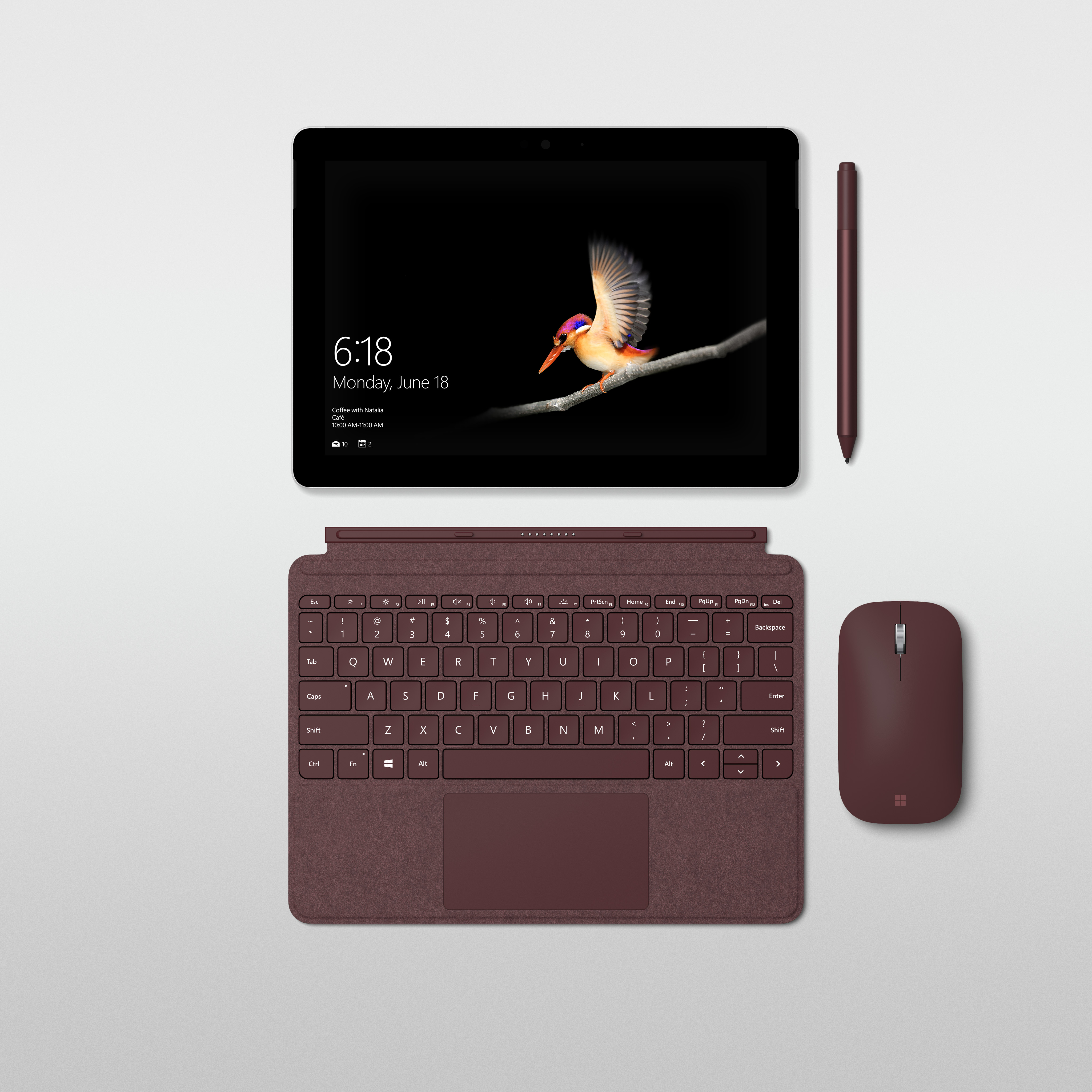
Our new Surface Go Signature Type Cover is custom-made for Surface Go integrating design features that give the user the best typing experience possible, with ergonomic key pitch and exceptional key travel. It also has high precision tuning and Windows Precision Trackpad that supports five-point multi-finger gestures, and you can connect the new Surface Mobile Mouse to work the way that you want.
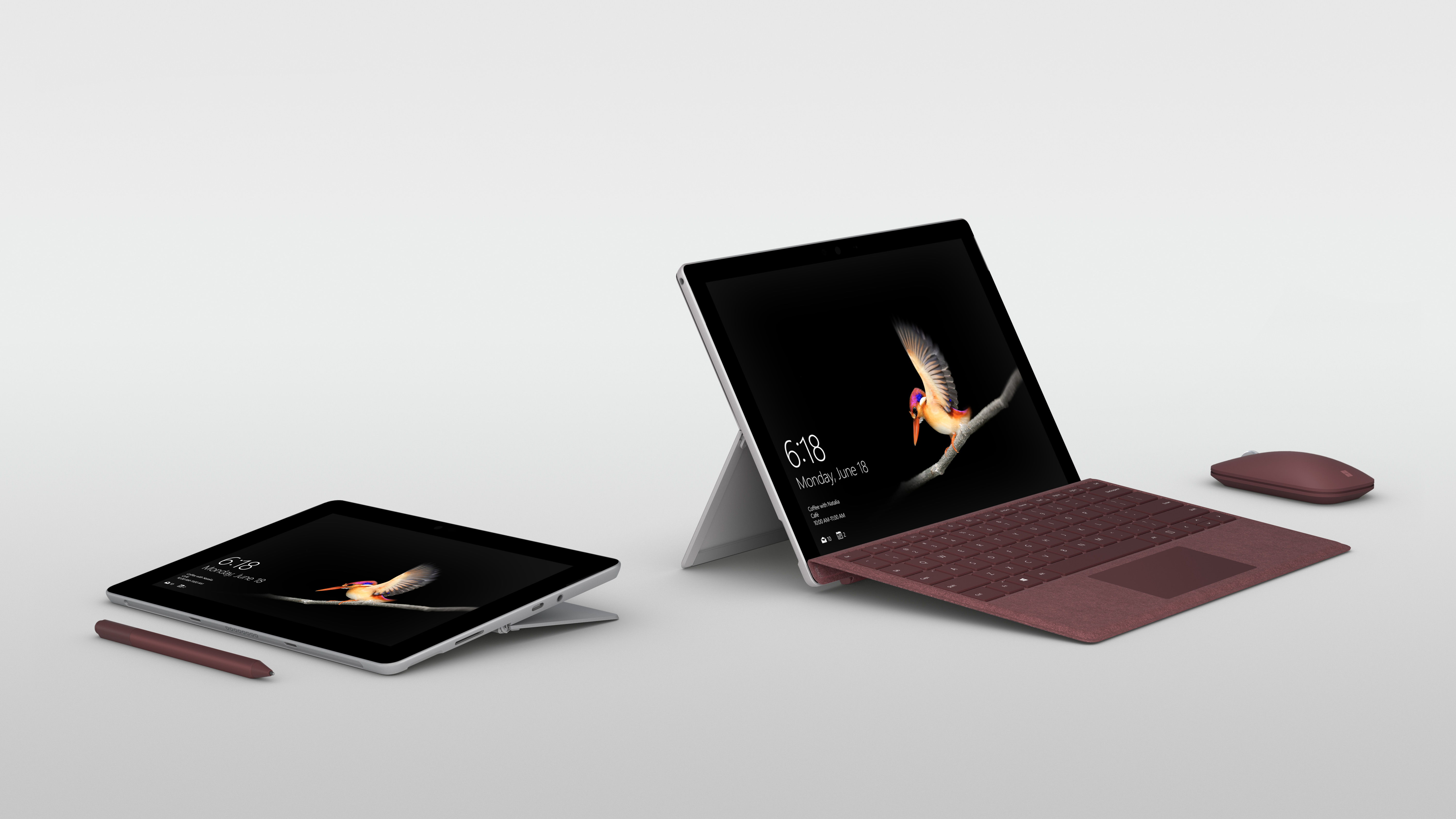
A built-in kickstand with full friction hinge that extends to 165 degrees helps you stay in your flow from tablet to studio mode, and a Windows Hello camera allows for familiar, quick, and secure sign-in using face recognition.
Surface Go also has the ports you need, including Surface Connect for charging and docking; USB-C 3.1 for data, video, and charging; a headphone jack; and a MicroSD card reader for storage expansion. All designed to help you be more productive whether you’re studying in a library, working on a plane, or sharing your content in a boardroom on a 4K monitor.
Surface Go with Wi-Fi will be available for pre-order tomorrow, July 10 in select countries*, with products beginning to hit shelves on August 2. We’re also happy to share that an LTE model will be arriving later this year.
For a family at home or on the move, an expert on the front line of a business interacting with customers, or a school that wants to provide its students with the most versatile tools for learning, this device offers a premium experience with incredible value.
Wherever the day takes you, and whatever unique tasks await you along the way, Surface Go moves with you.
Meet Surface Go, starting at $399 MSRP, it’s the smallest and most affordable Surface yet
*Availability: Surface Go will be available for pre-order beginning on July 10 in the following markets, US, Canada, Australia, New Zealand, UK, Ireland, France, Germany, Austria, Belgium, Luxembourg, Netherlands, Switzerland, Denmark, Finland, Norway, Sweden, Poland, Italy, Portugal, and Spain.
In the coming weeks, Surface Go will be available for pre-order in Japan, Singapore, Korea, Taiwan, Malaysia, Thailand, Hong Kong, and in China with more markets to follow.
Panos Panay is the betting type. You can see the evidence in Microsoft’s Building 37, where two $1 bills stick out from beneath a Surface tablet sitting on a shelf.
When I ask Panay about the dollars during a recent visit to Microsoft, he says it was a wager he made a few years back on a specific product. I ask if it was a bet on Surface RT, the very first Surface product Microsoft made, and he seems genuinely surprised. “I would have lost that bet, and I’m going to win this one,” he says. “It’s about a product that’s in market right now.” And that’s all he’ll volunteer.
Panay, Microsoft’s chief product officer, isn’t there to talk about the ghosts of Surface’s past, or even the present. Panay wants to talk about his next big bet in the Surface product lineup: the brand-new Surface Go. But to call it “big” would be a misnomer, because the Surface Go was designed to disappear.
Ian C. Bates
If you’ve followed the trajectory of the Surface product line, you might say that the Surface Go previously existed in some form, if not as a prototype then in sketches and leaks and rumors and in our own imaginations. But Panay insists that this new 2-in-1 device is not the offspring of anything else—not the Surface RT, not the Surface 3, and not the Surface Mini (which served as a kind of fever-dream notepad for Panay, but never shipped).
Instead, the new Surface Go is an attempt to bring most of the premium features of a $1,000 Surface Pro to something that’s both ultra-portable and more affordable.
Ian C. Bates
Like a Surface Pro, the Go is a “detachable”—a tablet that attaches to Microsoft’s alcantara Type Cover keyboard. It has the same magnesium enclosure; a bright, high-res touchscreen display that has a 3:2 aspect ratio and is bonded with Gorilla Glass; a kickstand in the back that extends to 165 degrees; support for Microsoft’s stylus pen, which attaches magnetically to the tablet; a Windows Hello face recognition camera, for bio-authentication; two front-facing speakers, an 8-megapixel rear camera; and on and on. It’s a veritable checklist of Surface Go’s external features.

But the Surface Go is tiny. It measures just 9.6 by 6.9 by .33 inches, with a 10-inch diagonal display. It also weighs 1.15 pounds. The first time I saw the Go, Natalia Urbanowicz, a product marketing manager at Microsoft, pulled the thing out of a 10-inch, leather, cross-body Knomo bag to show just how easily it can be tucked away. It’s light enough to mistake for a notebook; the last time I felt that way about a computer was when Lenovo released the YogaBook back in 2016.
Ian C. Bates
The Go also happens to be the least expensive Surface ever. When it ships in early August, it will have a base price of $399. That’s for a configuration that includes 64 gigabytes of internal storage and 4 gigabytes of RAM, and ships with Windows 10 Home in S Mode (the S stands for “streamlined,” which means you can only download apps from the Windows Store). You’ll also have to shell out extra for a Type Cover keyboard and stylus pen.
From there, specs and prices creep up: A Surface Go with 256 gigabytes of storage, 8 gigabytes of RAM, and LTE will cost you more, though Microsoft hasn’t shared how much yet. All configurations have a microSD slot for additional storage too.
The Surface Go is not the first 10-inch Surface that Panay and his team have shipped. The original Surface had a 10.6-inch display. And in 2015, Microsoft released the 10.8-inch Surface 3. It started at $499, and ran a “real” version of Windows, not Windows RT. But it was also underpowered; and, Panay admits now, it had an inelegant charging mechanism.
“To this day I regret the charging port on Surface 3,” Panay says. “I’d convinced myself that this ubiquitous USB 2.0 connector was going to solve the thing people asked me for: Can I just charge it with the charger I already have? And what I learned is that people want a charger with the device, they want a very seamless charging experience…I know that seems small, but I don’t think I can overstate that every single little detail can be a major difference maker.”
Panay says there’s been clear demand for a successor to the Surface 3, which would, by definition, have been the Surface 4. But “that evolution wasn’t right,” he says. “That would be too close to the original Surface Pro, and that’s not what this product should be at all.” Instead, he’s been noodling something like the Surface Go—codenamed “Libra”—for the past three years.
The new Surface Go benefits from all those learnings. It has the same Surface Connect port as the Pro lineup, along with a USB-C 3.1 port for data transfers and backup charging. It’s supposed to get around nine hours of battery life. It also runs on an Intel Pentium Gold processor. This is not one of Intel’s top-of-the-line Core processors, but it’s still a significant jump up from the Cherry Trail Atom processor in the Surface 3.
Pete Kyriacou, general manager of program management for Surface, says Microsoft has worked closely with Intel to tune the processor for this particular form factor. “If you compare the graphics here to the Surface Pro 3 running on an i5 [chip], it’s 33 percent better; and if you compare it to the i7, it’s 20 percent better,” Kyriacou says. “So we’re talking about Pentium processing, but, it’s better from a graphics perspective than a Core processor was just three years ago.”
A lot about the new Surface has been “tuned”—not just the guts of the Go, but its software, too. “We tuned Office, we then tuned the Intel part, we tuned Windows, we made sure that, in portrait, it came to life,” Panay says. “We brought the Cortana [team] in to better design the Cortana box—we went after the details on what we think our customers need at 10 inches.”
There’s usually a tradeoff when you’re buying a computer this small. You get portability at the expense of space for apps and browser windows. The Surface Go has a built-in scaler that optimizes apps for a 10-inch screen, and Microsoft says that it’s working with third-parties to make sure certain apps run great. There’s only so much control, though, you have over software that’s not your own. I was reminded of this when I had a few minutes to use the Surface Go, went to download the Amazon Kindle app in the Windows Store, and couldn’t find it there.
Making the Surface smaller was no small feat, according to Ralf Groene, Microsoft’s longtime head of design. Groene walks me through part of Building 87 on Microsoft’s campus, where the design studio is housed and where Groene’s team of 60 are tasked with coming up with a steady stream of ideas for potential products.
Ralf Groene, Microsoft’s head of design.
Ian C. Bates
Behind a door that says “Absolutely No Tailgating”—a warning against letting someone in behind you, not a ban on barbecues and cornhole—a small multimedia team makes concept videos. “Before products get made, we have a vision, we have an idea, and we express it in a video,” Groene tells me. If the video is received well by top executives, they know they have a winner. “Since there’s usually a timeline on how long processors are good for, we try to build as many iterations as possible of a product within that timeline.”
Once the Surface Go got the go ahead, Groene’s job became that of a geometrist: How do you fit all this stuff into a 9.6-inch enclosure? Going with magnesium again was an easy choice; it’s up to 36 percent lighter than aluminum, Groene says, and Microsoft has already invested in the machinery needed to work with magnesium. Some of the angles of the Go’s body are softer—Groene calls these “curvatures and radii”—making it more comfortable to hold close for extended time periods, like if you’re reading or drawing.
By far the biggest challenge was the Go’s Type Cover keyboard. The factor that always stays the same is the human, Groene says, and that includes fingers. Shrink a keyboard too much in your quest to make a laptop thin and light, and you’ll inevitably get complaints from people that their fingers are cramped, or that they land on each key with an unsatisfying thud. (Or worse, that the keyboard is essentially broken.)
The Go’s keyboard is undoubtedly smaller than the one that attaches to the Surface Pro. But it still has a precision glass trackpad, and a key travel that Groene says is fractionally less than the key travel on the Pro.
Ian C. Bates
Most notably, the Go’s keyboard uses a scissor-switch mechanism that was designed to give, as Groene describes it, the right “force to fire.” Each key is also slightly dished, a decision that Microsoft made after watching hours of footage of people typing, captured with a high-speed camera. The keys are supposed to feel plush and good under your fingers and not at all like a tiny accessory keyboard. (I only used the keyboard on the Go for a brief period of time, so I can’t really say what it would be like to use the keyboard to, say, type of a story of this length.)
I mention to Groene that Apple has long held the stance that touchscreens aren’t right for PC’s, something that Apple’s software chief Craig Federighi underscored in a recent WIRED interview when he said that they’re “fatiguing.” And yet, Microsoft is pretty committed to touchscreen PCs. What does Microsoft’s research show about how people use touchscreen PCs?
Groene first points out that the Surface laptop is the only one in Microsoft’s product line that has a classic laptop form factor and a touchscreen; the others are detachables, or, there’s the giant Surface Studio PC. But, more to the point, he says, “By offering multiple ways to get things done doesn’t mean that we add things. It’s not like the Swiss army knife, where every tool you put in makes it bigger.”
Sure, if you sit there for eight hours holding your arm up, it will get tired, Groene acknowledges. But that’s not the way people are supposed to use these things. “It’s the same thing with the pen. ‘We don’t need the pen because we are born with ten styluses,’” Groene says, wiggling his fingers, making an oblique reference to a well-known Steve Jobs quote about styluses. “However, having the tool of a pen is awesome when you want to go sketch something.”
“We are trying to design products for people,” he says, “and we don’t try to dictate how people use our devices.”
Ian C. Bates
So who is this tiny Surface Go actually made for? It depends on who you ask at Microsoft, but the short answer seems to be: anybody and everybody.
Urbanowicz, the product marketing manager, says Go is about “reaching more audiences, and embracing the word ‘and’: I can be a mother, and an entrepreneurial badass; I can be a student, and a social justice warrior.” Kyriacou, when describing the Go’s cameras, says to “think about the front line worker in the field—a construction worker, architect, they can capture what they need to or even scan a document.” You can also dock the Go, Kyriacou points out, using the Surface Connect port, which makes it ideal for business travelers. Groene talks about reading, about drawing, about running software applications like Adobe Photoshop and Illustrator. Almost everyone talks about watching Hulu and Netflix on it.
Panos Panay initially has a philosophical answer to this. It’s his “dream,” he says, to just get Surface products to more people. “I mean, that’s not my ultimate dream. But there are these blurred lines of life and work that are happening, and if you collect all that, Go was an obvious step for us.”
The evening before Panay and I chatted, he went to the Bellevue Square shopping center with his son, and at one point, had to pull out his LTE-equipped Surface Go to address what he said was an urgent work issue. His son asked if it was a new product, and Panay, realizing the blunder of having the thing out in public, tucked the Go in his jacket. To him, that’s the perfect anecdote: The lines between work and family time were blurred, he had to do something quickly, and when he was done, he could make his computer disappear.
Panos Panay, Microsoft’s chief product officer.
Ian C. Bates
Panay’s team also has a lot more insight into how people are using Surface products than it did eight years ago, he says, when Surface was still just a concept being developed in a dark lab. To be sure, Microsoft has been making hardware for decades—keyboards, mice, web cameras, Xbox consoles. But when Microsoft made the decision to start making its own PCs (and ultimately, take more control over how its software ran on laptops), it was a new hardware category for the company. It was a chance to get consumers excited about Microsoft again, not just enterprise customers.
The first few years of Surface were rocky. The first one, known as Surface RT, seems to be something that Microsoft executives would rather forget about; I don’t see it anywhere in the product lineups that Microsoft’s PR team has laid out ahead of my visit. Its 2012 launch coincided with the rollout of Windows 8, which had an entirely new UI from the previous version of Windows. It ran on a 32-bit ARM architecture, which meant it ran a version of the operating system called Windows RT. Depending on who you ask, the Surface RT was either a terrible idea or ahead of its time. (Panay says it was visionary.) Microsoft ending up taking a massive write-down on it the following year.
Since then, Microsoft has rolled out a series of Surface products that, due to the company’s design ethos, a newer operating system, and plain old Moore’s Law, have only gotten better. In 2013 it introduced the Surface Pro line, which are still detachables, but are built to perform like a premium laptop and can cost anywhere from $799 to $2,600. There’s the Surface Book line; the Surface Book 2 starts at $1,199 and clocks in around 3.5 pounds, making it a serious commitment of a laptop. The Surface Studio is a gorgeous, $2,999, all-in-one desktop PC, aimed at creative types. The Surface Laptop is Microsoft’s answer to Apple’s MacBook Air. It starts at $799, and got largely positive reviews when it launched last year.
Even still, Microsoft’s Surface line has struggled to make a significant dent in the market for personal computing. HP and Lenovo dominate the broader PC market, while Apple leads in the tablet category (including both detachables and slate tablets).“From a shipment perspective, the entire Surface portfolio has been fairly soft,” says Linn Huang, an IDC research director who tracks devices and displays. “It was growing tremendously, and then the iPad Pro launched and Surface shipments have either been negative, year-over-year, for the past several quarters, or flat.”
Microsoft has new competition to worry about, too: Google’s inexpensive Chromebooks, which in a short amount of time have taken over a large share of the education market.
“Do I think about Chromebooks? Absolutely,” Panay says, when I ask him about them. “Do I think about iPads? Absolutely. I use multiple devices. It’s exhausting. But this product is meant to bring you a full app suite.” Panay is highlighting one of the drawbacks of lightweight Chromebooks: Their lack of local storage. Meanwhile, he says, Surfaces are designed to let people be productive both locally on the device, and in the cloud when they need to work in the cloud.
And, while Panay says he’s keeping an eye on Chromebooks, he insists that Microsoft didn’t build Go to compete with Chromebooks. That said, Surface Go will have a school-specific software option: IT administrators for schools can choose whether they want a batch of Go’s imaged with Windows 10 Pro Education, or Windows 10 S mode-enabled.
Panay wouldn’t comment on Microsoft’s plans for the future beyond Surface Go, although there have long been rumors of a possible Microsoft handheld device, codenamed Andromeda. If the Surface Go is something of a return to a smaller, 10-inch detachable, then a pocketable device that folds in half, one that could potentially run on an ARM processor, would be something of a return to mobile for Microsoft. Qualcomm has also been making mobile chips that are designed to compete directly with Intel’s Core processors for PCs.
For now, though, Panay is throwing all his chips behind the Surface Go, and making a big bet that this little device is the one that will make the masses fall in love with Surface. He tends to chalk up past Surface products, even the ones that didn’t do well, as simply before their time. Now, with the Go, he says, “it’s time.”
A whole new wave of features has drifted into Minecraft! Players on Windows 10, VR, mobile devices, Xbox One and Nintendo Switch will find the second Phase of Update Aquatic pouring into their game today, including adorable turtles, bubble columns that punish careless swimmers and a sinister new mob. Yay/yikes!
Java players, we haven’t forgotten you – the incredibly hard-working Java team are almost done putting together the Update Aquatic for your version – why not try the latest Java pre-release to experience some of the Aquatic features right now?
Here’s what’s new for Phase Two!
FULL LIST OF PHASE TWO FEATURES
Realms are now available on Nintendo Switch
The Drowned – These dangerous, underwater zombies lurk in dark, deep water and will come up to the shore at night
Sea Turtles – These gentle creatures can be found swimming in oceans and tanning on beaches. Protect their eggs so more can hatch!
Turtle Shell and Scute items
Potion of the Turtle Master
Nautilus Shells – Can be found while fishing or held by the Drowned
Conduits can now be constructed underwater and give players the Conduit Power effect. Craft them with Nautilus Shells & Heart of the Sea
Bubble Columns – Magma Blocks create downward flowing columns and Soul Sand creates upward flowing bubbles
New Achievements!
Added new commands that only affect worlds with Education Edition enabled: 1. /ability – Sets a player’s ability 2. /immutableworld – Sets the immutable state of the world 3. /worldbuilder – Toggle World Builder status of caller
CHANGES
Changed the menu background to be themed for Update Aquatic
Undead mobs will now sink in water and can walk on the bottom
Improved the steering of Boats when using keyboard and mouse by pressing W to move forward and S to reverse
Dolphins can now be given Raw Fish or Raw Salmon and will swim towards the nearest Ocean Ruins or Shipwreck
Husks that have sunk in water will now transform into Zombies and Zombies will transform into Drowned
Skeleton Horses can now be ridden underwater
Skeletons and Strays will switch from ranged to melee attacks while underwater and switch back when out of water
Coral blocks will no longer die as long as one side is touching water
Improved player swimming at the surface of water
Tridents can now be enchanted with Mending and Unbreaking
Added an animation when using Riptide in first person perspective
Slightly decreased the friction of Blue Ice
Updated the texture of the top of Kelp
Updated the texture of Cooked Fish
Updated the Riptide spin texture
Default Field of View has been reduced from 70 to 60 and can be adjusted in Video Settings
Tridents will no longer break blocks in Creative mode
The Inventory button has been moved to the top of the Store page
Today, Microsoft announces Surface Go: the most portable and affordable Surface product yet.
Many of us play different roles throughout the day, moving from work or school to home and everywhere in between. Our team designs every Surface to adapt to that dynamic lifestyle, to strike a balance between performance and versatility, form and function. Our products don’t do just one thing because people don’t do just one thing.
We pioneered categories like the 2:1 to provide the mobility of a tablet with the performance of a laptop, inspiring new ways of creating. As you pursue your passions, connect with friends and family, and work with your team, the products you’re able to take on the go with you are the ones that can keep up with the huge range of things you want to accomplish. This is true whether you’re a parent and a product-maker like me or a student and amateur photographer like my daughter.
That’s the idea behind the design of Surface Go – our smallest, lightest, and most affordable Surface yet. When we designed this device, we had to ask ourselves what people want and need from a 10” Surface. The answers seem obvious – lightweight, productive, and accessible to more people. I’m pumped to introduce you to Surface Go, because it’s all those things, and so much more.
The power and connectivity in a device this small gives you the style and productivity Surface is known for in a more convenient package. At just 1.15 pounds and 8.3 mm thin, Surface Go packs portable performance into a 10” device. Starting at $399 MSRP, it represents a new entry point for the Surface family, while keeping the premium qualities that have come to define it.
Surface Go offers a stunning, custom-built high-resolution PixelSense Display that supports Surface Pen with 4096 levels of pressure sensitivity, low pen parallax, low latency, and precision for accurate note taking, drawing and computer-aided design. The custom calibrated 3:2 display is soft on your eyes while you’re working and vibrantly high-contrast when you want to watch videos, create art, or edit photos.
In portrait mode, the screen was designed to render the page to the scale of most school textbooks, and in landscape mode, it can render pages side by side as if you were holding a paperback book in hand. At the approximate size of a composition notebook, writing on the screen feels natural and intuitive.
Since my two youngest daughters have started using Surface Go, I see them watching movies, reading, and drawing on it every day. It’s the perfect device for them. And for me, whether I’m at home, in the office, or on a plane, putting my Surface Pen on the screen and letting my thoughts flow is a necessary step in my creative process. It’s how I work. It’s so easy to carry Surface Go with me so I can capture those moments, instantly.
Surface Go is small and mighty, giving you the performance you need to be productive. A device powered by the 7th Generation Intel Pentium Gold Processor 4415Y, in a fanless design, offering up to nine hours of battery. Our team worked closely with Intel to optimize power, performance, and battery for the most critical tasks people perform every day.
Being able to run Office apps on this device with its portability is one of the things that was critical to the experience we had in mind when we designed Surface Go – the productivity of having the apps you use for work and school with the flexibility to relax and read or watch a show on Netflix or Hulu.
Our new Surface Go Signature Type Cover is custom-made for Surface Go integrating design features that give the user the best typing experience possible, with ergonomic key pitch and exceptional key travel. It also has high precision tuning and Windows Precision Trackpad that supports five-point multi-finger gestures, and you can connect the new Surface Mobile Mouse to work the way that you want.
A built-in kickstand with full friction hinge that extends to 165 degrees helps you stay in your flow from tablet to studio mode, and a Windows Hello camera allows for familiar, quick, and secure sign-in using face recognition.
Surface Go also has the ports you need, including Surface Connect for charging and docking; USB-C 3.1 for data, video, and charging; a headphone jack; and a MicroSD card reader for storage expansion. All designed to help you be more productive whether you’re studying in a library, working on a plane, or sharing your content in a boardroom on a 4K monitor.
Surface Go with Wi-Fi will be available for pre-order tomorrow, July 10 in select countries*, with products beginning to hit shelves on August 2. We’re also happy to share that an LTE model will be arriving later this year.
For a family at home or on the move, an expert on the front line of a business interacting with customers, or a school that wants to provide its students with the most versatile tools for learning, this device offers a premium experience with incredible value.
Wherever the day takes you, and whatever unique tasks await you along the way, Surface Go moves with you.
Meet Surface Go, starting at $399 MSRP, it’s the smallest and most affordable Surface yet
*Availability: Surface Go will be available for pre-order beginning on July 10 in the following markets, US, Canada, Australia, New Zealand, UK, Ireland, France, Germany, Austria, Belgium, Luxembourg, Netherlands, Switzerland, Denmark, Finland, Norway, Sweden, Poland, Italy, Portugal, and Spain.
In the coming weeks, Surface Go will be available for pre-order in Japan, Singapore, Korea, Taiwan, Malaysia, Thailand, Hong Kong, and in China with more markets to follow.
Shin’s journey hasn’t been an easy one, but thanks to his parents lobbying a local education board – which once suggested Shin go to a special needs school – he has always been studying at regular schools.
Since elementary school, he studied with the help of computer software, such as Microsoft Word and OneNote. He uses a small, special mouse to draw graphs.
“By using Windows’ on-screen keyboard and moving the mouse, I can use my PC for study and communicating with my friends,” he explained.
Since 2013, Microsoft has assisted his learning, including preparation for the tough university entrance exam, by providing IT tools, such as the on-screen keyboard and a cursor control system that uses eye movements.
Shin is now trialing a new eye tracking software that enables him to move the mouse cursor with his eyes
“I have faced lots of challenges like everyone else, but we often need help too,” Shin said. “I’m currently trialing the new eye tracking software that enables me to move the mouse cursor with my eyes. This is one more example of how technology will help people like me work more efficiently.”
“My dream is that one day these kinds of functions will not be listed under accessibility but will be an integral part of how we all work to make a better future,” he added.
In 2016, Shin successfully passed the entrance exam for Tokyo University after spending a year at a preparatory school together with other students who aimed to enter the country’s competitive universities.
Now as a university student, Shin continues to study on his electric stretcher with assistance and support from helpers and the school. Since April this year, he lives on his own with assistance when he needs to move.
The entrance exam for Tokyo University is one of Japan’s most competitive assessments. Before the exams, Shin submitted a request to the exam authority, the National Center for University Entrance Examinations, notifying them that his physical condition required more attention.
During the exam, Shin sat in a separate room with more time to take the paper, and was assigned an assistant to write down his answers. Shin was also allowed to use a computer, especially when an answer required a graph.
Shin’s favorite quote by Friedrich Nietzsche, the philosopher he admires, is “Man is something that shall be overcome.” The feisty student is often led by these words when reflecting his own physical disability.
Shin, now 21, studies Western Philosophy at Tokyo University
“I believe that we need a new inclusive philosophical framework because technology is now empowering people to become independent beyond any physical barriers,” he says.
Learning from those with disabilities to improve their opportunities
One of those working with people with disabilities, such as Shin, is Microsoft Japan employee Tomoko Ohshima.
Gathering their comments, requests and feedback, she passes those to the tech giant’s developers to create tools to help people with disabilities.
Ohshima was encouraged to take on this project by Microsoft Japan some ten years ago, inspired by her interactions with a colleague, a programmer who is blind. “Technology is so helpful for people!” she says.
Meanwhile, Japan’s entrance exam system is also improving to accommodate students with various disabilities. A consensus has been established to allow students with disabilities to use tools approved by the authorities, such as computers, and to extend the test time depending on each student’s condition. Ohshima’s commitment of the last ten years coincides with this improvement, and has allowed her to witness the transition.
Challenges still remain for students with disabilities. For example, having a computer read out exam questions is rarely permitted in Japan. Instead, a reader is assigned to read the questions aloud for the examinee. This does not always work well for the students –– some students might want to read important parts more slowly, and others might want to have questions read out repeatedly to better understand them.
One of the reasons computer reading has not been approved is because examiners need to create extra exam papers by digitalizing them. This may be avoidable with optical character recognition (OCR).
“We are willing to provide any useful help and technology to create a society in which anyone can have the opportunity to take the entrance exams and be judged fairly regardless of one’s physical condition,” says Ohshima.
To read more about Microsoft Philanthropies’ work to build future ready generations in Asia, click here.
Oschner Health is one example of a company using AI to revolutionise healthcare. Its system is able to accurately track patients who are at risk of cardiac arrest, and can determine when there is a decline in their condition. This allows them to be admitted into intensive care hours earlier than they otherwise would have been. They are provided with potentially life-saving care, before their condition deteriorated to the point where medical care would have been less effective.
Project InnerEye, in use at Addenbrooke’s Hospital in Cambridge, is another solution which uses machine learning and computer vision for the analysis of radiological images. Designed to identify tumours, it improves the delivery of treatments such as radiotherapy, by precisely distinguishing between cancerous and healthy tissues. It can also better monitor disease progression during chemotherapy, so that treatment can be adjusted in line with how patients respond.
These AI solutions allow medical professionals to improve patient care and admittance time, thanks to their improved precision. This, in turn, reduces financial and manpower strain, improving the healthcare experience in the areas where this technology is being used.
This is supported by data from the World Health Organization (WHO), which shows that between 30 and 50 percent of cancer deaths could be avoided with prevention, early detection and treatment. With cancer costing the global economy an excess of an estimated $1.16 trillion a year, the impact of technology such as AI, is game-changing.
In the UK alone, for example, there are only 4.7 radiologists per 100,000 population, and this number will need to almost double by 2022 to meet demand. Because of this shortage, the NHS spent nearly £88 million in 2016 paying for backlogs of radiology scans to be reported – the same amount could have paid for over 1,000 full-time consultants.
“We are drowning in data in hospitals,” Kos states. “We don’t have enough human brainpower to deal with it all in a timely manner – which in healthcare, is vital.”
Using technology such as AI can therefore substantially decrease strain on healthcare systems, while simultaneously improving patient care and reducing costs, allowing doctors to spend their time on more complex medical diagnoses. Or, indeed, spending more time connecting with patients.
The human factor Introducing AI to healthcare isn’t removing the humanity from medicine. On the contrary, it’s increasing it.
A study in the Annals of Internal Medicine found that doctors spend nearly twice as much time doing administrative work (49 percent) as they do with their patients (27 percent). In other words, doctors are spending more time crunching through data, sifting through and updating records, and analysing scans, than they are speaking to their patients.
In a profession where people are dealing with often traumatic, life-changing developments, this personal, human touch, is vital for the emotional well-being of patients and their loved ones. By using tools such as AI to free up more of their time, healthcare professionals can focus more on patient interaction, offering reassurance, providing guidance, and answering more questions.
Culture, and the challenges of change Motivated by the lack of technology during his critical care period, Kos spent eight years crusading to introduce electronic medical record systems into hospitals. But nothing improved.
“We digitized, but we digitized all of the mistakes too. Then it dawned on me – digitization is important, but it’s not transformation.”
Without the supportive technology of cloud storage, or the data analysis powers of AI and machine learning, the full potential of these digitized records weren’t even close to being reached. Only years after, when cloud technology was accepted on a wider scale, and when collaborative tools such as Skype or real-time document editing in the cloud were established – could this initial digitization move on to the next level.
Research has shown that an organisation with the most advanced technology still won’t be as effective if it lacks the right company culture. Employees must be willing to embrace their new tools, while leaders must encourage a culture of learning. Only then, can the new tools be as effective as possible.
In the world of medicine, however, adopting the right culture for technological change can prove to be a challenge.
“Healthcare professionals are rather inward-looking,” says Kos. “Doctors listen to doctors. It’s a very top-down, hierarchical environment. You could have the best technology in the world, but if the culture isn’t ready to embrace it with a willingness to learn, it’s just not going to work.”