Posted on Leave a comment

London’s V&A museum adds Xbox Adaptive Controller to gallery on groundbreaking design

The Xbox Adaptive Controller has been added to a V&A gallery dedicated to groundbreaking moments in design.

The controller, which was released on September 4, lets gamers with limited mobility plug in assistive aids such as buttons, joysticks and switches to allow them to play videogames on Xbox and Windows 10 PCs.

The V&A, the world’s leading museum of art, design and performance, has acquired Microsoft’s product for its Rapid Response Collecting display. The area, on the third floor of the seven-floor museum, was opened in 2014 and explores how current global events, political changes and pop cultural phenomena impact, or are influenced by, design, art, architecture and technology.

Other products in the Rapid Response Collecting gallery include a pair of Christian Louboutin shoes, a Lufsig soft toy, a set of Bolide HR handlebars, a personal genetic testing kit and a LEGO set.

The Xbox Adaptive Controller on display at the V&A

Corinna Gardner, Senior Curator of Design, Architecture and Digital at the V&A, said: “The Rapid Response Collecting is about bringing objects into the museum that signal moments of economic, political, social and technological change. It’s contemporary design history in action.

“The Xbox Adaptive Controller was an object that we thought very much captured a specific moment within the field of videogames but also more broadly about social and inclusive design. It’s a real opportunity to bring an object into the collection that addresses the question of inclusive design head on. It’s an important and attractive acquisition for us here at the V&A.”

The Xbox Adaptive Controller delighted charities and gamers with limited mobility when it was unveiled in May. They say it will help them continue to enjoy something they love as well as connect with other people and be more independent.

There are around a billion people across the world with a disability, including 13.9 million people in the UK. Research from Muscular Dystrophy UK found that one-in-three gamers has been forced to stop playing videogames due to their disability.


Chris Kujawski, Senior Industrial Designer at Xbox, said it was an honour to see the controller placed in the V&A.

“This is the most important project that I’ve been a part of at Microsoft because of the impact it will have on people,” he said. “It’s an honour to have a product that we designed in a museum.

“The recognition of inclusivity and gaming that this provides is good for the industry, and it’s great that Microsoft is being recognised as a leader in this space. I hope it inspires other companies and the next generation of designers to build hardware that’s inclusive.”

The Xbox Adaptive Controller, which can be connected to any Xbox One or Windows 10 PC via Bluetooth, features 19 3.5mm input jacks and two USB ports. Gamers can plug their third-party devices into these, with specific support for PDP’s One-Handed Joystick, Logitech’s Extreme 3D Pro Joystick and Quadstick’s Game Controller.

The Xbox Adaptive Controller is in the Rapid Response Collecting gallery of the V&A

Two, large, easy-to-press programmable buttons and a D-pad means it can also be used as a standalone controller. The internal lithium-ion battery can be recharged, eliminating the need to change small batteries.

Up to three profiles can be saved on the controller, allowing people to quickly switch between set-ups depending on the game they are playing.

Even the packaging has been specially designed to be opened by gamers with limited mobility.

The Xbox Adaptive Controller is available to buy now, priced at £74.99. Sitting alongside 12 other objects, It will have a permanent place in the free area at the V&A, in London, which houses a collection of more than 2.3 million objects that span over 5,000 years of human creativity. The V&A also displays a copy of Minecraft, as well as a hooded sweatshirt and action figure of the Creeper from the game in its Museum of Childhood.

Tags: , , , , ,

Posted on Leave a comment

Gaming gets more inclusive with launch of the Xbox Adaptive Controller

Without a doubt, 2018 has been a hallmark year for inclusivity in gaming. From individual platforms and games introducing more features for gamers with accessibility needs to physical hardware like the Xbox Adaptive Controller, there has never before been such a high point for inclusivity in gaming. Available at Microsoft Stores and GameStop Online for $99.99, the first-of-its-kind Xbox Adaptive Controller will be available starting today, so even more gamers from around the world can engage with their friends and favorite gaming content on Xbox One and Windows 10.

The Xbox Adaptive Controller is a product that was ideated and pioneered with inclusivity at its heart. We iterated on and refined it through close partnership with gamers with limited mobility and fan feedback, as well as guidance and creativity from accessibility experts, advocates and partners such as The AbleGamers Charity, The Cerebral Palsy Foundation, Craig Hospital, Special Effect and Warfighter Engaged. Even the accessible packaging the Xbox Adaptive Controller arrives in was an entirely new approach to redefining success in product packaging—directly informed and guided by gamers with limited mobility. It’s truly the collaboration and teamwork from these individuals and groups who helped bring the Xbox Adaptive Controller to gamers around the world. And gaming, everywhere, becomes greater because of that collaborative spirit.

Xbox Adaptive Controller

Xbox Adaptive Controller

To the gamers and industry professionals around the world who shared their thoughts, feelings and feedback on either the Xbox Adaptive Controller itself or the accessible packaging it ships in—thank you. From gamers like Mike Luckett, a combat veteran based in the US who tested and shared feedback on the controller through the beta program, to gamers in the UK who kindly invited us into their homes and shared which iteration of the accessible packaging they liked most—this day of launch is a thanks to all your contributions. On behalf of gamers everywhere, we share our sincere thanks.

While the response from communities, gamers and press when we introduced the controller in May was remarkable, the true impact the Xbox Adaptive Controller has had with gamers becomes clearer when attending events like E3 in Los Angeles in June, wearing an “Xbox Adaptive Controller” t-shirt. Walking the show floor to run a simple errand, you become bombarded with smiles, greetings and high-fives—shared by gamers of all types—embracing and furthering the fondness of supporting inclusivity in gaming. It’s a powerful sentiment of appreciation for inclusivity, and we’re humbled by the reception.

Xbox Adaptive Controller

Xbox Adaptive Controller

Beyond the humbling praise from the gaming industry, the Xbox Adaptive Controller has been equally recognized for its innovative approach to inclusive design in gaming. In fact, just today it was announced that the V&A, the world’s leading museum of art, design and performance, has acquired the controller as part of its Rapid Response Collecting program, which collects contemporary objects reflecting major moments in recent history that touch the world of design, technology and manufacturing. It’s an honor and achievement we did not set out to accomplish but are nonetheless moved by the recognition of the team’s passionate work invested in the Xbox Adaptive Controller, helping it stand out as a truly first of its kind product—in gaming and beyond.

Let today be a celebration of inclusivity in gaming—regardless of your platform, community or game of choice. Whether you’re a gamer using the Xbox Adaptive Controller for the first time or new to gaming, welcome to the Xbox family! Inclusivity starts with the notion of empowering everyone to have more fun.  That means making our products usable by everyone, to welcome everyone, and to create a safe environment for everyone.

If you’re looking for more information on the Xbox Adaptive Controller, peripherals available today to configure it just for your use, or tips on how to get setup, we’ve got you covered. Learn more about peripherals from our hardware partners such as Logitech, RAM and PDP, used to customize your Xbox Adaptive Controller configuration, here. Visit this page to learn more about using Copilot with the Xbox Adaptive Controller. And here is some general product information to help you learn more about the Xbox Adaptive Controller. Thanks again for joining us on this incredible journey of inclusivity; see you online!

Posted on Leave a comment

‘PlayerUnknown’s Battlegrounds’ full product release now available on Xbox One

Today, the Full Product Release (1.0) update for PlayerUnknown’s Battlegrounds (PUBG) released for new and existing owners across the Xbox One family of devices. This is a big moment for the PUBG Xbox community, now over nine million players strong, who have been every bit an important part of the development process since we first launched in Xbox Game Preview in December 2017. With the support of fans and the team at Microsoft, it’s been an incredible journey and we’re just getting started.

The Full Product Release comes with several exciting updates, including the Xbox One debut of the Sanhok Map, available today, along with Event Pass: Sanhok, which unlocks awesome rewards for leveling up and completing missions. The Sanhok Map is included with the Full Product Release 1.0 update, and Event Pass: Sanhok can be purchased in the Microsoft Store or the PUBG in-game Store beginning today. For additional details on all of the new features included in the Full Product Release update today and in the weeks ahead, click here.

While Full Product Release represents an exciting milestone for PUBG on Xbox One, it does not represent the end of the journey. The game will continue to be updated and optimized, and we have an exciting roadmap of new features and content ahead in the months to come, including the winter release of an all-new snow map.

The Full Product Release of PUBG for Xbox One is available for $29.99 USD digitally and as a retail disc version at participating retailers worldwide. If you already own the Xbox Game Preview version of PUBG on Xbox One you will receive a content update automatically today at no additional cost.

As shared previously, we’re also providing some special bonuses both to new players and those who have supported PUBG over the past nine months.

To enhance the ultimate PUBG experience on Xbox, fans can also look forward to the PlayerUnknown’s Battlegrounds Limited Edition Xbox Wireless Controller, which is now available for pre-order at the online at the Microsoft Store and starts shipping to retailers worldwide on October 30 for $69.99 USD.

Be sure to tune into Mixer’s very own HypeZone PUBG Channel to catch the most exciting, down-to-the-wire PUBG action that give viewers the opportunity to discover streamers of all levels during the most intense moments of the game.

Whether you’re already a player or your chicken dinner hunt starts today – now is the best time to jump into PUBG on Xbox One!

Posted on Leave a comment

Showcasing new computing possibilities at IFA

This year at IFA, we get another glimpse into what the future may hold as technology evolves and, more tangibly, the devices consumers will have in hand. This week, we’ve seen numerous partners announce new and innovative modern devices that allow people to achieve more. To fully light up these new devices, we’re continuing to evolve our experiences and features to bring more functionality and delight to our Windows users.

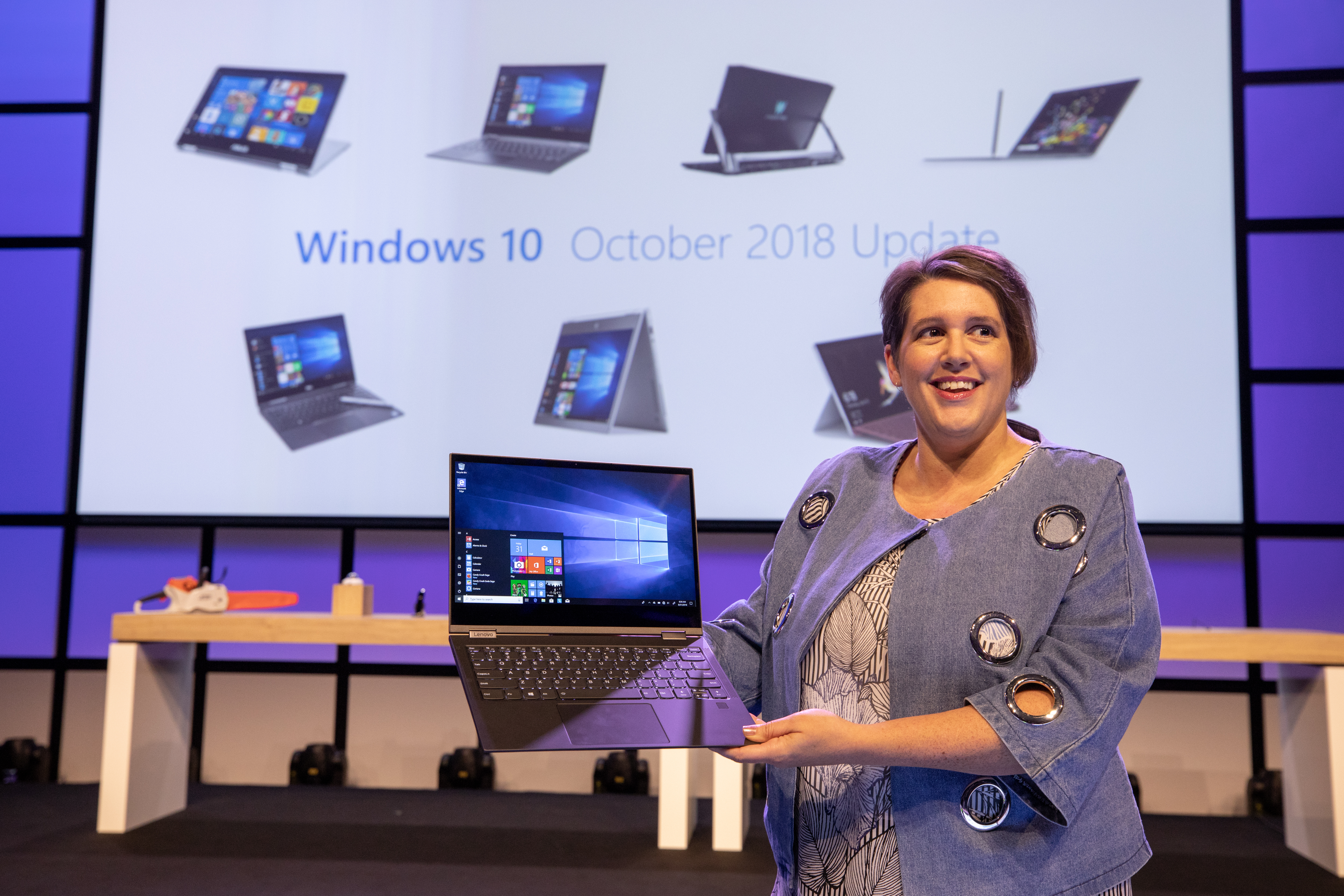
Erin Chapple, corporate vice president, Microsoft, speaking at the IFA 2018 keynote in Berlin, with displays of laptops and other devices behind her on the stage

Erin Chapple, corporate vice president, Microsoft, speaking at the IFA 2018 keynote in Berlin

As part of this commitment, I’m pleased to announce that our next feature update to Windows will be called the Windows 10 October 2018 Update. With this update, we’ll be bringing new features and enhancements to the nearly 700 million devices running Windows 10 that help people make the most of their time. We’ll share more details about the update over the coming weeks.

We’re excited to continue to innovate with our partners and to bring new and meaningful technology to this ever-changing world. Today at IFA, Nick Parker, corporate vice president, Consumer and Device Sales, and Erin Chapple will be showcasing a number of these great new Windows PCs as part of our keynote presentation. For those of you that can’t be at IFA, not to worry. Here’s Erin to tell you more about the exciting innovation she’ll be showing in Berlin.

New PCs, new opportunities (Erin Chapple, corporate vice president, Microsoft)

I’m so excited to be here in Berlin to share new Windows experiences that help people achieve more – all come to life by new modern PCs announced this week.

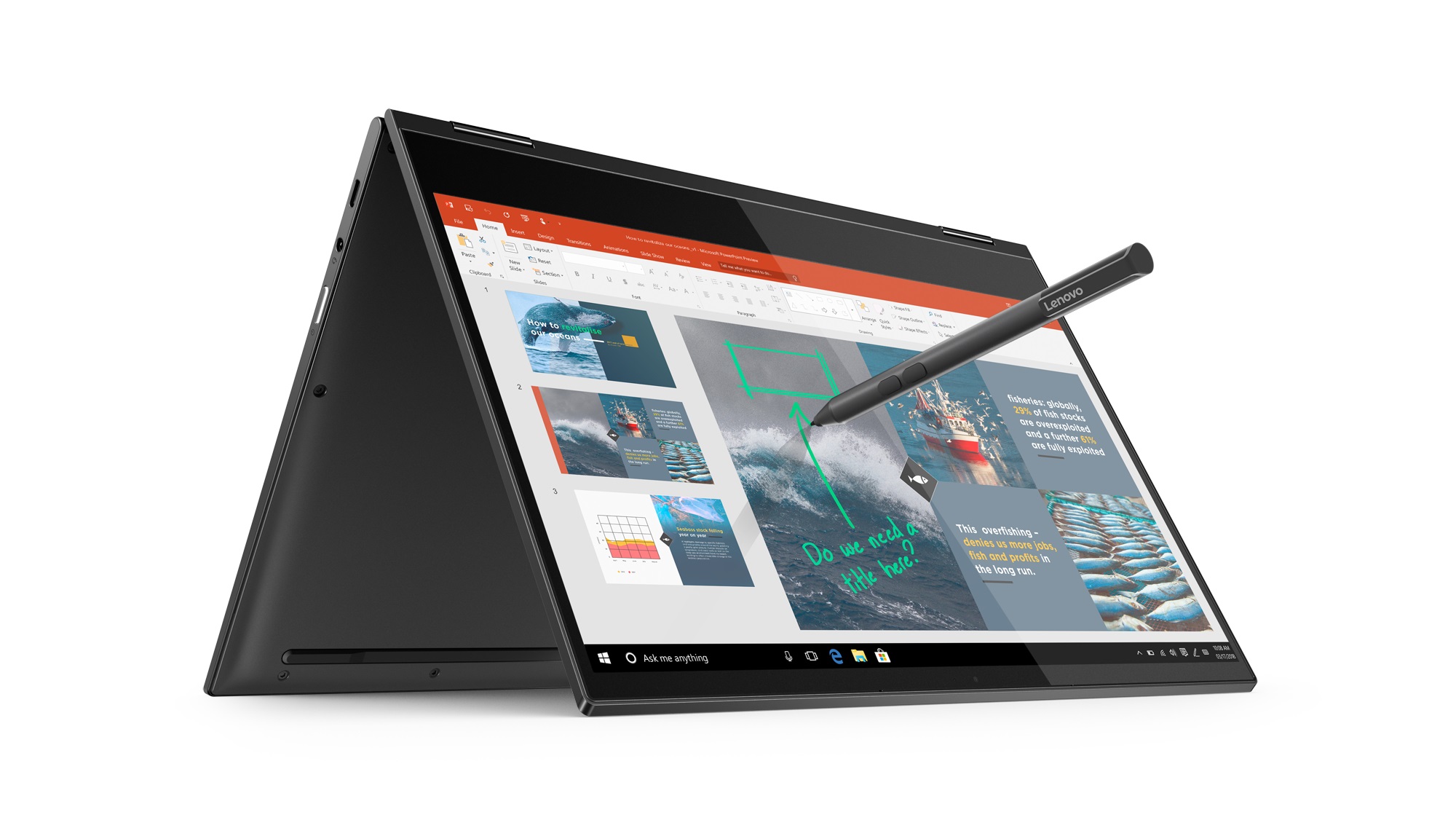
One of the areas that remains a top commitment for us is the connected computing space. Earlier this week, we took another step forward in our focus on connected PC experiences with the announcement of the first Qualcomm Snapdragon 850 powered Always Connected PC: the Lenovo Yoga C630 WOS (Windows on Snapdragon). Lean, light and crafted from premium aluminum, the Yoga C630 WOS offers LTE connectivity and, as noted by Lenovo, an incredible up to 25 hours [1] of battery life. Combined with powerful entertainment features and an optional Lenovo pen, the Yoga C630 WOS is designed for wherever the day takes you.

Lenovo Yoga Book C630 open, inverted with digital pen hovering over screen, marking it up

Lenovo Yoga Book C630

Beautiful devices like the Lenovo Yoga C630 WOS are pairing the functionality of Windows 10 with portable, lightweight devices that keep our users connected to the things that are important to them, while on the go. We believe that the mobile, cellular-connected PC experience is going to continue to grow in popularity, and devices like the Lenovo Yoga C630 WOS, as well as connected PCs from ASUS and HP that went on sale earlier this year, are ensuring that we have a robust and diverse portfolio of products to keep users connected and happy.

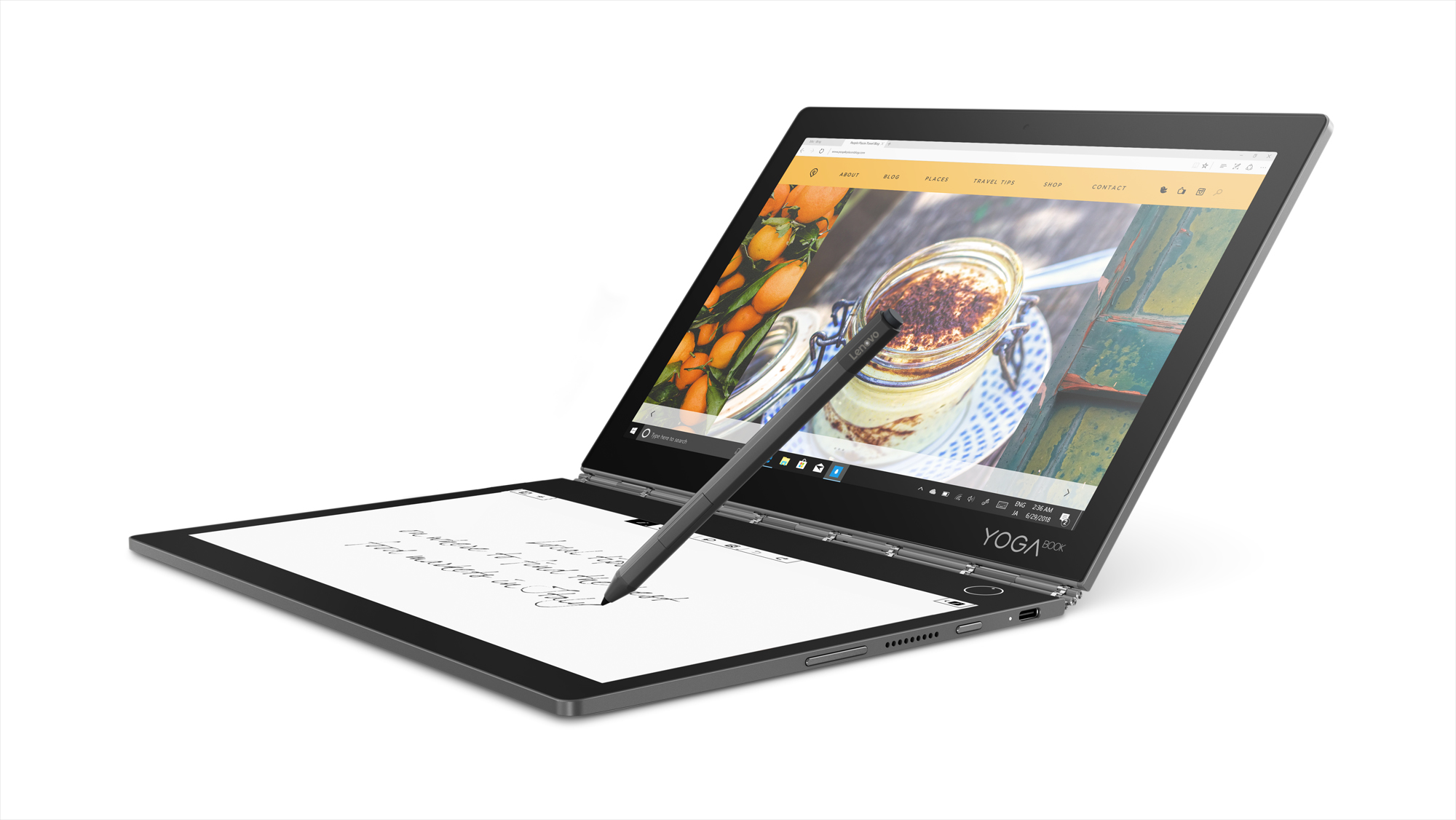
Lenovo also announced the Lenovo Yoga Book C930 – a multi-year, multi-release investment by Lenovo focusing on creativity and productivity for the mobile user, using new paradigms of input and content consumption built on the Windows 10 platform, combined with optional Office productivity tools. At the press of a button, the Yoga Book C930’s E Ink display appears and serves as a keyboard, notepad and eReader. Ultra-thin and light, the device is packed with Windows hero features like Cortana, Windows Ink and Windows Hello, along with optional 4G connectivity to keep you productive all-day long.

Lenovo Yoga Book C930 open, with a pen hovering above, sketching notes on the E Ink screen while an image of a dessert is on the other display

Lenovo Yoga Book C930

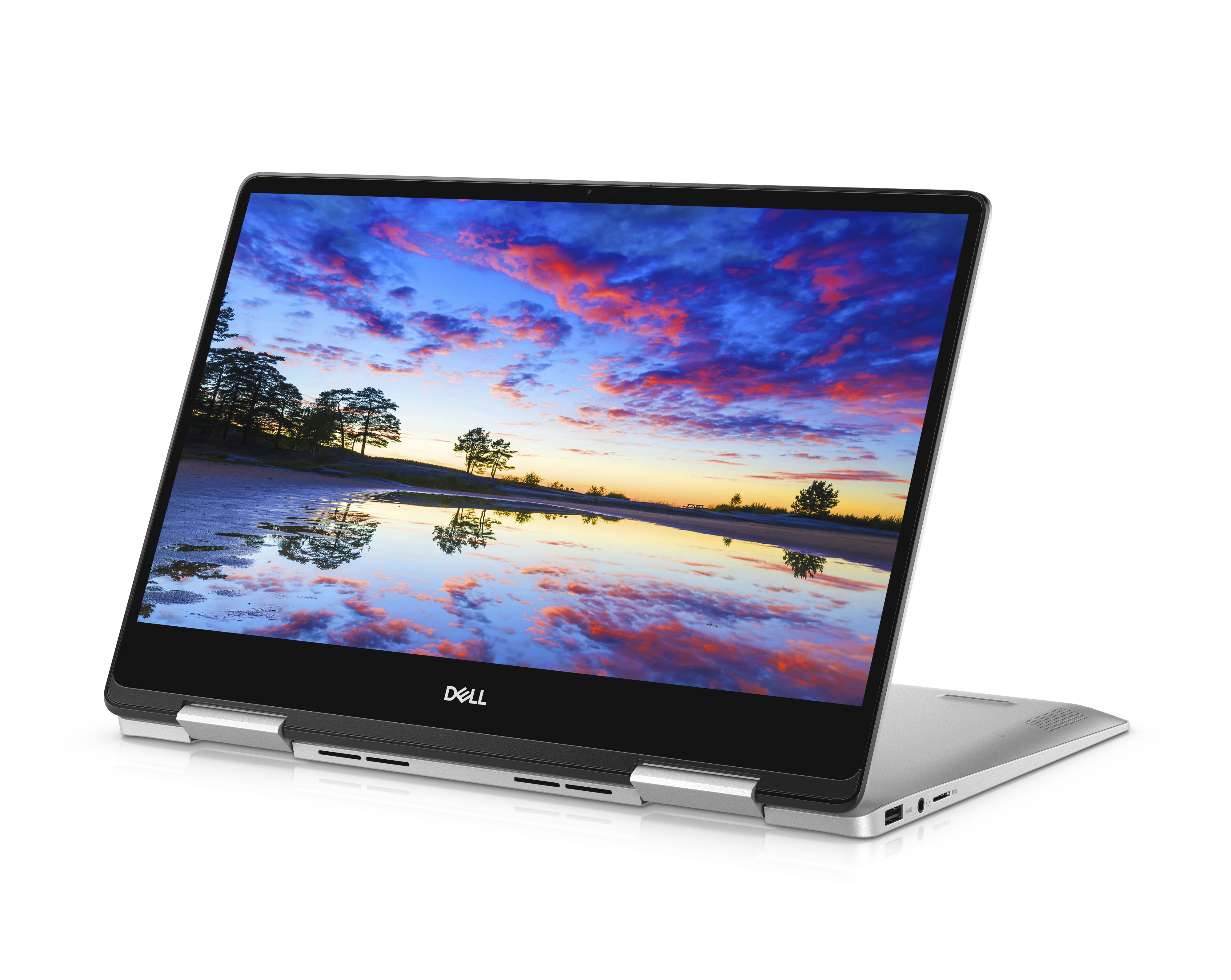
Another great productivity PC is the Dell Inspiron 13 7000 2-in-1. It brings beauty from every angle with a 3-sided narrow border that focuses on the IPS and Active Pen compatible touch screen. The Inspiron 13 7000 2-in-1 brings a ‘Modern Standby’ feature for instant-on performance and the ability to log in with just one touch using the Windows Hello fingerprint reader, while a miniature 4-element lens webcam offers temporal noise reduction and increases image quality in low-light settings.

Dell Inspiron 13 7000 2-in-1, open, sitting on its hinge with one screen flat, the other one showing dusk over water

Dell Inspiron 13 7000 2-in-1

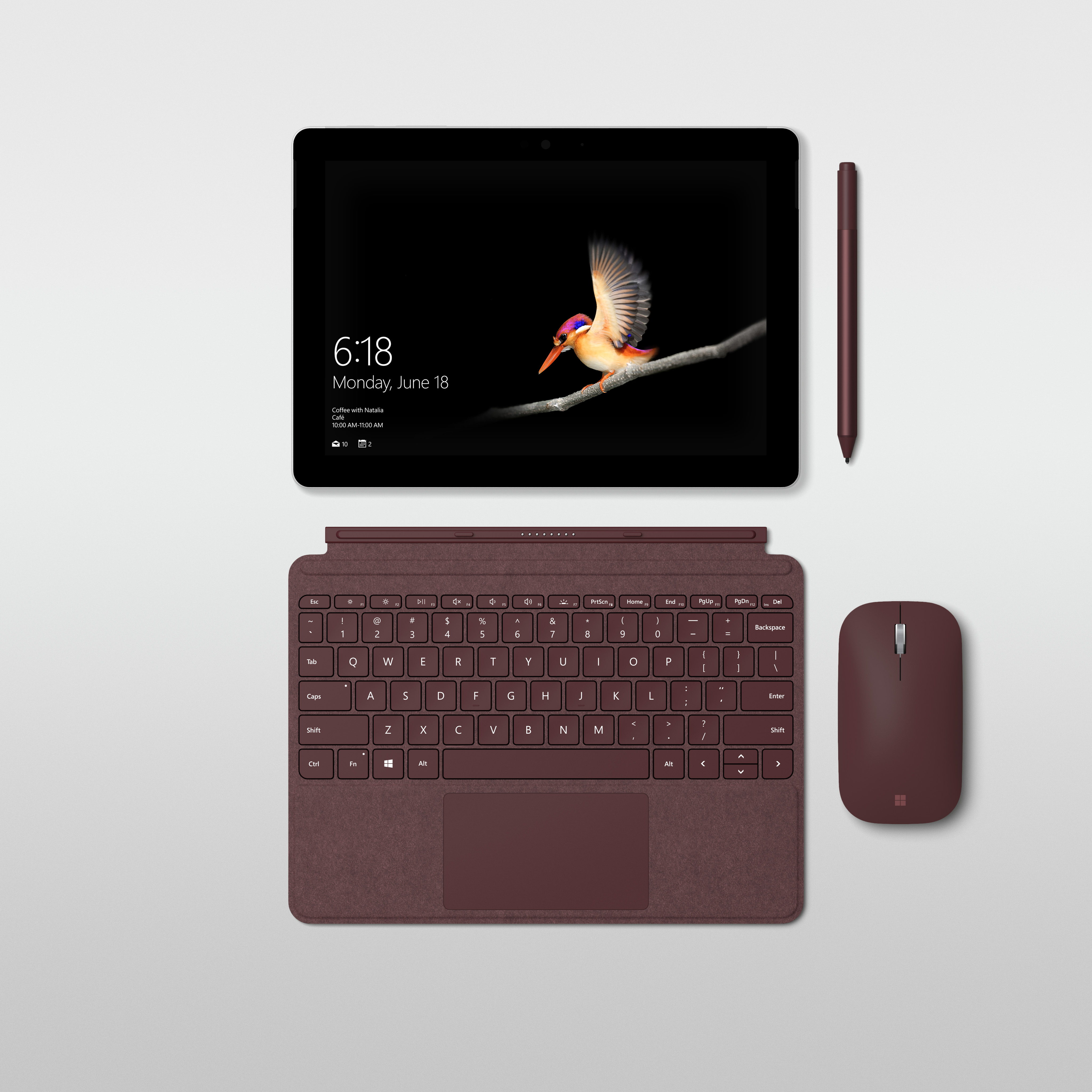
One of the devices that really turned heads in the booth this week was the new Surface Go. It offers all the comforts of a laptop, with the convenience of a 10’’ tablet. Sometimes, a little can go a long way, and the Surface Go offers a small, 1.15 pound portable 2-in-1 form factor that adapts to the way you want to work. Whether at work or home, travelling, or just for everyday tasks, it runs Office365 with a touchscreen, has built-in Windows Hello for a more secure sign-in and offers note taking, drawing and more with the Surface Pen.

Surface Go, shown from above with screen and keyboard detached, with digital pen and matching wireless mouse next to the screen and keyboard

Surface Go

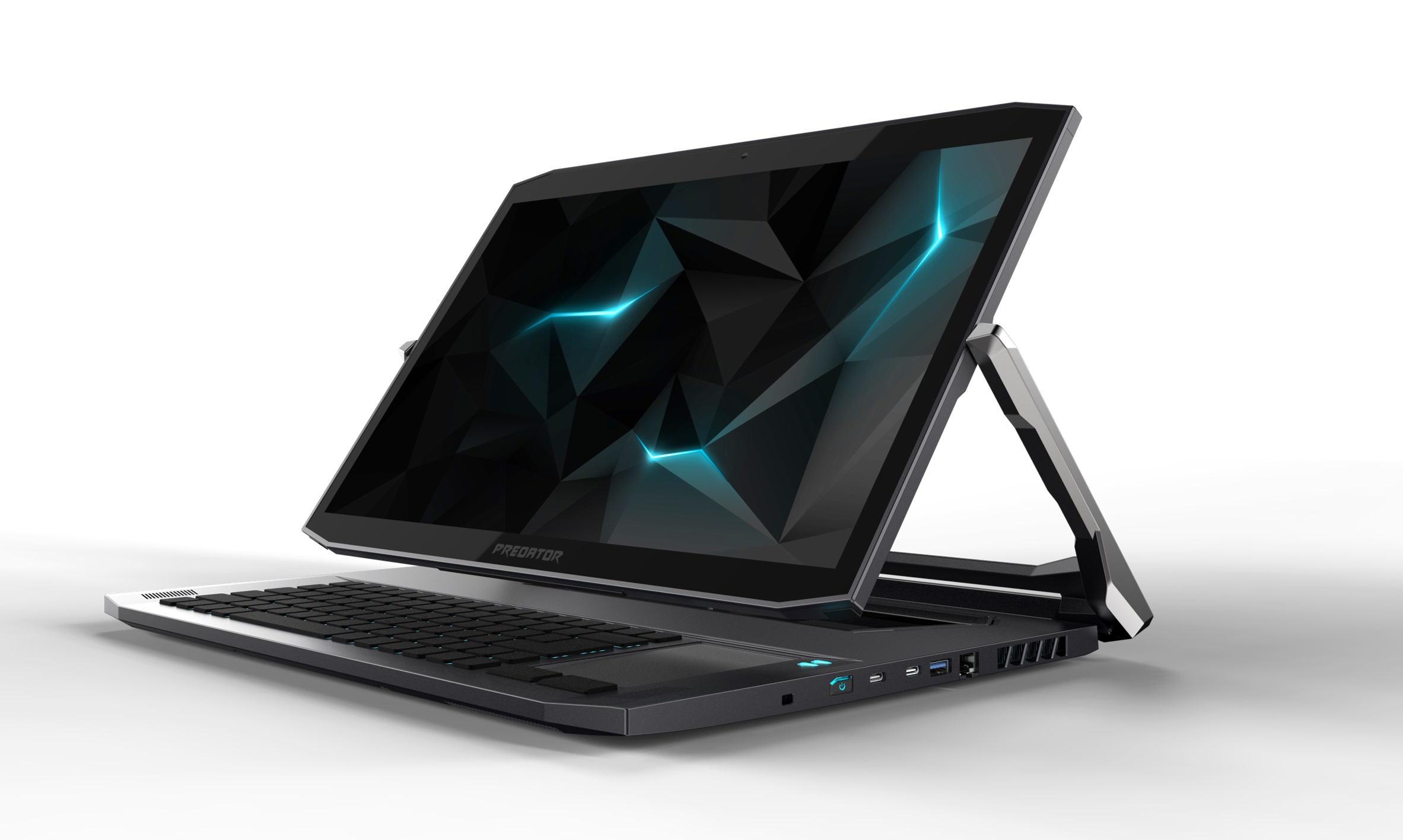
And, of course, we have to have something for our gaming fans! The newly refreshed Acer Predator Triton 900 gaming rig sports the latest 8th Generation Intel Core i7 processor for ultimate power and speed, while the laptop’s hinge pivots the screen to fit whatever angle you’d like to game at. With the garage door, you can insert an Xbox controller dongle to play Xbox games seamlessly, and a custom-engineered dual-fan keeps things cool while the RGB backlit keyboard and overclocking capabilities customize your gaming experience.

Acer Predator Triton 900 with laptop hinge bringing screen angled over keyboard

Acer Predator Triton 900

As you can imagine, this is only a small snapshot of the great innovation that is coming from our partners this week here in Berlin. Whether it’s gaming, productivity or creativity that drives you, there’s truly a modern Windows 10 PC that will help you achieve more. And, as Roanne mentioned, we’re excited to bring even more experiences and innovation to our customers with the Windows 10 October 2018 Update.

To learn more about the other devices announced this week at IFA, check out posts about Dell, Acer, Lenovo and MSI.

[1] Battery life varies significantly with settings, usage and other factors.

Updated August 31, 2018 11:06 am

Posted on Leave a comment

Introducing Sketch2Code: Turn whiteboard UX sketches into working HTML in seconds

This post is authored by Tara Shankar Jana, Senior Technical Product Marketing Manager at Microsoft.

The user interface design process involves lots of creativity and iteration. The process often starts with drawings on a whiteboard or a blank sheet of paper, with designers and engineers sharing ideas and trying their best to represent the underlying customer scenario or workflow. Once a candidate design is arrived at, it’s usually captured via a photograph and then translated manually into a working HTML wireframe that works in a web browser. Such translation takes time and effort and it often slows down the design process.

What if the design could instead be captured from a whiteboard and be instantly reflected in a browser? If we could do that, at the end of a design brainstorm session we would have a readymade prototype that’s already been validated by the designer, developer and perhaps even the customer.

Introducing Sketch2Code – a web based solution that uses AI to transform a picture of a hand-drawn user interface into working HTML code.

Let’s take a closer look at the process of transforming hand-drawn images into HTML using Sketch2Code:

  • The user first uploads an image using our website.
  • A custom vision model predicts what HTML elements are present in the image and also pins their location.
  • A handwriting text recognition service reads the text inside the predicted elements.
  • A layout algorithm uses the spatial information from the bounding boxes of the predicted elements to generate a grid structure that accommodates all these components.
  • An HTML generation engine uses the above pieces of information to generate HTML markup code reflecting the end result.

The application workflow looks something like this:


Sketch2Code uses the following elements:

  • Microsoft Custom Vision Model: This model has been trained with images of different handwritten designs, tagging the information associated with common HTML elements including text boxes, buttons, images, etc.
  • Microsoft Computer Vision Service: This is used to identify the text within a design element.
  • Azure Blob Storage: The information associated with each step of the HTML generation process is stored, including the original image, predicted results, the layout and grouping information, etc.
  • Azure Function: This serves as the backend entry point that coordinates the generation process by interacting with all the services.
  • Azure Website: The user interface front-end that enables uploading a new design and seeing the generated HTML results.

The above elements combine together via the following architecture:


Intrigued? You can find the code, solution development process and all other details associated with Sketch2Code on GitHub. Sketch2Code was developed by Microsoft in collaboration with Kabel and Spike Techniques.

We find the range of scenarios in which AI can be applied to be truly amazing, and this is one simple but powerful example of how AI can augment human ingenuity. If you get a chance to play with Sketch2Code, please do share your experiences and thoughts with us below.

Tara

Posted on Leave a comment

Building the security operations center of tomorrow—harnessing the law of data gravity

This post was coauthored by Diana Kelley, Cybersecurity Field CTO, and , EMEA Chief Security Advisor, Cybersecurity Solutions Group.

You’ve got a big dinner planned and your dishwasher goes on the fritz. You call the repair company and are lucky enough to get an appointment for that afternoon. The repairperson shows up and says, “Yes, it’s broken, but to figure out why I will need to run some tests.” They start to remove your dishwasher from the outlet. “What are you doing?” you ask. “I’m taking it back to our repair shop for analysis and then repair,” they reply. At this point, you’re annoyed. You have a big party in three hours, and taking the dishwasher all the way back to the shop for analysis means someone will be washing dishes by hand after your party—why not test it right here and right now so it can be fixed on the spot?

Now, imagine the dishwasher is critical business data located throughout your organization. Sending all that data to a centralized location for analysis will give you insights, eventually, but not when you really need it, which is now. In cases where the data is extremely large, you may not be able to move it at all. Instead it makes more sense to bring services and applications to your data. This at the heart of a concept called “data gravity,” described by Dave McCrory back in 2010. Much like a planet, your data has mass, and the bigger that mass, the greater its gravitational pull, or gravity well, and the more likely that apps and services are drawn to it. Gravitational movement is accelerated when bandwidth and latency are at a premium, because the closer you are to something the faster you can process and act on it. This is the big driver of the intelligent cloud/intelligent edge. We bring analytics and compute to connected devices to make use of all the data they collect in near real-time.

But what might not be so obvious is what, if anything, does data gravity have to do with cybersecurity and the security operations center (SOC) of tomorrow. To have that discussion, let’s step back and look at the traditional SOCs, built on security information and event management (SIEM) solutions developed at the turn of the century. The very first SIEM solutions were predominantly focused on log aggregation. Log information from core security tools like firewalls, intrusion detection systems, and anti-virus/malware tools were collected from all over a company and moved to a single repository for processing.

That may not sound super exciting from our current vantage point of 2018, but back in 2000 it was groundbreaking. Admins were struggling with an increasing number of security tools, and the ever-expanding logs from those tools. Early SIEM solutions gave them a way to collect all that data and apply security intelligence and analytics to it. The hope was that if we could gather all relevant security log and reporting data into one place, we could apply rules and quickly gather insights about threats to our systems and security situational awareness. In a way this was antidata gravity, where data moved to the applications and services rather than vice versa.

After the initial “hype” for SIEM solutions, SOC managers realized a few of their limitations. Trying to write rules for security analytics proved to be quite hard. A minor error in a rule led to high false positives that ate into analyst investigative time. Many companies were unable to get all the critical log data into the SIEM, leading to false negatives and expensive blind spots. And one of the biggest concerns with traditional SIEM was the latency. SIEM solutions were marketed as “real-time” analytics, but once an action was written to a log, collected, sent to the SIEM, and then parsed through the SIEM analytics engine, quite a bit of latency was introduced. When it comes to responding to fast moving cyberthreats, latency is a distinct disadvantage.

Now think about these challenges and add the explosive amounts of data generated today by the cloud and millions of connected devices. In this environment it’s not uncommon that threat campaigns go unnoticed by an overloaded SIEM analytics engine. And many of the signals that do get through are not investigated because the security analysts are overworked. Which brings us back to data gravity.

What was one of the forcing factors for data gravity? Low tolerance for latency. What was the other? Building applications by applying insights and machine learning to data. So how can we build the SOC of tomorrow? By respecting the law of data gravity. If we can perform security analytics close to where the data already is, we can increase the speed of response. This doesn’t mean the end of aggregation. Tomorrow’s SOC will employ a hybrid approach by performing analytics as close to the data mass as possible, and then rolling up insights, as needed, to a larger central SOC repository for additional analysis and insight across different gravity wells.

Does this sound like an intriguing idea? We think so. Being practitioners, though, we most appreciate when great theories can be turned into real-world implementations. Please stay tuned for part 2 of this blog series, where we take the concept of tomorrow’s SOC and data gravity into practice for today.

Posted on Leave a comment

How government is transforming with AI – part 3

In our last two blogs in this series, we discussed how governments are using digital assistants—often with cognitive services such as language translation built in—to engage their community in more accessible ways and support their teams.

Another way that governments are using emerging technologies such as artificial intelligence (AI) and the Internet of Things (IoT) is to help them predict needs and anticipate issues so they can prepare accordingly.

For example, to keep Alaska’s highways open and safe during severe winter weather, the Alaska Department of Transportation and Public Facilities uses the Fathym WeatherCloud solution and Microsoft Azure IoT technologies to make better, hyper-local decisions about deploying road crews. Being able to make more informed decisions with better data is helping Alaska save lives and significantly reduce road maintenance costs.

“The information we get from WeatherCloud puts us miles ahead in creating accurate forecasts,” says Daniel Schacher, Maintenance Superintendent at the Alaska Department of Transportation and Public Facilities, in this article. “We’ve become much more proactive in our responses.”

Read How Alaska outsmarts Mother Nature in the cloud” to learn about what led Alaska to deploy the system, how it works, and the way it’s helping the state keep residents safer and save hundreds of thousands of dollars each year in resource usage.

Another example of keeping vital infrastructures up and running with insight from AI and IoT solutions comes from our partner eSmart Systems. With its Connected Drone portfolio, utilities can send smart drones out on beyond-line-of-sight missions to inspect power lines and pinpoint faults and weaknesses.

Utilities are using Connected Drones to stay ahead of power grid maintenance issues and help them prevent or reduce blackouts in the communities they serve. And by using drones to inspect lines, which can be dangerous for personnel, they can keep their teams safer.

Utilities are also using Connected Drones to get power back up and running after a disaster, as was the case in Florida after Hurricane Irma. Watch this video to see how the drones helped to assess the damage quickly—inspecting hazardous areas so human inspectors wouldn’t have to be put in harm’s way. With insight from the Connected Drones, the utility company was able to know not only precisely where repairs were required, but also which crew and equipment were needed to get power restored as quickly as possible in the affected communities.

Those are just a few examples of how governments can gain insight with AI and IoT that can help them keep the infrastructures their citizens rely on up and running. To learn about more vertical and horizontal areas where your government agency can benefit from AI, read the Gartner report: “Where you should use artificial intelligence—and why.” It provides research on the potential of various use cases and offers recommendations on the most effective strategies for applying AI.

Posted on Leave a comment

Unleashing ESL students’ potential with Microsoft Translator

I am a reading specialist, and my main goal is to provide students with tools to overcome barriers to literacy to promote strong readers, writers and critical thinkers. As an educator, I am always looking for ways to innovate my teaching practices. My lessons with English language learners (ELL) overseas challenge me to not only use best techniques in literacy instruction, but to also stay up-to-date on the most current technologies that will help meet their needs from thousands of miles away.

This past year, I started teaching high school students from China who hope to study in the United States. Due to the vast distance between me and my students, we use Skype to meet for class. This enabled us to meet from anywhere at any time. As a former ELL student myself, I can relate with my students’ need to visualize content as it is essential for comprehension. Therefore, I have always typed out important information, such as key vocabulary or phrases, that I want to emphasize during lessons. The Share Screen feature has made it possible for students to follow the lesson by looking at a PowerPoint or OneNote notebook with charts and notes. Often, however, the language barrier can be impeding, regardless of how many ways I may try to explain the meaning of a word or concept.

Recently, I began to work with James, an ELL student with a strong background in English grammar, vocabulary and reading accuracy. Yet, he struggled with verbal communication and comprehension. During our Skype lessons, it quickly became clear that James was not fully engaged in our lessons. It took him a while to respond to my questions or prompts throughout the lessons. Even with visuals and written instructions, James really struggled to understand concepts and was becoming frustrated. This led me to modify my lessons. Instead of working on higher level thinking in our discussions, we had to work on basic comprehension. I needed to find a way for him to follow what I was saying throughout the lessons.

During this time, I was attending a technology conference (International Society for Technology in Education—ISTE) in Chicago, and I learned about Microsoft Translator. As I tried out the translator demo, I realized that this was not like other translation applications. Microsoft Translator (available on PowerPoint, as an app for mobile devices, as well as on the web) documents your dialogue as you speak into your microphone and provides live captions on the screen of anyone that is part of the conversation. In addition, anyone who joins the conversation (from one person to a large group of people) can choose which language they wish the information to be translated into. The most exciting feature for me was the one that allowed you to read information in English and in another language, simultaneously. I became so excited by the possibilities that this would provide for my students that I decided to try it the next day during my morning lesson with James.

While working with James using the Microsoft Translator, I learned more about him in that hour than I had in the prior month of lessons. I learned that James is a visual learner, and that he learns best when he can follow what is being said. I also learned that James is a strong thinker who can look at concepts abstractly, but he struggles finding the right words to express his ideas. For the first time, I saw James smile during our lessons. His high-level of engagement was evident as he quickly responded to my questions and eagerly waited for my responses. I noticed his eyes carefully following the captions on the screen to make sure he was not missing anything. By the end of this transformative lesson, James told me that he could not wait to share the Microsoft Translator app with his parents, who do not speak English, and his friends. He said, “Ms. Mata, the translator helped me feel so much more comfortable during my lesson, and I even learned new vocabulary!”

During our next lesson, we started a young adult novel. As we read together, he could see the captions in English and Chinese. Throughout the chapter, we stopped and discussed important ideas and even symbols in the story. Because he was able to understand what was being discussed, he was also able to respond — in English — and point out different important symbols in the story. At certain points in the lesson, I asked him to share symbols from his own culture and to explain them in Chinese. More recently, I asked James to challenge himself by trying to use only the English captions without the Chinese ones. Though this has been more difficult, he has been able to follow our conversations and effectively communicate while using this tool to help him stay engaged throughout the lesson.

I wonder how often students are not seen for who they really are and are instead perceived as disengaged and unmotivated. Literacy barriers that stem from learning disabilities or lack of fluency lead to frustration and, sometimes, negative behaviors in the classroom. As educators, it is our job to find ways to highlight students’ strengths, regardless of these barriers. Tools such as Microsoft Translator make it that much easier for students to understand ideas and express their own, thus alleviating frustrations in the classroom.

By using Skype and Microsoft Translator together, a whole new layer of James was revealed, and though his journey to English fluency continues, his progress has been remarkable. With this new tool, James is more capable to take on the English language than ever before. As we head into a new school year, I encourage other educators to take risks and try innovative techniques, tools and approaches. Microsoft Translator is just one of many incredible learning tools available to educators and students. Time and again, I have witnessed that while integrating new technologies may be an adjustment at first, their effect on student learning will positively impact students’ confidence and ensure their success in the classroom and beyond.

For more information on Microsoft Education tools for the classroom, visit the Microsoft Educator Community at https://education.microsoft.com.

Posted on Leave a comment

Two seconds to take a bite out of mobile bank fraud with Artificial Intelligence

The future of mobile banking is clear. People love their mobile devices and banks are making big investments to enhance their apps with digital features and capabilities. As mobile banking grows, so does the one aspect about it that can be wrenching for customers and banks, mobile device fraud. 

image

Problem: To implement near real-time fraud detection

Most mobile fraud occurs through a compromise called a SIM swap attack in which a mobile number is hacked. The phone number is cloned and the criminal receives all the text messages and calls sent to the victim’s mobile device. Then login credentials are obtained through social engineering, phishing, vishing, or an infected downloaded app. With this information, the criminal can impersonate a bank customer, register for mobile access, and immediately start to request fund transfers and withdrawals.

Artificial Intelligence (AI) models have the potential to dramatically improve fraud detection rates and detection times. One approach is described in the Mobile bank fraud solution guide.  It’s a behavioral-based AI approach and can be much more responsive to changing fraud patterns than rules-based or other approaches.

The solution: A pipeline that detects fraud in less than two seconds

Latency and response times are critical in a fraud detection solution. The time it takes a bank to react to a fraudulent transaction translates directly to how much financial loss can be prevented. The sooner the detection takes place, the less the financial loss.

To be effective, detection needs to occur in less than two seconds. This means less than two seconds to process an incoming mobile activity, build a behavioral profile, evaluate the transaction for fraud, and determine if an action needs to be taken. The approach described in this solution is based on:

  • Feature engineering to create customer and account profiles.
  • Azure Machine Learning to create a fraud classification model.
  • Azure PaaS services for real-time event processing and end-to-end workflow.

The architecture: Azure Functions, Azure SQL, and Azure Machine Learning

Most steps in the event processing pipeline start with a call to Azure Functions because functions are serverless, easily scaled out, and can be scheduled.

The power of data in this solution comes from mobile messages that are standardized, joined, and aggregated with historical data to create behavior profiles. This is done using the in-memory technologies in Azure SQL.  

Training of a fraud classifier is done with Azure Machine Learning Studio (AML Studio) and custom R code to create account level metrics.

Recommended next steps

Read the Mobile bank fraud solution guide to learn details on the architecture of the solution. The guide explains the logic and concepts and gets you to the next stage in implementing a mobile bank fraud detection solution. We hope you find this helpful and we welcome your feedback.

Posted on Leave a comment

Join the Bing Maps APIs team at Microsoft Ignite 2018 in Orlando

The Bing Maps team will be at Microsoft Ignite 2018, in Orlando, Florida, September 24th through the 28th. If you are registered for the event, stop by the Bing Maps APIs for Enterprise booth in the Modern Workplace area of the Expo, to learn more about the latest features and updates to our Bing Maps platform, as well as attend our sessions.


Bing Maps APIs sessions details:


Theater session ID: THR1127


Microsoft Bing Maps APIs – Solutions Built for the Enterprise


The Microsoft Bing Maps APIs platform provides mapping services for the enterprise, with advanced data visualization, website and mobile application solutions, fleet and logistics management and more. In this session, we’ll provide an overview of the Bing Maps APIs platform (what it is and what’s new) and how it can add value to your business solution.


Theater session ID: THR1128


Cost effective, productivity solutions with fleet management tools from Microsoft Bing Maps APIs

The Bing Maps API platform includes advanced fleet and asset management solutions, such as the Distance Matrix, Truck Routing, Isochrone, and Snap-to-Road APIs that can help your business reduce costs and increase productivity. Come learn more about our fleet management solutions as well as see a short demo on how you can quickly set up and deploy a fleet tracking solution.


If you are not able to attend Microsoft Ignite 2018, we will share news and updates on the blog after the conference and post recordings of the Bing Maps APIs sessions on http://www.microsoft.com/maps.


For more information about the Bing Maps Platform, go to https://www.microsoft.com/maps/choose-your-bing-maps-API.aspx.


– Bing Maps Team