Media coverage from the Mobile World Conference in Barcelona has worked to establish a narrative that Apple is dangerously behind other companies in releasing support for 5G mobile networks and the foldable screens that enable a phone to convert into a tablet. Yet, the last decade of MWC shows that vendor announcements aren’t really worth very much.
Media fawning over concepts, yet consumers unmoved
MWC could be viewed as the mobile industry’s equivalent to the Consumer Technology Association’s CES trade show. Just as Apple solidly upstaged the announcements at CES for fifteen years, the iPhone maker has done the same to MWC over the last decade, despite Apple’s initial position as a fledgling mobile maker among solidly entrenched incumbents.
While competitors have consistently announced ideas first, Apple is unique in being able to correctly envision what its customers will want, and then actually develop working, finished ideas it is then able to ship and, most importantly, sell to buyers in significant volumes.
Other companies, notably Samsung, had demonstrated promising ideas of grand visions of their own, but haven’t had much success in actually selling those concepts. Overall, MWC vendors have outlined a broad range of ideas reaching into the premium space, but have largely only been able to perpetuate their miserable, unprofitable cycles of selling lower-end, largely unimaginative commodity products.
To clarify how likely it is that today’s MWC announcements are going to have any real impact on Apple’s operations or market position, take a look at the last ten years of Apple simply clobbering the entire gamut of the mobile industry. This is all despite year after year of MWC announcements that excited the media but failed to have much commercial or cultural impact at all.
MWC 2010: Lots of promising ideas crushed by iOS
In 2010, MWC officially honored Steve Jobs as its “mobile industry personality of the year.” Apple was nowhere to be seen at the February trade show. Instead, Jobs had introduced Apple’s then-new iPad at its own event in January.
Pundits had crapped all over iPad at its 2010 unveiling. Back then, I was interviewed by tech outlets who never published my interview because it didn’t fit the narrative they were working to create —they only wanted to hear opinions of why iPad would fail.
Yet, just weeks later the same media sources were breathlessly excited to fantasize about the prospects of a series of things being shown at MWC 2010 that today are remembered as hilariously doomed failures.
These included Microsoft’s finally-shipping Windows Phone 7, an attempt at rivaling Apple’s iPhone, albeit three years late. “Every Windows Phone 7 Device is a Zune,” PC World noted at the time, with no apparent awareness of the irony.
To the world outside of Apple, Microsoft’s MP3 playing Zune wasn’t yet officially a failure, and Windows Phone 7 was definitely going to be big. That same logic was never used to explain that Apple’s iPod sales weren’t shrinking, but actually growing as iPhones became a new more premium tier of “Widescreen iPods.”
Pundits painted success as failure, and failure as success.
Beyond Microsoft, Google’s Android was finally becoming a mass market option for phone makers. Yet as with the short and tortured existence of WP7, Apple’s iOS was about to kill off the remains of Android’s original originality.
At the time, Android was still a weird experiment stuck between its initial design created by Google—a button phone with a trackball for navigation—and its ultimate destiny as being little more than a means to knockoff the surface design of Apple’s iPhones.
After iPhone, Google’s Android did try to launch original ideas—like the HTC G1’s trackball—each of which was later incrementally stripped away to look more like an iPhone
At WMC 2010, HTC was showing off its Android Legend phone using an optical trackpad spot instead of the physical trackball that Google had come up with for its own PC-like alternative to multitouch navigation on the earlier HTC-built Dream (aka Tmobile G1). That later was stripped away as well.
A few years later, Google fans would be saying that Androids looked just like iPhones simply because there is really only one way to make a phone, until iPhone X changed that one design dramatically and Androids all jumped in line to copy it, too, notch and all.
Another dead-end trend visible at MWC 2010: mini smartphones, seen in HTC’s HD mini and the Palm Pixi Plus, as well as tiny phones attempted earlier by Nokia and Samsung. All of this sent pundits into an excited clamoring for more tiny phones. Why wasn’t Apple making an iPhone mini? This was later answered when mini phones failed to sell.
Another big, exciting trend from MWC 2010 that is now forgotten history: the idea that Android licensees had the “freedom” to fashion their own innovative, proprietary UI appearances and behaviors on top of the Android foundation. Google once touted this as a feature of the platform before switching gears to advertise its own Nexus phones as “pure,” stripped of the obnoxious crap licensees were ruining their products with.
Motorola showed phones with MotoBlur UI, while HTC showed the Desire, effectively a Google One with HTC’s own Sense UI applied to it. This was supposed to make Android interesting and foster innovation, but really just confused users and fragmented their experience.
Sony Ericsson launched new Android and Symbian phones at MWC 2010, both with slide-out physical keyboards that nobody thinks of using anymore. At the time these were considered to be a feature Apple was missing. Were Android licensees too weak or incompetent to make their ideas stick, or was Apple just always right about its design decisions? It’s hard to say.
Another notable idea from a decade ago: just as Android was beginning to take off, Samsung used MWC 2010 to make a “splashy” launch of Bada OS on its Wave handset. Bada was Samsung’s new Linux-based OS that has since gone nowhere, but was intended to free Samsung from Google’s control over Android. Why was Samsung already itching to leave Android?
“Highly confidential” internal documents revealed during Samsung’s iPhone copycatting trial showed Samsung was worried about competitive threats in Google’s partnership with HTC and its acquisition of Motorola.
In parallel, mobile giant Nokia and chipzilla Intel presented MeeGo at MWC 2010, their own Mobile Linux project to rival Android and iPhones.
Samsung’s Bada initiative ultimately failed, as did Google’s partnership with HTC and its acquisition of Motorola, and Intel and Nokia’s MeeGo. Yet all along, pundits were desperately concerned with how Apple could possibly stay in business when facing the coordinated alliance of Android partners that were all marching in lockstep to kill the iPhone.
The reality was that Google and its Android licensees were all desperately paranoid and incompetent, plotting against each other and working at cross purposes. Did members of the media have no idea this was occurring, or did they cover this all up to create the illusion of Android being a world-leading, united competitor to Apple? Again, it’s really hard to say whether they were ignorant or stupid.
One last idea from 2010 that sounds like a modern-day fantasy: think of a light, thin notebook running on a Snapdragon ARM chip, with integrated mobile data and an OLED touch display. That’s what HP Compaq debuted in 2010 under the AirLife brand, which it called a smartbook.
HP’s Android-based AirLife was suffocated in part by Google’s opposition
Attendees sounded excited about this Android netbook, but it wasn’t yet shipping and there was no price set yet. Nobody is using AirLife smartbooks today, and HP didn’t weather the introduction of Apple’s iPad very well.
In fact, within a few months, HP would buy Palm for its webOS and launch its own attempt at beating iPad using that new platform. That step cast doubt on the future of HP’s Android phones and tablets, including the AirLife.
Interestingly, Davide Dicenso, a member of HP’s Emerging Platforms Group that created the AirLife, noted that it was contention between HP and Google over its design that prompted HP to attempt to develop webOS as its own platform, independent from Google.
While Google appeared to be open to licensees using Android in new ways, Dicenso noted that Google was “not pleased with the form factor, [which was] too different from a phone for which Android OS was conceived. The result? We still shipped but without Google’s app store, G Suite and any support to Google’s services.”
Are you picking up what I’m putting down
Over the next decade, these themes of adversarial contention, poorly conceived failed concepts, and ideological dogma kept resurfacing at MWC. It bamboozled attendees with products that would never matter while making grand claims about the future that weren’t going to pan out.
Oddly enough, at the same time, Apple kept introducing incredibly successful new products at a regular clip. Within 2010, rather than just dumping out a failed OS strategy, more bad navigation experiments, a mini phone, or a smartbook, Apple launched the world changing iPad even as it increased Mac sales by 30 percent. It then introduced the all-new design of iPhone 4 and its new iOS-based Apple TV.
And yet tech industry pundits kept repeating the idea that Apple was suffering from a lack of innovation while its products were being sold at prices that were just too high to make any meaningful difference in the market. This has solidly continued every year for ten years.
MWC 2011: Android Everywhere, Albeit On Fire
In 2011, Apple again launched iPad 2 in January, prior to MWC, which was increasingly being taken over by Google. Motorola, which Google would later acquire, was showing off a series of products including the Xoom, Motorola’s official Android 3.0 Honeycomb answer to Apple’s iPad.
[youtube https://www.youtube.com/watch?v=FgOX9mb7V4o&w=560&h=315]
Motorola’s pretentious ad for Xoom portrayed it as a joyful device that made the world better, rather than arrogantly overpriced and sloppily unfinished
A recap written by the Telegraph noted that Google’s then Chief Executive Eric Schmidt delivered a MWC keynote speech where he showed off the Xoom’s new movie editor,
The Xoom was priced higher than Apple’s iPad but Motorola was confident it would sell because it had more features, including the ability to connect to 4G networks.
Beyond Xoom—which would go down as one of the worst tablet failures ever hyped into the stratosphere with an incredible level of arrogance—Motorola was also showing off its new Atrix phone, which boasted 4G, a fingerprint sensor, and a dock connector that turned it into the brains of a netbook-like device running a Ubuntu Linux-based desktop—all features that Apple’s iPhone lacked.
Motorola Atrix 4G, docked to display a Linux desktop
Only years later did iPhones get 4G support and Touch ID, which ended up major features that drove high volumes sales. Why didn’t Atrix sell better? In part, its fingerprint sensor wasn’t secure or reliable and ended up unsupported within the year, in part because Google acquired Motorola and dropped support for it. 4G mobile service, while very fast, initially only had limited coverage and early chipsets incurred significant drawbacks including battery life and a larger case.
Despite being commercial failures, the “features” of Xoom and Atrix bellowed huge clouds of distraction, including media narratives that included the important ability to run Adobe Flash content under Android Froyo, another thing iPhones couldn’t do.
Continuing its coverage of Schmidt’s MWC keynote, the Telegraph stated, “but more than that he talked almost poetically of a world, enabled by computers, where people are ‘Not lost, never lonely, never bored.’ Little wonder expert consultants Accenture talk about a new phenomenon: ‘Android everywhere.'”
That wasn’t so much “new phenomenon:” as it was a regurgitation of Microsoft’s “Windows Everywhere” marketing of the 1990s. And notably, the idea that Windows code would someday power everyone’s office equipment and home appliances had already failed miserably in a sea of incompatibilities, competitive contention, and security lapses. Accenture was begging the question of how Android was about to do the same thing, somehow with different consequences.
Ten years later, Android isn’t “everywhere.” It’s really only on smartphones. On netbooks, TV appliances, game consoles, tablets and elsewhere, even Google is using code that isn’t Android. And Google’s top licensees, despite being unable to establish strong platforms of their own, are still trying to do so, from Samsung’s Tizen SmartTVs and Gear watches and elsewhere.
Also in 2011, LG was showing off a 3D tablet and HP launched its TouchPad, based on the webOS platform it acquired via Palm. When you look at the combined accomplishments of the entire consumer tech industry outside of Apple, it is really quite hard to understand how pundits kept wagging their innovation finger at the Mac maker while praising the vaporware and dud factories around it.
MWC 2012: Samsung ascendent
The settled narrative that Samsung invented the phablet is a little less than accurate. Back then (as today), Samsung was throwing out everything it could prototype: big tablets, little tablets, big phones and little phones like the Galaxy Mini 2.
MWC 2012 awarded its “best smartphone” award to Samsung’s Galaxy SII, the closest copy of an iPhone anyone had dared to make. The best tablet went to Apple’s iPad 2, which remained a no-show at the event.
Samsung really had no idea what people wanted. It told attendees it was also planning (in addition to last year’s Bada and continuing efforts with Android) to roll out Windows Phone 8 models, and Windows 8 tablets. That’s a lot of platforms to support.
Two years after taking on iPad, Dan Grabham noted for TechRadar that at MWC 2012, “a Samsung spokesman also got into a bit of a pickle as he said that the company wasn’t doing that well in tablets, something the company later looked to dispel.”
LG was still pushing a 3D smartphone with the Optimus 3D. Nokia was showing off its Windows Phone with a PureView camera touting a 41MP sensor. Those features got media attention but never resulted in market traction.
Huawei was touting what it claimed were the fastest mobile chips: a smartphone powered by its custom K3V2 and a MediaPad tablet running a custom developed K3. Yet seven years later, Huawei today is positioned by media wonks as if it is a fresh startup springing into the market with advanced new processor tech straight from the communist party labs, rather than simply being a company that’s been around forever and like every other Android licensee, couldn’t sell its high-end devices, forcing it to focus on cheap, profitless commodity.
This failure is rebranded as winning because Huawei now serves the largest number of people looking for a cheap handset. But more importantly, that volume of cheap hardware hasn’t created economies of scale capable of producing affordable, high-end processors the way Apple has.
Seven years later, Huawei’s new Kirin 980 isn’t just behind Apple’s A12 Bionic, it’s also struggling to keep up with last year’s A11
Today, Apple’s A12 Bionic in its newest iPhone and iPad Pro models are years ahead of Huawei—as well as being years ahead of Qualcomm, another company that used to have a solid lead in mobile chip technology.
MWC 2013: the exciting world of tablet-phones
In 2013, The Verge summed up MWC with the grammatically incorrect lede, “It’s a crazy world, one where 8-inch slates can take phone calls and 5-inch slates is the new home for 1080p full HD.”
The site was particularly excited about Windows Phone at Nokia, albeit sadly observing “Nokia’s Windows Phone range is complete, now it’s up to Microsoft.” It also noted that Nokia was trying to compete with Microsoft Surface in the Windows tablet market.
It also hyped up Firefox OS, the Asus Padfone, Nvidia’s Tegra 4 chip, and HP’s Slate 7 Android tablet, all of which went nowhere. HP had given up on webOS and sold it to LG, but moving back to Android didn’t turn its tablet prospects around.
MWC 2014: nascent wearables before Apple Watch
In 2014, PCMag tried to breathe some interest into MWC by observing, “if you think there’s nothing exciting left to invent in mobile tech, you haven’t seen anything yet. From online privacy and OLED displays to wearables and tactile touch displays, there’s plenty of innovation at MWC.”
Its top picks were Yotaphone, which had “a 5-inch 1080p AMOLED screen on one side, and a 4.7-inch, 960-by-540 E Ink display on the other” and Blackphone, a “handset that puts security first and foremost—including your texts, phone calls, and local storage, thanks to the custom-built PrivateOS built on top of Android.”
You couldn’t use Blackphone for email or run any Android apps though, or it would be as spyware-leaky as any other Android dripping with Google’s custom-built and freely-shared surveillance advertising architecture.
HP switched platforms again to promote its Pavilion X360, a convertible Windows 8.1 slate tablet/clamshell laptop.
But the real news of the show was wearables, including Samsung’s Tizen-powered Gear Fit, a bracelet design that “drops the rest of the Galaxy Gear’s gimmicks, like phone calls and the built-in camera.”
PCMag also noted that “Huawei’s getting into the fitness gadget game with the TalkBand B1, a combination wrist-worn activity tracker and Bluetooth headset that lets you answer phone calls,” while the “Sony SmartBand SWR10 is the company’s most compelling one yet. It combines an activity tracker, sleep tracker, and what Sony calls a life-logging companion inside.”
By the end of 2014, Apple showed off its new Apple Watch, which went on sale the next spring. Despite dogging media efforts to denigrate its prospects, Apple absolutely destroyed the market for premium wearables, leaving rivals to once again spend their time building low margin, low-end devices that didn’t really leave users satisfied, and subsequently didn’t have any real market impact.
MWC 2015: No Apple at the VR party
A report by TechRadar covering MWC 2015 depicted attendees as striving to catch up with Apple in the premium tier.
Writing about Samsung’s Galaxy 6S, the site noted, “as Apple has proved over the years, premium design can go a long way to deciding a smartphone’s success, and the Galaxy S6’s front and rear glass panels, combined with its metal unibody, has ramped up the appeal.”
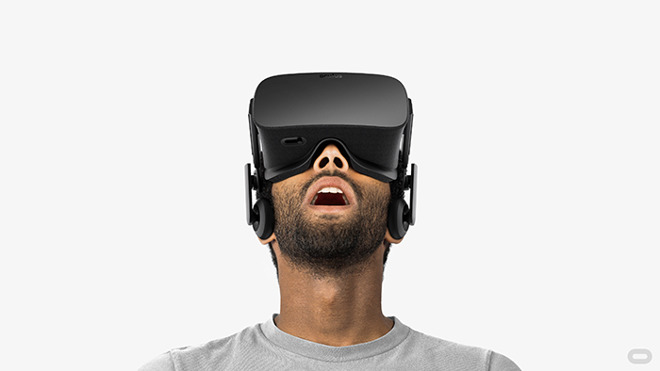
Samsung also rolled out its own Samsung Pay competing with Google’s Android Pay to challenge Apple Pay. But after using various events to tout its Gear smartwatches, Samsung bowed out of smartwatches at MWC to wait for the launch of Apple Watch. Instead, it focused its attention on Gear VR, a way to experience binocular immersive images using a head-mounted smartphone.
HTC also worked to rival Apple’s iPhone premium with its One M9 featuring a metal look and feel, and launched its own HTC Vive VR headset.
Microsoft continued pushing Lumia and the new Windows 10 Mobile, which was looking increasingly unlikely to matter.
Ubuntu’s mobile Linux-based OS was picked up by Chinese makers who wanted an alternative to Android, including the Meizu MX4. TechRadar optimistically observed, “there aren’t many apps for it, there are even fewer handsets that run it and the software itself is buggy. But it’s hard to deny that it shows promise.”
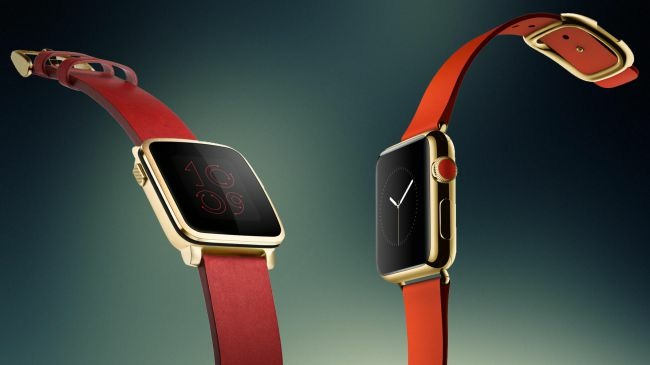
LG, which had acquired webOS from HP 2013, used its new software to launch its Urbane smartwatch. Huawei launched its own Android Wear watch, and Pebble launched its own new wearable, of which TechRadar said, “the Apple Watch may have a competitor on its hands.”
When Apple Watch launched a few days later at Apple’s March 9 “Spring Forward” event, it ended up not having any competitors on its hands.
Pebble’s wearable was described as “maybe” being a competitor to the upcoming Apple Watch
MWC 2016: VR blows up, burns down
The following year, TechRadar observed, “Samsung has managed to somewhat steal the MWC show for the past two years, launching the Galaxy S5 and the Galaxy S6 at the 2014 and 2015 events respectively. This year has been no different, with the smartphone giant launching both the S7 and S7 Edge (with part of the press conference done in virtual reality), and surprising us with an appearance from Facebook CEO Mark Zuckerberg.”
It added, “Not only did Zuck explain why VR is the next social platform, but he also announced that Facebook would be bringing many more apps to Gear VR. He also confirmed the launch of Minecraft on the platform.”
Facebook’s VR partnership with Samsung didn’t move the needle
While the partnership between Facebook and Samsung got hyped up, it didn’t deliver a promised new world of VR social networking. Instead, by the end of the year, Samsung flubbed up its Galaxy Note 7 battery fiasco so badly that its entire Gear VR headset strategy was thrown into question. And nobody apart from media personalities seemed interested in VR for more than 15 minutes anyway.
At the same show, LG announced its G5, with an internal expansion bay to make it “modular.” It was a total flop. It also connected to VR. Google, HTC, Microsoft and Sony also invested big in VR, yet despite all of their combined efforts, VR ended 2016 being described as the biggest loser of the year.
Meanwhile, as the entire industry failed to deliver on VR hardware hype, Apple singlehandedly launched its very successful Apple Watch foray into wearables, while touting augmented reality as a larger opportunity. Pundits didn’t predict either outcome.
MWC 2017: Nostalgia for the time before Apple
In 2017, CNET provided a rundown of MWC that detailed a trip “back to the drawing board” with nostalgic designs. Simple phones from “Nokia” turned the once significant mobile maker into a licensed brand slapped on existing products, the same sort of humiliation suffered by Polaroid and Atari.
Blackberry unveiled its retro-design of the KeyOne, and Lenovo relaunched the Moto brand it bought from Google. Samsung didn’t bring its Galaxy S8 to the show, instead choosing to launch it at its own event, Apple style. There were, however, protesters who interrupted Samsung’s press conference to demand Samsung’s plans for millions of recalled Note 7 batteries.
The report noted that “VR was everywhere at last year’s show, but this year saw more emphasis on content and less on hardware,” and also added that “a bunch of companies have come out and said they will push to get 5G here for mass deployment by 2019—a year ahead of schedule.”
That push was driven by Qualcomm, which needed partners selling 5G as a feature iPhones lacked, given that Apple and Qualcomm had reached an impasse in chips. Without being able to articulate why 5G is important, the media narrative has erupted that its a big problem that Apple won’t have 5G iPhones for the duration of 2019.
That hot take appears to have forgotten that iPhones lacked 4G for about three years, at a time when it faced more significant competition from Motorola and others pushing 4G connectivity. If Apple could hold out for years while 4G delivered a massive, clearly visible boost in mobile data speeds compared to saturated 3G networks, surely it can hold out on 5G in a year where nobody can really use it, and current phones aren’t anywhere close to maxing out their existing potential.
MWC 2018: cheap Androids trying to look like iPhone X
For 2018, DigitalTrends noted that Samsung was back to showing its Galaxy S9 at MWC.
“On the surface, the phone isn’t all that different from the Galaxy S8, apart from a few small design tweaks like the fingerprint sensor being placed in a slightly more convenient spot,” it noted. Galaxy S9 sales have performed poorly.
The other big event of the show was Android Go, which the site stated: “is set to play an important role in bringing ultra-low-cost phones to emerging markets, and several such phones were unveiled at MWC.”
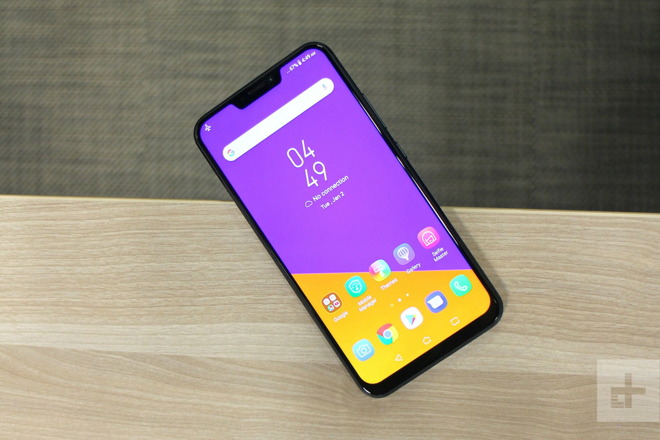
Asus launched its new Zenfone 5 series at MWC 2018, which the site declared “takes some pretty heavy design cues from the iPhone X.”
Asus Zenfone 5 “takes some pretty heavy design cues from the iPhone X”
MWC 2018: cheap Androids trying to look like iPhone X
After a solid year of desperately trying to look like an iPhone X, Android makers are now seeking to position their cheap phones under the halo umbrella of fantastically expensive folding devices. But will the buyers of cheap Androids really feel better about the existence of super expensive concept phones from the same brand?
Appel’s iPhone X, which was belabored as too expensive for most of its launch year, wasn’t merely an aspirational halo device that sought to make Apple’s other phones seem cool. It was Apple’s most popular phone at launch. It was a mass market success that major media sources flat out lied about.
This year, despite desperate attempts to repeat that strategy of lying about Apple’s “failure” until it sounded like reality, Apple’s iPhone XS and XR models were all mass market sellers, and wildly profitable. And despite a slowdown in expected sales particularly in China, Apple still brought in massively more money than all of its competition combined, globally.
So rather than MWC headlines offering any real perspective on the industry, it really looks like a hype festival that’s desperately trying to put a happy face on a series of companies that are desperately losing in the mobile arena to Apple, in conventional smartphones, in connected tablets, and in wearables.
That could change if Huawei, Samsung, and others create a real market for their ultra expensive folding phones. But given that they couldn’t sell far more affordable phones, tablets, wearables, or VR, it’s pretty clear that 5G folding phones are a huge phony cutout trying to distract from much larger problems.