



This tutorial helps to learn how to validate email using regular expression (regex) in JavaScript. It has more than one example of how to do email validation.
Those examples differ in the regex patterns used and in the handling of input email.
The below quick example uses a regex pattern with a JavaScript match() function to validate email. Before finding the match, it converts the input email to lowercase.
Quick example
const validateEmail = (email) => { return String(email) .toLowerCase() .match( /^(([^<>()[\]\\.,;:\s@"]+(\.[^<>()[\]\\.,;:\s@"]+)*)|(".+"))@((\[[0-9]{1,3}\.[0-9]{1,3}\.[0-9]{1,3}\.[0-9]{1,3}\])|(([a-z\-0-9]+\.)+[a-z]{2,}))$/ );

};
Test results
When receiving an invalid email format, it returns null. Otherwise, it returns an array of content matched with the regex.
Input: vincy#example
Output: null. Input: vincy@example.com
Output: vincy@example.co,vincy,vincy,,,example.co,,example.co,example.
Simple Email Validation in JavaScript using regex
This simple email validation script does a basic check with the input email string.
It validates the input email if it has the expected format regardless of the length and the data type.
I have added this example just to understand how to do pattern-based validation with regex in JavaScript.
I prefer to use the quick example and the strict validation example follows.
simple-validation.html
<!DOCTYPE html>
<html lang="en">
<head>
<meta charset="utf-8">
<title>JavaScript Simple Email Validation using Regular Expression (regex)</title>
<link rel='stylesheet' href='style.css' type='text/css' />
<link rel='stylesheet' href='form.css' type='text/css' />
</head>
<body> <div class="phppot-container"> <h1>JavaScript Simple Email Validation using Regular Expression (regex)</h1> <div class="tile-container"> <form name="form"> <div class="row"> <label for="email">Email address: </label> <input id="email" name="email" /> </div> <div class="row"> <input type="submit" name="submit" value="Submit" onclick="validateEmail(document.form.email)" /> </div> </form> </div> </div> <script> function matchEmailRegex(emailStr) { var emailRegex = /\S+@\S+\.\S+/; return emailStr.match(emailRegex); }; // validates in the form anystring@anystring.anystring // no more fancy validations function validateEmail(emailField) { var emailStr = emailField.value; if (matchEmailRegex(emailStr)) { alert("Entered value is a valid email."); } else { alert("Entered value is not an email."); } return false; } </script>
</body>
</html>
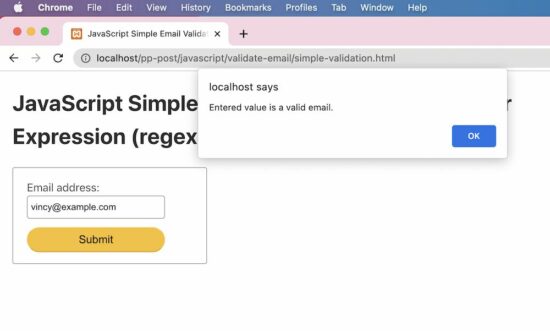
Test results
Input: vincy
Output: Entered value is not an email. Input: vincy@example.c
Output: Entered value is a valid email.
How to do strict email validation in JavaScript
This example uses an almost similar regex pattern that is used in the quick example. But, it handles the return value of the JavaScript match to output the validation message.
It gives a code to directly include in an application validation script to validate a form email input.
The alert() can be replaced with any form of letting the end user know about the validation status.
strict-validation.html
<!DOCTYPE html>
<html lang="en">
<head>
<meta charset="utf-8">
<title>JavaScript Validate Email using Regular Expression (regex)</title>
<link rel='stylesheet' href='style.css' type='text/css' />
<link rel='stylesheet' href='form.css' type='text/css' />
</head>
<body> <div class="phppot-container"> <h1>JavaScript Validate Email using Regular Expression (regex)</h1> <div class="tile-container"> <form name="form"> <div class="row"> <label for="email">Email address: </label> <input id="email" name="email" /> </div> <div class="row"> <input type="submit" name="submit" value="Submit" onclick="validateEmail(document.form.email)" /> </div> </form> </div> </div> <script> function matchEmailRegex(emailStr) { var emailRegex = /^(([^<>()[\]\\.,;:\s@\"]+(\.[^<>()[\]\\.,;:\s@\"]+)*)|(\".+\"))@((\[[0-9]{1,3}\.[0-9]{1,3}\.[0-9]{1,3}\.[0-9]{1,3}\])|(([a-zA-Z\-0-9]+\.)+[a-zA-Z]{2,}))$/; return emailStr.match(emailRegex); }; function validateEmail(emailField) { var emailStr = emailField.value; if (matchEmailRegex(emailStr)) { alert("Entered value is a valid email."); } else { alert("Entered value is not an email."); } return false; } </script>
</body>
</html>
Test results
Unlike the simple example, it strictly validates the email prefix with the allowed special characters.
It also checks the domain name format to validate the email. The following results show the test cases and respective outputs of the JavaScript email validation.
Input: vincy
Output: Entered value is not an email. Input: vincy@example.c
Output: Entered value is not an email. Input: vincy@example.com
Output: Entered value is a valid email.
https://www.sickgaming.net/blog/2022/09/...ion-regex/