



07-28-2013, 08:08 PM
How to Mod State of Decay with Horizon
State of Decay’ is a diamond tool within Horizon, you must have Diamond Membership to use it

Download Horizon! (Click Image above.)

Go Diamond! (Click Image above.)
Diamond is $4.99 for 1 month (Recurring), $14.99 for 3 months, $44.99 for 1 year.
Diamond is £3.40 for 1 month (Recurring), £9.37 for 3 months, £28.12.10 for 1 year.
1. Move your Save that you are wanting to modify State of Decay for, from your Xbox 360 HDD to your USB.
Open Me
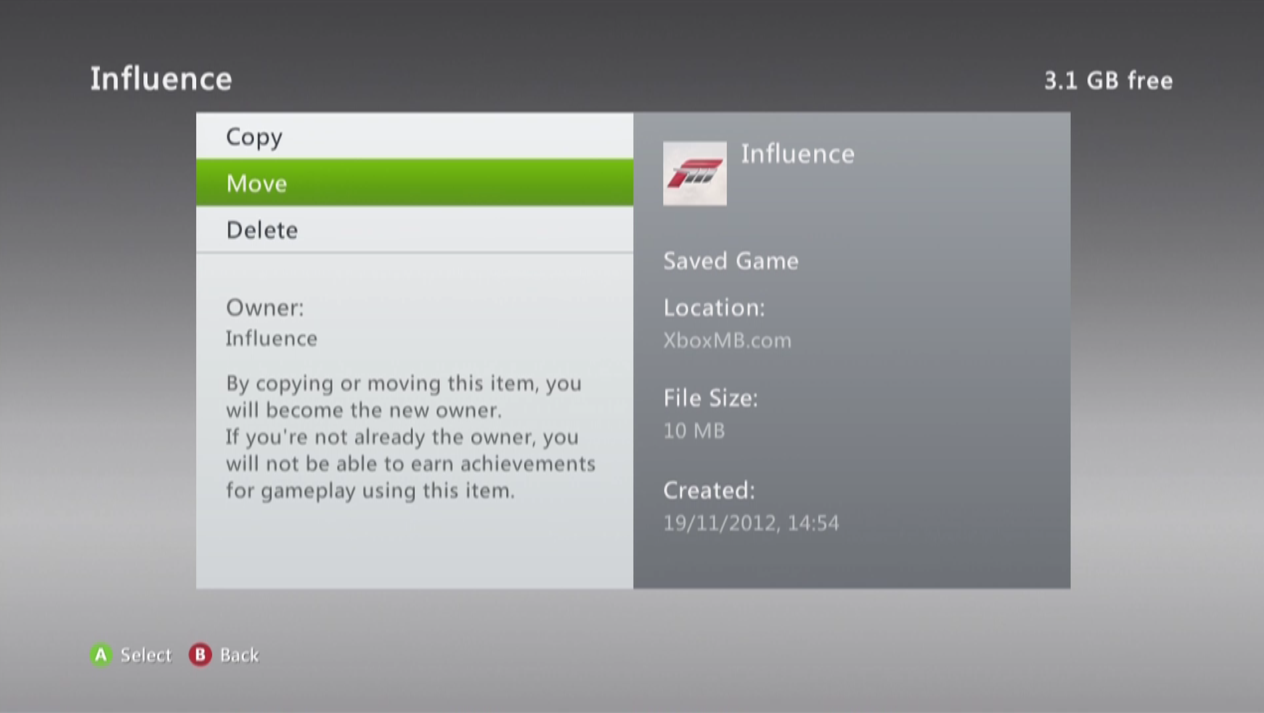
Example
2. Open Horizon with your USB inserted into your Computer. If your USB doesn’t recognize, run Horizon as Administrator! (Download Horizon Here.)
Please only download Horizon from XboxMB’s Horizon page
3. Located to the right of Horizon, the Device Explorer should show…
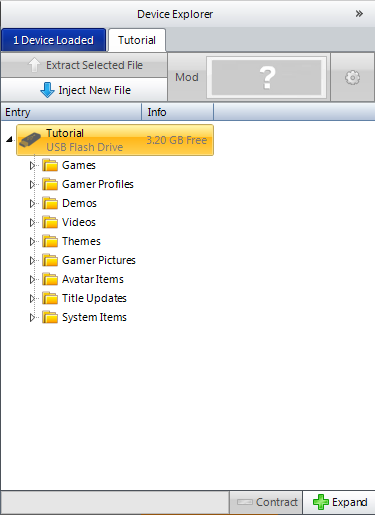
Simply click the ‘Games Folder’ and scroll down till you see ‘State of Decay’
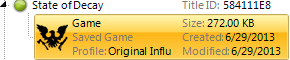
4. Once you highlight the save you are wanting to modify, click the ‘Mod’ button located at the top of the Device Manager

The Editor will then show in the center of Horizon
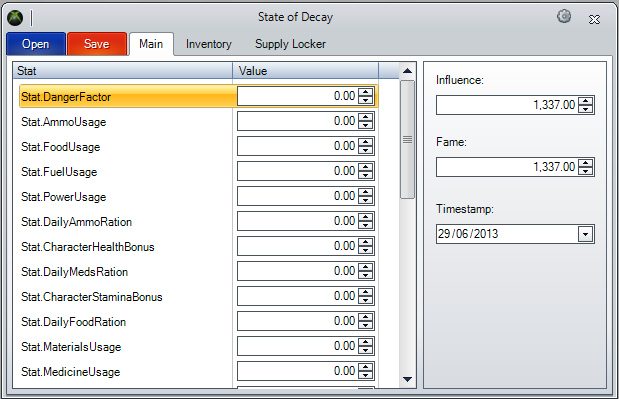
Within the editor you have three tabs… ‘Main’, ‘Inventory’ & ‘Supply Locker’, below you can have a peek of what they look like and what you can do within them.
Main
This tab contains your main stats, such as Bonuses, Usage, Factors, Ration, Stockpiles, Materials (etc)
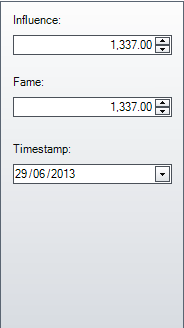
To the right side of the ‘Main’ tab, you can edit your Influence Points & Fame. Please do note Fame counts to the leaderboards
On top of that, you can also edit your Timestamp which allows you to fast forward or rewind the game, in other words, you can save your resources.
Inventory
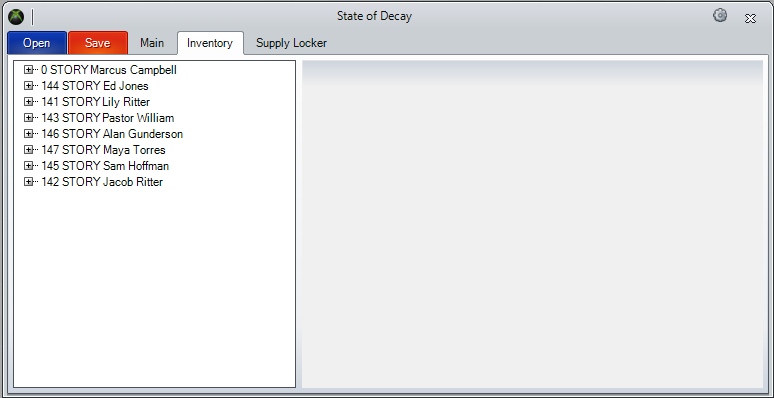
The Inventory tab allows you to edit your Players Inventory, but also contains a lot of other features, such as Skills and Traits.
Skills
Traits
Inventory
Supply Locker
The Supply Locker plays a big part in State of Decay, and now is your times to make the most of it. Within the editor you can edit the contents of your Supply Locker, which allows you to add and change items to it.
TimeStamp
Make sure to move the timestamp ahead of your current date to make sure the inventory and supplies you modify are not affected by the game’s use of resources while you are away.
For example : if the current date is 6/29/2013, you should move it to 6/30/2013.
If you have any issues with this editor post in the section below, if you have any suggestions please also say.
Horizon Support
This is the forum to post in if you have any issues.
Horizon Suggestions
This is the forum to post in if you have any suggestions for this editor or other editors you would like to see within Horizon.
Notice: Diamond tool modifying for non-diamond members is strictly not allowed, and doing so can involve losing your Diamond membership permanently or temporary & may also result in a machine ban from Horizon.
Terms of Service
State of Decay’ is a diamond tool within Horizon, you must have Diamond Membership to use it
Download Horizon! (Click Image above.)
Go Diamond! (Click Image above.)
Diamond is $4.99 for 1 month (Recurring), $14.99 for 3 months, $44.99 for 1 year.
Diamond is £3.40 for 1 month (Recurring), £9.37 for 3 months, £28.12.10 for 1 year.
1. Move your Save that you are wanting to modify State of Decay for, from your Xbox 360 HDD to your USB.
Open Me
Example
2. Open Horizon with your USB inserted into your Computer. If your USB doesn’t recognize, run Horizon as Administrator! (Download Horizon Here.)
Please only download Horizon from XboxMB’s Horizon page
3. Located to the right of Horizon, the Device Explorer should show…
Simply click the ‘Games Folder’ and scroll down till you see ‘State of Decay’
4. Once you highlight the save you are wanting to modify, click the ‘Mod’ button located at the top of the Device Manager
The Editor will then show in the center of Horizon
Within the editor you have three tabs… ‘Main’, ‘Inventory’ & ‘Supply Locker’, below you can have a peek of what they look like and what you can do within them.
Main
This tab contains your main stats, such as Bonuses, Usage, Factors, Ration, Stockpiles, Materials (etc)
To the right side of the ‘Main’ tab, you can edit your Influence Points & Fame. Please do note Fame counts to the leaderboards
On top of that, you can also edit your Timestamp which allows you to fast forward or rewind the game, in other words, you can save your resources.
Inventory
The Inventory tab allows you to edit your Players Inventory, but also contains a lot of other features, such as Skills and Traits.
Skills
Traits
Inventory
Supply Locker
The Supply Locker plays a big part in State of Decay, and now is your times to make the most of it. Within the editor you can edit the contents of your Supply Locker, which allows you to add and change items to it.
TimeStamp
Make sure to move the timestamp ahead of your current date to make sure the inventory and supplies you modify are not affected by the game’s use of resources while you are away.
For example : if the current date is 6/29/2013, you should move it to 6/30/2013.
If you have any issues with this editor post in the section below, if you have any suggestions please also say.
Horizon Support
This is the forum to post in if you have any issues.
Horizon Suggestions
This is the forum to post in if you have any suggestions for this editor or other editors you would like to see within Horizon.
Notice: Diamond tool modifying for non-diamond members is strictly not allowed, and doing so can involve losing your Diamond membership permanently or temporary & may also result in a machine ban from Horizon.
Terms of Service