



06-23-2019, 08:27 AM
UPDATED Logitech No Recoil v4.5.1 (MINI UPDATE RECOIL TABLE)
Game: PLAYERUNKNOWN'S BATTLEGROUNDS (PUBG)
Details
New and improved version of no recoil table for Logitech Gaming Software. Updated to v4.5.1!
Old thread click here.
What's new?
- Recoil Table updated
- Main focus on AKM due to multiple complaints.
- A few more comments were added for advanced users and beginners.
How to Import?
(Go to "How to install?" for more detailed explanation)
Simple: Like all other scripts, go into scripting page then paste the code there.
Explained: Open Logitech Gaming Software, Right click on profile, go to Scripting page, Copy code from Notepad, Paste code into scripting page, Save (Control + S )
How to install?
1. Download the script
2. Extract the file to anywhere you want
3. Open up Logitech Gaming Software
4. At "Home" page, make sure to switch to "Automatic Game Detection"
5. Go to "Customize buttons" page
6. Click the "Import/Export" button (an icon of a folder) and import the .xml file
7. Right click the profile and enter "Properties"
8. Click the Plus button and locate your "TslGame.exe"
(by default it would be C:\Program Files (x86)\Steam\steamapps\common\PUBG\TslGame\Binaries \Win64)
9. Tick "Lock profile while game is running"
10. Press Ok, right click the profile again and press "Scripting"
11. Under "KEY BIND", configure your own macro buttons according to your liking.
12. Simply save the profile by pressing Ctrl+S button and you're good to go.
*You can fix and adjust your own recoil by changing the values under "Recoil Table"*
[b]Note:[/b]
- If the scripts pull your mouse down way too much, change the values of "local all_recoil_times" to a lower number. Do it the opposite way if your guns recoil goes up too much.

-If your resolution is 1920 x 1080 and in-game sens default then no change required
- If Resolution smaller than 1920 x 1080 then decrease "local all_recoil_times = 1 to like 0.9 or smaller"
- If Resolution bigger than 1920 x 1080 then increase "local all_recoil_times = 1 to like 1.1 or higher"
-REMEMBER to follow the SENSITIVITY SETTINGS in script and make sure it matches your sensitivity in the game
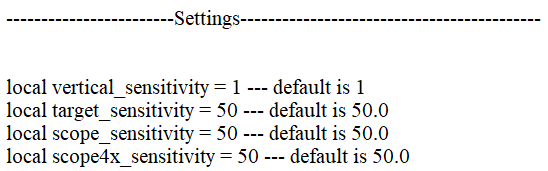
It should work without problem just like in the video if you followed all the steps correctly. (Do not exit Logitech Gaming Software from taskbar.)
Virus scans
Jotti's Malware Scan
Virustotal Scan
If you like it, press Download & Thanks <3
All credits goes to Kript
Download:
As always, use caution. This file is provided for archival purposes. SickGaming cannot be held liable.
Game: PLAYERUNKNOWN'S BATTLEGROUNDS (PUBG)
Details
New and improved version of no recoil table for Logitech Gaming Software. Updated to v4.5.1!
Old thread click here.
What's new?
- Recoil Table updated
- Main focus on AKM due to multiple complaints.
- A few more comments were added for advanced users and beginners.
How to Import?
(Go to "How to install?" for more detailed explanation)
Simple: Like all other scripts, go into scripting page then paste the code there.
Explained: Open Logitech Gaming Software, Right click on profile, go to Scripting page, Copy code from Notepad, Paste code into scripting page, Save (Control + S )
How to install?
1. Download the script
2. Extract the file to anywhere you want
3. Open up Logitech Gaming Software
4. At "Home" page, make sure to switch to "Automatic Game Detection"
5. Go to "Customize buttons" page
6. Click the "Import/Export" button (an icon of a folder) and import the .xml file
7. Right click the profile and enter "Properties"
8. Click the Plus button and locate your "TslGame.exe"
(by default it would be C:\Program Files (x86)\Steam\steamapps\common\PUBG\TslGame\Binaries \Win64)
9. Tick "Lock profile while game is running"
10. Press Ok, right click the profile again and press "Scripting"
11. Under "KEY BIND", configure your own macro buttons according to your liking.
12. Simply save the profile by pressing Ctrl+S button and you're good to go.
*You can fix and adjust your own recoil by changing the values under "Recoil Table"*
[b]Note:[/b]
- If the scripts pull your mouse down way too much, change the values of "local all_recoil_times" to a lower number. Do it the opposite way if your guns recoil goes up too much.
-If your resolution is 1920 x 1080 and in-game sens default then no change required
- If Resolution smaller than 1920 x 1080 then decrease "local all_recoil_times = 1 to like 0.9 or smaller"
- If Resolution bigger than 1920 x 1080 then increase "local all_recoil_times = 1 to like 1.1 or higher"
-REMEMBER to follow the SENSITIVITY SETTINGS in script and make sure it matches your sensitivity in the game
It should work without problem just like in the video if you followed all the steps correctly. (Do not exit Logitech Gaming Software from taskbar.)
Virus scans
Jotti's Malware Scan
Virustotal Scan
If you like it, press Download & Thanks <3
All credits goes to Kript
Download:
As always, use caution. This file is provided for archival purposes. SickGaming cannot be held liable.
Attached Files
