



11-01-2024, 11:52 AM
Black Ops 6 Season 2 is live and to maximize your performance in the multiplayer mode, it’s essential to use the best PC settings. Doing this will result in higher, smoother frame rates, quicker response times, and minimal lag.
The skill gap is higher than ever this year thanks to the Omnimovement system and higher TTK, so you’ll need to bring your A-game to be the best in your lobby and drop a Nuke.
Having ideal PC settings means your FPS will be smooth and stable, and you’ll eliminate any connection issues. This will help you on your way to victory throughout Black Ops 6 Season 2.
Best PC settings for max FPS in BO6 Season 2
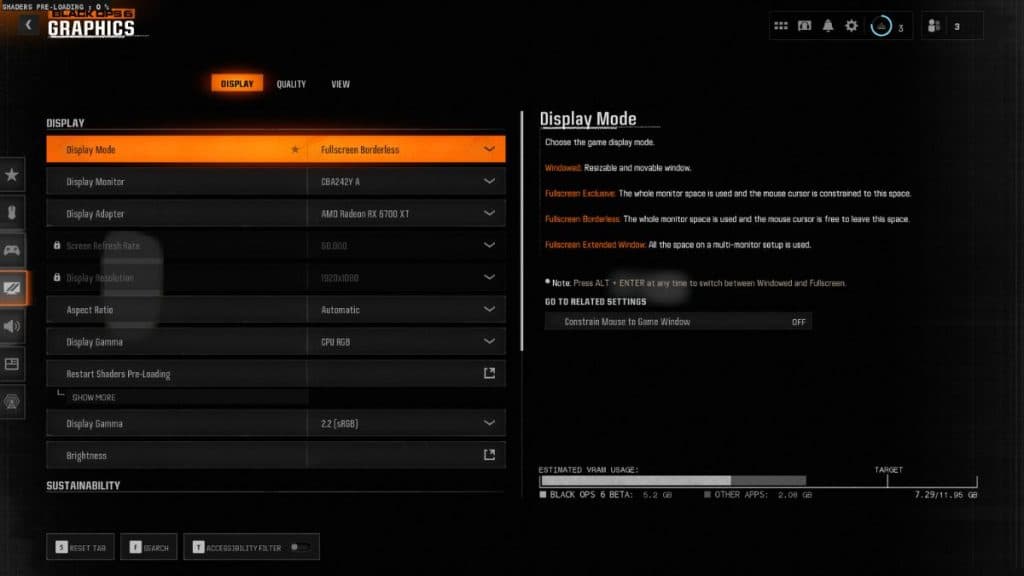
Display
Settings | Value
Display Mode | Fullscreen Exclusive
Display Monitor | Your monitor
Display Adaptor | Your graphics card
Screen Refresh Rate | Your monitor’s max refresh rate (e.g 144hz)
Display Resolution | Your primary monitor’s resolution (e.g 1920×1080)
Dynamic Resolution | Off
Aspect Ratio | Automatic
Display Gamma | 2.2 (sRGB)
Brightness | 55 (Personal preference)
NVIDIA Reflex Low Latency | On+Boost
V-Sync (Gameplay) | Off
V-Sync (Menus) | Off
Custom Framerate Limit | Custom
Gameplay Custom Framerate Limit | Your monitor’s refresh rate (e.g 144)
Menu Custom Framerate Limit | 60
Minimized Game Custom Framerate Limit | 5
Reduced Menu Render Resolution | Optimal
Pause Game Rendering | Off
Reduce Quality When Inactive | 10 Minutes
Focused Mode | Off
High Dynamic Range (HDR) | Off
Global Quality
Setting | Value
Quality Presents | Custom
Render Resolution | 100
Dynamic Resolution | Off
Upscaling/Sharpening | FidelityFX CAS
AMD Fidelity CAS Strength | 85
VRAM Scale Target | 90
Variable Rate Shading | Off
Details & Textures
Setting | Value
Texture Resolution | Low
Texture Filter Anisotropic | Normal
Depth of Field | Off
Detail Quality Level | Low
Particle Resolution | Very low
Bullet Impacts | On
Persistent Effects | Off
Shader Quality | Medium
On-Demand Texture Streaming | Minimal
Allocated Texture Cache Size | 16
Download Limits | On
Daily Download Limit (GB) | 1.0
Local Texture Streaming Quality | Low
On-Demand Texture Streaming is now mandatory, which can cause lag and stuttering issues if you don’t have top-of-the-range internet speeds.
To work around it as much as possible, you should set it to Minimal with the Allocated Texture Cache size on its lowest setting (16), turn Download Limits On, and set the Daily Download Limit to 1GB. This means On-Demand Texture Streaming will turn off after 1GB has been downloaded.
Shadow & Lighting
Setting | Value
Shadow Quality | Low
Screen Space Shadows | Off
Occlusion and Screen Space Lighting | Low
Screen Space Reflections | Off
Static Reflection Quality | Low
Environment
Setting | Value
Tessellation | Off
Volumetric Quality | Low
Deferred Physics Quality | Off
Weather Grid Volumes | Off
Water Quality | Off
View
Setting | Value
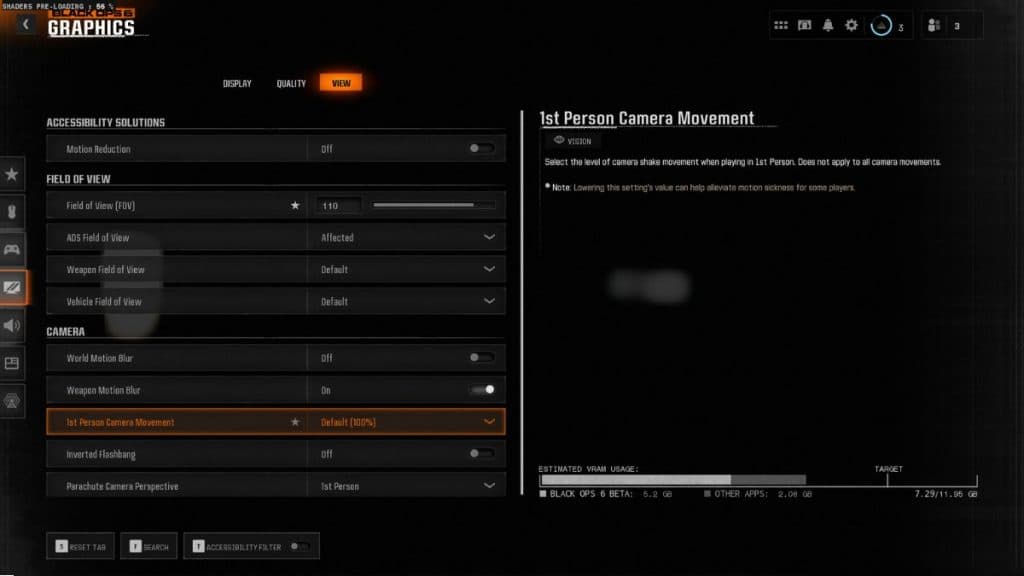
Motion Reduction Preset | Off
Field of View | 105
ADS Field of View | Affected
Weapon Field of View | Wide
3 Person Field of View | 90
Vehicle Field of View | Default
Camera
Setting | Value
World Motion Blur | Off
Weapon Motion Blur | Off
Film Grain | 0.00
1 Person Camera Movement | Least (50%)
3 Person Camera Movement | Least (50%)
3rd Person ADS Transition | 3rd Person ADS
Inverted Flashbang | On
BO6 system requirements
| Minimum | Recommended | Competitive/4K Ultra Specs
OS | Windows 10 64 Bit (latest update) | Windows 10 64 Bit (latest update) or Windows 11 64 Bit (latest update) | Windows 10 64 Bit (latest update) or Windows 11 64 Bit (latest update)
CPU | AMD Ryzen 5 1400 or Intel Core i5-6600 | AMD Ryzen 5 1600X or Intel Core i7-6700K | AMD Ryzen 7 2700X or Intel Core i7-8700K
RAM | 8 GB | 12 GB | 16 GB RAM
Graphics Card | NVIDIA GeForce GTX 960 / GTX 1650 or AMD Radeon RX 470 | NVIDIA GeForce GTX 1080Ti / RTX 3060 or AMD Radeon RX 6600XT, or Intel Arc A770 | NIVIDA GeForce RTX 3080 / RTX 4070 or AMD Radeon RX 6800XT
VRAM | 2 GB | 8 GB | 10 GB
Storage Space | SSD with 102 GB available space required | SSD with 102 GB available space required | SSD with 102 GB available space required
Network | Broadband Internet connection | Broadband Internet connection | Broadband Internet connection
Sound Card | DirectX Compatible | DirectX Compatible | DirectX Compatible
How to update graphics drivers
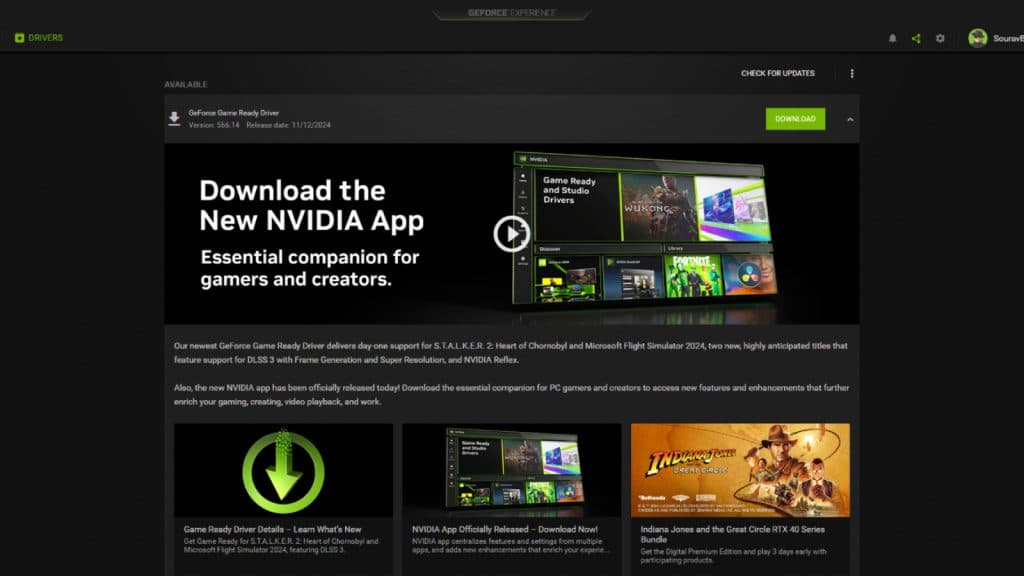
To update NVIDIA graphics drivers, follow the steps below:
Activision recommends the following drivers for Black Ops 6:
Those are the best Black Ops 6 PC settings. For more on the game, check out our best Assault Rifles and the meta SMG loadouts to dominate multiplayer lobbies in Season 2.
The skill gap is higher than ever this year thanks to the Omnimovement system and higher TTK, so you’ll need to bring your A-game to be the best in your lobby and drop a Nuke.
Having ideal PC settings means your FPS will be smooth and stable, and you’ll eliminate any connection issues. This will help you on your way to victory throughout Black Ops 6 Season 2.
Best PC settings for max FPS in BO6 Season 2
Display
Settings | Value
Display Mode | Fullscreen Exclusive
Display Monitor | Your monitor
Display Adaptor | Your graphics card
Screen Refresh Rate | Your monitor’s max refresh rate (e.g 144hz)
Display Resolution | Your primary monitor’s resolution (e.g 1920×1080)
Dynamic Resolution | Off
Aspect Ratio | Automatic
Display Gamma | 2.2 (sRGB)
Brightness | 55 (Personal preference)
NVIDIA Reflex Low Latency | On+Boost
V-Sync (Gameplay) | Off
V-Sync (Menus) | Off
Custom Framerate Limit | Custom
Gameplay Custom Framerate Limit | Your monitor’s refresh rate (e.g 144)
Menu Custom Framerate Limit | 60
Minimized Game Custom Framerate Limit | 5
Reduced Menu Render Resolution | Optimal
Pause Game Rendering | Off
Reduce Quality When Inactive | 10 Minutes
Focused Mode | Off
High Dynamic Range (HDR) | Off
Global Quality
Setting | Value
Quality Presents | Custom
Render Resolution | 100
Dynamic Resolution | Off
Upscaling/Sharpening | FidelityFX CAS
AMD Fidelity CAS Strength | 85
VRAM Scale Target | 90
Variable Rate Shading | Off
Details & Textures
Setting | Value
Texture Resolution | Low
Texture Filter Anisotropic | Normal
Depth of Field | Off
Detail Quality Level | Low
Particle Resolution | Very low
Bullet Impacts | On
Persistent Effects | Off
Shader Quality | Medium
On-Demand Texture Streaming | Minimal
Allocated Texture Cache Size | 16
Download Limits | On
Daily Download Limit (GB) | 1.0
Local Texture Streaming Quality | Low
On-Demand Texture Streaming is now mandatory, which can cause lag and stuttering issues if you don’t have top-of-the-range internet speeds.
To work around it as much as possible, you should set it to Minimal with the Allocated Texture Cache size on its lowest setting (16), turn Download Limits On, and set the Daily Download Limit to 1GB. This means On-Demand Texture Streaming will turn off after 1GB has been downloaded.
Shadow & Lighting
Setting | Value
Shadow Quality | Low
Screen Space Shadows | Off
Occlusion and Screen Space Lighting | Low
Screen Space Reflections | Off
Static Reflection Quality | Low
Environment
Setting | Value
Tessellation | Off
Volumetric Quality | Low
Deferred Physics Quality | Off
Weather Grid Volumes | Off
Water Quality | Off
View
Setting | Value
Motion Reduction Preset | Off
Field of View | 105
ADS Field of View | Affected
Weapon Field of View | Wide
3 Person Field of View | 90
Vehicle Field of View | Default
Camera
Setting | Value
World Motion Blur | Off
Weapon Motion Blur | Off
Film Grain | 0.00
1 Person Camera Movement | Least (50%)
3 Person Camera Movement | Least (50%)
3rd Person ADS Transition | 3rd Person ADS
Inverted Flashbang | On
BO6 system requirements
| Minimum | Recommended | Competitive/4K Ultra Specs
OS | Windows 10 64 Bit (latest update) | Windows 10 64 Bit (latest update) or Windows 11 64 Bit (latest update) | Windows 10 64 Bit (latest update) or Windows 11 64 Bit (latest update)
CPU | AMD Ryzen 5 1400 or Intel Core i5-6600 | AMD Ryzen 5 1600X or Intel Core i7-6700K | AMD Ryzen 7 2700X or Intel Core i7-8700K
RAM | 8 GB | 12 GB | 16 GB RAM
Graphics Card | NVIDIA GeForce GTX 960 / GTX 1650 or AMD Radeon RX 470 | NVIDIA GeForce GTX 1080Ti / RTX 3060 or AMD Radeon RX 6600XT, or Intel Arc A770 | NIVIDA GeForce RTX 3080 / RTX 4070 or AMD Radeon RX 6800XT
VRAM | 2 GB | 8 GB | 10 GB
Storage Space | SSD with 102 GB available space required | SSD with 102 GB available space required | SSD with 102 GB available space required
Network | Broadband Internet connection | Broadband Internet connection | Broadband Internet connection
Sound Card | DirectX Compatible | DirectX Compatible | DirectX Compatible
How to update graphics drivers
To update NVIDIA graphics drivers, follow the steps below:
- Download GeForce Experience through NVIDIA.com and launch it.
- Head to the ‘Drivers’ tab.
- Select ‘check for updates’ in the upper right corner.
- If an update is available, follow the steps to get it installed.
- Right-click on the desktop.
- Click on AMD Radeon Settings.
- Select the Home icon.
- Hit ‘New Updates’ on the bottom left.
- Select ‘check for update.’
- If an update is available, follow the steps.
Activision recommends the following drivers for Black Ops 6:
- AMD: 24.8.1
- NVIDIA: 560.70
- INTEL: 32.0.101.5972
Those are the best Black Ops 6 PC settings. For more on the game, check out our best Assault Rifles and the meta SMG loadouts to dominate multiplayer lobbies in Season 2.