



Do you want to connect a remote server from the phpMyAdmin installed on a local or test server? This article gives the steps needed to achieve it.
There are many database clients, most of which support connecting a database server. But, working with phpMyAdmin to connect to a remote database server is heavenly easier than with other clients.
We have seen many tutorials for phpMyAdmin to create a database and perform the operations around it.
Configure remote server details in the phpMyAdmin application config file
A configuration file config.inc.php is there for the phpMyAdmin application. Open that file and add the below settings into it.
This setting is to add the remote database details, host, username, and password. The database port is optional if it is the default.
Before setting the database details, it increments the existing config array index. We can add as many configurations as following the current batch of settings.
$i++;
$cfg['Servers'][$i]['host'] = 'DATABASE_HOST:PORT';//set the database hostname.
$cfg['Servers'][$i]['user'] = 'DATABASE_USER';// set the remote database user
$cfg['Servers'][$i]['password'] = 'DATABASE_PASSWORD';// database password
$cfg['Servers'][$i]['auth_type'] = 'config';
After adding these details, the phpMyAdmin application lists the configured database hostnames.
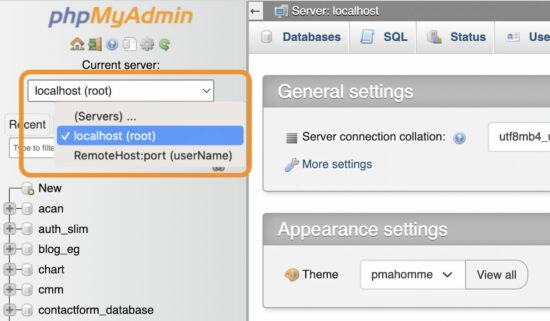
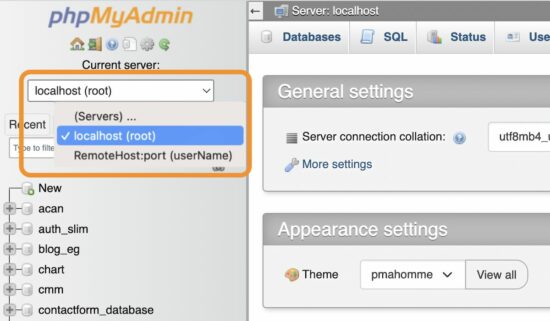
The list is a dropdown of selectable database hosts that appears above the left navigation menu.
The below figure shows the dropdown options of the current localhost and the RemoteHost server.
It allows navigation between these two database servers to manage their assets.
Note: The RemoteHost:port is a test configuration data. Replace it with the remote database IP and port to be connected.
These guidelines assume that you have the PHP and MySQL environment with the phpMyAdmin application installed.
If you newly create the environment or install the phpMyAdmin, ensure the required privileges and security measures. We have seen steps to install phpMyAdmin on a windows machine via the WAMP package installer.
Security measures needed for the machine connecting the remote database
(1) Use a Linux environment
Before connecting the remote database via phpMyAdmin, we must be confident about the security.
Linux-based machines are safe for proceeding with the remote connection.
If you are using a Windows machine, there are settings to enable WSL to let it be secure while working with the remote database servers.
(2) Let login configuration empty
When setup the remote database server configuration, let the username and password empty.
Set only the remote database server IP address to show in the phpMyAdmin web interface.
Choosing the remote server to connect will redirect to the phpMyAdmin login panel to enter the details.
Directly access the remote phpMyAdmin web application URL
If you know the URL of the phpMyAdmin web application installed on the remote server, we can visit and land on its login page.
The login page prompts the MySQL database host, username, and password. Entering and submitting these details allows access to the remote database.
Thus, we have seen the possible ways of connecting the remote database server using the phpMyAdmin application.
https://www.sickgaming.net/blog/2023/03/...-database/