



The JSON string is a convenient format to transfer data between terminals. Almost all of the API responses you see are in JSON string format.
The JSON string should be parsed to read the data bundled with this string.
JSON.parse function is used to convert a JSON string into a JavaScript object.
Quick example
The below quick example has an input JSON string having properties of animals. The properties are stored in a multi-level hierarchy.
The JSON.parse() JS function converts this JSON string input into an object array.
const jsonString = `{ "animals": { "Lion": { "name": "Lion", "type": "Wild", "Location": { "1": { "zoo-1": "San Diego Zoo", "zoo-2": "Bronx Zoo" } } } }

}`; javaScriptObject = JSON.parse(jsonString)

console.log(javaScriptObject);
The above code will log the output of the converted JSON into the browser’s developer console.
Output:
animals: Lion: Location: 1: zoo-1: "San Diego Zoo" zoo-2: "Bronx Zoo" name: "Lion" type: "Wild"
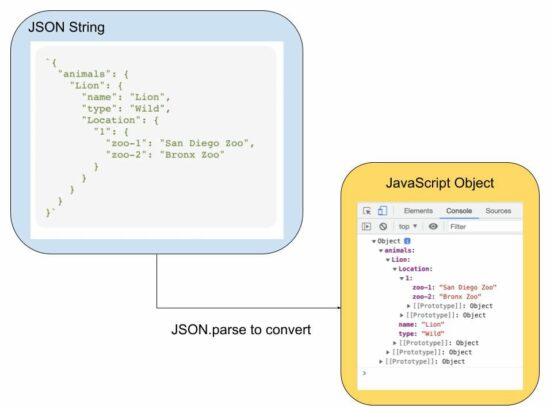
The source JSON string can be from many different resources. For example,
- It can be stored in the database that is to be parsed.
- It can be a response to an API.
The JSON string will contain many types of data like dates, functions and more.
The following examples give code to learn how to convert a JSON string that contains different types of data. In the previous article, we have seen how to convert a JavaScript object to JSON.
How the date in the JSON string will be converted
If the input JSON string contains date values, the JSON.parse() JS function results in a date string.
For example, the date in 2014-11-25 into Tue Nov 25 2014 05:30:00 GMT+0530.
It will be converted later into a JavaScript date object.
// JSON string with date to JavaScript object

const jsonString = '{"animal":"Lion", "birthdate":"2014-11-25", "zoo":"Bronx Zoo"}';

const jsObject = JSON.parse(jsonString);

jsObject.birthdate = new Date(jsObject.birthdate);

console.log(jsObject.birthdate);
Output:
Tue Nov 25 2014 05:30:00 GMT+0530
JSON input script with function to JavaScript object
If a JSON script contains a function as its value, the below code shows how to parse the input JSON. In an earlier tutorial, we have see many functions of JSON handling using PHP.
It applied JSON.parse as usual and get the scope of the function by using JavaScript eval(). The JavaScript object index gets the scope to access the function in the input JSON string.
Note: Using the JS eval() is a bad idea if you are working with sensitive data. So avoid using functions as a string inside a JS JSON input.
// JSON string with a function to JavaScript object and invoke the function

const jsonString = '{"animal":"Lion", "birthdate":"2014-11-25", "id":"function () {return 101;}"}';

const jsObject = JSON.parse(jsonString);

jsObject.id = eval("(" + jsObject.id + ")");

console.log(jsObject.id());

// also be aware that, when you pass functions in JSON it will lose the scope
JSON.parse reviver to convert the date string to a JavaScript object
In a previous example, we parsed the date as a string and then converted it into a Date object.
Instead of converting the resultant Date string into a Date object later, this program uses JSON.parse() with its reviver parameter.
The reviver parameter is a callback function created below to convert the input date into a Date object.
Using this method, the output Javascript object will include the date object as converted by the reviver method.
// JSON string with a date to JavaScript object using the reviver parameter of JSON.parse

const jsonString = '{"animal": "Lion", "birthdate": "2014-11-25", "zoo": "Bronx Zoo"}';

const jsObject = JSON.parse(jsonString, function(key, value) { if (key == "birthdate") { return new Date(value); } else { return value; }

}); jsObject.birthdate = new Date(jsObject.birthdate);

console.log(jsObject.birthdate);
The reviver parameter is optional while using the JSOM.parse function. The callback defined as a reviver will check each item of the input JSON string.
https://www.sickgaming.net/blog/2022/11/...pt-object/