



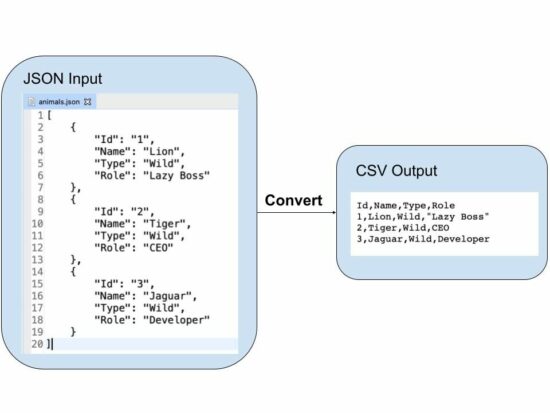
This tutorial gives examples for converting a PHP JSON variable content into a CSV file.
This quick example achieves it in a few steps. It uses the PHP fputcsv() method to prepare the CSV output.
- It reads the input JSON and decodes it into an array.
- Iterate the JSON array to read the line of the record.
- Apply PHP fputcsv() to write the array keys in the header, followed by array values.
Quick example
<?php function convertJsonToCSV($jsonFile, $csvFile)

{ if (($json = file_get_contents($jsonFile)) == false) { die('Unable to read JSON file.'); } $jsonString = json_decode($json, true); $fp = fopen($csvFile, 'w'); fputcsv($fp, array_keys($jsonString[0])); for ($i = 0; $i < count($jsonString); $i ++) { fputcsv($fp, array_values($jsonString[$i])); } fclose($fp); return;

}

$jsonFile = 'animals.json';

$csvFile = 'animals.csv'; convertJsonToCSV($jsonFile, $csvFile);

echo 'JSON to CSV converted. <a href="' . $csvFile . '" target="_blank">Download CSV file</a>';
The input JSON file is in the local drive and specified to a PHP variable $jsonFile.
This example creates a custom function convertJsonToCSV(). It requires the input JSON and the target CSV file names.
It converts the input JSON object to a PHP array. Then, it iterates the PHP array to read the row.
This function uses the PHP fputcsv() function to write each row into the target CSV file.
Output:
The above program will return the following CSV content in a file. In a previous tutorial, we have seen how to export to a CSV file using the PHP fputcsv() function.
Id,Name,Type,Role
1,Lion,Wild,"Lazy Boss"
2,Tiger,Wild,CEO
3,Jaguar,Wild,Developer
Note: The input JSON must be a one-dimensional associative array to get a better output.
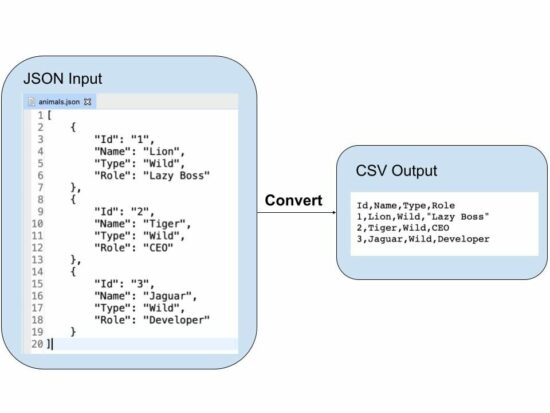
JSON string to CSV in PHP
This example has a different approach to dealing with PHP JSON to CSV conversion.
It uses a JSON string as its input instead of reading a file. The JSON string input is initiated in a PHP variable and passed to the convertJSONtoCSV() function.
It reads the JSON string and converts it into a JSON array to prepare CSV. The linked article has an example of reading CSV using PHP.
Then, it iterates the JSON array and applies PHP fputcsv() to write the CSV row.
It reads the array_keys to supply the CSV header. And this will be executed only for the first time. It writes the column names as the first row of the output CSV.
json-string-to-csv.php
<?php

function convertJsonToCSV($jsonString, $csvFile)

{ $jsonArray = json_decode($jsonString, true); $fp = fopen($csvFile, 'w'); $header = false; foreach ($jsonArray as $line) { if (empty($header)) { $header = array_keys($line); fputcsv($fp, $header); $header = array_flip($header); } fputcsv($fp, array_merge($header, $line)); } fclose($fp); return;

}

$jsonString = '[ { "Id": "1", "Name": "Lion", "Type": "Wild", "Role": "Lazy Boss" }, { "Id": "2", "Name": "Tiger", "Type": "Wild", "Role": "CEO" }, { "Id": "3", "Name": "Jaguar", "Type": "Wild", "Role": "Developer" }

]';

$csvFile = 'animals.csv'; convertJsonToCSV($jsonString, $csvFile);

echo 'JSON to CSV converted. <a href="' . $csvFile . '" target="_blank">Download CSV file</a>';
Upload CSV file to convert into JSON in PHP
This example is to perform the JSON to CSV with a file upload option.
This code will be helpful if you want to convert the uploaded JSON file into a CSV.
It shows an HTML form with a file input field. This field will accept only ‘.json’ files. The restriction is managed with the HTML ‘accept’ attribute. It can also be validated with a server-side file validation script in PHP.
The $_FILES[‘csv-file’][‘tmp_name’] contains the posted CSV file content. The JSON to CSV conversion script uses the uploaded file content.
Then, it parses the JSON and converts it into CSV. Once converted, the link will be shown to the browser to download the file.
upload-json-to-convert-to-csv.php
<?php

if (! empty($_FILES["csv-file"]["tmp_name"])) { $csvFile = 'animal.csv'; if (($json = file_get_contents($_FILES["csv-file"]["tmp_name"])) == false) { die('Unable to read JSON file.'); } $jsonString = json_decode($json, true); $fp = fopen($csvFile, 'w'); fputcsv($fp, array_keys($jsonString[0])); for ($i = 0; $i < count($jsonString); $i ++) { fputcsv($fp, array_values($jsonString[$i])); } fclose($fp); echo 'JSON to CSV converted. <a href="' . $csvFile . '" target="_blank">Download CSV file</a>';

}

?>

<HTML>

<head>

<title>Convert JSON to CSV</title>

<style>

body { font-family: arial;

} input[type="file"] { padding: 5px 10px; margin: 30px 0px; border: #666 1px solid; border-radius: 3px;

}

input[type="submit"] { padding: 8px 20px; border: #232323 1px solid; border-radius: 3px; background: #232323; color: #FFF;

}

</style>

</head> <body> <form method="post" enctype="multipart/form-data"> <input type="file" name="csv-file" accept=".json" /> <input type="submit" name="upload" value="Upload"> </form>

</body>

</HTML>
https://www.sickgaming.net/blog/2023/03/...on-to-csv/