Create an account


Welcome, Guest
You have to register before you can post on our site.

Username
  

Password


Search Forums

(Advanced Search)

Forum Statistics
» Members: 20,407
» Latest member: nimiseh
» Forum threads: 21,716
» Forum posts: 22,619

Full Statistics

Online Users
There are currently 808 online users.
» 0 Member(s) | 804 Guest(s)
Applebot, Baidu, Bing, Google

 
  (Indie Deal) FREE Doodle Devil & Borderlands: The Pre-Sequel Crackerjack Deal
Posted by: xSicKxBot - 05-16-2020, 03:07 PM - Forum: Deals or Specials - No Replies

FREE Doodle Devil & Borderlands: The Pre-Sequel Crackerjack Deal

Borderlands: The Pre-Sequel at a historical handsome price
[www.indiegala.com]
Save 80% OFF! Discover the story of Handsome Jack, and his rise to power.
https://youtu.be/ZgW7fsSUyGQ
If You Love Doodle God…Embrace Your Dark Side with Doodle Devil!
[freebies.indiegala.com]
The same addictive, puzzle game play that made Doodle God a hit is back but with an evil twist. Being bad has never been so much fun & free!

GalaQuiz today,DCCU-themed
[www.indiegala.com]

Stay Inside, Stay Safe and Enjoy Good Games.
Check out IndieGala on Twitter, YouTube & Facebook[www.facebook.com]


https://steamcommunity.com/groups/indieg...9576059590

Print this item

  (Free Game Key) Four Kings One War - Free Steam Game
Posted by: xSicKxBot - 05-16-2020, 03:07 PM - Forum: Deals or Specials - No Replies

Four Kings One War - Free Steam Game

Four Kings One War - just go to the store page and add it to your account.

https://store.steampowered.com/app/883680/Four_Kings_One_War/

!addlicense asf 463361 - for ASF users.

We are welcoming everyone to join our discord[discord.gg]. We are more active there on finding giveaways, small or large, and there are daily raffles you can participate.

?GrabFreeGames.com ?Twitter ?Steam Curator ?Facebook[fb.me]?Discord[discord.gg]
❤️Support us: ✔️HumbleBundle Partner[www.humblebundle.com] Epic Tag: GrabFreeGames


https://steamcommunity.com/groups/GrabFr...2027983224

Print this item

  News - Animal Crossing: New Horizons Musicians Give A Social Distanced Performance
Posted by: xSicKxBot - 05-16-2020, 11:55 AM - Forum: Lounge - No Replies

Animal Crossing: New Horizons Musicians Give A Social Distanced Performance

Animal Crossing: New Horizons has rightfully gotten a lot of attention as a salve for our troubled times. The friendly, low-stress gameplay is complemented by smooth music that makes the whole thing a relaxing respite. Now the performers behind the main theme reconvened virtually for an encore performance.

The short-but-sweet video was shared by the official Animal Crossing Twitter, with each musician performing out of their homes--sometimes multiple times so that their various instruments can be compiled into the mix. The result is a nice overview of the work put into the iconic song and lets Animal Crossing fans put faces to the performances.

Between some combination of its chill vibes and recent big spending on video games in general, Animal Crossing has had a booming launch, already earning a spot in the top-sellers for Nintendo Switch. It's also gotten a fair amount of mainstream pop culture attention, from the likes of NFL teams and members of the US Congress.

Continue Reading at GameSpot

https://www.gamespot.com/articles/animal...01-10abi2f

Print this item

  News - Nintendo’s Quality Of Life Project Pops Up Yet Again In New Patent
Posted by: xSicKxBot - 05-16-2020, 05:19 AM - Forum: Nintendo Discussion - No Replies

Nintendo’s Quality Of Life Project Pops Up Yet Again In New Patent


Nintendo’s ‘Quality of Life’ initiative has been in the works for years now – the first time we heard about it was way back in 2014 – but it’s been a little while since we last received any new info. Today, however, it has been revealed that the Big N has applied for a new patent that’s concerned with measuring health information, including a user’s sleep patterns.

The patent includes a base device which would sit in a user’s home and connect to a mobile device. It has plenty of potential tricks up its sleeves, as documented in the description below courtesy of Japanese Nintendo:

The base device is installed in the user’s home where-as the mobile terminal is fully portable. The base device can also charge the mobile terminal when connected with communication between both mobile and base devices also able to be performed by a communication method via a network such as a LAN or the Internet.

A Doppler sensor is included in the base device which detects biological information such as respiration and pulse, in addition to the user’s body movement.

The base device also includes a projector that projects an image on a wall surface (including a ceiling) or a screen. Such images could be to prompt the user to fall asleep or wake up, or to display an image that shows the sleep evaluation result when the user wakes up in the morning.

Further, the base device also includes a camera, speaker, and control unit. The control unit has a CPU and a memory, and can also transmit the information detected by the Doppler sensor to the mobile terminal.


You can read up on all of Japanese Nintendo’s findings here if you’re interested in learning more.

The last time we heard about Nintendo’s Quality of Life plans was in June last year, when the company confirmed that the initiative was still very much alive but wasn’t linked to Pokémon Sleep, a mobile app announced by The Pokémon Company.

Have you been keeping tabs on Nintendo’s QoL plans? We can’t say we’re not intrigued about what Nintendo’s working on, but for all we know, any eventual product could still be years away from release.


https://www.sickgaming.net/blog/2020/05/...ew-patent/

Print this item

  News - PGA Tour 2K21 Pre-Orders Live: Release Date, Editions, Bonuses, And More
Posted by: xSicKxBot - 05-16-2020, 05:19 AM - Forum: Lounge - No Replies

PGA Tour 2K21 Pre-Orders Live: Release Date, Editions, Bonuses, And More

HB Studios' The Golf Club games have admirably filled the void left by the absence of EA Sport's long-running Tiger Woods series for years now. But it was only when the PGA Tour license was secured for 2018's The Golf Club Featuring PGA Tour--the first in the series to be published by 2K Sports--that real courses began to make their way into the experience. The latest game in the franchise has adopted the standard naming convention of 2K Sports titles and will make better use of the PGA Tour license. PGA Tour 2K21 releases August 21 on PS4, Xbox One, Nintendo Switch, PC, and Stadia. It's available to pre-order now in two editions, and you can also snag a bonus for buying early.

Just from looking at the cover art, you can see that PGA Tour 2K21 is making a concerted effort to become closer to what we remember from EA Sports' defunct golf series. PGA Tour star Justin Thomas graces the cover, and he will be joined by 11 other pros that will be named at a later date. Unfortunately, you will only compete against the pros in career tournaments; you cannot play as them.

Continue Reading at GameSpot

https://www.gamespot.com/articles/pga-to...01-10abi2f

Print this item

  [Tut] How to Add an Element to a Python List at an Index?
Posted by: xSicKxBot - 05-16-2020, 02:57 AM - Forum: Python - No Replies

How to Add an Element to a Python List at an Index?

To add an element to a given Python list, you can use either of the three following methods:

  1. Use the list insert method list.insert(index, element).
  2. Use slice assignment lst[index:index] = [element] to overwrite the empty slice with a list of one element.
  3. Use list concatenation with slicing lst[:2] + ['Alice'] + lst[2:] to create a new list object.

In the following, you’ll learn about all three methods in greater detail. But before that, feel free to test those yourself in our interactive Python shell (just click “Run” to see the output):

Method 1: insert(index, element)


The list.insert(i, element) method adds an element element to an existing list at position i. All elements j>i will be moved by one index position to the right.

Here’s an example with comments:

# Create the list
lst = [2, 4, 6, 8] # Insert string at index 2
lst.insert(2, 'Alice') # Print modified list object
print(lst)
# [2, 4, 'Alice', 6, 8]

Properties of insert()
Operates on existing list object
Simple
Fast

Check out the objects in memory while executing this code snippet (in comparison to the other methods discussed in this article):

Click “Next” to move on in the code and observe the memory objects creation.

Related article: Python List insert() Method

Method 2: Slice Assignment


Slice assignment is a little-used, beautiful Python feature to replace a slice with another sequence.

Simply select the slice you want to replace on the left and the values to replace it on the right side of the equation.

For example, the slice assignment list[2:4] = [42, 42] replaces the list elements with index 2 and 3 with the value 42.

Here’s another example that shows you how to insert the string 'Alice' into a list with four integers.


Let’s have a look at the code:

# Create the list
lst = [2, 4, 6, 8] # Insert string at index 2
lst[2:2] = ['Alice'] # Print modified list object
print(lst)
# [2, 4, 'Alice', 6, 8]

Properties of Slice Assignment
Operates on existing list object
Slightly more complex
Fast

Related article: Python Slice Assignment

Method 3: List Concatenation


If you use the + operator on two integers, you’ll get the sum of those integers. But if you use the + operator on two lists, you’ll get a new list that is the concatenation of those lists.

Here’s the same example, you’ve already seen in the previous sections:

# Create the list
lst = [2, 4, 6, 8] # Insert string at index 2
lst = lst[:2] + ['Alice'] + lst[2:] # Print modified list object
print(lst)
# [2, 4, 'Alice', 6, 8]

Properties of List Concatenation
Creates a new list object
Slightly more complex
Slower

Related article: How to Concatenate Lists in Python? [Interactive Guide]

Where to Go From Here?


Enough theory, let’s get some practice!

To become successful in coding, you need to get out there and solve real problems for real people. That’s how you can become a six-figure earner easily. And that’s how you polish the skills you really need in practice. After all, what’s the use of learning theory that nobody ever needs?

Practice projects is how you sharpen your saw in coding!

Do you want to become a code master by focusing on practical code projects that actually earn you money and solve problems for people?

Then become a Python freelance developer! It’s the best way of approaching the task of improving your Python skills—even if you are a complete beginner.

Join my free webinar “How to Build Your High-Income Skill Python” and watch how I grew my coding business online and how you can, too—from the comfort of your own home.

Join the free webinar now!


https://www.sickgaming.net/blog/2020/05/...-an-index/

Print this item

  (Indie Deal) Blaster Knights Bundle & 505 Games, up to -90%
Posted by: xSicKxBot - 05-16-2020, 02:56 AM - Forum: Deals or Specials - No Replies

Blaster Knights Bundle & 505 Games, up to -90%

Blaster Knights Bundle | 7 Steam Games | 92% OFF
[www.indiegala.com]
Have a blast with knights, ducks, narrators, lobsters, guns and more!

Stay Safe Sale Day 8: 505 Games, up to -90%
[www.indiegala.com]
Get a BONUS Steam copy of Men of War: Assault Squad when spending a minimum of $8/€7/£6 in the IndieGala Store per basket (while stocks last).
Stay Inside, Stay Safe and Enjoy Good Games.
Check out IndieGala on Twitter, YouTube & Facebook[www.facebook.com]


https://steamcommunity.com/groups/indieg...9573343530

Print this item

  Humble Launch Indie Publisher Humble Games
Posted by: xSicKxBot - 05-15-2020, 11:09 PM - Forum: Game Development - No Replies

Humble Launch Indie Publisher Humble Games

Humble, famous for the Humble Bundle deals, have just launched an indie game developer focused publisher Humble Games.  Humble have already worked with a number of developers to bring games such as Void Bastards and Slay the Spire to market.  In celebration of the Humble Games launch, they are also running a “Make Your Own Bundle sale” featuring games they have published.

Reasons to publish with Humble Games include:

BRAND

Humble Bundle has done right by millions of gamers and thousands of industry partners – Humble Games is no different.

IP OWNERSHIP

Our Humble terms allow you to own your IP.

MARKETING

We will help you market your game with a dedicated team of experienced publishing marketers.

12M CUSTOMERS

As part of the Humble family, Humble Games will help you connect with customers across Bundles, Store, and Choice.

FINANCING

We give you money upfront so you don’t need to starve to finish your game.

CREATIVE CONTROL

We look for developers and games we believe in. We want you to be able to build the game of your dreams.

PRODUCTION

You’ll receive a dedicated producer to help you with all technical milestones, processes, and challenges you may encounter.

CROSS PLATFORM

We will help you succeed not just on the Humble Store, but on Steam, Xbox, PlayStation, Nintendo Switch, and more.

If you are interested in applying, the form is available here.  You can learn more in the video below.

[embedded content]

GameDev News


<!–

–>


https://www.sickgaming.net/blog/2020/05/...ble-games/

Print this item

  Fedora - The pieces of Fedora Silverblue
Posted by: xSicKxBot - 05-15-2020, 11:08 PM - Forum: Linux, FreeBSD, and Unix types - No Replies

The pieces of Fedora Silverblue

Fedora Silverblue provides a useful workstation build on an immutable operating system. In “What is Silverblue?“, you learned about the benefits that an immutable OS provides. But what pieces go into making it? This article examines some of the technology that powers Silverblue.

The filesystem


Fedora Workstation users may find the idea of an immutable OS to be the most brain-melting part of Silverblue. What does that mean? Find some answers by taking a look at the filesystem.

At first glance, the layout looks pretty much the same as a regular Fedora file system. It has some differences, like making /home a symbolic link to /var/home. And you can get more answers by looking at how libostree works. libostree treats the whole tree like it’s an object, checks it into a code repository, and checks out a copy for your machine to use.

libostree


The libostree project supplies the goods for managing Silverblue’s file system. It is an upgrade system that the user can control using rpm-ostree commands.

libostree knows nothing about packages—an upgrade means replacing one complete file system with another complete file system. libostree treats the file system tree as one atomic object (an unbreakable unit). In fact, the forerunner to Silverblue was named Project Atomic.

The libostree project provides a library and set of tools. It’s an upgrade system that carries out these tasks.

  1. Pull in a new file system
  2. Store the new file system
  3. Deploy the new file system

Pull in a new file system


Pulling in a new file system means copying an object (the entire file system) from a remote source to its own store. If you’ve worked with virtual machine image files, you already understand the concept of a file system object that you can copy.

Store the new file system


The libostree store has some source code control qualities—it stores many file system objects, and checks one out to be used as the root file system. libostree’s store has two parts:

  • a repository database at /sysroot/ostree/repo/
  • file systems in /sysroot/ostree/deploy/fedora/deploy/

libostree keeps track of what’s been checked in using commit IDs. Each commit ID can be found in a directory name, nested deep inside /sysroot .A libostree commit ID is a long checksum, and looks similar to a git commit ID.

$ ls -d /sysroot/ostree/deploy/fedora/deploy/*/
/sysroot/ostree/deploy/fedora/deploy/c4bf7a6339e6be97d0ca48a117a1a35c9c5e3256ae2db9e706b0147c5845fac4.0/

rpm-ostree status gives a little more information about that commit ID. The output is a little confusing; it can take a while to see this file system is Fedora 31.

$ rpm-ostree status
State: idle
AutomaticUpdates: disabled
Deployments:
● ostree://fedora:fedora/31/x86_64/silverblue Version: 31.1.9 (2019-10-23T21:44:48Z) Commit: c4bf7a6339e6be97d0ca48a117a1a35c9c5e3256ae2db9e706b0147c5845fac4 GPGSignature: Valid signature by 7D22D5867F2A4236474BF7B850CB390B3C3359C4

Deploy the new filesystem


libostree deploys a new file system by checking out the new object from its store. libostree doesn’t check out a file system by copying all the files—it uses hard links instead. If you look inside the commit ID directory, you see something that looks suspiciously like the root directory. That’s because it is the root directory. You can see these two directories are pointing to the same place by checking their inodes.

$ ls -di1 / /sysroot/ostree/deploy/fedora/deploy/*/
260102 /
260102 /sysroot/ostree/deploy/fedora/deploy/c4bf7a6339e6be97d0ca48a117a1a35c9c5e3256ae2db9e706b0147c5845fac4.0/

This is a fresh install, so there’s only one commit ID. After a system update, there will be two. If more copies of the file system are checked into libostree’s repo, more commit IDs appear here.

Upgrade process


Putting the pieces together, the update process looks like this:

  1. libostree checks out a copy of the file system object from the repository
  2. DNF installs packages into the copy
  3. libostree checks in the copy as a new object
  4. libostree checks out the copy to become the new file system
  5. You reboot to pick up the new system files

In addition to more safety, there is more flexibility. You can do new things with libostree’s repo, like store a few different file systems and check out whichever one you feel like using.

Silverblue’s root file system


Fedora keeps its system files in all the usual Linux places, such as /boot for boot files, /etc for configuration files, and /home for user home directories. The root directory in Silverblue looks much like the root directory in traditional Fedora, but there are some differences.

  • The filesystem has been checked out by libostree
  • Some directories are now symbolic links to new locations. For example, /home is a symbolic link to /var/home
  • /usr is a read-only directory
  • There’s a new directory named /sysroot. This is libostree’s new home

Juggling file systems


You can store many file systems and switch between them. This is called rebasing, and it’s similar to git rebasing. In fact, upgrading Silverblue to the next Fedora version is not a big package install—it’s a pull from a remote repository and a rebase.

You could store three copies with three different desktops: one KDE, one GNOME, and one XFCE. Or three different OS versions: how about keeping the current version, the nightly build, and an old classic? Switching between them is a matter of rebasing to the appropriate file system object.

Rebasing is also how you upgrade from one Fedora release to the next. See “How to rebase to Fedora 32 on Silverblue” for more information.

Flatpak


The Flatpak project provides a way of installing applications like LibreOffice. Applications are pulled from remote repositories like Flathub. It’s a kind of package manager, although you won’t find the word package in the docs. Traditional Fedora variants like Fedora Workstation can also use Flatpak, but the sandboxed nature of flatpaks make it particularly good for Silverblue. This way you do not have to do the entire ostree update process every time you wish to install an application.

Flatpak is well-suited to desktop applications, but also works for command line applications. You can install the vim editor with the command flatpak install flathub org.vim.Vim and run it with flatpak run org.vim.Vim.

toolbox


The toolbox project provides a traditional operating system inside a container. The idea is that you can mess with the mutable OS inside your toolbox (the Fedora container) as much as you like, and leave the immutable OS outside your toolbox untouched. You pack as many toolboxes as you want on your system, so you can keep work separated. Behind the scenes, the executable /usr/bin/toolbox is a shell script that uses podman.

A fresh install does not include a default toolbox. The toolbox create command checks the OS version (by reading /usr/lib/os-release), looks for a matching version at the Fedora container registry, and downloads the container.

$ toolbox create
Image required to create toolbox container.
Download registry.fedoraproject.org/f31/fedora-toolbox:31 (500MB)? [y/N]: y
Created container: fedora-toolbox-31
Enter with: toolbox enter

Hundreds of packages are installed inside the toolbox. The dnf command and the usual Fedora repos are set up, ready to install more. The ostree and rpm-ostree commands are not included – no immutable OS here.

Each user’s home directory is mounted on their toolbox, for storing content files outside the container.

Put the pieces together


Spend some time exploring Fedora Silverblue and it will become clear how these components fit together. Like other Fedora variants, all these of tools come from open source projects. You can get as up close and personal as you want, from reading their docs to contributing code. Or you can contribute to Silverblue itself.

Join the Fedora Silverblue conversations on discussion.fedoraproject.org or in #silverblue on Freenode IRC.




https://www.sickgaming.net/blog/2020/05/...ilverblue/

Print this item

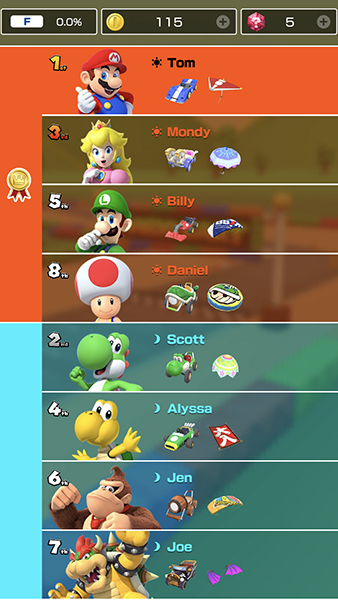
  News - Mario Kart Tour Update Adds Multiplayer Team Racing And Custom Matchmaking
Posted by: xSicKxBot - 05-15-2020, 11:08 PM - Forum: Nintendo Discussion - No Replies

Mario Kart Tour Update Adds Multiplayer Team Racing And Custom Matchmaking

Mario Kart Tour Multiplayer

A new update has drifted onto the scene in Mario Kart Tour, bringing with it a couple of welcome new features that should improve your multiplayer gaming experience.

The first new addition is Team Races, which puts players into four separate teams of two racers. These races can be made up of friends nearby, friends online, or strangers online, and each team will be competing to get themselves to the top of the podium to earn in-game rewards.

The second update adds a ‘Room Code’ feature. This allows you to create your own custom room and provides you with a code to share with your friends or family. This way, you’ll be able to play with people you know – and only people you know – in matches that support up to eight players.

If you’re wanting to check out these new features, make sure your app is fully up to date. You should find that the game is now on version 2.1.0 (or higher if you’re reading this in the future).

Mario Kart Tour

Still play the odd game of Mario Kart Tour? Do these new features sound like a good addition to you? Tell us below.


https://www.sickgaming.net/blog/2020/05/...tchmaking/

Print this item

 
Latest Threads
News - Starfield Remains ...
Last Post: xSicKxBot
9 hours ago
News - Call Of Duty: Mode...
Last Post: xSicKxBot
Yesterday, 09:13 PM
Black Ops (BO1, T5) DLC's...
Last Post: Brenox
Yesterday, 09:44 AM
(Free Game Key) The Life ...
Last Post: xSicKxBot
Yesterday, 04:49 AM
Black Ops (BO1, T5) DLC's...
Last Post: imp132509
Yesterday, 12:01 AM
(Free Game Key) Catch Me!...
Last Post: xSicKxBot
07-19-2026, 12:15 PM
News - Call Of Duty: MW4 ...
Last Post: xSicKxBot
07-19-2026, 12:15 PM
(Free Game Key) Steam | P...
Last Post: xSicKxBot
07-18-2026, 07:50 PM
News - Former Rockstar De...
Last Post: xSicKxBot
07-18-2026, 07:50 PM
(Free Game Key) Steam | W...
Last Post: xSicKxBot
07-18-2026, 03:25 AM

Forum software by © MyBB Theme © iAndrew 2016