Feature: Every Nintendo Switch Online NES Game Ranked
The collection of NES games available to Nintendo Switch Online subscribers continues to grow over time, albeit slowly, and there are now over 50 retro releases from the original Nintendo Entertainment System to enjoy on the service, and today Rygar joined the lineup.
We recently asked Nintendo Life readers to rate the available NES games on Switch using our User Rating system, and it’s now time to reveal the results! The following list is compiled using the ratings (out of 10) given to each game in our database.
It should be noted, however, that this list is not set in stone and will automatically change over time to reflect the ratings. If you look below and see a game you think deserves to be higher up, click on the ‘Profile’ button and score it yourself – your personal rating could boost its placement in the overall ranking.
So, settle down and prepare to scroll through the best NES games available on Nintendo Switch Online in the West (see our full list of every Nintendo Switch Online NES and SNES game for Japanese exclusives). We begin, naturally, at the bottom…
Publisher: Nintendo / Developer: Nintendo R&D1
Release Date: 19th Nov 2006 (USA) / 22nd Dec 2006 (UK/EU)
The beautiful game has seen more than its fair share of digital iterations over the years. This quaint early effort won’t keep you occupied for long, but Soccer is an intriguing look into early sports titles on the system and worth firing up at least once.
Publisher: Nintendo / Developer: Nintendo R&D1
Release Date: 12th Nov 2007 (USA) / 10th Aug 2007 (UK/EU)
Certain entries in Nintendo’s ‘Black Box’ series have aged better than others and, unfortunately, Volleyball went off long ago. In fact, we’d go as far as to say it’s the worst of Nintendo’s early sports titles, providing only the very basics of the game in a rather unattractive package. We much prefer a round of Tennis when it comes to ball-based net sports, but we suppose you’ve got nothing to lose in firing up Volleyball for a match or two.
Publisher: Nintendo / Developer: Nintendo R&D1
Release Date: 1st Jan 2007 (USA) / 29th Dec 2006 (UK/EU)
Another rather primitive take on a national sport, the ‘Black Box’ title Baseball is a slow-and-steady game that takes time to master, but persevere and you’ll find it to be a fun, if simple, experience – especially with a second player in tow. It’s more of a historical document at this point, but there’s fun to be had if you give it a chance.
City Connection didn’t look or feel particularly good back in the day, and time has not been kind to Jaleco’s city-hopping arcade port. With so many other options available in the NES library, getting behind the wheel of this one again isn’t recommended unless you’re determined to take every last NES title available for a quick test drive.
Publisher: Culture Brain / Developer: Nihon Game
Release Date: 1988 (USA) / 5th Mar 2015 (UK/EU)
You’ll need to bring a second player along to get the most out of Kung-Fu Heroes. It’s a simple martial arts game but the combination of decent moves, power-ups and the tactical options that come from having two players controlling Jacky and Lee makes this one worth a go, especially if you’re a fan of kung-fu fighting.
If you can stomach the odd controls and steep difficulty, you may well be able to mine some fun from Clu Clu Land, and as a ‘Black Box’ title it’s certainly got curio kudos. That said, this arcade puzzle-style maze game is unlikely to keep your attention unless you’re a real Nintendo enthusiast or scholar. We’d be tempted to leave our Rupee collecting to Link.
Publisher: Nintendo / Developer: Nintendo R&D1
Release Date: 18th Dec 2006 (USA) / 22nd Dec 2006 (UK/EU)
Rudimentary is perhaps too kind an adjective to describe Tennis, although we’ve always had a soft spot for it (and its Game Boy brethren, in particular). It’s an extremely simple take on the sport, and not one that’ll keep you occupied for any length of time, but at the very least it’s fun to see how far we’ve come.
Game? Why not. Set? Hmm, perhaps. Match? Nah, you’re alright – let’s play Mario Bros. 3.
A relatively unique offering from Tecmo, Mighty Bomb Jack won’t click with everyone and couldn’t be described as ‘essential’. However, if you’ve played through all the obvious NES platformers and are looking for something a bit different, this hybrid platformer offers a good challenge that’s fun to control. Worth a look for arcade-style platforming fans.
Release Date: Nov 1991 (USA) / 29th Apr 1993 (UK/EU)
One of the lesser-known entries in the NES lineup, Eliminator Boat Duel is worth firing up if you’ve never taken its powerboats for a spin. A bird’s-eye view racer from the early ’90s, it isn’t likely to rock your world, but it’s a solid addition to the console’s library and there are many worse ways to spend an hour or two than at the wheel of a ruddy great 8-bit powerboat. The odd ’90s mix of 12-year-old boy’s fantasy and technicolor on the cover alone makes it worth investigating at least once.
As vertical shooters go, Star Soldier hasn’t aged brilliantly, and looks particularly drab these days. It’s not without merit, and shooter fans may get a kick from it, but better alternatives are readily available. One for ‘fans of the genre’ only, then.
“A WINNER IS YOU.” This game is worth playing at least once just to see that iconic meme phrase in its original context. It’s a simple interpretation of professional wrestling with a slim roster, but it’s charged with nostalgia and personality, and given the sorry state of the genre in recent years (Fire Pro Wrestling notwithstanding), you could do much worse than returning to Pro Wrestling for a bout.
Publisher: Nintendo / Developer: Nintendo R&D1
Release Date: 19th Nov 2007 (USA) / 24th Aug 2007 (UK/EU)
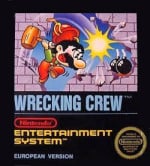
Wrecking Crew isn’t something we’d recommend spending vast sums on, but it’s definitely worth checking out as part of the Nintendo Switch Online package of NES games. It can be a frustrating experience and it lacks the control finesse players would come to expect from later Nintendo efforts, but as an early 8-bit Mario puzzle-platformer, it certainly warrants investigation.
Posted by: xSicKxBot - 05-21-2020, 07:46 AM - Forum: Python
- No Replies
Python List Concatenation: Add (+) vs INPLACE Add (+=) vs extend()
A wildly popular operation you’ll find in any (non-trivial) code base is to concatenate lists—but there are multiple methods to accomplish this. Master coders will always choose the right method for the right problem.
This tutorial shows you the difference between three methods to concatenate lists:
Concatenate two lists with the + operator. For example, the expression [1, 2, 3] + [4, 5] results in a new list [1, 2, 3, 4, 5]. More here.
Concatenate two lists with the += operator. This operation is inplace which means that you don’t create a new list and the result of the expression lst += [4, 5] is to add the elements on the right to the existing list object lst. More here.
Concatenate two lists with the extend() method of Python lists. Like +=, this method modifies an existing list in place. So the result of lst.extend([4, 5]) adds the elements 4 and 5 to the list lst. More here.
To summarize: the difference between the + method and the += and extend() methods is that the former creates a new list and the latter modify an existing list object in-place.
You can quickly compare those three methods in the following interactive code shell:
Puzzle: Can you already figure out the outputs of this code snippet?
Fear not if you can’t! I’ll explain you each detailed example next.
Method 1: Add (+)
The standard way of adding two lists is to use the + operator like this:
While the + operator is the most readable one (especially for beginner coders), it’s not the best choice in most scenarios. The reason is that it creates a new list each time you call it. This can become very slow and I’ve seen many practical code snippets where the list data structure used with the + operator is the bottleneck of the whole algorithm.
In the above code snippet, you create two list objects in memory—even though your goal is probably just to update the existing list ['Alice', 'Bob', 'Ann'].
This can be nicely demonstrated in the code visualization tool:
Just keep clicking “Next” until the second list appears in memory.
Method 2: INPLACE Add (+=)
The += operator is not well understood by the Python community. Many of my students (join us for free) believe the add operation lst += [3, 4] is just short for lst = lst + [3, 4]. This is wrong and I’ll demonstrate it in the following example:
Again, you can visualize the memory objects with the following interactive tool (click “Next”):
The takeaway is that the += operation performs INPLACE add. It changes an existing list object rather than creating a new one. This makes it more efficient in the majority of cases. Only if you absolutely need to create a new list, you should use the + operator. In all other cases, you should use the += operator or the extend() method.
Speaking of which…
Method 3: Extend()
Like the previous method +=, the list.extend(iterable) method adds a number of elements to the end of a list. The method operators in-place so no new list object is created.
Click “Next” and explore how the memory allocation “unfolds” as the execution proceeds.
Speed Comparison Benchmark
Having understood the differences of the three methods + vs += vs extend(), you may ask: what’s the fastest?
To help you understand why it’s important to choose the best method, I’ve performed a detailed speed benchmark on my Intel i7 (8th Gen) Notebook (8GB RAM) concatenating lists with increasing sizes using the three methods described previously.
Here’s the result:
The plot shows that with increasing list size, the runtime difference between the + method (Method 1), and the += and extend() methods (Methods 2 and 3) becomes increasingly evident. The former creates a new list for each concatenation operation—and this slows it down.
Result: Thus, both INPLACE methods += and extend() are more than 30% faster than the + method for list concatenation.
You can reproduce the result with the following code snippet:
To become successful in coding, you need to get out there and solve real problems for real people. That’s how you can become a six-figure earner easily. And that’s how you polish the skills you really need in practice. After all, what’s the use of learning theory that nobody ever needs?
Practice projects is how you sharpen your saw in coding!
Do you want to become a code master by focusing on practical code projects that actually earn you money and solve problems for people?
Then become a Python freelance developer! It’s the best way of approaching the task of improving your Python skills—even if you are a complete beginner.
FREE Construct, Tropico, Planet Coaster and more deals
Construct: Escape the System FREEbie
[freebies.indiegala.com] The latest FREEbie is a sci-fi themed first person platformer that sees you trapped in a computer system, trying to escape.
Stay Safe Sale Day 13: Frontier Developments Sale, up to -77%
[www.indiegala.com] The Stay Safe Sale has brought some new deals for this weekend. Get a BONUS Steam copy of Men of War: Assault Squad when spending a minimum of $8/€7/£6 in the IndieGala Store per basket (while stocks last).
Posted by: xSicKxBot - 05-21-2020, 07:34 AM - Forum: Lounge
- No Replies
GTA 5 Keeps Chugging Along With A New Massive Sales Milestone
In Take-Two's latest earnings call, the company confirmed that Rockstar Games' hugely successful open-world game Grand Theft Auto V has now hit 130 million units across all platforms worldwide.
The entire Grand Theft Auto series has sold more than 325 million units worldwide to date, with GTA V making up approximately 40 percent of the franchise's sales. (It's worth noting that these GTA V sales figures don't include the free giveaway Epic Games is holding until May 21 at 8 AM PT / 11 AM ET.)
Crocotile3D is a unique level editor that takes the traditional 2D tiled based map creation approach, but applies it in 3D. Crocotile3D is described as:
Crocotile 3D is a tile-based 3d modeling editor. Originally released back in 2015 it is the first of its kind to use 2d tiles to construct 3d scenes. In contrast to most 3d applications that are bloated and over-complicated, Crocotile 3D is a simple to use tool targeted at creating lowpoly models and scenes with pixel-art tilesets or low-res textures. Simply select tiles directly from tilesets and place them into a scene to quickly give them a third dimension. Use various tools to edit your tiles and shape your models, let your imagination go wild!
It is available for Windows, Mac and Linux. There is a free trial version available on Itch.io that is limited to saving less than 100 tiles and cannot export in OBJ format. The full version is available for purchase on Steam. Crocotile is frequently updated, with the most recent release coming just a week ago.
You can see more of this unique tool in action in the video below.
That’s it! You should now be all set to use .NET 5 Preview 4.
What’s new?
Performance Improvements to HTTP/2
By adding support for HPack dynamic compression of HTTP/2 response headers in Kestrel, the 5.0.0-prevew4 release improves the performance of HTTP/2. For more information on how HPACK helps save bandwidth and help reduce latency, we recommend reading this excellent write-up by the team at CloudFlare.
Reduction in container image sizes
The canonical multi-stage Docker build for ASP.NET Core involves pulling both the SDK image and ASP.NET Core runtime image. By re-platting the SDK image upon the ASP.NET runtime image, we’re sharing layers between the two images. This dramatically reduces the size of the aggregate images that you pull. For more information about the size improvements and other container enhancements, check out the .NET 5 Preview 4 blog post
See the release notes for additional details and known issues.
Give feedback
We hope you enjoy this release of ASP.NET Core in .NET 5! We are eager to hear about your experiences with this latest .NET 5 release. Let us know what you think by filing issues on GitHub.
Verizon enables 5G uploads, 30% speed increase over 4G
Verizon on Wednesday said that it has enabled 5G uploads in all of its current 5G markets in the U.S., though coverage in those areas might be limited.
While Verizon was among the first to roll out a functional 5G network in the U.S., the speedy protocol was restricted to data downloads with uploads handled by 4G LTE. That changed on Wednesday when the carrier enabled 5G uploads, saying customers will see an average 30% speed increase over LTE.
It’s worth noting that a Verizon footnote points out that “5G upload coverage area differs from 5G download coverage area.” The carrier didn’t elaborate on what, exactly, that means.
Since it’s still early in 5G’s rollout, there are still some major caveats for most consumers. Verizon’s 5G Ultra Wideband is only available in select parts of certain cities and requires a 5G-compatible smartphone. Apple is expected to release its first 5G-enabled iPhone sometime in 2020.
Verizon also announced that San Diego will become the 35th market to receive 5G Ultra Wideband service on May 28.
“Our customers’ need for 5G is accelerating. We’re building our 5G Ultra Wideband network to develop and enable the 5G innovations that will support the changing behavior of consumers, businesses and entire industries,” said Verizon CTO Kyle Malady.
Verizon’s low-band 5G networks, which will make up the second part of its 5G deployment, are due to launch later in 2020.
Posted by: xSicKxBot - 05-21-2020, 01:57 AM - Forum: Windows
- No Replies
Creating a virtual stage when in-person isn’t possible
The Azure Kinect camera captures depth information with an infrared light and that data helps make the AI model more accurate. We used an app called Speaker Recorder to manage two video signals from the Azure Kinect camera, the RGB signal and the depth signal. Once the recording was complete, the AI model was applied through a command line tool. To get the full details on how this all came together, check out the Microsoft AI Lab.
The AI model we used is based on the work recently published by the University of Washington. In their research, the university developed a deep neural network that takes two images, one with a background and another one with a person in it. The output of the neural network is a smooth transparency mask.
This neural network was trained with images where the masking work was done manually. The UW researchers used a dataset provided by Adobe with many images where a designer manually created the transparency mask.
With this approach, the neural network can learn how to smooth areas like hair or lose clothing. However, there are some limitations. If the person is wearing something with a similar color to the background, the system renders it as holes in the image which defeats the illusion.
So, what the UW researchers did is to combine this method with another. A second neural network tries to guess the contour just by looking at the image. In the case of our virtual stage we know that we have a person on screen, so the neural network tries to identify the silhouette of that person. Adding this second neural network eliminates the color transparency issue but the small details like hair or the fingers can be an issue.
So, here’s the interesting part. The UW researchers created an architecture called Context Switching. Depending on the conditions, the system can pick the best solution, getting the best of the two.
In our case, because we are using Azure Kinect, we can go a step farther and replace the second neural network with the silhouette provided by the Kinect, which is much more accurate since it’s coming from the depth information captured.
The model is improved even more with another AI technique called adversarial network. We connect the output of our neural network with another neural network that identifies if an image is fake or real. This makes small variations to the original neural network to fool it. The result is a neural network that can create even more natural images.
The Fedora Silverblue project takes Fedora workstation, libostree and podman, puts them in a blender, and creates a new Immutable Fedora Workstation. Fedora Silverblue is an OS that stops you from changing the core system files arbitrarily, and readily allows you to change the environment system files. The article What is Silverblue describes the big picture, and this article drills down into details for the developer.
Fedora Silverblue ties together a few different projects to make a system that is a git-like object, capable of layering packages, and has a container focused work flow. Silverblue is not the only distribution going down this road. It is the desktop equivalent of CoreOS, the server OS used by Red Hat Openshift.
Silverblue’s idea of ‘immutable’ has nothing to do with immutable layers in a container. Silverblue keeps system files immutable by making them read-only.
Why immutable?
Has an upgrade left your system in an unusable state? Have you wondered why one server in a pool of identical machines is being weird? These problems can happen when one system library – one tiny little file out of hundreds – is corrupted, badly configured or the wrong version. Or maybe your upgrade works fine but it’s not what you’d hoped for, and you want to roll back to the previous state.
An immutable OS is intended to stop problems like these biting you. This is not an easy thing to achieve – simple changes, like flipping the file system between read-write and read-only, may only change a fault-finding headache to a maintenance headache.
Freezing the system is good news for sysadmins, but what about developers? Setting up a development environment means heavily customizing the system, and filling it with living code that changes over time. The answer is partly a case of combining components, and partly the ability to swap between OS versions.
How it works
So how do you get the benefits of immutability without losing the ability to do your work? If you’re thinking ‘containers’, good guess – part of the solution uses podman. But much of the work happens underneath the container layer, at the OS level.
Fedora Silverblue ties together a few different projects to turn an immutable OS into a usable workstation. Silverblue uses libostree to provide the base system, lets you edit config files in /etc/, and provides three different ways to install packages.
rpm-ostree installs RPM packages, similar to DNF in the traditional Fedora workstation. Use this for things that shouldn’t go in containers, like KVM/libvirt.
flatpak installs packages from a central flathub repo. This is the one-stop shop for graphical desktop apps like LibreOffice.
The traditional dnf install still works, but only inside a toolbox (a Fedora container). A developer’s workbench goes in a toolbox.
If you want to know more about these components, check out Pieces of Silverblue.
Rolling back and pinning upgrades
All operating systems need upgrades. Features are added, security holes are plugged and bugs are squashed. But sometimes an upgrade is not a developer’s friend.
A developer depends on many things to get the job done. A good development environment is stuffed with libraries, editors, toolchains and apps that are controlled by the OS, not the developer. An upgrade may cause trouble. Have any of these situations happened to you?
A new encryption library is too strict, and an upgrade stopped an API working.
Code works well, but has deprecated syntax. An upgrade brought error-throwing misery.
The development environment is lovingly hand-crafted. An upgrade broke dependencies and added conflicts.
In a traditional environment, unpicking a troublesome upgrade is hard. In Silverblue, it’s easy. Silverblue keeps two copies of the OS – your current upgrade and your previous version. Point the OS at the previous version, reboot, and you’ve got your old system files back.
You aren’t limited to two copies of your file system – you can keep more by pinning your favorite versions. Dusty Mabe, one of the engineers who has been working on the system since the Project Atomic days, describes how to pin extra copies of the OS in his article Pinning Deployments in OSTree Based Systems.
Your home directory is not affected by rolling back. Rpm-ostree does not touch /etc/ and /var/.
System updates and package installs
Silverblue’s rpm-ostree treats all the files as one object, stored in a repository. The working file system is a checked-out copy of this object. After a system update, you get two objects in that repository – one current object and one updated object. The updated object is checked out and becomes the new file system.
You install your workhorse applications in toolboxes, which provide container isolation. And you install your desktop applications using Flatpak.
This new OS requires a shift in approach. For instance, you don’t have to keep only one copy of your system files – you can store a few and select which one you use. That means you can swap back and forth between an old Fedora release and the rawhide (development) version in a matter of minutes.
Build your own Silverblue VM
You can safely install Fedora Silverblue in a VM on your workstation. If you’ve got a hypervisor and half an hour to spare (10 minutes for ISO download, and 20 minutes for the build), you can see for yourself.
Boot a VM with the Fedora Silverblue ISO. You can squeeze Fedora into compute resources of 1 CPU, 1024MiB of memory and 12GiB of storage, but bigger is better.
If you’re looking for ideas about how to use Silverblue, read articles in the magazine.
Is Silverblue for you?
Silverblue is full of shiny new tech. That in itself is enough to attract the cool kids, like moths to a flame. But this OS is not for everyone. It’s a young system, so some bugs will still be lurking in there. And pioneering tech requires a change of habit – that’s extra cognitive load that the new user may not want to take on.
The OS brings immutable benefits, like keeping your system files safe. It also brings some drawbacks, like the need to reboot after adding system packages. Silverblue also enables new ways of working. If you want to explore new directions in the OS, find out if Silverblue brings benefits to your work.
Review: Shmup Collection – A Solid Collection Of Modern 2D Shooters
It’s one of gaming’s greatest myths that graphics aren’t as important as gameplay. Without the right kind of graphics, it’s possible to depth-charge the potential of an otherwise enjoyable experience. Visuals are a crucial part of a game’s feel, and a mismatch between what you’re doing and how it all looks is a major factor in whether a title hangs together as a cohesive experience.
Naturally, it’s relevant to Shmup Collection, a rather banal title for a compilation that’s stated to contain three games from doujin developers Astro Port, but technically features five – Satazius and update Satazius Next, Armed 7 and update Armed 7 DX, and finally Wolflame – sans update. These are games that each take inspiration from one classic shmup in the main, and these influences are very much worn on their sleeves.
Horizontal shooter Satazius, to begin with, is effectively Konami’s Gradius with the serial numbers filed off. Of course, that’s no bad thing, given that Gradius is one of the best shmup series ever, but we digress. It’s so indebted to that flagship franchise that it’s almost cheeky – the first stage culminates in your ship being chased through a cavern by a much larger craft, which ploughs throw the walls as it goes, collapsing rocks down from above while launching volleys of missiles your way. Sounds familiar? It should, as it’s almost directly lifted from the opening set-piece of Game Boy classic Nemesis II / Gradius: The Interstellar Assault.
The trademark Gradius power-up system is absent, replaced by a selection of weapons and sub-weapons you level up as you play. They’re all rather familiar – directional missiles, anyone? – but there’s a nice twist in that your accrued weapon power can be unloaded into a single powerful onslaught that’s capable of wiping out most foes in one hit.
Strong stage design that’s clever and tricky without resorting to “bullet hell” style projectile spam makes Satazius possibly the standout game in Shmup Collection, though kicking you back to a checkpoint on death may be a Gradius feature they could have left in the host series. Nonetheless, it’s brilliant fun, but definitely don’t ignore the rest of the package.
Next up is Armed 7, another horizontal scroller that’s clearly inspired by the likes of Technosoft’s Hyper Duel with its multi-directional shooting mech action; again you pick your weapons then head out into battle, aiming and locking your guns as you attempt to tackle the overwhelming odds. As in Satazius, you power up your chosen weaponry rather than collecting new guns, and also have a powerful super-weapon at your disposal you can use it as many times as you please, but it takes a fair while to charge up.
It’s a little samier than Satazius, but Armed 7 is no slouch – the action is challenging and compelling, with the larger size of your mech making everything just that little bit more dangerous. Thankfully this time, you have a refillable shield rather than a traditional “lives” system, which means taking a hit won’t rob you of your weapons or progress, and your shield can be refilled with collectables. It’s still rough going but eminently friendly.
Lastly there’s Wolflame, and the roots of this one seem to be the stone-cold classic Raiden. It’s a vertical shooter this time, with a focus on precision and a slightly more realistic, grounded feel. That is until the skyscraper-sized tanks show up, but realism is relative.
It’s the purest game on the set, the most akin to a straight-up traditional shmup, and as a result, it feels the least interesting. By no means is it bad, or even substandard, but compared with the level design and set-pieces of Satazius and Armed 7 it doesn’t quite measure up. It’s fun, but unremarkable, and a bit of an odd choice for inclusion when Astro Port’s other games include better fits like the ingenious Zangeki Warp and the delightful Supercharged Robot Vulkaiser.
You may be wondering why we mentioned the importance of graphics at the start of this review. The “enhanced” versions of Satazius and Armed 7 (Next and DX) have arranged soundtracks, some changes to bullet patterns and level design and, crucially, brighter and more colourful graphics. Unfortunately, this leads the games to look garish and detracts from the original versions’ atmospheres; coupled with the less-than-impressive animation (mostly rotating sprites), these “improved” versions actually feel worse than the originals. They’re fine, and entirely playable, but we found ourselves wondering why they felt the need to mess with elements that worked. Yes, the graphics in Satazius are a little grungy, but they fit the game feel. It was a case of less meaning more, and resulted in a coherent, logical progression from the game’s look to its mechanics. The deluxe versions sacrifice this for unnecessarily flashier visuals. It’s a small complaint, though, as the games on offer here range from good to great.
Conclusion
Satazius is the pick of the pack and almost worth the asking price in itself, but if you enjoy the shmup genre then Shmup Collection is a package that will keep on giving. There’s nothing in the way of extras outside of each game’s respective practice/stage select mode (and a “Tate” mode for Wolflame, for those with a Flip Grip), but you won’t find yourself wanting. This is an impressive bundle of joy at a very competitive price. We just hope it’ll be followed by a second instalment; Astro Port has a lot of awesome games in its catalogue and we’d love to see them find a second home on Switch.