
+- Sick Gaming (https://sickgaming.net)
+-- Forum: Programming (https://sickgaming.net/forum-76.html)
+--- Forum: Python (https://sickgaming.net/forum-83.html)
+--- Thread: [Tut] Python List Concatenation: Add (+) vs INPLACE Add (+=) vs extend() (/thread-95167.html)
[Tut] Python List Concatenation: Add (+) vs INPLACE Add (+=) vs extend() - xSicKxBot - 05-21-2020
Python List Concatenation: Add (+) vs INPLACE Add (+=) vs extend()
A wildly popular operation you’ll find in any (non-trivial) code base is to concatenate lists—but there are multiple methods to accomplish this. Master coders will always choose the right method for the right problem.
This tutorial shows you the difference between three methods to concatenate lists:
- Concatenate two lists with the operator. For example, the expressionCode:
+results in a new listCode:[1, 2, 3] + [4, 5]. More here.Code:[1, 2, 3, 4, 5]
- Concatenate two lists with the operator. This operation is inplace which means that you don’t create a new list and the result of the expressionCode:
+=is to add the elements on the right to the existing list objectCode:lst += [4, 5]. More here.Code:lst
- Concatenate two lists with the method of Python lists. LikeCode:
extend(), this method modifies an existing list in place. So the result ofCode:+=adds the elementsCode:lst.extend([4, 5])andCode:4to the listCode:5. More here.Code:lst
To summarize: the difference between the
Code:
+Code:
+=Code:
extend()You can quickly compare those three methods in the following interactive code shell:
https://repl.it/@finxter/listinplaceaddvsaddvsextend?lite=true
Puzzle: Can you already figure out the outputs of this code snippet?
Fear not if you can’t! I’ll explain you each detailed example next.
Method 1: Add (+)
The standard way of adding two lists is to use the
Code:
+Code:
# METHOD 1: ADD +
lst = ['Alice', 'Bob', 'Ann']
lst_new = lst + [42, 21]
print(lst)
print(lst_new)
While the
Code:
+Code:
+In the above code snippet, you create two list objects in memory—even though your goal is probably just to update the existing list
Code:
['Alice', 'Bob', 'Ann']This can be nicely demonstrated in the code visualization tool:
https://pythontutor.com/iframe-embed.html#code=%23%20METHOD%201%3A%20ADD%20%2B%0Alst%20%3D%20%5B'Alice',%20'Bob',%20'Ann'%5D%0Alst_new%20%3D%20lst%20%2B%20%5B42,%2021%5D%0Aprint%28lst%29%0Aprint%28lst_new%29&codeDivHeight=400&codeDivWidth=350&cumulative=false&curInstr=0&heapPrimitives=nevernest&origin=opt-frontend.js&py=3&rawInputLstJSON=%5B%5D&textReferences=false
Just keep clicking “Next” until the second list appears in memory.
Method 2: INPLACE Add (+=)
The
Code:
+=Code:
lst += [3, 4]Code:
lst = lst + [3, 4]Code:
# METHOD 2: INPLACE ADD +=
lst = ['Alice', 'Bob', 'Ann']
lst_old = lst
lst += [42, 21]
print(lst)
print(lst_old)
Again, you can visualize the memory objects with the following interactive tool (click “Next”):
https://pythontutor.com/iframe-embed.html#code=%23%20METHOD%202%3A%20INPLACE%20ADD%20%2B%3D%0Alst%20%3D%20%5B'Alice',%20'Bob',%20'Ann'%5D%0Alst_old%20%3D%20lst%0Alst%20%2B%3D%20%5B42,%2021%5D%0Aprint%28lst%29%0Aprint%28lst_old%29&codeDivHeight=400&codeDivWidth=350&cumulative=false&curInstr=0&heapPrimitives=nevernest&origin=opt-frontend.js&py=3&rawInputLstJSON=%5B%5D&textReferences=false
The takeaway is that the
Code:
+=Code:
+Code:
+=Code:
extend()Speaking of which…
Method 3: Extend()
Like the previous method
Code:
+=Code:
list.extend(iterable)Code:
# METHOD 3: EXTEND()
lst = ['Alice', 'Bob', 'Ann']
lst_old = lst
lst.extend([42, 21])
print(lst)
print(lst_old)
Here’s the interactive memory visualization:
https://pythontutor.com/iframe-embed.html#code=%23%20METHOD%203%3A%20EXTEND%28%29%0Alst%20%3D%20%5B'Alice',%20'Bob',%20'Ann'%5D%0Alst_old%20%3D%20lst%0Alst.extend%28%5B42,%2021%5D%29%0Aprint%28lst%29%0Aprint%28lst_old%29&codeDivHeight=400&codeDivWidth=350&cumulative=false&curInstr=0&heapPrimitives=nevernest&origin=opt-frontend.js&py=3&rawInputLstJSON=%5B%5D&textReferences=false
Click “Next” and explore how the memory allocation “unfolds” as the execution proceeds.
Speed Comparison Benchmark
Having understood the differences of the three methods
Code:
+Code:
+=Code:
extend()To help you understand why it’s important to choose the best method, I’ve performed a detailed speed benchmark on my Intel i7 (8th Gen) Notebook (8GB RAM) concatenating lists with increasing sizes using the three methods described previously.
Here’s the result:
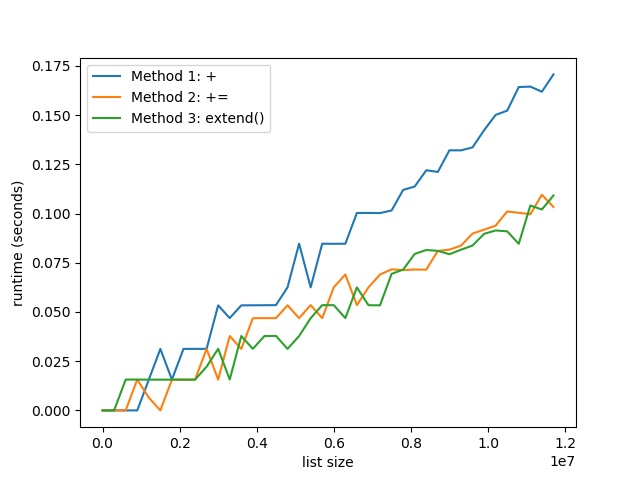
The plot shows that with increasing list size, the runtime difference between the
Code:
+Code:
+=Code:
extend()Result: Thus, both INPLACE methods
Code:
+=Code:
extend()Code:
+You can reproduce the result with the following code snippet:
Code:
import time # Compare runtime of three methods
list_sizes = [i * 300000 for i in range(40)]
runtimes_1 = [] # Method 1: + Operator
runtimes_2 = [] # Method 2: += Operator
runtimes_3 = [] # Method 3: extend() for size in list_sizes: to_add = list(range(size)) # Get time stamps time_0 = time.time() lst = [1] lst = lst + to_add time_1 = time.time() lst = [1] lst += to_add time_2 = time.time() lst = [1] lst.extend(to_add) time_3 = time.time() # Calculate runtimes runtimes_1.append((size, time_1 - time_0)) runtimes_2.append((size, time_2 - time_1)) runtimes_3.append((size, time_3 - time_2)) # Plot everything
import matplotlib.pyplot as plt
import numpy as np runtimes_1 = np.array(runtimes_1)
runtimes_2 = np.array(runtimes_2)
runtimes_3 = np.array(runtimes_3) print(runtimes_1)
print(runtimes_2)
print(runtimes_3) plt.plot(runtimes_1[:,0], runtimes_1[:,1], label='Method 1: +')
plt.plot(runtimes_2[:,0], runtimes_2[:,1], label='Method 2: +=')
plt.plot(runtimes_3[:,0], runtimes_3[:,1], label='Method 3: extend()') plt.xlabel('list size')
plt.ylabel('runtime (seconds)') plt.legend()
plt.savefig('speed.jpg')
plt.show()
If you liked this tutorial, join my free email list where I’ll send you the most comprehensive FREE Python email academy right in your INBOX.
Join the Finxter Community Now!
Where to Go From Here?
Enough theory, let’s get some practice!
To become successful in coding, you need to get out there and solve real problems for real people. That’s how you can become a six-figure earner easily. And that’s how you polish the skills you really need in practice. After all, what’s the use of learning theory that nobody ever needs?
Practice projects is how you sharpen your saw in coding!
Do you want to become a code master by focusing on practical code projects that actually earn you money and solve problems for people?
Then become a Python freelance developer! It’s the best way of approaching the task of improving your Python skills—even if you are a complete beginner.
Join my free webinar “How to Build Your High-Income Skill Python” and watch how I grew my coding business online and how you can, too—from the comfort of your own home.
Join the free webinar now!