Welcome, Guest
You have to register before you can post on our site.

Username
  

Password


Search Forums

(Advanced Search)

Forum Statistics
» Members: 20,946
» Latest member: blackopsdlc
» Forum threads: 22,105
» Forum posts: 23,072

Full Statistics

Online Users
There are currently 1581 online users.
» 0 Member(s) | 1577 Guest(s)
Applebot, Bing, Facebook, Google

Latest Threads
Stackable Battery Holders...
Forum: Printers & CAD Projects
Last Post: xSicKxBot

» Replies: 0
» Views: 0
Parts Tray Drawers 3D Pri...
Forum: Printers & CAD Projects
Last Post: xSicKxBot

» Replies: 0
» Views: 7
All In One 3D Printer tes...
Forum: Printers & CAD Projects
Last Post: xSicKxBot

» Replies: 0
» Views: 8
1.75mm Filament Clip 3D P...
Forum: Printers & CAD Projects
Last Post: xSicKxBot

» Replies: 0
» Views: 10
[DevBlog MS] Build Agenti...
Forum: C#, Visual Basic, & .Net Frameworks
Last Post: xSicKxBot

» Replies: 0
» Views: 9
Headphone Stand 3D Print ...
Forum: Printers & CAD Projects
Last Post: xSicKxBot

» Replies: 0
» Views: 9
[Dev News] Gozen – Free &...
Forum: Game Development
Last Post: xSicKxBot

» Replies: 0
» Views: 9
[WoW Retail News] Glory o...
Forum: World of Warcraft
Last Post: xSicKxBot

» Replies: 0
» Views: 11
[PS.Blog] Suri: The Seven...
Forum: Sony Discussion
Last Post: xSicKxBot

» Replies: 0
» Views: 8
[PS.Blog] God of War Lauf...
Forum: Sony Discussion
Last Post: xSicKxBot

» Replies: 0
» Views: 13

 
  AppleInsider - Duelling mini LED suppliers could cut cost on display tech for Apple
Posted by: xSicKxBot - 09-21-2020, 09:09 AM - Forum: Apples Mac and OS X - No Replies

Duelling mini LED suppliers could cut cost on display tech for Apple

Apple may not limit the sourcing of mini LED chips for a rumored future iPad model to just one supplier, analyst Ming-Chi Kuo suggests, with work from a second supplier on the technology potentially leading to cost savings for Apple.

Mini LED is a display technology that could help TFT screens have a better backlight than existing displays, bringing it closer to OLED in terms of contrast. While Apple has been rumored to bring the technology to market in some form of iPad, it seems Apple may already have a way to boost production.

According to TF Securities analyst Ming-Chi Kuo in a research note seen by MacRumors, supplier Epistar was previously predicted to be the only supplier of mini LED chips to Apple in 2021. However, progress made on mini LED at Sanan Optoelectronics has been rapid enough to potentially change Apple’s schedule for inclusion.

Previously, Sanan was thought to be included in the mini LED supply chain in 2022, but developments now puts Kuo’s estimate to a 2021 entry instead.

For Apple, having two suppliers for mini LED will be extremely useful, as it will help drive competition and lower the cost of components. It is suggested the die cost of a mini LED display would drop down from around $80 per unit to in the region of $45 per unit.

This reduced cost would in theory result in Apple using the technology more, with mini LED expected in between 30% and 40% of iPad shipments in 2021, and between 20% and 30% of MacBook shipments. Earlier estimates put the mini LED share at around 10 to 20% for each product range.

Future display technology


Apple is expected to employ two different types of display technology in the future, with it having invested in both mini LED and micro LED research and development. Of the two, mini LED will probably find more widespread use first, while micro LED may arrive in 2023 or 2024.

As the name suggests, mini LED consists of very small LEDs, smaller than typically used in current TFT backlight panels. As mini LEDs light up a smaller region of the display, the use of Mini LED will allow for selective dimming of the backlight itself.

By dimming areas of the backlight, the screen will be able to offer deeper black shades, as current TFT panels simply attempt to block out the backlight without turning it off to display a black pixel. With selective dimming of the backlight, darker shades could reach close to levels produced by OLED panels that don’t use a backlight at all, due to OLED’s use of self-illuminating pixels.

Micro LED takes the concept further, in producing even smaller LEDs the size of a display pixel. Rather than as a backlight, micro LED would be used to form the pixels on a display itself, and can potentially offer OLED-quality contrast.


https://www.sickgaming.net/blog/2020/09/...for-apple/

Print this item

  News - Nintendo Currently Has “No Plans” To End Online Services For The 3DS
Posted by: xSicKxBot - 09-21-2020, 09:08 AM - Forum: Nintendo Discussion - No Replies

Nintendo Currently Has “No Plans” To End Online Services For The 3DS

3DS

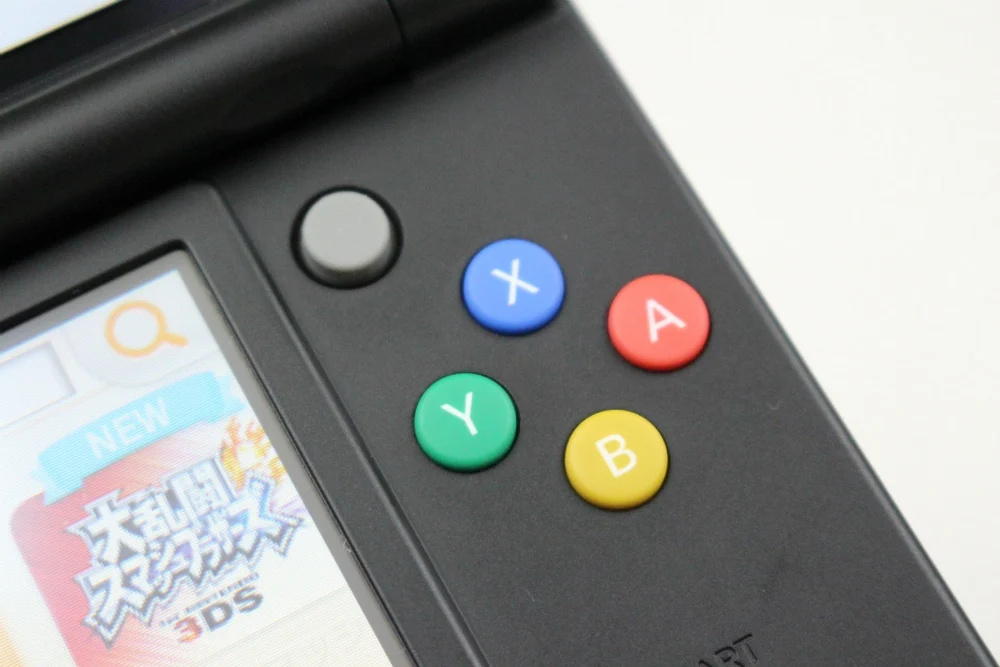
Earlier this week, Nintendo confirmed the production of its mighty 3DS line had been officially discontinued. It brings an end to all six models in the 3DS family – the 3DS, 3DS XL, New 3DS, New 3DS XL, 2DS and New 2DS XL.

Fortunately, there’s still some life left in this system. In a statement to GamesIndustry.biz, a Nintendo spokesperson confirmed the 3DS’s online services and eShop would be hanging around. First and third-party games will also continue to be offered on Nintendo.com and at retail.

“We can confirm that the manufacturing of the Nintendo 3DS family of systems has ended.”

“Nintendo and third-party games for the Nintendo 3DS family of system will continue to be available in Nintendo eShop, on Nintendo.com and at retail.”

“The existing library of more than 1,000 Nintendo 3DS games contains many critically acclaimed titles and can provide years of content to explore and enjoy.”

“We currently have no plans to end any existing online services for the Nintendo 3DS family of systems. Online play and Nintendo eShop will continue to be available and it will be possible to access and redownload all previously purchased content in the foreseeable future.”

So – at least in the foreseeable future, you’ll still be able to play the 3DS online, buy games, download them and even redownload them. Will you be making the most of this system’s online services while you still can? Leave a comment below.


https://www.sickgaming.net/blog/2020/09/...r-the-3ds/

Print this item

  News - Monster Hunter Stories Is The Best-Selling 3DS Game On Amazon Right Now
Posted by: xSicKxBot - 09-21-2020, 09:08 AM - Forum: Nintendo Discussion - No Replies

Monster Hunter Stories Is The Best-Selling 3DS Game On Amazon Right Now


Capcom surprised Nintendo fans this week with not one but two brand new Monster Hunter games. The second title, Monster Hunter Stories 2: Wings of Ruin, will be released on the Switch in 2021 and is a follow-up to the original 2016 3DS entry.

This announcement is now seemingly fueling sales of the original Monster Hunter Stories game on Amazon in the US, as originally spotted by Twitter user Stealth40k. At the time of writing, the game is the best-selling 3DS title, and right now is the 11th best-selling 3DS product overall.


On Amazon UK, this game is also one of the best-selling 3DS games, in 38th place. Twitter user TheShaneM further noted how the digital version is currently on sale on the eShop in the US. Instead of $39.99, it’s currently available for $19.99. Monster Hunter Generations Ultimate is on sale as well via the Switch eShop.

To learn more about the original Monster Hunter Stories, why not check out our review – we gave it 9 out of 10 stars. Are you at all tempted to try out this game now that a sequel has been revealed? Tell us below.

Please note that some external links on this page are affiliate links, which means if you click them and make a purchase we may receive a small percentage of the sale. Please read our FTC Disclosure for more information.


https://www.sickgaming.net/blog/2020/09/...right-now/

Print this item

  News - Pokemon Go Adds A New Mega Evolution
Posted by: xSicKxBot - 09-21-2020, 09:08 AM - Forum: Lounge - No Replies

Pokemon Go Adds A New Mega Evolution

A new Mega-Evolved Pokemon is now available in Pokemon Go. As a reward for collectively completing two million Mega Raid Battles during the first week of the Mega September event, developer Niantic has added Mega Pidgeot in the game as a Mega Raid boss.

With Mega Pidgeot's arrival, you can now Mega Evolve your own Pidgeot once you collect enough Pidgeot Mega Energy. You'll earn this energy for defeating Mega Pidgeot in Raids. You'll need to amass 100 energy to Mega Evolve your Pidgeot for the first time, but subsequent transformations will take less energy. Niantic also says it is tweaking Mega Evolutions to give players more ways to earn Mega Energy outside of Mega Raids.

Mega Pidgeot
Mega Pidgeot

Continue Reading at GameSpot

https://www.gamespot.com/articles/pokemo...01-10abi2f

Print this item

  (Indie Deal) FREE Desert Law | Elite Dangerous & Planet Coaster/Zoo Deals
Posted by: xSicKxBot - 09-21-2020, 02:53 AM - Forum: Deals or Specials - No Replies

FREE Desert Law | Elite Dangerous & Planet Coaster/Zoo Deals

FREE Desert Law
[freebies.indiegala.com] Immerses into a post-apocalyptic world where gasoline is the new world currency with the newest FREEbie

Frontier Development Sale, up to -78%
[www.indiegala.com]
https://youtu.be/zKaOdawslQM

The 205th GalaQuiz will be LIVE soon, win up to $50:dollars: in GalaCredit!
[www.indiegala.com]
The GalaQuiz will take place in less than 15 minutes from this announcement
Today's GalaQuiz[www.indiegala.com] hints are up. The theme will be Lyrics Redux.

Stay Inside, Stay Safe and Enjoy Good Games.
Check out IndieGala on Twitter, YouTube & Facebook[www.facebook.com]


https://steamcommunity.com/groups/indieg...5405147500

Print this item

  News - Review: Georifters – An Ultimately Unremarkable 2D Platformer
Posted by: xSicKxBot - 09-21-2020, 02:50 AM - Forum: Nintendo Discussion - No Replies

Review: Georifters – An Ultimately Unremarkable 2D Platformer


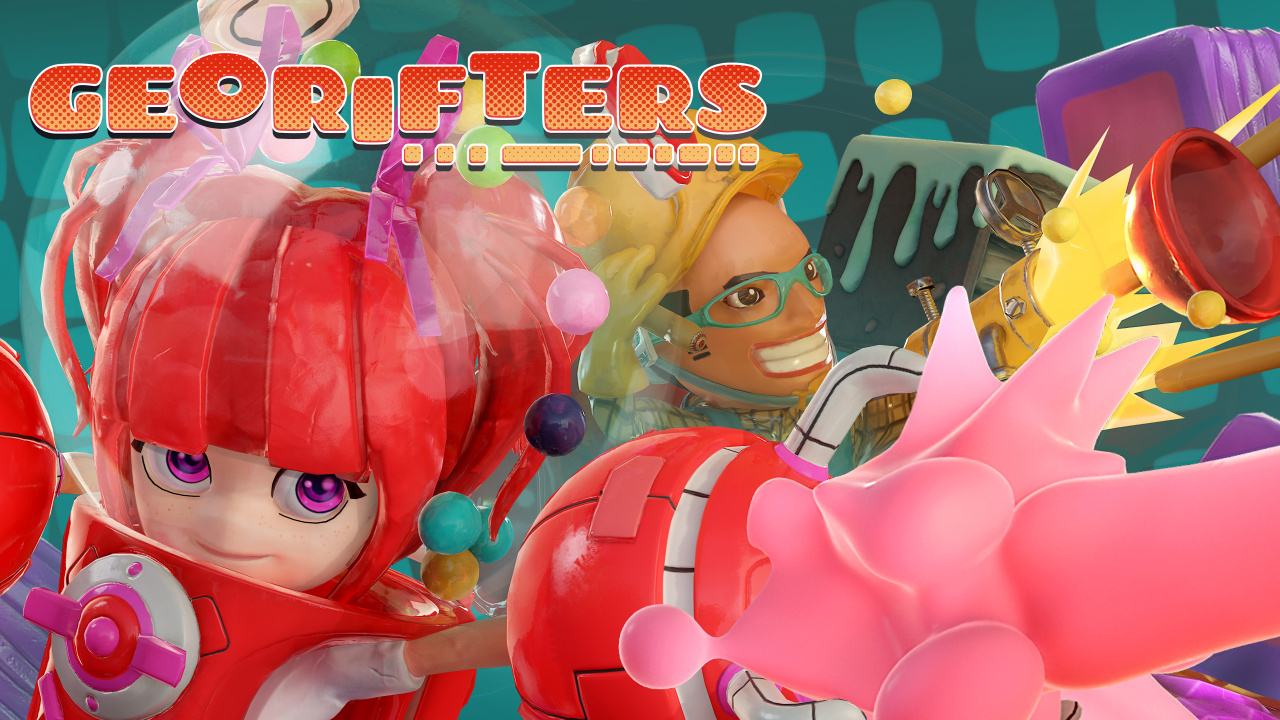
There’s been no end to 2D platformers on Switch, but only a select few featured that heavier focus on puzzle mechanics. Whether it’s enjoyable first-party efforts like BOXBOY! + BOXGIRL! to indie affairs such as Evergate, we’ve seen a great line-up so far, and Georifters is next to the plate. Developed by Busy Toaster, Georifters is more of a kid-friendly experience, featuring a strong focus on local multiplayer that allows up to 4 players. It holds some good ideas but sadly, the execution just isn’t that fun.

Our main campaign takes place within adventure mode, letting you play alone or in 2-player co-op. Starting in the land of Sweet Spot, a world where everyone is obsessed with sugary treats, our local hero Candy notices that strange rifts have appeared within their atmosphere. Aided by Chief in her investigation, she discovers those rifts are spatially unstable, bringing in waves of foul Buttflys. Resolving to find the cause, this story spreads across 6 different worlds, meeting new playable characters along the way and spans over 30 levels.


Levels are split into 10 different stages; each being filled with collectable crystals. To unlock the exit portal, you must pick up at least one but blocks obstruct your path. Sometimes they can be jumped over, but finding a way through is what makes up Georifters’ more puzzling elements, utilising a ground manipulation system. Providing your intended direction isn’t obstructed by a wall or other objects, you can push blocks out of the way to make new paths. Special rift levels also appear when travelling to new worlds, placing you on a strict timer to get through but adding seconds to the clock when new crystals are obtained.

Each character holds a special manipulation ability too, so Dr Schnoz can create paths by vertical separation, but Candy wields bubblegum cannons that can move whole block rows at once. You can only do three successive moves before your battery depletes, requiring a short recharge and this feels needlessly restrictive, slowing down gameplay – and in rift levels particularly, that becomes frustrating. Resets restore blocks to their original placements if you get stuck, but outside of blocks, numerous obstacles appear to interrupt your progress. This includes disappearing spaces, spikes that decrease your health and red blocks that will immediately kill you upon contact.


Lives are granted rather generously throughout – hidden amongst moveable blocks – but are also purchasable with points, earned upon level completion. Your performance is ranked on time taken, attacks, special ability use and how many crystals were collected, all translating to points. If you sustained damage, there’s a small deduction, but when compared to points earned from crystals, the impact is rather minimal. Rewards are also unlocked for finishing levels – and that includes badges, acting as an in-game achievement system for reaching certain milestones. Points can also buy cards too, which can be equipped with multiple stickers to enhance your abilities.

On paper, this all works as expected and with a more simplistic style of level design, kids are likely to find some enjoyment here without too much hassle. Georifters’ biggest problem, though, is that outside of multiplayer, it’s just not interesting and fails to ever engage you truly as a player. It comes across as rather generic and even with varying stages to play through, becomes rather tedious. It’s certainly a functional game and playing in co-op does alleviate some tedium but ultimately, it won’t keep you coming back.

Elsewhere, you’ve also got a Battle Arena, allowing two to four players to join in a race to collect more crystals, granting access to weapons such as long-distance claws, bombs, stun grenades, homing missiles and more. You can enter quick matches, but this can also be customised to change your number of rounds, lives and setting. With a group of four, there’s a more competitive element that becomes more enjoyable than adventure mode but it doesn’t offer much variety, so this is best experienced in smaller bursts to avoid repetition.


Visually, Georifters’ is a mixed bag and at times, the 3D character models look rough up close, particularly with their human characters. It brings a colourful aesthetic across each environment – one that’ll likely appeal to younger audiences – and all seven heroes have customisable appearances, too. Unlocked as you progress through Adventure Mode, this at least offers some visual variety and a motivation to continue, letting you change up their heads, legs and body.

Conclusion


Georifters has good ideas on paper but ultimately, it all feels rather tedious. If you’re searching for new kid-friendly multiplayer games, there are better experiences available and at a lower cost, making this hard to recommend by comparison. Should those options already be exhausted, Georifters does have some fun moments within its Adventure Mode co-op while the Battle Arena mode offers competitive fun. But ultimately, those seeking a new puzzle-platforming fix would be better off looking elsewhere.


https://www.sickgaming.net/blog/2020/09/...latformer/

Print this item

  Xbox Wire - Xbox Insider Release Notes – Beta and Delta (2010.200908-2000)
Posted by: xSicKxBot - 09-21-2020, 02:49 AM - Forum: Xbox Discussion - No Replies

Xbox Insider Release Notes – Beta and Delta (2010.200908-2000)

Hey Xbox Insiders! We have a new Xbox One update preview coming to the Beta and Delta ring. It’s important we note that some updates made in these preview OS builds include background improvements that ensure a quality and stable build for Xbox One.

We continue to post these release notes, even when the noticeable changes to the UI are minimal, so you’re aware when updates are coming to your device. Details can be found below!

Xbox Insider Release Notes

System Update Details:


  • OS version released: RS_XBOX_RELEASE_2010\19041.4818.200908-2000
  • Available: 6 p.m. PT – September 10, 2020
  • Mandatory: 3 a.m. PT – September 11, 2020

New Features and Experiences


We have exciting news! Beta and Delta users can expect something new coming to their Xbox One update preview.


Introducing the Game Activity tab!

The Xbox team is previewing a new experience that makes it easier to discover game related activities around the game you are currently playing or the last game you played.  We want users to know what is happening around their favorite games, hunt for achievements, and discover new ways to engage with liked minded gamers. We have made a few changes since getting feedback from Alpha and Alpha Skip-Ahead.

While this feature is active, a random subset of users in Preview will now see the Game Activity tab in place of the Achievement tab, which includes:

  • Achievements: Achievements are here to stay! Your top option on the tab is still the list of Achievements for the game you are playing or your most recently played game. We have added new sorting and filtering options to the list.
    • Notice the new shortcut to turn the Achievement Tracker On/Off
    • Gamerscore leaderboard has been added to the People tab on the Guide
  • All Achievements: see the complete Achievements experience in your Profile
    • We have added Next Achievements and Recent Achievements to the full screens Achievements experience in your Profile
  • Friends playing: See which friends are playing, or have played, this game.
  • Looking for group: See LFG posts for this game to find new people to play with.
  • Events: See Suggested Events that are happening in-game or access the ones you have expressed interest in!
  • Official club: Check out updates from developers and see posts from the Xbox Live community.

We want to gather initial feedback and analyze usage to evaluate these changes, and adjusting this experience based on your reports. Achievements are a pillar of the Xbox ecosystem, and we want to support them alongside promoting different ways to engage with your favorite games!

Home – Content Blocks

Two new content blocks have been added and will now be made default for most users. For those of you who already have these content blocks enabled, nothing will change.

  • The Entertainment block will showcase the latest content in movies, TV, and music across popular entertainment apps.
    • If you want to see all Entertainment options currently available, you can launch the application by clicking the Entertainment button in the block.
      • Note: This block will only be available for users located in the US, UK, Germany, France, Canada and Australia
  • The “Events” content block will display the top four most recent events rotating through the block.
    • If you want to see all Events currently available, you can launch the Events application by clicking the Events button in the block.

If you don’t see either block for some reason (and are in a supported region), simply scroll to “Add more” at the bottom of Home, click See All Suggestions then select the block you want and press A to add it.

Profile Themes

  • Profile Themes, currently available in the Xbox (Beta) app and Game Bar on PC, can now be displayed on console! View your own theme, and view themes other users have chosen on their profiles. You will be able to see these themes both in the user’s full profile as well as the mini profile in the guide.
    • To set your theme on Xbox: Go to your Profile > Customize profile

Sign in

  • To make it easier to choose an account when booting up your console, you will now be prompted with a full screen sign in experience before landing on Home. Customers with auto-sign in or using a linked controller will not see this screen.

Fixes Implemented


Thanks to the hard work of Xbox engineers, we are happy to announce the following fixes have been implemented for this build:

Community

  • Fixed an issue where navigation would be unresponsive when viewing a video thumbnail.

Guide

  • The Delete button in the Share menu should now work correctly.

System

  • Various updates to properly reflect local languages across the console
    • Note: Users participating in Preview may see “odd” text across the console, for more information go here.

Known Issues


We understand some issues have been listed in previous Xbox Insider Release Notes. These items aren’t being ignored, but it will take Xbox engineers more time to find a solution.

We’re still tracking these known issues:


Audio

  • Some users have reported that Dolby Atmos for Headphones audio setting changes when the console is rebooted/updated.
    • Note: If you attempt to set the audio to Dolby Atmos for Headphones and see a message advising you to launch the Dolby Access App, please file feedback before launching the app.

Guide

  • Some users have reported that the audio mixer cannot be used to adjust chat/game audio levels.
  • We’ve received reports of the Guide not launching or loading.
  • Users are reporting that the “Recent Captures” section isn’t loading any content.
  • There are reports that the Guide is not working if the console is offline or no account is logged in.

My Games & Apps

  • Users have reported seeing black tiles instead of game artwork when browsing their collection.
    • Note: We are still investigating the issue, please report the issue again from the console if you have done so with a prior update and are still seeing this behavior.
  • Some titles in collection may appear with a “trial” tag incorrectly in collection.

New Store Experience

  • Some titles may display a “Not currently available” message on the product page and will be unavailable to purchase
    • Note: Users can use the Microsoft Store on the web or Windows to complete purchases for these items.
  • Users will not be able to use the “gifting” option for both Xbox 360 and original Xbox titles at this time.
  • Users will not be able to use the “Build a bundle” functionality at this time
    • Workaround: Create the bundle via the Microsoft Store on the web or Windows.
  • Xbox Design Lab customization is not currently supported.
    • Workaround: Use the Microsoft Store on the web or Windows to purchase.

Profile Color

  • Sometimes users may encounter the incorrect Profile color when powering on the console.

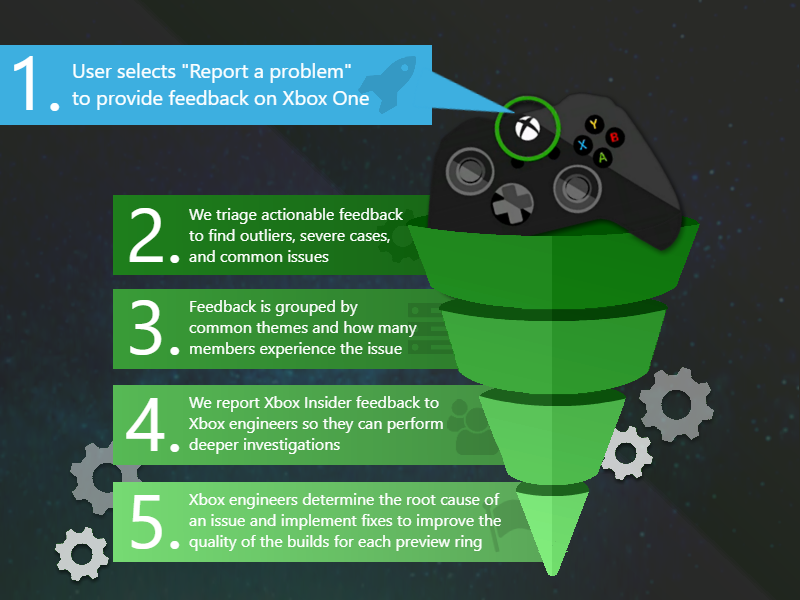
Make sure to use Report a problem to keep us informed of your issue. We may not be able to respond to everyone, but the data we’ll gather is crucial to finding a resolution.

What Happens to Your Feedback

How to Get Xbox Insider Support


If you’re an Xbox Insider looking for support, please reach out to the community subreddit. Official Xbox staff, moderators, and fellow Xbox Insiders are there to help with your concerns.

When posting to the subreddit, please look through most recent posts to see if your issue has already been posted or addressed. We always recommend adding to threads with the same issue before posting a brand new one. This helps us support you the best we can! Don’t forget to use “Report a problem” before posting—the information shared in both places helps us understand your issue better.

Thank you to every Xbox Insider in the subreddit today. We love that it has become such a friendly and community-driven hub of conversation and support.

For more information regarding the Xbox Insider Program follow us on Twitter. Keep an eye on future Xbox Insider Release Notes for more information regarding your Xbox One Update Preview ring!


https://www.sickgaming.net/blog/2020/09/...0908-2000/

Print this item

  News - Blog: Rules for a future-proof 2D render order
Posted by: xSicKxBot - 09-21-2020, 02:49 AM - Forum: Lounge - No Replies

Blog: Rules for a future-proof 2D render order

<!– –> Gamasutra: Julian Colbus’s Blog – Rules for a Future-Proof 2D Render Order

Gamasutra is part of the Informa Tech Division of Informa PLC

This site is operated by a business or businesses owned by Informa PLC and all copyright resides with them. Informa PLC’s registered office is 5 Howick Place, London SW1P 1WG. Registered in England and Wales. Number 8860726.

Gamasutra: The Art & Business of Making Gamesspacer

<!–

–>

If you enjoy reading this site, you might also want to check out these UBM Tech sites:


Share on Twitter    RSS

The following blog post, unless otherwise noted, was written by a member of Gamasutra’s community.
The thoughts and opinions expressed are those of the writer and not Gamasutra or its parent company.


Once you start working on a 2D game, the question of how to set up a proper render order will come up very early on. Render order, at least in the way I will be using the term, determines which parts of your 2D game get rendered (drawn, displayed, shown) in front of (i.e. later than) other parts.

Unfortunately, you won’t be able to figure out the requirements for a good system until after you need it. I just spent almost a week changing ours from what I thought would be good when we started our current project to what many months later turned out to make a lot more sense. Here’s hoping that our findings will save you the trouble of going through that painful refactoring process and help you get it right from the start.

Please note:

  1. Some of this makes sense for any 2D game, but some will be specific to a perfect side view typical for side-scrolling games.
  2. This system accounts for real-time lighting; if that’s no concern of yours, a simpler system might do.
  3. It also accounts for multiple vertical layers, some of which are only revealed after a foreground sprite fades out. If your game doesn’t have this, parts of our system will be irrelevant for you.
  4. I will be using some Unity-specific terminology like “Sorting Layer” and “Order in Layer”. Nevertheless, most of this article should be helpful on a conceptual level regardless of game engine.

In case you’re working in Unity and are completely new to the topic, I thought I’d provide a short explanation of Unity’s Render Order system (as of Unity 2019.3.13) and give you a quick intro into its usage. If you already know it, skip right ahead to Best Practices below.

The following assumes that you actually work in a 2-dimensional space and aren’t using the Z axis to determine Render Order. If you want your sprites to use Unity’s 2D Render Order system instead of rendering based on your sprites’ Z positions, you need to select your camera and set its Projection to Orthographic instead of Perspective.

1.1 Sorting Layers


Once that is done, all your sprites will be rendered based on Sorting Layers (“SL” for short). These work essentially like layers in Photoshop or any other image editing software: All sprites on one SL will always be rendered in front of all sprites on another, thus adding depth on an “imagined Z axis”.

Let’s have a look at the available Sorting Layers. Add a SpriteRenderer component to a game object and select the Sorting Layer drop-down.

Hit Add Sorting Layer… at the bottom to open the Tags and Layers window. It shows all existing SLs and allows you to add any number of new ones. “Default” cannot be deleted, but you don’t have to use it. The SL at the top of the list is rendered at the very back, the SL at the bottom is all the way in the front.

Most of the advice under Best Practices pertains to which layers you should set up, so I won’t go into detail about it here. However, here’s a Unity-specific tip: When adding new SLs, use a slash to nest them. Nested layers will then appear neatly grouped together in the SL drop-down on your Sprite Renderers. In the example below, we distinguish between middleground (MG) and background (BG), each of which encompass several SLs:

Once your SLs are set up, you can assign any sprite in your scene to them by selecting its SpriteRenderer component and picking the desired SL from the drop-down menu.

1.2 Order in Layer


Within each SL, sprites are again organized into an Order in Layer (“OiL” for short). While SLs have names, the OiL of a sprite is indicated as an integer. The higher it is, the further in front a sprite is rendered. Consider the following example containing three SLs: “Background”, “Middleground”, and “Foreground”.

Sprite Sorting Layer Order in Layer
Sky Background -1
Moon Background 0
Skyline Background 1
House Middleground -1
Player character Middleground 0
Column Middleground 1
Laundry Foreground 0

Even though sky, moon, and skyline are all on the background layer, they are rendered in the correct order because of their Order in Layer. As you can see, an OiL can have a negative int value.

At this point, you might think that you know all you need to render your sprites in the right order. If you’re going for a more simple look, that might be the case. However, if you want to go the extra mile (especially if you have  dynamic lighting), here are some more specific tips for setting up Sorting Layers (SLs) and Orders in Layer (OiL) in a future-proof way. And even though the terminology comes from Unity, much of the following advice should apply to any engine on a conceptual level.

2.1 Background and Foreground


For our project, we have decided to distinguish between background (BG), middleground (MG), and foreground (FG). This is merely a conceptual distinction; on a technical level, each of these is made up of multiple Sorting Layers. We also added a Sorting Layer named “Dev” for sprites that we use for development only that’s invisible to the player. Something we didn’t do (but might in the future) is add another visible layer for all World Space UI to ensure that it renders in front of all non-UI sprites.

Hiding and showing the three main groups of Sorting Layers (BG, MG, and FG) using a custom script

No matter how you end up doing it, one thing to keep in mind when setting up SLs is lighting. Each 2D Light component in Unity can be set to affect or not affect any number of Sorting Layers:

This means that the system determining render order and the system determining which lights affect which sprites are intertwined. This may cause problems; for example, let’s go back to the example shown under Sorting Order above: If you add a light to brighten the moon, it will inevitably (within its range) also brighten the sky and skyline because all three of them are on the same Sorting Layer. You might not want one light in the background to affect another background layer that seems very far away from it (on the imagined Z axis). Luckily, this can easily be resolved by making the system more granular, i.e. by adding more Sorting Layers. The moon and sky could remain on the same SL and the skyline could be put on a new one that’s visually closer to the player. This way, the moon would light up the clouds, but not the skyline.

For our game, we created 7 Sorting Layers for the background alone. We ended up with that number specifically after experimenting and deciding that 7 visually distinct layers looked alright. You’ll notice that some background layers contain a big, semi-transparent sprite that adds atmospheric tint:

Incidentally, we got another usage out of those 7 background layers by giving each one its own parallax speed. (Creating a parallax effect without the need for a Z axis is a topic for another day.)

Some of those SLs may be further subdivided into Orders in Layer. For example, this street in the background is made up of three parts in itself: handrail in front, NPCs in the middle, and the rest in the back.

We also added a “negative parallax” layer to the very foreground that moves in opposition to the camera and the parallax layers in the background:

The middleground is where it gets complicated, so let’s give it a closer look!

2.2 Middleground


The middleground (at least in our terminology) is where all the action takes place, where the player and NPCs live, and as a result, where things move around a lot. I’ll first explain how we set it up and then elaborate on the reasoning behind it.

2.2.1 Sorting Layers


This next distinction might appear arbitrary at first, but it is in fact the ideal result we arrived at after a long series of experimentation: There are generally two types of Sorting Layers in the middleground; “movement layers” where the player and NPCs move around (called MG/middle and MG/back), and “wall layers” separating them (called MG/frontwall, MG/middlewall, and MG/backwall). Think of this latter type as the “walls” sandwiching the middle and back SLs between each other (even though they contain many sprites not specifically depicting walls).

The player and NPCs can only move on MG/middle and MG/back and sometimes switch from one to the other. Differently put, they can be in “middle areas” (where they are rendered on MG/Middle) and “back areas” (where they are rendered on MG/back). The distinction between these two isn’t always immediately apparent and may seem open for interpretation. When does the player transition from middle to back? The quick answer is: Whenever they “pass by” a layer of sprites (specifically MG/middlewall) that rendered behind them before and now renders in front of them, i.e. when they walk past a wall layer.

By doing so, the player may enter the bounds of a sprite on the wall layer inbetween that then fades out. We call these “facades”, and one can be seen in the first example below.

Moving up: Buildings and areas entered via frontal stairs from below are usually considered as the player entering a back area because the player walks “further into” the screen or “away from the player”, behind the wall layer they were previously in front of:

However, this isn’t necessarily the case when moving up. In the example below, the player stays on MG/middle the whole time. That is because they never pass by a wall layer; the facade sprite that fades out was in front of them the whole time (on MG/frontwall), as you can see from the columns at the bottom:

Other movements: Entering a building or area from the side or top is different as the player never goes “further into” the screen, thus never bypassing a wall layer, no matter if they walk normally, use stairs, or walk through a door. This case never counts as entering or leaving a back area because no movement on the imagined Z axis occurs.

Teleporting: Teleporters moving the player from an open area into a room or building aren’t all the same. If the player is transported behind a sprite that was previously behind the player (again: if they move past MG/middlewall), they are indeed moving from MG\middle to MG\back:

However, if the player does not move past a sprite that was previously behind them, they stay on the same layer. In the example below, the player teleports from MG\middle to MG\middle.

2.2.1.1 What to look out for

After telling you what worked, I also want to talk about the mistake we made with our Sorting Layers that caused me to rebuild the system completely to the way it is now. I urge you to read this bit as it might save you a lot of headache!

The render order we used to have included only the Sorting Layers MG/front/middle/back/veryback. However, this fell apart with the introduction of 2D Lights: In certain scenarios, a sprite needed to be rendered on a certain layer but wasn’t supposed to be affected by a light source that applied to other sprites on that same layer. This mostly affected facades; consider the example below:

Example setup; sprites have been moved on the Z axis only for demonstration purposes

The player needs to be rendered in front of the facade while outside the building. Therefore, since the player is on the (formerly) MG\middle layer, the facade needs to be on the same or a lower middleground layer to be rendered behind the player; it cannot be on MG/front.

Example: outside (MG/middlewall)


Example: inside (MG/backwall)

However, light sources inside the building apply to (formerly) MG/middle as well as (formerly) MG/back to light up the correct sprites on the inside, behind the facade. As a result, lights rendered behind the facade appear to fall on the front of the facade, which shouldn’t be the case.

That’s why the facade has to be on another layer between the player and the regular MG\middle layer, which is only affected by lights in front of it. To allow for this, we needed to add more layers.

Unfortunately, simply adding more layers only half-solved the problem because sprites like the player and NPCs may switch from middle to back and vice versa. As a result, any light on one of those layers will either not affect those moving sprites or always affect them, including in the wrong scenarios (i.e. through walls). That is why we came up with the distinction between middle areas and back areas as well as the wall layers between them. Moving from one to the other changes the moving sprite’s Render Layer to MG/middle and MG/back respectively (simply based on entering trigger colliders). As a result, a light source affects them when they’re right next to it in the same room – but not when they’re right next to it but with a wall-inbetween.

2.2.2 Order in Layer


Similarly to the background, each Sorting Layer in the middleground is in itself divided into multiple Orders in Layer (OiL). Here’s what we learned about using those.

2.2.2.1 Keep OiL the same across SLs
The “wall layers” are each structured very similarly to one another, meaning that one wall layer’s OiL values are (almost) exactly the same as all the other wall layers’ OiL values. The two movement layers also share the same OiL values. This makes memorizing OiL much easier and considerably speeds up placing sprites in the scene. For example, one type of sprite (e.g. foliage) has the same OiL across all wall layers on which it occurs. Make sure to set up external documentation for these general OiL rules (and your Render Order in general)!

2.2.2.2 Reserve OiL
In our project, some of the sprites can be interacted with (we call these “Interactables”) and show outlines once the player gets in range. The outlines need to be rendered behind the Interactable, but in front of the sprite behind it. This means that one OiL between the Interactable and the sprite right behind it needs to be reserved for the outline to prevent “fighting” for render order between the outline and the background sprite. For instance, if an Interactable (e.g. a cigarette vending machine) is on OiL 1 and the sprite behind it (e.g. a wall) is on OiL 0, the outline of the Interactable would have nowhere to go in-between the two. That’s why we have now reserved certain OiL for certain renderers: The OiL of any sprite must always be set to a multiple of ten (i.e. end in 0); outlines always render 1 OiL behind the sprite they belong to (i.e. end in 9). In our example, the cigarette vending machine could be on 10, the wall behind it on 0, and the vending machine outline on 9. Particle effects also often overlap with multiple sprites in uncontrolled ways, so we always place them on an OiL ending in 8 to avoid “fights”. Layers ending in 2 to 7 are still free for future special usage if the need arises.

2.2.2.3 Dynamic OiL
Most moving sprites in our game, like characters, update their Order in Layer every frame depending on their y position. This has to happen in order for them to render in the correct order relative to one another (on the same SL) where movement on the Y axis occurs, e.g. on stairs. In the example below, the player character renders in front of the NPCs above it, but behind the NPCs below it.

Simply binding the OiL to an object’s y position – the further up it is on the screen, the lower its OiL – might be enough depending on your setup. However, you’ll likely run into a couple of problems:

Problem 1: This might not work for special situations, e.g. complex set piece animations with lots of moving parts.  
Solution: That is why we recommend adding a boolean so you can turn this functionality off if you ever desire to set the Order in Layer manually instead.

Problem 2: What about the rule that sprites can only be rendered on OiL that end in 0?  
Solution: To ensure that this is the case for moving sprites as well, just multiply the OiL by 10. (Concrete formula below.)

Problem 3: Calculating the render order of sprites based on their relative position only works for sprites that rest on the floor.  
Solution: If your sprites can jump, float, or fly, things get a bit trickier. The short answer is: take the distance between a sprite and the ground platform it relates to into account when calculating the sprite’s OiL. This wasn’t a problem for us because we have no jumping mechanics, so I won’t go into more detail about it. However, [this great blog post](https://breadcrumbsinteractive.com/two-u...ric-games/) does!

Finally, here’s our complete OiL calculation formula (located in the _Update()_ method) followed by a quick explanation:

movingSprite.sortingOrder = -1 * (Mathf.RoundToInt(transform.position.y * 100f) * 10);
Element Reasoning
movingSprite.sortingOrder The sprite’s Order in Layer value.
-1 Sprites higher up are actually further in the back, i.e. the higher the y value, the lower we want the OiL to be.
Mathf.RoundToInt() The OiL needs to be an integer. Use rounding rather than casting to int, which only chops off the decimals.
transform.position.y * 100 Take the sprite’s y position down to the second position after the decimal point before rounding. (bigger order of magnitude = more precise)
* 10 Make sure the sprite’s OiL always ends in 0 as established above.

This is what it looks like in the game. Note that the OiL at the top changes as the player moves up and down.

And that’s how we do it!

I’ll talk more about properly setting up 2D assets, e.g. creating a parallax effect and how to handle pixel art, in future blog posts. Keep an eye our for that on our blog or our Twitter. If you found an error in this post or see room for improvement, I’ll be happy to update it. And if you found it useful, feel free to share it!

Cheers,  
Julian


Related Jobs


Deep Silver Volition

Deep Silver Volition

Random42

Evil Empire


<!–

Extra Div –>


https://www.sickgaming.net/blog/2020/09/...der-order/

Print this item

  News - Among Us PS4, Xbox One Port More Complicated Than You Think
Posted by: xSicKxBot - 09-21-2020, 02:49 AM - Forum: Lounge - No Replies

Among Us PS4, Xbox One Port More Complicated Than You Think

Developer InnerSloth has explained why its popular online multiplayer game Among Us isn't on consoles like PlayStation 4 or Xbox One yet. The biggest hurdle in the studio's way is apparently player communication. It's at the core of the experience, and if it isn't implemented correctly, it could ruin the game.

According to studio programmer Forest Willard--who played Among us with a bunch of Twitch streamers earlier this week, including 5uppp--figuring out how to implement player communication in a game that's largely text-based chat might prove difficult when porting Among Us to consoles.

"[A console port] is something we're starting to talk about," Willard said. "But we'd have to write a system for quick comms. It'd basically be for randoms, like Rocket League. I don't know if we'd be able to implement console voice chat or not. I know one of the first things we want to add is a friend's list-type account system because it's real hard to do anything without that s***."

Continue Reading at GameSpot

https://www.gamespot.com/articles/among-...01-10abi2f

Print this item

  Castle Game Engine Hands-On
Posted by: xSicKxBot - 09-20-2020, 08:23 PM - Forum: Game Development - No Replies

Castle Game Engine Hands-On

The Castle Game Engine is a pretty unique option. It’s a long running open source 2D/3D game engine for Pascal and Delphi developers with a recent emphasis on improving the editing experience. Hand and hand with the Castle engine is the Lazarus IDE and the open source Pascal implementation Free Pascal, which are required for Castle game development.

Top features of Castle include:

  • Use any 3D or 2D software to create your models in various formats: glTF, X3D, VRML, Spine JSON, Collada…
  • Develop cross-platform applications, for desktop (Windows, Linux, macOS, FreeBSD…), mobile (Android, iOS), consoles (Nintendo Switch) and other devices (Raspberry Pi).
  • Visual editor to design games UI and to build applications, powerful command-line build tool under the hood.
  • Optimized rendering with a lot of graphic effects (physically-based rendering, shadows, mirrors, bump mapping, shader effects, gamma correction…).
  • Build and edit the scene graph (X3D) at runtime. Create 3D processing, visualization tools and CAD applications.
  • Extensible system for game objects, with physics, creatures with AI and navmesh, and more.
  • Access numerous services, like in-app purchases and game services on mobile devices.
  • Create cross-platform user-interface with anchors and automatic scaling.
  • Code in modern Object Pascal, an efficient OOP language with cross-platform open-source compiler (FPC), compiled to a native optimized code.

If you are interested in learning more about the Castle game engine be sure to check out the video below (or watch it here on Odysee). The Castle developers have also recently released a document making it easier for Unity developers to get up to speed with key concepts in Castle, which is available here. If you are interested in getting started with Castle and Lazarus, step by step instructions are available here.


https://www.sickgaming.net/blog/2020/09/...-hands-on/

Print this item