Random: Not Everyone Is Happy With Cadence Of Hyrule’s Interior Artwork
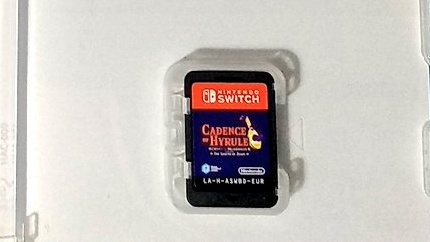
If you’ve got full artwork inside your Cadence of Hyrule Switch game case, consider yourself lucky, as fans of the game in certain regions around the world have opened up their latest physical purchase to discover it’s a completely blank canvas.
One individual, located in Spain, was nice enough to upload an image over on Twitter, and well…as you can see, it’s just the game card sitting there all by itself. A few other people in this same location shared similar shots. In other regions, like North America, it’s slightly better – with the game’s main artwork at least repeated in the interior.
This isn’t the first time something like this has happened, either. There have been past incidents where local classifications have obstructed stunning game artwork, and last month, the North American game card for the “limited-time” Super Mario 3D All-Stars release rubbed fans up the wrong way.
There’s also been a trend of physical games shipping with a code instead of a card. There are even entire collector editions – like the Fire Emblem: Shadow Dragon & the Blade of Light one Nintendo announced this week – that come with everything but a game card. It’s sure not easy being a physical collector in 2020!
While it’s certainly a bummer for anyone who receives a copy of Cadence of Hyrule with a blank interior, at least they’ll still get the game and all of its DLC on the cartridge. Have you got any physical Switch cases that don’t include interior artwork? What’s your own copy of Cadence of Hyrule look like? Tell us down below.
Posted by: xSicKxBot - 10-25-2020, 05:15 AM - Forum: Lounge
- No Replies
Xbox Could Offer Streaming Stick For Game Pass Subscribers
In addition to streaming for your phones, tablets, and (eventually) your PC and Xbox consoles, Microsoft could be offering a dedicated streaming stick that comes free with a Game Pass subscription. All you would need is a TV and a controller to start playing your favorite Xbox games.
Speaking to Stratechery (via The Verge), head of Xbox Phil Spencer didn't outright confirm such a device is coming, but he very heavily hinted at it.
"You could imagine us even having something that we just included in the Game Pass subscription that gives you an ability to stream xCloud games to your television and buying a controller," Spencer said.
microStudio is a game engine that runs entirely in your browser and makes it incredibly easy to get started creating 2D games, with a polished, well designed, comprehensive and documented set of tools. You can start as easily as going to microStudio.dev in your browser, clone an existing or create a new project and start coding, no account creation required.
Key features of microStudio include:
entirely browser based, no install or account creation required
simple Lua inspired programming language microScript
built in multi-file code editor with contextual documentation and syntax highlighting
run your game directly in browser or remote test on phones with live loading
pixel art editor
tile map editor
support for multiple devs with automatic synchronisation of changes
deploy your game as HTML5, or beta export support for Windows, Mac and Linux
You can learn more about microStudio and see in it action in the video below (or Odysee here). If you want to learn more or encounter a problem check out their discord server.
The kernel team is working on final integration for kernel 5.9. This version was just recently released, and will arrive soon in Fedora. As a result, the Fedora kernel and QA teams have organized a test week from Monday, October 26, 2020 through Monday, November 02, 2020. Refer to the wiki page for links to the test images you’ll need to participate. Read below for details.
How does a test week work?
A test week is an event where anyone can help make sure changes in Fedora work well in an upcoming release. Fedora community members often participate, and the public is welcome at these events. If you’ve never contributed before, this is a perfect way to get started.
To contribute, you only need to be able to do the following things:
Download test materials, which include some large files
Read and follow directions step by step
The wiki page for the kernel test day has a lot of good information on what and how to test. After you’ve done some testing, you can log your results in the test day web application. If you’re available on or around the day of the event, please do some testing and report your results. We have a document which provides all the steps written.
Happy testing, and we hope to see you on test day.
Review: Pumpkin Jack – The Perfect Platforming Treat For The Spooky Season
We don’t know about you, but Halloween is one of our favourite times of the year. Autumn is in full force, supermarkets are littered with skeletons and pumpkins, and it’s possibly the only time of year where it’s acceptable to watch The Exorcist on repeat while gorging on Toblerone (although you’ll forgive us if that’s been our Saturday night ritual for much of the year — 2020, eh?). For most of us, Halloween will likely look a bit different this year; some may not even bother celebrating at all. Thankfully, though, Pumpkin Jack has arrived to fill the ghostly void, and we’re delighted to say that it’s absolutely worth picking up.
If you’re a fan of the classic action platformer MediEvil, then you’ll be right at home with Pumpkin Jack. Taking place in the quiet, dreadfully boring Arc En Ciel Kingdom, the Devil himself conjures up a curse to plunge the kingdom into depths of despair, unleashing monsters and ghouls upon the poor, unsuspecting residents. The King tasks his champion Wizard to defend his people, so in retaliation, the Devil enlists his own champion to take on the Arc En Ciel Wizard: Stingy Jack.
The story is about as in-depth as you need it to be. As you traverse the land, you’ll encounter a rather mouthy owl, who guides Jack along his 6-8 hour quest with hints, tips, and the occasional jibe. Other characters pop up here and there, including a merchant who sells cosmetic skins, and a range of spooky boss characters that will test your platforming and combat skills. The character and world design is simply magnificent, and there’s plenty here to really kickstart a successful franchise, should the developer choose to do so (oh, and we should mention that Pumpkin Jack was developed by just one person, Nicolas Meyssonnier, with Adrien Lucas on porting duties).
The stages themselves are fairly open, whilst maintaining a comfortable level of linearity. You can stray off the beaten path to find hidden crow skulls (which can be exchanged for the cosmetic skins mentioned earlier), but by and large, you’ll be following a designated path from A to B. It’s really well done, and while a couple of levels suffer from a touch of repetition, most of them are expertly paced, injecting new and absurd tasks from riding a ghostly horse through a swamp to navigating a magical maze that brings back vivid memories of Ocarina of Time’s Lost Woods.
Gameplay is split between platforming and combat, with a few mini-games sprinkled in for good measure. Fighting off hordes of the undead (which, of course, can’t distinguish between friend or foe, and so attack Jack regardless) is relatively simplistic, but consistently satisfying. Tapping ‘Y’ unleashes a combo that is more than capable of cutting down most basic enemies, and you can also perform separate attacks whilst in the air. As you complete each level and its subsequent boss, you’ll be gifted with a new tool of destruction, including a magical sword, a blunderbuss, and a spear. Each has its own unique attack animation, and we particularly enjoyed how the magical sword allows Jack to float along the ground like a powerful mage.
The platforming is a touch trickier, and can cause a bit of hassle here and there. Jack can double jump right from the start of the game, but his movement is severely hampered once he’s in the air. This means that if you misjudge a jump and go off in the wrong direction, it’s quite difficult to correct this, and you’ll end up falling more times than necessary. It’s a minor gripe, though, and doesn’t rear its head too much, particularly once you’ve gotten to grips with how Jack controls. On the whole, the platforming is well implemented, and there’s plenty of variety to keep you on your toes, including rotating columns and bouncy mushrooms.
Visually, Pumpkin Jack isn’t going to compete with some of the Switch’s more accomplished titles, but in terms of its art design, it’s absolutely wonderful from start to finish. It’s typically ‘Halloween’, with oranges, purples, and greens making up the majority of the colour palette. The environments can feel a tad bare at times, and some of the assets tend to fade away on occasion (though we might argue this actually adds to the spooky effect at times!), but the variety on display here is commendable, and the game rarely, if ever, feels stale. If you’re playing in handheld mode, though, just be aware that the graphics look quite rough in comparison to docked mode.
One housekeeping measure we would recommend if you do decide to take the plunge on Pumpkin Jack is to make sure you crank up the camera sensitivity. The camera works really well for the most part and rarely gets in the way of the action, but its default setting is far too slow. Moving the dial right up to maximum is definitely the way to go here, and makes the gameplay feel much smoother as a result.
Conclusion
Pumpkin Jack is an absolute triumph. For a debut title, it’s remarkably confident in its vision, delivering a delightfully spooky experience that feels very familiar to MediEvil without outright copying it; in fact, with MediEvil’s controls feeling distinctly dated by 2020 standards, we’d go so far as to say Pumpkin Jack is superior. The controls are slick with satisfying combat mechanics, and while the platforming can occasionally feel a bit frustrating, it’s mostly very well done. Visuals in handheld mode can look a little grotty, so we’d recommend playing on the TV if you can, and make sure you crank up that camera sensitivity. Fear not though, folks; Halloween is well and truly alive in 2020 thanks to Pumpkin Jack.
In an interview with Game Informer, Insomniac discussed the ways the game takes advantage of the PlayStation 5. The first being no loading screens, with creative director Brian Horton saying that "if you die or if you fast travel there are near-instant loads." Horton went on to add that the game "just fades down and then fades up," stating Marvel's Spider-Man: Miles Morales has a seamless world with no loading thanks to the next-gen system's SSD.
Three other areas deal with performance. Specifically, graphical fidelity in the game world is higher, character performances will seem more believable, and action is smoother and more explosive. Art director Gavin Golden touched on all three topics, saying ray tracing, 4D model scans, and improved particle systems and simulations allow the game to be more immersive.
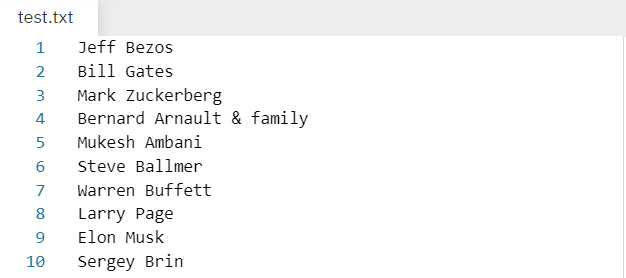
In the above example we have a file by the name test.txt that stores the names of few well known personalities . Our purpose is to read each line (which in this case contains names) one by one and store them in a list.
Note: The file taken into consideration is the same file as mentioned in the example above. Therefore the solution derived is in accordance to the same file. I have attached the file below for your convenience. Please feel free to download it in case you want to practice with it.
Without further delay let us dive into the solutions.
Method 1: Using The readlines And strip Methods
readlines()is a built-in method in Python used to read a file line by line and then store each line in a list.
string.strip(): Removes leading and trailing whitespaces including newline characters ‘\n’ and tabular characters ‘\t’.
We are going to use the readlines() method to read the file line by line while the strip() method is used to get rid of the new line character '\n' while storing the elements in the list. Let us have a look at the following program to visualize how we can solve our problem using the above mentioned methods.
with open('test.txt') as f: content = f.readlines()

# you may also want to remove whitespace characters like `\n` at the end of each line

li = [x.strip() for x in content]

print(li)
string.rstrip() is a built-in function in Python removes all whitespaces on the right of the string (trailing whitespaces). Thus, we can use it to strip or separate elements out of each line and then store them in a list using the [] notation.
Example:
with open('test.txt') as f: lines = [line.rstrip() for line in f]

print(lines)
Another approach to our problem is to use a for loop to iterate over the lines in the file one by one and then append them to a list using the append() function. The strip() function again comes into play which allows us to strip the newline character.
with open("test.txt") as file_in: lines = [] for line in file_in: lines.append(line.strip('\n')) print(lines)
❖ splitlines() is an inbuilt function in Python which is used to split a string breaking at line boundaries.
Example:
# Open the file for reading.

with open('test.txt', 'r') as infile: data = infile.read() # Read the contents of the file into memory. # Return a list of the lines, breaking at line boundaries.

li = data.splitlines()

print(li)
In the solution above, we’re opening the file for reading and assigning it to the variable ‘infile.’ Once the code has finished running, the file will be automatically closed. Then we use the splitlines() method to store it in a list by storing each line of the file as a separate element.
Method 5: Using The pathlib Library And The splitlines() Method
The pathlib library was introduced in Python 3.4 and has a handy method known as read_text() which is a nice way to read the file without having to worry about opening or closing it. The splitlines function turns the contents of the file to a list containing the elements of the file line by line.
Example:
from pathlib import Path

p = Path('test.txt')

lines = p.read_text().splitlines()

print(lines)
List comprehension is a compact way of creating lists. The simple formula is [expression + context].
Expression: What to do with each list element?
Context: What elements to select? The context consists of an arbitrary number of for and if statements.
The example [x for x in range(3)] creates the list [0, 1, 2].
If you want to learn more about list comprehensions, please have a look at our blog tutorial here. Now let us have a look at a one-line solution to our problem using list comprehension.
print([line.rstrip() for line in open('test.txt')])
Method 7: Reading a csv File Line By Line And Store In a List
Thus far we have seen how we can read a text file line by line and store the elements in a list. Now let us discuss how we can do the same for a csv file. The approach used by us, in this case, is the pandas library in Python which allows us to read the data from the csv file and store the values in an array. We can convert the array to a list using the tolist() method.
The file that we are going to mention in the example to follow looks like the one given blow.
I hope that after reading this article you can read files line by line and then store the elements in a list such that each line represents an element of the list. Please subscribe and stay tuned for more interesting articles!
Where to Go From Here?
Enough theory, let’s get some practice!
To become successful in coding, you need to get out there and solve real problems for real people. That’s how you can become a six-figure earner easily. And that’s how you polish the skills you really need in practice. After all, what’s the use of learning theory that nobody ever needs?
Practice projects is how you sharpen your saw in coding!
Do you want to become a code master by focusing on practical code projects that actually earn you money and solve problems for people?
Then become a Python freelance developer! It’s the best way of approaching the task of improving your Python skills—even if you are a complete beginner.
Hello members of GrabFreeGames :) I'm just here with a short explanation
As you may or may not know we share partner / affiliate links of Humble Bundle, Fanatical, IndieGala, Epic Games ...
When posting links to those websites mentioned above we are adding our partner tag. Those links generate profit ONLY if someone decides to purchase something while using the link (at no additional cost to you, the user, we get a small cut).
We are a group dedicated on finding free games, trying to consistently share any quality free to keep games available. So far we have never taken money offers from other companies or individuals (they offered), and any affiliate links added are done on our own accord.
What I'm saying is because we are focused on Free Games, If you use those links to grab a free game because the price of the game is 0 our cut is also 0 :) Which is totally fine. We are not here for the money.
Using the Epic Creator Tag for the whole lifetime (last year and a half) generated a total of $14.19. And most of that was from our staff, because they used the link while purchasing stuff on Epic Games.
If you are wondering why are we still using the tag if it generates almost nothing. Reasons are consistency, branding purposes and tracking who is sharing our links online. (I don't mind people sharing what we post, its public knowledge) That amount generated is used to purchase games for giveaways that we make on discord or the website, be sure to join our discord :)
Just in case anyone is wondering: I have contacted steam support about the use of partner / affiliate links and they said its fine to share our links inside our own group and not in other places such as the official community forums or the official steam groups.






 . Our purpose is to read each line (which in this case contains names) one by one and store them in a list.
 for your convenience. Please feel free to download it in case you want to practice with it.


