Posted by: xSicKxBot - 11-26-2022, 06:37 AM - Forum: Lounge
- No Replies
Get An Awesome Pro-Style Xbox Controller For Only $50
It's always handy to have a wired controller on standby, and for Black Friday, you can grab a great backup peripheral that also has a competitive edge to it. The PowerA Fusion Pro 2 for Xbox Series X|S normally sells for $90, but at Amazon, it's available for just $50.
The controller can also be used on PC thanks to the USB-C connection, and it features the usual array of buttons that you'd expect for an Xbox device, including the always useful Share button.
In Football Manager 2023, it's not just about picking tactics or crafting a team. It's about taking on challenges and breaking new ground as you establish your own style.
Delve into unrivalled depth and detail as you take charge at your club. You'll join the elite by writing your own headlines, earning the love and respect of the fans and dominating the competition.
Posted by: xSicKxBot - 11-25-2022, 11:54 AM - Forum: Python
- No Replies
Easiest Way to Convert List of Hex Strings to List of Integers
5/5 – (1 vote)
Question: Given a Python list of hexadecimal strings such as ['ff', 'ef', '0f', '0a', '93']. How to convert it to a list of integers in Python such as [255, 239, 15, 10, 147]?
Easiest Answer
The easiest way to convert a list of hex strings to a list of integers in Python is the list comprehension statement [int(x, 16) for x in my_list] that applies the built-in function int() to convert each hex string to an integer using the hexadecimal base 16, and repeats this for each hex string x in the original list.
Here’s a minimal example:
my_list = ['ff', 'ef', '0f', '0a', '93']

my_ints = [int(x, 16) for x in my_list] print(my_ints)

# [255, 239, 15, 10, 147]
The list comprehension statement applies the expression int(x, 16) to each element x in the list my_list and puts the result of this expression in the newly-created list.
The int(x, 16) expression converts a hex string to an integer using the hexadecimal base argument 16. A semantically identical way to write this would be int(x, base=16).
In fact, there are many more ways to convert a hex string to an integer—each of them could be used in the expression part of the list comprehension statement.
However, I’ll show you one completely different approach to solving this problem without listing each and every combination of possible solutions.
For Loop with List Append
You can create an empty list and add one hex integer at a time in the loop body after converting it from the hex string x using the eval('0x' + x) function call. This first creates a hexadecimal string with '0x' prefix using string concatenation and then lets Python evaluate the string as if it was real code and not a string.
Here’s an example:
my_list = ['ff', 'ef', '0f', '0a', '93'] my_ints = []

for x in my_list: my_ints.append(eval('0x' + x)) print(my_ints)

# [255, 239, 15, 10, 147]
You use the fact that Python automatically converts a hex value of the form 0xff to an integer 255:
>>> 0xff

255

>>> 0xfe

254

>>> 0x0f

15
You may want to check out my in-depth guide on this important function for our solution:
BF Cashback 10%, FREE Larry 3D ending, Giveaways & more
Black Friday Cashback Sale
[www.indiegala.com] Black Friday brings not only MASSIVE savings, new giveaways, surprise FREEbies & fresh gameplay challenge prizes, but also UNLIMITED cash back for all of your purchases. During this special period only, get a BONUS 10% CASHBACK in GalaCredit to spend on thousands of deals, here are just a few highlights:
Posted by: xSicKxBot - 11-25-2022, 11:54 AM - Forum: Lounge
- No Replies
Netflix's Wednesday: Will Tim Burton Be Back For Season 2?
Now that Wednesday is streaming on Netflix, viewers are getting to see what, exactly, a TV show directed by the legendary Tim Burton is like. Turns out that it's a silly, creepy, gothic thriller that harkens back to the director's glory days of the '80s and early '90s. While Burton only directed the first four episodes, he was very involved in bringing the show to life, even beyond the episodes he helmed, as an executive producer. What comes next, though?
While Wednesday has yet to be renewed for a second season, viewers have to be wondering if Burton would return to direct more episodes. While the answer isn't concrete just yet, it certainly sounds like the door is wide open for his return to the series.
Warning: The following contains mild spoilers for the Season 1 finale of Wednesday. If you haven't watched it yet, you should stop reading now.
- Login / Register on fanatical.com - Subscribe to the fanatical newsletter - Link steam account to fanatical in the settings (my guess is only unlimited steam accounts are valid) - Go to the giveaway page: - https://www.fanatical.com/en/game/garfield-kart-furious-racing?ref=gfg - Add the game to cart, checkout - Activate the game on your steam account as soon as possible
We are welcoming everyone to join our discord[discord.gg]. We are more active there on finding giveaways, small or large, and there are daily raffles you can participate.
HARVESTELLA takes place on a planet where four giant crystals, known as the Seaslight, govern the seasons. One day, the Seaslight start behaving abnormally. Quietus begins to visit in the interim between seasons - and quickly establishes itself as the season of death. The Seaslight glow with a strange light, emitting a dust formed of light that threatens all it touches - crops die, and people are trapped inside.
During one particular Quietus, your character - a traveler - collapses in an isolated village. You meet a girl called Aria, who claims to have come from the future and is researching the mysteries of this new, unwelcome season.
Thus you and she take the first step on a journey that will reveal the very truth of the world.
JDK 12.0.2, 11.0.4, 8u221, and 7u231 Have Been Released!
The JDK 12.0.2, 11.0.4, 8u221, and 7u231 update releases are now available. You can download the latest JDK releases from the Java SE Downloads page. OpenJDK 12.0.2 is available on http://jdk.java.net/12/. An item of interest in the CPU release is that JDK 8u221 also includes JDK 8u221 for ARM. Info...
While working on the second box in the series, Looking Glass, I stumbled upon a bash script written by Tay1or, another user on TryHackMe.
The opening challenge involves finding the correct port which hides an encrypted poem, Jabberwocky by Lewis Caroll.
Using a script here is a more efficient solution because it is quite time-consuming to manually attempt connecting to different ssh ports over and over until the correct port can be found.
The box also resets the mystery port after each login, so unless you solve the box on your first attempt, the script will come in handy multiple times.
Bash Script
Here is Tay1or’s bash script with a few slight modifications in bold to make it run on my machine:
#!/usr/bin/bash low=9000
high=13000 while true
do mid=$(echo "($high+$low)/2" | bc) echo -n "Low: $low, High: $high, Trying port: $mid – " msg=$(ssh -o "HostKeyAlgorithms=+ssh-rsa" -p $mid $targetIP | tr -d '\r') echo "$msg" if [[ "$msg" == "Lower" ]] then low=$mid elif [[ "$msg" == "Higher" ]] then high=$mid fi
done
I’m still new to bash scripting, but because I already understand the context of the problem being faced, I can more or less guess what the script is doing.
At the top, under the shebang line, it first sets low and high values for the ports to be searched. Then we see a while true loop.
The first command in the loop calculates the midpoint between the low and the high port values in the given range.
The echo command prints the low/high/and midpoint port that is currently being tested.
Then we have if/elif commands to respond appropriately to the output of the $msg to set the mid to either the lower or higher range variables. By resetting the range after each attempted connection, the search will take a minimal amount of time by eliminating the largest number of ports possible on each attempt.
When the output msg is neither “Higher” or “Lower” it will end the loop because we will have hit our secret encrypted message on the correct port.
Conversion into a Python script
I started wondering how it might be possible to translate the bash script to a Python script and decided to try my hand at converting the functionality of the code.
I’m more comfortable scripting in Python, and I think it will probably come in handy later in future challenges to be able to quickly write up a script during CTF challenges to save time.
The inputs of the code are the targetIP and high and low values of the target SSH port range.
Outputs are the response from the targetIP on each attempted connection until the secret port is found. Once the secret port is found, the program will reiterate that you have found the port.
I posted the final version of the python script here on GitHub. For your convenience, I’ll include it here too:
#!/usr/bin/env python3

# These sites were used as references: https://stackabuse.com/executing-shell-commands-wi>

# https://stackoverflow.com/questions/4760215/running-shell-command-and-capturing-the-> #set up initial conditions for the target port search

import subprocess

low_port=9000

high_port=13790

targetIP = "10.10.252.52"

print(targetIP)

#initialize loop_key variable:

loop_key="higher" while loop_key=="Higher" or "Lower": print('low = ' + str(low_port) + ', high = ' + str(high_port))

#a good place to use floor division to cut off the extra digit mid_port=(high_port+low_port)//2 print('Trying port ' + str(mid_port)) #attempt to connect to the mid port result = subprocess.run(['ssh', 'root@' + str(targetIP), '-oHostKeyAlgorithms=+ssh-rsa', '-p', str(mid_port)], stdout=subprocess.PIPE) # prep the decoded output variable msg = result.stdout decoded_msg = msg.decode('utf-8') # print result of attempted ssh connection print(decoded_msg) if "Higher" in decoded_msg: #print("yes I see the words Higher") high_port=mid_port print(high_port) loop_key="Higher" elif "Lower" in decoded_msg: low_port=mid_port print(low_port) loop_key="Lower" else: print("You found the secret port - " + str(mid_port)) exit()
PHPMyAdmin is one of the widely used database clients for PHP MySQL developers. It provides a simple user interface that can be easily adapted by beginners.
We can blindly say that PHPMyAdmin as the de-facto database client used by PHP developers for MySQL / MariaDB. It is hugely popular and that is because of its simplicity and ease of use.
It allows many database operations. Example,
Creating databases and the corresponding tables.
Adding and managing data.
Altering the existing structure and attributes defined.
Import, and export operations.
In this article, we will see how to create a MySQL database using PHPMyAdmin.
How to create a database?
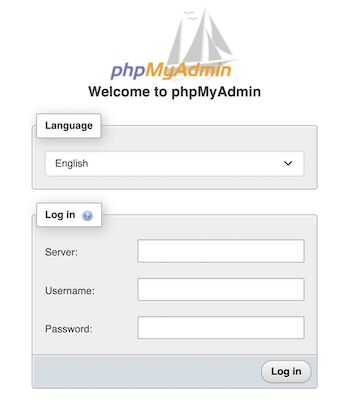
First login to the PHPMyAdmin client to go to the database control panel.
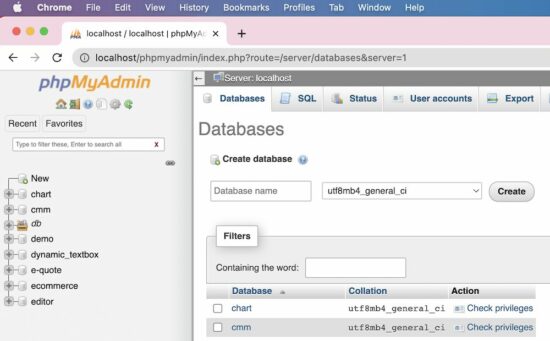
After login, it redirects to the PHPMyAdmin control panel which allows doing the following.
To manage and manipulate MySQL database assets.
To perform CRUD or other database-related operations.
There are 4 ways to create a new MySQL database using the PHPMyAdmin client interface.
Via the left panel navigation.
Via the header tab control navigation.
By executing a CREATE statement via the SQL tab.
By importing a CREATE statement SQL script via the Import tab.
1. Create database via left panel
In the PHPMyAdmin left panel, it contains a New link. It redirects to the page to create a new database.
2. Create database via header tab
The PHPMyAdmin UI shows tabs like Database, Import, Export and more. The Database tab redirects to show a list of existing databases with an option to create a new one.
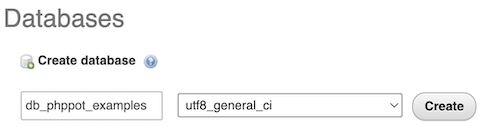
Both of these navigation controls will display the UI as shown in the figure.
The database create-form shows two fields.
To type the name of the database to be created.
To choose a collation that is encoding type.
In the above screenshot, the utf8_unicode_ci collation is selected.
The other two methods are for the one who has the SQL script for creating a new MySQL database.
Sometimes the database SQL will be provided. In that case, it is not required to use the interface to input the database name and the collation.
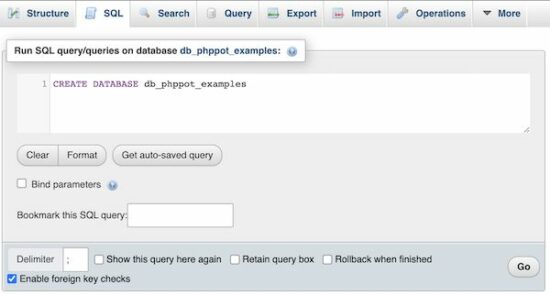
3. Create database via SQL tab, by running a CREATE SQL query
Choose the SQL tab from the PHPMyAdmin header. It will show a textarea to paste the CREATE database query.
Then, execute the entered query to see the created database among the existing list.
4. Create database via Import tab, by uploading a SQL script
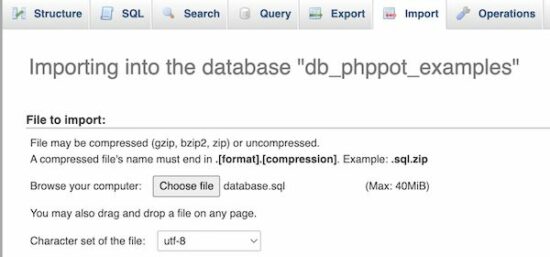
If you have the database CREATE statement Choose the Import tab from the PHPMyAdmin header. Then browse the SQL script that contains the CREATE statement.
Then click the “Go” button to process the import. It will result in displaying a new database imported.
After creating a MySQL database using PHPMyAdmin, the next job is to start adding the tables.
The PHPMyAdmin has the option to “Check privileges” to map roles and MySQL database operations.
But, this is a rarely used feature. If the database is associated with more than one user, then this feature will be used.
How to create tables in a database?
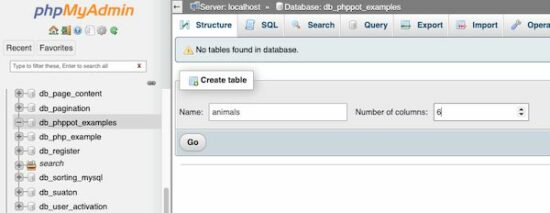
After creating a database, the PHPMyAdmin shows a form to a create table. That form show fields to enter the table name and the number of columns of the table.
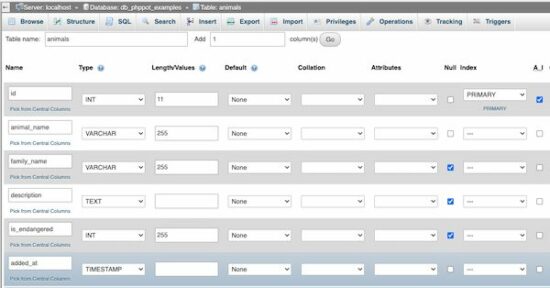
After specifying the table name and the “Number of columns”, the PHPMyAdmin panel will show inputs to add the table column specification.
See the following screen that is added with the column names with their corresponding types and more details.
Add user accounts and set privileges
Select the “User accounts” tab to see the number of existing user accounts. The PHPMyAdmin also allows adding a new user via the interface.
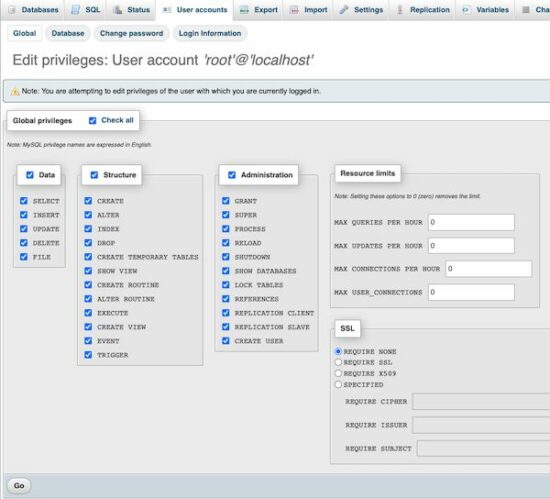
The “Create user” page will have the option to select the user account details and set the permission to perform operations like,
CRUD operations on the Data.
CREATE, ALTER, DROP and more operations on the MySQL database Structure.
Access Administration tools.
Setting resource limits like making the number of simultaneous connections.
See the screenshot below to allow or deny access permissions of the user created for a MySQL database.




 Question: Given a

 Recommended Tutorial:



 Recommended Tutorial: