Posted by: xSicKxBot - 01-24-2023, 08:21 AM - Forum: Python
- No Replies
Reading 365 Books in 365 Days Possible? Yes, with ChatGPT!
4/5 – (1 vote)
It’s no surprise that many of us are looking for ways to increase our productivity. After all, an increase in productivity can mean an increase in our income and a better quality of life.
For example, if you’re a freelance developer earning $40,000 per year and you increase the number of clients you serve by 2x and the value per client by 2x, your income can easily jump to $240,000, adding an additional 25% premium for quality, a very realistic assumption.
Or say you’re the owner of a fast-growing startup, and you boost your productivity to achieve an additional +15% growth per year. For a company with $200,000 in sales, $150,000 in net profit, and a valuation of $800,000, the additional growth means a nice little bonus of $800,000 in exit value!
But how can we achieve such a lofty goal of boosting your productivity?
Enter ChatGPT, the revolutionary new artificial intelligence technology that can help us increase our productivity by 10x to 100x. And now, a new idea has emerged for how we can use ChatGPT to rapidly increase our personal growth: speed reading books.
Made by DALL.E
Warren Buffett famously said, “knowledge compounds.” The idea is that if we can improve our skills by just 1% each day, we can increase our skills by 36x in a year.
But how can we actually achieve this?
One of the most potent ways is to simply become a much more effective person by consuming massive amounts of high-quality information related to your area of expertise. Warren Buffett fills his extremely valuable time with reading for more than 5 hours every day. Most other billionnaires share his habit of reading tons of books in their areas of interest.
Books are full of knowledge, but they are not filled with shallow distractions and low-quality or misleading content found on social media. Following top-level research papers, books are the highest-quality sources of information, followed by “B-level” research papers, blogs, news sites, forums, and social networks.
Made by DALL.E
Average Information Quality (Ranking):
A-level research papers
Books
Quality blogs
News sites
Forums
Social networks
By focusing our information consumption on the top three sources, we can expect to see a dramatic increase in our knowledge. ChatGPT helps us to accomplish this by allowing us to read condensed versions of quality books in mere minutes. With ChatGPT, we can theoretically read 365 books in 365 days!
An intelligent chat bot could help you understand the main points of non-fiction books by summarizing the content of the book.
In fact, I did it to help me understand the main points of a lengthy 1200 pages non-fiction book “Atlas Shrugged”:
The chat bot uses natural language processing and machine learning algorithms to scan the text and extract key concepts and ideas. The chat bot could then generate a summary of the book and present it to you in a conversational format, allowing you to interact with it and ask it questions.
This helps you quickly get an overview of the main points of the book so you can decide whether or not you want to read it in more depth.
You can ask it all kinds of questions to dive deeper into various aspects of the book. You can even ask it to generate a series of questions to ask about the book — and ask it those questions right afterwards!
Imagine the possibilities if we could rapidly increase our knowledge by reading more quality books! We could become much more effective and efficient human beings and experience a leap in productivity.
These productivity levels are now within our reach, thanks to the powerful technology of ChatGPT. Reading 365 books in 365 days is now a reality, and with it comes the potential for rapid personal growth.
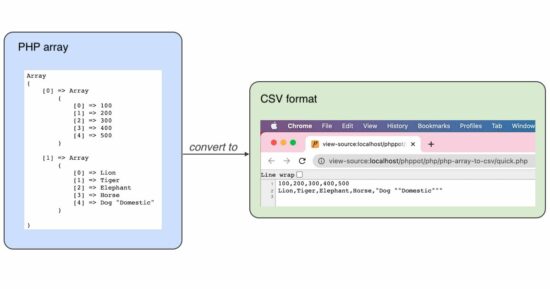
In this example, code connects the database and reads the results into an array. Then, it creates a PHP file output stream to put the CSV data row by row.
First, the code sets the array of column headers. Then, it iterates the database result array and calls fputcsv() on each row of data.
The PHP header() is set with the application/csv to download the CSV file to the browser.
<?php

// PHP code will connect to a database

// Read from a table and get result

// Formulate the result as an array to use in a convenient form

// Iterate the array

// Use PHP's function fputcsv and write the array elements

// to a CSV file

// Then push that CSV file as download

$mysqli = new mysqli("localhost", "root", "", "db_phppot_examples");

$i = 0;

$query = "SELECT id, name, type FROM tbl_php_array_to_csv";

if ($resultArray = $mysqli->query($query)) { while ($record = $resultArray->fetch_array()) { $animalArray[$i]['id'] = $record['id']; $animalArray[$i]['name'] = $record['name']; $animalArray[$i]['type'] = $record['type']; $i++; }

}

$fileOut = fopen("php://output", 'w') or die("Unable open php://output"); // Header forces the CSV file to download

header("Content-Type:application/csv");

header("Content-Disposition:attachment;filename=example-csv.csv");

// writing the first CSV record as the column labels

// Refer: https://www.php.net/manual/en/function.fputcsv.php

fputcsv($fileOut, array('id', 'name', 'type')); // writing array elements as CSV file records one by one

foreach ($animalArray as $animal) { fputcsv($fileOut, $animal);

}

fclose($fileOut) or die("Unable to close php://output");

?>
Database script
This database script imports the table structure and data to run this example.
You may also try this code with a different database table. It requires only minor code changes to edit the new table’s column names.
--

-- Database: `db_phppot_examples`

-- -- -------------------------------------------------------- --

-- Table structure for table `tbl_php_array_to_csv`

-- CREATE TABLE `tbl_php_array_to_csv` ( `id` int NOT NULL, `name` varchar(255) NOT NULL, `type` varchar(255) NOT NULL

); --

-- Dumping data for table `tbl_php_array_to_csv`

-- INSERT INTO `tbl_php_array_to_csv` (`id`, `name`, `type`) VALUES

(1, 'Lion', 'Wild'),

(3, 'Dog', 'Domestic'),

(4, 'Tiger', 'Wild'); --

-- Indexes for dumped tables

-- --

-- Indexes for table `tbl_php_array_to_csv`

--

ALTER TABLE `tbl_php_array_to_csv` ADD PRIMARY KEY (`id`); --

-- AUTO_INCREMENT for dumped tables

-- --

-- AUTO_INCREMENT for table `tbl_php_array_to_csv`

--

ALTER TABLE `tbl_php_array_to_csv` MODIFY `id` int NOT NULL AUTO_INCREMENT, AUTO_INCREMENT=6;
Uses of PHP array to CSV conversion
(1) Database table export
We can use this code export database to a CSV file. It is for taking a backup of a database table.
Hentai Avenger Bundle & Twin Sails Interactive Sale
Hentai Avenger Bundle | 8 Adult Games | 93% OFF
[www.indiegala.com] ?Vengeance may come in many shapes and forms, but in eroge form, not as often. Start this new year with a sensual & titillating erotic anime / hentai DRM-FREE game selection.
Posted by: xSicKxBot - 01-24-2023, 08:21 AM - Forum: Lounge
- No Replies
Fortnite The Kid LAROI Event -- Concert Start Date, Rewards, And More
Epic has revealed more information about its upcoming Fortnite concert featuring the Australian rapper The Kid LAROI. We now know details on how to participate in the event, how long it'll stay, all the items players can unlock, and more.
The Kid LAROI's Wild Dream island event will start on January 27, 6 PM ET / 3 PM PT and will feature his upcoming song "Love Again" alongside three unreleased songs for Wild Dreams island and Afterparty island.
Players can load into both The Kid LAROI Wild Dreams and Afterparty island via the main menu, or they can input the following island code to join them:
A good friend and his wife recently founded an AI startup in the lifestyle niche that uses machine learning to discover specific real-world patterns from videos.
For their business system, they need a pipeline that takes a video file, converts it to audio, and transcribes the audio to standard text that is then used for further processing. I couldn’t help but work on a basic solution to help fix their business problem.
Project Overview
I finished the project in three steps:
First, install the necessary libraries.
Second, convert the video to an audio file (.mp4 to .wav)
Third, convert the audio file to a speech file (.wav to .txt). We first break the large audio file into smaller chunks and convert each of them separately due to the size restrictions of the used API.
Let’s get started!
Step 1: Install Libraries
We need the following import statements in our code:
# Import libraries

import speech_recognition as sr

import os

from pydub import AudioSegment

from pydub.silence import split_on_silence

import moviepy.editor as mp
Consequently, you need to pip install the following three libraries in your shell — assuming you run Python version 3.9:
Before you can do speech recognition on the video, we need to extract the audio as a .wav file using the moviepy.editor.VideoFileClip().audio.write_audiofile() method.
Here’s the code:
def video_to_audio(in_path, out_path): """Convert video file to audio file""" video = mp.VideoFileClip(in_path) video.audio.write_audiofile(out_path)
After extracting the audio file, we can start transcribing the speech from the .wav file using Google’s powerful speech recognition library on chunks of the potentially large audio file.
Using chunks instead of passing the whole audio file avoids an error for large audio files — Google has some restrictions on the audio file size.
However, you can play around with the splitting thresholds of 700ms silence—it can be more or less, depending on your concrete file.
Here’s the audio to text code function that worked for me:
def large_audio_to_text(path): """Split audio into chunks and apply speech recognition""" # Open audio file with pydub sound = AudioSegment.from_wav(path) # Split audio where silence is 700ms or greater and get chunks chunks = split_on_silence(sound, min_silence_len=700, silence_thresh=sound.dBFS-14, keep_silence=700) # Create folder to store audio chunks folder_name = "audio-chunks" if not os.path.isdir(folder_name): os.mkdir(folder_name) whole_text = "" # Process each chunk for i, audio_chunk in enumerate(chunks, start=1): # Export chunk and save in folder chunk_filename = os.path.join(folder_name, f"chunk{i}.wav") audio_chunk.export(chunk_filename, format="wav") # Recognize chunk with sr.AudioFile(chunk_filename) as source: audio_listened = r.record(source) # Convert to text try: text = r.recognize_google(audio_listened) except sr.UnknownValueError as e: print("Error:", str(e)) else: text = f"{text.capitalize()}. " print(chunk_filename, ":", text) whole_text += text # Return text for all chunks return whole_text
Need more info? Check out the following deep dive:
Finally, we can combine our functions. First, we extract the audio from the video. Second, we chunk the audio into smaller files and recognize speech independently on each chunk using Google’s speech recognition module.
I added comments to annotate the most important parts of this code:
# Import libraries

import speech_recognition as sr

import os

from pydub import AudioSegment

from pydub.silence import split_on_silence

import moviepy.editor as mp def video_to_audio(in_path, out_path): """Convert video file to audio file""" video = mp.VideoFileClip(in_path) video.audio.write_audiofile(out_path) def large_audio_to_text(path): """Split audio into chunks and apply speech recognition""" # Open audio file with pydub sound = AudioSegment.from_wav(path) # Split audio where silence is 700ms or greater and get chunks chunks = split_on_silence(sound, min_silence_len=700, silence_thresh=sound.dBFS-14, keep_silence=700) # Create folder to store audio chunks folder_name = "audio-chunks" if not os.path.isdir(folder_name): os.mkdir(folder_name) whole_text = "" # Process each chunk for i, audio_chunk in enumerate(chunks, start=1): # Export chunk and save in folder chunk_filename = os.path.join(folder_name, f"chunk{i}.wav") audio_chunk.export(chunk_filename, format="wav") # Recognize chunk with sr.AudioFile(chunk_filename) as source: audio_listened = r.record(source) # Convert to text try: text = r.recognize_google(audio_listened) except sr.UnknownValueError as e: print("Error:", str(e)) else: text = f"{text.capitalize()}. " print(chunk_filename, ":", text) whole_text += text # Return text for all chunks return whole_text # Create a speech recognition object

r = sr.Recognizer() # Video to audio to text

video_to_audio('sample_video.mp4', 'sample_audio.wav')

result = large_audio_to_text('sample_audio.wav') # Print to shell and file

print(result)

print(result, file=open('result.txt', 'w'))
Store this code in a folder next to your video file 'sample_video.mp4' and run it. It will create an audio file 'sample_audio.wav' and chunk the audio and print the result to the shell, as well as to a file called 'result.txt'. This contains the transcription of the video file.
The Block is the world's smallest city builder - a bite sized experience for city builder fans short on time / money / attention / all of the above. Each level is slightly different and can be completed in a matter of minutes.
Build up a tiny but perfectly formed city block from randomly generated tiles, try out a variety of colour palettes and map sizes, then sit back, relax, and bask in the glory of your adorable creation!
This blog provides an overview and introduction to the "Oracle No-Fee Terms and Conditions" license (NFTC). This is a new free use license for Oracle JDK releases for Java 17 and later.



 A-level research papers
 News sites
 Recommended:



 Recommended:


