Welcome, Guest
You have to register before you can post on our site.

Username
  

Password


Search Forums

(Advanced Search)

Forum Statistics
» Members: 20,944
» Latest member: NeroSx
» Forum threads: 21,959
» Forum posts: 22,926

Full Statistics

Online Users
There are currently 3141 online users.
» 0 Member(s) | 3135 Guest(s)
Applebot, Baidu, Bing, Facebook, Google, Yandex

Latest Threads
Where to find Giant Turtl...
Forum: PC Discussion
Last Post: xSicKxBot

» Replies: 0
» Views: 3
[WoW Retail News] Season ...
Forum: World of Warcraft
Last Post: xSicKxBot

» Replies: 0
» Views: 11
[DevBlog MS] Build Your O...
Forum: C#, Visual Basic, & .Net Frameworks
Last Post: xSicKxBot

» Replies: 0
» Views: 14
[Steam Release] Killsquad...
Forum: New Game Releases
Last Post: xSicKxBot

» Replies: 0
» Views: 9
How to play Squirrel Girl...
Forum: PC Discussion
Last Post: xSicKxBot

» Replies: 0
» Views: 12
[WoW Retail News] Paladin...
Forum: World of Warcraft
Last Post: xSicKxBot

» Replies: 0
» Views: 14
[Steam Release] Rec Room
Forum: New Game Releases
Last Post: xSicKxBot

» Replies: 0
» Views: 18
[DevBlog MS] Share your ....
Forum: C#, Visual Basic, & .Net Frameworks
Last Post: xSicKxBot

» Replies: 0
» Views: 22
[Steam Release] Clone Dro...
Forum: New Game Releases
Last Post: xSicKxBot

» Replies: 0
» Views: 20
[WoW Retail News] Noctina...
Forum: World of Warcraft
Last Post: xSicKxBot

» Replies: 0
» Views: 28

 
  How to Download Music and more using Soulseek (Setup Guide)
Posted by: SickProdigy - 05-10-2023, 11:13 PM - Forum: Windows - No Replies

Soulseek Qt is a song sharing platform where users can share songs with each other.
It's underlying platform is p2p. So no worries of files going down as long as every user is running soulseek and sharing files. It works a lot different than traditional torrenting. Everything is encoded also. So ISP can't see what's being downloaded. Just that you are downloading. (Which happens anyways)
You can search for any song or album you want using the search tab.
There's rooms to chat with others and see what content they may have. Be sure to join a few. We have group called SickGaming.net on there.

You may need to share some files before downloading other people's music.

FLAC files are high quality and sound better than the normal mp3. The files are larger in size because they contain more information.
The SoulSeek community have a vast library of flac, mp3, and sometimes other files like movies and tv. Big anime group.


Download FLAC songs for FREE using Soulseek Qt (Simple tutorial)


Download: https://www.slsknet.org/news/node/1

If you need help, feel free to comment below or shoot me a message.

Print this item

  [Tut] Did ChatGPT Just Kill Freelancing? ?
Posted by: xSicKxBot - 05-10-2023, 11:00 AM - Forum: Python - No Replies

Did ChatGPT Just Kill Freelancing? ?

4/5 – (1 vote)

? I wrote this in my coding, tech, career, and artificial intelligence newsletter. Join us, we’re hundreds of thousands of ambitious techies!

If you’ve read this newsletter for some time, you know that I don’t take the disruptive power of ChatGPT lightly. Some Finxter readers asked me whether freelancing is still the future of work. 

While I don’t have a crystal ball, I’ll give you my best answer below. But first, let’s look at the answer of somebody more credible than me: Upwork’s CEO Hayden Brown.

Hayden spills the beans on the future of freelancing in the age of AI-driven communication and whether ChatGPT is a friend or foe in the gig economy.

[Blog] Will ChatGPT Kill Freelancing? No They’re Allies Not Enemys, Says Upwork CEO

The article shows many interesting stats and facts and glimpses into Upwork’s vast internal datasets. If you want to learn the secrets only known to large freelancing marketplaces, check out the full article on the blog.

In short, Hayden argues that brand-new job roles such as prompt engineers elicit explosive demand at the same time as virtually every single job role is now expected to integrate LLM-based generative AI tools into their own work.

Hayden also argues that the demand for skilled labor has only increased through the advent of strong AI with ChatGPT and other LLMs

Great news! ?

My take is that, like the pandemic, the emergence of AGI in the upcoming years will catapult most companies out of their traditional ways and into new ways of organizing talent. Freelancing as a way to organize labor will be winning.

Change is inevitable in the years to come, and the most flexible one has a significant advantage. I’d rather be a freelancer with a diversified business selling my specialized knowledge to companies worldwide, as compared to an employee selling my skills to a single organization/company/government.

? Recommended: Should I Become a Freelance Developer?

The sovereign individual needs a high degree of mobility and independence that is only possible with a remote or online-based business.

Legions of freelancers already leverage AI tools to generate large amounts of value for their clients — and income for themselves. Income that flows independently of the prosperity of a single nation, industry, or organization.

But here’s the catch: freelancer or employee, we’ll all be disrupted eventually. And it will be sooner than many of us expect. So, even as freelancers, we’re not protected against the emergence of strong AI. 

What we should do, however, is shift our minds to become investors rather than freelancers or employees so we can get our hands on some of the newly-created wealth. Because this wealth will flow to the owners first. 

? Recommended: The Math of Becoming a Millionaire in 13 Years

A sensible approach following these considerations is to work harder, add a new income stream via freelancing (whether you already have a primary income source as an employee or not), and invest the additional proceeds. Where? In companies that benefit from AI’s emergence or in scarce assets like Bitcoin or gold.

I’m not an investment advisor though – just a random dude from the Internet.

Tomorrow, I’ll send you more exciting LLM content – stay tuned!

To your success! ?

Chris


Join our free email newsletter by downloading your Python cheat sheet here:


https://www.sickgaming.net/blog/2023/05/...%9f%98%b5/

Print this item

  PC - OTXO
Posted by: xSicKxBot - 05-10-2023, 11:00 AM - Forum: New Game Releases - No Replies

OTXO


OTXO (pronounced oh-cho) is a violent top-down shooter with roguelite elements. Play as the protagonist entering an inexplicable mansion in search of his lost love. As you venture deeper into the Mansion, more of its secrets will be unveiled to you.

Featureless, unnamed, and without memories of how you came here but you remember why. She's waiting for you somewhere in this Mansion and you cannot leave until you find her. Cut your way through various unique areas and meet new allies as you delve deeper into the mystery, face your inner demons, and annihilate them.

With a massive variety of guns, over 100 abilities, and Focus to dodge bullets at your disposal, kick down doors and eviscerate the variety of enemies standing in between you and your mission.

Publisher: Lateralis

Release Date: Apr 20, 2023


https://www.metacritic.com/game/pc/otxo

Print this item

  (Indie Deal) Nacon Giveaways, City of Beats , More Sales, World Turtles
Posted by: xSicKxBot - 05-09-2023, 05:51 PM - Forum: Deals or Specials - No Replies

Nacon Giveaways, City of Beats , More Sales, World Turtles

[www.indiegala.com]
Music is everywhere in the City of Beats and drives absolutely everything in this rogue-lite, twin-stick shooter. Listen to the beat, get into the flow, and unleash bullet hell on the rooftops of the City, blasting through legions of hostile robots.
https://www.youtube.com/watch?v=roD95f8hIr4&ab_channel=ThaiGameGuide-Let%27sPlayCo-opGames
Dear Villagers Sale, up to 90% OFF
[www.indiegala.com]

The Turtle beckons! You have been selected by a tribe of peace-loving Meeps to save the life of their World Turtle, a giant space reptile carrying the entire world as they know it on its back. Establish a new way for Meeps to survive and create a sustainable society... All the while feeding the great World Turtle to ensure that it doesn't perish along its endless way.
https://www.youtube.com/watch?v=L79WX62sUX8&ab_channel=Re%3AcOgMission
Whitethorn Digital Sale, up to 85% OFF
[www.indiegala.com]
In the Trailmakers: Airborne Expansion you will take to the skies in an epic campaign to save the peaceful Chirpos from the pesky Robot Pirate invasion.
https://www.youtube.com/watch?v=edrOspsPDVo&ab_channel=FlashbulbGames
Last Chance Happy Hour Cherry Blossom Bundle
[indiegala.com]


https://steamcommunity.com/groups/indieg...3132976776

Print this item

  PC - Omega Strikers
Posted by: xSicKxBot - 05-09-2023, 05:51 PM - Forum: New Game Releases - No Replies

Omega Strikers


Join the footbrawl! Smash opponents off the arena and score goals in this lightning-fast 3v3 free-to-play game. Squad up with friends and choose from a growing cast of colorful Strikers to sling slimes, toss tofu, and rocket boost to victory.

Publisher: Odyssey Interactive

Release Date: Apr 27, 2023


https://www.metacritic.com/game/pc/omega-strikers

Print this item

  [Tut] Was ist AutoGPT und Wie Fängt Man Damit An?
Posted by: xSicKxBot - 05-08-2023, 11:10 PM - Forum: Python - No Replies

Was ist AutoGPT und Wie Fängt Man Damit An?

5/5 – (1 vote)

Schau dir das folgende Erklärungsvideo von AutoGPT an ? (Videoquelle):


? Artikel auf Englisch

Über AutoGPT


AutoGPT ist eine experimentelle Open-Source-Anwendung, die die Fähigkeiten des GPT-4-Sprachmodells demonstriert?. Es entwickelt und verwaltet Unternehmen autonom mit dem Ziel, ihren Nettovermögenswert zu erhöhen ??. Als eines der ersten Beispiele für GPT-4, das vollständig autonom arbeitet, erweitert AutoGPT die Grenzen dessen, was mit KI möglich ist ? Quelle.

Mit AutoGPT können Sie die Leistungsfähigkeit künstlicher Intelligenz nutzen, um groß angelegte Projekte in kürzester Zeit zu erstellen und dabei viel Zeit und Geld zu sparen ⏰?. Beispielsweise kann es die SEO Ihrer Website erheblich verbessern und sie aktiver und professioneller erscheinen lassen ? Quelle.

So sieht es aus, wenn AutoGPT auf meinem Computer läuft – es öffnet automatisch den Browser, besucht Websites, führt webbasierte Recherchen durch und schreibt Dateien auf meinem Computer: ???


Mit AutoGPT zu beginnen ist einfach! Befolgen Sie einfach diese Schritte?:

Schritt 1: Besuchen Sie das Auto-GPT-Repository auf GitHub, wo Sie alle notwendigen Dateien und Anweisungen finden ?.

Schritt 2: Treten Sie der Auto-GPT-Discord-Community bei, um Fragen zu stellen und sich mit Gleichgesinnten auszutauschen ?.

Schritt 3: Folgen Sie dem Projekt-Ersteller, Torantulino, auf Twitter, um über die neuesten Entwicklungen und Fortschritte auf dem Laufenden zu bleiben ?.


Denken Sie daran, dass die anfängliche Einrichtung zwar etwas Zeit in Anspruch nehmen kann, es sich jedoch lohnt, wenn Sie die fantastischen Vorteile sehen, die AutoGPT für Ihren Content-Erstellungsprozess bieten kann ?.

Viel Spaß beim Experimentieren! ?

Einführung in AutoGPT


AutoGPT ist ein fortschrittliches Sprachmodell, das auf der GPT-3.5-Architektur basiert und darauf ausgelegt ist, hochwertigen Text mit minimalem Benutzereingriff zu generieren ?.

In diesem Abschnitt führen wir Sie durch den Prozess der Einführung in AutoGPT, einschließlich der Voraussetzungen und Vorbereitung sowie der Installation und Konfiguration. Lasst uns eintauchen! ?

Voraussetzungen und Vorbereitung


Bevor Sie mit der Installation beginnen, stellen Sie sicher, dass Sie die folgenden Voraussetzungen erfüllen:

  • ? Ein Computer mit Internetzugang
  • ? Python installiert (neueste stabile Version)
  • ? Zugang zu GitHub zum Herunterladen des AutoGPT-Repositorys

Sobald Sie all diese Voraussetzungen erfüllt haben, ist es an der Zeit, Ihren Computer für die Installation vorzubereiten. Beginnen Sie, indem Sie zu dem Verzeichnis navigieren, in dem Sie AutoGPT herunterladen möchten.

Wenn Sie eine virtuelle Umgebung für Python-Projekte bevorzugen, aktivieren Sie diese. Mit eingerichteter Umgebung sind Sie bereit, AutoGPT zu installieren.

Installation und Konfiguration


Das Installieren von AutoGPT ist ein Kinderspiel ?! Um zu beginnen, klonen Sie das AutoGPT-Repository von GitHub:

git clone https://github.com/Torantulino/Auto-GPT.git

Navigieren Sie anschließend zum neu erstellten Auto-GPT-Verzeichnis und installieren Sie die erforderlichen Abhängigkeiten. Dies kann normalerweise mit einem einzigen Befehl erledigt werden, wie zum Beispiel:

pip install -r requirements.txt

Sobald die Abhängigkeiten installiert sind, sind Sie bereit, AutoGPT zu verwenden ?! Denken Sie daran, auf die AutoGPT-GitHub-Seite für zusätzliche Informationen und Dokumentationen zu verweisen, die Ihnen helfen, das Beste aus diesem leistungsstarken Tool herauszuholen ?. Von GitHub:

5 Schritte zur einfachen Installation


Um Auto-GPT zu installieren, befolgen Sie diese fünf grundlegenden Schritte:

Schritt 1: Stellen Sie sicher, dass Sie alle oben genannten Anforderungen erfüllen. Wenn nicht, installieren/besorgen Sie sie.

Die folgenden Befehle sollten in einem CMD-, Bash- oder PowerShell-Fenster ausgeführt werden. Um dies zu tun, gehen Sie zu einem Ordner auf Ihrem Computer, klicken Sie oben in den Ordnerpfad und geben Sie CMD ein, dann drücken Sie die Eingabetaste.

Ich verwende PowerShell unter Windows anstelle von CMD für eine einfachere Navigation.

Schritt 2: Klonen Sie das Repository. Sie benötigen Git installiert, aber Sie können stattdessen einfach die ZIP-Datei herunterladen, indem Sie auf die Schaltfläche oben auf der GitHub-Seite klicken.

git clone https://github.com/Torantulino/Auto-GPT.git

Schritt 3: Navigieren Sie zum Projektverzeichnis: Geben Sie dies in Ihr CMD-Fenster ein, Sie möchten das CMD-Fenster zum Repository navigieren, das Sie gerade heruntergeladen haben.

cd 'Auto-GPT'

Schritt 4: Installieren Sie die erforderlichen Abhängigkeiten: Geben Sie dies erneut in Ihr CMD-Fenster ein

pip install -r requirements.txt

Schritt 5: Benennen Sie .env.template in .env um und füllen Sie Ihren OPENAI_API_KEY aus. Wenn Sie den Sprachmodus verwenden möchten, füllen Sie auch Ihren ELEVEN_LABS_API_KEY aus. Besorgen Sie sich Ihren OpenAI-API-Schlüssel von: https://platform.openai.com/account/api-keys.

Das war’s! Sie haben AutoGPT erfolgreich auf Ihrem Computer eingerichtet. Jetzt können Sie das erstaunliche Potenzial dieses KI-gesteuerten Sprachmodells erkunden ?.

10 Anwendungen und Anwendungsfälle aus der Praxis


AutoGPT bietet eine Vielzahl praktischer Anwendungen, die Ihre täglichen Aufgaben vereinfachen und Ihre Projekte verbessern können. Hier sind zehn Anwendungsfälle aus der Praxis, bei denen Sie die Möglichkeiten von AutoGPT nutzen können:

  • Internetrecherche ?: AutoGPT kann Ihnen helfen, das Internet zu durchsuchen und Suchvorgänge durchzuführen, um relevante Informationen zu finden und Ihnen Zeit und Energie zu sparen.
  • Autonomes Programmieren und Debuggen ?: Nutzen Sie die Leistungsfähigkeit der KI, um schneller und effizienter als je zuvor Code zu schreiben und zu debuggen.
  • Social Media Management ?: Setzen Sie AutoGPT als Twitter-Bot ein, der autonom ansprechende Inhalte generiert und veröffentlicht, um Ihre Online-Präsenz auszubauen.
  • Inhalte erstellen ✍: Verbessern Sie Ihre Schreibfähigkeiten, indem Sie AutoGPT für kreative Aufgaben wie Geschichtenerzählen, Artikelverfassen oder sogar Dichten verwenden.
  • Bessere Entscheidungsfindung ?: Nutzen Sie die fundierten Vorhersagen und Erkenntnisse von AutoGPT, um Sie bei persönlichen und beruflichen Entscheidungen zu unterstützen.
  • Individuelle Chatbots ?: Erstellen Sie intelligente Chatbots, die mit Benutzern interagieren und informative Antworten an ihre Bedürfnisse anpassen können.
  • Sprachübersetzung ?: Überwinden Sie Sprachbarrieren, indem Sie AutoGPT nutzen, um Texte mühelos in mehreren Sprachen zu übersetzen.
  • Online-Nachhilfe ?: Unterstützen und helfen Sie Schülern bei ihren Studien, indem Sie AutoGPT als virtuellen Lernbegleiter einsetzen.
  • E-Mail-Verwaltung ?: Rationalisieren Sie Ihren Posteingang, indem Sie AutoGPT beauftragen, E-Mails zu sortieren, wichtige Nachrichten zu kennzeichnen und automatisch auf Routineanfragen zu antworten.
  • Simulation und Modellierung ?: Verbessern Sie Ihr Verständnis komplexer Systeme, indem Sie die Fähigkeit von AutoGPT nutzen, verschiedene Szenarien zu simulieren und zu analysieren.

Indem Sie AutoGPT in Ihre Arbeit integrieren, können Sie neue Möglichkeiten erschließen und Ihre Projekte auf die nächste Stufe heben. Legen Sie noch heute los und entdecken Sie die erstaunlichen Vorteile, die auf Sie warten! ?

?‍? Empfohlen (Englisch): The Evolution of Large Language Models (LLMs): Insights from GPT-4 and Beyond


https://www.sickgaming.net/blog/2023/05/...-damit-an/

Print this item

  (Indie Deal) Cash Back, Ghost Trick: Phantom Detective, Sales, Monster Tribe, Arto
Posted by: xSicKxBot - 05-08-2023, 11:09 PM - Forum: Deals or Specials - No Replies

Cash Back, Ghost Trick: Phantom Detective, Sales, Monster Tribe, Arto

[www.indiegala.com]
Buy at the Gala Shop and get cash back now
[www.indiegala.com]
BANG! A single bullet rings out in the dark city. But as one life ends, the story is just getting started... Sissel wakes up as a ghost and realises he has lost his memory along with his life
https://www.youtube.com/watch?v=8Ob83jbeJ4Y&ab_channel=CapcomUSA
Black Pants Studio, all titles 80% OFF
[www.indiegala.com]
Check out Handcrafted Indie Games for a Reasonable Price during the Black Pants Studio Sale.
[www.indiegala.com]
Akama. A lone island, sitting in the middle of an endless ocean, and the site of a magical phenomenon known only as the Rift. It was once a source of limitless power for humanity through magical creatures called the Ateyan. Capable of incredible and wonderful feats of magic, they lived alongside humanity for centuries - until something destroyed this harmony.
https://www.youtube.com/watch?v=Aq59s2LeJoc&ab_channel=IGN
Private Division Sale, up to 77% OFF
[www.indiegala.com]
Private Division brings deals on Kerbal Space Program, The Outer Worlds & Ancestors: The Humankind Odyssey
[www.indiegala.com]
Arto is a colorful hack-n-slash action-RPG, a fast-paced journey into a desolate, desaturated world that you bring back to life with every step you take. Arm yourself with a varied arsenal of weapons and spells to unlock and upgrade, and the magic ability to shoot beams of paint. You’ll begin a journey through wildly different biomes – each is presented in different perspectives and art styles and brings different gameplay mechanics to the experience!
https://www.youtube.com/watch?v=JYgyUngr3UI&ab_channel=OrionGamesSTU


https://steamcommunity.com/groups/indieg...3132903755

Print this item

  PC - Star Wars Jedi: Survivor
Posted by: xSicKxBot - 05-08-2023, 11:09 PM - Forum: New Game Releases - No Replies

Star Wars Jedi: Survivor


Star Wars Jedi: Survivor picks up five years after the events of Star Wars Jedi: Fallen Order. Cal must stay one step ahead of the Empire's constant pursuit as he continues to feel the weight of being one of the last remaining Jedi in the galaxy. Developed by the veteran team at Respawn Entertainment, Jedi: Survivor will expand upon iconic Star Wars stories, worlds, and characters, and thrilling combat first experienced in Jedi: Fallen Order.

Publisher: Electronic Arts

Release Date: Apr 27, 2023


https://www.metacritic.com/game/pc/star-...i-survivor

Print this item

  [Tut] Python Async Function
Posted by: xSicKxBot - 05-08-2023, 04:28 AM - Forum: Python - No Replies

Python Async Function

5/5 – (1 vote)

As a Python developer, you might have encountered the terms async and await, wondering what they are and how to use them in your projects.

Async functions enable you to write concurrent code using the async/await syntax. This powerful duo allows you to perform multiple tasks simultaneously without blocking the execution of your code. ? Think of it as having multiple browser tabs open; while one page loads, you can continue browsing other tabs. This capability means your Python applications can become faster, more efficient, and capable of handling many I/O operations. ?

To get started with async functions, you’ll need to get acquainted with Python’s asyncio library, which serves as a foundation for numerous asynchronous frameworks such as high-performance network and web servers, database connection libraries, and distributed task queues. ?

Mastering async functions can truly elevate your Python programming skills and help you build powerful and responsive applications. ?

Python Async Function Basics


First, you’ll learn the basics of Python async functions, which can help improve the performance of your asynchronous programming.

We’ll cover

  • async functions without await,
  • an async function example, async function return, and
  • async function call.

Async Function Without Await


You might wonder if it’s possible to create an async function without using the await keyword. Well, it is!

However, without await, the async function becomes somewhat less useful, since you won’t be able to pause its execution and yield control back to the event loop.

This means your async code will not be able to achieve cooperative concurrency, and other coroutines might be stuck waiting for their turn to execute. It’s generally a good idea to use await when working with async functions for more efficient asynchronous programming.

Async Function Example


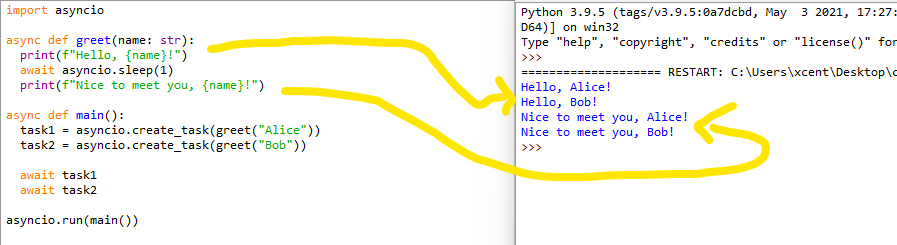
Let’s dive into a simple example of using an async function in Python with asyncio:

import asyncio async def greet(name: str): print(f"Hello, {name}!") await asyncio.sleep(1) print(f"Nice to meet you, {name}!") async def main(): task1 = asyncio.create_task(greet("Alice")) task2 = asyncio.create_task(greet("Bob")) await task1 await task2 asyncio.run(main())

In this example, an async function greet is declared, which prints a greeting message, waits for 1 second using asyncio.sleep, and then prints another message.

The main asynchronous function creates two tasks to call greet with different names, running them concurrently.

Async Function Return


When you want to return a value from an async function, just use the return statement as you would in regular functions. However, keep in mind that the returned value will be wrapped in an asyncio.Future object, not the actual value.

You’ll need to use await to get the value when calling this async function.

For example:

async def calculate_result(): await asyncio.sleep(1) return "Result!" async def main(): result = await calculate_result() print(result) asyncio.run(main())

Here, calculate_result is an async function that returns a value after asynchronously waiting for 1 second. In the main() function, you can use await to get the actual value and print it. ?

Async Function Call


To call an async function, you can’t simply use the normal function call syntax, because doing so would just return a coroutine object, not the actual result of the function. Instead, you have to use the await keyword to call the async function, or use asyncio.create_task or similar functions to run it concurrently:

# Using `await` to call async function
result = await async_function() # Using `asyncio.create_task` to run concurrently
task = asyncio.create_task(async_function())

Remember to always use the appropriate method to call your async functions in order to achieve efficient asynchronous programming with Python’s powerful async/await syntax.

Advanced Async Function Concepts


Next, you’ll explore advanced async function concepts to give you a better understanding of how they work in Python. ? Ready? Let’s dive in!

Async Function Decorator


To create an async function, you’ll use the async def syntax. This means you don’t have to use a decorator, but you can still decorate asynchronous functions with the @some_decorator syntax for better modularity in your programs.

For instance, consider using @asyncio.coroutine with a yield from syntax if you’re working with Python 3.4 or earlier. Or simply upgrade to newer versions! ?

Async Function Type Hint


Type hints help improve the readability of your async code. Specify the input and output types of your async function using the typing module’s Coroutine and asyncio‘s Future objects.

Here’s an example:

from typing import Coroutine
import asyncio async def some_async_function() -> Coroutine[str]: await asyncio.sleep(1) return "done"

Async Function Returns Coroutine


An async function, also known as a coroutine, returns a coroutine object when called. You can use it as a direct call or pass it to an event loop to run the async function using asyncio.run() or loop.run_until_complete().

Keep in mind coroutine objects aren’t executed until you explicitly use an event loop or an await expression.

Async Function Await


When writing async functions, the await keyword is crucial. It allows you to pause the execution of a coroutine and wait for a result without blocking other coroutines.

You’ll often use await with I/O-bound operations, like reading from files, interacting with network services, or retrieving resources, which can take a significant amount of time.

⭐ Recommended: Python __await()__ Magic Method

Async Function Type


An async function’s type is coroutine. So when defining your async function, you’re essentially creating a non-blocking function that allows other functions to run while it waits for results.

To check if an object in Python is a coroutine, you can use inspect.iscoroutine(obj) or inspect.iscoroutinefunction(obj).

Async Function Return Type


Async functions return a coroutine object, but you can also specify the type of the eventual returned value. For instance, if your async function performs some networking tasks and returns JSON data, you can specify the return type as Dict[str, Any].

Here’s how you do that:

from typing import Dict, Any, Coroutine
import asyncio async def fetch_json_data() -> Coroutine[Dict[str, Any]]: # some networking tasks here await asyncio.sleep(2) return {"key": "value"}

Async Function in Different Contexts


In this section, we will explore using async functions in different circumstances, such as within classes, threads, and converting async functions to sync. We will also discuss the concepts of async function sleep and handling functions that were never awaited.

Async Function in Class


When working with classes in Python, you might want to include asynchronous methods. To achieve this, just define your class method with async def. Remember to await your async methods when calling them to ensure proper execution.

Here’s an example:

class MyClass: async def my_async_method(self): await asyncio.sleep(1) async def main(): my_obj = MyClass() await my_obj.my_async_method()

Async Function in Thread


Running async functions in a thread can be tricky due to event loop requirements. Use asyncio.to_thread() for running async functions in threads. This will ensure your async function is executed within the correct thread’s event loop.

For example:

async def my_async_function(): await asyncio.sleep(1) print("Hello from async function!") async def main(): result = await asyncio.to_thread(my_async_function)

Async Function to Sync


If you need to call an async function from synchronous code, you can use asyncio.run() or create an event loop that runs a given coroutine.

Here’s an example of how to run an async function from sync code:

def sync_function(): asyncio.run(my_async_function())

Async Function Sleep


Sometimes, you might want to introduce a delay in your coroutine using asyncio.sleep. This allows other coroutines to run while waiting for IO operations or other events.

Example:

async def delayed_hello(): await asyncio.sleep(1) print("Hello after 1 second!")

? Recommended: Time Delay in Python

Async Function Was Never Awaited


In some cases, you may forget to await an async function, which leads to warnings such as "coroutine 'my_async_function' was never awaited."

To prevent these issues, always ensure you’re using await when calling async functions:

async def my_async_function(): await asyncio.sleep(1) async def main(): # Missing 'await' would lead to a warning await my_async_function()

If you got something out of this article, I’m sure you’ll learn something of this one: ?

? Recommended: Python Async With Statement — Simplifying Asynchronous Code

I promise it has more beautiful pics. ?



https://www.sickgaming.net/blog/2023/05/...-function/

Print this item

  PC - Honkai: Star Rail
Posted by: xSicKxBot - 05-08-2023, 04:27 AM - Forum: New Game Releases - No Replies

Honkai: Star Rail


Honkai: Star Rail features a game world awaiting discovery with elements of myths and legends blended into the space sci-fi story.

Honkai: Star Rail invites players to board the Astral Express and travel across unique worlds, each filled with different adventures and surprises. During the whirlwind trip of a star-chasing ride, players will meet new companions as well as faces familiar to series fans, resolving [Stellaron]-related conflicts, and eventually unraveling the mysteries concealed within.

This role-playing game features a newcomer-friendly strategic turn-based combat system and large maps and mazes involving puzzle-solving and exploration, providing players with epic combat and a journey of discovery full of surprises and rewards.

Publisher: miHoYo

Release Date: Apr 26, 2023


https://www.metacritic.com/game/pc/honkai-star-rail

Print this item