[Tut] Sort a List, String, Tuple in Python (sort, sorted)
5/5 – (1 vote)
Basics of Sorting in Python
In Python, sorting data structures like lists, strings, and tuples can be achieved using built-in functions like sort() and sorted(). These functions enable you to arrange the data in ascending or descending order. This section will provide an overview of how to use these functions.
The sorted() function is primarily used when you want to create a new sorted list from an iterable, without modifying the original data. This function can be used with a variety of data types, such as lists, strings, and tuples.
On the other hand, the sort() method is used when you want to modify the original list in-place. One key point to note is that the sort() method can only be called on lists and not on strings or tuples.
To sort a list using the sort() method, simply call this method on the list object:
Using the sorted() function and the sort() method, you can easily sort various data structures in Python, such as lists, strings, and tuples, in ascending or descending order.
In Python, sorting a list is a common operation that can be performed using either the sort() method or the sorted() function. Both these approaches can sort a list in ascending or descending order.
Using .sort() Method
The sort() method is a built-in method of the list object in Python. It sorts the elements of the list in-place, meaning it modifies the original list without creating a new one. By default, the sort() method sorts the list in ascending order.
Here’s an example of how to use the sort() method to sort a list of numbers:
The sorted() function is another way of sorting a list in Python. Unlike the sort() method, the sorted() function returns a new sorted list without modifying the original one.
Here’s an example showing how to use the sorted() function:
Both the sort() method and sorted() function allow for sorting lists as per specified sorting criteria. Use them as appropriate depending on whether you want to modify the original list or get a new sorted list.
Tuples are immutable data structures in Python, similar to lists, but they are enclosed within parentheses and cannot be modified once created. Sorting tuples can be achieved using the built-in sorted() function.
Ascending and Descending Order
To sort a tuple or a list of tuples in ascending order, simply pass the tuple to the sorted() function.
When sorting a list of tuples, Python sorts them by the first elements in the tuples, then the second elements, and so on. To effectively sort nested tuples, you can provide a custom sorting key using the key argument in the sorted() function.
Here’s an example of sorting a list of tuples in ascending order by the second element in each tuple:
As shown, you can manipulate the sorted() function through its arguments to sort tuples and lists of tuples with ease. Remember, tuples are immutable, and the sorted() function returns a new sorted list rather than modifying the original tuple.
Sorting Strings
In Python, sorting strings can be done using the sorted() function. This function is versatile and can be used to sort strings (str) in ascending (alphabetical) or descending (reverse alphabetical) order.
In this section, we’ll explore sorting individual characters in a string and sorting a list of words alphabetically.
Sorting Characters
To sort the characters of a string, you can pass the string to the sorted() function, which will return a list of characters in alphabetical order. Here’s an example:
text = "python"

sorted_chars = sorted(text)

print(sorted_chars)
Output:
['h', 'n', 'o', 'p', 't', 'y']
If you want to obtain the sorted string instead of the list of characters, you can use the join() function to concatenate them:
The key parameter in Python’s sort() and sorted() functions allows you to customize the sorting process by specifying a callable to be applied to each element of the list or iterable.
Sorting with Lambda
Using lambda functions as the key argument is a concise way to sort complex data structures. For example, if you have a list of tuples representing names and ages, you can sort by age using a lambda function:
An alternative to using lambda functions is the itemgetter() function from the operator module. The itemgetter() function can be used as the key parameter to sort by a specific index in complex data structures:
In some cases, you might need to sort based on a custom comparison function. The cmp_to_key() function from the functools module can be used to achieve this. For instance, you could create a custom comparison function to sort strings based on their lengths:
In Python, you can easily sort lists, strings, and tuples using the built-in functions sort() and sorted(). One notable feature of these functions is the reverse parameter, which allows you to control the sorting order – either in ascending or descending order.
By default, the sort() and sorted() functions will sort the elements in ascending order. To sort them in descending order, you simply need to set the reverse parameter to True. Let’s explore this with some examples.
Suppose you have a list of numbers and you want to sort it in descending order. You can use the sort() method for lists:
numbers = [4, 1, 7, 3, 9]

numbers.sort(reverse=True) # sorts the list in place in descending order

print(numbers) # Output: [9, 7, 4, 3, 1]
If you have a string or a tuple and want to sort in descending order, use the sorted() function:
Keep in mind that the sort() method works only on lists, while the sorted() function works on any iterable, returning a new sorted list without modifying the original iterable.
When it comes to sorting with custom rules, such as sorting a list of tuples based on a specific element, you can use the key parameter in combination with the reverse parameter. For example, to sort a list of tuples by the second element in descending order:
So the reverse parameter in Python’s sorting functions provides you with the flexibility to sort data in either ascending or descending order. By combining it with other parameters such as key, you can achieve powerful and customized sorting for a variety of data structures.
Sorting in Locale-Specific Order
Sorting lists, strings, and tuples in Python is a common task, and it often requires locale-awareness to account for language-specific rules. You can sort a list, string or tuple using the built-in sorted() function or the sort() method of a list. But to sort it in a locale-specific order, you must take into account the locale’s sorting rules and character encoding.
We can achieve locale-specific sorting using the locale module in Python. First, you need to import the locale library and set the locale using the setlocale() function, which takes two arguments, the category and the locale name.
import locale

locale.setlocale(locale.LC_ALL, 'en_US.UTF-8') # Set the locale to English (US)
Next, use the locale.strxfrm() function as the key for the sorted() function or the sort() method. The strxfrm() function transforms a string into a form suitable for locale-aware comparisons, allowing the sorting function to order the strings according to the locale’s rules.
The sorted_strings list will now be sorted according to the English (US) locale, with case-insensitive and accent-aware ordering.
Keep in mind that it’s essential to set the correct locale before sorting, as different locales may have different sorting rules. For example, the German locale would handle umlauts differently from English, so setting the locale to de_DE.UTF-8 would produce a different sorting order.
Sorting Sets
In Python, sets are unordered collections of unique elements. To sort a set, we must first convert it to a list or tuple, since the sorted() function does not work directly on sets. The sorted() function returns a new sorted list from the specified iterable, which can be a list, tuple, or set.
In this example, we begin with a set named sample_set containing four integers. We then use the sorted() function to obtain a sorted list named sorted_list_from_set. The output will be:
[1, 2, 4, 9]
The sorted() function can also accept a reverse parameter, which determines whether to sort the output in ascending or descending order. By default, reverse is set to False, meaning that the output will be sorted in ascending order. To sort the set in descending order, we can set reverse=True.
It’s essential to note that sorting a set using the sorted() function does not modify the original set. Instead, it returns a new sorted list, leaving the original set unaltered.
Sorting by Group and Nested Data Structures
Sorting nested data structures in Python can be achieved using the built-in sorted() function or the .sort() method. You can sort a list of lists or tuples based on the value of a particular element in the inner item, making it useful for organizing data in groups.
To sort nested data, you can use a key argument along with a lambda function or the itemgetter() method from the operator module. This allows you to specify the criteria based on which the list will be sorted.
For instance, suppose you have a list of tuples representing student records, where each tuple contains the student’s name and score:
students = [("Alice", 85), ("Bob", 78), ("Charlie", 91), ("Diana", 92)]
To sort the list by the students’ scores, you can use the sorted() function with a lambda function as the key:
Alternatively, you can use the itemgetter() method:
from operator import itemgetter sorted_students = sorted(students, key=itemgetter(1))
This will produce the same result as using the lambda function.
When sorting lists containing nested data structures, consider the following tips:
Use the lambda function or itemgetter() for specifying the sorting criteria.
Remember that sorted() creates a new sorted list, while the .sort() method modifies the original list in-place.
You can add the reverse=True argument if you want to sort the list in descending order.
Handling Sorting Errors
When working with sorting functions in Python, you might encounter some common errors such as TypeError. In this section, we’ll discuss how to handle such errors and provide solutions to avoid them while sorting lists, strings, and tuples using the sort() and sorted() functions.
TypeError can occur when you’re trying to sort a list that contains elements of different data types. For example, when sorting an unordered list that contains both integers and strings, Python would raise a TypeError: '<' not supported between instances of 'str' and 'int' as it cannot compare the two different data types.
Consider this example:
mixed_list = [3, 'apple', 1, 'banana']

mixed_list.sort()

# Raises: TypeError: '<' not supported between instances of 'str' and 'int'
To handle the TypeError in this case, you can use error handling techniques such as a try-except block. Alternatively, you could also preprocess the list to ensure all elements have a compatible data type before sorting. Here’s an example using a try-except block:
mixed_list = [3, 'apple', 1, 'banana']

try: mixed_list.sort()

except TypeError: print("Sorting error occurred due to incompatible data types")
Another approach is to sort the list using a custom sorting key in the sorted() function that can handle mixed data types. For instance, you can convert all the elements to strings before comparison:
With these techniques, you can efficiently handle sorting errors that arise due to different data types within a list, string, or tuple when using the sort() and sorted() functions in Python.
Sorting Algorithm Stability
Stability in sorting algorithms refers to the preservation of the relative order of items with equal keys. In other words, when two elements have the same key, their original order in the list should be maintained after sorting. Python offers several sorting techniques, with the most common being sort() for lists and sorted() for strings, lists, and tuples.
Python’s sorting algorithms are stable, which means that equal keys will have their initial order preserved in the sorted output. For example, consider a list of tuples containing student scores and their names:
students = [(90, "Alice"), (80, "Bob"), (90, "Carla"), (85, "Diana")]
Sorted by scores, the list should maintain the order of students with equal scores as in the original list:
Notice that Alice and Carla both have a score of 90 but since Alice appeared earlier in the original list, she comes before Carla in the sorted list as well.
To take full advantage of stability in sorting, the key parameter can be used with both sort() and sorted(). The key parameter allows you to specify a custom function or callable to be applied to each element for comparison. For instance, when sorting a list of strings, you can provide a custom function to perform a case-insensitive sort:
How to sort a list of tuples in descending order in Python?
To sort a list of tuples in descending order, you can use the sorted() function with the reverse=True parameter. For example, for a list of tuples tuples_list, you can sort them in descending order like this:
sorted_tuples = sorted(tuples_list, reverse=True)
What is the best way to sort a string alphabetically in Python?
The best way to sort a string alphabetically in Python is to use the sorted() function, which returns a sorted list of characters. You can then join them using the join() method like this:
What are the differences between sort() and sorted() in Python?
sort() is a method available for lists, and it sorts the list in-place, meaning it modifies the original list. sorted() is a built-in function that works with any iterable, returns a new sorted list of elements, and doesn’t modify the original iterable.
Keep in mind that this will create a new list. If you want to create a new tuple instead, you can convert the sorted list back to a tuple like this:
sorted_tuple = tuple(sorted_tuple)
How do you sort a string in Python without using the sort function?
You can sort a string without using the sort() function by converting the string to a list of characters, using a list comprehension to sort the characters, and then using the join() method to create the sorted string:
string = "hello"

sorted_list = [char for char in sorted(string)]

sorted_string = "".join(sorted_list)
What is the method to sort a list of strings with numbers in Python?
If you have a list of strings containing numbers and want to sort them based on the numeric value, you can use the sorted() function with a custom key parameter. For example, to sort a list of strings like ["5", "2", "10", "1"], you can do:
This will sort the list based on the integer values of the strings: ["1", "2", "5", "10"].
Python One-Liners Book: Master the Single Line First!
Python programmers will improve their computer science skills with these useful one-liners.
Python One-Linerswill teach you how to read and write “one-liners”: concise statements of useful functionality packed into a single line of code. You’ll learn how to systematically unpack and understand any line of Python code, and write eloquent, powerfully compressed Python like an expert.
The book’s five chapters cover (1) tips and tricks, (2) regular expressions, (3) machine learning, (4) core data science topics, and (5) useful algorithms.
Detailed explanations of one-liners introduce key computer science concepts and boost your coding and analytical skills. You’ll learn about advanced Python features such as list comprehension, slicing, lambda functions, regular expressions, map and reduce functions, and slice assignments.
You’ll also learn how to:
Leverage data structures to solve real-world problems, like using Boolean indexing to find cities with above-average pollution
Use NumPy basics such as array, shape, axis, type, broadcasting, advanced indexing, slicing, sorting, searching, aggregating, and statistics
Calculate basic statistics of multidimensional data arrays and the K-Means algorithms for unsupervised learning
Create more advanced regular expressions using grouping and named groups, negative lookaheads, escaped characters, whitespaces, character sets (and negative characters sets), and greedy/nongreedy operators
Understand a wide range of computer science topics, including anagrams, palindromes, supersets, permutations, factorials, prime numbers, Fibonacci numbers, obfuscation, searching, and algorithmic sorting
By the end of the book, you’ll know how to write Python at its most refined, and create concise, beautiful pieces of “Python art” in merely a single line.
Garrett, the Master Thief, steps out of the shadows into the City. In this treacherous place, where the Baron’s Watch spreads a rising tide of fear and oppression, his skills are the only things he can trust. Even the most cautious citizens and their best-guarded possessions are not safe from his reach. https://www.youtube.com/watch?v=HJk-d8YBck0&ab_channel=GameSpot
Remnant II is the sequel to the best-selling game Remnant: From the Ashes that pits survivors of humanity against new deadly creatures and god-like bosses across terrifying worlds. Play solo or co-op with two other friends to explore the depths of the unknown to stop an evil from destroying reality itself. To succeed, players will need to rely on their own skills and those of their team to overcome the toughest challenges and to stave off humanity's extinction.
Open Liberty Java runtime now available to Red Hat Runtimes subscribers
Open Liberty is a lightweight, production-ready Java runtime for containerizing and deploying microservices to the cloud, and is now available as part of a Red Hat Runtimes subscription. If you are a Red Hat Runtimes subscriber, you can write your Eclipse MicroProfile and Jakarta EE apps on Open Liberty and then run them in containers on Red Hat OpenShift, with commercial support from Red Hat and IBM.
Develop cloud-native Java microservices
Open Liberty is designed to provide a smooth developer experience with a one-second startup time, a low memory footprint, and our new dev mode:
Open Liberty provides a full implementation of MicroProfile 3 and Jakarta EE 8. MicroProfile is a collaborative project between multiple vendors (including Red Hat and IBM) and the Java community that aims to optimize enterprise Java for writing microservices. With a four-week release schedule, Liberty usually has the latest MicroProfile release available soon after the spec is published.
Also, Open Liberty is supported in common developer tools, including VS Code, Eclipse, Maven, and Gradle. Server configuration (e.g., adding or removing a capability, or “feature,” to your app) is through an XML file. Open Liberty’s zero migration policy means that you can focus on what’s important (writing your app!) and not have to worry about APIs changing under you.
Deploy in containers to any cloud
When you’re ready to deploy your app, you can just containerize it and deploy it to OpenShift. The zero migration principle means that new versions of Open Liberty features will not break your app, and you can control which version of the feature your app uses.
Monitoring live microservices is enabled by MicroProfile Metrics, Health, and OpenTracing, which add observability to your apps. The emitted metrics from your apps and from the Open Liberty runtime can be consolidated using Prometheus and presented in Grafana.
Learn with the Open Liberty developer guides
Our Open Liberty developer guides are available with runnable code and explanations to help you learn how to write microservices with MicroProfile and Jakarta EE, and then to deploy them to Red Hat OpenShift.
[Oracle Blog] Easily install Oracle Java on Oracle Linux in OCI: It’s a perfect ma
Oracle Java is supported on Oracle's long-standing and highly performant operating system, Oracle Linux. Learn how you can use RPMs available from the OCI yum service to easily install Oracle Java on an Oracle Linux system running on OCI.
[Tut] Top 7 Ways to Use Auto-GPT Tools in Your Browser
5/5 – (1 vote)
Installing Auto-GPT is not simple, especially if you’re not a coder, because you need to set up Docker and do all the tech stuff. And even if you’re a coder you may not want to go through the hassle. In this article, I’ll show you some easy Auto-GPT web interfaces that’ll make the job easier!
Tool #1 – Auto-GPT on Hugging Face
Hugging Face user aliabid94 created an Auto-GPT web interface (100% browser-based) where you can put in your OpenAI API key and try out Auto-GPT in seconds.
The example shows the Auto-GPT run of an Entrepreneur-GPT that is designed to grow your Twitter account.
Tool #2 – AutoGPTJS.com
I haven’t tried autogptjs.com but the user interface looks really compelling and easy to use. Again, you need to enter your OpenAI API key and you should create a new one and revoke it after use. Who knows where the keys are really stored?
Well, this project looks trustworthy as it’s also available on GitHub.
Tool #3 – AgentGPT
AgentGPT is an easy-to-use browser based autonomous agent based on GPT-3.5 and GPT-4. It is similar to Auto-GPT but uses its own repository and code base.
AutoGPT UI, built with Nuxt.js, is a user-friendly web tool for managing AutoGPT workspaces. Users can easily upload AI settings and supporting files, adjust AutoGPT settings, and initiate the process via our intuitive GUI. It supports both individual and multi-user workspaces. Its workspace management interface enables easy file handling, allowing drag-and-drop features and seamless interaction with source or generated content.
Some More Comments…
Before you go, here are a few additional notes.
Token Usage and Revoking Keys
To access Auto-GPT, you need to use the OpenAI API key, which is essential for authenticating your requests. The token usage depends on the API calls you make for various tasks.
You should set a spending limit and revoke your API keys after putting them in any browser-based Auto-GPT tool. After all, you don’t know where your API keys will end up so I use a strict one-key-for-one-use policy and revoke all keys directly after use.
3 More Tools
The possibilities with Auto-GPT innovation are vast and ever-expanding.
For instance, researchers and developers are creating new AI tools such as Godmode (I think it’s based on BabyAGI) to easily deploy AI agents directly in the web browser.
With its potential to grow and adapt, Auto-GPT is poised to make an impact on numerous industries, driving further innovation and advancements in AI applications.
AutoGPT Chrome extension is another notable add-on, providing an easily accessible interface for users.
Yesterday I found a new tool called JARVIS (HuggingGPT), named after the J.A.R.V.I.S. artificial intelligence from Ironman, that is an Auto-GPT alternative created by Microsoft research that uses not only GPT-3.5 and GPT-4 but other LLMs as well and is able to generate multimedia output such as audio and images (DALL-E). Truly mindblowing times we’re living in.
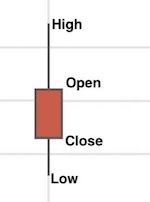
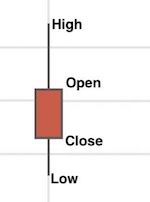
The ChartJS library provides modules for creating candlestick charts. It also supports generating OHLC (Open High Low Close) charts.
The candlestick and OHLC charts are for showing financial data in a graph. Both these charts look mostly similar but differ in showing the ‘open’ and ‘close’ points.
In this article, we will see JavaScript code for creating a candlestick chart using ChartJs.
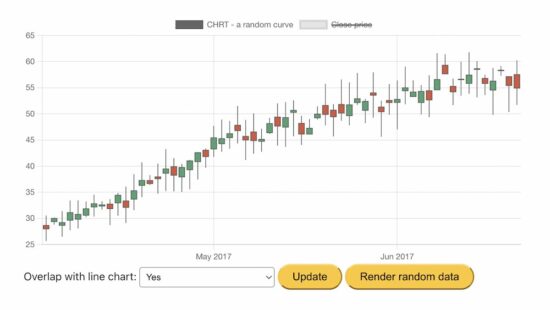
This example generates the random data for the candlestick graph on loading the page.
We have seen many examples of creating ChartJS JavaScript charts. If you are new to the ChartJS library, how to create a bar chart is a simple example for getting started.
How to get and plot candlestick random data via JavaScript?
This JavaScript code uses the chartjs.chart.financial.js script functions to create a candlestick chart.
It generates and uses random bar data for the chart. The random data of each bar includes a horizontal coordinate, x, and four vertical coordinates, o, h, l, and c (open, high, low, close).
It performs the below steps during the chart generation process.
It makes random bar data by taking the initial date and the number of samples.
It initiates the ChartJS class to set the chart type, dataset, and options as we did in other ChartJS examples.
It sets the random bar data to the ChartJS dataset property and updates the chart instance created in step 3.
It checks if the user sets the “Mixed” option and adds the close points to the dataset if yes.
Step 5 overlaps a line chart of close points on the rendered candlestick chart.
chart-data-render.js
var barCount = 60;

var initialDateStr = '01 Apr 2017 00:00 Z'; var ctx = document.getElementById('candlestick-chart').getContext('2d');

ctx.canvas.width = 800;

ctx.canvas.height = 400; var barData = getRandomData(initialDateStr, barCount);

function lineData() { return barData.map(d => { return { x: d.x, y: d.c } }) }; var chart = new Chart(ctx, { type: 'candlestick', data: { datasets: [{ label: 'Random Curve', data: barData }] }

}); function randomNumber(min, max) { return Math.random() * (max - min) + min;

} function randomBar(date, lastClose) { var open = +randomNumber(lastClose * 0.95, lastClose * 1.05).toFixed(2); var close = +randomNumber(open * 0.95, open * 1.05).toFixed(2); var high = +randomNumber(Math.max(open, close), Math.max(open, close) * 1.1).toFixed(2); var low = +randomNumber(Math.min(open, close) * 0.9, Math.min(open, close)).toFixed(2); return { x: date.valueOf(), o: open, h: high, l: low, c: close }; } function getRandomData(dateStr, count) { var date = luxon.DateTime.fromRFC2822(dateStr); var data = [randomBar(date, 30)]; while (data.length < count) { date = date.plus({ days: 1 }); if (date.weekday <= 5) { data.push(randomBar(date, data[data.length - 1].c)); } } return data;

}

var update = function () { var mixed = document.getElementById('mixed').value; var closePrice = { label: 'Close Price', type: 'line', data: null }; // put data in chart if (mixed === 'true') { closePrice = { label: 'Close Price', type: 'line', data: lineData() }; } else { } chart.config.data.datasets = [ { label: 'Random Curve', data: barData }, closePrice ] chart.update();

};

document.getElementById('update').addEventListener('click', update); document.getElementById('randomizeData').addEventListener('click', function () { barData = getRandomData(initialDateStr, barCount); update();

});
More functionalities and features are there in the ChartJS module. It allows customizing the output candlestick chart. This example enables two of them.
Overlap line data over the close points of the candlestick bars.
I am reloading the candlestick with a new set of random bar data.
ChartJS candlestick functionalities
Some possible customization options for the candlestick chart are listed below.
To change the bar type between candlestick and OHLC. The OHLC chart will display the ‘open’ and ‘close’ points by horizontal lines on the candle body.
To change the scale type, border, and color.
To allow overlapping line charts with the rendered candlestick chart to highlight the close points of the bar data.
[www.indiegala.com] The definitive MK11 experience! Take control of Earthrealm's protectors in 2 acclaimed, time-bending Story Campaigns as they race to stop Kronika from rewinding time & rebooting history. Feat. the complete 37-fighter roster, incl. Rain, Mileena & Rambo. https://www.youtube.com/watch?v=f8o9bysnzoQ&ab_channel=MortalKombat
- Click on the GET Button - Verify that the price is zero - Click on the Place Order Button - That's it, the game will be added to you Epic Games Account


 Recommended:


 Image Source:







 Recommended: