Huawei To Help Create Nation’s First Open-Source Foundation
Huawei Technologies Co said it plans to partner with other companies to set up China’s first open-source software foundation, which is expected to begin to operate in a month or two to expand the nation’s software community. The plan for the software foundation came after GitHub, the world’s largest host of source code, prevented in July users in Iran and other nations sanctioned by the United States government from accessing portions of its service. The incident highlights increasing geopolitical interference with global open-source tech communities, which are supposed to be fair and open to all, analysts said. (Source: China.org)
Fedora Linux packages a suite of graphical software for content creators. This article introduces a use case and suggestions for creating tutorial videos with Kdenlive.
Plan tutorial
A question that you need to address is whether text and images are appropriate to share your knowledge. If you create resources for learners of graphical software, a tutorial video is something to consider.
Review abstract and draft script
An abstract in content writing helps reviewers look for key points of your tutorial. Depending on your workflow, you can submit this abstract to reviewers for comments, questions, or updates.
Once an abstract of the tutorial video is agreed upon by the reviewers, a video script is created and works like a manuscript for your tutorial. Break down process steps into each sequence. Check this link for an example.
Screen recording
Use your preferred recording tool that comes with the desktop environment or enable the ‘Screen Grab’ option in Kdenlive in the ‘View’ menu. Alternatively, you can install OBS Studio.
Kdenlive can process various container formats. You should transcode to a high-quality lossless matroska file (.mkv) that ensures high quality and compression ratio.
Installation
Kdenlive supports Linux, Mac, Windows and FreeBSD, which encourages collaboration among content creators. If you are Linux users, go to the packager manager of your distro to install Kdenlive. If you use Fedora Linux, we recommend the Fedora Linux RPM version or Flatpak.
Set up Kdenlive
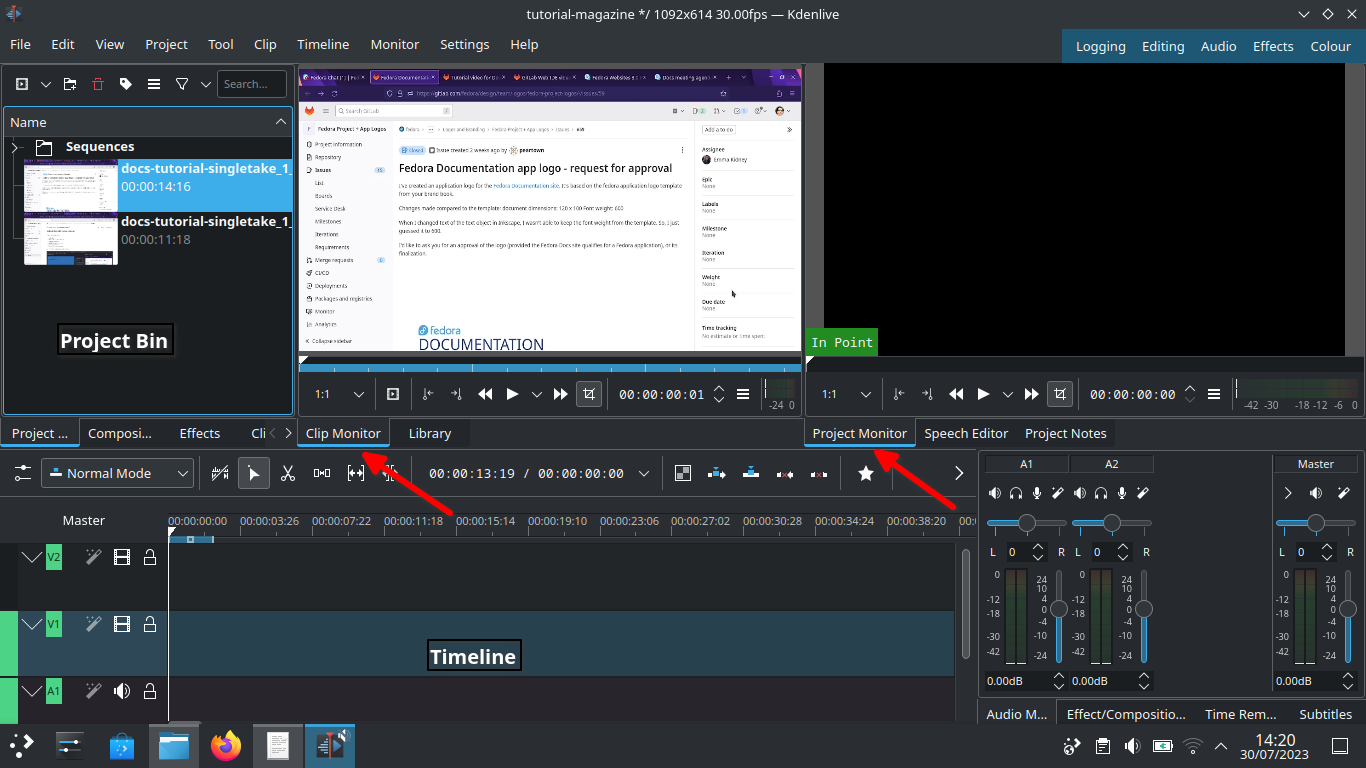
Let’s start with Kdenlive’s user interface and focus on three sections – Project bin, Monitors and Timeline.
Kdenlive user interface
Project bin
Load video clips into Project Bin on the upper left. The Project Bin lists all the clips that are associated with your project. You can drag and drop the clips onto Project Bin.
Monitors
Clip Monitor on the left window displays the unedited clip that is currently selected in The Project Bin. If you have loaded multiple takes of the same scene (process steps), you need to know which one you’re going to choose and edit. If you changed your mind during editing processes, that’s no problem. You can move around a sequence with timeline and tracks after the initial cut.
The Project Monitor is a place to watch your edited footage.
Timeline
Timeline is a place for all selected clips you edit. Drag and drop the clips directly on to the Timeline from the Project Bin.
Editing processes
Cut and stitch
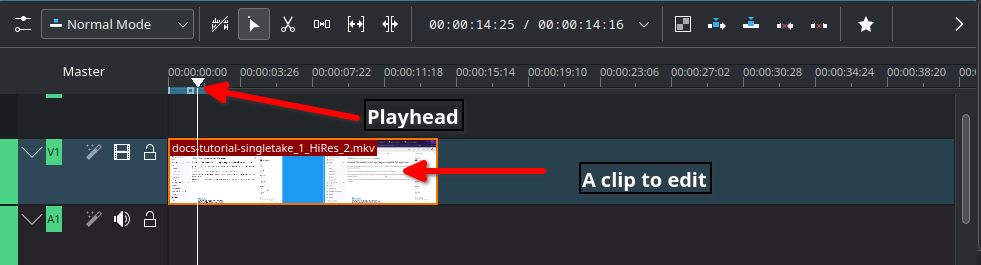
Timeline cursor, also known as playhead, indicates the position of clips you are working on and previewing in the Project Monitor.
Timeline
The initial cut means editing on a scene by scene basis until you’re ready to stitch tracks together into a complete piece.
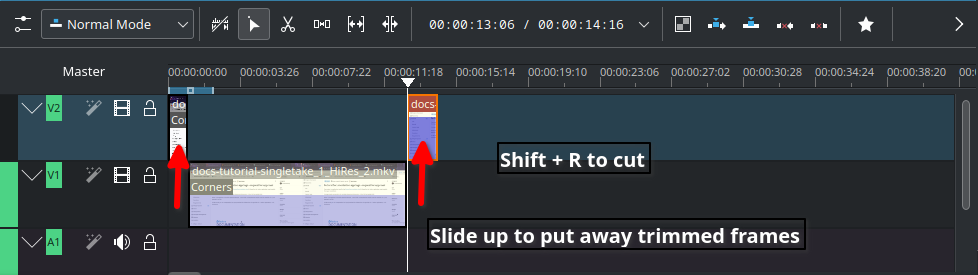
Cut when; – Delayed, boring or repetitive part was recorded. This happens often when recording a scene for loading apps or waiting for rendering on web browser – Transition pieces when a scene starts and ends – Trim off a few frames before you tidy up – Ensure basic continuity – let it flow!
In Timeline, video tracks (V2, V1) are cascaded up whereas audio tracks (A1, A2) are cascaded down as default.
Slide up trimmed video track and stitch frames you want to keep. Delete trimmed frames when you’re sure you don’t need them.
Cut
Timeline works like chef’s chopping board and takes time for new users to get familiar with it. Check the upstream documentation on this link.
Text effects with Titles
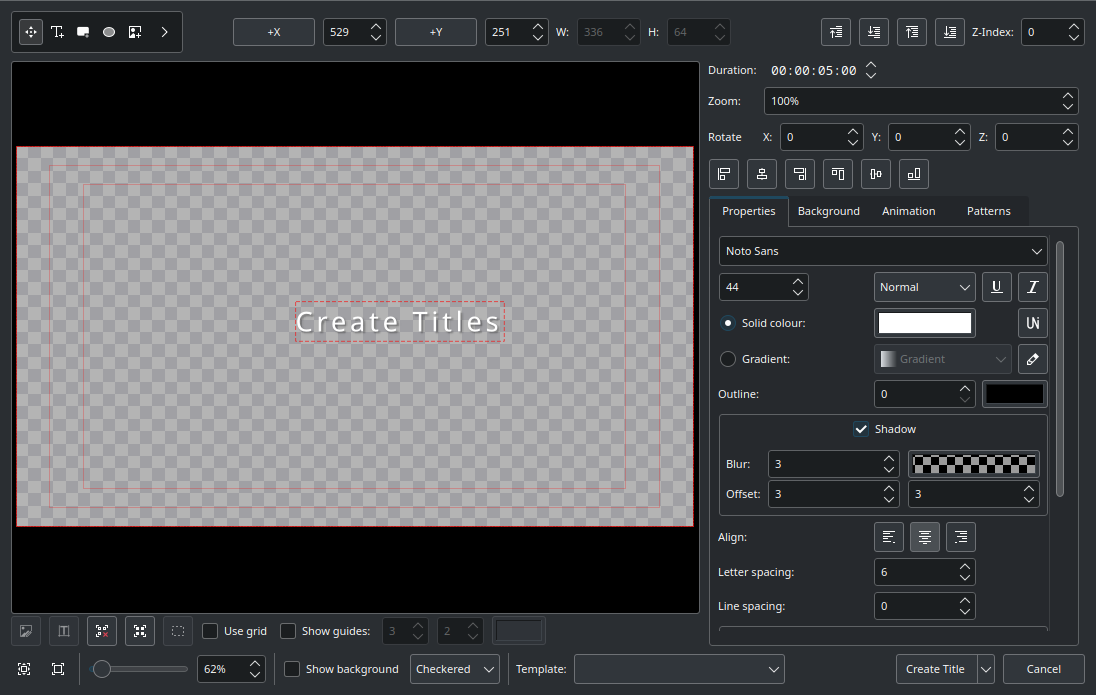
Titles are text elements that you can overlay to the timeline. To create Titles, right-click in the The Project Bin and open the Titles window as shown below. Select ‘Create Title’ to save it. Drag and drop the Title to the video track 2 in timeline. Check this link for more information.
Titler
Sound effects
Ambient music could jazz up your video tutorial for the audience.
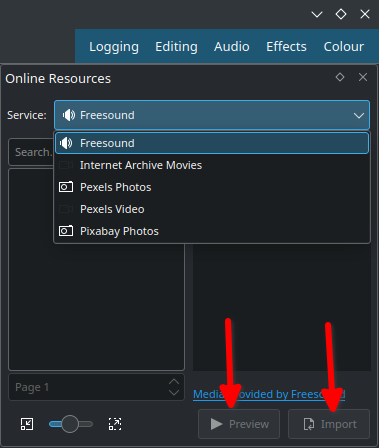
Go to top left corner of the Project Bin and select the arrow to list options. Select ‘Online Resources’. At the top right, ‘Service’ drop-down menu, choose ‘Freesound’. Select ‘Preview’ to play back and import to download and overlay to A1 audio track.
Sound
Transition and finishing touch
Text and sounds effects will blend well if tracks have transitions. Check this link for fine-tuning your final cut video.
Rendering
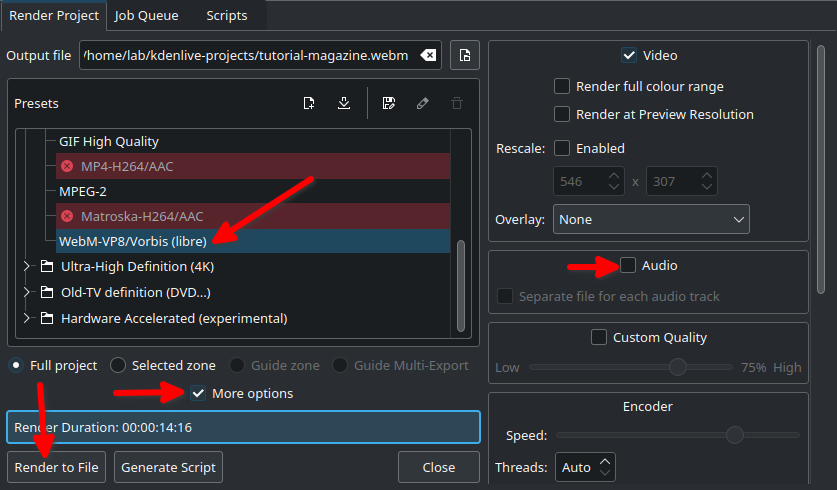
In the Render dialogue box (Ctrl + Return) on Project Bin, choose WebM as output file, select ‘More options’ to de-select the Export Audio option, and select ‘Render to File’ to save the clip.
Rendering
WebM offers good compression and output.
Rendering speed is dependent on the number of CPU cores in your computer. If you work with high quality footage and visual effects in a computer with low-end CPU and RAM, adapt your workflow with proxy clips and use script for rendering.
Share your tutorial video
PeerTube is a video sharing platform that runs on GNU/Linux infra, and Open Source/Free Software. Just like Vimeo or YouTube, you can embed your content to your documentation site from PeerTube.
Credits and acknowledgements
Big thanks to Seth Kenlon who provided me with a great deal of inspiration from his publication in Opensource.com and Kdenlive workshop.
Kdenlive Version 23.04.2 was used for this article.
First, I’d like to announce, to those who are not aware already, the name of the 1.20 Minecraft update. Trails & Tales! Agnes explained in the Minecraft Monthly video released earlier today that this update is about worldbuilding, storytelling, and self-expression. It seems very fitting since everyone’s journey in Minecraft is different and every one of us has stories and experiences to share.
Changes in 1.19.4 Pre-release 3
Potions have had their colors adjusted to make them more distinguishable from each other
Technical Changes in 1.19.4 Pre-release 3
Pressing F3+S will now dump contents of dynamic textures (like atlases, maps, etc.) to screenshots/debug/
Experimental Feature Changes in 1.19.4 Pre-release 3
Pottery Shards
Updated the textures of the Archer Pottery Shard based on community feedback
Fixed Bugs in 1.19.4 Pre-release 3
MC-148458 – Ridable mobs aren’t knocked back upon death
MC-250486 – Error saving GUI scale option when toggling fullscreen while the fullscreen resolution is changed
MC-258561 – Endermen teleport away instead of taking damage from end crystal, TNT, and wither skull explosions
MC-259666 – Reloading a resource pack that has a custom texture atlas for a second time causes severe FPS lag on the client
MC-260277 – potted_cherry_sapling and potted_torchflower not part of #flower_pots block tag
MC-260451 – Inventory character with semi-transparent outer skin layer not rendered correctly when looking right
MC-260456 – Certain potions are still indistinguishable by color
MC-260470 – Endermen can’t dodge arrows fired from a dispenser
MC-260474 – Players and mobs are no longer affected by knockback upon death
MC-260501 – Cannot delete previous snapshot world in the launcher
MC-260579 – Crash when a guardian deals damage to itself after removing thorns from avoids_guardian_thorns
MC-260627 – Dolphins with passengers either accelerate to ludicrous speed or are immobilized completely
Technical Changes in 1.19.4 Pre-release 2
Mob Behavior
Only mobs in the dismounts_underwater entity tag will now force the rider to dismount when underwater
Changes for Experimental Features in 1.19.4 Pre-release 2
Cherry Biome and Wood Set
Updated the texture for Pink Petals
Updated textures for the Cherry Door, Cherry Sapling, and Cherry Boat with Chest
Decorated Pot
Updated the neck of the Decorated Pot model
With the former pot, we decided to make the pot’s neck clip with blocks, so it would be extra flexible to build with
However, this had some Z-fighting issues where 2 objects are in the same exact position and cause flickering
This is prevented with the new and more complex block model
Fixed Bugs in 1.19.4 Pre-release 2
MC-137552 – Loaded crossbows look unloaded in item frames and when dropped on the ground
MC-229293 – Casting issue: Broken blocks drop items in the wrong position at high distances
MC-259208 – Zombie riding chicken or skeleton riding spider not considered controllers by /execute on controller command
MC-259609 – Tooltips from selected buttons and sliders don’t disappear when expected
MC-259831 – UI Buttons break certain resource packs as of 23w06a
MC-259839 – Duplicated “minecraft:freeze” in damage_type tag “bypasses_armor”
MC-259885 – Upon entering the credits screen while in F1 mode, the Minecraft: Java Edition logo does not display correctly
MC-259961 – item_display does not take some nbt tags into account
MC-259979 – Striders and blazes do not take five times the damage when using /damage with freeze type
MC-260208 – Display entities in spawn chunks with interpolation_duration greater than 0 visually reset to default transformation on rejoin
MC-260268 – Can’t scroll using arrows in the “Telemetry Data Collection” screen
MC-260324 – Cherry Boat with Chest item texture has a misplaced pixel
MC-260335 – Clicking with an item that is out of stock in the villager trading menu with sufficient payment will allow the purchase of the item regardless
Experimental 1.20 worlds created in the previous snapshot (23w07a) can no longer be opened in this version
Changes in 1.19.4 Pre-release 1
The enchantment glint for items in the inventory has been made more visible
The default value of the “Glint Strength” setting has been reduced to 75%
Potions no longer have an enchantment glint due to it obscuring the color of the potion contents
Added a notification system for Realms to tell you important information about your Realm
Accessibility
Added a built-in resource pack that enhances the contrast of UI elements
The resource pack can be enabled in the Accessibility Options screen or manually in the Resource Pack screen
This is only available in the menus for now, but we’ll be looking to bring this to gameplay UIs in the future as well
Updated Create New World Screen
The appearance of the tab bar in the Create New World screen has been updated
Tabs now have unique visuals instead of being traditional buttons
The tabs now align with the center of the screen
The content has been aligned to the top of the screen
Technical Changes in 1.19.4 Pre-release 1
The resource pack version is now 13
Changed the following game events:
item_interact_finish now has a vibration frequency of 2 instead of 14
New Damage Type Tag: bypasses_cooldown – damage types with this tag bypass the regular invincibility time after taking damage
New Entity Type Tag: fall_damage_immune – entity types with this tag do not take fall damage
Resource Pack Format
The enchantment glint now has two separate texture files: enchanted_glint_entity.png and enchanted_glint_item.png
Commands
Execute Positioned Over
New execute sub-command for finding positions on top of a heightmap. Changes the height of the execution position to be on top of the given heightmap. Syntax:
execute positioned over <heightmap>
Heightmaps
A heightmap records the highest position in a column of blocks according to some criteria. Available options:
world_surface: Any non-air block
motion_blocking: Any motion-blocking material (e.g. ignores flowers and grass)
motion_blocking_no_leaves: Any non-leaf motion-blocking material
ocean_floor: Any non-fluid motion-blocking material
Changes for Experimental Features in 1.19.4 Pre-release 1
The Brush crafting recipe now uses a Feather, Copper Ingot, and Stick in a vertical line
The Sniffer Spawn Egg colors have been updated
The recipe for the Decorated Pot made of all Bricks can now be found in the Recipe Book
Fixed Bugs in 1.19.4 Pre-release 1
MC-106484 – Some potions are indistinguishable by color
MC-132200 – Ghost block hoppers appear if summoned by a command to the powered location
MC-253210 – Goats will panic when receiving fall damage
MC-253211 – Frogs will panic when receiving fall damage
MC-256484 – Sitting camels don’t stand up and begin following players that are tempting them with their favorite food
MC-256489 – Sitting camels that are in love don’t attempt to stand up and approach one another to breed
MC-256731 – The sounds of camels recovering aren’t controlled by the “Friendly Creatures” sound slider
MC-256861 – Camels panic when receiving fall damage
MC-259192 – Server/client position desync when running /ride too fast and manually dismounting
MC-259246 – Passengers on an ender dragon ride too high
MC-259576 – The passenger’s riding position is too high on a phantom
MC-259613 – Enchantment glint is hardly noticeable on some items, even when the Glint Strength is set to 100%
MC-259630 – Camels, horses, and mules bounce high into the air when being ridden across the water
MC-259882 – Axolotls no longer give the Regeneration effect to nearby players after they kill a mob, and do not grant “The Healing Power of Friendship!” advancement
MC-259917 – Entities immune to fall damage are damaged when using minecraft:fall damage type in /damage
MC-259918 – Text scrolling speed isn’t accessible-friendly
MC-259920 – The “ITEM_INTERACT_FINISH” game event overrides other game events causing several actions not to produce their intended vibration frequency
MC-260030 – Starting data.Main for data generation crashes
MC-260033 – Torchflowers cannot be used to craft suspicious stew
MC-260035 – Torchflower seeds do not tempt chickens and parrots
MC-260051 – Bees are not tempted by or attempt to pollinate Pink Petals and Torchflowers
MC-260059 – Pigs do not seem to spawn in the Cherry Grove biome
MC-260071 – Sniffer Digging Sounds can be heard from way too far
MC-260089 – Sniffers panic when receiving fall damage
MC-260092 – Sniffers’ hitboxes are too small resulting in sniffers not being rendered from certain angles despite being visible on the screen
MC-260098 – Sniffers aren’t required for the “Two by Two” advancement
MC-260102 – Torchflower seeds don’t contribute to the “A Seedy Place” advancement
MC-260107 – Sniffers don’t swim properly and their walking animations freeze when in water
MC-260109 – Sniffers do not rotate their head to look at the player
MC-260118 – Disabling experimental features on the world creation screen causes pack validation to fail
MC-260121 – Hoppers are ghost blocks for other players when placed on jukeboxes that are playing music
MC-260125 – Sniffer’s head occasionally disappears
MC-260126 – Using the pick block function on grown torchflower crop gives torchflower seeds instead of the plant item
MC-260149 – Cherry logs can’t be used to craft campfires
MC-260156 – The sound of the torchflower being broken after growing is different than the sound of it breaking after being placed
MC-260157 – On existing snapshot servers, cherry grove biomes cannot be found with “/locate”, nor do they generate
MC-260168 – Torchflower crop aren’t part of the #crops block tag
MC-260171 – Cherry Leaves and Pink Petals aren’t part of the #flower block tag
MC-260172 – Torchflower isn’t part of the #flowers block or item tags
MC-260181 – Torchflower seeds are not grouped with other seeds in the creative inventory
MC-260189 – Cherry Sapling is not part of the #saplings item tag
MC-260191 – Cherry Leaves aren’t part of the #leaves and #complete_find_tree_tutorial item tags
MC-260192 – You can’t make Charcoal with Cherry Logs or Wood
MC-260193 – Cherry Logs and Wood can’t be used as fuel in furnaces
MC-260194 – Create new world screen appears even when world is created; clicking on the button causes to freeze or crash
MC-260195 – Cherry Logs and Wood are missing from the #log, #logs_that_burn and #complete_find_tree_tutorial item tags
MC-260209 – breaks_decorated_pots Item Tag is in the Vanilla datapack, not 1.20
MC-260210 – Brush Recipe is in the Vanilla datapack, not 1.20
Get the Pre-Release
Pre-releases are available for Minecraft: Java Edition. To install the Pre-release, open up the Minecraft Launcher and enable snapshots in the “Installations” tab.
Activision News - Activision Blizzard Recommends Shareholders Reject Mini-Tender Off
SANTA MONICA, Calif.–(BUSINESS WIRE)– Activision Blizzard, Inc. (Nasdaq: ATVI) today announced it has received notice of an unsolicited mini-tender offer by TRC Capital Corporation to purchase up to 2 million shares of Activision Blizzard common stock at a price of $63.25 per share in cash. TRC Capital’s offering price is 4.7 percent below the closing price per share of Activision Blizzard common stock on January 5, 2018, the last trading day prior to the date of the offer to purchase, and 10.1 percent below the closing price of Activision Blizzard common stock on January 17, 2018, the last trading day prior to the date of this news release. The offer is for approximately 0.26 percent of the Activision Blizzard common shares outstanding.
Activision Blizzard does not endorse TRC Capital’s unsolicited mini-tender offer and recommends that stockholders not tender their shares in response to the offer because the offer is at a price below the current market price for Activision Blizzard shares and is subject to many conditions. Activision Blizzard is not associated in any way with TRC Capital, its mini-tender offer or the offer documents.
TRC Capital has made many similar mini-tender offers for shares of other companies. Mini-tender offers seek to acquire not more than 5 percent of a company’s outstanding shares, thereby avoiding many disclosure and procedural requirements of the U.S. Securities and Exchange Commission (SEC) that apply to offers for more than 5 percent of a company’s outstanding shares. As a result, investors are not provided with the same level of protections in mini-tender offers as are provided for larger tender offers under U.S. securities laws.
The SEC has cautioned investors that some bidders making mini-tender offers at below-market prices are “hoping that they will catch investors off guard if the investors do not compare the offer price to the current market price.” More on the SEC’s guidance to investors on mini-tender offers is available at: https://www.sec.gov/reportspubs/investor-publications/investorpubsminitendhtm.html
Activision Blizzard urges investors to obtain current market quotations for their shares, review the conditions to the offer, consult with their broker or financial advisor and exercise caution with respect to TRC Capital’s offer. Activision Blizzard recommends that stockholders who have not responded to TRC Capital’s offer take no action. Stockholders who have already tendered their shares may withdraw them at any time prior to the expiration of the offer by following the procedures described in TRC Capital’s offering documents. The offer is currently scheduled to expire at 12:01 a.m. New York City time on Wednesday, February 7, 2018. TRC Capital may extend the offering period in its discretion.
Activision Blizzard requests that a copy of this press release be included with all distributions of materials relating to TRC Capital’s mini-tender offer related to Activision Blizzard’s shares of common stock.
About Activision Blizzard
Activision Blizzard, Inc., a member of the Fortune 500 and S&P 500, is the world’s most successful standalone interactive entertainment company. We delight hundreds of millions of monthly active users around the world through franchises including Activision’s Call of Duty®, Destiny and Skylanders®, Blizzard Entertainment’s World of Warcraft®, Overwatch®, Hearthstone®, Diablo®, StarCraft®, and Heroes of the Storm®, and King’s Candy Crush™, Pet Rescue™, Bubble Witch™ and Farm Heroes™. The company is one of the Fortune “100 Best Companies to Work For®.” Headquartered in Santa Monica, California, Activision Blizzard has operations throughout the world, and its games are played in 196 countries. More information about Activision Blizzard and its products can be found on the company’s website, www.activisionblizzard.com.
Marci * Base mana regen reduced from 0.5 to 0 * Dispose: Damage reduced from 70/140/210/280 to 70/130/190/250 * Rebound: Cast/jump range reduced from 850 to 800 * Unleash: Duration reduced from 18 to 16 * Unleash: Pulse damage reduced from 80/150/220 to 60/130/200 * Level 15 Talent reduced from +250 Rebound Cast/Jump Range to +200 * Level 20 Talent reduced from 1.75s Sidekick Spell Immunity to 1.5s
News - Nintendo’s New Employee Retention Rate Is 98.8% In Japan
Image: Nintendo
Being able to work with some of the biggest IPs in the world like Mario and Zelda is probably a dream for many aspiring game developers, but how many people actually stick with a career at the video game giant Nintendo?
According to new data from Biz Journal (via a translation by Tokyo Game Life), Nintendo has a 98.8% employee retention rate in Japan. That’s almost a perfect score, and when you compare it to Japan’s average employee retention rate of 70% it’s even more impressive!
As further stated by the source, some of the factors behind this retention rate include brand strength, the small number of new hires and a strong employee welfare program. A translation courtesy of GoNintendo also notes how “Nintendo’s approach to same-sex relationships and diversity are also positive” and “for every 100 employees the company brings on, just one decides to quit”.
Unfortunately, we don’t have any new data on Nintendo’s employee retention rate at its other branches around the world, but we do know there are many key figures who have enjoyed long and successful careers at the company throughout its history.
Would you work at a place like Nintendo? How about another video game studio? Leave a comment below.