
[Xbox 360] Xbox 360 Dashboard Update 2.0.13599.0 with Avatars Final (Download)

08-19-2011, 09:25 AM · Forum: Xbox Mods - No Replies
Xbox 360 Dashboard Update 2.0.13599.0 with Avatars Download Final

Description

[Image: attachment.php?aid=1195]

Xbox 360 Dashboard Update 2.0.13599.0 Download with Avatars

New Features:
  • Refllashes Dvd Drive
  • New AP2.5 challenges
  • Added support for Sterioscopic 3d for enabled TV's
  • Locks the SPI on the 9504/0272 (slim) chips so their write is disabled so you can not write fw to them anymore just like the 0225 drive which comes disbled by default.
    Once write is disabled only way to write to your drive again is to mod the chip or replace the PCB
Released:

July 19,2011

How to install:

1.) Unrar the download
2.) Copy the $SystemUpdate folder to the root of a CD or USB Stick (The memory stick must be FAT or Fat32 formatted)
3.) Insert the CD or USB Stick into your Xbox 360 console.
4.) You will be automatically prompted to update with a USB stick, with a CD / DVD it should say Mixed Media Disc, power down the 360 and power it on again. You should be ask to update before the 360 boots to the dashboard.
5.) Once the update is complete your Xbox 360 will restart then boot up to the new dashboard. Enjoy!

InsaneNutter has created a video to try and help those of you who are having problems:


Download:

Hidden Content


Reply to this thread to unlock the contents

Additional Info:

Info on this update from Team Executer:

1. We recommend that you DO NOT update on 9504/0272 drives - they lock the spi on the chip (just like we told you they could). If you REALLY want to update, flash to LT+ v1.9 first then update at your own risk. The fw will be ok but the SPI will lock and you may get flagged for a ban.

2. If you insist on updating we recommend as always that you revert to stock fw (OFW) or the update might fail or you may get banned ( Example Status Code: 335A - 351F - 1380 - 0703 - C000 - 0099 )

3. If you have a spoofed drive and you update - expect to be banned. We have been telling you not to spoof for over a year now, so tough tits.

4. 9504/0272 drives updated in 0225/0401 Xbox's were NOT locked. Another proof that the unlocked PCB works perfectly and that they dont update drives where the OSIG was a locked drive.

5. The new dash 13599 updates ap2.5 challenges (this was totally expected). update if you want live. stay offline and don't update if you cant wait for new ap2.5 patches

6. The update is NOT just simply to set up some background technology for further improvements later this year. this is being investigated as we speak. Lot's discovered already !

7. Use your original AP2.5 games! Abgx will be updated eventually! (there are still the original 6 AP2.5 games - no new ones reported)

8. 0272/0225/0401 v1.9 LT+ FW is ready and will be released tonight. I wonder how many of you read down this far Click to expand...

Use at your own risk.

Attached Files

Attached images
.zip
Xbox_360_Dashboard_Update_2.0.13599.0_with_Avatars_Final.zip

  Xbox 360 - How to put Games on Demand and DLC onto Hard Drive using Horizon

08-12-2011, 11:06 AM · Forum: Xbox Mods - No Replies
This is for people always asking how to put GoD games on their Hard Drive so i thought I’d make a tutorial

First you’ll need the latest version of Horizon with the device explorer. Then connect your HDD using a Transfer Cable or a USB big enough for the game you want.

[Image: attachment.php?aid=116]

Then go to the where ever you extracted the game. In this case I am using Prince of Persia TFS.

[Image: d1d2bedbb5bf56d5eddfb87a01c12f025ab902a3.jpg]

After that open the game’s id # folder (5553083E for this game) and you should see the folder 00007000. That is where your Game on Demand is located. Open that up.

[Image: attachment.php?aid=119]

If you are trying to transfer DLC into your HDD it is located in the folder 00000002.

[Image: attachment.php?aid=117]

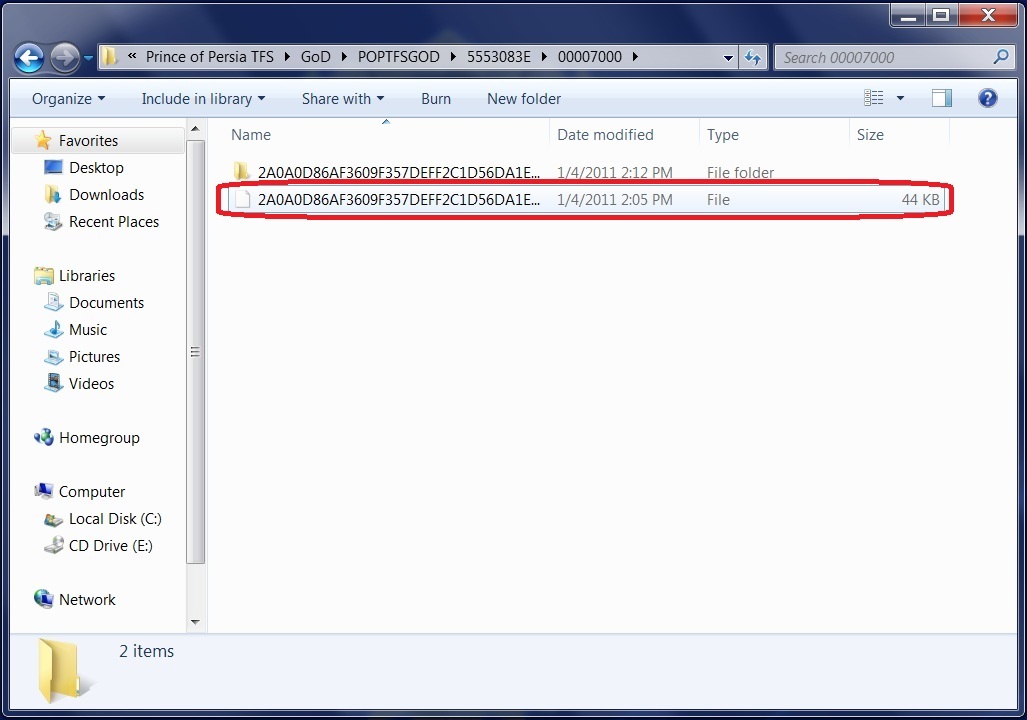
Now to transfer the Game on Demand into your Hard Drive you have to select the file that is 44kb.

[Image: b6589ba6e58996a445d2656ab1b49bf4d3de1c2b.jpg]

Next, drag that 44kb file into your Game Library of your Hard Drive into Horizon. If you are transferring DLC over then you can select the DLC file inside the 00000002 folder and drag that into the same place.

[Image: ab995e400aa8aab8aa1a4d6c59b0da7628f1fd29.jpg]

After you drag and drop the file, Horizon will do the rest in putting it on your Hard Drive so just wait for it to be finished.

[Image: 99057e673e849441b9dfb26abc968281f1cd68a5.jpg]

And wallah, you have succesfully put your Game on Demand onto your Hard Drive in record time [Image: attachment.php?aid=115] You can now go play the game you just injected into your Hard Drive.

[Image: attachment.php?aid=118]

Attached Files

Attached images

  Call of Duty: World at War: How To Play a Movie In Game (Tutorial)

07-30-2011, 08:24 PM · Forum: PC Discussion - No Replies
Call of Duty: World at War: How To Play a Movie In Game

Game: Call of Duty: World at War

Description

First, you'll have to know how to add custom .biks to your iso correctly. If you don't know how to do this, then this is useless for you.

PC Users: Place custom .bik in main\videos\ folder.

Alright, so precache this:
Code: precacheshader("cinematic");
Then use this code to play the movie.
Code: doMovie( arg ) { movie = newHudElem(); movie setShader( "cinematic", 800, 600 ); CinematicInGame( arg ); }
Name of the custom .bik goes in place of arg.

Example thread:
Code: self thread doMovie( "Saw IV" );
Heres a video.

  [Xbox 360] Call of Duty: Black Ops Xbox 360 Title Update 8 [Title ID 4 (Download)

07-30-2011, 12:28 AM · Forum: JTAG/RGH - No Replies
Call of Duty: Black Ops Xbox 360 Title Update 8 Download [Title ID 41560855]

Description

[Image: attachment.php?aid=3664]

Call of Duty: Black Ops Title Update: 8
Title ID: 41560855
Media IDs: 0AEB2159, 1E0BB99A, 4D18C76A, 54CDD2BC

Download:

Hidden Content


Reply to this thread to unlock the contents
[Title ID 41560855]

In the download:
  • Title Update 8 for Media ID 0AEB2159: Title Update 8 - Media ID 0AEB2159\41560855\000B0000\tu00000003_00000000
  • Title Update 8 for Media ID 1E0BB99A: Title Update 8 - Media ID 1E0BB99A\41560855\000B0000\tu00000008_00000000
  • Title Update 8 for Media ID 4D18C76A: Title Update 8 - Media ID 4D18C76A\41560855\000B0000\tu0000000a_00000000
  • Title Update 8 for Media ID 54CDD2BC: Title Update 8 - Media ID 54CDD2BC\41560855\000B0000\tu00000009_00000000

How to Install:

These title updates go in Content\0000000000000000\41560855\000B0000, where the Xbox 360 keeps its larger title updates, on its hard drive or on a USB drive configured for use in the Xbox 360.

  1. Extract the zip and open the folder for your disc's Media ID.
  2. Use a FATX tool such as Horizon or USB Xtaf to inject the 41560855 folder in it into Content\0000000000000000 (it holds 41560855\000B0000).
  3. Start the game and the update loads with it. It only works with the version of the game whose Media ID is listed above.

What's new in this update:

• Support for Escalation Map Pack (Releasing 5/3/11)
• Security Updates.
• Addition of banner-style Message of the Day on the MP Main Menu.
• Addition of Hardcore FFA and TDM for Combat Training.
• Additional sniper rifle tuning changes.
• Addition of “Competition” Barebones playlist.
• Replaced RPG with Grim Reaper in Gun Game Wager Match.
• Prevent automatic weapons from jamming if the player is feathering the fire button on “Default Alt”, “Tactical Flipped” or “Nom4d Flipped”.
• Fine-tuned napalm and bombing-run damage indoors.
• Prevented rare invulnerability issue.
• Additional game mode timer options for Custom Games.
• Fixed a minor out of map exploit in Grid.
• General Killcam and death-cam improvements.
• Improved Auto-Assign reliability in Private Match.
• Addressed an infinite “joining session in progress” screen under very specific timing conditions.
• Demolition bombs can no longer explode and be defused at the same time.
• Spy play now activates in One in the Chamber in all cases.
• The “Sprint Kills” challenge for Steady Aim perk now rewards the player with the correct number of kills.
• Contracts purchased but not yet expired no longer count as expired when viewing a friend’s player card.
• Addressed a rare issue where a hacked camera spike would not function properly if the hacker also had a camera spike that was destroyed.
• Recording a clip with the speed mode for 2 cameras set to .1 will no longer increase in speed when switching perspectives back and forth.
• Improvements to Zipline functionality when viewed in Theater mode.
• Settings from custom games are all cleared and no longer carry over from one custom match to another.
• Improvements to map voting reliability in lobbies.
• Nova gas will now affect players that are standing over their tactical insertion.
• Hardcore players who kill another teammate in last stand now lose the proper amount of points.
• Players can no longer transfer emblems/backgrounds from Combat Training to Player Match.
• Player is no longer able to use a primary weapon in Second Chance (rare, specific instance).
• Improvements to “Community” filters.
Competitive Playlist Details (Accessible via the “Bare Bones” category)
Disabled content within this playlist:

Killstreaks
• All

Perks
• Flak Jacket
• Second Chance
• Warlord

Launchers
• All

Attachments
• Rapid Fire
• Grenade Launcher
• Flame Thrower

Equiptment
• All

Tactical Grenades
• Nova Gas
• Decoy

Frequently Asked Questions
• No killstreaks.
• No equipment whatsoever.
• The playlist has a subset of the most competitive maps as agreed upon with members of the competitive community. It does include Escalation and First Strike maps. You can still vote.
• Minimum and maximum player counts are set up just like Team Tac. We recommend you go in with a party of 4.
• One might argue that banning Ghost is pointless, since the playlist has no Killstreaks taking Ghost gives no advantage.
• The playlist uses variant game mode rules. For example: Search and Destroy has a lowered game round timer, switches sides, and modifies the game mode timer.
• The playlist will be available with the next game update. As we are not 100% in control of when Microsoft or Sony will release the update providing an exact time is difficult.
• The video contains the list of banned weapons. All secondary launchers are banned; everything else fair game.
• Subject to some caps on the number of restrictions, the list of allowed/disallowed weapons, attachments, and perks is easily modified.
• We believe that both First Strike and Escalation have some competitive maps and want to see online leagues add them to the line up.
• Domination spawn delay should be set at 7.5 seconds.
• The playlist still impacts your stats.
• The playlist does not have it’s own leaderboard. That is out of scope since it’s made up of multiple game modes.
• Search and Destroy, Domination, and Capture the Flag are the principal game modes in the Competion playlist.
• Party chat is currently enabled.
• Search already uses a 1.5 round time limit.
• If the MLG unbans Rapid Fire and bans Steady Aim, we will consider making that change as well. However, it’s important to note that MLG is not the only competitive league. The Competitive playlist will be modified, as necessary, when the ground is common or be somewhere between the extremes.

About Call of Duty: Black Ops:

Call of Duty®: Black Ops takes you deep behind enemy lines into the world of deniable operations as a member of an elite special forces unit engaging in covert warfare, classified operations, and explosive conflicts across the globe. With access to a variety of exclusive weaponry and equipment, your actions will tip the balance during the most dangerous time period mankind has ever known.

Helpful Tutorials:

  1. How to use Xbox 360 Title Updates
  2. Inject a title update with Horizon
  3. Inject a title update into Content on a USB drive
  4. Open the Xbox 360 hard drive on a PC with Party Buffalo
  5. Configure a USB memory stick to be used as Xbox 360 storage
Need help with something else? Visit our Xbox 360 Guides.

Use at your own risk.

Attached Files
Attached images
.zip
CallofDutyBlackOps41560855_TU8.zip

  Call of Duty: Modern Warfare 2: How to system link theory (Tutorial)

07-25-2011, 08:34 AM · Forum: Xbox Discussion - No Replies
Call of Duty: Modern Warfare 2: How to system link theory

Game: Call of Duty: Modern Warfare 2

Description

If You have a jtag with tu6 like origanaly system linking with a retail console not had tu7 update in theory you could system link the way you used to if you didnt update your retail to tu7 you could use tu6 to system link

  Xbox 360 - How to get a custom gamerpicture!

07-22-2011, 09:03 PM · Forum: Xbox Mods - No Replies
Hey everyone, since theres a few threads every now and again about a custom gamerpicture, and I [seem] to have found a way to get it to work… I decided I’d make a guide on it before some leech beats me to the punch.

So first, let’s cover what you’ll need-

-Xbox LIVE Vision Camera

-Horizon

-USB/Memory Device

-64x64 and 32x32 .png of your desired new picture

And before you go *****ing [to/at] me for lying and that this doesn’t work and blah blah, note this is the equivalent of a personal picture - only your friends can see it. It’s literally only one step up from the old way - where only you could see it. I have a few theories I’m going to try later but I cbf for now.

Now that that’s out of the way, let’s start.

At the xbox:

  1. Take a personal picture and let it sync.

  2. move your profile to your USB/Memory device that you can freely disconnect the memory device…

  3. use your xbox live vision cam to take a personal picture as you normally would

  4. once you get to the part where you hit accept picture, go to your xbox, and get ready to take out your memory device.

  5. press accept, and quickly take out your USB/MD.

  6. Stay signed in. Disregard the PLEASE REPLACE MU ;~; message.

At the computer:

  1. Open horizon, and open your profile in package manager.

  2. Go to the “contents” tab.

  3. replace pp_64 and pp_32 with your own files you hopefully prepared earlier.

  4. Rehash, resign, and go back to your xbox.

At the xbox again!:

  1. Sign back in. Right away you should see your own picture being displayed on the sign in menu.

  2. Go to edit profile -> gamerpicture -> Personal Picture.

  3. Pick the modded picture.

    [Image: attachment.php?aid=3243]

    The gamerpicture on that tag is from my sig…

    The source:

    [Image: attachment.php?aid=3244][Image: pp_32.png]

    And you should be set! Pictures / video coming soon-ish (this weekend, perhaps?)

Cheater912:

Quote:I tried changing my personal picture to the public one in my profile a few months ago. Didn’t work [Image: attachment.php?aid=3245]

I’m very surprised that this actually works. Nice find [Image: attachment.php?aid=3246]

Niko Jims:

Quote:I finally got it! I needed to wait longer after accepting the pic. Thank you, good sir. I also used Paint instead of Photoshop and used the same pics from the profile instead of brand new pics. Don’t know if those affected the outcome or not. If you want to record the Xbox portion of the tutorial in HD and don’t have the equipment, I would be more than happy to do it and send you the Raw footage, as long as I can do this again so I don’t end up messing up.

A VIDEO?!


Working as of 12/21/11

[Image: attachment.php?aid=3247] Aspired:

Quote:For anybody who wants the horizon logo as their gamerpicture [Image: attachment.php?aid=3246]

[Image: i6JOjRNkfp7I6.png] [Image: jMEQl1PKfon6X.png]

Attached Files

Attached images

  Xbox 360 - How to mod Black Ops Offline. (Zombies) (USB) (Download)

07-22-2011, 06:42 AM · Forum: Xbox Mods - No Replies
How To Mod Black Ops Offline (Zombies) (USB)

OK first off you will need these things:

Modio:
Hidden Content


Reply to this thread to unlock the contents

Black ops Gpd:
Hidden Content


Reply to this thread to unlock the contents

Steps on xbox:

  1. plug your USB device into your xbox.

  2. Configure it

  3. now place your profile on your USB stick.

  4. Delete the system cache by pressing y and delete system cache.

  5. disconnect from your router/modem/ethernet cable.


Steps on computer :

  1. Download the GPD and modio

  2. Replace the GPD on your profile with this one using modio.

    You can do this by opening modio, and open a divice. now find your profile and extract it to the desktop. Now drag it into modio and click profile content. Next find the 41560855.GPD. Right click and click replace file. Replace it with The modded one you downloaded.

  3. Click rehash and resign and close the little window not modio.

  4. Open your device up again and replace your old profile with your new modded one.

  5. plug your USB into your xbox again and put the modded profile onto your xbox.

  6. start up black ops and there you have it!


note

When extracting your profile, make a backup because your profile sometimes corrupts.

instructions on how to use mod:

Instructions Set One : Player Modifications :
  • Back Button = Toggle Noclip + Give Ammo + Give Freeze gun/Thunder Gun/Death Machine ( Depending on what map youre on )

  • DPAD UP = Toggle god mode

  • DPAD LEFT = Toggle third person

  • DPAD RIGHT = Toggle promod perspectives

  • DPAD DOWN = Drop current weapon

  • B button = Alien vision toggle ( Have no clue what to call this )

  • Left Bumper = Toggle cartoon mode on/off

  • Right Stick = Annihiliate all zombies On/Off ( Dont use it to kill the doctor or the game wont go past the round youre on )

  • Right Bumper = Changes to instruction set two, the weapon shop

Instruction Set Two : The Weapon Shop :
  • Back Button = Changes to instruction set one, player modifications

  • B Button = Drop ALL weapons ( Ray gun, M72, Death Machine, Etc, Etc )

  • Right Bumper = Toggles Game Speed ( Fast, Slow, Regular )

Infections :
  • Fully automatic triple burst and semi automatic weapons

  • Smexy bullet trails

  • Gun sticks out promod style ( Different from changing the promod perspective )

  • Essentially infinite melee range

  • Double tap = Godly now ( You have to buy the perk )

  • Far away revives

  • Infinite ammo

  • The chest doesnt move at all no matter how many times you use it

  • Faster walking speed

  • Zombie bodies fly up after you kill them

  • Really really long last stand time like 10+ minutes lol

  • With quick reload you can make any weapon fully auto by holding X and shooting ( Need the perk )

  • Perfect Wallhack

  • Simple FPS counter

  • No fog

~xZelno. This tutorial was brought to you by me >_< NOT COPIED AND PASTED… Enjoy [Image: attachment.php?aid=3010]

Attached Files

Attached images

  Kinect Drivers and SDK for Windows 7 (32bit and 64bit) (Download)

07-19-2011, 11:45 AM · Forum: Windows - No Replies
Kinect Drivers and SDK for Windows 7 (32bit and 64bit) Download

Description

The Kinect for Windows SDK beta is a starter kit for applications developers that includes APIs, sample code, and drivers. This SDK enables the academic research and enthusiast communities to create rich experiences by using Microsoft Xbox 360 Kinect sensor technology on computers running Windows 7. Learn more >

The Kinect for Windows SDK beta includes the following:
  • Drivers, for using Kinect sensor devices on a computer running Windows 7.
  • Application programming interfaces (APIs) and device interfaces, together with technical documentation.
  • Source code samples.

System requirements:

Hardware:
  • Kinect for Xbox 360 sensor
  • Computer with a dual-core, 2.66-GHz or faster processor
  • Windows 7–compatible graphics card that supports DirectX® 9.0c capabilities
  • 2-GB RAM (4-GB RAM recommended)

Software
  • Windows 7 (x86 or x64)
  • Visual Studio 2010 Express (or other 2010 edition)
  • Microsoft .NET Framework 4.0
  • For additional requirements for samples, see the Readme file

Hidden Content


Reply to this thread to unlock the contents
Hidden Content


Reply to this thread to unlock the contents

Version 1.00.11 - released on 16th June 2011

Use at your own risk.

  Call of Duty: World at War: [RELEASE]How To Edit WaW Credits (Tutorial)

07-15-2011, 07:17 PM · Forum: PC Discussion - No Replies
Call of Duty: World at War: [RELEASE]How To Edit WaW Credits

Game: Call of Duty: World at War

Description

This is is a simple tut to edit the waw credits....
There is no much you can do[But im sure someone will figure it out]
Just go into WaW/Zone/English/Credits/
There is A way to edit the shader and Background but thats Effort
This IS WaW Pc Bye the way

Here Is A Pic

Uploaded with ImageShack.us