12-27-2012, 05:54 PM · Forum: Xbox Mods
- No Replies
Xbox 360 Dashboard / System Update 2.0.16202.0 Download With Avatars
Description
Xbox 360 Dashboard Update 2.0.16202.0 Download
Released: 27-11-2012
System Software Changes:
Displaying the incorrect playlist name when launching a playlist from Xbox SmartGlass to the console[SUP][/SUP]
An error with Xbox Video closed-captioning[SUP][/SUP]
An error with Xbox Music that some were experiencing
How to install:
1.) Unrar the download
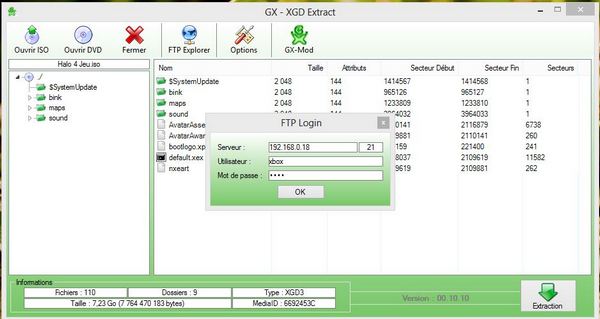
2.) Copy the $SystemUpdate folder to the root of a CD or USB Stick (The memory stick must be FAT or Fat32 formatted)
3.) Insert the CD or USB Stick into your Xbox 360 console.
4.) You will be automatically prompted to update with a USB stick, with a CD / DVD it should say Mixed Media Disc, power down the 360 and power it on again. You should be ask to update before the 360 boots to the dashboard.
5.) Once the update is complete your Xbox 360 will restart then boot up to the new dashboard. Enjoy!
Video tutorial by InsaneNutter on updating the Xbox 360 dashboard with a USB memory stick:
Grand Theft Auto IV: {Video} (TUT) How To Add .scos to your OFFLINE SCRIPT.img
Game: Grand Theft Auto IV
Description
How To Add .scos to your script.img
This mainly to keep people from cluttering the support and modding sections with "is this too big?" and if you don't want to do it your self I have made mods like this Click here you can just replace the mods with your own in the script.img. Doing it this way lets you keep more game modes. Note you cant use these off-line this is to save space and keep game modes in your scrip_network.img
Hi everyone,
I have a minor problem and want to see whattsup before I do anything. I have, had, a modded skill tree, and alot of the times before I started modding I would always find my skill tree being reset. This has not happened in a while, but now with my modded skill tree, my skill tree got reset and only gave me 46 skill points instead of the amount I had before, which was about 129. Why did it not give me that many points back, did i get reset for modding reasons, or just got glitchy, and should i redo a modded skill tree. Thanks, and all help is appreciated
12-17-2012, 01:12 AM · Forum: PC Discussion
- No Replies
Updated Cracked Feed The Beast Launcher!
Game: Minecraft
Details
Oh well, hope this thread doesn't get removed again. Probably will though. Haha
I except you guys to know how to use this launcher because it's pretty simple and I'm too lazy to type a how-to.
Also, this launcher isn't made by me. It is made by silkooy, an awesome guy from thepiratebay.
When creating a new profile, just put in your "unpaid" minecraft account ID and your password. The password doesn't really matter at all since this is a cracked launcher but our friend silkooy was too lazy to remove the password field.
12-15-2012, 11:01 AM · Forum: Windows
- No Replies
Requiem 4.1 - Remove iTunes DRM (FairPlay) from music, video and books
Description
Requiem is a program that removes Apple's DRM (called FairPlay) from songs, videos, and books purchased on iTunes, This allows content purchased on iTunes to be played on non-Apple-approved devices, like a SlimServer or Linux box. The DRM removal is a lossless process, it is merely decrypting the file, not decoding and re-encoding it, meaning no quality is lost when the DRM is removed.
Requiem must be run on a computer that are currently authorized to play the DRM'd music or video.
Download:
Hidden Content
Reply to this thread to unlock the contents
Hidden Content
Reply to this thread to unlock the contents
Hidden Content
Reply to this thread to unlock the contents
Old Downloads:
Hidden Content
Reply to this thread to unlock the contents
- Apparently works better for Ebooks.
How to use:
Double-click on the Requiem application and watch it work!
It will automatically find DRMed files in your iTunes library and remove the DRM from them.
The original DRMed files will be moved to the trash. Make sure you verify that the songs and videos still work before emptying the trash.
Windows users will need to install Java.
You can also drag & drop files or directories (which will be searched recursively) onto the Requiem application or the Requiem window.
Starting Requiem with the shift key down will disable scanning of the iTunes library. You can use this feature to start requiem with a blank window into which you can drag & drop files to be processed.
How it works:
Requiem decrypts the audio and video data in your file exactly like iTunes does:
1. Requiem authenticates with the DRM library using the secret credentials used by iTunes.
2. Requiem uses the decrypt routines in the DRM library to decrypt all of the audio and video data.
Changes:
There is no longer a key cache.
Warning:
This program is not intended to promote piracy. I just wanted to play my iTunes songs on a SlimServer! As such, the output file is only minimally modified to remove the DRM. It still has lots of information in it identifying you.
Command Line:
You can run Requiem a bunch of different ways from the command line (Mac examples):
run it as usual:
java -cp Requiem.app/Contents/Resources/Java/Requiem.jar Requiem
deDRM a single file:
java -cp Requiem.app/Contents/Resources/Java/Requiem.jar UnDrm
Borderlands 2: Since the last Update (14th November (EU)) Game freezes
Game: Borderlands 2
Description
Hi Se7ensins Community
My Story: I played the game since day one and right now i'am at TVHM at 50% of the story. Played a little with buddys online and everything was OK. No Missions Problems. But since when I saw some youtube videos of modified gun's/modded characters etc. i thought "hm I played the entire game and now i'm at the second run, hm, let's get the bee+the baby maker and kick some buds". Well I never changed my default character (gunzerker lvl 50) but took some modded ones to play with it. (M4YON's Legendary Gamesave V4). Mecro. Saved it on my usb flash drive and played from there. Even played with him online with my friends. Worked fine.
My Problem; today (14th november) i got an update for BL2. After the Update I can't play the game for more than a few seconds to few minutes (below 10min). What happend? Game constantly freezes. I tried a lot of different approaches :
1) Play hard - Modded chara - single play - THVM - failed (game freezed, load screen)
2) Cleared the cache - then see 1
3) deleted everything i downloaded for the game (dlc mission, mecro, compt. pack.. etc) Run the game, downloaded the compt. pack and mecro and the update - then 1)
4) did 3 BUT this time i back up'd my default gunzerker, and deleted the one on the harddrive - then I created a new one (maya) and the first few minutes worked fine. strange... no freezes at all
5) I disconnect the xbx from the Internet (yep, paranoid modus on), and could played with my modded charac. for few minutes but the game froze again.
6) Even when I play with my "normal" chara the gunzerker, the game freezes. Hmpf
°) Just for the fun, i took my new chara, took an online session and I jumped on one with an lvl 127 guy. He said something about "beta over patch".. i don't get that. since when can we install a beta update on an console???? But hey, perhaps just stupid talk.
Now I'm completely lost. Did I f**** up the game? Someone has the same problem than me? I'm completely lost at all.
Thanks for your advice (hope this is the right thread for it?) (sorry for my english, it's not that perfect)