
PS4: How to get a PS4 with a 1.76 firmware or lower

04-12-2016, 02:13 PM · Forum: Sony Mods - No Replies
How to get a PS4 with a 1.76 firmware or lower

A fully functional PS4 Jailbreak is now available for PS4 running on Firmware 1.76 or lower. The Jailbreak allows to run native code and/or Linux. All files for that exploit have been released here. As such, PS4 models running firmware 1.76 will probably skyrocket in prices very soon, and now might be the last time to get one at a reasonable price.

About PS4 Firmware 1.76

PS4 Firmware 1.76 was released on 8/20/2016(August 20th, 2014). Any bundle released before that date will have a firmware below 1.76.

Some advice when buying for a PS4:
  • It’s easier to ensure you have the right firmware version if get the device new and sealed, not “used”
  • If you get a “used” console, be careful: expect the seller to update before it is shipped. Same with Local stores also. Asking first is always best. Make sure you clarify you want it on that firmware.
  • On Amazon and eBay, description isn't always spot on. Make sure to ask the sellers for details if possible.
    *Amazon has a great return policy. Use it if the PS4 is not the one you expected!

Buying a PS4 new, with guaranteed low firmware

The best way to get yourself a PS4 with low firmware is to buy one of the old bundles, and get it new. The listings below are old bundles shipping with the old PS4 hardware, which are guaranteed to have firmware <= 1.76, if you buy them new.

On eBay, you can look for PS4 Launch Systems in the Game consoles category. Make sure it is a “sealed” unit.
  • Ps4 Glacier white with Destiny Bundle
  • Battlefield 4 Launch Bundle
  • Knack launch Bundle
  • “InFamous Second Son + Killzone Shadow Fall + Knack” Bundle
  • NBA 2K14 Bundle
  • FIFA 2K14 Bundle
  • Dynasty Warriors 7 bundle
  • Dynasty Warriors 8 bundle
  • Assassin’s Creed IV: Black Flag Bundle
  • Infamous: Second Son launch bundle
  • Watch_Dogs bundle
  • Destiny Bundle (black)
  • DriveClub Bundle (Black)
  • DriveClub Bundle (Glacier white)
  • Call of Duty: Ghost Bundle

Additionally, people are reporting that consoles bundled with The Last of us usually ship with firmware 1.76 or 2.03. Get confirmation from the seller before buying those!

  PS4 Now Jailbreakable

04-12-2016, 01:42 PM · Forum: Sony Mods - No Replies
Jailbreakable PS4 is now here!

As of 2016/04/02, it is now possible to Jailbreak your PS4 if you are on firmware 1.76 or below. The full files to Jailbreak the PS4 and/or run Linux have been released here. We have an article to help you find a 1.76 PS4 to buy. The dlclose exploit lets you run Linux on your PS4, or run your own PS4 native code.

For people running on a firmware higher than 1.76, generally, we recommend that you stay on as low a firmware as possible, as new hacks will eventually surface. Your current best bet however is to get a 1.76 PS4.

Additionally, people have found ways to pirate games on the PS4 with Raspberry pi (a technique known as the Brazilian Jailbreak) in 2014. It is unclear if this technique still works on latest firmwares.

Search around the forum Playstation Jailbreak forum for more information!

  PS4 Jailbreak Fully operational dlclose exploit By: kR105

04-12-2016, 01:35 PM · Forum: Sony Mods - No Replies
The name kR105 might ring a Bell to you because this developer has been credited a lot recently by CTurt on his PS4 hack work. Today, kR105 popped up on wololo.net to release something that lots of us have been chasing for a while: a fully operational dlclose exploit. He also emailed wololo to mention he has now integrated support for booting Linux straight from the PS4-Playground tools, and, icing on the cake, also provided the actual PS4 Linux files to use with the tools.

In other words, kR105 is closing the gap here, releasing everything you need to run Linux on your PS4. This is not a drill or a proof of concept video, people. The files are up for anyone to grab. I haven’t tested them myself though, because I’ve still been hesitating on getting a 1.76 PS4, but I’m regretting not having one every day that goes by. If you’re the lucky owner of a PS4 1.76 though (we have an article here on where you might be able to get one), now’s the right time to test this! Furthermore, there’s absolutely no reason to doubt this release is real, given that it initiates strait from kR105, in CTurt’s github. Also CTurt confirmed this release to wololo earlier today.

So, what was just released by kR105?

A fully functional dlclose exploit. The exploit had been released about a week ago, and several people had been able to take it further, but there were still issues on how the publicly available code was working, crashing as soon as the exploit was attempting to return to userland. kR105’s release fixes all of that, it includes root, sandbox escape and jailbreak. This exploit is what you’ll want to run your native code on a 1.76 PS4

[Image: dlclose_ps4_kernel_exploit_cturt.jpg]

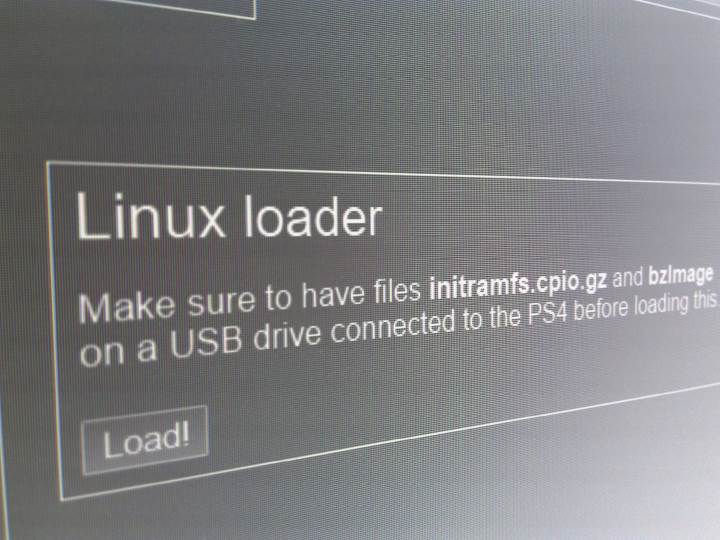
An update to PS4-Playground to run Linux. Another missing link here, that will let people launch linux without having to write their own loader. The launcher integrates the dlclose exploit if I understand correctly. From the Readme:

Quote:You need a FAT32 formatted USB drive plugged in on any PS4’s USB port with the following files on the root directory:


Code:
bzImage
: Kernel image that will be loaded. Recommended to use this sources to compile it.


Code:
initramfs.cpio.gz
: The initial file system that gets loaded into memory during the Linux startup process. This one is recommended.
The file names must match with the above and you can have more files on the same USB drive. From there you can setup the environment to run from an NFS share or from an external drive via USB (recommended) and boot a complete distro!


[Image: linux_loader.jpg]

A Compiled distro of Linux for the PS4. kR105 has the files bzImage and initramfs.cpio.gz ready for anyone to grab, so you don’t have to compile your own version. In his words: “those files should get you into linux with a nice bash console on your tv”.

Downloads


Source: wololo.net

  (PS4) kR105's ps4kerneltest files, Download

04-12-2016, 01:34 PM · Forum: Sony Mods - No Replies
About these files:


a compiled basic Linux distribution for the PS4, to use with PS4 Playground:

You need a FAT32 formatted USB drive plugged in on any PS4's USB port with the following files on the root directory:

bzImage : Kernel image that will be loaded.

initramfs.cpio.gz : The initial file system that gets loaded into memory during the Linux startup process. This one is recommended.

The file names must match with the above and you can have more files on the same USB drive. From there you can setup the environment to run from an NFS share or from an external drive via USB (recommended) and boot a complete distro!

Release Date: 4/1/16
Find download links for kr105's ps4kerneltest below.

DOWNLOAD:
PS4 Linux Kernel + initramfs
Hidden Content


Reply to this thread to unlock the contents

  Pokemon GEN2 Legit Mew, Celebi & Other Event Pokemon [Gold, Silver, Cr (Download)

04-12-2016, 01:07 PM · Forum: Nintendo Discussion - No Replies
Pokemon GEN2 Legit Mew, Celebi & Other Event Pokemon [Gold, Silver, Crystal] Download

Description

Here is a Pokemon Crystal Save containing a collection of GEN2 event Pokemon obtained from the Pokemon Center In New York, among them are Celebi and multiple egg events. The Mew has been traded up from Pokemon Blue, it was obtained from the 1999 ToysRus Distribution Event.

This save was originally shared by Gold Ursaring from ProjectPokemon, all I have done is trade across the Mew from the 1999 ToysRus distribution.

The save contains the following Pokemon:

  • Mew (From 1999 ToysRus Distribution)
  • Celebi (Enough unique Celebi to make a team or two filled with them, obtained from Pokemon Center New York)

Shiny Distributions:
  • Meganium
  • Typhlosion
  • Feraligatr
  • Entei
  • Raikou
  • Suicune
  • Lugia

Pokemon With Special Moves:
  • Ancientpower Bulbasaur
  • Crunch Charmander (Not A Breeding Move Generation II)
  • Zap Cannon Squirtle
  • Double Slap Lickitung
  • Leech Seed Oddish
  • Sweet Kiss Nidoran
  • Flail Zubat
  • Synthesis Paras
  • False Swipe Machop
  • Fury Attack Cubone
  • Flail Seel
  • Faint Attack Kangaskan
  • Sharpern Onix
  • Swords Dance Goldeen
  • Synthesis Tangela
  • Future Sight Lapras
  • Petal Dance Chikorita
  • Double Edge Cyndaquil
  • Submission Totodile
  • Absorb Phanpy
  • Agility Hoppip
  • Mimic Aipom
  • Spikes! Delibird
  • Hypnosis Misdreavous
  • Safeguard Stantler
  • Mega Kick Miltank

Ferocious Monsters with Game Breaking Moves:

  • Splash Snorlax
  • Splash Sunkern
*Nintendo actually selected Splash as a distribution move on several occasions, as if getting a Sunkern wasn't bad enough.

Download:

Hidden Content


Reply to this thread to unlock the contents

Screenshots:

Use at your own risk.

Attached Files

.zip
Pokemon_Crystal_Save_-_Pokemon_Center_New_York_Pokemon_and_ToysRus_Mew.zip

  Microsoft Says "We're Ready" to Xbox One and PS4 Cross-Platform Multiplayer Gaming

04-12-2016, 12:55 PM · Forum: Xbox Discussion - No Replies
[Image: 15a7b4306f.jpg]

These updates follow a March announcement from Microsoft which confirmed that the platform will be supporting play between Xbox One, Windows 10, and other capable platforms. At the time, Microsoft’s Chris Charla explained that in addition to cross-platform play between Xbox One and Windows 10, Microsoft was working toward cross-network play as well. Microsoft explained that this is an option being offered to developers, who would have to code it into the games themselves, with the "ok" of the "other console networks."

"In addition to natively supporting cross-platform play between Xbox One and Windows 10 games that use Xbox Live, we're enabling developers to support cross-network play as well," Microsoft explained at the time. "This means players on Xbox One and Windows 10 using Xbox Live will be able to play with players on different online multiplayer networks - including other console and PC networks."

[Image: Xbox-and-Playstation-Collaboration.jpg]

In a recent interview with Eurogamer, ID@Xbox Europe boss Agostino Simonetta was asked if the technology for cross-play between Xbox One and PlayStation 4 was in place, to which he responded: "Absolutely--we're ready. Rocket League is the first game--and it is a heavily network-orientated game."

[Image: Eurogamer-FIFA-10-logo-2.jpg]

"But yes, any title that wants to update their game to include cross-network play, any title that wants to launch soon and take advantage of that, we are ready," he continued. "As far as we're concerned - we've made the announcement and we're ready - whoever wants to get on board. It remains an open invitation to any network that wants to do the same."

"We can only say: we're ready. We've done our bit and we welcome anyone who wants to take part."

[Image: xbox-one-vs-ps4.jpg?1c368f]


Online play has become a major part of modern gaming, and as we move, quickly it seems, toward major summer conferences, seeing these developments move so rapidly (despite the already mentioned hurdles) is encouragingly for both players and developers alike - larger, more well-integrated audiences are what online games thrive on, and finally being able to play together without the boundaries of consoles and networks will drive those audiences to prosper as friends and family can game without limits.

  TWLSaveTool - Nintendo 3DS App For DS Save Game Backup and Restore (Download)

04-12-2016, 09:17 AM · Forum: Nintendo Mods - No Replies
TWLSaveTool - Nintendo 3DS App For DS Save Game Backup and Restore

Description

TWLSaveTool is a 3DS homebrew app that allows you to read, write, and erase save files from Nintendo DS cartridges.

Esentially you can place an Nintendo DS games in your Nintendo 3DS, load up TWLSaveTool and dump the save game to the SD card in your 3DS.

TWLSaveTool has no problems with games which used to be problematic such as Pokemon Heart Gold / Soul Silver or Pokemon Black / White, or Pokemon Black / White 2.

In addition you do not need to mess about with legacy WEP secured wireless networks, Firewalls, FTP's servers and GBA / DS flashcards. This is a simple offline solution anyone with a 3DS running the Homebrew Launcher or a Custom Firmware can use to backup Nintendo DS save games from original game cartridges.

Requirements:

  • The CIA build requires your sysNAND to be on firmware 9.2 or less. If it's the case, this is the best option.
  • The 3dsx build requires you to have either PokéTransporter or Pokémon Dream Radar installed on your 3DS. In both cases you'll need to pay to be able to download them from the Nintendo Eshop.

Downloads:

Hidden Content


Reply to this thread to unlock the contents
Hidden Content


Reply to this thread to unlock the contents

Hidden Content


Reply to this thread to unlock the contents

Compatibility

All Nintendo DS games except WarioWare D.I.Y., Band Brothers DX, Art Academy DS, and Pokémon Typing Adventure should be supported.

Other Links:

Tutorial on how to use TWLSaveTool: Nintendo DS Save Game Backup Using The Nintendo 3DS [Easy Offline Solution]

TWLSaveTool on Github

Use at your own risk.

Attached Files

.zip
TWLSaveTool-sickgaming.net.zip

  PS4 1.760.000 Update/Recovery File (Download)

04-11-2016, 02:39 PM · Forum: Sony Mods - No Replies
In case you guys can't find a download anywhere here you go!

PS4UPDATE.PUP (SYStem)
Version: 1.760.000
Release date: 20 august 2014

Download:
Hidden Content


Reply to this thread to unlock the contents

PS4UPDATE.PUP (RECovery)
Version: 1.760.000
Releasedate: 20 august 2014

Download:
Hidden Content


Reply to this thread to unlock the contents

  Installing linux OS on PS4 with USB Flash Drive

04-11-2016, 01:52 PM · Forum: Sony Mods - No Replies
Installing linux OS on PS4 with USB Flash Drive


AT THE TIME OF THIS WRITING, THIS WORKS ONLY ON PS4 1.76 FW!

You’ll need:
  • USB flash drive
  • USB keyboard
  • Internet connection


What to do:
  • You will need to get access to the browser from 1.76 without updating your console. How to do so is explained here.
  • Download the Linux Kernel and ram init files from kR105.
  • Format usb stick to FAT32

[Image: format-usb-flash-drive-fat32-3.jpg]

[Image: format-usb-flash-drive-fat32-4.jpg]
[Image: linux_loader.jpg]

And there you go, should look like so...
[Image: ps4_running_linux.jpg]

If you want do something in console, connect a usb keyboard

Troubleshooting
  • “Not Enough System Memory” error when trying to launch linux:
       
    [1]Make sure you’re on firmware 1.76. The exploits have some hardcoded values that will not work on lower firmwares. You can get the 1.76 update file from psdevwiki here.
       
    [2]If you’re on 1.76 but still have the issue, some people are recommending that you reboot your PS4 before trying again.
       
    [3]Others say you might have to go into safemode: safemode [Initialize PS4 (Reinstall System Software)] with the PS4UPDATE.PUP (RECovery) http://www.sickgaming.net/thread-82957.html

  • How do I access the browser on PS4 1.76 without updating?
    Here is a tutorial HERE.

Source: WOLOLO.net
