[CounterStrike (CS) 1.6/ Counter Strike: Source (CSS)] CS:S HvH Hack |... (Download)

07-30-2016, 10:43 AM · Forum: PC Mods - No Replies
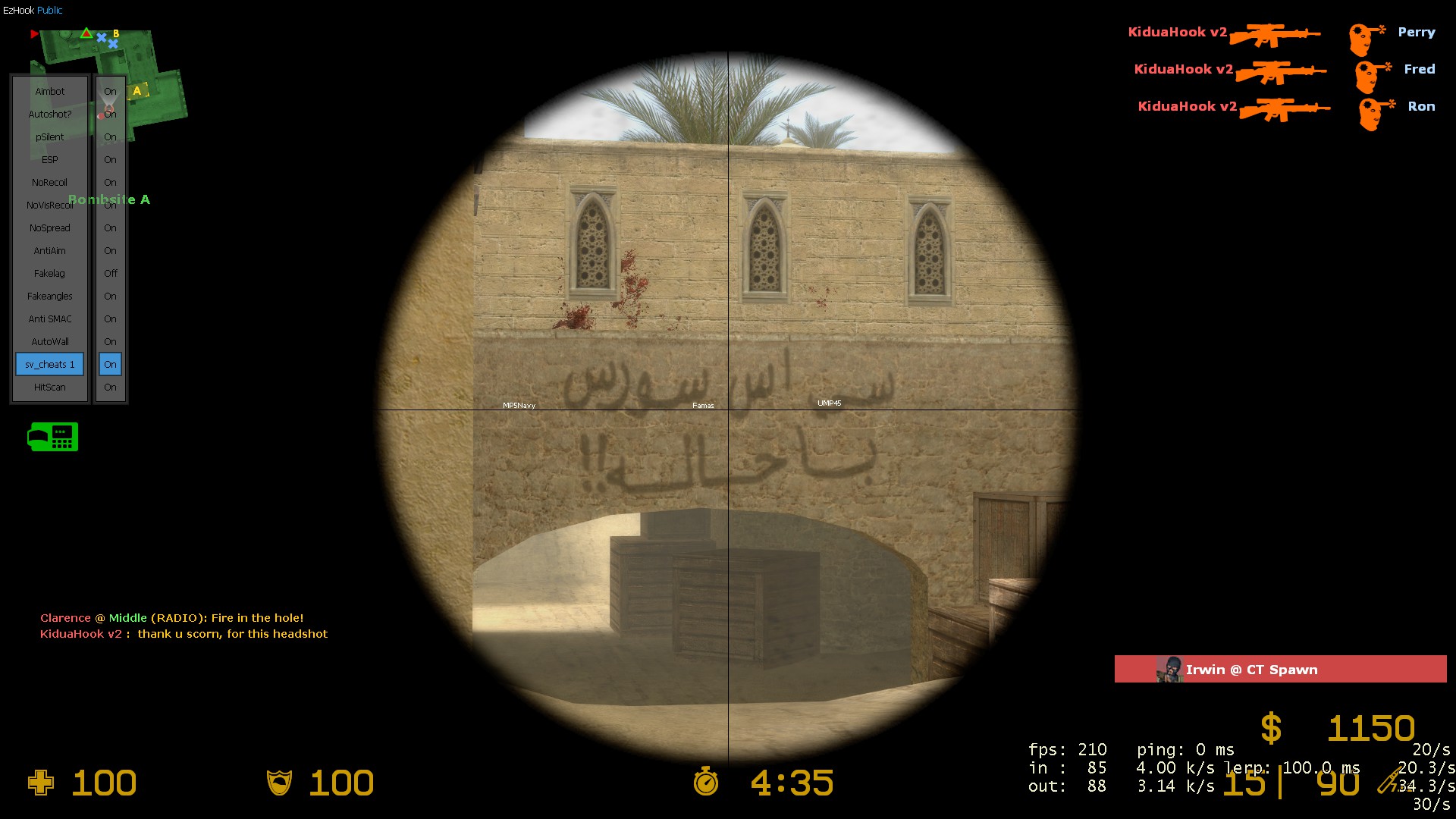
? CS:S HvH Hack | [EZHOOK] v1.0

Game: CounterStrike (CS) 1.6/ Counter Strike: Source (CSS)

Details

Status: Undetected

Features:

- Aimbot

- Autoshot

- pSilent

- ESP

- NoVisualRecoil

- NoRecoil

- NoSpread

- AntiAim

- FakeLagg

- FakeAngels

- AntiSmac

- AutoWall

- sv_cheats Bypass [Undetected for SMAC] /zBlock detected\

- HitScan

- Anti Flash

- Anti Smoke

- Bhop

- Rage autostrafe

credits:

scorn (for release and c+p)

bh4x (for good aimbot)

s1mplex (for good base)


Virus scans:

Jotti

Virustotal

I used with the latest version of extreme injector, but others should work too.

GL&HF

Download:
Hidden Content


Reply to this thread to unlock the contents

As always, use caution. This file is provided for archival purposes. SickGaming cannot be held liable.

Attached Files

.rar
megapriv8memes_sickgaming.net.rar

  [Unturned] [All version]Unturned hack Mod menu -more options (Download)

07-30-2016, 10:00 AM · Forum: PC Discussion - No Replies
? [All version]Unturned hack Mod menu -more options

Game: Unturned

Details

This hack is not MAYA / MSZ / hack

Hack version:1.6

Unturned Version:All version

Look:

Put all Unturned\Unturned_Data\Managed

then,Join game(wait 12 seconds), press "Delete" to open hack menu

meaning(This is chinese):

[[玩家菜单-players hack menu]]:

人物设置(Player sets):

无限体力-Infinite physical strength (Only work on single player)

移除水面-remove water

变热-to be hot

无流血-no bleed

欢乐视角-HAPPY SET

天气设置(weather sets):

开始下雨-start raining

停止下雨-stop raining

停止下雪-stop snowing

FOV控制-FOVsets:

FOV控制-START FOV

FOV:25-150

瞄准镜设置-scope sets:

20倍瞄准镜-all scope 20x zoom

16倍瞄准镜-all scope 16x zoom

瞄准镜夜视-all scope nightvision

稳定瞄准不消耗氧气-no scope swag (Doesn't work,wait for update)

夜视:night vision

军用夜视:open military night vision

民用夜视:open civil night vision

时间类:Time sets

早晨:morning 7 o clock (700)

中午: noon 12 o clock (1200)

傍晚:mid-night 24 o clock (3000)

满月:Full moon

当前时间:Set time 0-3575

<关闭>close players menu

[[透视菜单-Esp hack menu]]

开启描边透视-3D hack

透视玩家-open players ESP

透视玩家名称-open players name ESP

透视动物-Animals ESP

透视车辆-Car ESP

透视陷阱-trap esp

透视僵尸-zombie ESP

透视僵尸名字-Zombie name ESP

透视容器-locker/box ESP

透视距离-0-6000

全图透视-ALL MAP ESP (If you computer doens't good,Turn off this,and set ESP range 600)

低等距离-near 200 (need turn off "ALL MAP ESP")

中等距离-normal 600 (need turn off "ALL MAP ESP")

远距离-far 1250 (need turn off "ALL MAP ESP")

<关闭>-close ESP HACK MENU

车辆菜单-vehicle hack menu

最大车辆速度-the quickly car speed

跳车,弹出-get off quickly

恢复油量-100% oil

修理车辆(dosn't work,Fix car)

<关闭>-close Vehicle HACK MENU

武器菜单-Weapon hack menu

How to useMelee hack: Use a melee,then open it,set melee far (0-10)

[COLOR="#FF0000"]How to useWapon hackpen menu,start 无后坐力(no recoil),无扩散(No spread)

MELEE HACK AND WEAPON HACK FOR ALL WORKSHOP MOD!!

ENJOY!

统计菜单-Statistics menu

You can look something,(Hp,food,water,time)

设置-setting

无退出时间-no 10seconds time to wait,exit server quickly

迅速退出服务器-quickly exit server,some doesn't work

快速关闭游戏-Exit game,some doesn't work

Don't sell this hack,By Mlpalice and chinese xiaoyao

This hack don't need Unturned .Dat Verification Remover and other tools

Scan serach is in Rar look.txt at top

Virus scans:

https://www.virustotal.com/en/file/e...is/1467291482/.

https://virusscan.jotti.org/en-US/fi...job/hno37r0px6.

Download:
Hidden Content


Reply to this thread to unlock the contents

As always, use caution. This file is provided for archival purposes. SickGaming cannot be held liable.

Attached Files

.rar
All_version_Free_Hack_1.6.1_by_xiaoyao_sickgaming.net_sickgaming.net.rar

  Far Cry 4 Cheats and Trainer for Steam (Download)

07-10-2016, 12:48 PM · Forum: PC Mods - No Replies
[Image: attachment.php?aid=2083]
This is the official discussion topic of the Far Cry 4 Trainer and Cheats in the WeMod app. Please post any suggestions, bug reports, or praise that you may have for the cheats in here!

Download:

[Image: attachment.php?aid=2084]

Download the trainer or find it in the WeMod app.

Trainer Options and Cheats:

Code:
1. Unlimited Health 2. No Fall Damage 3. Unlimited Vehicle Health 4. Unlimited Elephant Health 5. Unlimited Armor 6. Unlimited Ammo 7. Unlimited Throwables 8. No Reload 9. Unlimited Stamina 10. Unlimited Breath 11. Super Accuracy 12. No Recoil 13. No Reticle Sway 14. No C4 Limit 15. No Mine Limit 16. Super Weapon Range 17. Unlimited Medkits 18. Unlimited Syringes 19. Unlimited Syringe Effect Time 20. One-Hit Kills 21. Vehicle One-Hit Kills 22. Instant Bow Tension 23. Quick Action 24. Easy Crafting 25. Huge Loot Bag 26. Ghost Mode 27. Unlock Weapon Slots 28. Unlock All Weapons/Items 29. Unlock All Skills 30. Disable Enemy Guns 31. Player Speed 32. Elephant Speed 33. Jump Height 34. Unlimited Money 35. Add 1K Karma Points 36. Add Skill Point 37. Add 1K XP 38. Add 1K Arena Points 39. Float Mode 40. Float Up 41. Float Down 42. Time of Day 43. Set 44. Save Location 45. Teleport 46. Undo Teleportation 47. Set Time

Screenshot:

[Image: 1200.jpg]

Supported Game Versions:

We strive to keep our trainers up to date with the latest game versions. WeMod automatically detects which version you have installed and activates the mods accordingly. So there’s no need to worry about which version of the game you have!

Updates and Changes:
  • 03/16/2017

    Started development

  • 03/16/2017

    Released trainer with 48 cheats

  • 08/13/2019

    Bug fixes and game compatibility improvements

  • 10/05/2019

    Bug fixes and game compatibility improvements

Attached Files

Attached images

  [Garry's Mod] MemeSmasher v3 |Aimbot|ESP|AntiAim|FakeLag|BunnyHop|AutoS... (Download)

07-03-2016, 12:33 PM · Forum: PC Mods - No Replies
MemeSmasher v3 |Aimbot|ESP|AntiAim|FakeLag|BunnyHop|AutoStrafer|K illSpam|Text2Speech|

Game: Garry's Mod

Details

releasing best meme of 2016

screenshots:


features stated in title

includes the ok.lua file and 2 modules:

mega (my module, text2speech and broken spread compensation)

dickwrap (spread compensation)

have fun

http://www.virustotal.com/en/file/78...is/1464917203/

https://virusscan.jotti.org/en-US/fi...job/rsje2ff0d4

Download:
Hidden Content


Reply to this thread to unlock the contents

As always, use caution. This file is provided for archival purposes. SickGaming cannot be held liable.

Attached Files

.zip
memesmasher_sickgaming.net.zip

  Pokemon GEN4 Pokemon Battle Revolution - Bonus Pokemon Save Game (Download)

06-22-2016, 02:18 PM · Forum: Nintendo Discussion - No Replies
Pokemon GEN4 Pokemon Battle Revolution - Bonus Pokemon Save Game Download

Description

This is a completed save game for Pokemon Battle Revolution with the Pikachu (Secret Gift), Electivire (Shocking Secret Gift) and Magmortar (Heated Secret Gift) unlocked and ready to distribute to Pokemon Diamond, Pearl, Platinum, Heart Gold and Soul Silver.

Their is no limit as to how many times Pokemon Battle Revolution can distribute these events, however a save game can only receive each event once.

Download:

Hidden Content


Reply to this thread to unlock the contents

This save game is from a PAL UK copy of Pokemon Battle Revolution, however you should be able to import it to other region copies of the game using SaveGame Manager GX. The Pikachu (Secret Gift) should remain unlocked when using the save on another region, however you might need to enter the codes below for your region to unlock the Electivire (Shocking Secret Gift) and Magmortar (Heated Secret Gift) again.

How to use:

  1. Unzip the savegames folder from the zip file you downloaded in to the root of your Wii's SD card.
  2. Restore the save game to your Wii with the homebrew app Save Manager GX. a save game for Pokemon Battle Revolution must already exist on your Wii for Save Manager GX to be able to restore the save game. (You can start a new game and save it on the main menu if required).
  3. Load Pokemon Battle Revolution, choose Colosseum Mode, continue the game on File 1 with the name Haruhi, Choose Shop on the main menu, then Mystery Gift.
  4. You can now follow the on screen instructions to distribute the Secret Gift, Shocking Secret Gift and Heated Secret Gift to your Pokemon games on the DS.

Alternative:


If you don't have a homebrew enabled Wii I have included the wondercards that you can inject in to your save game with Pokegen.

Download Pokemon Battle Revolution Wondercards


Pikachu (Secret Gift)


When the player beats Pokétopia Master Mysterial for the first time, a Pikachu will become available for download to Pokémon Diamond and Pearl, Pokémon Platinum and Pokémon HeartGold and SoulSilver in the Shop. It is free and can be downloaded by multiple games, but no two Pikachu can be downloaded by a single card.

[Image: attachment.php?aid=2880]

Electivire (Shocking Secret Gift)

An Electivire and the gold pass can be unlocked by entering a specific code at the “Self-Introduction” option in the Profile menu.

Codes:
US: BA16-X4SH-E2AT
UK: tko3-9jwp-34kl
France: jk4i-df87-dsf9
Spain: 04in-1ynj-24fv
Germany: 0f9-ud0g-ughj
Italy: t4oi-6j8d-sb5r

[Image: attachment.php?aid=2881]

Magmortar (Heated Secret Gift)

An Magmortar and the silver pass can be unlocked by entering a specific code at the “Self-Introduction” option in the Profile menu.

Codes:

US: B416-X4HT-VTWF
UK: jl49-05kn-odnv
France: 13io-h4rf-1tpa
Spain: kn34-q0uc-1mbx
Germany: kre9-ef90-5hgn
Italy: 97ea-78hl-jrgu

[Image: attachment.php?aid=2882]

Use at your own risk.

Attached Files

Attached images
.zip
Pokemon-GEN4-Pokemon-Battle-Revolution-sickgaming.net.zip

  PokeGen Diamond, Pearl, Platinum, Heart Gold, Soul Silver, Black, White 1+ (Download)

06-22-2016, 11:49 AM · Forum: Nintendo Discussion - No Replies
PokeGen Diamond, Pearl, Platinum, Heart Gold, Soul Silver, Black, White 1+2 Save Edit

Description

PokeGen is a save game editor for Pokemon Diamond, Pearl, Platinum, Heart Gold, Soul Silver, Black, White, Black 2 and White 2 games.

This program can be used for the following tasks:
  • Generating Action Replay codes to create Pokemon, modify the Pokedex, and add Mystery Gift data, including exporting to an XML file that can be dragged to the Action Replay code manager
  • Loading and saving of save files. Pokemon data and Pokedex data can be fully modified.
  • Loading and saving of party and PC .pkm files (136, 220, and 236 byte, encrypted and unencrypted)
  • Adding Wonder Cards to save files
  • Conversion of Action Replay codes into Pokemon information (This is limited.)
  • Finding a PID to match IVs, nature, gender, ability, shininess, and hidden power type/power - with variable IVs
  • Recalculating save file checksums
  • Editing items
  • Editing C-Gear background images
Most of what you need to know to use the program is self-explanatory. However, there are now tooltips explaining just about everything in it. There are some things that aren't quite covered though:


  • Windows XP or newer is required. (However, it does run without issues on "emulated" Windows programs for Mac OS and Linux.)
  • (This is only applicable to generation 4 games, and maybe not even HG/SS.) Using codes for party Pokemon can sometimes cause bad eggs upon activating the code. You can just activate it again and it should fix the problem. (You can check the summary after activating each time to see if it's fixed, or just close the party display and re-open it.) I don't think there's any way around this. As far as I know, this has no negative effect on the game when you save, as long as you don't save it with a bad egg. (I'm not even sure if saving with a bad egg would be harmful, but there's no reason to do so.)
  • Pokemon can be dragged around amongst party/box slots.
  • .pkm files can be dragged into and from party/box slots.
  • You can associate compatible files (save files, .pkm files, etc) with PokeGen to be able to easily load them from Explorer windows.
  • Holding alt and clicking a Pokemon icon will display that Pokemon's information instead of requiring you to right click and "View data".
  • Holding shift + alt and clicking a Pokemon icon will set the slot's data with the tab's data. Obviously this is equivalent to right clicking and selecting "Set".
  • If you don't want to receive updates to certain languages, delete the corresponding language file.

Download:

Hidden Content


Reply to this thread to unlock the contents

Use at your own risk.

Attached Files

.zip
PokeGen_full.zip

  Dump Nintendo DS Game Cartridges & Saves Over Wi-Fi [Dump Nintendo DS (Tutorial)

06-21-2016, 01:45 PM · Forum: Nintendo Discussion - No Replies
Dump Nintendo DS Game Cartridges & Saves Over Wi-Fi [Dump Nintendo DS Roms]

Description

This tutorial will teach you how to create roms of Nintendo DS game cartridges you own. The end result will be you have a clean rom of your Nintendo DS game which can be used on an emulator, or on an Nintendo DS flashcard for convenience.

Creating a rom of your Nintendo DS game is easy enough to do, however because the Nintendo DS is 12 years old it's very likely your home wireless network will be using security which is not compatible with the Nintendo DS, which does complicate the process a bit.

I will do my best to try and assist you with lowering your wireless network security so you can get your Nintendo DS connected. However because 1000's of different routers / home networks setup combinations are out there all I can do is try guide you the best I can. This is why knowledge of your home network setup, along with some networking knowledge will be a great advantage for following this tutorial.

Please keep the following in mind before progressing:


  • You will need a DS flashcard, any Slot 1 DS flashcard you purchase today will be capable of running homebrew apps.
  • The DS can only connect to WEP secured wireless networks, however the default security on routers today is WPA2, which is incompatible with the Nintendo DS.
  • The DSi / 3DS support newer network security, however DS homebrew and DS games can still only support WEP secured wireless networks, so even if you're using a newer DS console. You still need a WEP secured wireless network regardless.
  • WEP security is insecure and can be cracked very easily, so be sure to change your wireless network security back after following this tutorial.
  • It's very unlikely the people living next door to you know how to crack WEP wireless security, or even know anything about wireless network security. You should be pretty safe lowering your network security for the purpose of this tutorial, i'm simply been responsible and warning you why you should switch the security back to WPA2 after you have finished.

Change Your Wireless Network Security To WEP

This is easy to do, however hard to explain as so many different home networking setups exist, for the sake of convenience when changing wireless network settings on your home router i'd recommend doing so from a computer connected directly to your router via Ethernet (wired). If you are doing so from a wireless connected computer once you change the security settings you will be disconnected from your home network and have to re connect the computer.

Most home routers have a web interface which allows you to configure various settings, if you are unsure of how to connect to your routers web interface do the following.

Open a command prompt and type "ipconfig /all" without the quotations

This will show you the Default Gateway and DHCP Server IP address, this is usually the IP address of the router on your home network. As you can see on my home network this is 192.168.1.1

Now we know the IP address of your router, using your web browser you can open up its configuration page, do to this simply go to http://192.168.1.1/ (or the ip address you found) in your web browser.

You will then be asked to log on to your routers configuration page, for example this is my routers web interface below:

Once logged in you need to look for your Wireless security settings and change the security type to WEP:

WEP Keys (aka wireless passwords) have to be 26 hexadecimal characters long, in the example below i used: 12345678912345678912345678

Once you have changed the security to WEP and entered a WEP key you can save your settings, remember all your Wireless devices will no longer connect to your network unless you connect them again or change the security / password back to what it originally was.

Setting Up A WEP Wireless Connection On the Nintendo DS:

You either want to load a game or a rom of a game which supports Nintendo WiFi connection, for this tutorial we will use Mario Kart 7, however any Nintendo WiFi connection enabled game will allow you to do this.

Load your game as normal and go to Nintendo WiFi Connection Settings:

Click on Nintendo Wi-Fi Connection Settings:

Choose a free connection profile to setup the WiFi connection on:

Now search for an access point:

The DS will display the wireless networks it's in range of

Digiex.net is my WPA 2 secured wireless network, the padlock is grey as the DS is not able to connect to this network.
Digiex.net Legacy is my WEP secured wireless network which the DS can connect to, the padlock is red, meaning the DS can connect, however I need to enter the network key:

This is what happens when you try to connect to a wireless network using modern WPA2 security:

So choose your WEP secured network:

Enter the network key:

The DS will connect to your WEP secured network ok:

How To Dump Nintendo DS Game Cartridges To Roms:

This is where you are going to need a DS flashcard, if you search around online you should be able to find them pretty cheap these days.

I have a very old M3 DS Real which were popular around 2007:

First Download Wood Dumper, then unzip and then copy wooddumper.nds to your DS flashcard like you would do any other Nintendo DS rom.

Wood Dumper allows you to dump roms of your Nintendo DS game cartridges over WiFi to your PC. Essentially Wood Dumper loads an FTP server on the Nintendo DS, allowing games to be downloaded over WiFi using a web browser or FTP client.

You should then be able to load Wood Dumper from your DS Flashcards menu system:

When Wood Dumper loads it will say "Set a target card" what you are been asked here is to remove the DS flashcard from your DS and place the DS cartridge / game in the DS that you wish to dump (create a rom of)

Do this then press "A" to confirm the game you wish to dump a rom of is in your DS:

Wood Dumper will read the game cartridge you just inserted then try and connect to your WEP secured wireless network:

All been well after a few seconds you should see an IP address listed on the top DS screen, this is the IP address the Nintendo DS received from your router:

Now on your PC you want to load your favorite web browser, for the purpose of this tutorial i'm using Google Chrome.

In the address bar type in ftp:// followed by the IP address displayed on your DS's top screen, for me this was 192.168.1.63

So I typed in ftp://192.168.1.63:

You should then see the .nds (rom) and .sav (save game) listed as a file you can download:

Simply clicking on the .nds file will download a rom of your game, over WiFi from the Nintendo DS to your computer.

The download will either start automatically or you will be asked what to name / where to save the rom:

Depending on the size of the game it could take 5 to 15 mins to download, simply leave the download to finish:

It should be obvious when the download has finished, the DS will also display a message stating the transfer has finished:

Congratulations you have now dumped a rom of your Nintendo DS game cart, which can be loaded from your flash card for convenience or on an emulator:

You might be asking yourself why not just download an rom? well this way you can be sure your roms are 100% clean and untouched. In addition their are still rare DS game cartridges out there which have not been dumped, such as Event Pokemon distribution cartridges.

Hopefully this tutorial has been some help in showing you how to dump roms of your Nintendo DS games.


Attached Files

Attached images

  [Rainbow Six Siege] Free Season Pass (Download)

06-20-2016, 12:56 PM · Forum: PC Discussion - No Replies
? Free Season Pass

Game: Rainbow Six Siege

Details

Rainbox Six: Siege Free Season Pass

Instructions:

1. Download the attachment and extract it to a fold at your choice.

2. Place the two .dll's in the game folder: \Steam\steamapps\common\Tom Clancy's Rainbow Six Siege.

3. You're done! Enjoy!

Notice: Note that these can get your account banned as explained here by @brent1000. Use them at your risk.

Adding to that, read the following:

when using this for more than a year, it will not unlock anything anymore so you'll have to re-download it and put it in your game directory when that year expires.

Virus Scans:

https://www.virustotal.com/en/file/7...is/1463578040/.

https://virusscan.jotti.org/en-US/fi...job/wkxzc4uomv.

Download:
Hidden Content


Reply to this thread to unlock the contents

As always, use caution. This file is provided for archival purposes. SickGaming cannot be held liable.

Attached Files

.rar
unlocker_season_pass_sickgaming.net.rar

  Killing Floor 2 Cheats and Trainer for Steam (Download)

06-18-2016, 09:03 AM · Forum: PC Mods - No Replies
[Image: attachment.php?aid=1618]
This is the official discussion topic of the Killing Floor 2 Trainer and Cheats in the WeMod app. Please post any suggestions, bug reports, or praise that you may have for the cheats in here!

Hidden Content


Reply to this thread to unlock the contents

Download the trainer or find it in the WeMod app.

Trainer Options and Cheats:

Code:
1. Unlimited Health 2. Unlimited Armor 3. One-Hit Kills 4. Unlimited Ammo 5. No Reload 6. No Recoil 7. Unlimited Flashlight 8. Give 9 Grenades 9. Add 5K Money 10. Freeze Enemies 11. Trap Enemies Above Player 12. Mass Kill 13. Max Level 14. Slow Motion 15. Float Mode 16. Save Location 17. Float Up 18. Float Down 19. Teleport 20. Undo Teleport

Screenshot:

[Image: attachment.php?aid=1619]

Supported Game Versions:

We strive to keep our trainers up to date with the latest game versions. WeMod automatically detects which version you have installed and activates the mods accordingly. So there’s no need to worry about which version of the game you have!

Updates and Changes:
  • 03/16/2017

    Started development

  • 03/16/2017

    Released trainer with 16 cheats

  • 08/31/2017

    Bug fixes and game compatibility improvements

  • 10/10/2018

    Save Location cheat added

    Float Up cheat added

    Float Down cheat added

    Undo Teleport cheat added

  • 10/31/2018

    Bug fixes and game compatibility improvements

  • 01/24/2019

    Bug fixes and game compatibility improvements

  • 05/17/2019

    Bug fixes and game compatibility improvements

  • 08/02/2019

    Bug fixes and game compatibility improvements

  • 10/31/2019

    Bug fixes and game compatibility improvements

  • 11/26/2019

    Bug fixes and game compatibility improvements

    Updated notes

  • 01/09/2020

    Bug fixes and game compatibility improvements

  • 07/18/2020

    Bug fixes and game compatibility improvements

  • 10/01/2020

    Bug fixes and game compatibility improvements

  • 06/28/2021

    Bug fixes and game compatibility improvements

  • 10/09/2021

    Bug fixes and game compatibility improvements

  • 11/21/2021

    Bug fixes and game compatibility improvements

  • 12/13/2022

    Bug fixes and game compatibility improvements

  • 12/16/2022

    Bug fixes and game compatibility improvements

    Updated notes

Attached Files

Attached images

  Pokemon GEN4 Pokemon Ranger Manaphy Egg Save Game (Download)

06-16-2016, 06:48 PM · Forum: Nintendo Discussion - No Replies
Pokemon GEN4 Pokemon Ranger Manaphy Egg Save Game Download

Description

This Pokemon Ranger save game has the "Rescue the Precious Egg" mission completed, meaning you can transfer the Manaphy Egg to any Generation IV game using Mystery Gift, which must have been unlocked already. Please be aware you can only transfer the Egg once, however you can simply restore this save game to your DS again to easily get another Manaphy Egg without playing through Pokemon Ranger again.

[Image: attachment.php?aid=2294]

Download:

Hidden Content


Reply to this thread to unlock the contents

Note: This save game has been tested with the US and European English versions of Pokemon Ranger, i'm not sure if it will work with other language versions of the game.

How to obtain the Manaphy Egg on Pokemon Diamond, Pearl, Platinum, Heart Gold or Soul Silver (Any of the GEN 4 games)

Presuming you have mystery gift unlocked on Pokemon Diamond, Pearl, Platinum, Heart Gold or Soul Silver you are ready to go, if not:

In Pokémon Diamond, Pearl, and Platinum, the Mystery Gift system is activated at Jubilife TV. There is a TV producer on the third floor who will activate the Mystery Gift system if players answer his questions with the correct keywords as shown below (based on the language of the game) and save the game. If the player receives a Wonder Card via a Nintendo event or another compatible game prior to activating the feature, Mystery Gift will be activated automatically regardless.

[Image: attachment.php?aid=2295]

In Pokémon HeartGold and SoulSilver, the Mystery Gift system is automatically unlocked after receiving the Pokédex. Due to the addition of an option for connecting to the Pokéwalker in the main menu and its placement as the third entry, players must scroll down on the touch screen to access the Mystery Gift option

Transferring the Manaphy Egg:


  1. You will need 2x Nintendo DS's to do this, the first DS you need to load Pokemon Ranger on, the second DS you need to load the Pokemon GEN 4 game you wish to transfer the Manaphy Egg to.
  2. On Ranger, tap 'Check the Egg', and tap the screen. Afterwards, tap 'Send the Message', and place the 2 DS' across from each other.
  3. Once you're ready, put the Pokémon GEN 4 game in the second DS. Turn it on, and go to the Main Menu (Continue, New Game, etc).
  4. In Diamond or Pearl, a new screen should come up, from here follow the instructions provided.
  5. Congratulations, you now have the Manaphy Egg!

To hatch the Manaphy Egg:

  1. To hatch it, go to any PokeMart (not the department store or Pokémon league) in the Sinnoh region and talk to the man in green. He'll give you the egg (provided that you have an open spot in your Party).
  2. Walk roughly 2,740 steps. After that, it should hatch.

Use at your own risk.

Attached Files

Attached images
.zip
Pokemon_Ranger_Save_With_Manaphy_Egg.zip