Xbox 360 - Borderlands 2 - GPD Editor v2.3.0.5 (Download)

02-14-2013, 08:56 AM · Forum: Xbox Mods - No Replies
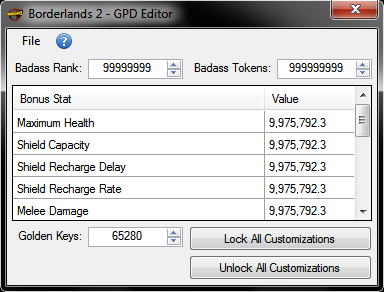
Borderlands 2 - GPD Editor v2.3.0.5

Pictures:

[Image: attachment.php?aid=146]

How to use:

1.) Extract your Gamer Profile from your XBox 360 device using Horizon.

2.) Open the extracted Gamer Profile with Horizon, go to contents and extract the Borderlands 2 GPD [5454087C].

3.) Run the editor, first open the extracted Borderlands 2 GPD then open your extracted Gamer Profile.

4.) Edit your Badass Tokens, Golden Keys, Bonus Stats and save.

5.) Open your extracted Gamer Profile with Horizon and replace your GPD with the modded one.

6.) Rehash & Resign your Gamer Profile.

Download:

Hidden Content


Reply to this thread to unlock the contents

Have fun [Image: attachment.php?aid=145]

Attached Files

Attached images

  GX XGD Extract v00.10.10 - Xbox and Xbox 360 ISO Extractor & FTP Uploader (Download)

01-03-2013, 10:20 AM · Forum: Xbox Mods - No Replies
GX XGD Extract v00.10.10 - Xbox and Xbox 360 ISO Extractor & FTP Uploader

Description

GX XGD Extract is a Windows tool that will extract Xbox and Xbox 360 ISO and upload them directly to the console via FTP.

Download:

Hidden Content


Reply to this thread to unlock the contents

Use at your own risk.

  Xbox 360 Dashboard / System Update 2.0.16202.0 With Avatars (Download)

12-27-2012, 05:54 PM · Forum: Xbox Mods - No Replies
Xbox 360 Dashboard / System Update 2.0.16202.0 Download With Avatars

Description

Xbox 360 Dashboard Update 2.0.16202.0 Download

Released: 27-11-2012

System Software Changes:
  • Displaying the incorrect playlist name when launching a playlist from Xbox SmartGlass to the console[SUP][/SUP]
  • An error with Xbox Video closed-captioning[SUP][/SUP]
  • An error with Xbox Music that some were experiencing

How to install:

1.) Unrar the download
2.) Copy the $SystemUpdate folder to the root of a CD or USB Stick (The memory stick must be FAT or Fat32 formatted)
3.) Insert the CD or USB Stick into your Xbox 360 console.
4.) You will be automatically prompted to update with a USB stick, with a CD / DVD it should say Mixed Media Disc, power down the 360 and power it on again. You should be ask to update before the 360 boots to the dashboard.
5.) Once the update is complete your Xbox 360 will restart then boot up to the new dashboard. Enjoy!

Video tutorial by InsaneNutter on updating the Xbox 360 dashboard with a USB memory stick:

Download:

Hidden Content


Reply to this thread to unlock the contents

Use at your own risk.

  Requiem 4.1 - Remove iTunes DRM (FairPlay) from music, video and books (Download)

12-15-2012, 11:01 AM · Forum: Windows - No Replies
Requiem 4.1 - Remove iTunes DRM (FairPlay) from music, video and books

Description

Requiem is a program that removes Apple's DRM (called FairPlay) from songs, videos, and books purchased on iTunes, This allows content purchased on iTunes to be played on non-Apple-approved devices, like a SlimServer or Linux box. The DRM removal is a lossless process, it is merely decrypting the file, not decoding and re-encoding it, meaning no quality is lost when the DRM is removed.

Requiem must be run on a computer that are currently authorized to play the DRM'd music or video.

Download:

Hidden Content


Reply to this thread to unlock the contents
Hidden Content


Reply to this thread to unlock the contents
Hidden Content


Reply to this thread to unlock the contents

Old Downloads:

Hidden Content


Reply to this thread to unlock the contents
- Apparently works better for Ebooks.

How to use:

Double-click on the Requiem application and watch it work!
It will automatically find DRMed files in your iTunes library and remove the DRM from them.

The original DRMed files will be moved to the trash. Make sure you verify that the songs and videos still work before emptying the trash.

Windows users will need to install Java.

You can also drag & drop files or directories (which will be searched recursively) onto the Requiem application or the Requiem window.

Starting Requiem with the shift key down will disable scanning of the iTunes library. You can use this feature to start requiem with a blank window into which you can drag & drop files to be processed.

How it works:

Requiem decrypts the audio and video data in your file exactly like iTunes does:

1. Requiem authenticates with the DRM library using the secret credentials used by iTunes.

2. Requiem uses the decrypt routines in the DRM library to decrypt all of the audio and video data.

Changes:

There is no longer a key cache.

Warning:

This program is not intended to promote piracy. I just wanted to play my iTunes songs on a SlimServer! As such, the output file is only minimally modified to remove the DRM. It still has lots of information in it identifying you.

Command Line:

You can run Requiem a bunch of different ways from the command line (Mac examples):

run it as usual:
java -cp Requiem.app/Contents/Resources/Java/Requiem.jar Requiem

deDRM a single file:
java -cp Requiem.app/Contents/Resources/Java/Requiem.jar UnDrm

print mp4 structure of a file:
java -cp Requiem.app/Contents/Resources/Java/Requiem.jar Mp4

print configuration info:
java -cp Requiem.app/Contents/Resources/Java/Requiem.jar Config

request more memory: add "-Xmx1024m" (or whatever number of megabytes you want)

Official Website:

Requiem had a Tor website, the project is however no more and the website closed down many years ago: http://tag3ulp55xczs3pn.onion

Use at your own risk.

  Horizon Xbox 360 USB Modding Tool Latest Version (Download)

12-10-2012, 11:16 AM · Forum: Xbox Mods - No Replies
Horizon Xbox 360 USB Modding Tool Download Latest Version

Description

Horizon is an up-to-date and innovative Xbox 360 modding tool. In seconds you can achieve 100% save game completion along with unlimited health, endless ammunition, bank loads of cash, and so much more for your favorite games.

For example Horizon will let you extract your Xbox 360 save games so you can mod the save and then inject it back in to your console to enjoy unlimited money for example.

Another thing Horizon will let you do on the Xbox 360 is copy downloaded Xbox Demo's from Digiex and put them on the Xbox 360 hard drive or USB memory stick. You don't need to worry about the game ID, simply drag and drop. Perfect for newcomers to Xbox 360 hacking and modding.

This is an older version of Horizon, however regardless of that with a few clicks on Horizon you can unlock those achievements and avatar awards for games you just can't beat while using Horizons incredible user interface, built with the casual gamer in mind. Horizon is updated frequently with the latest and greatest tools, making the possibilities endless, and modding for you, a cinch.

Download:

Hidden Content


Reply to this thread to unlock the contents

Horizon Xbox 360 Modding Tool Screenshots:


[Image: horizon-xbox-360-modding-tool-2-jpg-14648.jpg]


Below, Horizon Xbox 360 BlacOps 3 Modding:


I would personally recommend that you download the 2.7.6.7 version of the Horizon Xbox 360 modding tool, this is a much more up to date version of Horizon.

Use at your own risk.

  How To Inject Xbox 360 Content Using Usb Xtaf v45 (Tutorial)

11-26-2012, 05:42 PM · Forum: Xbox Mods - No Replies
How To Inject Xbox 360 Content Using Usb Xtaf v45

Description

This guide will show you how to inject demos, arcade games, apps, dlc using a usb drive and Usbxtaf v45

1
.Configure your 1gb+ usb drive for xbox 360 use if not already configured. If you want to skip some steps copy a gamer picture or theme to the usb so it creates the folders.

Insanenutter has created a tutorial for configuring a usb drive.
How to configure a USB memory stick to be used as Xbox 360 storage (Saves & Profiles)

1a
.Extract any demo,app,arcade game,dlc.

2
.Download usbxtaf here.With the usb drive connected, open the program.

3
.Select file > open first usb drive

3a.If you have the content and zeros folder you can skip to #6.

4
.Right click on the data partition and select new folder.Type in Content and press ok.

5
.Select the content folder and create a folder named 0000000000000000

6.Select the 0000000000000000 folder.Right click in the right side of the program then select inject folder.Select the extracted folder of the demo, arcade game,app,ect.

Usually the right folder to inject is

Game folder
>folder

Full path: content>0000000000000000>Game folder>folder

7.It may appear the program is frozen or crashed that is normal.This is what it looks like when the demo,app,arcade game is injected properly.When it is unfrozen you can close the program and safely remove the drive.

  FakeAnim for Xbox 360 Jtag / RGH - Change boot animation (Download)

11-25-2012, 05:22 AM · Forum: JTAG/RGH - No Replies
FakeAnim for Xbox 360 Jtag / RGH - Change boot animation

Description

What is FakeAnim?

This is a replacement bootanimation for freeboot consoles, FakeAnim allows for animations in the form of WMV 9 encoded videos to be played on the console prior to showing the dashboard. Since this file is only loaded after the console is ready there will be a minor increase in boot times. This has no impact on glitch times since the glitch occurs prior to this file ever being loaded. The Delay and Calibration settings are designed to allow the user to tweak the video to their specific system and display. This tweaking makes it so that the video does not get cut off. Please read below for a full set of instructions:

Installation & Configuration:

Important: Do NOT attempt to delete bootanim.xex if you are unable to restore to a previous NAND dump via hardware.

Requirements: DashLaunch v3.03 is required for this to work.

Installation:
1) Copy over all files in the archive to the HDD or USB of the 360.
2) Edit your launch.ini to have fakeanim = point to the fakeanim.xex
3) Reboot the console and make sure the application runs. Ignore the Red Screen being present for a while.
4) Once you have verified the application is launched remove bootanim.xex** from the consoles Flash. (Use FS3 or FTP).
5) Reboot the console and pay attention to how long the red screen is displayed.
6) Calibration takes place in the fakeanim.ini file and should be checked with a cold boot in order to force the GPU to initialize.
7) Once calibration is complete edit the fakeanim.ini and set calibration to 0

Calibration Notes:
* To adjust the length the red screen is shown. Add to the number to increase the time take delay. Take away to decrease it.
* The delay function is used to ensure the video does not get cut off during the monitor and GPU starting each « delay » is 250ms. Valid entries are between 0 and 100.
* For slims start around 5.
* For Phats start around 13.
* The goal is to get the red screen to show for the least amount of time possible on the Evil Laugh wmv when performing a cold boot.

Download:

Hidden Content


Reply to this thread to unlock the contents

Use at your own risk.

Attached Files

.zip
FakeAnim_v0.60b.zip

  Xbox 360 Dashboard / System Update 2.0.16197.0 With Avatars (Download)

11-16-2012, 08:35 AM · Forum: Xbox Mods - No Replies
Xbox 360 Dashboard / System Update 2.0.16197.0 Download With Avatars

Description

Xbox 360 Dashboard Update 2.0.16197.0 Download

Released: 16-10-2012

System Software Changes:
  • Added: Internet Explorer browser to Apps
  • Added: "My Pins" panel
  • Added: "Recent" panel
  • Added: Recommendation panels to Dashboard
  • Added: Ability to name console from settings
  • Added: Access to Xbox Video and Xbox Music apps
  • Added: SmartGlass
  • Added: Play To
  • Added: Gamertag in corner of screen now shows users email address
  • Added: "Security Proofs" under Account Security
  • Added: Add new anti-piracy scheme on AP 2.5 and XGD3
  • Modified: Smaller background stage size
  • Modified: Dashboard tiles enlarged
  • Modified: Combined TV and Video into TV & Movies
  • Modified: A single usb drive can be configured up to 32gb instead of 16gb
  • Fixed: USB bug when unplugged from console
  • Removed: Companion Devices from Console Settings
  • Removed: Facebook & Twitter from Social Apps with introduction of Internet Explorer

Unpublished Changes:
  • Authentication servers updated

How to install:

1.) Unrar the download
2.) Copy the $SystemUpdate folder to the root of a CD or USB Stick (The memory stick must be FAT or Fat32 formatted)
3.) Insert the CD or USB Stick into your Xbox 360 console.
4.) You will be automatically prompted to update with a USB stick, with a CD / DVD it should say Mixed Media Disc, power down the 360 and power it on again. You should be ask to update before the 360 boots to the dashboard.
5.) Once the update is complete your Xbox 360 will restart then boot up to the new dashboard. Enjoy!

Video tutorial by InsaneNutter on updating the Xbox 360 dashboard with a USB memory stick:

Download:

[b]Hidden Content


Reply to this thread to unlock the contents
[/b]

Use at your own risk.

  Xbox 360 - Horizon | How to Mod Forza Horizon! (Download)

11-14-2012, 04:51 PM · Forum: Xbox Mods - No Replies
[Image: attachment.php?aid=51]

Download Horizon!

[Image: f504398bf3614a275883e6fe2b3ae39f80904b39.png]

Go Diamond!

[Image: attachment.php?aid=50]


1. Move your ForzaProfile from your HDD to a USB from your Xbox 360.

2. Open your USB in the device Explorer from Horizon (Download Link
Hidden Content


Reply to this thread to unlock the contents
)

3. Open your “Game Folder” locate the game “Forza Horizon” hit the mod tab, and locate and hit

[Image: attachment.php?aid=49]

4. The editor will Open up.

[Image: ff5e01b4273a29e78c979f18757f2ba26ffe53b1.png]

5. Edit the XP, Level, Credits to whatever you desire.

Note: To reduce the risk of Ban mod as many credits as you want, stay offline, and buy all the stuff you want.

That would be the safest method

6. This is how is should look when you edited either your XP, Level, Credits.

[Image: b3e104131a5ead4e74cb731ee367d7511d1d8b61.png]

Note: To be on the safe side you can add small amounts of Credits, XP, Level a day.

Garage

When you hit the “Garage” Tab it should look like this:

[Image: ab9394a39f09c0202fa56307fdcefb147ea80218.png]

When you hit the option “Add all unicorn cars” it will unlock all the Unicorn cars for you!

[Image: 788960463e8e798104e92009247463dc7aa109f4.png]

Hit the “Add all secret cars” and it does what it exactly says!

Note: It is normal for the “Secret” cars to be incomplete pictures instead of showing the entire car since they are NPC-only cars and don’t have any actual thumb image.

[Image: e90da0165894581f806ce5c225f97ad77399d2b6.png]

Hit the [Image: 4c84e2c80fe7f59ba741f38cdb52f483767e80d0.png] tab, move your ForzaProfile back to your HDD, and your done. enjoy Horizon!

Forza Horizon Screenshot editor

1. Start by loading your Forza Horizon Screenshot file into the Screenshot editor.

The picture should show up.

If you want a copy of the car simply hit once done ‘Save’ it.

If you want to replace the car with a photo of your own simply hit

You should get a message saying it injected correctly.

Once you have injected, click at the top, enjoy Horizon!

Horizon Support

This is the forum to post in if you have any issues.

Horizon Suggestions

This is the forum to post in if you have any suggestions for this editor or other editors you would like to see within Horizon.

Attached Files

Attached images

  Internet Explorer App Title Update (Latest as of Jan.4.2013) (Download)

11-09-2012, 05:25 AM · Forum: JTAG/RGH - No Replies
Internet Explorer App Title Update Download (Latest as of Jan.4.2013)

Description

u0000000b_00000000 - Internet Explorer Title Update [63AB637D] [00000000] - FFFFFFFF - Region Free
Title update version currently unknown.

Download
Hidden Content


Reply to this thread to unlock the contents

How To Extract/Inject Title Updates With Horizon

Older Versions
Hidden Content


Reply to this thread to unlock the contents

Hidden Content


Reply to this thread to unlock the contents

Hidden Content


Reply to this thread to unlock the contents

Hidden Content


Reply to this thread to unlock the contents

Hidden Content


Reply to this thread to unlock the contents

Hidden Content


Reply to this thread to unlock the contents

Hidden Content


Reply to this thread to unlock the contents

Use at your own risk.