| |
| News - This Week at Bungie – 3/08/2018 |
|
Posted by: xSicKxBot - 03-09-2018, 09:33 AM - Forum: Lounge
- No Replies
|
 |
This Week at Bungie – 3/08/2018
 This week at Bungie, Lord Saladin returned to host the final 4v4 Iron Banner. New weapons are directly available from Saladin’s stock, or can be earned through Iron Engrams. This isn’t your last chance to earn those Season 2 ornaments, as Iron Banner will return after Destiny Update 1.1.4 is released, featuring 6v6 gameplay.
Speaking of Update 1.1.4…
Gotta Go Fast
Last week, Cozmo asked you fine readers to set an agenda on what we’d talk about in this week’s article. The overwhelming response: Sandbox!
While we’re still in the process of finishing development on 1.1.4, Senior Crucible Designer Kevin Yanes and Design Lead Josh Hamrick are here to get a bit more granular with what’s coming on March 27.
Kevin: Hey everyone, Kevin here from the Crucible team. I’m dropping by to share the details on the rest of our changes heading into Update 1.1.4. As Derek mentioned in last week’s TWAB, Iron Banner, Rumble, and Mayhem are making their triumphant returns to Destiny 2 with a few twists. Iron Banner has become 6v6, Mayhem features 90% fewer nova bombs (fixed this issue found during the Dawning), and Rumble has welcomed two additional players into the fray. There is a lot to get excited about in Update 1.1.4 but something the team really wanted to do was go back and refine the core experience.
Looking at the feedback, it was clear that the community felt there were two key areas for improvement with the Crucible: “Time to Kill” and “Team Shotting”. So we set our sights on re-working systems, mechanics, and values to tackle those two areas.
“Does this mean you’re changing the Time to Kill?”
When we looked at the core feedback on “Time to Kill” in the Crucible, we saw that it mostly stemmed from a lack of excitement or spikes of intensity you all came to expect from a Destiny experience. This came in the form of feedback that stated the game was too slow, or the core loop was too stale. We agree, and have worked with Sandbox to increase the pace of the Crucible as a whole. Josh is going to speak to all of the Sandbox changes here in a bit, and I won’t steal his thunder. So alongside all of the great changes the Sandbox team has made, we’re setting our sights on making the Crucible a faster, more dynamic, and more action-packed experience on the activity side.
Let’s get down to brass tacks on how we’re planning to change the Crucible and the delivery of the goal stated above. Here is an overview of the changes we’re bringing in 1.1.4:
- Respawn and Revive were tuned in all game modes
-
- Player respawn timers for all Quickplay modes have been reduced to 2s.
- Player respawn timers for Survival have been reduced to 7s
- Revive lockout time in Countdown has been reduced to 7s
- Players no longer lose Revive Tokens on death
- Power Ammo respawn timers were adjusted across the board
-
- Power Ammo respawn timers in Iron Banner have been reduced ~50%
- Power Ammo respawn timers for all Quickplay modes have been reduced ~30%.
- Power Ammo respawn timers in Survival have been reduced ~40%.
- Power Ammo respawn timers in Countdown have been reduced ~25%
- Ammo counts have been adjusted in relation to these timers, and in relation to weapon type.
-
- In almost all cases weapons either retained the same ammo count or received a buff. Swords and rockets were brought down to stay in line with the rest of the weapon offering.
- Enemy players now drop their Power Ammo on death.
-
- This brick is now networked to all players regardless of faction. Secure the power ammo to keep it from your foes or steal off your enemy’s ghost, but be quick because these bricks don’t stay in the world forever.
All these changes coalesce to create an experience that relies less on clumping with your team and focuses more on rewarding quick reflexes, thinking, and movement.
“But what about Competitive?”
During development of 1.1.4, we realized that while we’d reduced the “Team Shotting” in Quickplay and Iron Banner effectively, we hadn’t quite done the same to Competitive. Knowing this, we looked for a change that reinforced the following goals: reduce team clumping, reward individual plays, and incentivize flanks. With those goals in mind we looked to take a big step in shifting the gameplay in Competitive and Trials: starting in 1.1.4 we’ve opted to remove the Tracker from all Competitive and Trials game modes.
This means more communication is required to secure victories in Competitive and Trials matches. It also means that a crispy flank with Power Ammo is all the more powerful. Subverting expectations and reading opponents is more potent in matches with no Tracker. In playtests we’ve already seen some clutch underdog comebacks and we can’t wait to see what you all do in Competitive and Trials starting with 1.1.4. That said, we’re always listening and reacting to feedback so please tell us what you think about this change and all of our 1.1.4 changes once they go live.
Thank you so much for your time in reading and playing. We’re proud and excited of the work we’ve done on 1.1.4 and look forward to meeting you on the battlefield. Next up Hamslamrick with some Sandbox goodies.
Hamrick: Hello friends! As I mentioned last time, our goal for this update is to provide individual players with more hero moments by increasing overall speed and mobility, increasing the number of supers you charge to demolish your enemies, and increasing the frequency and impact of our most montage worthy power weapons, especially in the Crucible. With Update 1.1.4 drawing ever closer, it feels like a good time to swing back by and provide some updates and additional clarity to what this patch will bring.
The first thing you should know: we are VERY excited for this update to go live. After weeks of solid play-testing, some with external participants, we feel like this is really shaping up to be an update you will be happy with. Huge shout out to everyone involved that helped the list of possible changes grow instead of shrink. Also, to those who play-tested and gave us quality actionable feedback.
Now, here’s an updated version of the list of changes first detailed in the February 1 TWAB. New and/or updated entries are highlighted in bold:
- All three glides plus Catapult and Strafe Lift have been retuned and buffed to make them faster and more unique.
- The mobility stat range has been expanded and completely retuned as well. In short, everyone gets faster and the high end is higher.
- The players’ ground speed cap has been increased, allowing for faster total movement speed, regardless of how you may get there.
- Arcstrider, Sentinel, and Striker all move faster, and at the same speed as one another, while in their Supers.
- Arcstrider, as a whole, is performing well in PvP but mostly due to its neutral game perks. We’ve made the following changes in an effort to get the Super to be a more competitive option:
-
- Faster Attack Animations.
- Faster Dodge Animations.
- Increased range of all attacks.
- The previous Shoulder Charge changes are being reverted, allowing Shoulder Charge to be used as a movement mode once again.
- Dawnblade has been improved:
-
- Reduced cost for throwing swords, allowing for one additional throw
- Increased super duration extension gained from “Everlasting Fire”
- Removed all in-air accuracy penalties while “Swift Strike” is active
- Reduced the Icarus Dash cooldown
- Increased the Grenade and Melee energy “Heat Rises” gives you per kill
- Invisibility on Dodge / Smoke Updates:
-
- Invisibility on Dodge no longer breaks Aim Assist or Projectile Tracking in PvP (unchanged in PvE)
- Dodging still breaks both Aim Assist and Projectile Tracking, but only for the duration of the actual dodge
- Increased the duration of Invisibility on Dodge by 1 second
- Increased the duration of Smoke Bomb Invisibility by 1 second
- Supers recharge faster for everyone!
-
- Supers now recharge 1:40 faster, a cooldown reduction of 25%.
- Mods that reduce Grenade, Melee and Class Ability cooldowns have been buffed to allow for up to 2x faster cooldowns.
-
- This is NOT replacing Mods 2.0, which was recently delayed. More information is available below.
We’ve buffed several weapon archetypes (including, but not limited to, Hand Cannons, Pulse Rifles, Sniper Rifles, and Shotguns) and a few specific perks, as well. A key goal here is to make Shotguns, Snipers, and Fusion rifles more prevalent in the game.
- Pulse Rifles
-
- Increased PvE damage for all pulses
- Increased rate of fire for adaptive and high-impact pulses
- Increased base damage for adaptive, high-impact, and rapid-fire Pulses
- Increased precision multiplier for lightweight pulses
- Decreased precision multiplier for adaptive pulses
- This keeps precision damage close to where it is now, putting most of the buff into body shots, though it is still an increase in precision damage overall.
- Scout Rifles
-
- Increased PvE damage for all scouts
- Increased base damage for High-Impact Scouts
- Hand Cannon
-
- Increased PvE damage for all Hand Cannons
- Increased precision multiplier for precision hand cannons
- Increased hip fire accuracy on consoles
- Increased ADS accuracy on consoles
- Sidearms
-
- Increased PvE damage for all sidearms
- Increased hip fire accuracy
- Increased ADS accuracy
- Increased inventory size (allowing more reserve ammo to be stored)
- Increased minimum range
- Added an ADS movement bonus
- SMG
-
- Increased PvE damage for all SMG’s
- Set Optics to 1.3x
- Increased inventory size (allowing more reserve ammo to be stored)
- Linear Fusion Rifle
-
- Increased PvE damage for all linear fusions
- Increased precision multiplier
- Increased aim assist
- Reduced flinch multiplier
- Shotgun
-
- Increased PvE damage for all shotguns
- Increased inventory size (allowing more reserve ammo to be stored)
- Increased aim assist for Suros precision shotguns
- Sniper Rifle
-
- Increased PvE damage for all snipers
- Increased precision multiplier
- Increased aim assist
- Increased inventory size (allowing more reserve ammo to be stored)
- Grenade Launcher
-
- Assault Rifles
-
- Decreased range and aim assist stats for precision autos (Uriel’s Gift). Base damage is not changed.
A few weapon perks are also getting some updates:
- High Impact Reserves
-
- Kill Clip
-
- Rampage
-
- Increased PvE damage
- Increased duration
- Dragonfly
-
- Increased damage
- Increased radius
- Stronger visual effects
- Grave Robber
-
- Reloads .5 magazine instead of .3
- Timed Payload
-
- Splits damage 55 Explosive / 45 Direct instead of previous split which was more direct damage
- Explosive Rounds
-
- Decreased PvE Explosive Rounds damage
- This decrease has been compensated for with an increase in PvE damage for the base weapons – your weapons with explosive rounds will not do less damage after 1.1.4
Just like last time, we have a few additional notes to wrap things up.
Mods Rework
First, let’s talk about the changes to the potency of Ability Cooldown Mods. In our last update, we mentioned that we were going to wait and buff ability cooldowns at the same time we dropped the mods rework. Over the last few weeks it has become obvious that the mod rework was going to need more time to come together due to the scope of the changes. That decision, which has already been accounted for in the last Roadmap that you saw, is ultimately going to be a win for all of us. It gives us more time to deliver something we believe will add value to the game. However, we understood we should not delay the much-needed improvements to ability cooldowns. So, while there are many, many improvements to mods planned for the future, we are going to greatly increase the output for Ability Cooldown Mods in Update 1.1.4.
Invisibility
Nightstalkers, the day of reckoning is soon upon us. Our invisible exploits may have barely been seen, but they have most certainly been felt. In 1.1.4 our ability to ninja-smoke out to avoid any and all incoming fire (and/or lightning) is going to be reduced down to pure skill alone… not that we’d ever admit to it being anything but. As one of only two items deemed nerf-worthy on the entire list of incoming Sandbox changes, we as Hunters shall deal with this as we deal with everything: we’ll take it as a compliment and solid proof of our endless supply of talent, and we’ll never, ever let the ‘Locks and Titans hear the end of it.
- Currently:
-
- Initiate Dodge or Throw Smoke
-
- Dodging temporarily kills Aim Assist and Projectile Tracking (allowing you to actually Dodge things)
- Smoke just immediately jumps to…
- Initiate Invisibility
-
- For the duration of Invisibility Aim Assist and Projectile Tracking remain disabled.
- Dodge Finishes
- Invisibility Expires
-
- Aim Assist and Tracking are re-enabled
- Coming Soon in 1.1.4 (PvP Only!):
-
- Initiate Dodge or Throw Smoke
-
- Dodging temporarily kills Aim Assist and Projectile Tracking (allowing you to actually Dodge things)
- Smoke just immediately jumps to…
- Initiate Invisibility
- Dodge Finishes
-
- Aim Assist and Tracking are re-enabled
- Invisibility Expires
Note: Nothing changes for PvE except that they also get the one-second duration increase to Invisibility.
Snipers
In the last update I mentioned how a nasty bug has crept into our scopes and made it near-impossible for us to correctly tune Sniper Flinch. We have good news! That fix has been implemented and those changes will go live in the 1.2.0 update, planned for May. Sweet, sweet sniper action is on the way.
This is not the end…
While we are very excited to get this update into your hands, and we believe you’re really going to enjoy the changes, we all know these aren’t the only changes we’ll need to make to address feedback. It’s just the first leg of a long journey.
We hope this makes the game more fun for you all, that it begins to bring back hero moments, and makes you feel a bit more like tiny gods, but we also hope you know there is more to come and that this gets you excited to come along for the ride.
On that note, below you will find a video pulled from a 1.2.0 playtests that has all the 1.1.4 Sniper changes AND the new Sniper Flinch fixes in and working.
[embedded content]
See you all again soon,
<3 Hamrick
Companions to us all
As Destiny 2 continues to evolve, the Bungie.net team is also hard at work processing feedback and bringing updates to the Companion experience. Today, Associate UX Designer Joey Carpenter is here to walk us through some changes that were deployed to the Companion App earlier this week.
Joey: On Wednesday, we released a utility update to the Destiny Companion App. Now you can modify the shaders, effects, mods, perks, and Masterworks of the items in your inventory on the go. All you need to do is fire up your companion app and open up the detail view of the item you want to modify.
Find the slot for the mod, perk, shader, effect, or Masterwork on your item and tap what you want to replace it with. If a change you want to perform will cost you something, the cost of the action and how much you currently have to spend will be listed for you.
This update in particular is exciting as the foundation for this work can eventually be leveraged for other advanced actions on your character and gear. Ever wanted to clear out the cruft that’s built up in your inventory a bit faster? Us, too. Vendor purchasing on the go? Or perhaps it’s time for clearing all of the rare items from your inventory that have accumulated throughout your play session? These are all possible scenarios that we’re considering for future, to make the most of the same system we built. This work also gives us the opportunity to enable third-party developers to take advantage of this functionality, while providing a secure environment where these actions require your explicit approval. We have a bit of work to do before that’s possible, but we’ll keep you informed as we solidify future updates for the API, Bungie.net, and companion app.
As a heads up, this update is currently available on Android. iOS is in the process of being released, but we’ll let you know as soon as it’s available.
Now is prime time to head over to our mobile feedback forums to sound off on what cool new write actions you’d like to see in the future.
In the Know

Recently, we added two new members to Destiny Player Support. You may have encountered them in the #Help forum, troubleshooting issues or sharing Help articles. If you’re having difficulties when attempting to play Destiny 2, they’re at the ready to lend a hand. This is their report.
EDZ Destination Emblem
Last week, we noted that players may accrue 38 Ghost scannables on the EDZ Destination Emblem. Through investigation, we have identified that Ghost scannables found at the Farm do not contribute to these emblem statistics. The issue has been escalated to the appropriate team for further investigation.
WiFi: Convenience vs. Stability
While Destiny can be played with a strong and stable WiFi connection, many players have found that using WiFi can increase the likelihood that they will lose their connection to Destiny Services.
Sources of interference for WiFi connections
WiFi is susceptible to a variety of different sources of interference.
- The process of sending data wirelessly takes time and increases latency. This may increase the total latency of a player’s network to the point where they encounter latency, packet loss, or error code disconnects from Destiny.
- WiFi connections use one of several frequencies called channels to transmit data. If more than one WiFi network is trying to use the same channel it can create congestion that slows down network traffic. It can even cause data to be lost or the connection to be interrupted.
- If multiple devices are connected to the same wireless network and attempting to reach the internet at the same time they can interfere with each other.
- The distance and layout of a player’s console from their WiFi source can also negatively impact signal strength and stability.
- Some home appliances and consumer electronics, such as microwave ovens, can directly interfere with a network’s WiFi signal.
If you only have WiFi available for online gameplay, visit this page of the Network Troubleshooting Guide for tips on how to strengthen your connection: Network SetupShiny and Chrome
Whether you run solo or with a fireteam, the Creations page is open to all who wish to submit moments of greatness. We’re constantly on the lookout for footage that inspires, and this week, we’ve witnessed some stellar gameplay in both PvE and PvP. Give ‘em a watch, maybe you’ll be inspired to take on a Raid boss solo. Movie of the Week: Solo Argos (Phase 1)
[embedded content]
Honorable Mention: Afterlife
[embedded content]
Cheers to this week’s winners. If you’d like a chance to receive the Lens of Fate Emblem, make sure to tag your submission with #MOTW.
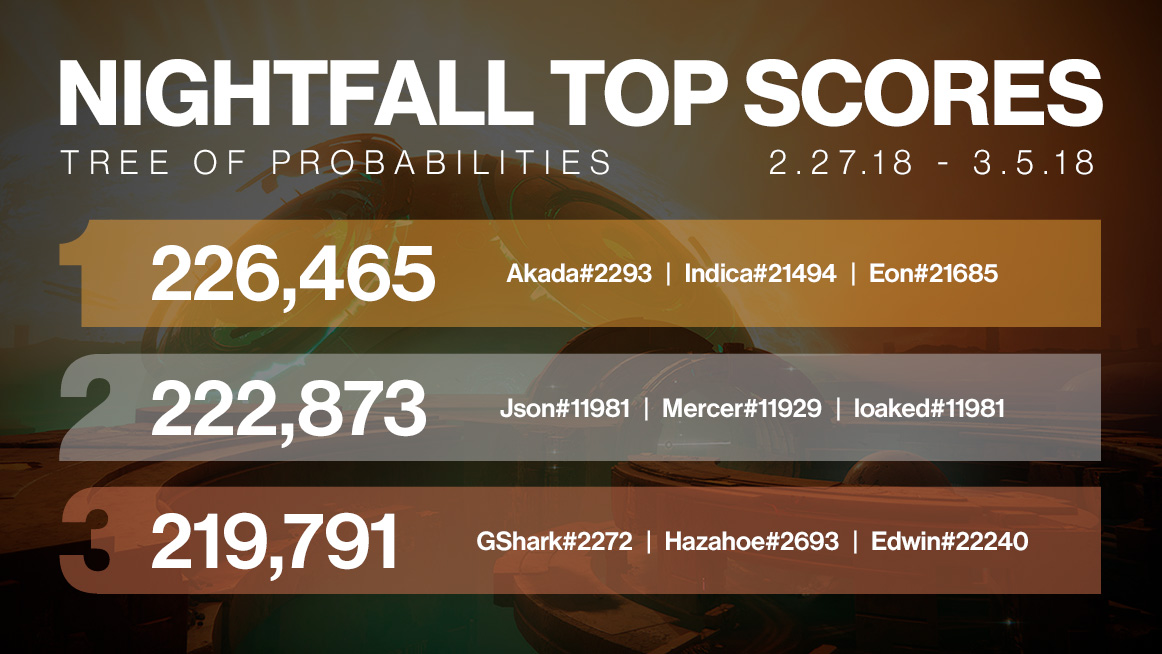
Since Tuesday, we’ve had quite a few players asking about the top Nightfall scores recorded for the Tree of Probabilities Strike. We’ll be highlighting top fireteams each week. As a note: we’re aware of an issue where Lost Sectors are currently contributing points to the Nightfall scorecard, which we are aiming to resolve by Update 1.2.0. Until resolved, you may find the top scores to be… huge!
While the Lost Sector strategy will live until May, we are actively collecting data on scores from percentiles of the player base. Score pars for emblem variants are still at 20, 40, 60, and 80k points, but expect these to be adjusted in the future. High scores achieved through creative use of Lost Sectors will not be factored in when setting these new score pars. We’ll keep you informed through @Bungie on Twitter for what to expect! Thanks for stopping by, and we’ll see you online.
Cheers,
-dmg04
|

|
|
| PS4 - Blasters of the Universe |
|
Posted by: xSicKxBot - 03-08-2018, 11:11 PM - Forum: New Game Releases
- No Replies
|
|
Blasters of the Universe
Features first-person bullet-hell gameplay that requires you to duck, dodge, and maneuver through myriad enemies and hundreds of bullets. Publisher: Secret Location Release Date: Feb 27, 2018
|
|
|
|
| PS4 - RiftStar Raiders |
|
Posted by: xSicKxBot - 03-08-2018, 11:11 PM - Forum: New Game Releases
- No Replies
|
|
RiftStar Raiders
The Spiral Arm has been plunged into chaos, hordes of WarSwarm, a hive-mind of alien AI, have waged war on humanity, and it?s fallen to the poster boy for the Federation?s ?Most Wanted? to save the galaxy? and turn a profit. Publisher: Climax Studios Release Date: Feb 27, 2018
|
|
|
|
| XONE - Gravel |
|
Posted by: xSicKxBot - 03-08-2018, 05:38 AM - Forum: New Game Releases
- No Replies
|
|
Gravel
Destroy obstacles, take shortcuts, and forget any rules until the end to win. Publisher: Milestone S.r.l Release Date: Feb 27, 2018
|
|
|
|
| XONE - Turok 2: Seeds of Evil Remaster |
|
Posted by: xSicKxBot - 03-08-2018, 05:38 AM - Forum: New Game Releases
- No Replies
|
|
Turok 2: Seeds of Evil Remaster
Having defeated the Campaigner, Turok throws the Chronocepter into a waiting volcano to destroy it. Unfortunately the blast awakens an even deadlier force - The Primagen. Once again a Turok is tasked with restoring peace to the land and stopping the Primagen from merging Earth with the nether world. The Dinosaur Hunter Returns Fight your way through 35 different types of enemies with bouncing bellies, blinking eyes, stretching tentacles and snapping jaws. From Prehistoric Raptors, to evolved Flesh Eaters, to your final battle with the Mother of all beasts? you?ll want to defeat all of them! Enemies are intelligent! They?re smart enough to attack in groups, to flee when they are outgunned, and to take cover during a firefight. Enemies flinch and spasm differently depending on which body part you hit. [Xbox.com] Publisher: Night Dive Studios Release Date: Mar 02, 2018
|
|
|
|
| XONE - Turok Remastered |
|
Posted by: xSicKxBot - 03-08-2018, 05:38 AM - Forum: New Game Releases
- No Replies
|
|
Turok Remastered
Turok is back and no dinosaur is safe. When it was first released in 1997, Turok introduced gamers to a world teeming with cunning enemies, traps, puzzles and deadly weapons all within a vast 3D environment ready to explore. Now the classic game has been restored and enhanced with a new visual engine and new features to sink your teeth into. [Xbox.com] Publisher: Night Dive Studios Release Date: Mar 02, 2018
|
|
|
|
| PC - Fable Fortune |
|
Posted by: xSicKxBot - 03-08-2018, 05:38 AM - Forum: New Game Releases
- No Replies
|
|
Fable Fortune
A collectible card game that combines the iconic world and characters of the Fable series with fast-paced tactical gameplay. Choose between Good and Evil to alter your special abilities and even the cards in your deck. Compete in leagues and events, or take on a boss with a friend in co-operative mode. Publisher: Flaming Fowl Studios Release Date: Feb 21, 2018
|
|
|
|
| PC - Into the Breach |
|
Posted by: xSicKxBot - 03-08-2018, 05:38 AM - Forum: New Game Releases
- No Replies
|
|
Into the Breach
Control powerful mechs from the future to defeat an alien threat. Each attempt to save the world presents a new randomly generated challenge in this turn-based strategy game. Publisher: Subset Games Release Date: Feb 27, 2018
|
|
|
|
| News - Video: How Gone Home was localized by fans |
|
Posted by: xSicKxBot - 03-08-2018, 05:38 AM - Forum: Lounge
- No Replies
|
|
Video: How Gone Home was localized by fans
 Localization is a task made even more difficult when working under the constraints of indie development. So how did the developers of Gone Home manage to localize the game for over ten languages with no budget?
In this 2014 GDC talk, The Fullbright Company’s Johnnemann Nordhagen explains how Gone Home enabled, supported, and encouraged fan-made translations for the game.
Johnnemann also discusses the studio’s approach to asking the community for help, as well as providing what went right and what went wrong during the localization proccess.
Developers interested in crowdsourcing localization for their games may appreciate that they can now watch the talk completely free via the official GDC YouTube channel!
In addition to this presentation, the GDC Vault and its accompanying YouTube channel offers numerous other free videos, audio recordings, and slides from many of the recent Game Developers Conference events, and the service offers even more members-only content for GDC Vault subscribers.
Those who purchased All Access passes to recent events like GDC or VRDC already have full access to GDC Vault, and interested parties can apply for the individual subscription via a GDC Vault subscription page. Group subscriptions are also available: game-related schools and development studios who sign up for GDC Vault Studio Subscriptions can receive access for their entire office or company by contacting staff via the GDC Vault group subscription page. Finally, current subscribers with access issues can contact GDC Vault technical support.
Gamasutra and GDC are sibling organizations under parent UBM Americas.
|
|
|
|
| News - Now available: Use Gold Points on digital games for the Nintendo Switch system |
|
Posted by: xSicKxBot - 03-08-2018, 05:38 AM - Forum: Lounge
- No Replies
|
|
Now available: Use Gold Points on digital games for the Nintendo Switch system
Now available: Use Gold Points on digital games for the Nintendo Switch system
My Nintendo members can now redeem Gold Points for digital games and DLC for the Nintendo Switch™ system. It’s as easy as applying your points during the checkout process, whether you buy on the Nintendo website or Nintendo eShop on the system.
Ready to earn and redeem your Gold Points? Here’s how:
- Buy a qualifying digital game for Nintendo Switch, Wii U™, or Nintendo 3DS™ family systems, or a physical game for the Nintendo Switch system.
- Earn Gold Points based on the amount you pay (excluding any points or discounts used).
* 5% for eligible digital purchases on Nintendo.com or Nintendo eShop (Nintendo Switch, Nintendo 3DS, Wii U)
* 1% of the Nintendo eShop price for physical purchases (Nintendo Switch)
-
- Redeem those points on your next eligible digital purchase (including games and DLC) for the Nintendo Switch system. Just look for the option to apply your points during checkout.
That means that if you buy a $59.99 game on Nintendo eShop, you’ll earn 300 Gold Points. Those points can then be redeemed for $3 toward your next purchase…which will earn more Gold Points, according to the amount you paid (excluding any points or discounts used)!
For more details, check out the new page about Gold Points.
Not yet a member of My Nintendo? Sign up for free today with your Nintendo Account.
Details:
- Purchases of Nintendo 3DS or Wii U DLC do not qualify to earn Gold Points. Additionally, service items/tickets, in-game items or virtual currency do not qualify to earn Gold Points.
- Gold Points can be used toward all eligible digital game and DLC purchases for the Nintendo Switch system, excluding automatic subscription renewals, service tickets and in-game items.
- My Nintendo Gold Points expire after 12 months on the last day of the month in which they were earned. Visit My Nintendo Rewards Program Terms of Service for the full terms and conditions.
|
|
|
|
|