Vienna-based developer Mi’pu’mi Games has taken inspiration from its home city for The Lion’s Song, a four-part narrative adventure. The world ‘adventure’ conjures images of swashbuckling and derring-do but this is a more meditative point-and-click experience. The Austrian capital was a hub of artistic and scientific endeavour at the turn of the 20th century and in that setting you’ll spend your time searching for inspiration in the every day, negotiating oppressive social norms and battling personal demons. No pirates or talking beasties here!
The four episodes compiled for this Switch release previously appeared on PC and mobile and each is immediately accessible from the main menu. Each self-contained chapter follows a different protagonist but their stories overlap, connecting in various ways depending on your choices, with recurring characters and locations. Episode one revolves around Wilma, a gifted young violinist having difficulties composing a piece following an incredible debut. Infatuated with her tutor, she retreats to an isolated cabin in the mountains at his suggestion in order to work in solitude.
Episode two focuses on aspiring artist Franz, struggling to develop his eye and understand both himself and his subjects while capturing their multi-faceted personalities on canvas. Episode three sees mathematician Emma fighting a numerical conundrum as well as the restrictive gender politics of her era, while Episode four – appropriately titled ‘Closure’ – poignantly links the previous stories. Although the protagonists are fictional, many luminaries from the artistic and scientific fields get name-checked and you’ll likely cross paths with Gustav Klimt, Freud and Wittgenstein on your journey.
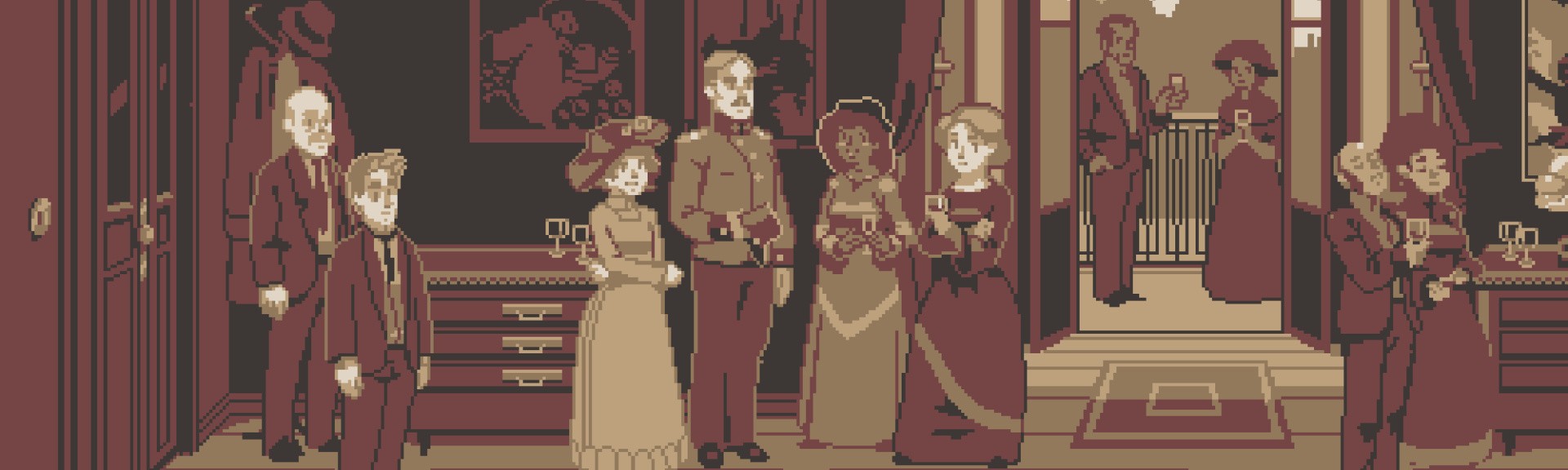
As you can see from the screenshots, the pixel aesthetic gives a period feel – imagine a sepia-toned Thimbleweed Park without the verb menu and you’re not far off. However, while you won’t be investigating murders or insult-sword-fighting in pre-war Vienna, dramatic framing and subtle graphical flourishes keep things visually striking. Environmental elements illuminate as your protagonist’s thought process develops; ghostly character outlines appear and hang in mid-air; mathematical equations and graph curves snake across furniture. It all looks sumptuously rich and sharp with wonderful animation.
There’s a cinematic influence in the direction of these scenes and the surreal elements that convey the characters’ perception of the world. They find inspiration in their everyday surroundings – figures appear and leave outlines that dissolve with audio flourishes or the cursor becomes a bouncing musical note as Wilma finds a melody. Sound is an integral part of the experience – whether it’s chalk on a blackboard, birdsong in the countryside or a character’s heartbeat – and a good pair of headphones will enhance the experience.
As with other point-and-click adventures that have appeared on Switch, The Lion’s Song disappointingly lacks pointer controls. Perhaps more surprisingly, the touchscreen also goes unsupported. Elsewhere this would be a significant drawback, but the tranquil nature of the gameplay and its lack of intricate verb menus or UI elements mean the stick-controlled cursor feels just fine in practice.
Tapping ‘A’ speeds up and skips text, though you’ll want to read everything as the writing is generally top drawer. Upon completion of an episode, you can review your decisions against those of other players – ‘11% didn’t talk about X to Y either’ – and you have the option to return to those decisive scenes and make different choices to uncover new ‘connections’. These unlock achievements viewable in a special gallery from the main menu. It’s a neat way of enabling you to explore the other narrative branches without replaying great swathes of the game.
Not that a replay would take long – The Lion’s Song is a pleasantly brief experience. Each episode lasts between 30 minutes to an hour. While this may seem short, it suits the game’s tone – it feels like a short novel and is best consumed in a comfy chair over a sitting or two with a glass of something nice. It certainly doesn’t outstay its welcome.
It’s a delicate game with choices that unlock opportunities for reflection and rely on memory and intuition rather than skill or dexterity. You might be asked to recall a particular conversation in order to reveal a new side of a subject’s personality or scroll back and forth to reveal a diagram representing earlier work on your mathematical problem. Puzzles are not the focus and the interactions are agreeably engaging rather than taxing. You won’t encounter the frustrations common to the genre – there are no objects to use in obscure, unorthodox ways – and this enables a gentle, pensive game that gives you time to meditate on some mighty big subjects of the human condition.
Conclusion
An emotional story that weaves big themes across its episodes, The Lion’s Song is a poignant point-and-click adventure with excellent audio, a beautiful art style and great writing. The exploration of its subjects isn’t muddied with obstinate riddles or ill-fitting mechanics and it’s a satisfying, albeit brief, experience that is absolutely worthy of your time.
The Steam Intergalactic Summer Sale wraps up in 24 hours! Take advantage of huge savings throughout our store on over ten thousand games in the final day of the sale.
Thanks to all that played the 2018 Summer Salien Game!
The Steam Intergalactic Summer Sale will run until 10 AM Pacific, July 5th.
Posted by: xSicKxBot - 07-11-2018, 01:17 AM - Forum: Minecraft
- No Replies
Update Aquatic OUT TODAY on mobile, consoles + more
Take a deep breath and dive into a vibrant new world beneath the surface! Full of marine life, new mobs and colourful sea-nery, Minecraft’s oceans are about to get their biggest update yet.
The Minecraft: Update Aquatic is out today on Windows 10, Xbox One, VR, mobile devices and Nintendo Switch! Java players can expect to see the Update Aquatic available on PC before the end of July.
A WORLD OF NEW CREATURES The oceans of the Overworld are populated by both fish and foe alike. Some will fight you, while others will become your buddy! Play with the dolphins, swim with majestic turtles, or brawl with the hostile Drowned. And if you do come up for air, watch out for the Phantom soaring the skies!
EXPLORE THE DEPTHS Swim through a paradise of colourful reefs, deep sea trenches, and kelp forests – all filled with neat new blocks to use in your builds! Legend also speaks about shipwrecks and forgotten ruins, rumoured to hold treasures for any adventurer brave enough to explore them…
WIELD NEW ITEMS It is said that the oceans are home to some mythical items, and only the most daring adventurers reap the rewards! Discover shipwrecks and underwater ruins, take a swing at the Drowned for a chance to earn a mighty trident, or assemble the awesome conduit.
Watch the trailer below, click here to learn more on Minecraft.net, check out your app store in the next few hours to play the update, and share your thoughts in the comments below!
Last Chance to Speak at Hyperledger Global Forum | Deadline is This Friday
Hyperledger Global Forum is the premier event showcasing the real uses of distributed ledger technologies for businesses and how these innovative technologies run live in production networks today. Hyperledger Global Forum unites the industry’s most respected thought leaders, domain experts, and key maintainers behind popular frameworks and tools like Hyperledger Fabric, Sawtooth, Indy, Iroha, Composer, Explorer, and more.
The Hyperledger Global Forum agenda will include both technical and enterprise tracks on everything from Distributed Ledger Technologies to Smart Contracts 101; roadmaps for Hyperledger projects; cross-industry keynotes and panels on use-cases in development, and much more. Hyperledger Global Forum will also facilitate social networking for the community to bond.
Learn more about submitting a proposal, review suggested technical and business topics, and see sample submissions. The deadline to submit proposals is Friday, July 13, so apply today!
Posted by: xSicKxBot - 07-10-2018, 09:38 PM - Forum: Windows
- No Replies
Inside Xbox Episode 5 news recap
Earlier today Inside Xbox Episode 5 aired, continuing to pull back the curtain on Team Xbox to celebrate our games, features, and fans. This episode was full of closer looks at some big upcoming games, including No Man’s Sky, We Happy Few, and Earthfall, as well as the announcement of a huge addition to Xbox Game Pass. So, without further ado, let’s take a closer look at some of the biggest news coming out of this month’s episode of Inside Xbox.
Rocket League and Warhammer: Vermintide 2 are Coming to Xbox Game Pass
The Xbox Game Pass catalog continues to grow this week, thanks to the addition of a couple of awesome titles. First up, the much-loved Rocket League, which blends elements of soccer, racing, and demolition derbies together to create a wonderful whole, hits Xbox Game Pass today. Then, tomorrow, Warhammer: Vermintide 2 brings its mix of over-the-top gore and first-person hacking and slashing to the service.
The Sport White Special Edition Xbox One Controller
Featuring beautiful, clean lines and a snazzy design, the latest addition to the Xbox One controller family is a looker. Inspired by sports and sneakers, the Sport White’s got mint green accents and grey and silver patterns to go along with its fresh white design. If you’re a sneaker head, you’ll definitely want one of these. You can snag this sporty beauty at the Microsoft Store and other retailers beginning July 31st in the U.S. and Canada, and then worldwide on August 7th.
A Closer Look at No Man’s Sky
The highly-anticipated space exploration game No Man’s Sky is hitting Xbox One on July 24, so we had Hello Games founder Sean Murray on to share a bit about how excited the team is to be bringing the game to our consoles. He also showed a new video created by the team that breaks down 11 new features, from freighters to alien sidekicks, added to the game since its initial launch, all of which will be available when the game launches on Xbox One.
We Happy Few Adds a Story Mode
The Inside Xbox team was joined by Guillaume Provost from Compulsion Games, the latest studio to join the Microsoft Studios family. Guillaume showed off We Happy Few’s new story mode for the first time, sharing that you’ll be able to see events in the game from multiple perspectives as you play. This is going to be one wild ride, and we can’t wait to see more when the game releases in August.
Surviving an Alien Invasion in Earthfall
Coming to join us from their studio just up the road in Bellevue, the team from developer Holospark gave us a closer look at the upcoming game Earthfall, which releases this coming Friday, July 13. Earthfall is a four-player co-op shooter that tasks players with surviving an alien invasion, and it looks like a blast. Even better, the guys announced that all maps and additions to the game will be absolutely free to anyone who purchases it. There will also be Mixer integration, so save up that Spark to help your friends!
Seasons Change in Forza Horizon 4
To close out the show, the team was joined by some familiar faces from Playground Games, who came on to give fans a closer at this highly-anticipated (and absolutely gorgeous) Xbox One racing game. This segment lead into a special live-stream on mixer.com/forzamotorsport , where the team at Playground Games highlighted the summer season, including interviews with the team and community Q&A.
Thanks to everyone who tuned in! We hope you enjoyed the show and we can’t wait to tell you all about next month’s episode in a few weeks.
Apple still considering foldable iPhones with flexible displays
Apple is still examining the possibility of creating a mobile device with a large screen that can be compacted into a smaller size, using a flexible section in the middle of the device to allow the screen to bend enough for it to fold without breaking.
Granted by the U.S. Patent and Trademark Office on Tuesday, the patent for “Electronic devices with flexible displays” details how a folding mobile device could be created. While foldable, the device could feasibly have a screen taking up an entire side of the device, similar to a smartphone or tablet, but with one cohesive display rather than using two or more with a noticeable line in the middle.
According to the patent, the concept relies on using multiple flexible elements in the middle of the device. In the process of flexing the device for the fold, the patent notes there will be a compression of material on the inside of the fold, and a thinning of material on the outside, with the former likely to cause an issue for the display layer.
To counter this problem the patent suggests the use of recesses in the material protecting the display layer in the middle section of the device, reducing the congregating mass and the amount of stress on layers closer to the inside of the fold.
It is said that there could be solid inflexible glass covers for sections of the display that are not affected by the fold, with a flexible cover spanning the gap between the two solid sections. In one implementation, the glass layer can even be bent, supported by a polymer layer for the bend itself, with grooves added to the glass in parallel to the bent section.
Aside from the display, the rest of the hypothetical device would also require flexible materials to cover the outside of the fold, and can possibly even include a hinge in the middle to help keep the bend occurring at one point in the flexible section.
Apple initially filed the application on June 8, 2016, and credits Jiang Ai, Erik A. Uttermann, and Soyoung Kim as inventors.
The latest patent is one in a string of similar applications Apple has submitted to the USPTO over the years.
One filing discovered in October 2017 surfaced at the same time as a rumor claiming Apple is working with LG to produce an OLED iPhone by 2020. Merrill Lynch analyst Wamsi Mohan wrote a note to investors in March suggesting a similar launch timeframe for the device, adding that the device could also “double up as a tablet,” giving the utility of a larger screen but with the portability of a smartphone.
Another patent granted in November 2016 suggested the use of a hinge and a metal-backed flexible OLED panel to create a foldable smartphone, one that could clip onto clothing for storage when not in use.
Apple has also invested heavily in a new display technology that could help bring such hardware to fruition. MicroLED is effectively a display panel made up of tiny LEDs on a sheet, which aside from potentially offering power savings and a reduced screen thickness, could be used to produce a flexible screen required for a foldable device.
While Apple regularly files patent applications with the USPTO, the publication of an application or the granting of a patent is not necessarily a sign that Apple is actively working on using the technology with its products, nor is it a guarantee it will be usable by consumers in a future release. Though it is plausible to be used in a foldable smartphone, a concept also being examined by Apple’s competitors, it is equally likely elements of this patent could be used in other hardware and not a mobile device.
Lace up your coaching shoes with New Star Soccer Manager, which is out now
By Ian Boudreau10 Jul 2018
As commenters wisely pointed out, there are better mobile options for football gaming than EA’s FIFA Mobile, which has a World Cup mode available now. One of these is New Star Soccer, which was the runner-up for our Sports Game of the Year in 2012 (iOOTP Baseball managed to edge it out for the top slot that year). Now, there’s a new front office layer available: New Star Soccer Manager is out today for iOS devices.
While it keeps a lot of the simple tap-to-kick charm of the original, New Star Soccer Manager adds in scouting and recruitment, additional team management layers, training, and even stadium building. There’s plenty to do off the field, but the updated look and feel of the action on the pitch is certainly welcome as well.
Right now, New Star Soccer Manager is only available for iOS devices, and it’s free to download from the App Store. Developer New Star Games says they have an Android version in the works, but that won’t show up in time for this weekend’s World Cup semifinals, unfortunately.
Microsoft has rolled out some more backwards compatible games for Xbox One. As Major Nelson revealed on Twitter, another pair Xbox 360 titles are now playable on the current-gen console: the fantasy strategy game Overlord and its sequel, Overlord II.
Unlike most typical fantasy games, both Overlord and its follow-up cast players in the role of the villain, rather than the hero. The titles were praised for their unique RPG and real-time strategy elements on their initial release, with players commanding an army of impish minions to rebuild their dark kingdom. You can read more about each game in our original Overlord review and Overlord II review.
If you still own a physical copy of Overlord or Overlord II, you can simply insert the disc into your Xbox One and begin playing. Likewise, if you've previously purchased either game digitally, it will automatically appear in the Ready to Download section of Xbox One's My Games and Apps menu. Both titles are also available to download from the Microsoft Store for US $10 / £9 / AU $14.95 each.
Microsoft has been rolling out a steady stream of new backwards compatible games for Xbox One since the feature was first introduced back in 2015. More than 400 Xbox 360 games are now backwards compatible with the console, including Assassin's Creed Liberation HD and Ghost Recon Advanced Warfighter, both of which were added last week.
In addition to Xbox 360 games, Microsoft has recently added some original Xbox titles to the BC library. You can see everything that's available in our full list of backwards compatibility games. For recommendations on what classic titles are worth playing, be sure to check out our gallery of the best Xbox One backwards compatible games.
To try everything this tutorial covers, you’ll need to create a new user on your system. Let’s be practical and make a user for anybody who needs to borrow your computer, that is, what we call a guest account.
WARNING:Creating and especially deleting users, along with home directories, can seriously damage your system if, for example, you remove your own user and files by mistake. You may want to practice on another machine which is not your main work machine or on a virtual machine. Regardless of whether you want to play it safe, or not, it is always a good idea to back up your stuff frequently, check the backups have worked correctly, and save yourself a lot of gnashing of teeth later on.
A New User
You can create a new user with the useradd command. Run useradd with superuser/root privileges, that is using sudo or su, depending on your system, you can do:
sudo useradd -m guest
… and input your password. Or do:
su -c "useradd -m guest"
… and input the password of root/the superuser.
(For the sake of brevity, we’ll assume from now on that you get superuser/root privileges by using sudo).
By including the -m argument, useradd will create a home directory for the new user. You can see its contents by listing /home/guest.
Next you can set up a password for the new user with
sudo passwd guest
Or you could also use adduser, which is interactive and asks you a bunch of questions, including what shell you want to assign the user (yes, there are more than one), where you want their home directory to be, what groups you want them to belong to (more about that in a second) and so on. At the end of running adduser, you get to set the password. Note that adduser is not installed by default on many distributions, while useradd is.
Incidentally, you can get rid of a user with userdel:
sudo userdel -r guest
With the -r option, userdel not only removes the guest user, but also deletes their home directory and removes their entry in the mailing spool, if they had one.
Skeletons at Home
Talking of users’ home directories, depending on what distro you’re on, you may have noticed that when you use the -m option, useradd populates a user’s directory with subdirectories for music, documents, and whatnot as well as an assortment of hidden files. To see everything in you guest’s home directory run sudo ls -la /home/guest.
What goes into a new user’s directory is determined by a skeleton directory which is usually /etc/skel. Sometimes it may be a different directory, though. To make check which directory is being used, run:
This gives you some extra interesting information, but what you’re interested in right now is the SKEL=/etc/skel line. In this case, and as is customary, it is pointing to /etc/skel/.
As everything is customizable in Linux, you can, of course, change what gets put into a newly created user directory. Try this: Create a new directory in /etc/skel/:
sudo mkdir /etc/skel/Documents
And create a file containing a welcome text and copy it over:
sudo cp welcome.txt /etc/skel/Documents
Now delete the guest account:
sudo userdel -r guest
And create it again:
sudo useradd -m guest
Hey presto! Your Documents/ directory and welcome.txt file magically appear in the guest’s home directory.
You can also modify other things when you create a user by editing /etc/default/useradd. Mine looks like this:
Most of these options are self-explanatory, but let’s take a closer look at the GROUP option.
Herd Mentality
Instead of assigning permissions and privileges to users one by one, Linux and other Unix-like operating systems rely on groups. A group is a what you imagine it to be: a bunch of users that are related in some way. On your system you may have a group of users that are allowed to use the printer. They would belong to the lp (for “line printer“) group. The members of the wheel group were traditionally the only ones who could become superuser/root by using su. The network group of users can bring up and power down the network. And so on and so forth.
Different distributions have different groups and groups with the same or similar names have different privileges also depending on the distribution you are using. So don’t be surprised if what you read in the prior paragraph doesn’t match what is going on in your system.
Either way, to see which groups are on your system you can use:
getent group
The getent command lists the contents of some of the system’s databases.
To find out which groups your current user belongs to, try:
groups
When you create a new user with useradd, unless you specify otherwise, the user will only belong to one group: their own. A guest user will belong to a guest group and the group gives the user the power to administer their own stuff and that is about it.
You can create new groups and then add users to them at will with the groupadd command:
sudo groupadd photos
will create the photos group, for example. Next time, we’ll use this to build a shared directory all members of the group can read from and write to, and we’ll learn even more about permissions and privileges. Stay tuned!
Learn more about Linux through the free “Introduction to Linux” course from The Linux Foundation and edX.
Posted by: xSicKxBot - 07-10-2018, 03:36 PM - Forum: Windows
- No Replies
Introducing Surface Go: the smallest and most affordable Surface yet
Today, Microsoft announces Surface Go: the most portable and affordable Surface product yet.
Many of us play different roles throughout the day, moving from work or school to home and everywhere in between. Our team designs every Surface to adapt to that dynamic lifestyle, to strike a balance between performance and versatility, form and function. Our products don’t do just one thing because people don’t do just one thing.
We pioneered categories like the 2:1 to provide the mobility of a tablet with the performance of a laptop, inspiring new ways of creating. As you pursue your passions, connect with friends and family, and work with your team, the products you’re able to take on the go with you are the ones that can keep up with the huge range of things you want to accomplish. This is true whether you’re a parent and a product-maker like me or a student and amateur photographer like my daughter.
That’s the idea behind the design of Surface Go – our smallest, lightest, and most affordable Surface yet. When we designed this device, we had to ask ourselves what people want and need from a 10” Surface. The answers seem obvious – lightweight, productive, and accessible to more people. I’m pumped to introduce you to Surface Go, because it’s all those things, and so much more.

The power and connectivity in a device this small gives you the style and productivity Surface is known for in a more convenient package. At just 1.15 pounds and 8.3 mm thin, Surface Go packs portable performance into a 10” device. Starting at $399 MSRP, it represents a new entry point for the Surface family, while keeping the premium qualities that have come to define it.
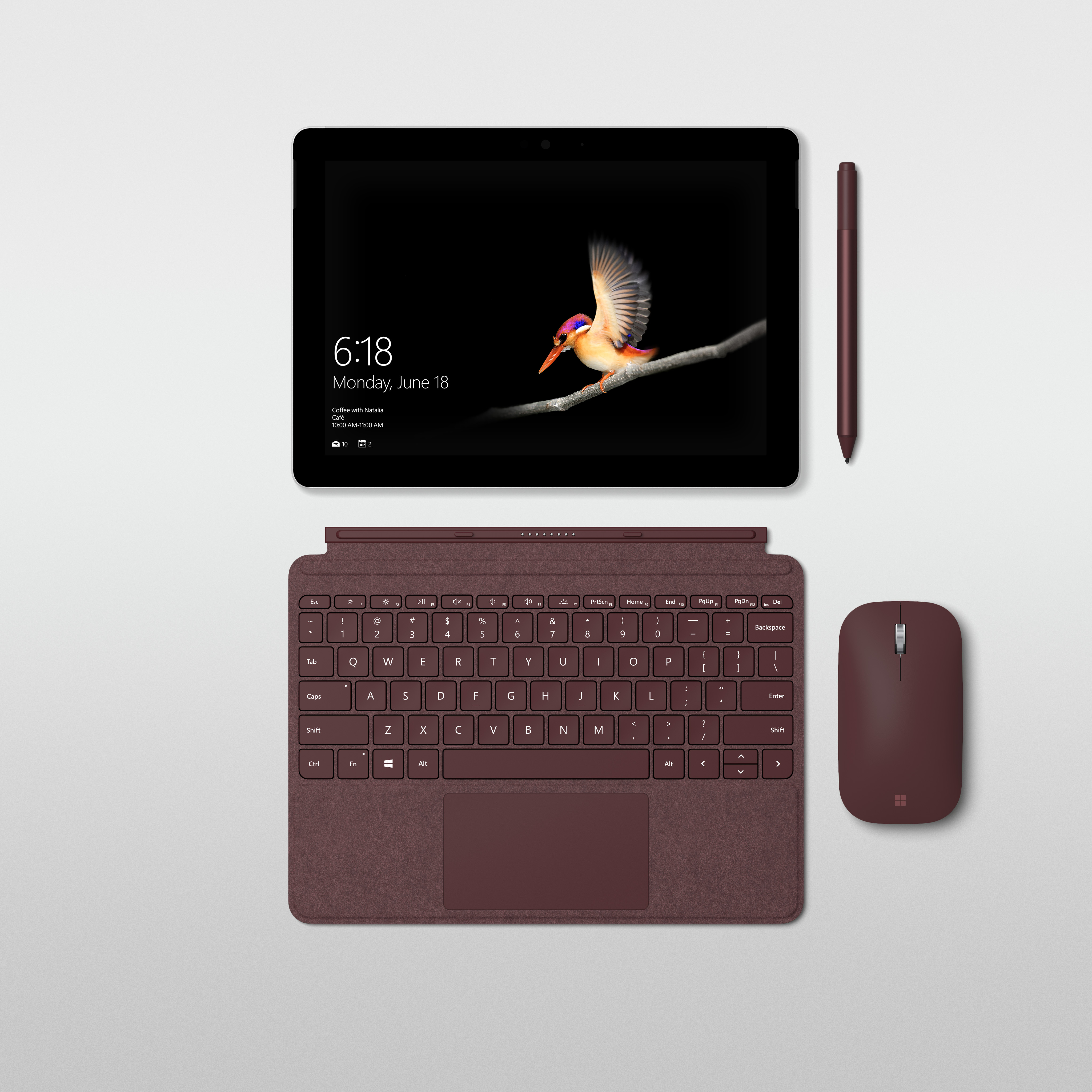
Surface Go offers a stunning, custom-built high-resolution PixelSense Display that supports Surface Pen with 4096 levels of pressure sensitivity, low pen parallax, low latency, and precision for accurate note taking, drawing and computer-aided design. The custom calibrated 3:2 display is soft on your eyes while you’re working and vibrantly high-contrast when you want to watch videos, create art, or edit photos.
In portrait mode, the screen was designed to render the page to the scale of most school textbooks, and in landscape mode, it can render pages side by side as if you were holding a paperback book in hand. At the approximate size of a composition notebook, writing on the screen feels natural and intuitive.
Since my two youngest daughters have started using Surface Go, I see them watching movies, reading, and drawing on it every day. It’s the perfect device for them. And for me, whether I’m at home, in the office, or on a plane, putting my Surface Pen on the screen and letting my thoughts flow is a necessary step in my creative process. It’s how I work. It’s so easy to carry Surface Go with me so I can capture those moments, instantly.
Surface Go is small and mighty, giving you the performance you need to be productive. A device powered by the 7th Generation Intel Pentium Gold Processor 4415Y, in a fanless design, offering up to nine hours of battery. Our team worked closely with Intel to optimize power, performance, and battery for the most critical tasks people perform every day.
Being able to run Office apps on this device with its portability is one of the things that was critical to the experience we had in mind when we designed Surface Go – the productivity of having the apps you use for work and school with the flexibility to relax and read or watch a show on Netflix or Hulu.
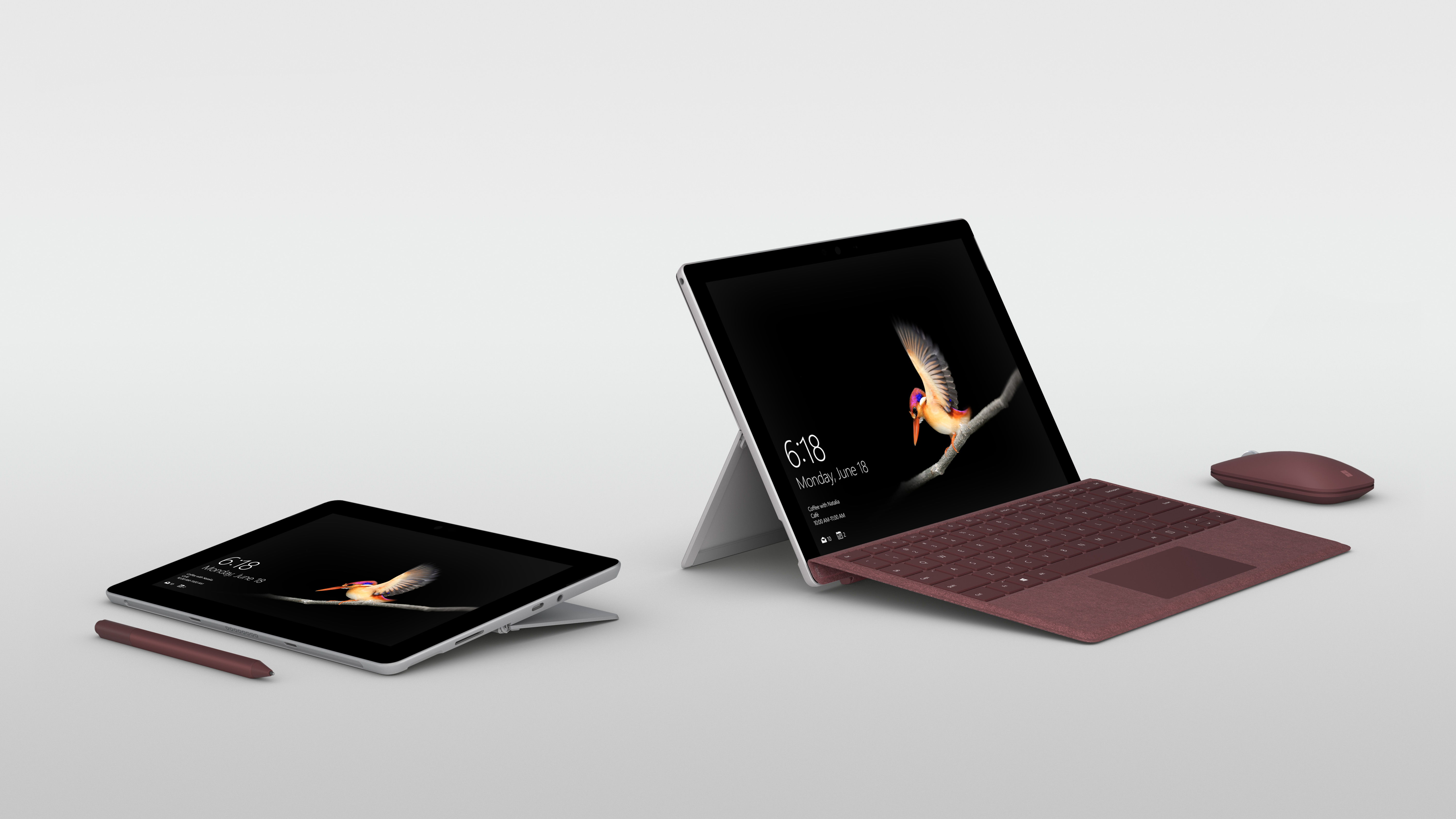
Our new Surface Go Signature Type Cover is custom-made for Surface Go integrating design features that give the user the best typing experience possible, with ergonomic key pitch and exceptional key travel. It also has high precision tuning and Windows Precision Trackpad that supports five-point multi-finger gestures, and you can connect the new Surface Mobile Mouse to work the way that you want.
A built-in kickstand with full friction hinge that extends to 165 degrees helps you stay in your flow from tablet to studio mode, and a Windows Hello camera allows for familiar, quick, and secure sign-in using face recognition.
Surface Go also has the ports you need, including Surface Connect for charging and docking; USB-C 3.1 for data, video, and charging; a headphone jack; and a MicroSD card reader for storage expansion. All designed to help you be more productive whether you’re studying in a library, working on a plane, or sharing your content in a boardroom on a 4K monitor.
Surface Go with Wi-Fi will be available for pre-order tomorrow, July 10 in select countries*, with products beginning to hit shelves on August 2. We’re also happy to share that an LTE model will be arriving later this year.
For a family at home or on the move, an expert on the front line of a business interacting with customers, or a school that wants to provide its students with the most versatile tools for learning, this device offers a premium experience with incredible value.
Wherever the day takes you, and whatever unique tasks await you along the way, Surface Go moves with you.
Meet Surface Go, starting at $399 MSRP, it’s the smallest and most affordable Surface yet
*Availability: Surface Go will be available for pre-order beginning on July 10 in the following markets, US, Canada, Australia, New Zealand, UK, Ireland, France, Germany, Austria, Belgium, Luxembourg, Netherlands, Switzerland, Denmark, Finland, Norway, Sweden, Poland, Italy, Portugal, and Spain.
In the coming weeks, Surface Go will be available for pre-order in Japan, Singapore, Korea, Taiwan, Malaysia, Thailand, Hong Kong, and in China with more markets to follow.