Pokémon GO Was A Huge Success In 2018, Thanks To Worldwide Consumer Spend
For most of 2018, we’ve heard about how Niantic’s AR mobile game Pokémon GO has been making a lot of money. It’s all tied to the spending habits of users – with millions of dollars being spent on the game each month. So just how well has the mobile sensation performed this year?
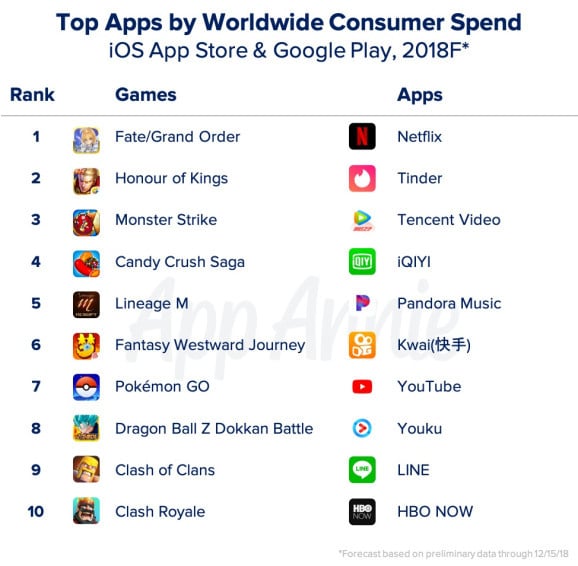
According to mobile data and analytics firm App Annie, Go was one of the games mobile users dropped the most coin on in 2018. In fact, it made it into the top ten worldwide consumer spend list. Fate/Grand Order took out the top spot, while GO managed to finish ahead of titles such as Dragon Ball Z Dokkan Battle and Clash of Clans. Take a look at the full list below:
App Annie said mobile game downloads and consumer spending within mobile apps reached new heights this year. Across iOS and Google Play, downloads for mobile apps and games are expected to surpass 113 billion, which is a 10 per cent increase on the previous year. Consumer spending increased year-over-year as well, surpassing $76 billion globally. It was also noted how mobile gaming is the most “popular and profitable” format now.
Are you at all surprised to see GO has made it onto this list? Do you play or spend money on this game? Tell us below.
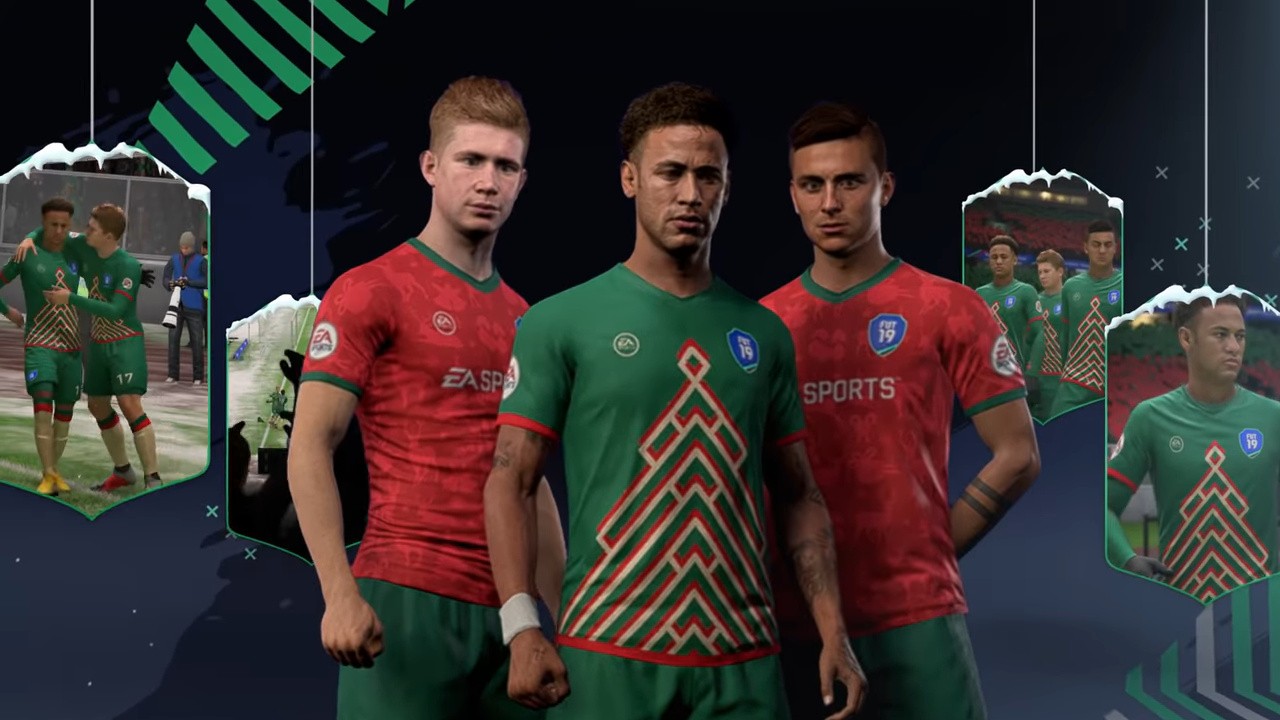
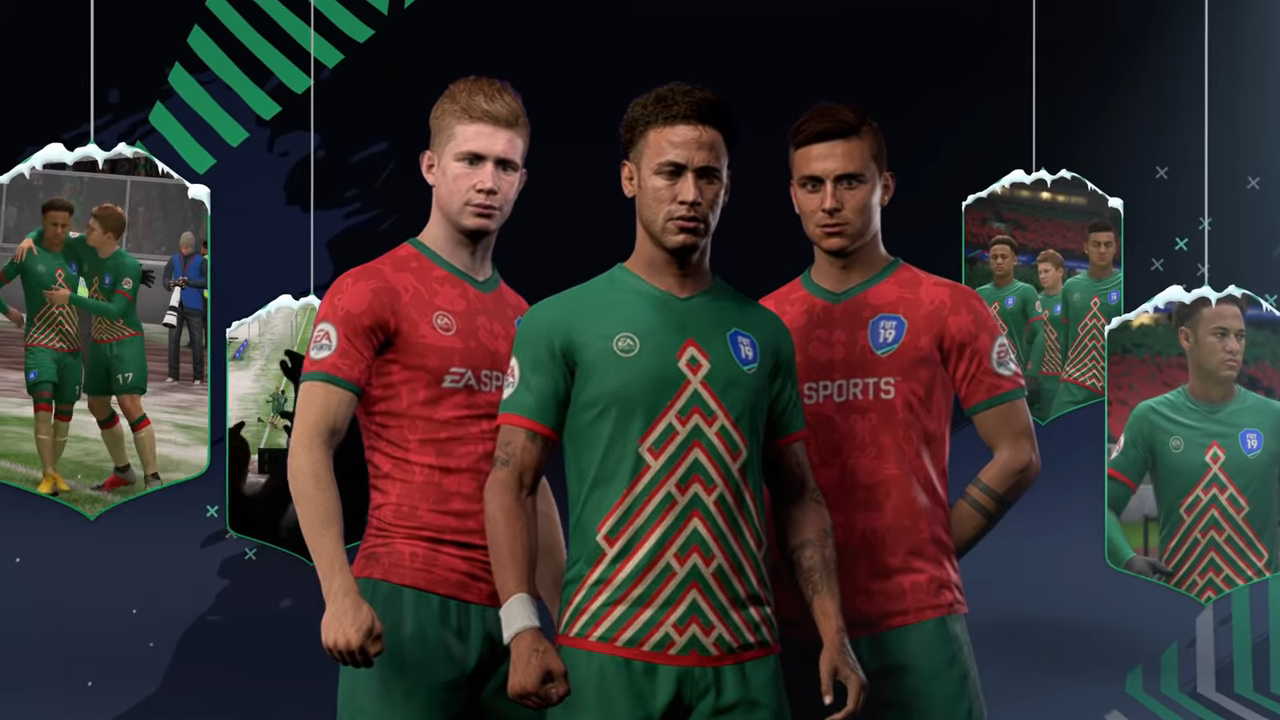
EA Confirms FIFA 19 FUTMAS Promotional Message On Switch “Wasn’t Intended”
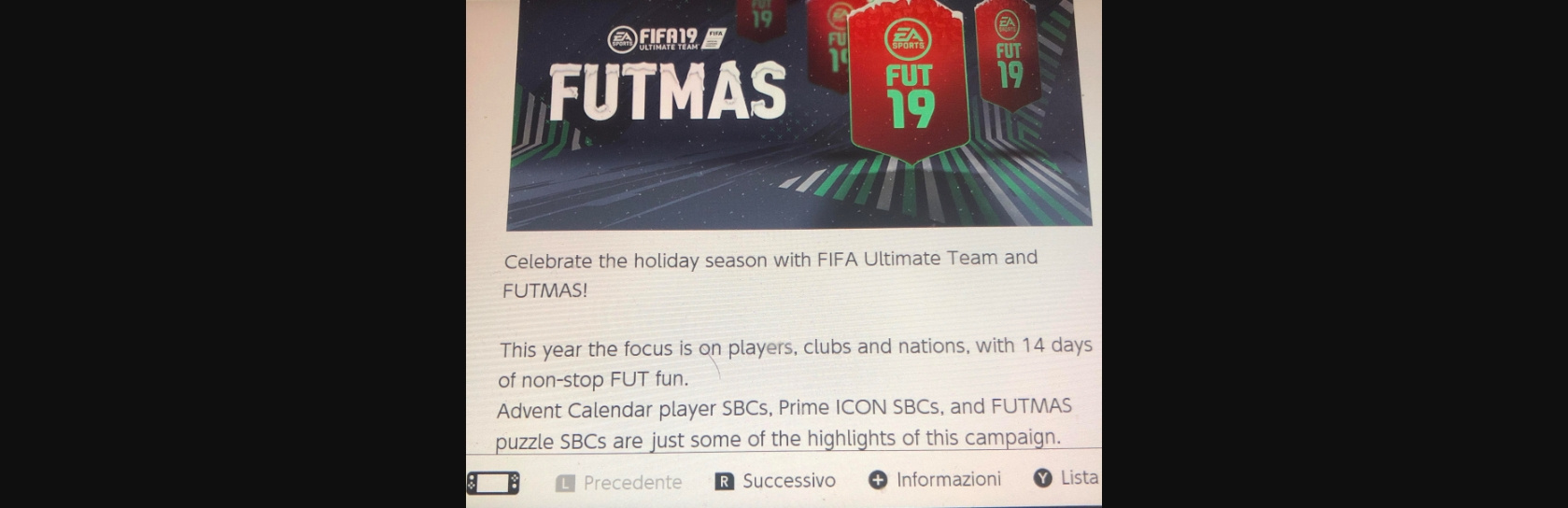
Last week, news surfaced about a Christmas promotion being advertised for the Switch version of FIFA 19 that wasn’t actually available within the game.
The fine print underneath the original EA announcement further highlighted how these themed daily and weekly objectives were not available in the Nintendo version. Despite this, Nintendo of America’s Twitter account promoted the limited-time event and it was even publicised in the news feed on the Switch. Here it is below:
An EA community manager over on the official FIFA forums has since clarified a FUTMAS Squad Building Challenge (SBC) was added, but it is not the same as the promotion on other platforms. As for Advent SBCs, it’s not the outcome Switch players probably wanted to hear:
“It looks as though the messaging that was showing on your [Switch] console wasn’t intended. We’re now working to have it removed (if it wasn’t already). There won’t be Advent Player SBCs on Nintendo Switch. I know this isn’t the news you wanted but wanted to let you know as soon as possible.”
Of course, this official reply has resulted in some backlash from the community – with multiple Switch players not happy it took EA so long to respond. It also left many players wondering why exactly Switch owners miss out, as the platform received the event last year. Below are a few of the community reactions to the news:
BrychanCymru: Thanks for telling us, but it’s really not good enough. There’s no reason as to why these players aren’t on the Switch.
Rotorooter: No reason given. And the advertisement is still up on the switch news page. Seriously? How do we go about complaining to advertisement regulators?
So, if you’re a person who plays FIFA 19 on the Switch, don’t expect to see Advent Player SBCs this holiday season. Also, tell us if this has impacted your own experience with the game in the comments.
The How to Build a Netboot Server, Part 1 article provided a minimal iPXE boot script for your netboot image. Many users probably have a local operating system that they want to use in addition to the netboot image. But switching bootloaders using the typical workstation’s BIOS can be cumbersome. This part of the series shows how to set up some more complex iPXE configurations. These allow the end user to easily choose which operating system they want to boot. They also let the system administrator manage the boot menus from a central server.
An interactive iPXE boot menu
The commands below redefine the netboot image’s boot.cfg as an interactive iPXE boot menu with a 5 second countdown timer:
$ MY_FVER=29 $ MY_KRNL=$(ls -c /fc$MY_FVER/lib/modules | head -n 1) $ MY_DNS1=192.0.2.91 $ MY_DNS2=192.0.2.92 $ MY_NAME=server-01.example.edu $ MY_EMAN=$(echo $MY_NAME | tr '.' "\n" | tac | tr "\n" '.' | cut -b -${#MY_NAME}) $ MY_ADDR=$(host -t A $MY_NAME | awk '{print $4}') $ cat << END > $HOME/esp/linux/boot.cfg #!ipxe set timeout 5000 :menu menu iPXE Boot Menu item --key 1 lcl 1. Microsoft Windows 10 item --key 2 f$MY_FVER 2. RedHat Fedora $MY_FVER choose --timeout \${timeout} --default lcl selected || goto shell set timeout 0 goto \${selected} :failed echo boot failed, dropping to shell... goto shell :shell echo type 'exit' to get the back to the menu set timeout 0 shell goto menu :lcl exit :f$MY_FVER kernel --name kernel.efi \${prefix}/vmlinuz-$MY_KRNL initrd=initrd.img ro ip=dhcp rd.peerdns=0 nameserver=$MY_DNS1 nameserver=$MY_DNS2 root=/dev/disk/by-path/ip-$MY_ADDR:3260-iscsi-iqn.$MY_EMAN:fc$MY_FVER-lun-1 netroot=iscsi:$MY_ADDR::::iqn.$MY_EMAN:fc$MY_FVER console=tty0 console=ttyS0,115200n8 audit=0 selinux=0 quiet initrd --name initrd.img \${prefix}/initramfs-$MY_KRNL.img boot || goto failed END
The above menu has five sections:
menu defines the actual menu that will be shown on the screen.
failed notifies the user that something went wrong and drops the user to a shell so they can troubleshot the problem.
shell provides an interactive command prompt. You can reach it either by pressing the Esc key while at the boot menu or if the “boot” command returns with a failure code.
lcl contains a single command that tells iPXE to exit and return control back to the BIOS. Whatever you want to boot by default (e.g. the workstation’s local hard drive) must be listed as the next boot item right after iPXE in your workstation’s BIOS.
f29 contains the same netboot code used earlier but with the final exit replaced with goto failed.
Copy the updated boot.cfg from your $HOME/esp/linux directory out to the ESPs of all your client systems. If all goes well, you should see results similar to the image below:
A server hosted boot menu
Another feature you can add to the netboot server is the ability to manage all the client boot menus from one central location. This feature can be especially useful when rolling out a new version of the OS. It lets you perform a sort of atomic transaction to switch all clients over to the new OS after you’ve copied the new kernel and initramfs out to the ESPs of all the clients.
Install Mojolicious:
$ sudo -i # dnf install -y perl-Mojolicious
Define the “bootmenu” app:
# mkdir /opt/bootmenu # cat << END > /opt/bootmenu/bootmenu.pl #!/usr/bin/env perl use Mojolicious::Lite; use Mojolicious::Plugins; plugin 'Config'; get '/menu'; app->start; END # chmod 755 /opt/bootmenu/bootmenu.pl
Define the configuration file for the bootmenu app:
# cat << END > /opt/bootmenu/bootmenu.conf { hypnotoad => { listen => ['http://*:80'], pid_file => '/run/bootmenu/bootmenu.pid', } } END
This is an extremely simple Mojolicious application that listens on port 80 and only answers to /menu requests. If you want a quick introduction to what Mojolicious can do, run man Mojolicious::Guides::Growing to view the manual. Use the Q key to quit the manual.
Move boot.cfg over to our netboot app as a template named menu.html.ep:
After you’ve copied the updated bootloader to all your clients, you can make future updates to the boot menu simply by editing /opt/bootmenu/templates/menu.html.ep and running:
$ sudo systemctl restart bootmenu.service
Making further changes
If the boot menu server is working properly, you’ll longer need the the boot.cfg file on your client systems.
For example, re-add the Fedora 28 image to the boot menu:
Posted by: xSicKxBot - 12-21-2018, 01:47 PM - Forum: Windows
- No Replies
How 50 classrooms used Skype to help save a school in Kenya
Ben Honeycutt is the Executive Director of non-profit Open World Cause and a Social Studies Teacher at Woodland Park Middle School in Colorado. As an educator, Ben’s mission is to provide his students with real world opportunities, so they can learn more about the world around them and take action to make a difference. One of their latest achievements was to help fund the construction of a school in Kenya. We met with Ben to learn all about this amazing, life-changing learning experience:
It all started with a Skype call
In June of 2015, we had a Skype call with Livingstone Kegode, the director of HIPAfrica, and were so impressed with his work that we were committed from the moment the call was over. A little over a year later, Livingstone informed us that the country of Kenya had changed its zoning standards for schools, and unless HIPAfrica could raise over $14,000 for three new classrooms, a new washroom, and new fencing, HIP would have to close its doors to the 59 children who attended its school.
We traveled out to Kimilili to survey HIP and the surrounding community in May of 2017. We surveyed that over half of the students would no longer be able to attend a school if HIP closed down. Additionally, we observed that 10 of the students had descended stomachs on Monday morning, and teachers had guessed that up to 15 of them received their only meals at the school.
The structures the school were using were deteriorating, as they were using semi-permanent structures for their classrooms. We found through conversations with a local architect that the bathrooms were about to collapse. It was at a point where it was creating unsanitary conditions for the entire student body.
HIP’s administration was completely committed to doing all they could to help their students. We were inspired to not only help lead a campaign to save HIP, but to look into providing sustainable clean water, nutrition, and educational programs to ensure that HIP’s students were receiving the best long-term education possible.
At the time, when we found out about the challenges facing HIP in 2016, I couldn’t conceive how to start a successful initiative to help solve this problem. Instead, I focused on what I could do on a micro level to start helping from my classroom. Two of my middle school students, named Amelia and Christina, came up with an idea to start a project called “Kenya Help?” where they collected shoes on behalf of an organization called Funds2orgs – “Kenya Help?” collected over 1,000 pairs of shoes and in exchange received over $1,000 toward HIP for their efforts.
It was after seeing my students go above and beyond that I started wondering about how this movement could go from my classroom to classrooms around the world. I designed and published a Collaboration on Skype in the Classroom’s website, calling for classrooms all around the world to join. In six months, over 50 classrooms from around the world got together and helped raise $8,000 for HIP, helping us collect a total of over $16,000 to fund the construction of three new classrooms, a washroom with hand-washing and sanitizing stations, and fencing. All this allowed HIP’s students to continue their education.
The new washrooms
After this experience, I would encourage every educator to start their own global projects and give their students real world issues to solve. Take the leap and don’t look back!
I was inspired early on from Dr. Neil Gershenfeld’s 2005 work, FAB: The Coming Revolution on Your Desktop—from Personal Computers to Personal Fabrication. Gershenfeld talked about how students have the potential to create “laboratories of learning” when they have ownership of their projects. Gershenfeld articulated that when students have this ownership, they often go above and beyond their outlined expectations. It’s 13 years later, and I believe Skype in the Classroom can be a platform for what Dr. Gershenfeld was advocating. In the “Day in the Life” project, when middle school students had the agency that Dr. Gershenfeld advocated, they soared past the outlined goals and propelled each other to do something as impactful as saving a school in Kenya.
With resources like Skype in the Classroom and the tools that universities provide, teachers can have their students not only start incredible real-world projects that they will remember for the rest of their lives, but also ones that make a real impact around the world. I’ve seen students go on to use technology to help people, start businesses, and take a classroom project and turn it into a worldwide campaign. Students today have the power to change the world from the screens of their devices – what’s stopping them?
Contact me through the Microsoft Educator Community to learn how your class can help teachers and schools in Nepal and Kenya today!
P.S. I’d like to thank our partners Jacqueline Jumbe-Kuhara, Fredrick Manzugu, Livingstone Kegode, Michael Soskil, Eric Crouch, Garrett Wilkinson, Sue Levine, Dr. Joe O’Brien, Professor Melissa Collum, Professors Beth and Jeremy Gulley, and acknowledge the works of Dr. Eric Hartman, Dr. Neil Gershenfeld, Dr. Paul Farmer as well as our many supporters who make our work possible.
Teachers: Explore all the available Skype Collaborations to connect your students with classrooms around the world to work on projects, explore different cultures, and build greater compassion and empathy for one another. You can also create your own Skype Collaboration—learn more by taking the Skype collaboration course.
Posted by: xSicKxBot - 12-21-2018, 01:47 PM - Forum: Windows
- No Replies
Gift from a Christmas Eve space voyage: Humanity’s first view of itself
In this edition of Today in Technology, Microsoft President Brad Smith and Communications Director Carol Ann Browne take a look back at Christmas Eve 1968, when three American astronauts showed the world the best of technology as they rode a rocket into space and gave the world its first glimpse back at planet Earth. It was an important moment, not just for people but for the history of technology.
Fifth-generation iPad mini rumored for revival in early 2019
By Malcolm Owen Friday, December 21, 2018, 04:36 am PT (07:36 am ET)
Apple may be preparing a new version of the iPad mini, a report from a Chinese newspaper claims, with a fifth-generation version of the pint-sized tablet allegedly on the way, coupled with other changes to the iPad lineup in 2019.
iPad mini 4
The iPad mini has not received an update since the announcement of the fourth-generation version in September 2015, with the lack of changes to the product in over three years suggesting the device line is probably on its way out, and faces removal from the iPad roster completely. While there has been little movement for the smaller iPad model in recent years, that may change in a few months.
China Business Timessources claim Apple will be launching two low-priced models of the iPad in 2019. It is alleged Apple is doing so because it saw “outstanding results” for the 2017 9.7-inch iPad followed by a sales decline, allegedly due to it not releasing a “new low-priced iPad” in 2018, though the launch of the 2018 iPad in March suggests this means the fiscal 2018 rather than calendar year.
A new low-priced model of the 7.9-inch iPad mini is slated to arrive in the first half of 2019, with the supply chain starting production for the model in late December. It is unknown if there will be any major changes to the device’s design, as observed for the iPad Pro.
A 2019 iPad is also planned, but according to the report, it will be undergoing a refresh that seems similar in many respects to the iPad Pro alterations. While still a low-priced option, the iPad will apparently have a larger screen that’s more than 10 inches in size, while also having a narrower frame.
The new iPad is said to be mass-produced sometime in 2019, for release in the second half of the year.
Along with introducing rumors, the publication also claims Apple is switching some of its sources for iPad display panels from Japanese producers to BOE, based in South Korea. It is claimed this is part of a cost-cutting measure for Apple.
While the China Business Times has a good track record with supply chain information, like the iPad display panel topic, it has a poor track record in predicting Apple’s future product plans.
Rome: Total War, the legendary 2004 PC game, is now available on mobile thanks to Feral Interactive. This was a groundbreaking game back when it came out and provided opportunity for both strategic and tactical gameplay. The strategy came from building a world-dominating empire, one turn at a time, and sending your army out to subdue and absorb other lands in the name of Rome. The tactical component was satisfied by a n excellent battlefield simulation where you were the architect of a battle’s victory, or defeat. This mixed-level gaming offered something for any strategy or war gaming fan and justly earned a place in gaming history.
Which classic strategy game would you like to see next on mobile? Let us know below!
It’s been fourteen years and switching to Apple’s ecosystem hasn’t gone smoothly for other fan favorites. How does this mobile version hold up? Read on, dear gamers.
THE CAMPAIGN
The Rome: Total War campaign takes you back to the (abstracted) height of the Roman Republic. You play as one of three major Roman families—the Julii, Brutii, or Scipii—and seek to build economic and military strength through growth and conquest. Your ultimate goal is returning home to end the republic and rule Rome as emperor.
Your faction starts with a couple cities and some controllable family members. They are all male and act as governors when in in town and generals when in the field. Additional family members become available when they come of age, sixteen years, or through marriage. Your mandate, as directed by the Roman Senate, is to go forth and conquer for the glory of Rome.
The setting of Rome: Total War is Europe, North Africa, and Near-East Asia—the area within the Roman Empire’s historic grasp. It is your classic turn-based strategy game filled with infrastructure development, domestic management, diplomacy, espionage, and of course war. You develop your cities to fuel your economy and improve your military capacity. You recruit armies and build ships and go forth to subdue other cities and nations.
Once you conquer you must rule, and foreign populations won’t make it easy on you. A key aspect of Rome: Total War is city management. You’ll manage expenses, set tax rates, track morale, and host expensive gladiatorial games to keep the masses distracted. If you don’t, they will revolt and set back your imperial ambitions. You also recruit diplomats and send them far and wide to deliver your offers, threats, and bribes to other factions and their emissaries. Spies and assassins do the dirtier work of opening city gates and taking out enemy leaders.
Gameplay is turn based and you can assign actions to each settlement, family member, and other key resources like diplomats and admirals each turn. Settlements have both a construction and recruitment queue. You can construct buildings that confer different benefits—a market to increase trade and commerce, or stables which enable the training of cavalry units and dogs of war, for example. Based on the buildings in that settlement you can recruit different military units as well. Both queues allow you to set actions for several turns in advance, which saves a little time if you have a long-term goal in mind.
Ruling a material portion of the known world is complicated, and there’s a lot going on in Rome: Total War. The game is addictive and can quickly suck you in with one-more-turn syndrome. Long ago I used to play the campaign mode for hours and hours and the urge to keep playing has been ported to iPad as well. The campaign mode is still very fun and holds up well. The UI shows its age a bit, but is still fine and I found the touch controls to be easy to work with. Once you complete a campaign with one of the starting factions the remaining eight playable factions are unlocked including the Greek Cities, Macedon, Britannia, Egypt, and Gaul. This adds quite a bit of replay value to the game.
THE BATTLES
The tactical component of Rome: Total War is the lifelike, real-time, battlefield simulation. You can command each and every unit down to the smallest detail of where they go and who they attack. You can view the battle from a birds-eye level or zoom way in to be part of the action. The attention to detail is very high and its clear Feral gave the soldiers a new layer of polish to better shine on more modern devices.
Battles can be very difficult as every unit has its strengths and weaknesses against each other, so proper alignment is key. The real-time element means things change pretty quickly and you will need to be equally fast to keep a handle on things. Feral didn’t skimp on units or options in the battle simulation to simplify things for the iPad, which is commendable and something tactical gamers, and long-time fans of the game, will certainly appreciate. Naturally they have rejiggered the controls for touchscreen so you can pretty quickly tap and send units to where you want them. I found these controls to be fine, but far from optimal. I accidentally sent units out of place more than once in an absentminded attempt to change my viewpoint.
If you’re worried about fat-fingering a victory into defeat, or just aren’t interested in micromanaging units and tactics in every battle, you can choose to auto-resolve them. The auto-resolution rules seem fair, much like in the original. If you go in with an advantage you’ll win. If you go in evenly matched or an underdog you might do better taking the reins yourself, especially if you are a capable virtual general.
OTHER OPTIONS
There are other options beyond campaign mode. You can step into and play either side of ten historic battles. Most of which feature Rome versus one of its many adversaries. There’s also a “quick battle” option which drops you immediately into the deployment phase of a battle where you take the reins of a Roman army. Custom battle lets you build your own battle. You decide the map, type of game, season, weather, time of day, time limit, and many other variables. Naturally, you also get to decide who fights and which side each is on.
THE VERDICT
Rome: Total War is one of my favorite games of all time and I’m very happy I can now play it on my primary gaming device, my iPad Pro. The beauty of the game remains in the interplay between the strategy and tactical elements. The ability to play both leader and general, stepping from a macro to micro view and back again, is something that few games have successfully replicated since Rome: Total War showed us the way.
As is to be expected, Rome: Total War is a huge install and a bit of a battery buster, but the game holds up well. The campaign mode is still very fun and will continue to please history buffs as well as strategy gamers. The real-time battle component does not hold up quite as well, but will satisfy the master tacticians out there given its depth of play. The extra options for a historic, quick, or custom battle also nicely replicate what the PC game offered.
All in all, this is a very well done port of the game to mobile. Fans of Rome: Total War will certainly not be disappointed. Those who have never played before might feel the game UI to be somewhat dated, but will likely soon forget as they are sucked in to the turn-based play of the campaign. I’d definitely pick this one up for your iPad today.
Posted by: xSicKxBot - 12-21-2018, 03:53 AM - Forum: Lounge
- No Replies
Strategy Fans, Get This Free PC Game Before The Price Goes Back Up
Getting new games is great, but paying for them is generally less fun. Between now and December 22, you can cut out the "less fun" part and get the Windows PC game Anno 1602: Creation of a New World (or Anno 1602 AD, as it was known in the US) for free from Ubisoft right here. Additionally, you can sign up to take part in a closed beta for the upcoming game Anno 1800. The beta will run January 31-February 4.
To get your free game, just head to the giveaway page, click the link, and sign in or create an Ubisoft account. Once you do that, the game is added to your Uplay library, where it's yours to keep and play forever.
Anno 1602: Creation of a New World launched back in 1998. It puts you on a ship en route for a new land, where you'll build a settlement, trade with the natives, and start an army to defend your growing town. Five sequels and numerous spinoffs have come out over the years, with Anno 1800 set for release on February 26, 2019. The original game is currently free to celebrate the series' 20th anniversary.
In GameSpot's Anno 1602 review, Bruce Grey wrote, "While it can't boast innovative design or unusual gameplay, 1602 A.D. has a peculiar charm all its own. The game captures the feel of the historical period very well and carries you along without the extreme highs and lows that characterize more fast-paced and violent games. Those who prefer to play action-packed computer games will be disappointed by 1602 A.D., but if you're looking for a more relaxing game, you'll find a pleasant diversion in this engaging colony builder."
If that sounds like your kind of game, make sure to grab your free copy before it goes back up to regular price on December 22.
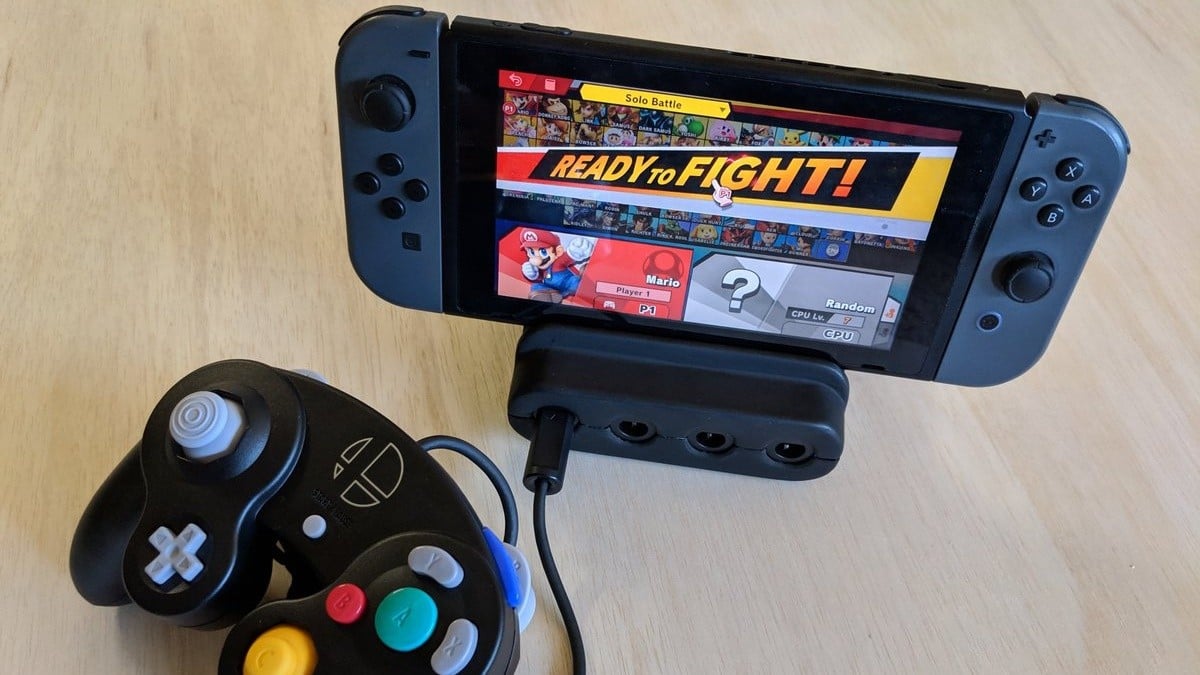
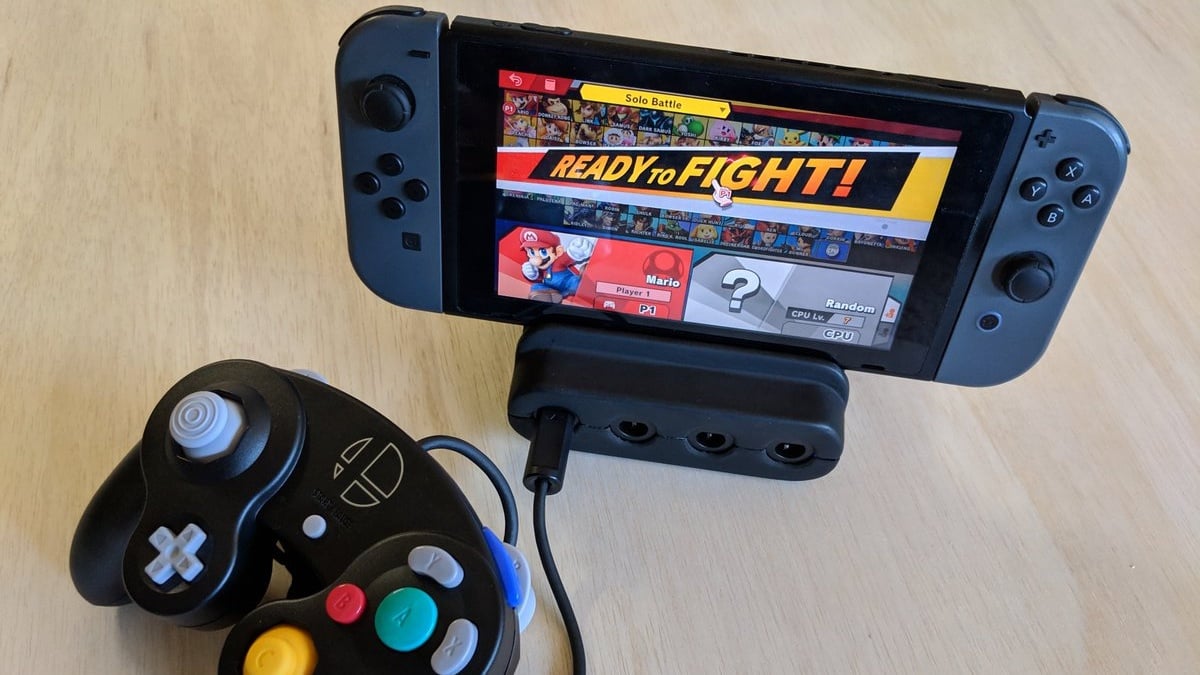
This Portable GameCube Controller Switch Adapter Hits Kickstarter Next Month
If you’re one of the countless Super Smash Bros. Ultimate fans who insist on playing with a traditional GameCube controller (or like using one, at least) then you might want to keep an eye on this little project.
eSports team Panda Global has revealed that it will soon be starting a Kickstarter crowdfunding campaign for an all-in-one GameCube adapter, charging station, and portable stand for the Nintendo Switch called the ‘Ultimate GameCube Adapter’. The Kickstarter is expected to launch in mid-January, with backer pledges being set at $45.
As you can see, the setup is designed to make on-the-go GameCube controller play a much easier and more convenient option. An FAQ posted on Panda Global’s website (where you can also register your interest to receive a Kickstarter discount) assures fans that the accessory will not ‘brick’ your Switch, noting that the product “works the same way as Nintendo’s GameCube adapter”.
Do you think this is a smart solution for your portable GameCube controller needs? Will you be checking out the Kickstarter when it arrives next month? Tell us below.
Travis Strikes Again DLC, Season Pass Pricing And Voice Cast Fully Detailed
A Travis Strikes Again: No More Heroes presentation has just taken place in Japan, hosted by none other than Suda51. It didn’t feature the “huge announcement” that the series director had promised, but it did deliver some finer details about some of the game’s content.
First up was a reveal for the actors lending their voices to characters in the game. Robin Atkin Downes returns to play Travis, Killer7’s Steve Blum will play Badman, Kimberly Brooks is Shinobu, Kathryn Fiore will play Bad Girl, and Greg Ellis will be bringing stage boss Brian Buster Jr. to life.
The Season Pass will be available for $9.99 / £8.99 / €9.99 – although this is included in physical copies of the game and some digital bundles. It’ll be made up of two DLC packs, both of which have now been detailed (see below).
DLC Vol. 1: Black Dandelion: – Scheduled release: 2/28/2019 – New playable character: Shinobu Jacobs (+special skills) – Badman Ver. ADV Part
DLC Vol. 2: Bubblegum Fatale: – Scheduled release: 4/30/2019 – New playable character: Bad Girl (+special skills) – Additional stage: Killer Marathon – Travis Ver. ADV Part
Are you feeling the hype for this one yet? Will you be giving the game a spin when it launches next month? Let us know with a comment.