Linux Server Hardening Using Idempotency with Ansible: Part 2
In the first part of this series, we introduced something called idempotency, which can provide the ongoing improvements to your server estate’s security posture. In this article, we’ll get a little more hands-on with a look at some specific Ansible examples.
Shopping List
You will need some Ansible experience before being able to make use of the information that follows. Rather than run through the installation and operation of Ansible let’s instead look at some of the idempotency playbook’s content.
As mentioned earlier there might be hundreds of individual system tweaks to make on just one type of host so we’ll only explore a few suggested Ansible tasks and how I like to structure the Ansible role responsible for the compliance and hardening. You have hopefully picked up on the fact that the devil is in the detail and you should absolutely, unequivocally, understand to as high a level of detail as possible, about the permutations of making changes to your server OS.
Be aware that I will mix and match between OSs in the Ansible examples that follow. Many examples are OS agnostic but as ever you should pay close attention to the detail. Obvious changes like “apt” to “yum” for the package manager is a given.
Inside a “tasks” file under our Ansible “hardening” role, or whatever you decide to name it, these named tasks represent the areas of a system with some example code to offer food for thought. In other words, each section that follows will probably be a single YAML file, such as “accounts.yml”, and each will have with varying lengths and complexity.
Let’s look at some examples with ideas about what should go into each file to get you started. The contents of each file that follow are just the very beginning of a checklist and the following suggestions are far from exhaustive.
SSH Server
This is the application that almost all engineers immediately look to harden when asked to secure a server. It makes sense as SSH (the OpenSSH package in many cases) is usually only one of a few ports intentionally prised open and of course allows direct access to the command line. The level of hardening that you should adopt is debatable. I believe in tightening the daemon as much as possible without disruption and would usually make around fifteen changes to the standard OpenSSH server config file, “sshd_config”. These changes would include pulling in a MOTD banner (Message Of The Day) for legal compliance (warning of unauthorised access and prosecution), enforcing the permissions on the main SSHD files (so they can’t be tampered with by lesser-privileged users), ensuring the “root” user can’t log in directly, setting an idle session timeout and so on.
Here’s a very simple Ansible example that you can repeat within other YAML files later on, focusing on enforcing file permissions on our main, critical OpenSSH server config file. Note that you should carefully check every single file that you hard-reset permissions on before doing so. This is because there are horrifyingly subtle differences between Linux distributions. Believe me when I say that it’s worth checking first.
To check existing file permissions I prefer this natty little command for the job:
$ stat -c "%a %n" /etc/ssh/sshd_config644 /etc/ssh/sshd_config
As our “stat” command shows our Ansible snippet would be an improvement to the current permissions because 0600 means only the “root” user can read and write to that file. Other users or groups can’t even read that file which is of benefit because if we’ve made any mistakes in securing SSH’s config they can’t be discovered as easily by less-privileged users.
System Accounts
At a simple level this file might define how many users should be on a standard server. Usually a number of users who are admins have home directories with public keys copied into them. However this file might also include performing simple checks that the root user is the only system user with the all-powerful superuser UID 0; in case an attacker has altered user accounts on the system for example.
Kernel
Here’s a file that can grow arms and legs. Typically I might affect between fifteen and twenty sysctl changes on an OS which I’m satisfied won’t be disruptive to current and, all going well, any future uses of a system. These changes are again at your discretion and, at my last count (as there’s between five hundred and a thousand configurable kernel options using sysctl on a Debian/Ubuntu box) you might opt to split off these many changes up into different categories.
Such categories might include network stack tuning, stopping core dumps from filling up disk space, disabling IPv6 entirely and so on. Here’s an Ansible example of logging network packets that shouldn’t been routed out onto the Internet, namely those packets using spoofed private IP Addresses, called “martians”.
name: Keep track of traffic that shouldn’t be routed onto the Internet
Pay close attention that you probably don’t want to use the file “/etc/sysctl.conf” but create a custom file under the directory “/etc/sysctl.d/” or similar. Again, check your OS’s preference, usually in the comments of the pertinent files. If you’ve not seen martian packets being enabled before then type “dmesg” (sometimes only as the “root” user) to view kernel messages and after a week or two of logging being in place you’ll probably see some traffic polluting your logs. It’s much better to know how attackers are probing your servers than not. A few log entries for reference can only be of value. When it comes to looking after servers, ignorance is certainly not bliss.
Network
As mentioned you might want to include hardening the network stack within your kernel.yml file, depending on whether there’s many entries or not, or simply for greater clarity. For your network.yml file have a think about stopping old-school broadcast attacks flooding your LAN and ICMP oddities from changing your routing in addition.
Services
Usually I would stop or start miscellaneous system services (and potentially applications) within this Ansible file. If there weren’t many services then rather than also using a “cron.yml” file specifically for “cron” hardening I’d include those here too.
There’s a bundle of changes you can make around cron’s file permissions etc. If you haven’t come across it, on some OSs, there’s a “cron.deny” file for example which blacklists certain users from accessing the “crontab” command. Additionally you also have a multitude of cron directories under the “/etc” directory which need permissions enforced and improved, indeed along with the file “/etc/crontab” itself. Once again check with your OS’s current settings before altering these or “bad things” ™ might happen to your uptime.
In terms of miscellaneous services being purposefully stopped and certain services, such as system logging which is imperative to a healthy and secure system, have a quick look at the Ansible below which I might put in place for syslog as an example.
name: Insist syslog is definitely installed (so we can receive upstream logs)
apt: name=rsyslog state=present
name: Make sure that syslog starts after a reboot
service: name=rsyslog state=started enabled=yes
IPtables
The venerable Netfilter which, from within the Linux kernel offers the IPtables software firewall the ability to filter network packets in an exceptionally sophisticated manner, is a must if you can enable it sensibly. If you’re confident that each of your varying flavours of servers (whether it’s a webserver, database server and so on) can use the same IPtables config then copy a file onto the filesystem via Ansible and make sure it’s always loaded up using this YAML file.
Next time, we’ll wrap up our look at specific system suggestions and talk a little more about how the playbook might be used.
Chris Binnie’s latest book, Linux Server Security: Hack and Defend, shows you how to make your servers invisible and perform a variety of attacks. You can find out more about DevSecOps, containers and Linux security on his website: https://www.devsecops.cc
Posted by: xSicKxBot - 04-13-2019, 01:47 PM - Forum: Windows
- No Replies
Check out the PBS documentary on ‘CyberWork and the American Dream’
Every day the world is becoming more digital and every company is becoming a technology company. Cloud computing and AI combined with new productivity, communication and intelligent tools and services enable us to do more, do it more quickly and in ways that were simply unimaginable a generation ago. But participating in the digital economy means that people need digital skills and companies need skilled workers.
There will be 1.4 million computer science-related jobs by 2020, yet U.S. college graduates are expected to fill less than a third of those jobs. Millions of Americans whose skills were valuable just a few years ago, find themselves underemployed — or worse, out of work altogether. PBS’ new documentary, “CyberWork and the American Dream,” examines this challenge and delves into the history of solving problems posed by technological disruption.
Ensuring that everyone has the opportunity to participate in the digital economy means that we need to change the way people are educated, trained and hired. This isn’t a challenge any one company can address alone. It will take a focused public-private approach to ensure everyone can participate in the digital economy. Microsoft is working hard on this issue and will share more about our approach in the coming months.
If America’s leaders come together and take on the challenge of preparing all Americans for the economic opportunities of tomorrow, we can unlock the potential of our nation’s best asset: our skilled and talented workforce.
Weedcraft Inc explores the business of producing, breeding and selling weed in America, delving deep into the financial, political and cultural aspects of the country's complex relationship with this troublesome and promising plant.
Posted by: xSicKxBot - 04-13-2019, 02:45 AM - Forum: Lounge
- No Replies
Apex Legends On Nintendo Switch Is Unlikely, Respawn Says
Apex Legends developer Respawn is aware of the interest among fans in a Nintendo Switch version of the battle royale game, but it might not happen--or it might. Respawn isn't ready to say just yet. Project lead Drew McCoy told Wired that the studio is working on "a lot of things" right now, but there is nothing to announce yet about a Switch edition.
"If Switch was coming, we would tell you, and we would blast it across the world. We are hearing all the Switch players who say they want the game," he said. "I can't make any promises right now. We have a lot of things that we're working on, so stay tuned for anything in the future. But currently we don't have anything to announce."
McCoy's wording is interesting. He never outright says it won't happen, or even that there are no plans. He's saying that Respawn has nothing to announce right now. This is very far from a confirmation that Apex Legends is coming to Switch, however.
Apex Legends is available on Xbox One, PlayStation 4, and PC.
Switch players aren't without any battle royale games, of course, as Epic's Fortnite is available on the console. Tetris 99 is also on Switch, while Crazy Justice has been announced for Switch.
Watch Top Pokémon Players Battle It Out In Livestreams Later This Month
From 26th to 28th April, some of Europe’s best Pokémon players will be competing at the Estrel Berlin in Germany to be part of the Pokémon Europe International Championships. If you can’t attend the event, don’t worry! The whole thing will be livestreamed so that you can watch the action from home.
All the intense action, along with play-by-play analysis from a panel of expert commentators, will be streamed across three separate channels. The broadcast is in English only and can be viewed at the following:
Broadast Times: – Friday 26 April from 08:30 BST / 09.30 CEST: Pokémon TCG and Pokémon video game match coverage – Saturday 27 April from 08:00 BST / 09:00 CEST: Pokkén Tournament DX, Pokémon TCG, and Pokémon VG match coverage – Sunday 28 April from 08:00 BST / 09:00 CEST: Final matches for Pokkén Tournament DX, Pokémon TCG, and Pokémon VG
We recently interviewed Joe Doss on how he uses Fedora. This is part of a series on the Fedora Magazine. The series profiles Fedora users and how they use Fedora to get things done. Contact us on the feedback form to express your interest in becoming a interviewee.
Who is Joe Doss?
Joe Doss lives in Chicago, Illinois USA and his favorite food is pizza. He is the Director of Engineering Operations and Kenna Security, Inc. Doss describes his employer this way: “Kenna uses data science to help enterprises combine their infrastructure and application vulnerability data with exploit intelligence to measure risk, predict attacks and prioritize remediation.”
His first Linux distribution was Red Hat Linux 5. A friend of his showed him a computer that wasn’t running Windows. Doss thought it was just a program to install on Windows when his friend gave him a Red Hat Linux 5 install disk. “I proceeded to install this Linux ‘program’ on my Father’s PC,” he says. Luckily for Doss, his father supported his interest in computers. “I ended up totally wiping out the Windows 95 install as a result and this was how I got my first computer.”
At Kenna, Doss’ group makes use of Fedora and Ansible: “We run Fedora Cloud in multiple VPC deployments in AWS and Google Compute with over 200 virtual machines. We use Ansible to automate everything we do with Fedora.”
Doss brews beer at home and contributes to open source in my free time. He also has a cat named Tibby. “I rescued Tibby off the street the Hyde Park neighborhood of Chicago when she was 7 months old. She is not very smart, but she makes up for that with cuteness.” His favorite place to visit is his childhood home of Michigan, but Doss says, “anywhere with a warm beach, a cool drink, and the ocean is pretty nice too.”
Tibby the cute cat!
The Fedora community
Doss became involved with Fedora and the Fedora community through his job at Kenna Security. When he first joined the company they were using Ubuntu and Chef in production. There was a desire to make the infrastructure more reproducible and reliable, and he says, “I was able to greenfield our deployments with Fedora Cloud and Ansible.” This project got him involved in the Fedora Cloud release.
When asked about his first impression of the Fedora community, Doss said, “Overwhelming to be honest. There is so much going on and it is hard to figure out who are the stakeholders of each part of Fedora.” Once he figured out who he needed to talk to he found the community very welcoming and super supportive.
One of the ideas he had to improve the community was to unite the various projects and team under on bug tracking tool and community resource. “Pagure, Bugzilla, Github, Fedora Forums, Discourse Forums, Mailing lists… it is all over the place and hard to navigate at first.” Despite the initial complexity of becoming familiar with the Fedora Project, Doss feels it is amazingly rewarding to be involved. “It feels awesome it to be apart of a Linux distro that impacts so many people in very positive ways. You can make a difference.”
Doss called out Dusty Mabe at Red Hat for helping him become involved, saying Dusty “has been an amazing mentor and resource for enabling me to contribute back to Fedora.”
Doss has an interesting way of explaining to non-technical friends what he does. “Imagine changing the tires on a very large bus while it is going down the highway at 70 MPH and sometimes you need to get involved with the tire manufacturer to help make this process work well.” This metaphor helps people understand what replacing 200-plus VMs across more than five production VPCs in AWS and Google Compute with every Fedora release.
Doss drew my attention to one specific incident with Fedora 29 and Vagrant. “Recently we encountered an issue where Vagrant wouldn’t set the hostname on a Fresh Fedora 29 Beta VM. This was due to Fedora 29 Cloud no longer shipping the network service stub in favor of NetworkManager. This led to me working with a colleague at Kenna Security to send a patch upstream to the Vagrant project to help their developers produce a fix for Fedora 29. Vagrant usage with Fedora is a very large part of our development cycle at Kenna, and having this broken before the Fedora 29 release would have impacted us a lot.” As Doss said, “Sometimes you need to help make the tires before they go on the bus.”
Doss is the COPR Fedora, RHEL, and CentOS package maintainer for WireGuard VPN. “The CentOS repo just went over 60 thousand downloads last month which is pretty awesome.”
What Hardware?
Doss uses Fedora 29 cloud in the over five VPC deployments in AWS and Google computer. At home he has a SuperMicro SYS-5019A-FTN4 1U Server that runs Fedora 29 Server with Openshift OKD installed on it. His laptops are all Lenovo. “For Laptops I use a ThinkPad T460s for work and a ThinkPad 25 at home. Both have Fedora 29 installed. ThinkPads are the best with Fedora.”
What Software?
Doss used GNOME 3 as his preferred desktop on Fedora Workstation. “I use Sublime Text 3 for my text editor on the desktop or vim on servers.” For development and testing he uses Vagrant. “Ansible is what I use for any kind of automation with Fedora. I maintain an Ansible playbook for setting up my workstation.”
Ansible
I asked Doss if he had advice for people trying to learn Ansible.
“Start small. Automate the stuff that makes your life easier, but don’t over complicate it. Ansible Galaxy is a great resource to get things done quickly, but if you truly want to learn how to use Ansible, writing your own roles and playbooks the path I would take.
“I have helped a lot of my coworkers that have joined my Operations team at Kenna get up to speed on using Ansible by buying them a copy of Ansible for Devops by Jeff Geerling. This book will give anyone new to Ansible the foundation they need to start using it everyday. #ansible on Freenode is a great resource as well along with the official Ansible docs.”
Doss also said, “Knowing what to automate is most likely the most difficult thing to master without over complicating things. Debugging complex playbooks and roles is a close second.”
Home lab
He recommended setting up a home lab. “At Kenna and at home I use Vagrant with the Vagrant-libvirt plugin for developing Ansible roles and playbooks. You can iterate quickly to build your roles and playbooks on your laptop with your favorite editor and run vagrant provision to run your playbook. Quick feedback loop and the ability to burn down your Vagrant VM and start over quickly is an amazing workflow. Below is a sample Vagrant file that I keep handy to spin up a Fedora VM to test my playbooks.”
OpenStack Stein Saunters Closer to Kubernetes, 5G, and the Edge
The OpenStack community is going for headlines with its latest platform release, which includes deeper integration with Kubernetes, 5G, and edge. That integration comes at a critical time as telecom operators increasingly focus on all three of those segments.
The latest release is dubbed “Stein” and is the OpenStack Foundation’s 19th release. Jonathan Bryce, executive director of the OpenStack Foundation, in an email noted that the community is “focused on the needs of users,” thus it “naturally includes many Kubernetes-focused updates.” He cited the 2018 OpenStack user survey that found 61% of deployments included integration of the two platforms.
How to live with a Mac mini or MacBook Air with a small internal drive
Today’s SSD drives are so fast that they speed up your entire Mac —but unless you spend a lot of money, they’re also very small. You can manage on 128GB of space instead, but it takes discipline and apps to pull it off.
There’s no question: the more storage you have on your Mac, the happier you’ll be. Yet it’s easy to say that a decent minimum is a 512GB SSD, it’s harder to actually buy that.
You have to specify your drive size when you’re buying the Mac and you have to get it from Apple. That means both predicting what you’ll ever need with this machine —and paying well for it. A 512GB SSD adds $400 to the cost of a Mac mini, or practically half the price of the machine again.
A 1TB SSD is the same cost as a Mac mini, if you get it from Apple. And if you’re buying a MacBook Air, getting it with a 512GB SSD will make that cheapest Mac laptop cost $1,599.
You get the same or at least similar price issues with machines like the higher-cost, higher-spec iMac or MacBook Pro. And if you’re used to having a couple of terabytes of spinning hard drives on your old Mac, even a 512GB SSD is going to feel cramped.
On the one hand, though, that SSD is going to make your Mac feel faster than ever. If you have a Mac with a small drive —or one with just a lot less than you’re used to —then you’re going to have to change how you use that machine. There are, as ever, apps that can help you. There are settings that will be of use.
More than anything, however, you’re going to need discipline.
Discipline
There are certain things you have to have on your Mac’s internal drive, on its startup disk. There are others where through years of habit you think you have to have there. And then there are ones you don’t.
As soon as you can, buy external drives. It’s another outlay but it’s vastly cheaper than paying Apple for a bigger SSD. Get at least two, and train yourself to move documents to both when you’re done with them.
Archive everything when it doesn’t need to be on your boot drive. And if you can keep those drives permanently connected to your Mac, online services like Backblaze will back them up exactly as if they’re your internal drive.
And, Thunderbolt 3 is very fast, with theoretical maximums of 40 gbit/sec. Don’t be afraid to get an external USB 3.1 type C drive capable of 10 gbit/sec for things you need fast access from, like for Photoshop scratch files, or the like.
Little choice
It’s best to assume that applications must stay on your startup drive. That’s not entirely true, but for the great majority of applications, it is safest and wisest.
However, apps tend to use temporary space on your drive. If you’re editing video in any app, for instance, you’re going to get a low disk space warning very quickly because of this.
Check the app to see if you can have this temporary space on another drive, though. Final Cut Pro X, for example, lets you set any drive as the place for these temporary files. It will always be faster to be using your startup drive, but if the external is an SSD then the difference may not be noticeable.
It takes some thought, but you can move your iTunes library off your Mac’s startup drive
FCPX makes this easy but you can also do it with iTunes, which doesn’t.
It’s well worth the effort it takes to move iTunes’s libraries to another drive, but right now you should probably wait. It looks likely that Apple will split up iTunes into its constituent parts, separating music and video for instance. And while the technique for moving them to an external drive will be the same, you may decide you only want to do this for, say, books.
Apps to help get a grip
If you’re struggling right now with a drive that is complaining about how little room you’ve got left, use some apps to help you get a handle on it.
OmniDiskSweeper, for instance, is a very good and free utility from the makers of OmniFocus. It catalogues your drive and gives you a quick way to see what’s taking up space – and delete it, if you choose. It’s not for people who are new to the Mac, but it’s a great tool if you know you shouldn’t ever delete your Library.
For newer uses or just when you haven’t time to study every document’s file size, you can use Gemini. This app, included in Setapp, is a duplicate file finder and it’s peculiar how easily you end up with two or more copies of the same thing.
Apps to stay on top
Once you’ve got a decent amount of space on your drive, the most useful thing you can do is plan. Make a workflow for yourself, just a list of when you do what with your documents. Figure out when you are done with them and when you can archive them off.
Then think about downloads. Your downloads folder already has too many files in it and because you haven’t looked in a year, you can’t easily tell now what’s important and what isn’t.
So plan to delete or archive every download after you’ve downloaded it.
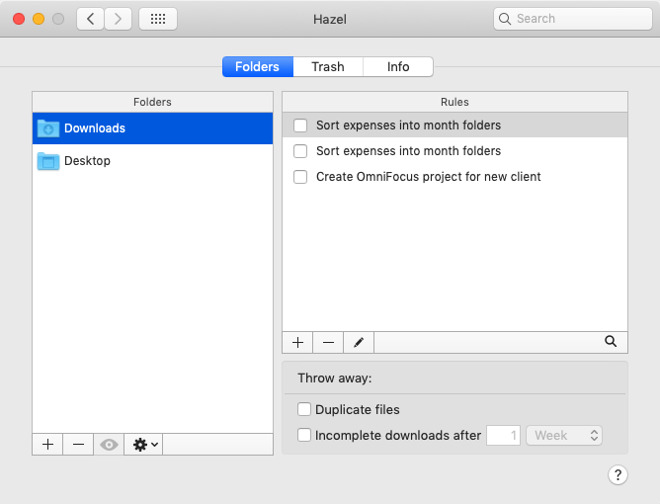
An extremely basic use of Hazel to stay on top of your Downloads folder
And if this all seems like too much trouble, it is —but you can get Hazel to help. Hazel is a reason to buy a Mac, it’s that good and useful. It monitors any folder you tell it to, and then it takes action on what it finds.
We have Hazel monitor our desktop for invoices which it archives off for us after a day. After a month, Hazel will collect up all the images we’ve created and not only move them to an external archive but rename and sort them to make it easy to find one later.
Archive or delete
There’s genuinely no question. If you have a Mac with a small drive then you are going to have to be conscious of what you Save and where you save it.
Yet if our Macs today come with smaller drives than we’re used to, they’re fantastically faster. If you move from an old iMac to a new Mac mini, well, you’ll likely miss the screen as well as the storage space, but you’d never go back either.
It’s been a bit of a slower week than I’d initially planned – I was away on Monday, but I was hoping to post up a review of Egypt: Old Kingdom yesterday. It released by accident when we mentioned it in a past Weekender update but we were expecting it to re-surface today – no joy though. Still as soon as it turns up we’ll have our review ready.
Hopefully you enjoyed reading out thoughts on Cultist Simulator & NecroDancer: Amplified. We’ve got plenty more reviews coming down the pipe now, and Nick’s even returning after a break for some feature work.
Meanwhile, in the world of mobile gaming…
Out Now
Solar Settles (iOS & Android) – Full review coming soon!
From the mind that also brought us Minos Strategos & Militia, Solar Settlers is essentially a worker placement game about space exploration and colonisation. It’s inspired by board game design, featuring a central grid and ‘cards’ that you can use to either gain resources or change a space on the board, provided you meet the placement requirements.
You only have a limited number of rounds to settle the required number of colonists, but colonists need oxygen to survive, which you have to harvest from nearby planets. You also need fuel hydrogen to move them around, and ores to play cards.
We actually meant to mention this last week, but it completely slipped my mind. I managed to take it for a quick spin last night, and it’s pretty interesting. A bit low budget, but the careful balancing act of moving your colonists around, getting the resources they need, but also ensuring you settle everyone in time (which you need to draw cards for) is pretty engaging. The game features challenges and a ranking system as well.
The roguelike train keeps on rocking along, and we have a new one to offer up to the gods of permadeath this week. SFD seems to be a tactical RPG first, with roguelike elements, featuring randomly generated dungeons, turn-based combat, over 200 weapons, spells & other items as well as 7 adventures to try out.
There’s a free demo available for anyone who wants to give it a whirl first, which gives you access to a single dungeon floor. SFD stands for ‘Sigma Finite Dungeon’, apparently.
Having spent my career covering PC games more than any other platform, I discovered the world of ‘Simulator’ games quite early. Like, the OG simulator games – Railway Simulator, Farming Simulator… it tickles me to learn that mobile is not immune to these pervasive, cumbersome games about drilling holes and driving around.
Construction Simulator 3 has been out since March, we think, but it recently got given a 1.1 update that brought it up to our radar. It’s mainly about driving around, building and/or repairing things, and this time it’s set in Europe. I mean, now it’s got the Liebherr LB28! That’s bound to have made someone’s day – apparently, it’s a drilling rig that lets you set better foundations for bridges. Yes mate. (Small caveat – there do appear to be IAPs for some kind of in-game currency.)
We’re also putting a shout-out for Aldarix the Battlemage, which is an android-only game that was described by the developer as “Kinda like Hoplie, but with spells”. I wasn’t able to give it a whirl in time for today’s tome, but if anyone does end up checking it out, let us know.
Ahead of the imminent release of Season 8, The Game of Thrones Reigns spin-off has been given a free update with over 100 new cards which tie in with the upcoming show. We imagine there may be more than a few spoilers, so beware. There’s also a sale running on Android.
We our information to TouchArcade for this one – you should check out Jared’s write-up for the full story, but it seems that after six the free iOS ports of Bungie’s classic Marathon games are finally getting updates again. The first milestone dropped at the end of January that brought all three games up to speed and workable with iOS 12, and then different games have been getting additional patches in the months since.
I never played the Marathon games, but I’m a big fan of Halo, so I’m glad to see this part of Bungie’s history is still being cared for on mobile devices.
Investing in Ticket to Earth is continuing to pay off. Episode 3 was finally released in December last year, and this week the game has received a new update that adds in new tutorials, as well as ‘rookie’ and ‘veteran’ difficulty modes that focus the player on either the story, or the tactical puzzles respectively. It’s also running a sale on iOS.
Sales
Going to do a quicker round-up than what we usually do this week, as it’s mainly iOS-only sales, sorry Android users!
Team 17 are running a sale on most of their iOS catalogue, and Overhaul have made Baldur’s Gate half price. It’s not the cheapest it’s been though, so you can probably afford to wait. Another PT favourite, Space Grunts, is going for a couple of dollars.
The only sale this week that’s on both iOS & Android is Age of Rivals, which is a great strategy boardgame.
Seen anything else you liked? Played any of the above? Let us know in the comments!