The Power-enabled combat of Iron Banner is live, and Guardians are mixing things up a bit. Wolf’s Favors, Iron Burdens, and the Reveler’s Tonic have all combined for a lively event. Whether you’re skipping grenades or hunting Iron Banner rewards, this is a week to break the rules and experiment with your loadouts. Double Valor is currently available, with Triple Valor beginning tomorrow at 10 AM PDT.
Last week, we covered some sandbox Super tuning on its way in Destiny 2 Update 2.2.2, planned for next month. Today, we’ll be looking at some changes currently in development for Season of Opulence, which is a bit further out. Read on to learn how the pinnacle Hand Cannons of Destiny 2 will be changing.
Balance the Bite
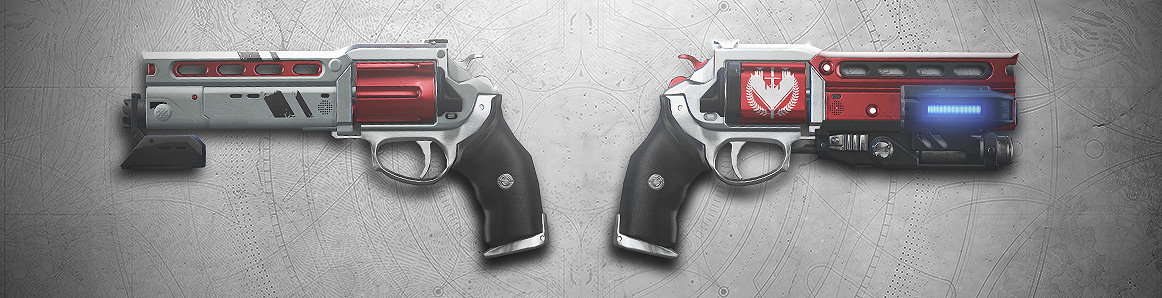
At the release of Destiny 2: Forsaken, two pinnacle weapons became available for players to earn in the Competitive playlist in the Crucible. Each weapon has a unique quest, requiring mastery of Hand Cannons to complete. There has been a lot of feedback on how the pinnacle Crucible Hand Cannons stand above most other weapons in the sandbox. Today, we’ll be going through some balance changes planned for Season of Opulence. We wanted to start this conversation early, to ensure players understood that change was coming, even if they were still on the path to acquiring these rewards. Here’s the Destiny Dev Team to walk us through the planned changes:
Dev Team: We wanted to give you a preview of some plans we have to balance Luna’s Howl and Not Forgotten in Season of Opulence. After significant amounts of feedback, internal discussion, and playtesting, we’ve decided to adjust how these Hand Cannons work. For some players, these weapons can represent a significant investment of time and the personal improvement needed to acquire them. When tuning, we attempt to take into account the time commitment players make to acquire weapons and balance that against how those weapons affect the different game modes.
Magnificent Howl (the unique perk on these weapons) is too effective. It works in a neutral setting and rewards players for getting precision shots—something they would have done naturally. As a result, the time to kill of the game shifts to meet this new benchmark, and players feel that the majority of primary weapons in Destiny 2 cannot compete with these pinnacle weapons.
Our current plan is to make Luna’s Howl and Not Forgotten the only 150 RPM precision Hand Cannons. They will maintain some aspects of their current behavior while taking on the firing speed and damage of the 150 RPM Hand Cannons. Magnificent Howl will also be adjusted so that it increases only body-shot damage, resulting in a two headshot/one body-shot kill. Magnificent Howl will still give an advantage due to requiring less precision hits for optimal time to kill.
Like we do whenever Destiny gameplay evolves, we’ll be watching the conversation starting today on our planned changes. We’ll continue collecting feedback once these changes go live at the beginning of Season of Opulence. If you have feedback now, please make sure to sound off on the #Destiny2 forum, right here on bungie.net
Revelry: Verdant Light
Last week, Revelry Orbs were disabled in Gambit, Gambit Prime, raids, and Competitive Crucible due to an increase in GUITAR errors and activity disconnections. As multiple sources of progress for the “Verdant Light: Competitive” Triumph are no longer available, the team has been investigating a change to the requirements for completion.
As the above listed activities no longer provide progress, players are required to create 200 orbs by defeating other Guardians with precision kills in Quickplay, Rumble, and the featured Crucible playlist. This week, that playlist is Iron Banner, for example.
At this time, our current plan is to reduce this requirement to 20 orbs.
This change will be deployed after the Revelry ends, in Destiny 2 Update 2.2.2. Players who meet the requirement of 20 orbs will have the Triumph auto-complete after downloading the patch, which will also unlock the “Party Harder” Triumph and “Stimulant Spring” Emblem reward if all other Revelry Triumphs have been completed.
Exploring the Curse
Last month, we featured a string of three Bungie Bounties to celebrate Season of the Drifter and Gambit Prime. A few of you have been asking when we’d be jumping back on stream with a Ride Along. With the curse in full effect this week, it’s the perfect time to engage in some developer commentary in a live-fire environment.
Shattered Throne Ride Along
Monday, April 29
2:30 PM Pacific
We’ll have Bungie developers in the hot seats to speak to their inspirations, share some behind the scenes stories of development, and answer a few questions. Get ready for a fun ride. We’ll see you in chat.
At the Ready
With Season of the Drifter, new activities and weekly rituals became available to owners of the Annual Pass. Destiny Player Support has been investigating reports of various issues, and this week brings vital information regarding the Invitations of the Nine.
This is their report.
Denial of the Nine
Tomorrow, the seventh Invitation of the Nine will become available from Xûr. Before this pursuit goes live, we’d like to make players aware of a blocking issue, which we are currently working on.
Tomorrow’s invitation, titled “The Tower,” will require players to complete the Hollowed Lair strike and defeat Hive, Scorn, and Vex on the Tangled Shore. Currently, this invitation cannot be completed, since Vex are not available as enemies at any location on the Tangled Shore. This issue does not impact previous Invitations of the Nine, only “The Tower” invitation is currently blocked. We are working to resolve this issue as soon as possible.
For more information as soon as it is available, please follow @BungieHelp on Twitter or monitor our support feed on help.bungie.net.
Spring Fever
On Tuesday, the Revelry kicked off its second week in Destiny 2.
Whether you’re plundering the depths of the Verdant Forest or you’re bringing a good mood to your favorite activity, there’s still another full week ahead of us before the Revelry ends at the weekly reset on May 7, 2019.
As a reminder, each new week brings a refresh of weekly bounties to Eva Levante. Players can complete these bounties to earn powerful Inaugural Revelry gear, as well as earn progress toward the “A Bountiful Spring” Triumph. Once the Revelry concludes, all unearned and unclaimed Triumphs will be hidden, so players are encouraged to party hard while they still can.
Additionally, we’d like to remind players that we’re tracking the following known issues in the Revelry:
Virescent Emblem Tracking: We’re investigating an issue where the Virescent emblem doesn’t track the deepest branch reached during a single run of the Verdant Forest.
Revelric Light and GUITAR Errors: To mitigate issues causing elevated GUITAR errors in Destiny 2, Revelric Light orb generation has been disabled in raids, Gambit, Gambit Prime, and Competitive Crucible.
Jubilant Engrams: We have identified an issue where Jubilant Engrams are not knocking out items as expected when opened across multiple characters. We will be reaching out to affected players to resolve this issue after the Revelry event has ended.
PC Players, Bergusia Forge and Ornaments: We’re investigating an issue where PC players who wear Revelry ornaments near the Bergusia Forge experience crashing. To mitigate this issue, it’s recommended to remove the Revelry ornament before going to the Forge.
For more information on the Revelry, players should visit our Revelry Guide.
Demolish Your Foes
The Revelry is all about breaking rules, and a few of you are having a field day. Brew your tonic and drink up, because the following videos may inspire you to throw more grenades.
Movie of the Week: Tripping over mines
Runner Up: Verdant Forest Solo : 5 Bosses Defeated
Runner Up: Perfect Grenades Don’t Exist
If you’d like a chance at the Lens of Fate emblem, be sure to submit your footage to the Community Creations portal on bungie.net.
We’re almost to the weekend, and I’m feeling heavy as death. Not in a bad way—truly! I’m on the grind toward the reward for 2,500 Iron Burden kills in the Iron Banner. I don’t know about you, but this is my favorite emblem in Destiny 2, with a badass name to boot.
I admit, the challenge is difficult. Tasking myself to fight against enemies at a 100 Power deficit is a wild ride. I’ve had to change the way I approach most engagements, but I’m getting closer and closer to my prize with each game.
Maybe I’ll see you out there. Apologies if you’re in the sights of my Arbalest.
Before I begin this test of Linux graphic design tools, I should admit two things up front. First, I am a designer, not a software developer. Second, although I try to incorporate open source methodologies and principles wherever I can, my field pretty much demands that I use Adobe software on a sticker-emblazoned MacBook Pro. (I know, hate me if you must.) For the purposes of this research project, however, I am running Fedora 29 on a repurposed Mac Mini.
Laid-Back Camp Anime Continues In January 2020 With Short Follow-Up Story
One of the most popular slice of life anime from 2018, Laid-Back Camp, is getting a short follow-up story early next year. Called Heya Kyan (which translates to Room Camp and has thus been nicknamed Heya Camp), the short anime will premiere January 2020.
According to Comic Natalie, and translated by Anime News Network, Laid-Back Camp opening animation sequence director Masato Jinbo will be heading Heya Camp. Laid-Back Camp writer Mutsumi Ito and character designer and chief animation director Mutsumi Sasaki are returning to reprise their roles in Heya Camp as well. The director of Laid-Back Camp Season 1, Yoshiaki Kyougoku, will supervise.
After Heya Camp, Laid-Back Camp will be getting a full second season, as well as a movie. A key visual for Laid-Back Camp's future direction and stories was released alongside the announcement of Heya Camp's premiere date. The artwork sees main characters Nadeshiko and Rin take center stage at the base of Mount Fuji, while Nadeshiko's fellow Outdoor Activities Circle members Chiaki and Aoi and Rin's friend Saitō stand to their left. On their right stands the Outdoor Activities Circle advisor Minami and Nadeshiko's older sister Sakura. The key visual can be viewed below.
Laid-Back Camp follows Nadeshiko and Rin, two high school girls who love camping. Rin is a quiet girl who prefers to camp alone, while Nadeshiko is quite boisterous and would rather spend time with others. Despite their different personalities, the two high schoolers forge a very close relationship and continue to camp together--with Rin beginning to open to the idea of occaissionaly spending time with others and Nadeshiko learning to appreciate more solitude excursions.
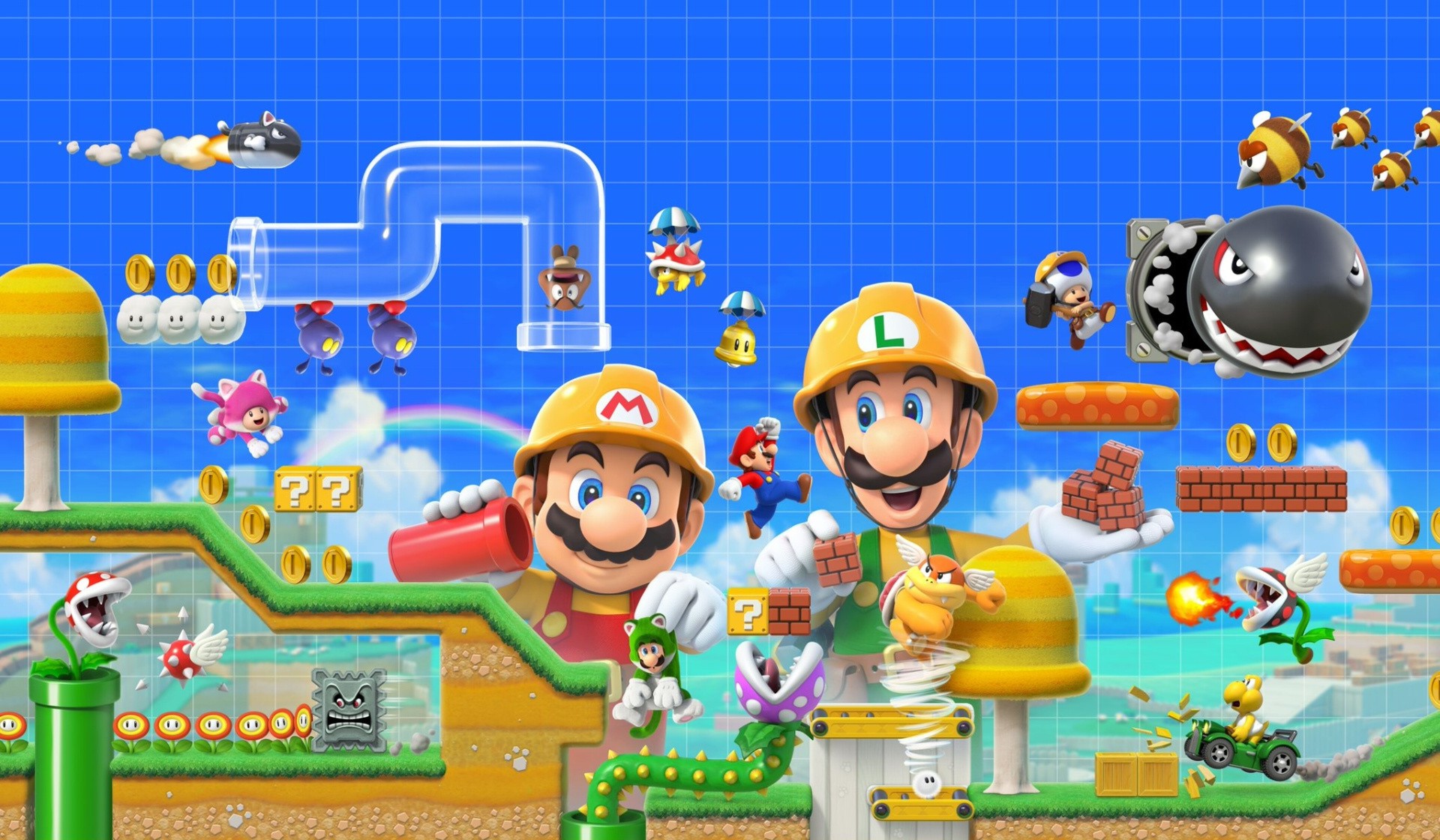
Earlier this year during a Direct presentation, Nintendo revealed it was bringing Super Mario Maker 2 to the Switch this June.
In the latest update, a release date has now been locked in. According to Nintendo of America and Nintendo Japan, the game will be arriving on 28th June. This date may be slightly different, depending on where you live.
This latest entry promises to let your imagination run wild as you make and play on your own Super Mario courses using brand new tools, items and features. One of the major selling points of the sequel is the ability to create slopes for the first time. There’ll also be underwater options and assets from the recent 3D games – Super Mario 3D Land and Super Mario 3D World.
Are you excited about Super Mario Maker 2 for the Switch? Will you be purchasing it in the month of June? Tell us below.
Reminder: Sega Ages Virtua Racing Is Out Now On The Japanese eShop
Virtua Racing has arguably been one of the most anticipated Sega Ages games since it was announced. The title includes 8-player split-screen, online multiplayer and a built-in replay mode not included in the original arcade release.
While there’s still no word on a launch date here in the west, the game is now available in Japan for 999 Yen (roughly $9.00 / £7.00). To celebrate this release, Sega’s Japanese YouTube channel has uploaded a new gameplay trailer, highlighting all of the above-mentioned features and more. See what all the fuss is about in the video below:
Virtua Racing began as an arcade release in 1992 and was developed by Sega AM2. It is considered to be one of the most influential games of all-time for popularising 3D polygonal graphics.
Will you be downloading this game from the Japanese eShop, or do you plan to hold out until the local release? Tell us in the comments.
Posted by: xSicKxBot - 04-25-2019, 10:24 PM - Forum: Windows
- No Replies
New Garage project bakes accessibility into game development
At Game Developers Conference 2019, we shared an early peek at Responsive Spatial Audio for Immersive Gaming, a Microsoft Garage project. The Unity plug-in helps developers infuse accessibility into games by making it easy to annotate game objects with descriptive text and present it to players through interactive audio cues. The project is now available worldwide in the Unity Store.
Baking accessibility into game development
A number of hackers have joined the cause to make games more accessible. For example, Ear Hockey, a Microsoft Garage project, is a game designed around the blind and low vision community, and the Xbox Adaptive Controller, a Hackathon project turned Garage Wall of Famer, is a game controller designed for gamers of all abilities. The Garage project team members who developed Responsive Spatial Audio are taking a different approach, focusing on the game developer by baking accessibility right into an easy, drag-and-drop interaction toolkit.
With Responsive Spatial Audio, game developers can tag 3D objects with descriptive text, and the experience captures these tags and spatial coordinates to help players navigate. As players traverse through the game world and encounter tagged objects and designated points of interest, they are guided by audio cues via a built-in, text-to-speech API. An accessible FPS controller presents relevant descriptions at the right time by monitoring player movement, scanning their surroundings for metadata, and cuing spatial audio guidance for objects in the frame of view.
Key features to provide a more accessible experience
Responsive Spatial Audio offers a number of features that make prioritizing accessibility easy.
Accessible FPS Controller Convey object descriptions within the player’s frame of view via audio cues and adjust the viewing frustum length and arc
Annotate Game Objects Tag and manage objects with descriptive text—tag once and descriptions appear everywhere the object does
Vantage Point Objects Add and manage vantage points, or invisible doorframe-like points of interests that convey a whole view (as opposed to objects within the viewing frustum). Present different descriptions based on the direction the player is facing
Accessible Navigation Aid player navigation with a suite of interaction tools including:
Guide players to a selected object via a navigation agent with an orientation and spatial beacon
Add a script to guide players to nearby vantage points with auditory beeps
Enable bump noises with custom sounds, that will play spatial audio upon collision, intelligently based on the orientation of the player
Change background audio based on the location of the player
Indicate the global north and south of the game with spatial sound
Inventory UI Leverage an optional in-box inventory UI to easily manage a library of game objects
To see how you can incorporate Responsive Spatial Audio into your games, see the project in action in a demo accompanying the plugin in the Unity Store.
One step closer to seamless, accessible development
We sat down with Brannon Zahand and Evelyn Thomas, each Senior Program Managers in Accessibility R&D who champion accessibility in the gaming space, to hear their reflections on the project. “The idea that I can drag and drop this into a game, with very little work to implement it, is a game changer for the industry” shared Brannon. Evelyn attended GDC 2019 to talk to developers about best practices in accessibility, highlighting the project at a conference talk and Microsoft’s accessibility booth.
“The idea that I can drag and drop this into a game, with very little work to implement it, is a game changer for the industry.”
Responsive Spatial Audio was developed by Manohar Swaminathan, a Senior Researcher in Microsoft Research, based in Bangalore, India. Manohar has been working in graphics for years, but found a passion for accessibility while working on CodeTalk, a solution that empowers developers in the blind and low vision community to do more with Visual Studio. He was searching for ways to do more impactful work in India when he met and teamed up with former Research Fellow Venkatesh Potluri, a blind developer who was interested in enhancing his productivity. After releasing CodeTalk, Manohar was inspired to combine his background with games and VR to make the gaming space more accessible through audio. “We thought ‘Can we use rich, spatial audio content to replace the visual information that is missing?” and decided to give it a shot,” he shared. It’s Manohar’s hope that plug-and-play tools will inspire developers to create fun and inclusive game experiences accessible to all.
Try It Out
Responsive Spatial Audio and a demo are now available worldwide in the Unity Store. The team looks forward to hearing feedback via UserVoice.
Supposed replicas of Apple’s next-generation iPhone lineup are beginning to circulate in Asia ahead of an expected release this fall, offering an opportunity to compare the mockups’ physical dimensions with existing models.
In a report on Thursday, Japanese Apple blog Mac Otakaracompares and contrasts a set of 3D printed “iPhone XI” mockups obtained from an Alibaba marketplace source with Apple’s existing iPhone XR and XS models. Specifically, the samples depict 6.1- and 6.5-inch OLED-toting handsets rumored to arrive in September as refreshes to the iPhone XR and XS Max.
The dummies were created using supposedly leaked CAD files, though the origin of the data remains undisclosed. Earlier today, graphical mockups of a 5.8-inch OLED model, thought to replace the iPhone XS, hit the web and were based on “final CAD renders of the device.”
Whether the two CAD leaks are related is unknown.
Mac Otakara notes the 6.1-inch version measures in at 143.9mm tall, 71.3mm wide and 7.9 mm thick, which is approximately 0.3mm taller, 0.4mm wider and 0.2mm thicker than the 5.8-inch iPhone XS. That extra space could allow for the inclusion of a larger 6.1-inch display, as claimed in the report, but Apple would likely need to slim down bezel size to make the screen fit. How the supposed change impacts screen ratio is unclear.
Compared to the current iPhone XR, which boasts a 6.1-inch LCD, the 6.1-inch mockup is 6.1mm shorter, 4.3mm more narrow and 0.4mm slimmer.
As for the 6.5-inch version, the mockup comes in at 157.6mm tall, 77.6mm wide and 8.1mm thick, roughly 0.1mm taller, 0.2mm wider and 0.4mm thinner than the 6.5-inch iPhone XS Max.
Both mockups incorporate a large square camera “bump” that features three lenses in a triangular layout alongside a single TrueTone flash module.
The publication conducted a similar comparison of mockups from Alibaba last year, a test that yielded largely accurate results and foreshadowed what would become iPhone XR, XS and XS Max.
Apple is expected to refresh its iPhone lineup later this year with so-called “iPhone XI” models. According to analyst Ming-Chi Kuo, the smartphones will include camera improvements like a super-wide rear-facing lenser and an improved 12 megapixel front-facing camera. As for displays, Kuo believes Apple to carry over OLED technology for the 5.8- and 6.5-inch versions, while others, namely Mac Otakara, predict a move to OLED for the 6.1-inch model.
Preparing Your Enterprise for the Worst With Disaster Recovery, Monitoring
With the rise of both man-made and natural disasters (including fires and earthquakes), the disaster recovery (DR) market has growing importance in protecting an enterprise and its user community, according to RackWare co-founder and CEO Sash Sunkara.
“It is a really critical requirement [for enterprises] and when people think about DR there are certain things that they should really think about when putting a plan together,” Sunkara said. This includes implementing the correct infrastructure monitoring and disaster recovery toolset so that an enterprise’s network, applications, and end-users don’t experience any downtime.
Avengers: Endgame Isn't The Final Movie In Marvel's Phase 3, Apparently
In a weird bit of news, it turns out that Avengers: Endgame won't be the last movie in Phase 3 of the Marvel Cinematic Universe. According to Marvel Studios President Kevin Feige, it will be Spider-Man: Far From Home, which we all thought was the start of Phase 4.
During an Endgame event in Shanghai last week, BiliBili asked about the upcoming Spider-Man movie, and although the excessive crowd noise in the background blocks out much of the question being asked, signs point to Far From Home closing out Phase 3. "It's the end of the third phase," explained Feige. "You're the first person I told that to."
This is a bit of a head-scratcher, as most of us assumed that the Infinity Saga would close up with Endgame, bringing a natural conclusion to the arc. However, it's not entirely out of the ordinary, when you think about it. Sure, Phase 1 wrapped up in 2012 with the first Avengers film. However, Phase 2 closed not with 2015's Avengers: Age of Ultron but with Ant-Man. So for fans, like myself, thinking these Phases always end with an Avengers movie, we're wrong. It just feels so weird to end this chapter at Marvel with the Spider-Man sequel.
Avengers: Endgame comes to theaters on April 26, and you can check out GameSpot's review of the movie--we liked it. As for the end of Phase 3, that won't happen until the recently moved up Spider-Man: Far From Home on July 2.
Posted by: xSicKxBot - 04-25-2019, 03:17 PM - Forum: Windows
- No Replies
Machine teaching: How people’s expertise makes AI even more powerful
Most people wouldn’t think to teach five-year-olds how to hit a baseball by handing them a bat and ball, telling them to toss the objects into the air in a zillion different combinations and hoping they figure out how the two things connect.
And yet, this is in some ways how we approach machine learning today — by showing machines a lot of data and expecting them to learn associations or find patterns on their own.
For many of the most common applications of AI technologies today, such as simple text or image recognition, this works extremely well.
But as the desire to use AI for more scenarios has grown, Microsoft scientists and product developers have pioneered a complementary approach called machine teaching. This relies on people’s expertise to break a problem into easier tasks and give machine learning models important clues about how to find a solution faster. It’s like teaching a child to hit a home run by first putting the ball on the tee, then tossing an underhand pitch and eventually moving on to fastballs.
“This feels very natural and intuitive when we talk about this in human terms but when we switch to machine learning, everybody’s mindset, whether they realize it or not, is ‘let’s just throw fastballs at the system,’” said Mark Hammond, Microsoft general manager for Business AI. “Machine teaching is a set of tools that helps you stop doing that.”
Machine teaching seeks to gain knowledge from people rather than extracting knowledge from data alone. A person who understands the task at hand — whether how to decide which department in a company should receive an incoming email or how to automatically position wind turbines to generate more energy — would first decompose that problem into smaller parts. Then they would provide a limited number of examples, or the equivalent of lesson plans, to help the machine learning algorithms solve it.
In supervised learning scenarios, machine teaching is particularly useful when little or no labeled training data exists for the machine learning algorithms because an industry or company’s needs are so specific.
YouTube Video
In difficult and ambiguous reinforcement learning scenarios — where algorithms have trouble figuring out which of millions of possible actions it should take to master tasks in the physical world — machine teaching can dramatically shortcut the time it takes an intelligent agent to find the solution.
It’s also part of larger goal to enable a broader swath of people to use AI in more sophisticated ways. Machine teaching allows developers or subject matter experts with little AI expertise, such as lawyers, accountants, engineers, nurses or forklift operators, to impart important abstract concepts to an intelligent system, which then performs the machine learning mechanics in the background.
Microsoft researchers began exploring machine teaching principles nearly a decade ago, and those concepts are now working their way into products that help companies build everything from intelligent customer service bots to autonomous systems.
“Even the smartest AI will struggle by itself to learn how to do some of the deeply complex tasks that are common in the real world. So you need an approach like this, with people guiding AI systems to learn the things that we already know,” said Gurdeep Pall, Microsoft corporate vice president for Business AI. “Taking this turnkey AI and having non-experts use it to do much more complex tasks is really the sweet spot for machine teaching.”
Today, if we are trying to teach a machine learning algorithm to learn what a table is, we could easily find a dataset with pictures of tables, chairs and lamps that have been meticulously labeled. After exposing the algorithm to countless labeled examples, it learns to recognize a table’s characteristics.
But if you had to teach a person how to recognize a table, you’d probably start by explaining that it has four legs and a flat top. If you saw the person also putting chairs in that category, you’d further explain that a chair has a back and a table doesn’t. These abstractions and feedback loops are key to how people learn, and they can also augment traditional approaches to machine learning.
“If you can teach something to another person, you should be able to teach it to a machine using language that is very close to how humans learn,” said Patrice Simard, Microsoft distinguished engineer who pioneered the company’s machine teaching work for Microsoft Research. This month, his team moves to the Experiences and Devices group to continue this work and further integrate machine teaching with conversational AI offerings.
Microsoft researchers Patrice Simard, Alicia Edelman Pelton and Riham Mansour (left to right) are working to infuse machine teaching into Microsoft products. Photo by Dan DeLong for Microsoft.
Millions of potential AI users
Simard first started thinking about a new paradigm for building AI systems when he noticed that nearly all the papers at machine learning conferences focused on improving the performance of algorithms on carefully curated benchmarks. But in the real world, he realized, teaching is an equally or arguably more important component to learning, especially for simple tasks where limited data is available.
If you wanted to teach an AI system how to pick the best car but only had a few examples that were labeled “good” and “bad,” it might infer from that limited information that a defining characteristic of a good car is that the fourth number of its license plate is a “2.” But pointing the AI system to the same characteristics that you would tell your teenager to consider — gas mileage, safety ratings, crash test results, price — enables the algorithms to recognize good and bad cars correctly, despite the limited availability of labeled examples.
In supervised learning scenarios, machine teaching improves models by identifying these high-level meaningful features. As in programming, the art of machine teaching also involves the decomposition of tasks into simpler tasks. If the necessary features do not exist, they can be created using sub-models that use lower level features and are simple enough to be learned from a few examples. If the system consistently makes the same mistake, errors can be eliminated by adding features or examples.
One of the first Microsoft products to employ machine teaching concepts is Language Understanding, a tool in Azure Cognitive Services that identifies intent and key concepts from short text. It’s been used by companies ranging from UPS and Progressive Insurance to Telefonica to develop intelligent customer service bots.
“To know whether a customer has a question about billing or a service plan, you don’t have to give us every example of the question. You can provide four or five, along with the features and the keywords that are important in that domain, and Language Understanding takes care of the machinery in the background,” said Riham Mansour, principal software engineering manager responsible for Language Understanding.
Microsoft researchers are exploring how to apply machine teaching concepts to more complicated problems, like classifying longer documents, email and even images. They’re also working to make the teaching process more intuitive, such as suggesting to users which features might be important to solving the task.
Imagine a company wants to use AI to scan through all its documents and emails from the last year to find out how many quotes were sent out and how many of those resulted in a sale, said Alicia Edelman Pelton, principal program manager for the Microsoft Machine Teaching Group.
As a first step, the system has to know how to identify a quote from a contract or an invoice. Oftentimes, no labeled training data exists for that kind of task, particularly if each salesperson in the company handles it a little differently.
If the system was using traditional machine learning techniques, the company would need to outsource that process, sending thousands of sample documents and detailed instructions so an army of people can attempt to label them correctly — a process that can take months of back and forth to eliminate error and find all the relevant examples. They’ll also need a machine learning expert, who will be in high demand, to build the machine learning model. And if new salespeople start using different formats that the system wasn’t trained on, the model gets confused and stops working well.
By contrast, Pelton said, Microsoft’s machine teaching approach would use a person inside the company to identify the defining features and structures commonly found in a quote: something sent from a salesperson, an external customer’s name, words like “quotation” or “delivery date,” “product,” “quantity,” or “payment terms.”
It would translate that person’s expertise into language that a machine can understand and use a machine learning algorithm that’s been preselected to perform that task. That can help customers build customized AI solutions in a fraction of the time using the expertise that already exists within their organization, Pelton said.
Pelton noted that there are countless people in the world “who understand their businesses and can describe the important concepts — a lawyer who says, ‘oh, I know what a contract looks like and I know what a summons looks like and I can give you the clues to tell the difference.’”
Microsoft Corporate Vice President for Business AI Gurdeep Pall talks at a recent conference about autonomous systems solutions that employ machine teaching. Photo by Dan DeLong for Microsoft.
Making hard problems truly solvable
More than a decade ago, Hammond was working as a systems programmer in a Yale neuroscience lab and noticed how scientists used a step-by-step approach to train animals to perform tasks for their studies. He had a similar epiphany about borrowing those lessons to teach machines.
That ultimately led him to found Bonsai, which was acquired by Microsoft last year. It combines machine teaching with deep reinforcement learning and simulation to help companies develop “brains” that run autonomous systems in applications ranging from robotics and manufacturing to energy and building management. The platform uses a programming language called Inkling to help developers and even subject matter experts decompose problems and write AI programs.
Deep reinforcement learning, a branch of AI in which algorithms learn by trial and error based on a system of rewards, has successfully outperformed people in video games. But those models have struggled to master more complicated real-world industrial tasks, Hammond said.
Adding a machine teaching layer — or infusing an organization’s unique subject matter expertise directly into a deep reinforcement learning model — can dramatically reduce the time it takes to find solutions to these deeply complex real-world problems, Hammond said.
For instance, imagine a manufacturing company wants to train an AI agent to autonomously calibrate a critical piece of equipment that can be thrown out of whack as temperature or humidity fluctuates or after it’s been in use for some time. A person would use the Inkling language to create a “lesson plan” that outlines relevant information to perform the task and to monitor whether the system is performing well.
Armed with that information from its machine teaching component, the Bonsai system would select the best reinforcement learning model and create an AI “brain” to reduce expensive downtime by autonomously calibrating the equipment. It would test different actions in a simulated environment and be rewarded or penalized depending on how quickly and precisely it performs the calibration.
Telling that AI brain what’s important to focus on at the outset can short circuit a lot of fruitless and time-consuming exploration as it tries to learn in simulation what does and doesn’t work, Hammond said.
“The reason machine teaching proves critical is because if you just use reinforcement learning naively and don’t give it any information on how to solve the problem, it’s going to explore randomly and will maybe hopefully — but frequently not ever — hit on a solution that works,” Hammond said. “It makes problems truly solvable whereas without machine teaching they aren’t.”
Related machine teaching links:
Jennifer Langston writes about Microsoft research and innovation. Follow her on Twitter.