Posted by: xSicKxBot - 07-23-2019, 05:01 AM - Forum: Windows
- No Replies
How AI is changing the world of manufacturing
Henry Ford’s assembly line revolutionized manufacturing in the 20th century. The transformation driven by AI in the 21st century will be just as dramatic.
“The Future Computed: AI and Manufacturing” is the second book in Microsoft’s The Future Computed series, looking at the impact of AI on society.
Author Greg Shaw examines the way in which leading manufacturing companies are using AI to build the factories and supply chains of the future. He explores the exciting opportunities around this new technology and also looks at the way the manufacturing industry is again at the forefront of grappling with the challenges of adopting a new technology. In particular, “The Future Computed: AI and Manufacturing” looks at the importance of creating a framework for the ethical and responsible use of AI and ensuring that workers can be trained to take on new tasks.
In this video, Shaw explains the themes underlying his research, and hears directly from Çağlayan Arkan, general manager of Microsoft Global Manufacturing, and some of the manufacturing customers at the cutting edge of industrial AI.
For more on AI innovations at Microsoft follow @MSFTIssues on Twitter.
Posted by: xSicKxBot - 07-23-2019, 05:01 AM - Forum: Windows
- No Replies
‘Gears 5’ Versus Multiplayer Tech Test goes live
It’s finally here – The Gears 5 Versus Tech Test goes live today to give players their first taste of Versus multiplayer action. Starting at 10 a.m. PDT today, COG hopefuls can enlist in the Boot Camp training mode and then jump right into Arcade, the new game type designed for over-the-top fun where characters become heroes with their own unique abilities, loadouts and playstyles.
Gears veterans will want to check out fan-favorite King of the Hill, the updated competitive game type Escalation and a mini-Tour of Duty, a series of challenges that grant sweet Tech Test exclusive rewards that will carry over into Gears 5. No matter your level of Gears familiarity, Gears 5 offers a game type for you.
Access to the Tech Test is included with your Xbox Game Pass membership or as part of your Gears 5 pre-order (whether as a separate 5×5 code from a participating retailer or bundled in your digital pre-order). Eligible players can download the game app now and matchmaking will begin at 10 a.m. PDT today. Matchmaking will run through July 22 at 10 a.m. PDT and will be active again from July 26 at 10 a.m. PDT until July 29 at 10 a.m. PDT. To download, simply search for “Gears 5” in the Xbox or Windows Store to pull up the Tech Test on your Xbox One or Windows 10 PC. If you’re an Xbox Game Pass member, you will see the Tech Test available to download in “Recently added” section of the Game Pass library. Online multiplayer will require Xbox Live Gold on console or an Xbox Game Pass Ultimate membership. For players on Windows 10 PC, we have the below chart that outlines minimum and recommended specs for the Tech Test:
Boot Camp
Within the Tech Test, players will find Boot Camp, the perfect way to practice your skills and learn new mechanics before joining the fight in Gears 5. Boot Camp takes you through all the basics, from cover movement to executions, in easy-to-repeat sections perfect for new players and returning veterans alike. Whether you’re learning the ropes or just refreshing your memory, Boot Camp offers an intuitive training mode to ensure you’re ready for primetime in the Tech Test.
Arcade
Arcade is a brand-new type of Versus experience that encourages approachable gameplay for all types of players. Arcade is the ultimate jump-in/jump-out mode featuring classic characters such as Kait and Marcus each with their own distinct abilities and weapon upgrades. For more details on the Arcade experience, check out the above trailer or jump into the action yourself this weekend.
King of the Hill
The classic King of the Hill action you know and love is back in full force in Gears 5. Battle for supremacy and prove your dominance with a team or solo as you compete to capture and hold territories.
Escalation
If you’re looking for the ultimate competitive experience from Gears 5, Escalation offers thrilling, objective-based play requiring a combination of individual skill, teamwork and strategy. With the introduction of limited respawns, an overhauled weapon system and updated player spawning, Escalation in Gears 5 is more tactically rich and competitive than ever before. So grab some friends, experiment with new strategies and watch each other’s backs this weekend.
Thanks for your support and we look forward to seeing you online! Be sure to visit www.gears5.com and follow @GearsofWar on Facebook and Twitter to keep up-to-date with the latest on Gears 5 ahead of launch on September 10.
Gears 5will release on September 10 for Xbox One, Windows 10 PC and Xbox Game Pass. Early access starts on September 6 for Xbox Game Pass Ultimate members and Gears 5 Ultimate Edition purchasers. Pre-order details can be found on the Microsoft Store.
Xbox Game Pass provides a curated library of over 100 great games for one low-monthly price, with new games added all the time including the latest titles from Xbox Game Studios on the day they launch. The service is available across console and PC, with Ultimate members receiving access to all the benefits of Xbox Live Gold, as well as access to titles across both platforms.
In .NET Core 3.0 we are introducing a new type of application template called Worker Service. This template is intended to give you a starting point for writing long running services in .NET Core. In this walkthrough you’ll learn how to use a Worker with Azure Container Registry and Azure Container Instances to get your Worker running as a microservice in the cloud.
Since the Worker template Glenn blogged about is also available via the dotnet new command line, I can create one on my Mac and edit the code using Visual Studio for Mac or Visual Studio Code (which I’ll be using here to take advantage of the integrated Docker extension).
dotnet new worker
I’ll use the default from the Worker template. As it will write to logs during execution via ILogger, I’ll be able to tell quickly from looking in the logs if the Worker is running.
public class Worker : BackgroundService

{ private readonly ILogger<Worker> _logger; public Worker(ILogger<Worker> logger) { _logger = logger; } protected override async Task ExecuteAsync(CancellationToken stoppingToken) { while (!stoppingToken.IsCancellationRequested) { _logger.LogInformation("Worker running at: {time}", DateTimeOffset.Now); await Task.Delay(1000, stoppingToken); } }

}
Visual Studio Code’s Docker tools are intelligent enough to figure out this is a .NET Core app, and will suggest the correct Docker file via the Command Palette’s Add Docker files to workspace option.
By right-clicking the resulting Dockerfile I can build the Worker into a Docker image in one click.
The Build Image option will package my Worker’s code into a Docker container locally. The second option, ACR Tasks: Build Image would use Azure Container Registry Tasks to build the image in the cloud, rather than on disk. This is helpful for scenarios when the base image is larger than I want to download locally or when I’m building an application on a Windows base image from Linux or Mac. You can learn more about ACR Tasks in the ACR docs. The Azure CLI makes it easy to login to the Azure Container Registry using the Azure CLI. This results in my Docker client being authenticated to the Azure Container Registry in my subscription.
az acr login -n BackgroundWorkerImages
This can be done in the VS Code integrated terminal or in the local terminal, as the setting will be persisted across the terminals’ environment. It can’t be done using the cloud shell, since logging into the Azure Container Registry requires local shell access so local Docker images can be accessed. Before I push the container image into my registry, I need to tag the image with the URI of the image once it has been pushed into my registry. I can easily get the ACR instance URI from the portal.
I’ll copy the URI of the registry’s login server in the portal so I can paste it when I tag the image later.
By selecting the backgroundworker:latest image in Visual Studio Code’s Docker explorer pane, I can select Tag Image.
I’ll be prompted for the tag, and I can easily paste in the URI I copied from the portal.
Finally, I can right-click the image tag I created and select Push, and the image will be pushed into the registry. Once I have a Docker image in the registry, I can use the CLI or tools to deploy it to Azure Container Instances, Kubernetes, or even Azure App Service.
Now that the worker is containerized and stored in the registry, starting an instance of it is one click away.
Once the container instance starts up, I’ll see some logs indicating the worker is executing, but these are just the basic startup logs and not my information-level logs I have in my Worker code.
Since I added Information-level logs during the worker’s execution, the configuration in appsettings.json (or the environment variable for the container instance) will need to be updated to see more verbose logs.
Once the code is re-packaged into an updated Docker image and pushed into the Azure Container Registry, following a simple Restart…
… more details will be visible in the container instance’s logging output.
The Worker template makes it easy to create long-running background workers that you can run for as long as you need in Azure Container Instances. New container instances can be created using the portal or the Azure Command Line. Or, you can opt for more advanced scenarios using Azure DevOps or Logic Apps. With the Worker template making it easy to get started building microservices using your favorite ASP.NET Core idioms and Azure’s arsenal of container orchestration services you can get your microservices up and running in minutes.
This is a slightly short and sweet entry this week because I’m out and above for work reasons, but still a few things to catch you guys up on. We’ll be cooling it a bit with Harry Potter content unless some news pops up and I’ve got nothing better to do, although I plan to look more into the Auto Chess stuff as it seems more our speed.
We’ve got more reviews coming as well, so don’t worry about that – most new, a few we missed from last month, and then looking at trying to keep things dynamic with more features etc… I’d especially be interested in what you thought about the Brave Exvius guide we ran. I’ve always wondered if there was room for content that’s on trying to ride the ‘free’ part of Free-to-play for as long as possible, making the most of what free resources one can get. I know plenty of people are turned off by the grind-mechanics themselves, but plenty do enjoy having something to whittle away idle time and I’m hoping this helps with that somewhat.
We reported on this a week or two ago, but the LEGO themed Tiny Tower spin-off is finally here. If you played the original game (or Tiny Death Star) you’ll know what to expect, but for anyone not in the know this is a free-to-play experience where you need to build and manage a tower complex. LEGO figurines will come to work and live in your tower depending on what you build, and you can keep going as high as you can.
Standard Free-to-play warning applies with premium currencies and timers, although Tiny Tower never had a reputation for being that bad with its monetisation. Still, this isn’t going to sway anyone who’s definitely anti-F2P, but it might be a nice distraction for anyone else looking for something to idle some time away without much thought. Plus, LEGO!
Tencent is a Chinese company you may have heard off because they’re kinda buying stakes in, like, everyone right now. I think they own a share of Paradox Interactive now? Perhaps I’m mis-remembering that, but they definitely own an interest in Riot Games, makers of League of Legends. Recently, they’ve done two things: The first is to partner with Drodo Games and Dragonest to help publish Auto Chess: Origin in China, the second is to just go ahead and launch their own similar game, Chess Rush.
I tried to fire it up for a spin but it couldn’t get it get past the ‘checking for update’ screen. It also asked for access to my microphone, to which I was like ‘hell no’. It’s mean’t to be a more fast-paced take on the genre though, with quicker matches lasting no more than ten minutes. I’ve always thought this was something that mobile-facing auto-battlers should try to deal with, as 30-40 minute matches that you can’t leave are problematic for a game that can be played on the go. If I can get it to work I’ll report back and most likely update our master list of Auto Chess games.
Sales
There’s still a fair few sales going on at the moment since it’s ‘the season’, and a few more interesting ones have popped up that you may be interested in:
Seen anything else you liked? Played any of the above? Let us know in the comments!
Blender have just released the first, and hopefully only, release candidate for Blender 2.80. Assuming no major show stopping bugs are found in the release candidate, Blender 2.80 final release should be just around the corner! You can download the release candidate here. Given the excitement around Blender 2.80 and the fact this isn’t their primary development server, except the download to be quite slow. Note, even though the file says Beta, this is in fact the release candidate, just be sure to look for the July 11th or later release date when selecting the file to download.
Blender 2.80 has spent over 4 years in development and is absolutely packed with new features. The star of the show is EEVEE, the new real-time viewport renderer, but other major features include massively improved 2D creation and animation tools, Cycles renderer improvements and of course a completely new UI.
To learn more about Blender 2.80 be sure to check out the Blender 2.80 launch page. Much more in-depth details of the thousands of new features in Blender 2.80 are available in the extensive release notes. Or you can simply watch the video below!
Stay tuned for more in-depth coverage when Blender 2.80 is finally released in the coming days!
Random: Watch A Parakeet Faithfully Recreate The Switch’s Home Menu Sounds
Here’s a random story if ever there was one: a parakeet has managed to faithfully recreate all of the little bleeps and bloops that can be heard while navigating the Nintendo Switch home menu. And it’s utterly fantastic.
Not content with copying mainstream phrases like ‘who’s a pretty boy, then?’, this parakeet has proudly stated its allegiance to the gaming community by talking in – what we like to call – Switch language. If you listen carefully, you might recognise all the familiar jingles from the system’s home menu – such as opening up your profile and checking your friends list – and even the sound made when scrolling through your games at high speed.
We’d love to see it take a crack at the GameCube loading screen, but this is still pretty cool nonetheless. If you’re reading, little parakeet, we salute you.
We’ll have absolutely no negativity shared towards this wonderful bundle of feathers and joy in the comments below.
Microsoft today announced that it would invest $1 billion in OpenAI, the San Francisco-based AI research firm cofounded by CTO Greg Brockman, chief scientist Ilya Sutskever, Elon Musk, and others, with backing from luminaries like LinkedIn cofounder Reid Hoffman and former Y Combinator president Sam Altman. In a blog post, Brockman said the investment will support the development of artificial general intelligence (AGI) — AI with the capacity to learn any intellectual task that a human can — with “widely distributed” economic benefits. Source: Venture Beat
Posted by: xSicKxBot - 07-22-2019, 10:25 PM - Forum: Windows
- No Replies
Norwegian Air Shuttle empowers its pilots with Surface Pro
Unlike conventional subscriber identity module (SIM) cards, which are used to authenticate a user’s identity with a mobile service provider, an eSIM is permanently embedded in a device, eliminating the need to acquire physical SIM cards from a carrier. “We saw that this device was able to take advantage of eSIM technology, which is uncharted territory in our industry,” says Olsen. “We’ve envisioned this for a long time because it’s easy to lose physical SIM cards. And with the eSIM and Microsoft Intune, we can send up to 20 SIM profiles to one client so that we can find the right profile for the region where we’re flying and quickly activate it.” In addition, because the eSIM is non-removable, there are no issues in matching the various physical SIM card sizes to devices.
A tough job EFB devices need to be tough. Flying through sub-zero temperatures in Norway during a brutal winter one day and landing in the searing heat of Dubai the next, demands a device that can stand up to temperature extremes. Even in a climate-controlled cockpit, devices are subjected to direct sunlight and cold because of their placement.
These devices must also remain stable and reliable regardless of exposure to rapid decompression. Among the requirements that are mandated by various regulatory bodies, including the United States Federal Aviation Administration (FAA), EFB devices must also have fail-safe power sources. For Olsen, Microsoft provides an advantage, as it maintains a dedicated lab for meticulous device testing. “Microsoft provides decompression testing for devices that are used as EFBs,” he explains. “Rather than testing the devices myself, I get all the relevant results directly from Microsoft.”
Lighting the way Screen brightness is a vital factor in an always-on cockpit environment. Pilots need a responsive, easily-adjustable screen to match fast-changing conditions. EFB data must be easily visible in bright sunlight or during the gloomy darkness of a night flight. “It’s really amazing to see the difference of the Surface Pro LTE screen in different light conditions,” Olsen states. “When you’re working with 2,500 pilots, you’ll always have extremes of opinion in what lighting level works best, so the ease of adjusting the screen is essential.”
Beyond brightness, another important screen factor is its sensitivity and accuracy. Crews use Surface Pro with LTE Advanced in tablet mode, so touch sensitivity is paramount, and Norwegian Air Shuttle calibrates screen sensitivity on devices every two to three months. Unlike previous devices, Olsen finds that the touch sensitivity of the Surface Pro with LTE Advanced doesn’t fade over time—an important factor for crews who may be flying in turbulent weather and require instant screen responsiveness without taking time to recalibrate or repeat an action when every second counts.
Johan Gauermann, Deputy Director of Flight Operations at Norwegian Air Shuttle states that “Our team of pilots really appreciate the value of our EFB Application in combination with the global LTE Connectivity of the Surface Devices. We train thousands of pilots, and they become effective Surface users quickly. The bright display at high altitudes and responsive touch screen work for everyone.”
Synchronising EFBs around the world Ensuring that all devices around the world are updated is also extremely important. The Norwegian team is working to perfect the next advancement in its device strategy—using Windows Autopilot Deployment to load Windows 10 and manage updates with self-service provisioning. Olsen looks forward to shipping Surface Pro with LTE Advanced devices around the globe, using Windows Autopilot to ensure that each device is configured to his exact specifications. “We’re taking our EFB provisioning to a new level with the possibilities we see in current Microsoft solutions,” he says. “Wherever I send the device, I can be sure that through the Intune portal and Windows Autopilot, it will be set up exactly as we want: all the settings, eSIM profiles, and software.”
With hundreds of planes to provision with EFB devices and the requirements for consistently high performance, Norwegian Air Shuttle puts a premium on reliability. Olsen looks for well-made devices that will last, and he doesn’t compromise on performance. The capabilities of Surface Pro with LTE Advanced was, according to him, the icing on the cake:
“We tested devices that were far more expensive,” he describes. “Price isn’t an issue for the right device. Only one device provided the best value—the performance we need at a reasonable cost that ticked every box on the list, plus LTE. We anticipate a huge benefit within the next year when our entire fleet is equipped with Surface Pro LTE.”
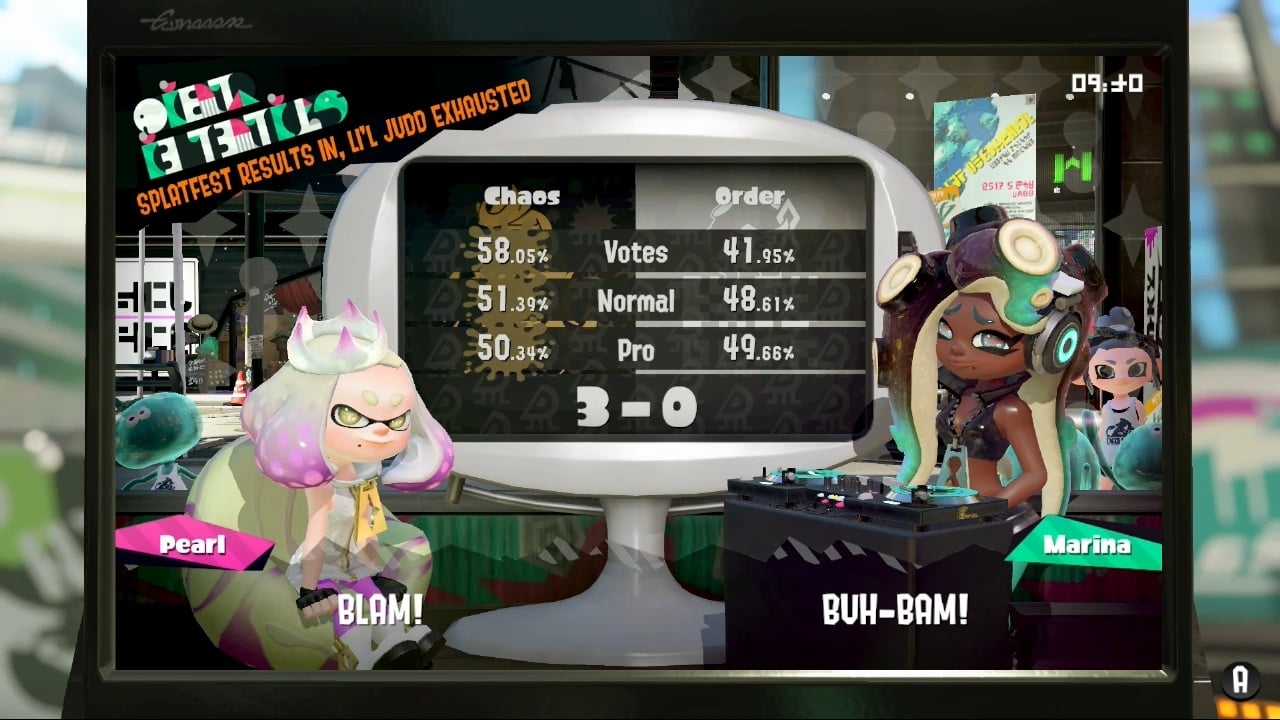
Pearl And Team Chaos Win The Final Splatoon 2 Splatfest
After 72 hours of intense battles, the final Splatoon 2 Splatfest results have now been tallied up. Chaos reigns supreme as Pearl takes out the victory, with a 3-0 win over Marina’s Team Order. Below is the full breakdown:
In the video below, courtesy of Nintendo Life contributor Gonçalo Lopes (Team Order), you can see how the aftermath unfolds.
The outcome is not necessarily as bad as Marina was expecting – with Pearl announcing the duo should break into new musical genres…at least until her solo career gets off the ground.
If you participated in the final Splatfest, be sure to collect your Super Sea Snail prizes in the main square. And if you’re wondering about the future of Splatoon series, check out our previous post from earlier this week.
In the beginning there was dual boot, it was the only way to have more than one operating system on the same laptop. At the time, it was difficult for these operating systems to be run simultaneously or interact with each other. Many years passed before it was possible, on common PCs, to run an operating system inside another through virtualization.
Recent PCs or laptops, including moderately-priced ones, have the hardware features to run virtual machines with performance close to the physical host machine.
Virtualization has therefore become normal, to test operating systems, as a playground for learning new techniques, to create your own home cloud, to create your own test environment and much more. This article walks you through using Virt Manager on Fedora to setup virtual machines.
Introducing QEMU/KVM and Libvirt
Fedora, like all other Linux systems, comes with native support for virtualization extensions. This support is given by KVM (Kernel based Virtual Machine) currently available as a kernel module.
QEMU is a complete system emulator that works together with KVM and allows you to create virtual machines with hardware and peripherals.
Finally libvirt is the API layer that allows you to administer the infrastructure, ie create and run virtual machines.
The set of these three technologies, all open source, is what we’re going to install on our Fedora Workstation.
Installation
Step 1: install packages
Installation is a fairly simple operation. The Fedora repository provides the “virtualization” package group that contains everything you need.
sudo dnf install @virtualization
Step 2: edit the libvirtd configuration
By default the system administration is limited to the root user, if you want to enable a regular user you have to proceed as follows.
Open the /etc/libvirt/libvirtd.conf file for editing
sudo vi /etc/libvirt/libvirtd.conf
Set the domain socket group ownership to libvirt
unix_sock_group = "libvirt"
Adjust the UNIX socket permissions for the R/W socket
In order to administer libvirt with the regular user you must add the user to the libvirt group, otherwise every time you start virtual-manager you will be asked for the password for sudo.
sudo usermod -a -G libvirt $(whoami)
This adds the current user to the group. You must log out and log in to apply the changes.
Getting started with virt-manager
The libvirt system can be managed either from the command line (virsh) or via the virt-manager graphical interface. The command line can be very useful if you want to do automated provisioning of virtual machines, for example with Ansible, but in this article we will concentrate on the user-friendly graphical interface.
The virt-manager interface is simple. The main form shows the list of connections including the local system connection.
The connection settings include virtual networks and storage definition. it is possible to define multiple virtual networks and these networks can be used to communicate between guest systems and between the guest systems and the host.
Creating your first virtual machine
To start creating a new virtual machine, press the button at the top left of the main form:
The first step of the wizard requires the installation mode. You can choose between a local installation media, network boot / installation or an existing virtual disk import:
Choosing the local installation media the next step will require the ISO image path:
The subsequent two steps will allow you to size the CPU, memory and disk of the new virtual machine. The last step will ask you to choose network preferences: choose the default network if you want the virtual machine to be separated from the outside world by a NAT, or bridged if you want it to be reachable from the outside. Note that if you choose bridged the virtual machine cannot communicate with the host machine.
Check “Customize configuration before install” if you want to review or change the configuration before starting the setup:
The virtual machine configuration form allows you to review and modify the hardware configuration. You can add disks, network interfaces, change boot options and so on. Press “Begin installation” when satisfied:
At this point you will be redirected to the console where to proceed with the installation of the operating system. Once the operation is complete, you will have the working virtual machine that you can access from the console:
The virtual machine just created will appear in the list of the main form, where you will also have a graph of the CPU and memory occupation: