Today's theme: Video Games Redux[www.indiegala.com] Are you passionate about videogames? Do you have some general knowledge about them? Of course you are and you have, elsewhere you wouldn't have seen this post. How much passion & knowledge thou...we'll find out during today's GalaQuiz! (starting in a few minutes)
Create an account or log in an already existing one and permanently add the games on your account. Alternatively you can redeem them from the Epic Launcher on the games' giveaway page.
Random: The Wii U Is Getting Two New Physical Releases This Year
Even though first-party support for the Wii U came to a halt a number of years ago, that hasn’t stopped third-party developers and publishers from pumping out new releases for Nintendo’s previous generation of console hardware. PixelHeart – a publisher and distributor of retro and next-generation games – has just put up pre-orders for two new Wii U physical releases.
The first is a hard-copy of the SHMUP Collection (containing Satazius Next and Armed 7 DX, and due out on 15th May 2020) and the other one is Finding Teddy II: Definitive Edition (arriving 17th April 2020). As noted by DualShocker, both of these releases are the European versions, so you’ll need to have access to a system from this region in order to play them.
Both games cost €29,90 and are limited to 3,000 units each. If you’re not interested in owning these titles on Wii U, there’s always the option to purchase them on the Switch as well for the same price. Could these be the very last physical Wii U games ever released? Tell us what you think below and if you would be interested in adding either or both of these titles to your physical collection.
Final Trailer For Scoob! Gives A Closer Look At Mark Wahlberg's Blue Falcon
The final trailer for Scoob! is out, and it splits the gang up. Shaggy and Scooby-Doo are captured by an alien spaceship that they later find out is manned by Blue Falcon. The superhero is a Hanna-Barbera character from the 1976 show Dynomutt, Dog Wonder, and will be voiced by Mark Wahlberg. The other members of the investigation squad, Velma, Fred, and Daphne, try to figure out what happened to Shaggy and Scooby-Doo and are determined to get them back.
The trailer also rehashes scenes of Shaggy and Scooby-Doo's origin story from other previews. Young Shaggy had a picnic on a beach once upon a time, and a sandwich lured Scooby-Doo to him, thus marking the beginning of a wonderful friendship. When a cop attempts to take Scooby-Doo to the pound for being a stray, Shaggy intercedes and claims that Scooby-Doo is his dog. He impromptu comes up with a name for the dog by looking at a box of crackers named Scooby-Doo.
Zac Efron, Amanda Seyfried, Gina Rodriguez, and Will Forte will voice Fred, Daphne, Velma, and Shaggy respectively. Frank Welker, who has voiced Scooby Doo since 2002's A Scooby-Doo! Christmas, will take on the iconic canine role again. Ken Jeong will voice Dynomutt, Dog Wonder.
We’re just five short sleeps from Season of the Worthy. Last week, you completed the Empyrean Foundation event, lighting a beacon for Guardians to follow back to the Lighthouse and Trials of Osiris. On Tuesday, we unveiled Season of the Worthy all up. If you haven’t seen the trailer, there is a new threat for you to confront.
Before we get started with the rest of the TWAB, I wanted to take a quick moment to highlight another blog post that went live earlier today. In response to the COVID-19 coronavirus outbreak, our teams have been working hard to build out an infrastructure that would enable Bungie employees to support Destiny 2, and the impending Season 10 release, safely from remote locations. Season of the Worthy is still planned to release on March 10, followed by the return of Trials of Osiris on March 13. While there is a possibility that this change could affect our patching cadence in the short term, we will be sure to keep players informed about those schedules as much as possible. Stay tuned to @Bungie and @BungieHelp for any future updates.
Now, we have some housekeeping to do before we arm an ancient Warmind. Let’s get to it.
#TrialsReturns
Moments after the announcement that Trials of Osiris would return with Season of the Worthy, we witnessed numerous Guardians sharing their favorite memories from this beloved corner of the PvP endgame. Moments of spectacle, joy, heartbreak, insanity, and everything in between. Trials of Osiris was the source of some awesome community highlights—a thing that some of our newer Guardians may have yet to experience. We’d love to see more of your stories and bring them into the scene.
Using the hashtag #TrialsReturns, share your favorite clips from Destiny 1’s Trials of Osiris. You can post them to Twitter, upload them to YouTube, and even post them to our Community Creations page. We’ll round up our favorites to be featured in next week’s TWAB.
If your video is selected, you and your fireteam will take home a Movie of the Week emblem. Make sure to include links to the Bungie.net profiles of every team member.
Power Gains
With each new Season, you’re faced with new challenges that require a bit of Power acquisition to take on. In Season of Worthy, you’ll be challenged in not only Trials of Osiris, but in Legendary Lost Sectors and Grandmaster Nightfalls. Here’s a quick update from the Dev team on what’s changing on day-one, and what our plans are for a mid-season update:
Dev team: We’re raising the ‘cap’ for gear drops 40 points—powerful gear will now drop up to 1000, with pinnacle drops going up to 1010. The soft cap has also been effectively raised 50 points. Gear drops from nearly all sources will continue to be upgrades until 950 Power, and powerful reward sources will not be required to progress to 950. We’re looking to present an element of gear progression available each Season, as well as prepare underlying systems for future updates like the forthcoming one for Legendary weapons mentioned by Luke Smith in the Director’s Cut ‘Weapons Forever’ section.
We’re also looking to make some quality of life updates in the pinnacle band. Starting in 2.8.1. (coming mid-Season), we’ll be upgrading some existing powerful rewards to pinnacle rewards. These are the weekly Crucible, Strike, and Gambit challenges, as well as the weekly clan engram. With this change, we want to increase the total number of pinnacle power sources in the game, broaden pinnacle drop access, as well as increase the pools of items that can drop in the pinnacle band.
Slot imbalances can also affect pinnacle progression. When we say slot imbalance, this could be explained as those times you have a chest piece drop from pinnacle sources a few times in a row. We’ve been looking at player feedback for some time, and are investigating a few approaches to the problem space. We’re looking to have an update on that at a later date. Until then, we hope the additional sources will help you on your climb.
While we have the Dev team here, they also wanted to give an update on Artifact Power for Trials of Osiris.
Dev team: With Trials just around the corner, we wanted to address the “Artifact Power problem” as quickly as we could. As Luke said last week, our short-term fix is to disable the Artifact’s Power bonus while in Trials and Iron Banner. Unfortunately, Season of the Worthy has already been released for certification, so we won’t be able to disable the Artifact’s Power for the first Trials weekend. We have the fix in-house to disable it and are testing it this week, and hope to deploy it on Tuesday, March 17. We really wish we could have gotten it in for the launch weekend, but we also expect the first Trials weekend to be the one impacted by the Artifact the least. Players will have much less time to increase their Artifact Power, so the majority will be close to each other outside of Pinnacle drops.
Our long-term plan is to enable a Power cap for Trials and Iron Banner and we’re investigating the work required for this. This will roll out no earlier than midway through Season of the Worthy, but we don’t have a firm date yet—we’ll make sure to communicate it when we do! We also plan to look at the damage curves for Power-enabled PvP modes to determine what, if any, adjustments should be made. Assuming we discover it’s necessary, the timeline for a change is still TBD. With both changes, we plan to provide more detailed write-ups before they go live, explaining the details of the change and the design philosophy behind why we are making those decisions.
Just for clarity, I’ll echo Luke’s statement from last week: we’re going to disable the Artifact Power bonus in Trials and Iron Banner until we can implement a new Power cap system for those playlists. I hope you all enjoy Season of the Worthy, and may your run to the Lighthouse be swift and merciless.
Season of the Worthy: Eververse Update
With the turn of each Season, we hope to keep players up to date on how the Eververse Store is evolving. This Season, we have a few changes concerning Bright Engrams, and a new path to directly purchasing some previously featured Eververse items.
Bright Engrams
In Season of the Worthy, Bright Engrams will no longer be available for purchase from the Eververse Store. As said in the February 2020 Director’s Cut:
“We want players to know what something costs before they buy it. Bright Engrams don’t live up to that principle so we will no longer be selling them on the Eververse Store, though they will still appear on the Free Track of the Season Pass.”
This Season, we are continuing to focusing our efforts on direct purchasing through the Eververse Store.
Daily Rotation of Returning Items
In the place of Bright Engrams, a new module will become available on the Eververse Store starting in Season of the Worthy. This daily-rotating module will feature one item from a small selection of ships, Sparrows, Ghosts, and finishers that were offered in previous Seasons. These items will be available to purchase directly for Silver at a discount from the original price.
Aside from these changes, there aren’t any other major shifts coming for Eververse. We’ll be monitoring the conversation through launch and beyond, and will be sure to update you before any large changes come. Here’s a quick preview of some upcoming items coming with Season of the Worthy:
Hunter Finisher
Titan Finisher
Warlock Finisher
The Final Preview (of Patch Notes)
Over the last few weeks, we’ve been giving some previews how your sandbox will be evolving in Season of the Worthy. Not just weapon tuning, but the ability to change the Elemental Affinity on your armor pieces. This week, we’ll be taking a wider look at Destiny 2 Update 2.8.0. Exotic armor tuning for PvE and PvP, UI updates, bug fixes, and more…
Exotic Armor
Hunter
Assassin’s Cowl
The invisibility and healing effect now triggers on powered melee (both against combatants and Guardians) and finishers.
The duration of the invisibility granted by this Exotic increases based on the tier of the enemy defeated.
Arc Staff kills no longer activate this perk.
FROST-EE5
Changed the ability regeneration so that it no longer stacks multiplicatively with other class ability energy-generating perks.
Khepri’s Sting
All smoke bombs deal 150% damage while wearing this Exotic.
Orpheus Rig
The maximum amount of Super you can regain from this Exotic with a single use of Shadowshot is 50%.
Young Ahamkara’s Spine
Increases the explosion radius for Tripmines by 14%.
Titan
Ashen Wake
Killing an enemy with a Fusion Grenade while wearing this Exotic now refunds grenade energy. The amount of grenade energy refunded scales based on the tier of enemy killed.
Anteus Wards
The shield created during a slide no longer allows chip damage through.
Doomfang Pauldrons
Fixed a bug where Doomfang Pauldrons would sometimes grant Super energy from melee kills while in your Super.
Dunemarchers
Increase the radius of the static charge to 20 meters, up from 12.
Mk. 44 Stand Asides
Reduced the delay from the start of sprinting until the overshield comes in to 0.5 seconds, down from 1.25.
One-Eyed Mask
The target marking from this Exotic has been replaced with target highlighting, eliminating the ability to detect targets through walls.
No longer provides a damage bonus when defeating your marked target.
Restored the previous overshield granted by defeating your marked target, which now has a duration of 6 seconds, down from 8.
Severance Enclosure
The explosion now triggers on powered melee (both against combatants and Guardians) and finishers.
The radius and damage of the explosion created by this Exotic increases based on the tier of the enemy defeated.
Warlock
Apotheosis Veil
This Exotic is now guaranteed to drop with a minimum +16 to Intellect.
Contraverse Hold
Reduced the damage reduction granted by this Exotic to 20%, down from 40%.
Sanguine Alchemy
Sanguine Alchemy has received a complete redesign. Its new perk, Blood Magic, allows the wearer to pause the countdown timer of any Rift they are standing in by getting weapon kills, extending the Rift’s duration.
Ophidian Aspects
Now increases the lunge range of all Warlock melee attacks, even if the ability is on cooldown.
Verity’s Brow
The buff provided by this Exotic now increases your grenade damage by 10% per stack.
The buff to allies’ grenade recharge rates now kicks in when you cast your grenade.
This Exotic now provides a buff text notification indicating how many allies are currently benefiting from your increased grenade recharge.
Investment
Legendary Engrams
Increased the number of armor sets available from world drops to 11 sets, up from 3.
This will include Faction Rally armor. Players who own previous Faction Rally Ornaments may apply them to these sets.
Several sets that were previously unavailable or extremely difficult to acquire are now available as world drops.
Armor Stats
Prime Engrams will now more reliably drop armor with higher overall stat rolls and spikier distributions.
Exotic armor will now more reliably drop with higher overall stat rolls.
Legendary armor now has an improved chance of receiving higher overall stat rolls, though low rolls will still be present.
User Interface
The Settings screen UI layout on consoles has changed to match the experience on PC, allowing for future updates.
Added the ability to change the color of the reticle on consoles.
Players can choose from seven different colors, matching PC.
Added hint text during loading screens.
Added comma separators to the Glimmer count in the loot stream.
No longer keeps me awake at night.
Added categories to the Quests screen.
Quest items will now be automatically filtered to any of the seven categories:
New Light
Note: This category will hide if there are no active New Light quests in the character’s inventory.
All Quests
Shadowkeep
Seasonal
Playlists
Exotics
The Past
Performance
Fixed UI stuttering and framerate drops when loading or applying mods.
Improved framerate in Gambit and Gambit Prime.
Fixed framerate issues during the Sanctified Mind encounter of the Garden of Salvation raid.
Fixed framerate issues in the Pit of Heresy dungeon, specifically in tunnel encounters.
Fixed stutter at high framerate on PC.
General improvements to performance on PC when a lot of debris is on the ground.
While this list is pretty lengthy, we’ll have more patch notes to share with you next Tuesday around 9 AM PDT, an hour before Season of the Worthy begins.
Some of you may be asking, “Wait, 10 AM? Don’t patches usually ship at 9 AM?” Daylight Saving Time begins on Sunday, March 8. If your region takes part in jumping forward, your weekly reset time will be an hour later than you’re used to. More information from the Player Support team below.
Systems Check
Before we dive headfirst into Season of the Worthy, we have a patch to ship. Destiny Player Support has your itinerary in hand, and a quick list of some resolved issues.
A NEW SEASON
Next week, Season of Dawn ends and Season of the Worthy kicks off with the release of Destiny 2 Update 2.8.0. Please see below for the rollout timeline.
8 AM PDT (1500 UTC): Destiny service maintenance begins.
8:45 AM PDT (1545 UTC): Destiny 2 is taken offline on all platforms.
9 AM PDT (1600 UTC): Destiny 2 Update 2.8.0 begins rolling out across all platforms and regions. Players will be able to log back into Destiny 2 at 10:01 AM PDT.
10:01 AM PDT (1701 UTC): Destiny 2 is back online on all platforms; Season of The Worthy begins.
12 PM PDT (1900 UTC): Destiny service maintenance concludes.
UPCOMING RESOLVED ISSUES, PT. 2
Below is a continuation of a list of issues that will be resolved when Season of the Worthy and Update 2.8.0 become available on March 10:
Hunter’s Tempest Strike melee ability can now be performed when using PC controls where Sprint is set to “Hold.”
Character subclasses with ranged melee abilities will now count towards Melee Kill bounties and Triumphs. These include Titan Hammer Throw, Hunter Throwing Knives and Corrosive Smoke Bomb, and Warlock Celestial Fire and Ball Lightning.
The Fastidious Miser Triumph will now correctly progress and complete for players who’ve found all 30 Ascendant Chests across the three Curse Weeks in the Dreaming City, and have claimed those corresponding Triumphs.
Weekly Strike bounties for Hive and Vex boss kills will now award progress to players for killing Savathûn’s Song, Xol, and Dendron the Root Mind.
While Update 2.8.0 is released to the world, Destiny Player Support will be on standby in the #Help forum, ready to assist anyone who is experiencing issues.
Dawn Comes to an End
Season of Dawn has been a fun ride. We saved a Legend, stopped the Psions from changing time itself, and had the opportunity to watch a lot of Community Creations along the way.
Movie of the Week: Creatures of Destiny: A Nature Documentary
Honorable Mention: This player should be banned for such an unsatisfying montage
Cheers to everyone who submitted a video, art piece, or anything to the Creations page during Season of Dawn. We’re excited to see what you cook up over the next few months.
It’s crazy to think that next week a new Season begins. It feels like just yesterday we were watching you all explore the Corridors of Time. It’s no secret that I’m pretty excited for Trials to return, and I’m also looking forward to see you share your memories with the #TrialsReturns hashtag.
See you next week. Maybe we’ll bump into each other on our way to the Lighthouse. No hard feelings when you lose, okay?
BETA: BEDROCK 1.15.0.55 (XBOX ONE / WINDOWS 10 / ANDROID)
Today Mojang brings another round of fixes for Beta players on Bedrock.
Remember that only those on Xbox One / Windows 10 / and Android may participate in the Beta builds. You will not be able to join Realms or non-beta players worlds and you will not be able to open worlds opened in the Beta in earlier/current stable builds of Bedrock.
Crashes/Performance
Fixed several crashes that could occur during gameplay
Fixed a crash that could occur when trying to enchant fishing rods
General
Marketplace ratings now appear correctly when scrolling (MCPE-60287)
Gameplay
Parity: Blocks will now lose their waterlogged state when pushed by a piston
Kelp will now keep growing after being partially broken by a piston, and the piece below will have a maximum random age of 24 (MCPE-57330)
Blue Wither Skulls will once again break Obsidian (MCPE-63223)
Ender Dragon Fireball attacks no longer cause excessive damage (MCPE-40344)
Hopper mine carts will now drop hoppers and mine carts when broken with a ranged weapon (MCPE-55859)
Fixed several crafting recipe issues:
Multiple Honey Blocks can be crafted in the 2×2 crafting grid (MCPE-63081)
Crafting Multiple Honey Blocks returns the correct amount of items to the player (MCPE-63461, MCPE-58579)
Mobs
Parity: Cured Zombie Villagers can now offer discounted trades (MCPE-47040)
Hostile mobs will now correctly seek out and jump on turtle eggs (MCPE-36244)
Cured Zombie Villagers no longer inherit XP unexpectedly, which would prevent them from acquiring a new profession (MCPE-48712)
Villagers will no longer become preoccupied with sharing carrots (MCPE-32627)
Vindicators that spawn in Woodland Mansions will now use the spawned event and become hostile before being attacked (MCPE-43208)
Villagers now have a chance to offer Trident Enchantment books as trades (MCPE-35406)
Creepers in boats now deal damage to players nearby
Wolves will once again heal when fed meat (MCPE-63205)
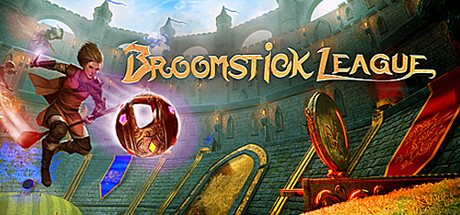
Now Available on Steam Early Access – Broomstick League, 10% off!
Broomstick League is Now Available on Steam Early Access and is 10% off!*
Equipped with a broomstick, a wand and nerves of steel, players must hone their flying skills and use magic to dodge enemies, defend their goal, and pull off incredible plays in Broomstick League. Soar high through the magical arenas as you try to outscore the competition and gain victory over your opponents.
Your first steps into the Wasteland will be the most
dangerous, but we’re here to help. Read on!
An Introduction to Wasteland
The year is 2087. Almost one hundred years have passed since
a devastating nuclear event blanketed the Earth in radiation. All that remains
now are the scattered dregs of society, trying to survive however they can.
Some semblance of society persists, but it’s not as it was.
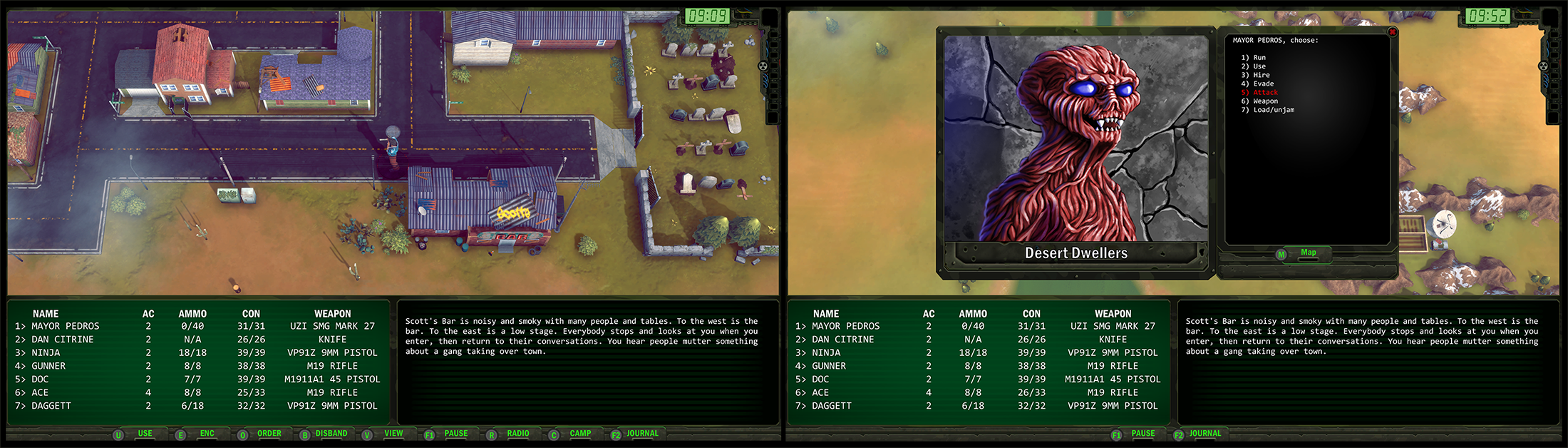
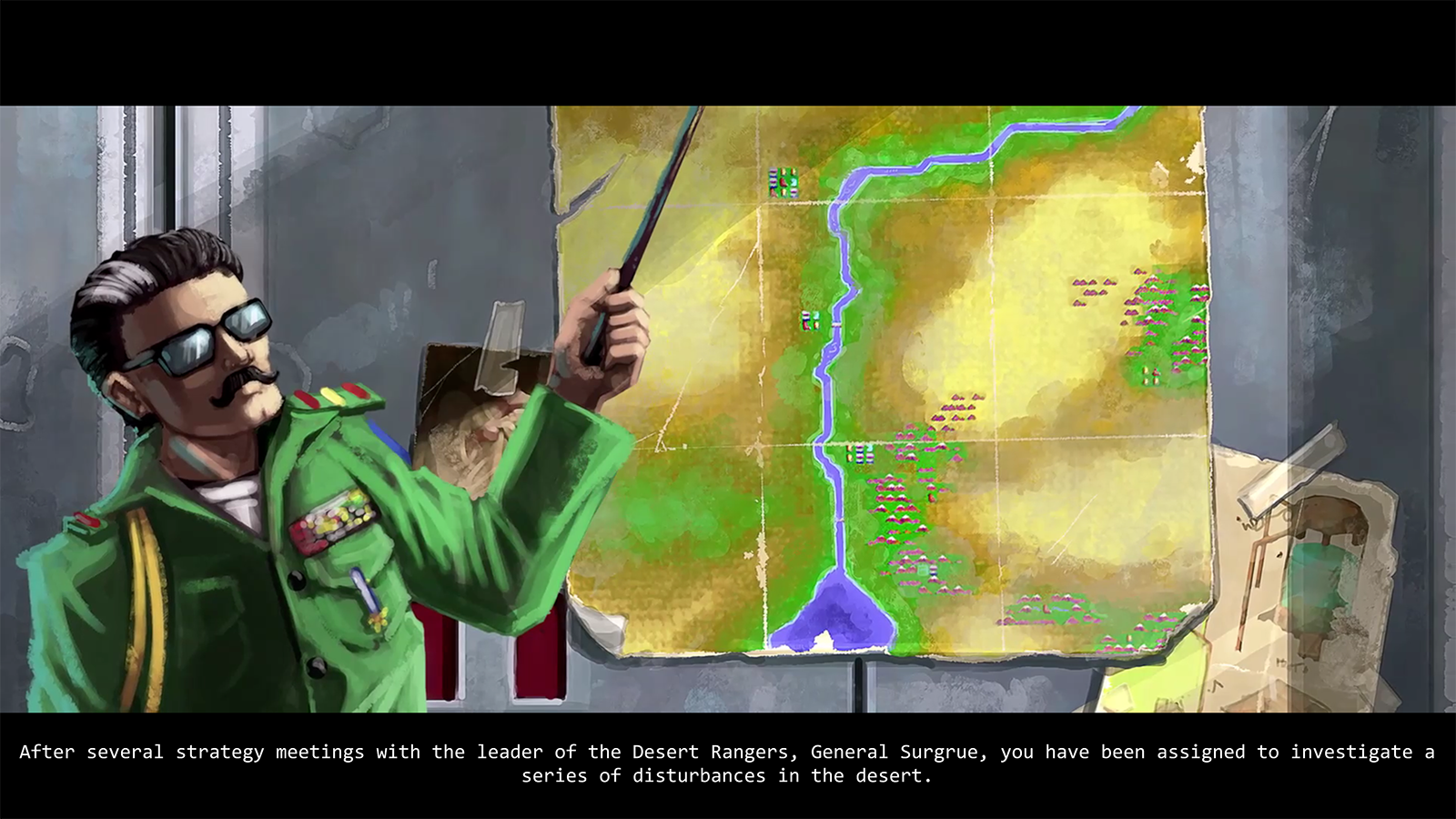
In Wasteland Remastered you’ll direct the actions of the Desert Rangers, a squad of peacekeepers sent to investigate a series of disturbances that have been affecting the camps and townships in the vicinity of your base of operations in what was the Southwestern United States.
The original Wasteland was released in 1988 to critical acclaim and stands as one of the most respected forebears of the RPG genre. Choice and consequence are the keystones of this experience. Innocuous decisions in your conversations will come to bear in significant ways throughout your travels. What characters you choose to accompany you, how you equip your team, and how you engage with the characters and creatures in the world, will all influence your overall chances of survival.
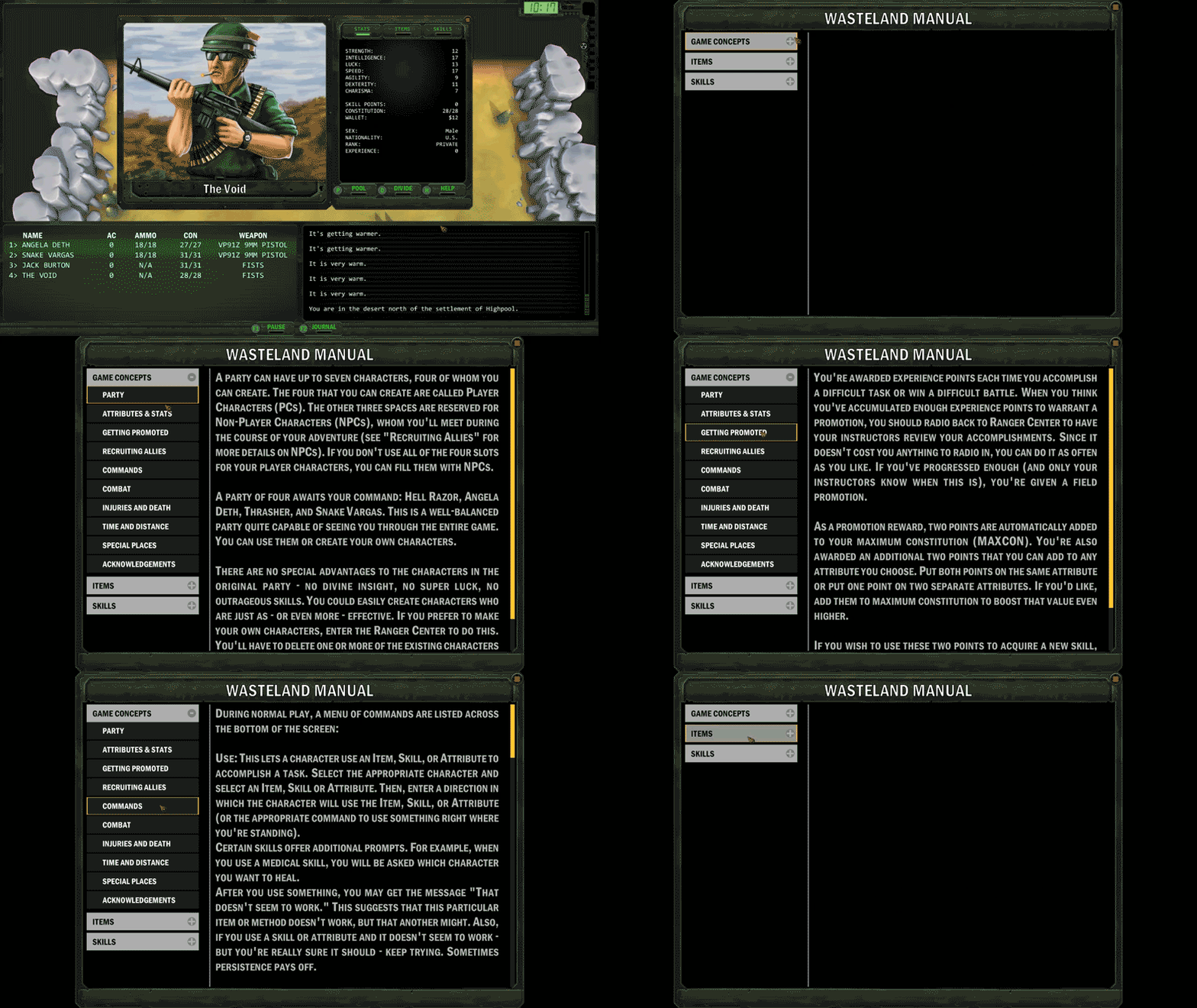
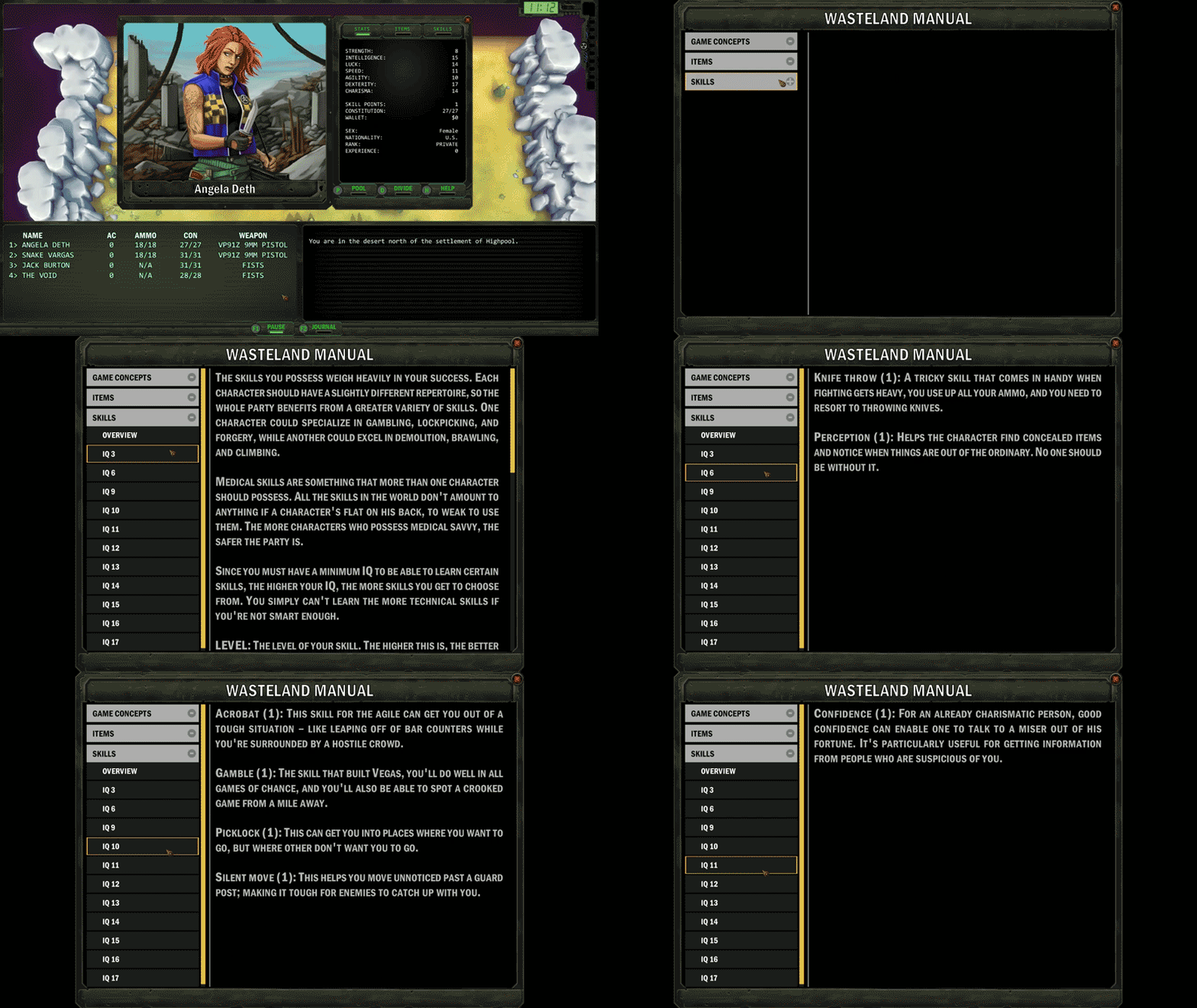
We won’t sugar-coat it: Wasteland was made to be as punishing as life in the post-apocalypse would be. Thankfully, the in-game manual (Y button on the controller or by pressing H on your keyboard when viewing a character pane) will help illuminate the game mechanics and provide some insight about the more nuanced details of the gameplay.
This guide will be your key to survival, we heartily suggest that you put it to good use.
The Adventure Begins
When you first set out from Ranger Center, you’re afforded a
squad of capable Rangers who have the attributes and skills that will offer you
a chance at success in your campaign. That said, these Rangers have no special
abilities or extreme skills that set them apart from anyone else you might come
across in your travels. At this point, the decision to continue with this
premade team, or to trade them out in favor of your own custom squad will be a
determining factor in how difficult this unforgiving world will be.
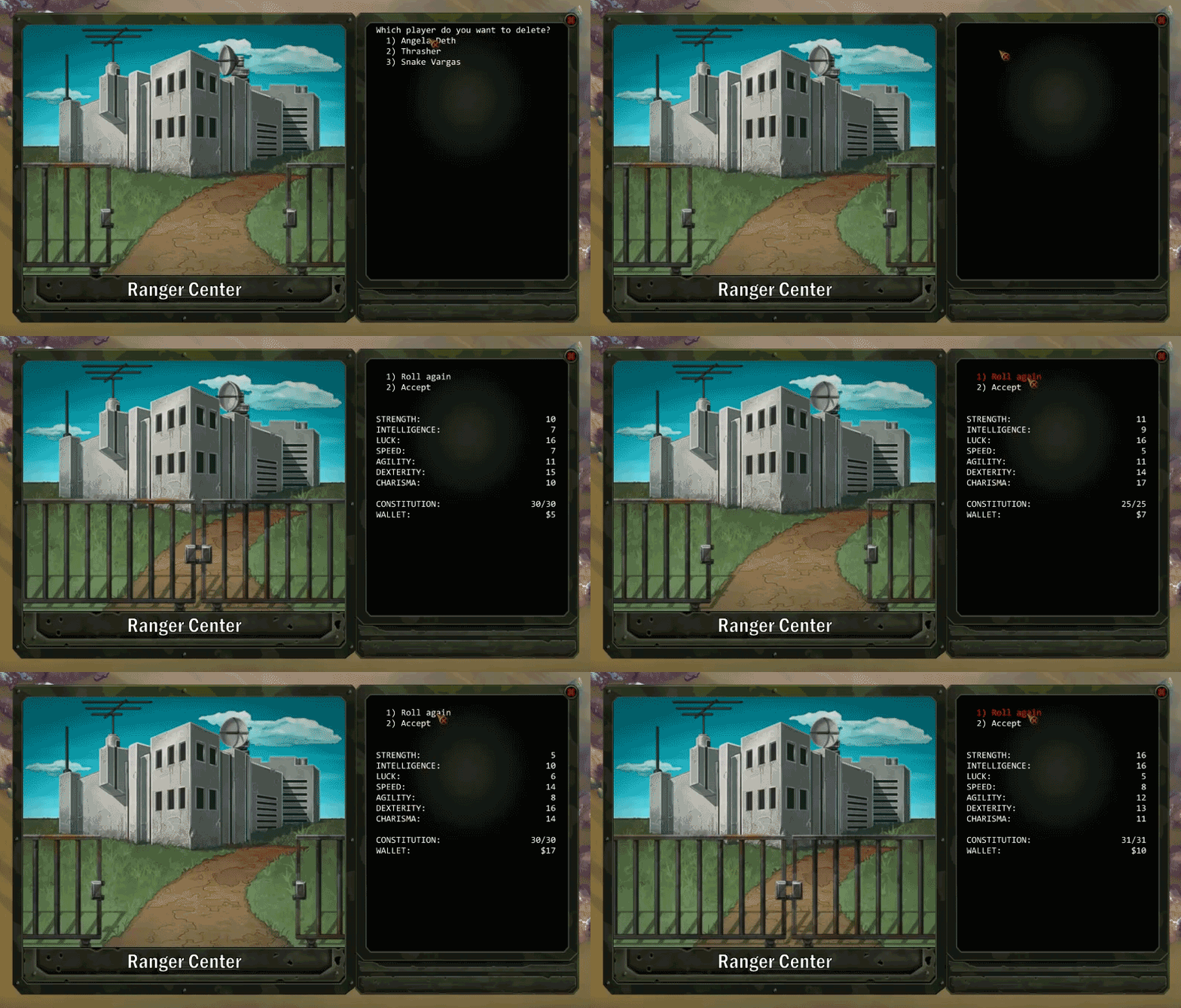
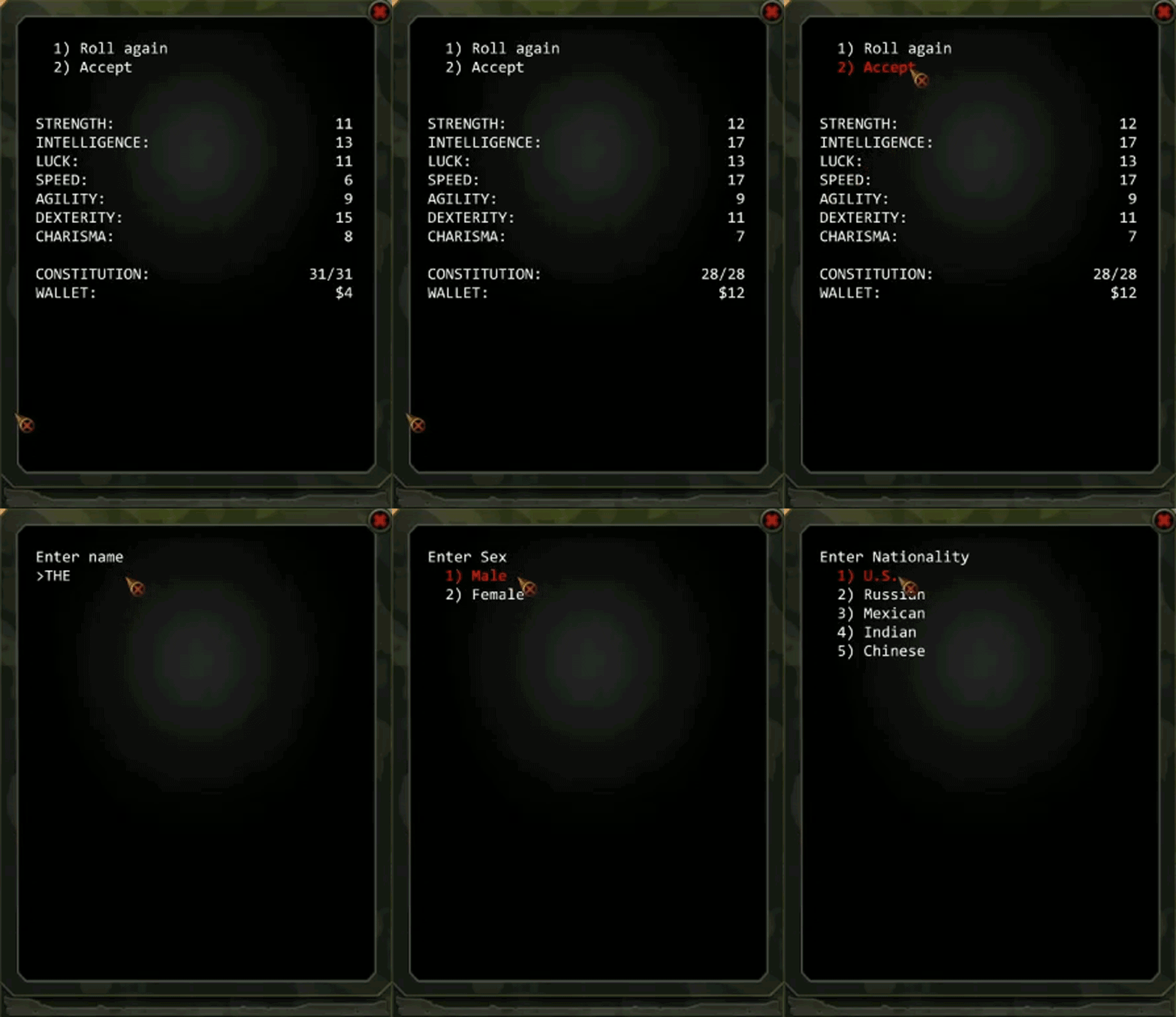
If a premade Ranger is dismissed, you can recruit a fresh
character, whose base stats can be re-rolled. If you’ve opted to create your
own custom character, we encourage you to continue to roll the stats to see how
they can be distributed into the different categories.
Each character is primarily defined by the attributes noted
below, but how your characters are equipped and how you use each character will
ultimately determine how well they perform. The breakdown of each character
attribute is as follows:
Strength (ST): The ability to overpower
enemies or to lift, move, and break items. This is important in hand-to-hand
combat and in physical tasks such as breaking down doors.
Intelligence (IQ): How well a character
thinks and solves problems. An important attribute as it determines which
skills and how many of them a character can master. Characters start with skill
points equal to their IQ. During the game you’ll definitely want to raise your
IQ.
Luck (LK): Lucky characters tend to find
more things and avoid more damage than the unlucky ones. Luck also improves
your odds in hand-to-hand combat.
Speed (SP): How quickly you move, which
helps you escape tight situations.
Agility (AGL): How deftly you move. High
agility enhances your acrobatic ability, so you can do things like dodge blows
and jump on tables. The higher this value, the better you’ll perform in
hand-to-hand combat.
Dexterity (DEX): Ability to master fine
movements like picking locks or aiming weapons. Dexterity is very important in
combat, and extremely useful in mastering the “thiefly” arts.
Charisma (CHR): This attribute lets you
know how likable or persuasive a character is. Although it may seem like a
trivial trait, it might well make the difference between life and death as you
try to convince someone that you’re trustworthy. Charisma also affects how an
NPC will react to you when you want to hire them or trade equipment.
As stated above, the total Intelligence that a character has determines what skills they will have access to. Because of this, you might reroll a character until you have a maximum (or as close to 18) IQ points before deciding what roles they’ll fulfill, and what skills they will be assigned. From the manual: “When you first create a character, this value is identical to IQ. The more skill points you have, the more skills you can learn. You can acquire more skill points during the game.”
It’s important to note that some skills are beneficial to have on more than one character. For example, since multiple team members may be critically wounded during combat, the Medic skill is one that more than one Ranger should have. Additionally, since freshly created characters start with pistols, investing at least a point in Clip Pistol per character is a good way to make sure that your Rangers have a decent chance of success with that weapon type early on.
Hint: Be on the
lookout for a library; characters that have earned promotions can apply
attribute points wherever they are in the world, but they will only be able to
learn the new skills they have access to at a library.
The entirety of the skills available to characters with the
appropriate IQ level includes Brawling, Climb, Clip Pistol, Knife Fighting,
Pugilism, Rifle, Swim, Knife Throwing, Perception, Assault Rifle, AT
(Anti-Tank) Weapon, SMG (Submachine Gun), Acrobat, Gamble, Picklock, Silent
Movement, Confidence, Sleight of Hand, Demolitions, Forgery, Alarm Disarm,
Bureaucracy, Bomb Disarm, Medic, Safecrack, Cryptology, and Metallurgy.
For a detailed description of each skill, please consult the
in-game manual (accessible from a Ranger’s character pane and selecting the Help
tab). To bring up a Ranger’s character pane, hold RT and move the left stick to
select a character and then press A. If you’re playing on PC, select the
numerical key that corresponds to the Ranger in your character list.
It’ll take dedication and the courage to survive if you are
to see your mission through, so be creative and be bold in your choices. If the
going gets too rough, you might seek the experience of the Rangers who have
gone before you, whose walkthroughs and guides are easily obtained online.
There’s also the fan-run Discord channel where you’ll be able to ask questions
and get assistance from other experienced Rangers: https://discord.gg/rH6QxAv
Hint: Save often,
and to different save files! A backup save file can mean all the difference
between a quick re-load and having to restart your mission from scratch.
Hint: As time
passes, your party’s health will recover for all members not critically
injured. Pressing the ESC key will allow time to pass at an increased pace. You
can also instruct your party to camp (R3) which will pass hours by, potentially
allowing much more health to be regained faster. Be warned though, camping in
exposed areas puts your group at risk of being ambushed by lurking enemies!
Setting Out on the Wasteland
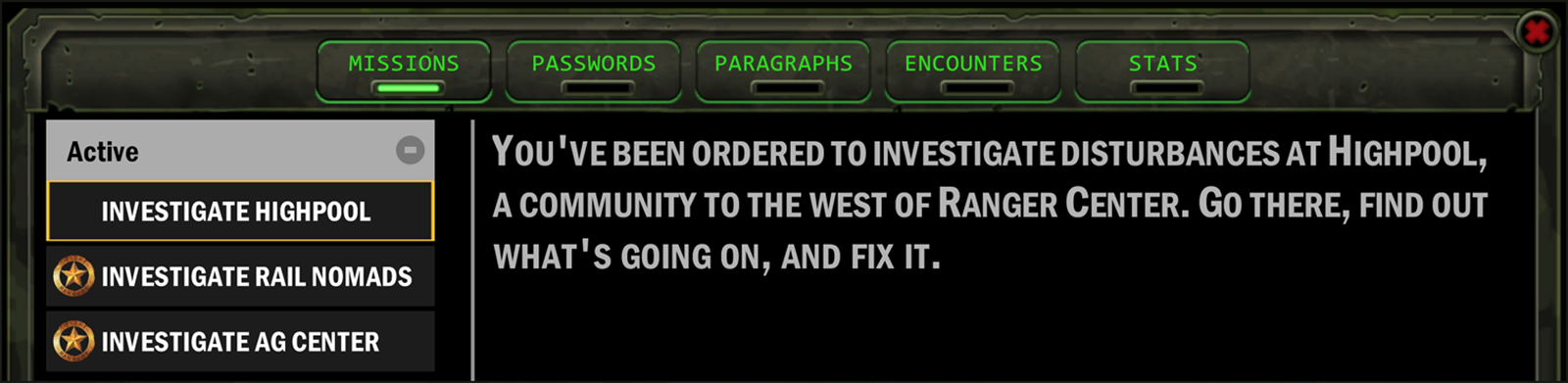
Armed with your squad of Rangers, consult your journal (View button on your controller or by pressing F2 if you’re playing on PC) to track the initial set of missions that have been assigned to you by your commanding officer, General Surgrue.
Investigate Highpool: You’ve been ordered to
investigate disturbances at Highpool, a community to the west of Ranger Center.
Go there, find out what’s going on, and fix it.
Investigate Rail Nomads: A community to the
north west of Ranger Center.
Investigate AG Center: West of Ranger Center; go
there, find out what’s going on, and resolve the problem.
The resources and experience of your starting group are both
limited, so be careful not to take on more than you can deal with too quickly.
Early on into the game, smart management of your supplies, and where to focus
your team’s attention are important factors to consider.
Hint: Use your
radio (RB on controller or press R on your keyboard) to report in and check
back with Ranger Center to see which, if any, Rangers have earned promotions
during missions. Each promotion earned allows experienced Rangers to assign new
attribute points. There is no penalty for checking back with base, so use your
radio regularly to make sure your team is appropriately recognized for their
efforts in the field.
The Remastered Experience
Wasteland Remastered features the iconic gameplay of the original turn-based RPG, with new graphics and overhauled audio. If you’ve played the original Wasteland, you’ll notice that some of that sound design has been carried over, though it has been further enhanced with character voice overs and narration which punctuate the major beats in the game. The original game’s paragraph book has been brought in-game, and the previously pixelated world of the original Wasteland game has been 3D-ified, which further help to make the classic environments pop. Additionally, character and creature portraits have been repainted and animated in a style that respects the original designs.
The End Has Just Begun
2020 is shaping up to be the most significant year for the Wasteland series yet, and we’re proud to bring this remastered version of our original classic to you. We sincerely hope you enjoy it, and that you’ll continue your adventure with us as the saga of the Rangers advances towards Colorado later this year.
Originally released in 1988, Wasteland brought the post-apocalypse to video games and inspired a genre. Play one of history’s defining RPGs with completely overhauled graphics, sound, and expanded musical score. The year is 2087, nearly a century after an all-out nuclear war turned vast swaths of the Earth into a radioactive hellscape. You are a Desert Ranger, a band of stalwart lawmen who are the only hope left in what was once the American southwest, and good people’s last defense against hunger, sickness, ravaging raiders, and mutants. Now something more secretive and sinister is menacing humanity, and it’s your job to investigate. Recruit help and follow leads—the choices you make will shape the world around you. Choose wisely, your life and the lives of those you’re sworn to protect depend on it.
The ESA is ‘actively assessing’ new COVID-19 info, but says E3 is still on
The Entertainment Software Association has posted an updated statement on June’s E3 plans as concerns about the ongoing COVID-19 coronavirus outbreak continue to rise.
In that statement, the ESA says that E3 is currently still planned to take place in Los Angeles on June 9-11, but that it is actively “monitoring and evaluating the situation daily.”
The ESA’s updated comments come hours after the county of Los Angeles declared a state of emergency, a step that ultimately allows local governments to better access and allocate funds for preventative measures and continue to monitor the virus’ spread. Los Angeles reported its first COVID-19-related death today, and has reported seven confirmed cases so far.
“The health and safety of our attendees, exhibitors, partners, and staff is our top priority,” reads the statement. “While the ESA continues to plan for a safe and successful E3 show June 9-11, 2020—we are monitoring and evaluating the situation daily. Our E3 team and partners continue to monitor COVID-19 via the Centers for Disease Control and Prevention (CDC) and the World Health Organization (WHO). We are actively assessing the latest information and will continue to develop measures to further reduce health risks at the show.”
Our artists honor the unique aesthetic vision of each project and work to make all aspects of the experience beautiful. The team is comprised of 2D/conceptual artists, 3D modelers, technical and effects artists, and animators. We are seeking a talented VFX Game Artist to work on projects ranging from online worlds and handheld games to virtual reality experiences and themed interactive attractions.
You must demonstrate the ability to collaborate well with a multidisciplined team, communicating constructively, both verbally and in writing, in order to create engaging and visually compelling game assets. The ideal candidate will have to be self-motivated and a collaborative team player who is able to work closely with the Art Director to be responsible for large sections of the game.
Our ideal candidate will have the ability to handle both technical and artistic issues during game development, as well as be able to work quickly in a team atmosphere with schedules and reliable milestone delivery, all while demonstrating the ability to respond professionally to feedback and art direction. This candidate should be highly creative, able to conceptualize, and possess an eye for motion. Passion for effects work and game visuals, with the ability to reach a wide range of styles within the media are crucial.
You will design, create and implement dynamic and dramatic in-game special effects in-engine (explosions, pyro, UI effects, magic, environmental effects, etc). You will work closely with designers, engineers, artists, and audio to inspire gameplay ideas and ensure that the effects meet design needs and stunning visuals. Our candidate should be comfortable using Maya, Photoshop, Unreal and/or Unity to create and implement VFX.
We’re looking for someone excited about cross-disciplined collaboration and making great games with us!
REQUIREMENTS:
Portfolio of work must be available for review, displaying the use of particle systems, shaders, and mesh effects
Understanding of optimization limitations and methodology
Display excellent communication skills, both verbal and visual
Understanding of various methodologies for VFX creation
Experience in Unreal and/or Unity engine for the creation of VFX
Understanding of VFX/PostFX integration and performance impacts
DESIRED SKILLS:
Concept art foundational skills
Houdini experience
Knowledge of shader creation or shader based workflows
EDUCATIONAL BACKGROUND:
BS/BA/BFA degree in fine arts, animation, visual communication, or similar
Whether you’re just starting out, looking for something new, or just seeing what’s out there, the Gamasutra Job Board is the place where game developers move ahead in their careers.
Gamasutra’s Job Board is the most diverse, most active, and most established board of its kind in the video game industry, serving companies of all sizes, from indie to triple-A.




 Today's theme: Video Games Redux