



Yesterday, 06:57 AM
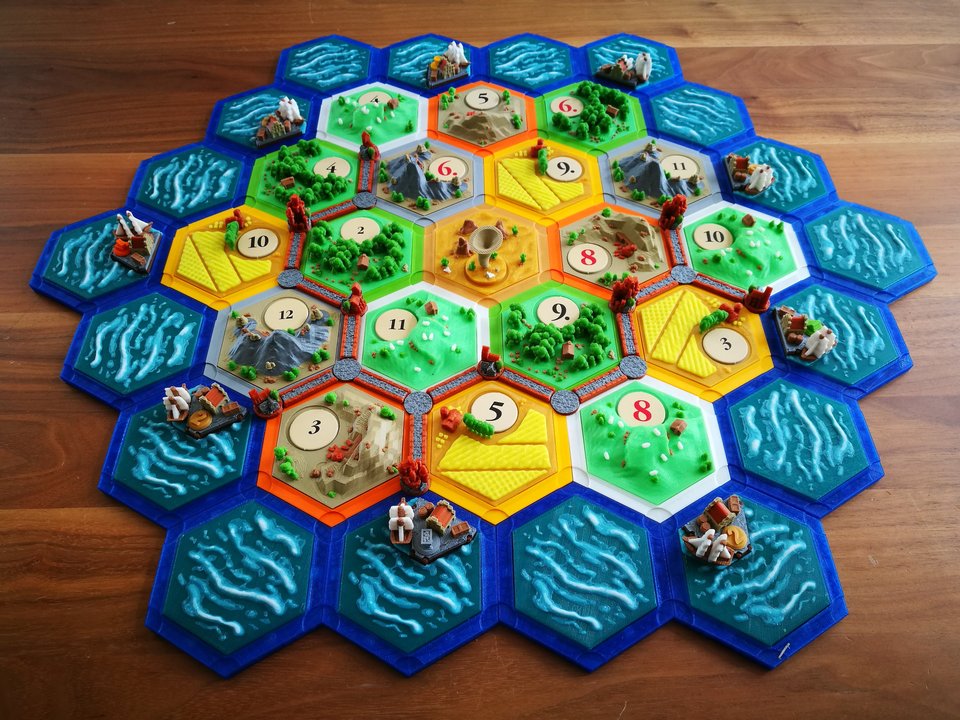
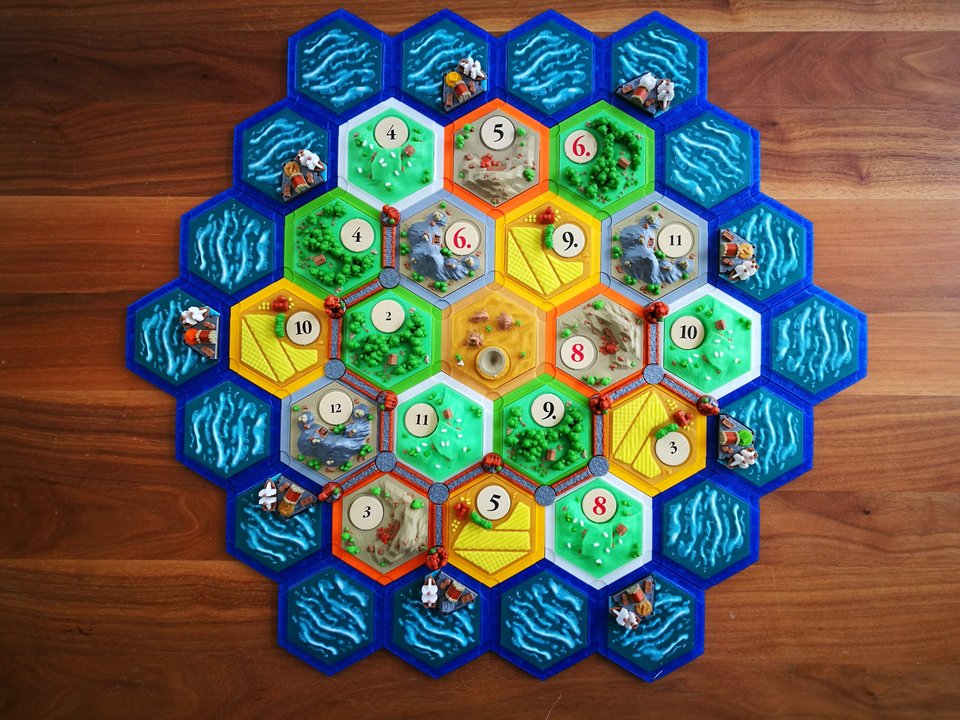
catan-style boardgame 2.0 (magnetic & multicolor)
Not my design. Originally created by Dakanzla.
Thing Details
UPDATE: I published all my designs from tinkercad and added the links on the bottom of the description. This should help you if you want to make some individual changes to the models. Feel free to change them to your liking :-)
OTHER 2.0 EXPANSIONS:
* City & knights: https://www.thingiverse.com/thing:2865138
* Seafarers: https://www.thingiverse.com/thing:3072272
This is my new low-poly settlers of catan-style boardgame. Especially made for multicolor printers like the prusa mk2 multimaterial upgrade ore the palette from mosaic.
Here are some of the new features compared to my first design (https://www.thingiverse.com/thing:1238980):
* new style and parts with more details
* additional multicolor-printable parts (If you have such a printer)
* easier assembling also for inserting the magnets (they can't fall out)
* less magnets needed
* less material needed for printing the landscapes
* less problems with warped tiles
DON'T POSSESS A MULTIMATERIAL-CAPABLE PRINTER? NO PROB...
You can just print out the files you find here under the thing-files. Those are for a single color printer and you then have the pleasure to paint them the way you like :-). Just print the following parts:
* Tiles (landscapes): 4 x wood, 4 x wool, 4 x wheat, 3 x brick, 3 x ore, 1 x desert, 9 x water, 9 x water with harbor
* Harbors: 9 x harbor base, 4 x harbor top 3:1, 5 x harbor top (one of each resource)
* Bases: 37 x bases
* Thief: 1 x sandstorm
* For each player: 15 x roads, 4 x cities, 5 x settlements, 10 x crossings (optional)
FOR THOSE WHO POSSESS A MUTLIMATERIAL-CAPABLE PRINTER CHECK OUT THOSE FILES HERE:
(used colors: https://cdn.thingiverse.com/assets/bc/c9...sition.pdf)
* Number tokens: https://www.thingiverse.com/thing:2525369
* Settlements: https://www.thingiverse.com/thing:2525194
* Cities: https://www.thingiverse.com/thing:2525205
* Roads: https://www.thingiverse.com/thing:2525208
* Crossings: https://www.thingiverse.com/thing:2525216
* Landscape ore: https://www.thingiverse.com/thing:2525061
* Landscape wheet: https://www.thingiverse.com/thing:2525064
* Landscape brick: https://www.thingiverse.com/thing:2525052
* Landscape wood: https://www.thingiverse.com/thing:2525067
* Landscape wool: https://www.thingiverse.com/thing:2525059
* Landscape desert: https://www.thingiverse.com/thing:2525164
* Landscape water: https://www.thingiverse.com/thing:2525072
* Landscape harbor water: https://www.thingiverse.com/thing:2525082
* Harbors resources: https://www.thingiverse.com/thing:2525180
* Harbor base: https://www.thingiverse.com/thing:2525098
* Harbor top: https://www.thingiverse.com/thing:2525169
* Sandstorm (robber): https://www.thingiverse.com/thing:2525085
* Landscape-bases: https://www.thingiverse.com/thing:2525182
Concerning the roules for the base game check out this link: http://www.catan.com/service/game-rules
RANDOM SETUP OF THE GAME BOARD:
If you would like to set up a random arrangement of the game board, this can be a tricky challenge with 3d-printed tiles
Here are two options you can use:
- the first brilliant option is an app from smhexum which has developed this especially for catan: https://play.google.com/store/apps/details?id=com.smhexum.snack27d6a43606db407ab3446aceb4a792c6&hl=en_US&gl=US
- the second option is to use some of your cards from the game:
Take from the resource-cards the same amount of resources for each tile you want to place on the board. For the main game (for 4 players), this would be the following cards:
• 4 cards of wood
• 4 cards of wool
• 3 cards of bricks
• 3 cards of ore
• 4 cards of wheat
• 1 knight card that represents the desert
Then shuffle the cards and start with the centerpiece. Draw the top card and place the corresponding tile in the middle. Let’s say you draw a card with bricks. Then take a brick-tile and place it in the center. Then define (clock or counter-clock-wise) the next tile you want to place and draw another card to determine which tile it’s going to be. For the harbors, you can use a similar approach. You take some knight-cards for the “pure” water-tiles and some of the corresponding resource-cards for the harbors and shuffle them. Then go around the already built up board and place the corresponding tiles / harbors according to the cards you drew.
Alternative bases:
* For 6mm x 4mm magnets (from Bash-T): https://www.thingiverse.com/thing:2818766
* interlocking bases (no magnets needed) by klayus: https://www.thingiverse.com/thing:3355285
* interlocking bases (no magnets n
Download:
Not my design. Originally created by Dakanzla.
Thing Details
UPDATE: I published all my designs from tinkercad and added the links on the bottom of the description. This should help you if you want to make some individual changes to the models. Feel free to change them to your liking :-)
OTHER 2.0 EXPANSIONS:
* City & knights: https://www.thingiverse.com/thing:2865138
* Seafarers: https://www.thingiverse.com/thing:3072272
This is my new low-poly settlers of catan-style boardgame. Especially made for multicolor printers like the prusa mk2 multimaterial upgrade ore the palette from mosaic.
Here are some of the new features compared to my first design (https://www.thingiverse.com/thing:1238980):
* new style and parts with more details
* additional multicolor-printable parts (If you have such a printer)
* easier assembling also for inserting the magnets (they can't fall out)
* less magnets needed
* less material needed for printing the landscapes
* less problems with warped tiles
DON'T POSSESS A MULTIMATERIAL-CAPABLE PRINTER? NO PROB...
You can just print out the files you find here under the thing-files. Those are for a single color printer and you then have the pleasure to paint them the way you like :-). Just print the following parts:
* Tiles (landscapes): 4 x wood, 4 x wool, 4 x wheat, 3 x brick, 3 x ore, 1 x desert, 9 x water, 9 x water with harbor
* Harbors: 9 x harbor base, 4 x harbor top 3:1, 5 x harbor top (one of each resource)
* Bases: 37 x bases
* Thief: 1 x sandstorm
* For each player: 15 x roads, 4 x cities, 5 x settlements, 10 x crossings (optional)
FOR THOSE WHO POSSESS A MUTLIMATERIAL-CAPABLE PRINTER CHECK OUT THOSE FILES HERE:
(used colors: https://cdn.thingiverse.com/assets/bc/c9...sition.pdf)
* Number tokens: https://www.thingiverse.com/thing:2525369
* Settlements: https://www.thingiverse.com/thing:2525194
* Cities: https://www.thingiverse.com/thing:2525205
* Roads: https://www.thingiverse.com/thing:2525208
* Crossings: https://www.thingiverse.com/thing:2525216
* Landscape ore: https://www.thingiverse.com/thing:2525061
* Landscape wheet: https://www.thingiverse.com/thing:2525064
* Landscape brick: https://www.thingiverse.com/thing:2525052
* Landscape wood: https://www.thingiverse.com/thing:2525067
* Landscape wool: https://www.thingiverse.com/thing:2525059
* Landscape desert: https://www.thingiverse.com/thing:2525164
* Landscape water: https://www.thingiverse.com/thing:2525072
* Landscape harbor water: https://www.thingiverse.com/thing:2525082
* Harbors resources: https://www.thingiverse.com/thing:2525180
* Harbor base: https://www.thingiverse.com/thing:2525098
* Harbor top: https://www.thingiverse.com/thing:2525169
* Sandstorm (robber): https://www.thingiverse.com/thing:2525085
* Landscape-bases: https://www.thingiverse.com/thing:2525182
Concerning the roules for the base game check out this link: http://www.catan.com/service/game-rules
RANDOM SETUP OF THE GAME BOARD:
If you would like to set up a random arrangement of the game board, this can be a tricky challenge with 3d-printed tiles
Here are two options you can use:
- the first brilliant option is an app from smhexum which has developed this especially for catan: https://play.google.com/store/apps/details?id=com.smhexum.snack27d6a43606db407ab3446aceb4a792c6&hl=en_US&gl=US
- the second option is to use some of your cards from the game:
Take from the resource-cards the same amount of resources for each tile you want to place on the board. For the main game (for 4 players), this would be the following cards:
• 4 cards of wood
• 4 cards of wool
• 3 cards of bricks
• 3 cards of ore
• 4 cards of wheat
• 1 knight card that represents the desert
Then shuffle the cards and start with the centerpiece. Draw the top card and place the corresponding tile in the middle. Let’s say you draw a card with bricks. Then take a brick-tile and place it in the center. Then define (clock or counter-clock-wise) the next tile you want to place and draw another card to determine which tile it’s going to be. For the harbors, you can use a similar approach. You take some knight-cards for the “pure” water-tiles and some of the corresponding resource-cards for the harbors and shuffle them. Then go around the already built up board and place the corresponding tiles / harbors according to the cards you drew.
Alternative bases:
* For 6mm x 4mm magnets (from Bash-T): https://www.thingiverse.com/thing:2818766
* interlocking bases (no magnets needed) by klayus: https://www.thingiverse.com/thing:3355285
* interlocking bases (no magnets n
Download:
Attached Files
