



12-27-2010, 02:48 PM
This first part of the tutorial is how to install XeXMenu the quick and easy way.
Things you will need:
A transfer Cable
This file:
To do this it is very simple; simply copy the CODE9999 Folder into Partition3 > content > 0000000000
A VERY short video of how to do it on PC:
Go onto Jtag and XeXMenu should be there under recent games in the game library. Or to find it quickly just hit the middle button on xbox controller and go to Quick Launch, and it’ll either be under Recent or Latest Downloads.
Another way you could install XeXMenu is by putting the CODE9999 file onto a disk (either a CD-R or a DVD-R, CD-R worked for me so maybe use that)
Things You will need:
A DVD-R/CD-R
This file: (CODE9999 File again)
Okay to do this, it is also simple. Burn file to the disk then insert the disk into your JTAG. Then you use the directory on XeXMenu to find the DVD and copy the CODE9999 that is on the DVD into Partition3 > content > 0000000000 just like the first way.
The go onto the Jtag and XeXMenu should be there under recent games in the game library. Or to find it quickly just hit the middle button on xbox controller and go to Quick Launch, and it’ll either be under Recent or Latest Downloads.
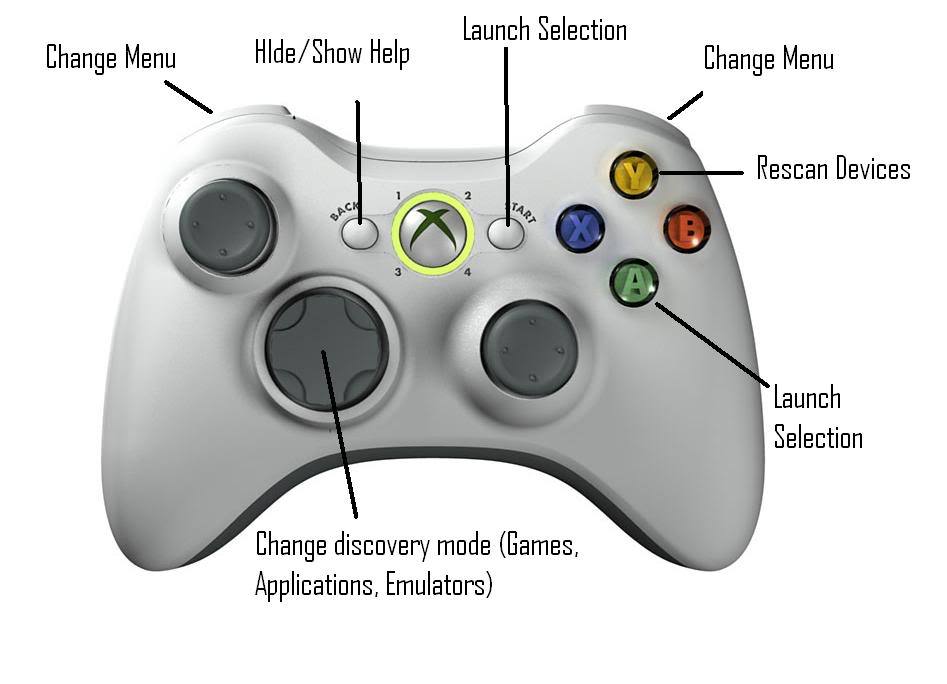
These are buttons that you can use in XeXMenu & what they do:
Note I DO NOT Take Credit Just Posted To Help Every One:)
Things you will need:
A transfer Cable
This file:
To do this it is very simple; simply copy the CODE9999 Folder into Partition3 > content > 0000000000
A VERY short video of how to do it on PC:
Go onto Jtag and XeXMenu should be there under recent games in the game library. Or to find it quickly just hit the middle button on xbox controller and go to Quick Launch, and it’ll either be under Recent or Latest Downloads.
Another way you could install XeXMenu is by putting the CODE9999 file onto a disk (either a CD-R or a DVD-R, CD-R worked for me so maybe use that)
Things You will need:
A DVD-R/CD-R
This file: (CODE9999 File again)
Okay to do this, it is also simple. Burn file to the disk then insert the disk into your JTAG. Then you use the directory on XeXMenu to find the DVD and copy the CODE9999 that is on the DVD into Partition3 > content > 0000000000 just like the first way.
The go onto the Jtag and XeXMenu should be there under recent games in the game library. Or to find it quickly just hit the middle button on xbox controller and go to Quick Launch, and it’ll either be under Recent or Latest Downloads.
These are buttons that you can use in XeXMenu & what they do:
Note I DO NOT Take Credit Just Posted To Help Every One:)