



9 hours ago
When stakes are high, and your data is worth gold, you want to keep it secure from your client to your storage. This usually means setting up in-transit security with transport layer security (TLS), proper user and group policies with an identity platform. Finally, you’ll want data encryption at rest, which ensures that it encrypts database storage on disk, and the encryption keys are themselves stored securely.
Without data encryption at rest, anyone with sufficient permissions can read the data from the files on the disk. If the disks are stolen, your data is not secured. With data encryption at rest properly implemented, no one will be able to recover the data without the encryption keys. Data encryption at rest can also be a matter of regulations and compliance on sensitive data.
Before diving into the details of data encryption at rest in MongoDB, a word of warning: losing the encryption keys means losing access to your data. Without the key, no one can recover the data on the disk, not even you. This article will provide ways to store the encryption keys securely so you don’t lose them.
Encryption at rest in MongoDB
The first thing to note is that whether or not you will implement encryption at rest is a major decision. In Charmed MongoDB, encryption at rest must be configured during the initial deployment, before the database starts for the first time. It cannot be enabled or disabled on an existing deployment by changing the configuration. It is an immutable state of the database. Enabling it at runtime will leave the server unable to restart until the configuration is updated to disable it. Similarly, you can’t disable encryption at rest at runtime, since the database won’t be able to restart until the configuration is restored.
For these reasons, you should always think carefully before enabling encryption at rest – even if the answer to the question “does my organization need encryption at rest?” is almost always a resounding yes.
Master key and database keys
That’s enough with the warnings; let’s dig into how encryption at rest works in MongoDB. Canonical’s Charmed MongoDB Operator supports data encryption at rest of the data using a two-level key hierarchy, and is local to each instance.
First, for each instance of MongoDB, a master key is created. This master key is used to encrypt a special database, the key database that contains one encryption key per database. So two different kind of keys are to be differentiated, as they represent different steps:
This two-level encryption ensures that one key only is used per database, not a single key for all the data. Moreover, it also provides an easy way to rotate encryption keys without having to re-encrypt each entry in the database: rotating the master key is enough. Only the key database will be re-encrypted with the new master key, while the individual database keys remain unchanged. There is no need to re-encrypt all the data.
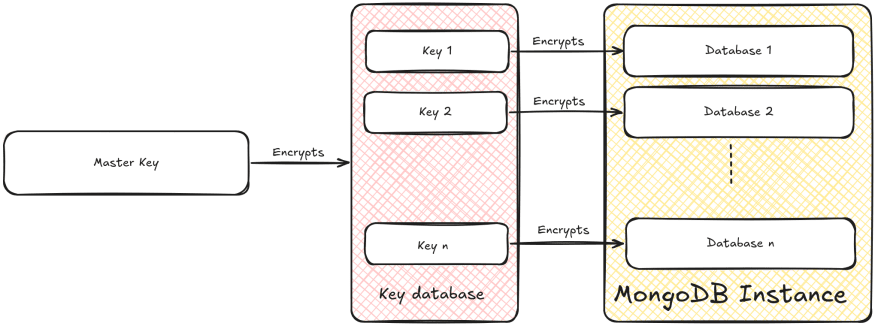
Figure 1 The two-level encryption mechanism used by MongoDB
Time for another warning: none of those keys should ever be lost, so no matter how the master key is stored, it should be backed up as well. If you’re taking file-based backups of your system, ensure that the key database is backed up. Losing the key database means losing access to your data.
Storing the master key securely
As we’ve seen, the master key is critical data as it allows us to encrypt and decrypt the data. Owning the key gives access to the data, so a secure management and storage of the key is absolutely essential. A few different methods are available to store the key: local file, KMIP or HashiCorp Vault KV engine.
While you can use a local file to store the master key, we don’t recommend it for production. The local file lives on the server, so if the machine is compromised, it is easy to get the master key and decrypt all the data. What’s more, it does not support rotating the key, which would fail any well-designed compliance test, and you wouldn’t be able to recover from a master key being leaked.
Percona Server for MongoDB (which we package in Charmed MongoDB) supports multiple backends for storing the master key securely: HashiCorp Vault, OpenBao, or any Key Management Interoperability Protocol (KMIP) server.
While KMIP is the new state-of-the-art protocol for a secure transfer of keys, few implementations exist and even fewer are production ready and open source. The enterprise version of HashiCorp Vault provides it, but not the Community Edition, for example. As we aim at providing an end-to-end, production-stable open source experience, we decided not to continue with this solution.
HashiCorp Vault (and its fork OpenBao) support the KV Engine, which stores key-value secrets securely, with restricted scope access. Crucially, it supports secret versioning and rotation. Secret versioning enables users to keep track of the older revisions of the secret inside Vault. Meanwhile, secret rotation does what the name suggests: it enables MongoDB to request a secret rotation. This covers both scenarios, either the master key is leaked and the secret needs rotation immediately, or a compliance regulation requires rotating the key every year. You should make sure that your Vault/OpenBao instance is backed up regularly, and that the data can be restored.
Limitations of those implementations
A few cases are not entirely covered by the data encryption at rest implementation:
Rotating the master key
Rotating the master key is a three step process: stop MongoDB, restart it with a specific argument, and restart it for good. When restarted with the argument to rotate the master key, MongoDB will restart, rotate the master key and exit again. Finally, remove the extra option from the CLI or the file, and restart. MongoDB will now use the new key to decrypt the key database. The rotation is now complete.
This process rotates the master key, and re-encrypts the key database only – the entire dataset is not changed. This is a tradeoff as re-encrypting the entire dataset could take a very long time in large deployments. Below, we’ll show that this can be achieved in one command when using the Charmed MongoDB Operator.
As you can see, the master key rotation for a node can only be done offline, and not online. This means that it must be done one member at a time within each relevant replica set (on a replica set deployment, or in a sharded deployment) to ensure high availability. This process can be cumbersome on large deployments, but provides an opportunity for well-engineered automation.
Charmed MongoDB Operator data encryption at rest support
Canonical’s NoSQL team has worked hard to provide seamless support of data encryption at rest for our Charmed MongoDB Operator and Charmed MongoDB K8s Operator. It features automated data encryption at rest, key loss prevention, master key rotation, and alert rules in case anything goes wrong. It also prevents any restart that would leave the deployment broken.
To simplify deployments, we prepared a Terraform module which can deploy the whole stack in a few simple commands, which you can find in this repository. This implementation uses Vault Operator (or Vault K8S Operator) as a backend to store the master key, and a Vault Agent to ensure that MongoDB always has access to a valid token. It ensures that the system stays highly available during all the necessary operations.
A production ready feature would not be fully ready without dedicated observability. Charmed MongoDB has exporters running, so you can integrate it with your observability stack or use the Canonical Observability Stack (COS). It also aims at providing observability and alerting on all the services it runs, including the side services such as Vault Agent. This gives the system administrator visibility over the full ecosystem, enabling them to understand the health of the entire system more easily.
Finally, to ensure that you don’t lose your master key, you can back up Vault Operator with the S3 Integrator. We strongly recommend that you backup your Vault deployment to ensure that the data is safe. Don’t store Vault backups in the same bucket with your data backups; make sure that Vault backups are stored in their own secure place with very limited access. Ensure that you have regular backup and restore testing as part of your disaster-recovery plan to ensure that you can recover your keys from the backups.
With a working Vault Operator deployment (see the documentation), the deployment is transparent:
Solving high availability and resiliency
A key challenge we had to address when designing Charmed MongoDB was high availability. Vault Operator provides an AppRole that can issue short-lived tokens (1h), which is usually not an issue as most services support AppRoles directly and can request the secrets through that AppRole. Percona MongoDB however suffers from a limitation, it does not support AppRoles, only token files.
This would lead to issues in the event of unexpected restarts. If the server restarts for whatever reason – RAM issue, a server fault, the process being killed accidentally – it would not find the token file and would refuse to start, leaving the database server unable to start and leaving the HA at risk.
We solved this using a specific feature of Hashicorp Vault, the Vault Agent. It authenticates using AppRole and maintains the token file by renewing the token or obtaining a replacement when needed. In this case, it is configured so that it will write the token in a file with very limited permissions, maintaining it always up to date. This ensures that MongoDB finds a valid token when it needs starting.
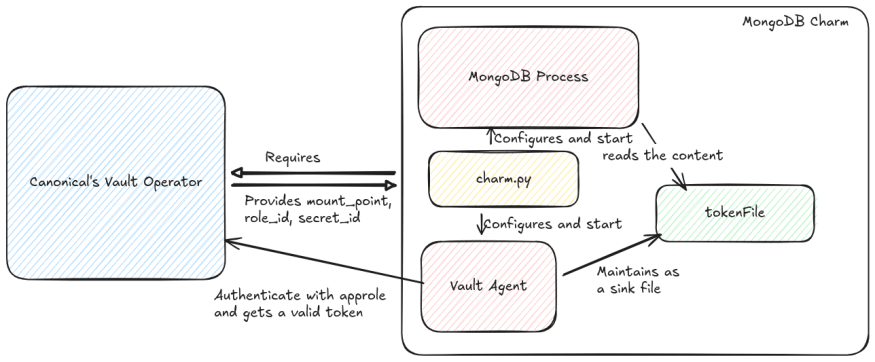
Figure 2 General deployment of Charmed MongoDB for data at rest encryption using Canonical Vault Operator
Conclusion
Encryption at rest complements in-transit security (TLS, network segregation), access controls, secure policies, and secure key management. It should be the last step to secure your data end-to-end. It’s pointless to have data encryption at rest if anybody can take a sneak peek at your data or intercept it before it even reaches the database.
However, when used as part of a robust security strategy, it ensures that sensitive data is protected up to the storage. This however does not provide run-time security, which can be obtained with confidential computing.
Canonical’s Charmed MongoDB simplifies a lot of these security operations, including encryption at rest. It provides an easy way to set up and configure it, and provides clear metrics and actions for master key rotation. However, you remain responsible for protecting recovery material and testing backups. There is only so much we can automate!
If there are just two takeaways from this article that you should remember about data at rest encryption, it is first that data at rest encryption is only valuable with proper in-transit encryption and access policies, and second that your master key should be stored securely, and you must never lose it.
To learn more about deploying Canonical’s Charmed MongoDB on-premises in your own infrastructure, read the documentation.
To discuss Canonical’s Data solutions for your own use case, get in touch with our Data team.
Without data encryption at rest, anyone with sufficient permissions can read the data from the files on the disk. If the disks are stolen, your data is not secured. With data encryption at rest properly implemented, no one will be able to recover the data without the encryption keys. Data encryption at rest can also be a matter of regulations and compliance on sensitive data.
Before diving into the details of data encryption at rest in MongoDB, a word of warning: losing the encryption keys means losing access to your data. Without the key, no one can recover the data on the disk, not even you. This article will provide ways to store the encryption keys securely so you don’t lose them.
Encryption at rest in MongoDB
The first thing to note is that whether or not you will implement encryption at rest is a major decision. In Charmed MongoDB, encryption at rest must be configured during the initial deployment, before the database starts for the first time. It cannot be enabled or disabled on an existing deployment by changing the configuration. It is an immutable state of the database. Enabling it at runtime will leave the server unable to restart until the configuration is updated to disable it. Similarly, you can’t disable encryption at rest at runtime, since the database won’t be able to restart until the configuration is restored.
For these reasons, you should always think carefully before enabling encryption at rest – even if the answer to the question “does my organization need encryption at rest?” is almost always a resounding yes.
Master key and database keys
That’s enough with the warnings; let’s dig into how encryption at rest works in MongoDB. Canonical’s Charmed MongoDB Operator supports data encryption at rest of the data using a two-level key hierarchy, and is local to each instance.
First, for each instance of MongoDB, a master key is created. This master key is used to encrypt a special database, the key database that contains one encryption key per database. So two different kind of keys are to be differentiated, as they represent different steps:
- The master key is stored separately from the database. It requires external management and is required to start the server. This key encrypts the key database.
- A database key is stored in the key database on the server. There is one key per database, used to encrypt this specific database, on this specific instance.
This two-level encryption ensures that one key only is used per database, not a single key for all the data. Moreover, it also provides an easy way to rotate encryption keys without having to re-encrypt each entry in the database: rotating the master key is enough. Only the key database will be re-encrypted with the new master key, while the individual database keys remain unchanged. There is no need to re-encrypt all the data.
Figure 1 The two-level encryption mechanism used by MongoDB
Time for another warning: none of those keys should ever be lost, so no matter how the master key is stored, it should be backed up as well. If you’re taking file-based backups of your system, ensure that the key database is backed up. Losing the key database means losing access to your data.
Storing the master key securely
As we’ve seen, the master key is critical data as it allows us to encrypt and decrypt the data. Owning the key gives access to the data, so a secure management and storage of the key is absolutely essential. A few different methods are available to store the key: local file, KMIP or HashiCorp Vault KV engine.
While you can use a local file to store the master key, we don’t recommend it for production. The local file lives on the server, so if the machine is compromised, it is easy to get the master key and decrypt all the data. What’s more, it does not support rotating the key, which would fail any well-designed compliance test, and you wouldn’t be able to recover from a master key being leaked.
Percona Server for MongoDB (which we package in Charmed MongoDB) supports multiple backends for storing the master key securely: HashiCorp Vault, OpenBao, or any Key Management Interoperability Protocol (KMIP) server.
While KMIP is the new state-of-the-art protocol for a secure transfer of keys, few implementations exist and even fewer are production ready and open source. The enterprise version of HashiCorp Vault provides it, but not the Community Edition, for example. As we aim at providing an end-to-end, production-stable open source experience, we decided not to continue with this solution.
HashiCorp Vault (and its fork OpenBao) support the KV Engine, which stores key-value secrets securely, with restricted scope access. Crucially, it supports secret versioning and rotation. Secret versioning enables users to keep track of the older revisions of the secret inside Vault. Meanwhile, secret rotation does what the name suggests: it enables MongoDB to request a secret rotation. This covers both scenarios, either the master key is leaked and the secret needs rotation immediately, or a compliance regulation requires rotating the key every year. You should make sure that your Vault/OpenBao instance is backed up regularly, and that the data can be restored.
Limitations of those implementations
A few cases are not entirely covered by the data encryption at rest implementation:
- The master key rotation does not replace the individual keys. It changes only the master key that protects the key database. However as the database keys are only stored unencrypted in memory, this should not be a problem.
- Encryption at rest does not provide process-level security. If someone were to dump the memory of a process, it will get access to the database key and the master key. If you want a higher level of security on your running processes, we recommend that you have a look at confidential computing as an additional protection against infrastructure threats.
Rotating the master key
Rotating the master key is a three step process: stop MongoDB, restart it with a specific argument, and restart it for good. When restarted with the argument to rotate the master key, MongoDB will restart, rotate the master key and exit again. Finally, remove the extra option from the CLI or the file, and restart. MongoDB will now use the new key to decrypt the key database. The rotation is now complete.
Code:
# First, stop mongodb
sudo snap stop charmed-mongodb.mongod
# This will rotate the master key and then exit
sudo snap run charmed-mongodb.mongod-cli --vaultRotateMasterKey
# This picks the new key and starts the server again.
sudo snap start charmed-mongodb.mongod
This process rotates the master key, and re-encrypts the key database only – the entire dataset is not changed. This is a tradeoff as re-encrypting the entire dataset could take a very long time in large deployments. Below, we’ll show that this can be achieved in one command when using the Charmed MongoDB Operator.
As you can see, the master key rotation for a node can only be done offline, and not online. This means that it must be done one member at a time within each relevant replica set (on a replica set deployment, or in a sharded deployment) to ensure high availability. This process can be cumbersome on large deployments, but provides an opportunity for well-engineered automation.
Charmed MongoDB Operator data encryption at rest support
Canonical’s NoSQL team has worked hard to provide seamless support of data encryption at rest for our Charmed MongoDB Operator and Charmed MongoDB K8s Operator. It features automated data encryption at rest, key loss prevention, master key rotation, and alert rules in case anything goes wrong. It also prevents any restart that would leave the deployment broken.
To simplify deployments, we prepared a Terraform module which can deploy the whole stack in a few simple commands, which you can find in this repository. This implementation uses Vault Operator (or Vault K8S Operator) as a backend to store the master key, and a Vault Agent to ensure that MongoDB always has access to a valid token. It ensures that the system stays highly available during all the necessary operations.
A production ready feature would not be fully ready without dedicated observability. Charmed MongoDB has exporters running, so you can integrate it with your observability stack or use the Canonical Observability Stack (COS). It also aims at providing observability and alerting on all the services it runs, including the side services such as Vault Agent. This gives the system administrator visibility over the full ecosystem, enabling them to understand the health of the entire system more easily.
Finally, to ensure that you don’t lose your master key, you can back up Vault Operator with the S3 Integrator. We strongly recommend that you backup your Vault deployment to ensure that the data is safe. Don’t store Vault backups in the same bucket with your data backups; make sure that Vault backups are stored in their own secure place with very limited access. Ensure that you have regular backup and restore testing as part of your disaster-recovery plan to ensure that you can recover your keys from the backups.
With a working Vault Operator deployment (see the documentation), the deployment is transparent:
Code:
juju deploy mongodb --channel 8/stable --config enable-encryption-at-rest=true -n 3
juju integrate mongodb:vault-kv vault:vault-kv
# To rotate the key on unit <n>
juju run mongodb/<n> rotate-encryption-master-key
Solving high availability and resiliency
A key challenge we had to address when designing Charmed MongoDB was high availability. Vault Operator provides an AppRole that can issue short-lived tokens (1h), which is usually not an issue as most services support AppRoles directly and can request the secrets through that AppRole. Percona MongoDB however suffers from a limitation, it does not support AppRoles, only token files.
This would lead to issues in the event of unexpected restarts. If the server restarts for whatever reason – RAM issue, a server fault, the process being killed accidentally – it would not find the token file and would refuse to start, leaving the database server unable to start and leaving the HA at risk.
We solved this using a specific feature of Hashicorp Vault, the Vault Agent. It authenticates using AppRole and maintains the token file by renewing the token or obtaining a replacement when needed. In this case, it is configured so that it will write the token in a file with very limited permissions, maintaining it always up to date. This ensures that MongoDB finds a valid token when it needs starting.
Figure 2 General deployment of Charmed MongoDB for data at rest encryption using Canonical Vault Operator
Conclusion
Encryption at rest complements in-transit security (TLS, network segregation), access controls, secure policies, and secure key management. It should be the last step to secure your data end-to-end. It’s pointless to have data encryption at rest if anybody can take a sneak peek at your data or intercept it before it even reaches the database.
However, when used as part of a robust security strategy, it ensures that sensitive data is protected up to the storage. This however does not provide run-time security, which can be obtained with confidential computing.
Canonical’s Charmed MongoDB simplifies a lot of these security operations, including encryption at rest. It provides an easy way to set up and configure it, and provides clear metrics and actions for master key rotation. However, you remain responsible for protecting recovery material and testing backups. There is only so much we can automate!
If there are just two takeaways from this article that you should remember about data at rest encryption, it is first that data at rest encryption is only valuable with proper in-transit encryption and access policies, and second that your master key should be stored securely, and you must never lose it.
To learn more about deploying Canonical’s Charmed MongoDB on-premises in your own infrastructure, read the documentation.
To discuss Canonical’s Data solutions for your own use case, get in touch with our Data team.