



01-19-2016, 12:29 AM
Jordans Menu v1.0 [1.31|CONTROLLER]
Game: Grand Theft Auto V
Details
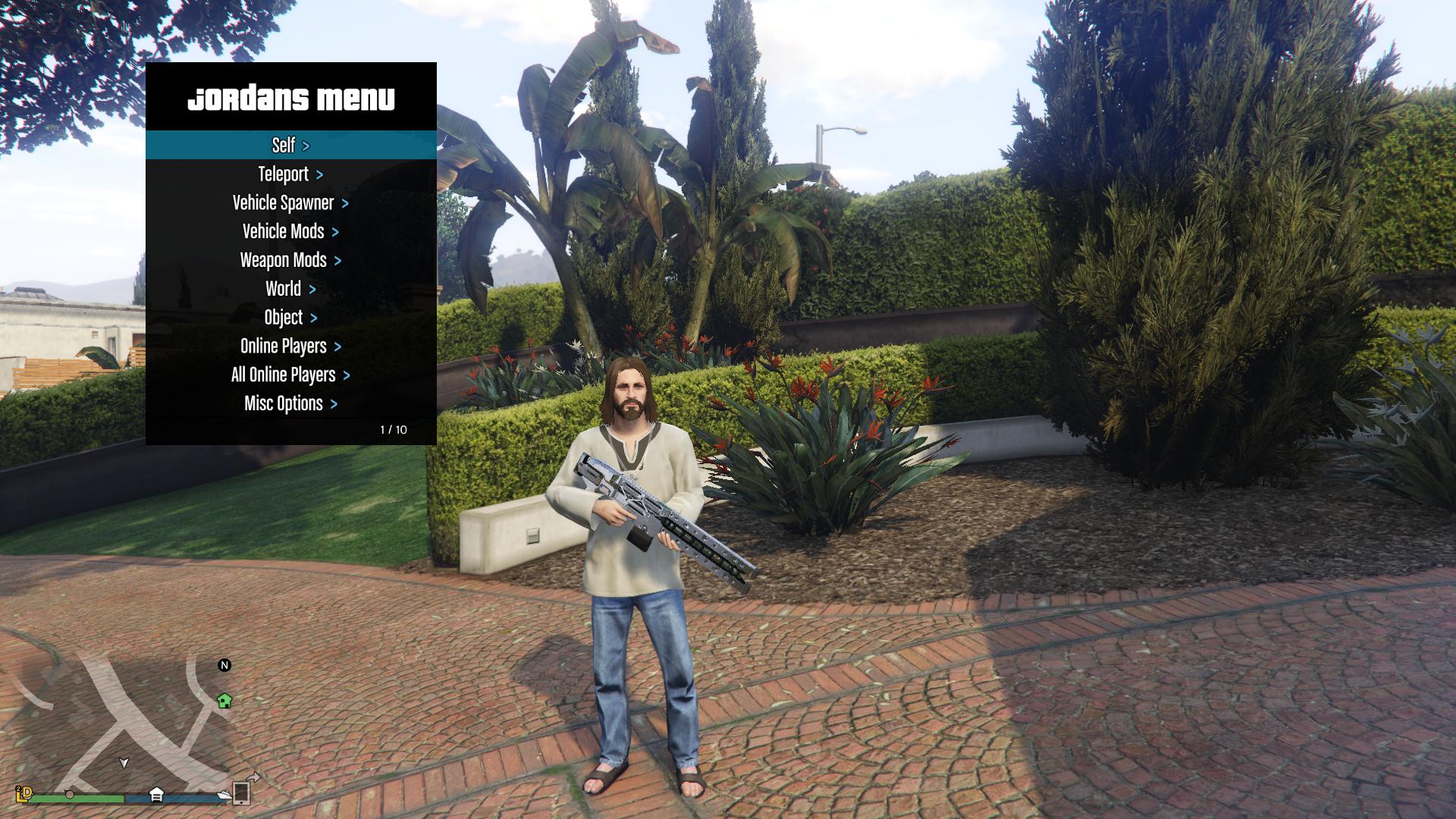
Features Include
Crash protection against clone crash attempts
Player aimbot/triggerbot with selectable targets
RP Increaser
A variety of vehicle mods including acceleration/braking force and engine power/torque adjustment
Ability to spawn vehicles for the entire lobby
Ability to teleport individual/all nearby players vehicles to a waypoint
Hotkeys for quick access to a number of functions
Full controller support
Plus much more
Requirements
Visual C++ Redistributable 2015 (x64, x86) - IMPORTANT
Visual C++ Redistributable 2013 (x64, x86)
.NET Framework 4.5.2
.NET Framework 4.0
An injector such as Extreme Injector v3.6.1, Extreme Injector v3.5.2, or Xenos Injector
Instructions
To change the default settings, edit JordanConfig.txt and place it in your C directory
If you used a previous version, delete the old JordanConfig.txt file
Inject Jordans Menu v1.0.dll when singleplayer has loaded
Open the menu with Numpad * (keyboard) or LB + DPAD Right (controller)
If using alt controller open option, open the menu with RB + X
Navigate the menu with Numpad 8 2 4 6 or DPAD
Select option with Numpad 5 or Controller A
Go back with Numpad 0 or Controller B
Toggle the anti crash cam with F4 or LB + DPAD Down
Initiate anti crash routine manually with F8 or RB + DPAD Right
Hotkeys
Hancock mode - ] and [
Vehicle rockets - Numpad plus(+) or press horn
Teleport to waypoint - =+
Invisibility - ;:
Fix player and fix/clean car - Caps lock
Reset downforce vehicle mod - Numpad Divide
Speed boost - Numpad 9 or RT + A
Instant stop - Numpad 3 or LT + DPAD Down
Remove attached objects - F11
Disable spectate mode - F12
Notes
-If you wish to sell low end spawned vehicles, disable the prevent kick option in spawn settings
-Keyboard and mouse users should disable controller support in Misc Options
-Money spawning is a high ban risk
-If the rp increaser doesn't work, try increasing the delay
-If the menu doesn't open, make sure num lock is on
-Clone detection 2 should detect clones faster, but can cause false positives when using the model changer
-To keep any spawned in vehicle (non blacklisted) - Drive a street car to your garage door with the menu open, highlighting
the car you wish to keep. During the garage animation, spawn the selected vehicle when the car begins to move
Changelog
Updated to work on patch 1.31
Added the new DLC vehicles
Added custom vehicle spawn option for individual/all players
Added vehicle custom RGB to the config file
Added more money props (mikebooner's suggestions)
Attachment detection now detaches and deletes the ped if there is only 1 clone
Max upgrade vehicle now includes more lowrider components
Moved the lowrider vehicles into their correct categories
Removed all mass griefing options and some individual griefing options
Credits
Menu developer:
Jordan787
Special thanks to:
s0biet - m0d-s0beit-v
gir489 - m0d-s0beit-v Redux
MAFINS - Menya Baes
Virus Scans
https://www.virustotal.com/en/file/3...520b/analysis/
https://virusscan.jotti.org/en-US/fi...job/32b0mr107u
Download:
As always, use caution. This file is provided for archival purposes. SickGaming cannot be held liable.
Game: Grand Theft Auto V
Details
Features Include
Crash protection against clone crash attempts
Player aimbot/triggerbot with selectable targets
RP Increaser
A variety of vehicle mods including acceleration/braking force and engine power/torque adjustment
Ability to spawn vehicles for the entire lobby
Ability to teleport individual/all nearby players vehicles to a waypoint
Hotkeys for quick access to a number of functions
Full controller support
Plus much more
Requirements
Visual C++ Redistributable 2015 (x64, x86) - IMPORTANT
Visual C++ Redistributable 2013 (x64, x86)
.NET Framework 4.5.2
.NET Framework 4.0
An injector such as Extreme Injector v3.6.1, Extreme Injector v3.5.2, or Xenos Injector
Instructions
To change the default settings, edit JordanConfig.txt and place it in your C directory
If you used a previous version, delete the old JordanConfig.txt file
Inject Jordans Menu v1.0.dll when singleplayer has loaded
Open the menu with Numpad * (keyboard) or LB + DPAD Right (controller)
If using alt controller open option, open the menu with RB + X
Navigate the menu with Numpad 8 2 4 6 or DPAD
Select option with Numpad 5 or Controller A
Go back with Numpad 0 or Controller B
Toggle the anti crash cam with F4 or LB + DPAD Down
Initiate anti crash routine manually with F8 or RB + DPAD Right
Hotkeys
Hancock mode - ] and [
Vehicle rockets - Numpad plus(+) or press horn
Teleport to waypoint - =+
Invisibility - ;:
Fix player and fix/clean car - Caps lock
Reset downforce vehicle mod - Numpad Divide
Speed boost - Numpad 9 or RT + A
Instant stop - Numpad 3 or LT + DPAD Down
Remove attached objects - F11
Disable spectate mode - F12
Notes
-If you wish to sell low end spawned vehicles, disable the prevent kick option in spawn settings
-Keyboard and mouse users should disable controller support in Misc Options
-Money spawning is a high ban risk
-If the rp increaser doesn't work, try increasing the delay
-If the menu doesn't open, make sure num lock is on
-Clone detection 2 should detect clones faster, but can cause false positives when using the model changer
-To keep any spawned in vehicle (non blacklisted) - Drive a street car to your garage door with the menu open, highlighting
the car you wish to keep. During the garage animation, spawn the selected vehicle when the car begins to move
Changelog
Updated to work on patch 1.31
Added the new DLC vehicles
Added custom vehicle spawn option for individual/all players
Added vehicle custom RGB to the config file
Added more money props (mikebooner's suggestions)
Attachment detection now detaches and deletes the ped if there is only 1 clone
Max upgrade vehicle now includes more lowrider components
Moved the lowrider vehicles into their correct categories
Removed all mass griefing options and some individual griefing options
Credits
Menu developer:
Jordan787
Special thanks to:
s0biet - m0d-s0beit-v
gir489 - m0d-s0beit-v Redux
MAFINS - Menya Baes
Virus Scans
https://www.virustotal.com/en/file/3...520b/analysis/
https://virusscan.jotti.org/en-US/fi...job/32b0mr107u
Download:
As always, use caution. This file is provided for archival purposes. SickGaming cannot be held liable.
Attached Files
