A Custom Tom Nook Emoji Has Been Added To Twitter For A Limited Time
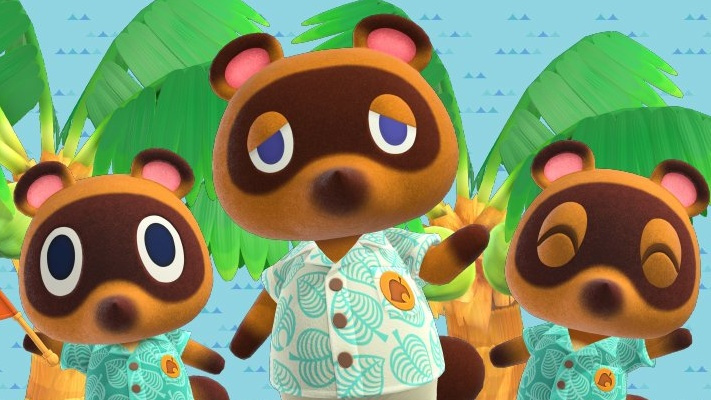
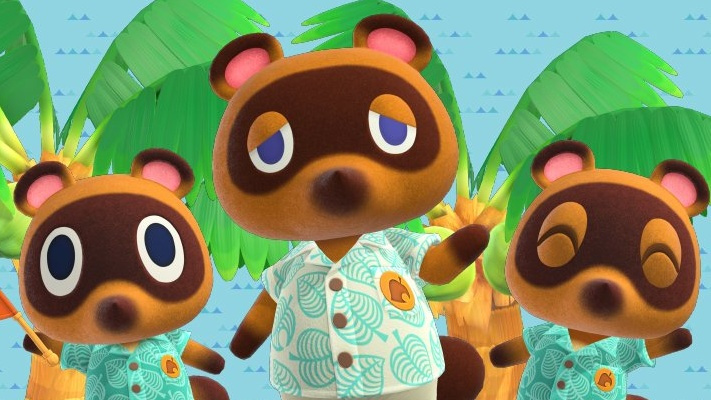
To help promote the upcoming Nintendo Switch release Animal Crossing: New Horizons, Tom Nook is teaming up with the social media platform Twitter. For a limited time, if you use the hashtags ‘AnimalCrossing’ or ‘AnimalCrossingNewHorizons’ the face of Nook will appear in your tweet.
While it’s not the first time something has been done, it always nice to see a Nintendo game – or character, in this case, get a bit of extra love. After all, Tom Nook is one of the most misunderstood raccoons out there. He’s just an animal who cares about his business and doesn’t even set a deadline on loan repayments.
Check out all the hashtags featuring Tom Nook’s furry face over on Twitter.
Posted by: xSicKxBot - 03-18-2020, 12:14 AM - Forum: Lounge
- No Replies
Watch Microsoft's GDC Stream: Xbox Series X, Gears 5, XCloud, And More Panels
Despite being postponed due to the novel coronavirus (COVID-19) outbreak, the Game Developers Conference is still continuing as a digital event, with talks being streamed throughout the week on Twitch. As part of this, Microsoft will hold its two-day Game Stack presentation, during which the company intends to talk more about Project xCloud and the Xbox Series X, among other things. You'll be able to watch it all here on GameSpot.
Microsoft's "New Chapter in Gaming" panel will be held on Wednesday, March 18 at 11:55 AM PT / 2:55 PM PT / 6:55 PM GMT, and it plans to discuss Xbox Series X and xCloud during this. It's unclear what the company plans to cover during the livestream, but the official Game Stack website states the company will discuss "the latest cloud and game development technologies from Microsoft, go behind-the-scenes with design and development decisions made by teams at Xbox Game Studios and creators in the ID@Xbox program."
There are other presentations Microsoft will hold, including a bunch that start on March 17. These include panels with Gears 5 developer The Coalition, a discussion about what Game Stack is, a look at how Rare built its pirate action-adventure game Sea of Thieves, and more. There are also talks happening on Wednesday, March 18 alongside the company's "New Chapter in Gaming" panel, including chats with developers Double Fine (Rad) and inXile Entertainment (Wasteland 3), and much more.
Posted by: xSicKxBot - 03-17-2020, 05:34 PM - Forum: Windows
- No Replies
Mixer’s got a new homepage, features and more
We’re barely into 2020, and yet so much has happened in such a short time. We know many of you, like the Mixer team here in Redmond, are practicing “social distancing,” learning how to “flatten the curve,” and otherwise taking precautions amid the outbreak of COVID-19. We’re proud and heartened by the stories you’ve shared and the ways we’ve seen Mixer streamers and their communities using Mixer to stay in touch digitally and support each other during this challenging time. Thank you for continuing to make the Mixer community shine as a positive and welcoming place for new and existing members alike.
Over the past couple of months, we’ve been hard at work behind the scenes on a set of new features and capabilities based on feedback we’ve heard from you. These are focused on improving discoverability, empowering communities of all sizes and making it easier to find your new favorite Mixer creators. We’re rolling them out starting today.
New Mixer homepage – We’ve refreshed the Mixer homepage across all platforms to give more focus to featured content as well as provide smart, AI-powered recommendations. The most immediate change you’ll notice on your homepage is that we’re introducing a new layout that displays all featured creators at the same time.
Below the “Featured,” “Top Category,” and “Partner Spotlight” sections, you’ll also find brand new content rows. These rows will highlight and recommend streams from community events, cultural moments, and more tailored content as time goes on. The rows will be a mix of AI-powered personalized recommendations and editorially programmed content, ensuring you can discover and join even more communities across Mixer.
Auto-Hosting for everyone – We’ve spent the last month testing Auto-Hosting with Mixer Partners and now we’re excited to share it with every streamer. With this feature, you’ll be able to create a list of specific streamers that you want to automatically host when you’re offline. We’ve added a host of customization options as well.
You’ll be able to set your Auto-Host list to host in a priority order or to pick at random. With showcase, you’ll be able to set custom Auto-Host time durations. This means Auto-Host could switch to a new streamer from your list every hour (you determine the time) instead of when that hosted streamer goes offline.
You can access your Auto-Hosting setting in the Broadcast dashboard.
Higher-Quality Emotes – This top community ask is no longer “Soon™”, it’s finally here! Starting today, we’re enhancing all emotes to 28 pixels across all platforms, introducing new prefixing requirements and completely refreshing our global emotes. New global emotes will be visible today and all partner emotes will be updated over the next few weeks.
Ad Break (Beta) – Our Mixer Partners have been testing advertising pre-roll for the last few months and now we’re expanding our advertising testing with an Ad-Break beta. With this, Partners can choose when they want to run ads during their stream. This was a request from the Mixer Partner community, and we’re excited to be testing it as part of the full package of monetization opportunities on Mixer.
Xbox Viewing Improvements – We’re continuing to add more features to the new Mixer viewing experience on Xbox. This new experience is built from the ground up to get you to your favorite streamers as fast as possible. With the April Xbox One system update that’s in some Insider rings now, you’ll see the additions of emotes and subscriber badging in chat.
Ember messages will also get the flair they deserve to help them stand out. We’ve also made it easier to access stream settings for selecting chat layout or video quality. Outside of this latest Xbox One system update, we also expect to have Gift Subs available in the new experience in the coming weeks.
Partner Badging on Homepage – To make it easier to find Mixer Partner channels, we’re adding the new badging to the homepage as well.
Notifications UX Improvements – We’ve added a new notification bell to the pages of channels you follow, so you have better control over which channels will trigger “go live” notifications.
Clips Creation Improvements – Clip creation is now available for more viewers of Mixer Partners and Verified channels in the Mixer app on iOS and Android. Clip creation on mobile respects the Rank, Subscriber, and Moderator permissions that the channel owner has set.
There’s much more coming, and we’re excited to share details soon. Going forward, we will be posting more frequent community updates on this blog. They’ll cover everything from events, to community news and features! Stay tuned for more updates and please keep sharing your feedback on Twitter with us at @WatchMixer.
Save 30% On WayForward’s Switch Library To Celebrate 30 Years
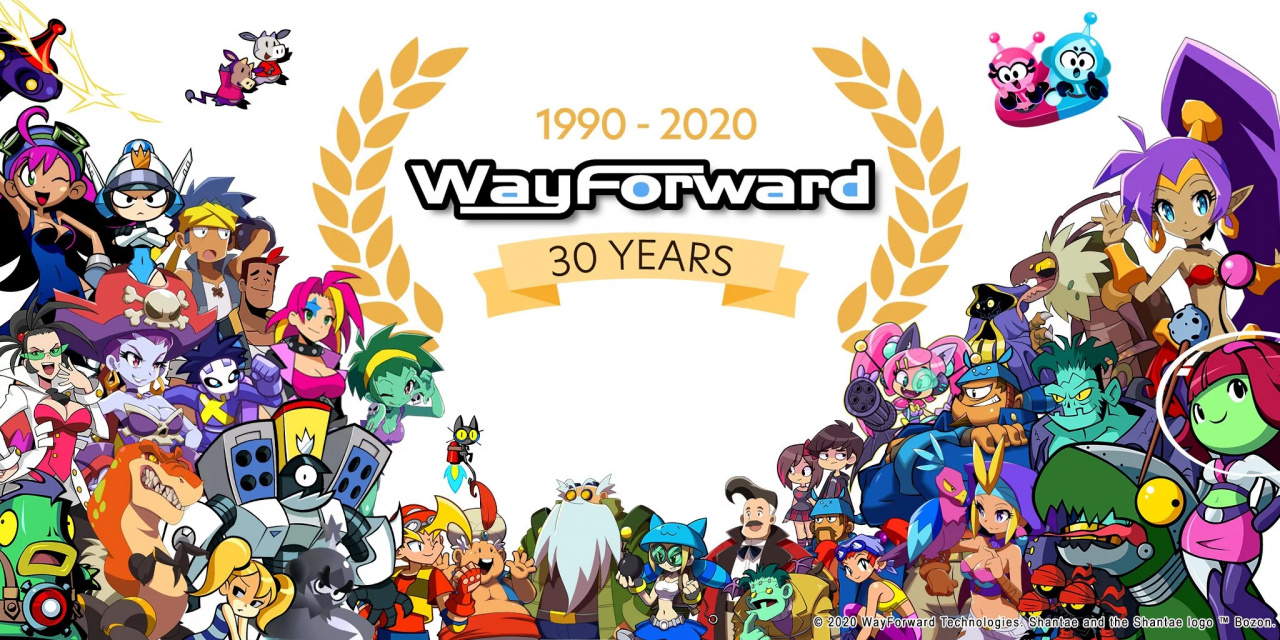
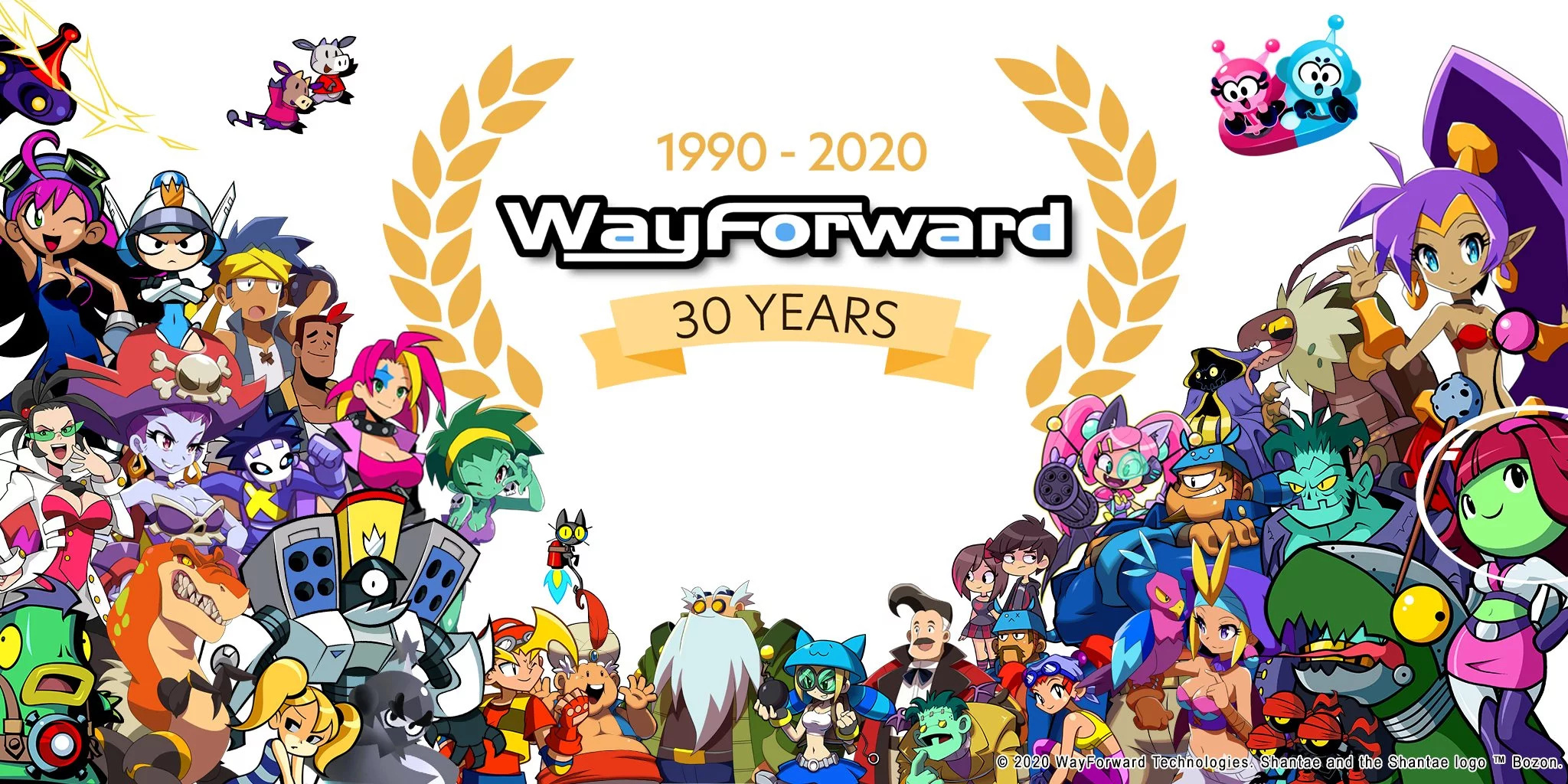
A few weeks after the independent developer and publisher WayForward celebrated its 30th anniversary, the Nintendo Switch eShop across multiple regions including the US and UK is hosting a special sale on select games.
Save 30% on WayForward’s Switch lineup to celebrate 30 years of indie excellence! Embark on a half-genie adventure in the Shantae series, hit the streets in River City Girls, solve platforming puzzles in Mighty Switch Force! Collection, and battle the undead in The Mummy Demastered!
This 30% off sale runs from now until the end of the month, so be sure to spend fast if you want anything in particular:
US
UK
River City Girls
Now: $20.99, Was: $29.99
Now: £18.89, Was: £26.99
Mighty Switch Force! Collection
Now: $13.99, Was: $19.99
Now: £11.19, Was £15.99
Shantae Half-Genie Hero Ultimate Edition
Now: $20.99, Was $29.99
Now: £15.32, Was £21.89
Shantae Half-Genie Hero
Now: $13.99, Was $19.99
Now: £11.19, Was £15.99
Shantae and the Pirate’s Curse
Now: $13.99, Was $19.99
Now: £10.21, Was £14.59
The Mummy Demastered
Now: $13.99, Was $19.99
Now: £12.59, Was £17.99
Will you be adding any of these titles to your collection? Tell us below.
Sony has announced that it will host a livestream to detail technical aspects of the PlayStation 5 tomorrow, March 18, via the PlayStation Blog.
The stream will be presented by PS5 lead system architect Mark Cerny, who previously revealed details of the PS4 and PS4 Pro at their respective events. The announcement was made on Twitter, with a follow-up from PlayStation Japan's account clarifying that the information was intended for GDC (which has been cancelled) and will only be in English.
Tomorrow at 9am Pacific Time, PS5 lead system architect Mark Cerny will provide a deep dive into PS5’s system architecture, and how it will shape the future of games. Watch tomorrow at PlayStation Blog: https://t.co/bgP1rXMeC8pic.twitter.com/BSYX9tOYhE
You can combine different types of plot – scatter, line, histogram etc. – but you may have to specify the colors manually if you do.
import random # Set seed to reproduce results

random.seed(1) # Generate random data

x = [random.random() for _ in range(100)]

y = [random.random() for _ in range(100)] # Scatter plot

plt.scatter(x, y, label='Data') # Red line plot acting as the 'line of best fit'

plt.plot([0, 1], label='Best Fit', c='r')

plt.legend()

plt.show()
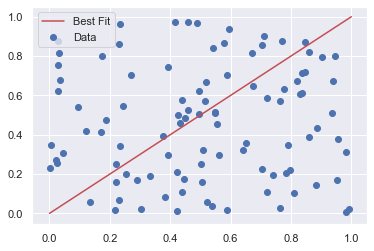
In this example, I first generated some random data before making a scatter plot from it. Then, I drew a line plot on top of it to act as the line of best fit (note that this is just an example and isn’t actually the line of best fit for this dataset!). Unfortunately, matplotlib does not automatically change the color of each plot if you plot a line and a scatter plot on top of each other. So, I manually changed it to red with the c keyword argument.
Let’s dive into a more detailed example of how legends work in matplotlib.
Matplotlib Legend Example
To display a legend on any plot, you must call plt.legend() at some point in your code – usually, just before plt.show() is a good place.
There are 3 ways you can call it:
plt.legend()
plt.legend(labels)
plt.legend(handles, labels)
The first option – plt.legend() – automatically detects which elements to show. It does this by displaying all plots that have been labeled with the label keyword argument. The order of the lines in the legend are the same as the order you plot them.
vals = np.array([0, 1, 2, 3, 4]) # Plot vals first

plt.plot(vals, label='vals') # Plot vals/2 second

plt.plot(vals/2, label='vals/2') # Call plt.legend() without arguments

plt.legend()

plt.show()
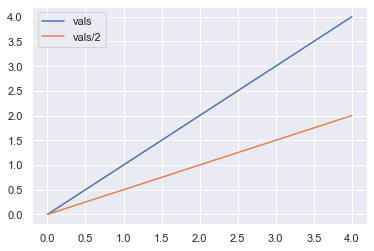
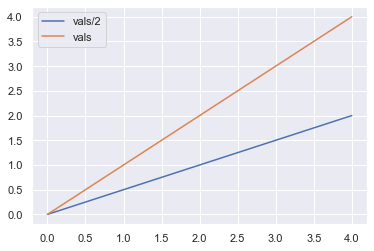
First I plotted vals and then plotted vals/2. You can see that vals is displayed first in the legend and is a blue line. Now let’s swap the order.
# Plot vals/2 first

plt.plot(vals/2, label='vals/2') # Plot vals second

plt.plot(vals, label='vals') # Call plt.legend() without arguments

plt.legend()

plt.show()
Now vals/2 is displayed first in the legend and is colored blue. By changing the order of the plots, you change not only the order in the legend but also the colors of the lines.
Note: you can manually control the colors using the c keyword argument if you want to.
The second option –plt.legend(labels) – is rarely used but I’ll show you what it does just for completeness.
The argument labels must be an iterable – most likely a list or tuple – containing the labels you want to display in the legend. Instead of explicitly labeling each line you draw like so:
This method does work but can cause you a lot of headaches. For example, the iterable labels must be exactly the same length as the number of lines you draw. Moreover, if you change the order of any of your plots, you must also change the order of the elements in labels. Lastly, it violates The Zen of Python Explicit is better than implicit because you implicitly label each plot based on its order.
It is much easier for everyone if you explicitly label each of the plots rather than implicitly doing so like this. Thus, both the matplotlib docs and I do not recommend you use this method.
The final method – plt.legend(handles, labels) – provides you with the most flexibility but takes slightly longer to write.
Both handles and labels are iterables – usually lists or tuples. The handles are the lines you wish to appear on the legend and the labels are, as I hope you know by now, the word(s) you want to appear in the legend next to each line.
# Save plots with descriptive variable names

linear, = plt.plot(vals)

sqrt, = plt.plot(vals**0.5) # Create iterables handles and labels

handles = [linear, sqrt]

labels = ['Linear', 'Square Root'] # Pass handles and lables to plt.legend()

plt.legend(handles, labels)

plt.show()
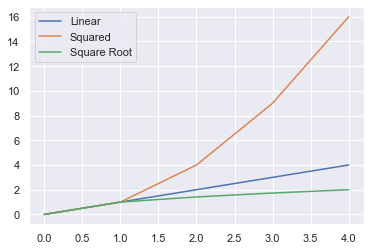
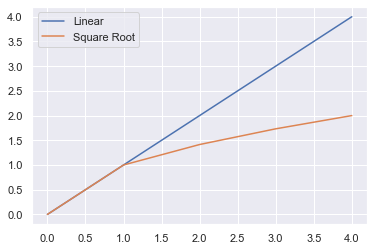
First, you must save the output of each line in a variable. The function plt.plot() returns a list of length 1, so you must unpack it by putting a comma after your variable name to get the value inside the list. The value is a matplotlib.lines.Line2D object which is how matplotlib stores lines.
# linear_wrong is a list of length 1

linear_wrong = plt.plot(val) # linear_correct is a Line2D object - what you want

linear_correct, = plt.plot(val)
For ease of reading, I created the lists handles and labels which I then passed to plt.legend(). You can skip this intermediate step if you wish.
The biggest advantage of this method is that you have total control of the order in which the legend’s items appear: the order you pass handles is the order they will appear. This means you can plot them in any order you want and still control the order of the legend entries. This is in contract to method 1 where the order you plot your lines is the order they appear in the legend.
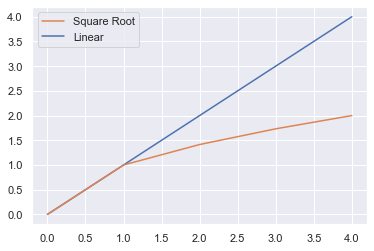
So, to make Square Root appear as the first entry in the legend, do the following.
linear, = plt.plot(vals)

sqrt, = plt.plot(vals**0.5) # Swap order of sqrt and linear

handles_ = [sqrt, linear]

labels_ = ['Square Root', 'Linear'] plt.legend(handles_, labels_)

plt.show()
In this plot, the color of the lines has not changed but the order in the legend has changed because I changed the lists handles and labels.
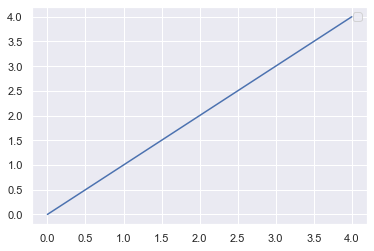
Finally, one thing many Python programmers don’t know is that if your label starts with an underscore, it will not be displayed in the legend. This may be useful if you have many plots and want to be able to easily scan the code but not display the names in the plots.
# No legend displayed because of underscore

plt.plot(vals, label='_I will not be displayed')

plt.legend()

plt.show()
No handles with labels found to put in legend.
Matplotlib Legend Location
To change the location of a legend in matplotlib, use the loc keyword argument in plt.legend().
By default, matplotlib draws the legend in the ‘best’ location i.e. the place that overlaps the least with the lines drawn. This can be slow if you plot a lot of data, so manually setting a location can speed up the process.
To manually set it, use the loc keyword and one of these 10, self-explanatory, strings:
‘upper right’, ‘upper left’, ‘upper center’
‘lower right’, ‘lower left’, ‘lower center’
‘center right’ or ‘center left’
‘right’ or ‘center’ (for some reason, ‘left’ is not an option)
Here are some examples of putting the legend in different locations. If you are unsure how to plot subplots in matplotlib, check out my article.
fig, axes = plt.subplots(nrows=1, ncols=3, figsize=plt.figaspect(1/3)) # Differnet legend locations

locations = ['best', 'upper center', 'lower left'] for ax, loc in zip(axes.flat, locations): ax.plot(vals, label='vals') ax.set_title(f"Legend loc='{loc}") # Set legend location ax.legend(loc=loc)

plt.show()
You can change the default location for all plots by setting plt.rcParams['legend.loc'] to the loc value of your choice.
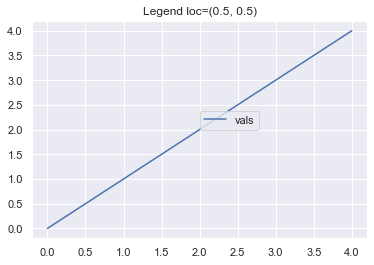
Finally, you can choose any coordinate points by passing a 2-tuple to loc instead of a string. This will specify the location of the lower-left corner of the legend as a fraction of the axes. So setting loc=(0.5, 0.5) will place the bottom left corner half way along the x-axis and half way along the y-axis.
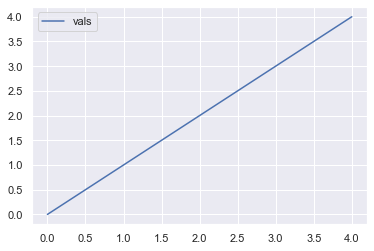
plt.plot(vals, label='vals') # Set location of legend

plt.legend(loc=(0.5, 0.5)) plt.title('Legend loc=(0.5, 0.5)')

plt.show()
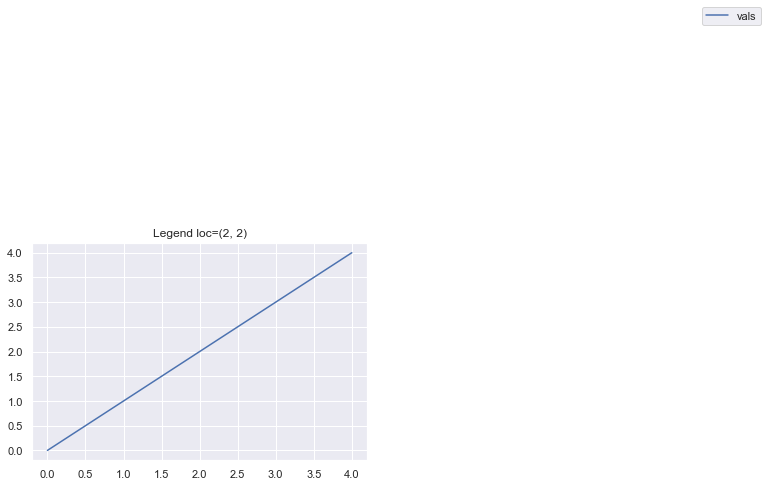
If you input loc=(2, 2) you get a very stange looking graph because matplotlib places the legend at double the length and double the height of the axes.
plt.plot(vals, label='vals') # Set location of legend

plt.legend(loc=(2, 2)) plt.title('Legend loc=(2, 2)')

plt.show()
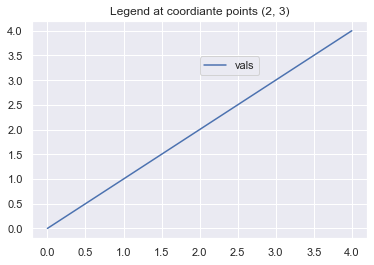
Of course, it is possible to place the legend at any coordinate point you want. Just remember to scale it by the maximum x- and y-axis values (both 4 in this example). So, to place the legend at the coordinate points (2, 3), pass loc=(2/4, 3/4).
plt.plot(vals, label='vals') # Set location of legend

plt.legend(loc=(2/4, 3/4)) plt.title('Legend at coordiante points (2, 3)')

plt.show()
Matplotlib Legend Font Size
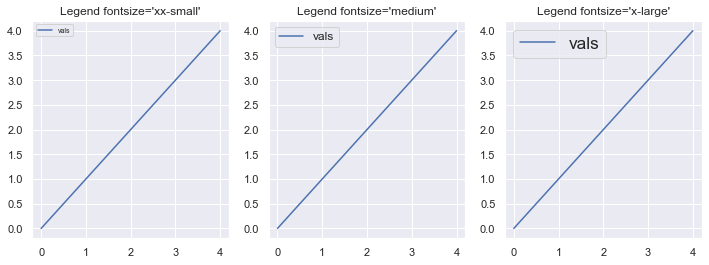
To change the fontsize of a legend, use the fontsize keyword argument. It can take any int or float – the absolute size in points. Try lots of different sizes to get a feel for it.
These are all relative to the current default font size. Let’s look at some examples.
fig, axes = plt.subplots(nrows=1, ncols=3, figsize=plt.figaspect(1/3)) # Different font sizes to try

fonts = ['xx-small', 'medium', 'x-large'] for ax, font in zip(axes.flat, fonts): ax.plot(vals, label='vals') ax.set_title(f"Legend fontsize='{font}'") # Set fontsize in legend ax.legend(fontsize=font) plt.show()
Matplotlib Legend Title
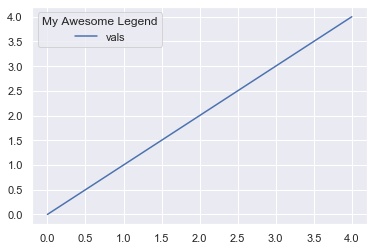
To add a title to a legend use the title keyword argument.
plt.plot(vals, label='vals') # Add title to legend

plt.legend(title='My Awesome Legend')

plt.show()
Matplotlib Legend Title Font Size
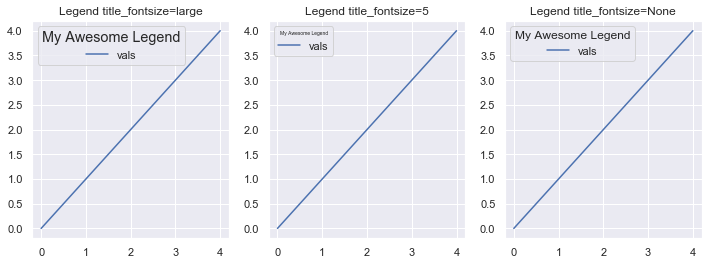
To change the font size of the title for a legend in matplotlib use the title_fontsize keyword argument. Like the fontsize keyword argument, it accepts any int or float – the absolute size in points – or one of the fontsize strings.
The matplotlib docs are actually incorrect because they say that title_fontsize only accepts a string or None.
fig, axes = plt.subplots(nrows=1, ncols=3, figsize=plt.figaspect(1/3)) # Differnet fontsizes to try

title_size = ['large', 5, None] for ax, size in zip(axes.flat, title_size): ax.plot(vals, label='vals') ax.set_title(f"Legend title_fontsize={size}") # Set title_fontsize of the legend ax.legend(title='My Awesome Legend', title_fontsize=size)

plt.show()
Matplotlib Legend Color
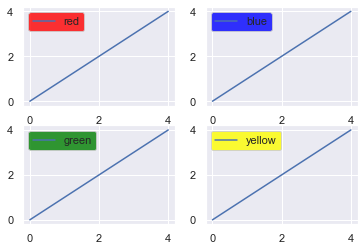
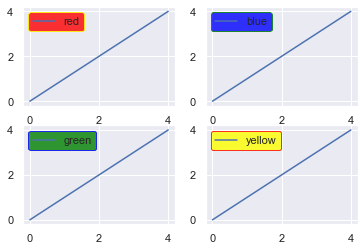
You can change both the facecolor and edgecolor of a legend using those keyword arguments in the function call.
The facecolor is the main color and the edgecolor is, you guessed it, the color around the edge of the box.
fig, axes = plt.subplots(nrows=2, ncols=2) # facecolors to choose

colors = ['red', 'blue', 'green', 'yellow'] for ax, color in zip(axes.flat, colors): ax.plot(vals, label=color) # Set facecolor of the legend ax.legend(facecolor=color)

plt.show()
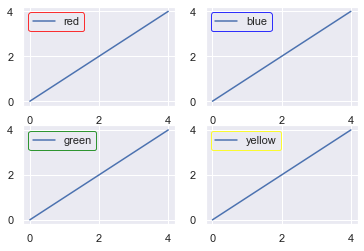
Let’s do the same now but just change the edge color.
fig, axes = plt.subplots(nrows=2, ncols=2) # Edgecolors to choose

colors = ['red', 'blue', 'green', 'yellow'] for ax, color in zip(axes.flat, colors): ax.plot(vals, label=color) # Choose edgecolor of legend ax.legend(edgecolor=color)

plt.show()
Of course, you can mix and match the face and edge colors to your heart’s content.
fig, axes = plt.subplots(nrows=2, ncols=2) # Colors to use

colors = ['red', 'blue', 'green', 'yellow'] # Same as colors but reversed

edges = colors[::-1] for ax, color, edge in zip(axes.flat, colors, edges): ax.plot([0, 1, 2, 3, 4], label=color) # Choose both the facecolor and edgecolor ax.legend(facecolor=color, edgecolor=edge)

plt.show()
Matplotlib Legend Order
To learn how to order elements in a legend, check out the Matplotlib Legend Example section.
Matplotlib Legend Background Color
To learn how to change the background color of a legend, check out the Matplotlib Legend Color section.
Conclusion
That’s it, you now know all the basics of working with legends in matplotlib.
You know the three different ways to call the function – plt.legend(), plt.legend(labels) and plt.legend(handles, labels) – you know how to set its location with both strings and coordinate points. Plus you can change the font size, set a title and even change the font size of the title. Lastly, you can jazz up your legends by setting the facecolor or edgecolor to anything you want.
Where To Go From Here?
Do you wish you could be a programmer full-time but don’t know how to start?
Check out the pure value-packed webinar where Chris – creator of Finxter.com – teaches you to become a Python freelancer in 60 days or your money back!
It doesn’t matter if you’re a Python novice or Python pro. If you are not making six figures/year with Python right now, you will learn something from this webinar.
These are proven, no-BS methods that get you results fast.
This webinar won’t be online forever. Click the link below before the seats fill up and learn how to become a Python freelancer, guaranteed.
With many people looking for a way to pass the next few weeks, this Humble Bundle might come at the perfect time. The Coding Starter Kit by No Starch Press Bundle is a collection of eBooks from No Starch about teaching kids and beginners programming, often through the lens of game development. As with all Humbles, this bundle is organized into tiers.
1$ Tier
Lauren Ipsum: A Story About Computer Science and Other Improbable Things
The Official ScratchJr Book
25 Scratch 3 Games For Kids
Build Your Own Website. A Comic Guide to HTML, CSS and WordPress
Make Your Own Scratch Games!
Super Scratch Programming Adventure!
8$ Tier
A Beginner’s Guide to Circuits
Learn Robotics With Raspberry Pi
Micro:bit For Mad Scientists
JavaScript for Kids
Electronics for Kids
15$ Tier
Coding with Minecraft
Python For Kids
Doing Math with Python
Invent Your Own Computer Games with Python
Mission Python – Code a Space Adventure Game!
As with all Humble Bundles, you get to decide how your money is allocated, between Humble, the Publisher, charity and if you so choose (and thanks if you do!) to support GFS is purchased using this link. You can learn more about the bundle in the video below.
Today we’re talking about multiplayer games, whether they be on iPhone (or iPad), Android or Windows Phone (lolz). There are fairly significant games out there that you can play with your friends locally, and then vast, massively multiplayer experiences that you can play online. Granted, a lot of these venture into Free-to-Play territory but it’s come to a point where we can’t ignore them.
What are the best multiplayer iPhone & Android games?
Mucho Party
Fortnite
Identity V
Clash of Clans
Heads Up!
Spaceteam
Hades Star
Talisman: Digital Edition
Arena of Valor
Triple Agent
Worms 4
Words With Friends
Presented for the curious, here is a list of multiplayer iphone & android games across all types, as well as local party games to help liven up a gathering. For those of you who’ve been paying attention, yes this is similar to the ‘Best Party Games’ feature we had – as an experiment I decided to ask Michael to give it an overhaul with a new focus. Enjoy!
Mucho Party
Developer: GlobZ Platforms:iTunes, Android Price: Free (effectively a trial with limited games), $3.99 one-time IAP for full unlock.
Sample a sumptuous variety of mini-games with inspired and easily-digested twists with goofy facial reactions, and deft touch controls. Your player avatar has an oversized head with a handful of emote options which are customizable: just snap a few photos of your mug with exaggerated expressions and mild hilarity ensues. Yes, the new Mario Party is a classic return to form but Mucho Party is a really nice substitute available for the price of a song. A hidden gem.
Fortnite fever shows no chance of breaking anytime soon; the game continues to generate its own hype through cross-overs and events like Thanos’s brief appearance or the sudden appearance of that black hole. It has crafting and the Battle Royale last-man-standing appeal. This phenomenon came from nowhere and isn’t going anywhere for the foreseeable future. Both it and PUGB (Player Unknown Battlegrounds) are still the golden standard for Battle Royale games, and until Apex launches on mobile, I don’t see them being unseated.
Identity V
Developer: NetEase Games Platforms: iOS, Android Price: Free
One hunter chases four innocents across a gothic manse while the would-be escapees struggle to find and solve puzzles. The asymmetry and creepy-cute aesthetic make for a thrilling and iconic experience. The devs are always experimenting with new play modes (like the 8v2 for starters) and the hunt-or-be-hunted setup is a timely mix of the survival- and battle-royale games so en vogue these days. Add in a splash of progression (skill trees, new and unusual characters, cosmetic unlocks) and you have a winner.
Clash of Clans is an august title dating all the way back to 2012. Supercell’s launched a billion other projects since and they all have similar DNA: easy core gameplay loops with short bursts of required activity and an addictive structure. Oh, and they’re all free-to-play with boosts and shortcuts tucked not-so-discreetly away behind a paywall. Clash is the original and still among the greats, though it has some issues with plateaus and top-level play, the ramping up to the endgame is still a delight.
Heads Up!
Developer: Warner Bros. Platforms:iOS, Android Price: $0.99, Free (android). Optional IAP to unlock extra category modes.
Heads Up! Was a victim of its own success for a time. The game is dead simple: a word appears on screen and is held above the guesser’s head. This same guesser is assailed by clues from teammates until the guesser finds the right word or phrase . Cycling through words quickly to rack up a high score, switching up the guessing role amongst team members. Heads Up! has one simple advantage over every other game on this list: it doesn’t need a surface to work. Works just as great standing or crammed together in a vehicle. Anywhere with good sight lines is fair game for Heads Up! short of a hall of mirrors. It’s so good that it’s cliche, at risk of getting played to death and forgotten. In case you’ve never given it a chance with a bored group, do.
Spaceteam
Developer: Henry Smith Platforms:iOS, Android Price: Free
Masquerading as chaos and nonsense, Spaceteam never fails to gin up a riotous good time. Navigating the reaches of space takes technical know-how and precise coordination, and Spaceteam spoofs these facts of spacetime-travel by splitting up instructions from control panels. Someone knows which button to press, and where, but the orders and details are deliberately turned into techno-speak-gibberish. Jabbering, giddy gibbons sharing gibberish…in space. Seriously though, the game works wonders for those improvisational types who thrive on chaos and unprecedented social situations. Oh, and it allows for cross-platform play between Android and iOS.
Hades’ Star
Developer: Parallel Space Inc. Platforms:iOS, Android Price: Free
Hades’ Star has a persistent, dynamic and massive world whose contours are shaped by the collective actions of the players. In this respect, it’s like a bite-sized EVE Online, though a tad simpler. I’ve always found that vast settings make the crawl of real-time games more palatable, like with Subterfuge. Situated in outer space, the 4X stages of explore and expand take a good amount of time, but that deliberation is the best part of Hades Star.
It suffers from a little free-to-play structure in its later stages, I guess, but it isn’t really a game which makes sense to binge, so the premium currency of ‘crystals’ is for those who want to play faster on their own terms. A little-known treat for fans of MMOs, 4X or the outer reaches of the universe.
Talisman is a wild time and a mess, digital or analogue, but it’s markedly tidier and every bit as much of a caper on the good old ‘pad. Collecting magic artefacts, spells and literal pieces of fate and destiny as the hour grows late. It’s a classic and epic game, but also well suited to casual meet-and-greets, too. Because each turn’s decisions are relatively simple and straightforward, players can banter, chow down or otherwise divert themselves without hampering the flow of the gameplay at all.
Arena of Valor
Developer: Tencent Platforms:iOS, Android Price: Free, IAP for cosmetics and other unlocks
Deliberately as evocative of League of Legends as possible, this one is a good game with a few caveats. First, the monetization is not especially burdensome but hard to ignore. Secondly, the controls work pretty well but since the Switch version came out they feel second fiddle, in terms of responsivity. Still, you can experience a polished and mature MOBA with respectable mechanics, tutorials and matchmaking. It’s not quite as vibrant a scene as it used to be, but Arena of Valor is still a rush to play.
Triple Agent is a mixture of chaos and order, of ineffective backstabs, liars giving useful tips and honest fools botching the naked truth. It’s a find-the-betrayer style party game, just like Mafia and Werewolf, but what sets it apart from its ilk, aside from a whip-smart app and panoply of extra optional win conditions, is the total miniaturisation of the experience. One device is passed around to dole out identities, clues and the final elimination vote. The group at the end of the chaotic play session collectively eliminates one person, and if they were a Good Guy the Bad Guys win and vice versa. Really fresh interface and game design take on an old standard.
Worms are good for the earth, enriching the soil and setting the fields for a rich harvest next season. Worms from Team 17, on the other hand, spend all their lives trading quips and aiming impractical and ultraviolent weapons at each other. Carpet bombs, napalm, the holy hand grenade, anything and everything is an instrument of death in Worms. The terrain is destructible too, and the only ‘loot crate’ drops are just in-game goodies and not a euphemism for scummy monetisation. This is a premier zany 2D shootout, decades old and no worse for wear.
Whoof, Words with Friends is a veritable dinosaur, dating back practically to the first days of the iPhone itself. It is an excellent multiplayer game because it accommodates all kinds of time commitments and skill levels. Yes, it’s a duo affair but so good it bears repeating. A simple word game gets even better with asynchronous play and friends list integration, so that when a moment of creative insight strikes, you can quickly convert it into a witty and devastating turn of phrase. It’s like texting, but with a score attached.
Other Party & Multiplayer Game Recommendations
Royal Adviser
Soul Knight
Psych
Mysterium
Legends of Andor
What are your favourite multiplayer games? Let us know in the comments!
[This message comes directly from the desk of Matthew Miller, the Fedora Project Leader. — Ed.]
Congratulations to the Fedora community for the upcoming on-time release of Fedora 32 Beta. While we’ve gotten better at hitting our schedule over the years, it’s always nice to celebrate a little bit each time we do. But that may not be what’s on your mind this week. Like you, I’ve been thinking a lot about the global COVID-19 pandemic. During the Beta period, many of us were unaffected by this outbreak, but as the effects intensify around the world, the month between now and the final release will be different.
“Friends” is the first of our Four Foundations for a reason: Fedora is a community. The most important Fedora concerns right now are your health and safety. Many of you are asked to work from home, to practice social distancing, or even to remain under quarantine. For some of you, this will mean more time to contribute to your favorite open source projects. For others, you have additional stress as partners, kids, and others in your life require additional care. For all of us, the uncertainty weighs on our minds.
I want to make one thing very clear: do not feel bad if you cannot contribute to the level you want to. We always appreciate what you do for the Fedora community, but your health — both physical and mental — is more important than shipping a release. As of right now, we’re planning to continue on schedule, but we understand that the situation is changing rapidly. We’re working on contingency plans and the option of delaying the Fedora 32 release remains on the table.
As you may already know, the Fedora Council has decided to refrain from sponsoring events through the end of the May. We will continue to re-evaluate this as the global situation changes. Please follow the directions of your local public health authorities and keep yourself safe.