
Xbox Live Friendslist Sidebar Gadget (Download)

11-26-2007, 09:40 AM · Forum: PC Mods - No Replies
Xbox Live Friendslist Sidebar Gadget

Description

Xbox Live Friendslist Sidebar Gadget

Ever wanted to see your live version of your Xbox Live friends list on your PC? Well if your running Vista you now can

A guy called Adam Kinney has created a sidebar gadget for Windows Vista in Silverlight which will give you a viewable list of your friends list on your Sidebar.
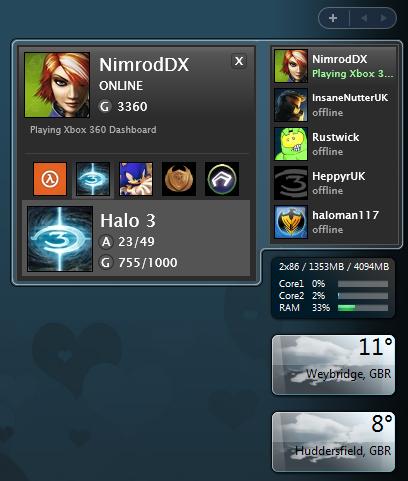
[Image: attachment.php?aid=3627]

To install this, you will first need to install "Silverlight" a new web application created by Microsoft to rival Flash. A copy of this is provided in the zip file attached. You MUST install this first before installing the gadget.

This is the second build of the application, and updates are promised but being only the second build a few bugs do remain:
  • Only 5 friends are supported at the moment
  • You must enter your friends gamertags into this application, it doesnt currently get your friends list automatically for you
  • It doesnt support the Sidebar in Vista x64 yet, he has promised to fix this straight away but for now, 64-bit users can use this gadget by running the 32-bit version of sidebar located in C:\Program Files (x86)\Windows Sidebar\Sidebar.exe
  • You cant change have often it updates, and it usually updates around every 10 minutes at the moment. Again this will be fixed in a later build
I will update this as newer builds become available, but this is looking to be a very promising addon. I myself will be using it, even if it means running the 32-bit Sidebar.

Download:
Hidden Content


Reply to this thread to unlock the contents

Use at your own risk.

Attached Files

Attached images
.zip
XboxFriendsList.zip

  (GBA) The Legend Of Zelda - ALTTP & 4 Swords [Gamesave]

10-10-2007, 02:44 PM · Forum: Nintendo Discussion - No Replies
(GBA) The Legend Of Zelda - ALTTP & 4 Swords [Gamesave]

Details

THE LEGEND OF ZELDA - A LINK TO THE PAST/4 SWORDS The reason we have made this save is because unless you have a friend or more, with a GBA each and a copy of the game, plus 3 link cables, you cannot play the 'Palace Of The 4 Swords' in 'A Link To The Past' or the 'Lumberjack Challenge' in 'A Link To The Past'. The .zip contains two .sav files: 1. Four swords 100% complete, A Link To The Past completed with all items and hearts. This .sav allows all extras in A Link To The Past To Be played, i.e walk forward to enter The Palace Of The 4 Swords. 2. Four swords 100% complete, A Link To The Past has the second dungeon in the Dark World completed. This .sav is for those who have just started the game, and will allow all extras to be played once A Link To The Past has been completed. This .sav will work on VBA and all Flashcards. There is also a Gamshark Save for those who don't have a Flash Card. Enjoy! -Thug and Nicko-Further Information: http://tinyurl.com/yvd8l4

Original author: T-hug

Download:
Hidden Content


Reply to this thread to unlock the contents

  Halo 2: Skinning Tutorial [VID INCLUDED] (Tutorial)

09-11-2007, 01:05 PM · Forum: Lounge - No Replies
Halo 2: Skinning Tutorial [VID INCLUDED]

Game: Halo 2

Description

THIS TUTORIAL WAS FULLY MADE BY MADMAN (AKA) xXxV3NDET4xXx) DO NOT RIP

Video Tutorial: Code: http://www.megaupload.com/?d=2BIDB7SN Word Tutorial:
Programs Needed:
Dothalo
Photoshop
DDS plugin for Photoshop

1. Open Dothalo
2. Open Map you wish to skin
3. Go to [BITM] tag
4. Select the thing you would like to skin
5. Extract the skin that you selected in the Raw Data section
6. Open Photoshop
7. Open the [BITM] that you saved where ever..
8. Do what ever editing you please to the [BITM]
9. Save the BITM as either DXT 1,2,3,5 Depending on what it is.
10. Inject the Skin on dothalo
11. Save Changes on dothalo
NOTE: In Order to see the skin of a Weapon or Vehicle you must Internalize the Bitmap using HALO2IB

Please Put in Beginner Tutorials

  Halo 2: [TUT] A few tut's with files included (Tutorial)

09-02-2007, 02:47 PM · Forum: Lounge - No Replies
Halo 2: [TUT] A few tut's with files included

Game: Halo 2

Description

-Creating ndht's

Download:AI tutorial.rar

-Customizing Effects

Download:AI tutorial.rar

-tut pack with files (I got lazy)

Includes:
-H2 Offsets
-Making eml=blems
-Ragdoll
-Sav3r
-UV mapping

Download: tutorials with files.rar

GIVE THANKS Please

  Halo 2: [TUT] Bugger in MP (Tutorial)

09-02-2007, 01:47 PM · Forum: Lounge - No Replies
Halo 2: [TUT] Bugger in MP

Game: Halo 2

Description

Found By The Reepr

You can probaly use it now and skip half the stuff in it.

Here it is:

This all takes place in insolece except step 7, and 8.

step 1.

Get a map that has the bugger in it. I chose 03a_oldmombasa.map , Then open your other

map that you want the bugger in. I chose coagulation.map .

Step 2.

Go to the biped tag in 03a_oldmombasa.map and select object\charcters\bugger\bugger

, click and hold to and drag it over to you otehr map which was coagulation.map for me.

step 3.

Once the moving box is done you can close 03a_oldmombasa.map

step 4.

Now in coagulation click the biped tag and double click on object\charcters\bugger\bugger

to open up. Now on the right side of insolnce a new box should open up. Under the words

Show on the left side of the new box click visble dependices. Now you should see some

dependencys in there. find where it says tag type and follow it down to the tag type

foot. Change the foot ID NOT Tag Type to effects\materials\objects\characters\elite .

Then close the bugger.biped tag.

Step 5.

Now go down to the hlmt tag and open up object\characters\bugger\bugger The new box on

the right side should open up agian but this time you want to click near the top where

it says IFP Plugin - "hlmt" -Edit Mode and it should change to IFP Plugin - "hlmt" -DevMode .

Once you have done that look below it and click on Variation below Reflexives.

A new white colum just like the one you were lookin at should pop up . Click all

dependinces below the word Show. You now need to null out the ID

sound\dialog\combat\bugger to Nulled Out. Close the hlmt tag.

Step 6.

Scroll Down to the matg tag and open it up, the double click on globals\globals .

Click On the IFP Plugin agian to change it to dev mode. Now alot of stuff should

come up =P don't be scared . Look under the word reflexives under the IFP Plugin for

Unknown8 click it, and then find the drop down box below were it says Author:

Iron_Forge and go to the number 3 on the list. WHen it opens up go to the bottem line

which should say objects\characters\elite\elite_mp and replace it with

objects\characters\bugger\bugger . Close the Matg tag.

Step 7. Use the Easy flying Biped program and use it on the Bugger so you can fly around,

you might want to set the speed up a little bit 5-10 is what I like.

Step 8.

Sign the map and ftp and you are done!

  Halo 2: [TUT] Adding Rockets To Pelican in MP (Tutorial)

09-02-2007, 01:42 PM · Forum: Lounge - No Replies
Halo 2: [TUT] Adding Rockets To Pelican in MP

Game: Halo 2

Description

Adding Rockets To The Pelican In MP

found by Reepr

Assuming you want it in an MP map (you didn't specify), you need to spawn the pelican via a vehc tag just like a regular vehicle, and set the permutation in the vehc tag to 'attack'. And that's it for getting the rocket launchers to spawn on it.

If you want to actually use the rocket launchers - open its vehi tag (forgot the name - but it is seperate from the main pelican.vehi) and on the first seat, set it so you can use it by making sure un-disable the seat and put a warthog turret animation on it. And increase the seat distance. And that's all - you just go next to the wing, and it'll say to press X to use warthog turret, and when you do, you'll get into the turret on the wing and it'll shoot rapid-fire pelican rockets (which do as much damage as regular rockets exactly, but look cooler).

  Halo 2: How To Make a Modded disc With Ease Ready To Hotswwap (Tutorial)

08-27-2007, 08:17 PM · Forum: Lounge - No Replies
Halo 2: How To Make a Modded disc With Ease Ready To Hotswwap

Game: Halo 2

Description

ok omg this is amazing realy easy to do

all you have to do is ftp and put the halo 2 disc in when your in dash so it says game and then go the d folder and burn everything in there in that order to a blank dvd but replace the ma[s with modded map and then when you hot swap i promise you it will work did it before i am using a phillps drive if that makes a diffrence your welcome
