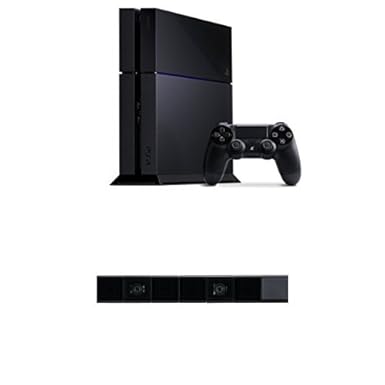
[GameDeals][Amazon] PS4 + PS4 Camera + TLOUR + 1 Free Game ($399)

12-17-2014, 06:36 AM · Forum: Deals or Specials - No Replies
[Amazon] PS4 + PS4 Camera + TLOUR + 1 Free Game ($399)

Link: http://adf.ly/vauPS
[Image: 31Us3HGi-3L._SX385_.jpg]

Buy a PlayStation 4, Get a Free Game + The Last of Us Remastered
Receive a code redeemable for one free game download, when you buy a PlayStation 4 Console, for up to $59.99 in value. Pick from Destiny, NBA 2K15, Far Cry 4, or Little Big Planet 3. Code must be redeemed at http://redeem.us.playstation.com. Learn more.
Additionally, receive a code redeemable for a digital download of The Last of Us Remastered for a limited time. A total value of up to $120. Both codes will be emailed within two days of your completed shipment. While supplies last. Offer only valid on select PlayStation 4 Consoles. See individual detail page for more information. Amazon reserves the right to change or modify this promotion at any time. Offer valid only when shipped and sold by Amazon.com


[Image: ChoiceBundle_TLOUR_HQP.jpg]

  (3DS) Inazuma Eleven GO Galaxy Supernova (JPN) - SAVE 2.2 [Gamesave]

12-15-2014, 05:17 PM · Forum: Nintendo Discussion - No Replies
(3DS) Inazuma Eleven GO Galaxy Supernova (JPN) - SAVE 2.2 [Gamesave]

Details

Gateway Omega Savegame.

-Story Mode beaten
-Team Supernova beaten
-All non-Level 99 Challenge Routes beaten with S-Rank.
-All level 99 Challenge Routes unlocked.
-Natsumi and Gojou's Level 99 Challenge Routes beaten with S-Rank. Only Aki's route missing.
-330+ Players recruited
-All Ultimate Eleven Mixi-Maxed players except Super Zanark recruited, but if you want Super Zanark, save contains normal Zanark & Clara Jane.
-All Photos and Topics.
-All recruiting items.
-80%+ achievements unlocked.
-Average team level 99.

Hissatsu Glitch can be used.

Original author: ultimatetemper

Download:
Hidden Content


Reply to this thread to unlock the contents

  [League of Legends] LEAGUE OF LEGENDS NAME UNLOCKER! USE ANY NAME YOU W... (Download)

12-13-2014, 04:10 PM · Forum: PC Discussion - No Replies
? LEAGUE OF LEGENDS NAME UNLOCKER! USE ANY NAME YOU WANT!

Game: League of Legends

Details

HELLO PEOPLE HERE TODAY BRINGING YOU THE ULTIMATE NAME UNLOCKER FOR LEAGUE OF LEGENDS!

IT ALLOWS YOU TO CHOOSE EVERY SINGLE NAME YOU WANT (Except for a name that includes the word "Riot" in it or a name that has already

been chosen)

Instructions:

-Copy ALL the .swf files to the following Directory: C:\Riot Games\League of Legends\RADS\projects\lol_air_client\releases\0.0. 1.118\deploy\assets\locale\App

and replace the existing ones. Its recommended to make a backup!


-(your version may be different than mine)

-see more instructions in the "Regions explained.txt" file inside "All resources.zip"

-PROOF AND FILES BELOW!

__Credits: Diablo_

Virus Scans:

http://virusscan.jotti.org/en/scanre...2809fda64720b3

https://www.virustotal.com/en/file/5...cd4b/analysis/

Download:
Hidden Content


Reply to this thread to unlock the contents

As always, use caution. This file is provided for archival purposes. SickGaming cannot be held liable.

Attached Files

.zip
All_resources_sickgaming.net.zip

  Where to get World of WarCraft Mods and Addons!

12-08-2014, 01:06 AM · Forum: PC Mods - No Replies
Looking for good places to get addons for World of WarCraft?

Here are few link you Can use.

One thing to make sure is, it's made for your CURRENT wow version.

Hidden Content


Reply to this thread to unlock the contents

That's a decent list for you to get your search on with.

Here are a few I use.

1. Real UI
Download:
Hidden Content


Reply to this thread to unlock the contents
Code:
AddOns Do Not Update: cargBags_Nivaya FreebTip Grid2 (you may update the individual Grid2 modules, but not the Grid2 folder itself) SharedMedia + SharedMedia_MyMedia AddOns Included: Aurora BadBoy Bartender4 Clique Easy Mail FreebTip Foglight Grid2 KuiNameplates Masque MikScrollingBattleText PhanxChat Raven Skada Optional AddOns: BagSync - Tracks the items on your characters and displays the information in item tooltips. Clean Icons - Thin - Enhances the appearance of WoW's in-game icons. Deadly Boss Mods - Dungeon/Raid encounter timers and alerts.


2. Auctioneer Suite
Download:
Hidden Content


Reply to this thread to unlock the contents
Code:
The Auctioneer Suite provides you with the tools and data necessary to make those difficult auctioning decisions with ease. From purchasing to posting, the Auctioneer Suite provides time-tested tools to allow you more time to actually play your characters or play the market. As you will soon discover, it is much more than a simple "Auctioning AddOn", the Auctioneer Suite also shows in-depth information for all game items, such as those used in quests or recipes, enchanting, milling, prospecting and more. Numerous other AddOns will also use the Auctioneer statistics you gather via scanning. This is especially true for many of the popular crafting AddOns, such as Little Sparky's Workshop.

3. Bartender4
Download:
Hidden Content


Reply to this thread to unlock the contents
Code:
Bartender4 is a full ActionBar replacement mod. It provides you with all the features needed to fully customization most aspects of your action and related bars. WoW 6.0 and Warlords of Draenor The latest version of Bartender (4.6.0) is fully compatible with WoW 6.0 and Warlords of Draenor! Features Support for all Action Bars and all related bars 10 Action Bars Stance Bar Pet Bar Bag Bar Micro Menu XP/Reputation Bar All Bars are fully customizable (Scale, Alpha, Fade-Out settings, ...) Very flexible and customizable Show/Hide driver based on Macro Conditions Additional Layout and Paging settings for Action Bars Page all bars based on Stance or Modifier Possess Bar support Custom State driver support with Macro Conditions Options to hide specific elements of the buttons (Macro Text, HotKey, more could be added on demand) StickyFrames support Masque/ButtonFacade support! Easy Hotkey Binding using KeyBound Options to control the hiding of the default blizzard artwork (you might still want that to be displayed..)

And that's it guys,
Now you can start of with some good addons/mods!

Thanks is appreciated!

  World of Warcraft Addons \ Mods, How to install Them! (Tutorial)

12-08-2014, 12:17 AM · Forum: PC Mods - No Replies
1. Exit "World of Warcraft" completely


2. Download the mod you want to install
*Make a folder on your desktop called "My Mods"
*Save the .zip/.rar files to this folder.
*If, when you try to download the file, it automatically "opens" it... you need to RIGHT click on the link and "save as..." or "Save Target As".

3. Extract the file - commonly known as 'unzipping'

Do this ONE FILE AT A TIME!

Windows
*Windows XP has a built in ZIP extractor. Double click on the file to open it, inside should be the file or folders needed. Copy these outside to the "My Mods" folder.
*WinRAR: Right click the file, select "Extract Here"
*WinZip: You MUST make sure the option to "Use Folder Names" is CHECKED or it will just extract the files and not make the proper folders how the Authors designed.

Mac Users
*StuffitExpander: Double click the archive to extract it to a folder in the current directory.

4. Verify your WoW Installation Path

That is where you are running WoW from and THAT is where you need to install your mods.

5.Move to the Addon folder
*Open your World of Warcraft folder. (default is C:\Program Files\World of Warcraft\)
*Go into the "Interface" folder.
*Go into the "AddOns" folder.
*In a new window, open the "My Mods" folder.
*The "My Mods" folder should have the "Addonname" folder in it.
*Move the "Addonname" folder into the "AddOns" folder.

6. Start World of Warcraft

7. Now make sure AddOns are installed
*Log in.
*At the Character Select screen, look in lower left corner for the "addons" button.
*If button is there: make sure all the mods you installed are listed and make sure "load out of date addons" is checked.
*If the button is NOT there: means you did not install the addons properly. Look at the above screenshots. Try repeating the steps or getting someone who knows more about computers than you do to help.


About WOW addons

When Blizzard patches WoW, they change the Interface number. This means that all mods will be "out of date" unless or until the author releases a new version for that interface. Some people go into the .toc files and update the numbers themselves, but this is STRONGLY advised against as it will cause problems locating possible incompatible addons. When you log into WoW after a patch, you DO NOT have to delete your interface directory. All you have to do is simply tell WoW to ignore the interface numbers and load all the mods anyway. All you have to do is, while at the "character select" screen, look in the lower left corner and click on the "addons" button. A window will pop up listing all your installed mods.

If you look in the upper left corner of that window there should be a box that says "Load Out of Date AddOns". You want to CHECK this box. Now simply go into WoW normally and all your mods should load. As of the 1.9 patch, you will have to do this after EVERY patch/update that Blizzard posts! If you encounter any problems with a mod after a patch, please be sure to let the author of the mod know so they can fix it.

See also: About "Out Of Date AddOns" Mac Support.

WoW addons are not platformed based. As such, they can be used on either Mac or PC. You can extract both .zip and .rar files on a Mac using StuffitExpander.

  DiseaseCraft Mod | 1.7.10 Forge | Minecraft

12-06-2014, 03:34 PM · Forum: Minecraft - No Replies
[Image: GwqivD0.png]

- - -
DiseaseCraft is a mod that adds 8 new diseases that alter the player's movement and everyday life. These can be achieved by simply hugging a rat, eating raw meat, or exploring long distances. Create/Trade medication, which can help you or harm you. Try to survive and thrive as disease and plague sneak towards you at every corner!

Requires Minecraft Forge 1230 or later!


EBOLA IN DISEASECRAFT (IMPORTANT POLL):

Documentation:


Crafting Recipe

[Image: E0Gd4A6.png]


Changelog:

1.1.1: Check the PMC changelog. It's very detailed
1.0.2: Fixed the times of influenza and Pneumonic Plague | Fixed a NPE.
1.0.1-QUICKFIX: Fixed the Savanna issue and removed most nausea on diseases.
1.0.0: Created the mod during ModJam 4!

Download:
Link: http://adf.ly/v1kfM

  How to install MineCraft Forge Mods (Really fast and easy) nOOb Guide

12-06-2014, 01:52 PM · Forum: Minecraft - No Replies
How to install mods for Minecraft Forge

(Please read what's in red at the bottom first!)
This guide will explain how to install mods that have been made for the Minecraft Forge API.

1. Make sure you have already installed Minecraft Forge.
(If you haven't here is a link: http://adf.ly/uwq4V)

2. Download a mod for Minecraft Forge from this site, Here is a link below to where to get legitimate mods!
Link: http://adf.ly/v1a4b

3. Locate the minecraft application folder.

*On windows open Run from the start menu, type %appdata%\.minecraft\ and click Run.
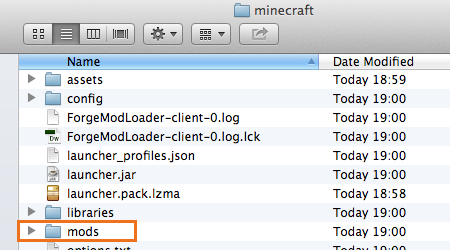
*On mac open finder, hold down ALT and click Go then Library in the top menu bar. Open the folder Application Support and look for minecraft.

4. Place the mod you have just downloaded (.jar or .zip file) into the Mods folder.

[Image: forge8.png]

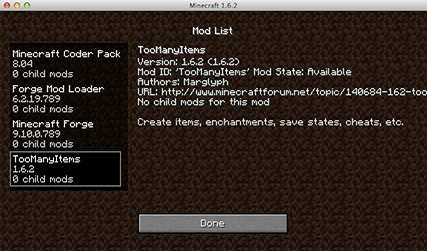
5. When you launch Minecraft and click the mods button you should now see the mod is installed.

[Image: forge9.png]


Note*

Some mods will come as an installer. Like From Skydaz as showed in the where to get mods link above, they will come in a .zip or .rar so you just run the program inside and it will automatically install it for you.

Just MAKE SURE you CHOOSE the RIGHT Minecraft VERSION!!!

Last but not least, only install 1 mod at a time. Then go back and check to make sure it works.

My first time, I wanted all the mods. Well all the mods didn't want to work together so I had to go back to point "A" and install them 1 by 1.

It will help in the long run.
Sometimes, 2 mods are incompatible with each other and will make the other crash, you never know. That's why you should be safe and back everything up to start with, and only install 1 mod at a time.

  Your Creations : Post any of your magnificant creations here!

12-05-2014, 02:40 PM · Forum: Minecraft - No Replies
Alright guys, so title states it all.

Post your Creations in the minecraft world here.

Just screenshot, record it, whatever.
We want to see what kind of creativity we have around here. ;)

Top Of the house!
[Image: 2014-12-05_225710_zps7c6181b8.png]


Side View of the house.
[Image: 2014-12-05_224844_zpse7c34462.png]

There is a lot more, but this was the first thing in this world we built.

What have you guys made?

  [GameDeals][Desura] Pitman (free for today)

12-05-2014, 02:34 PM · Forum: Deals or Specials - No Replies
[Desura] Pitman (free for today)

[Image: largeprofileheader.2.jpg]

Hidden Content


Reply to this thread to unlock the contents

Pitman is a turn-based rogue-like with boardgame style. Everything you desire is inside the randomized dungeons: Dwarfs, trolls, golems, treasures, potions, magic, hammer, bow, much more weapons, ... and don't forget the monster moles and pretzels!

[Image: pitman_64icon.png]